1. ആമുഖം
വാങ്ങിയതിന് നന്ദി.asing the Lepro LED Touch Table Lamp. ഈ എൽamp is designed to provide versatile lighting options for various environments, including bedrooms, offices, and living spaces. It features touch controls for ease of use, adjustable white light temperatures, RGB color changing capabilities, and an auto-off timer function.
ശരിയായ പ്രവർത്തനം ഉറപ്പാക്കുന്നതിനും അതിന്റെ ആയുസ്സ് പരമാവധിയാക്കുന്നതിനും ഉൽപ്പന്നം ഉപയോഗിക്കുന്നതിന് മുമ്പ് ദയവായി ഈ മാനുവൽ നന്നായി വായിക്കുക.
2. പാക്കേജ് ഉള്ളടക്കം
- ലെപ്രോ LED ടച്ച് ടേബിൾ എൽamp (Model PR210003-US)
- USB കേബിൾ (4.9 അടി)
- പവർ അഡാപ്റ്റർ
- ഉപയോക്തൃ മാനുവൽ (ഈ പ്രമാണം)
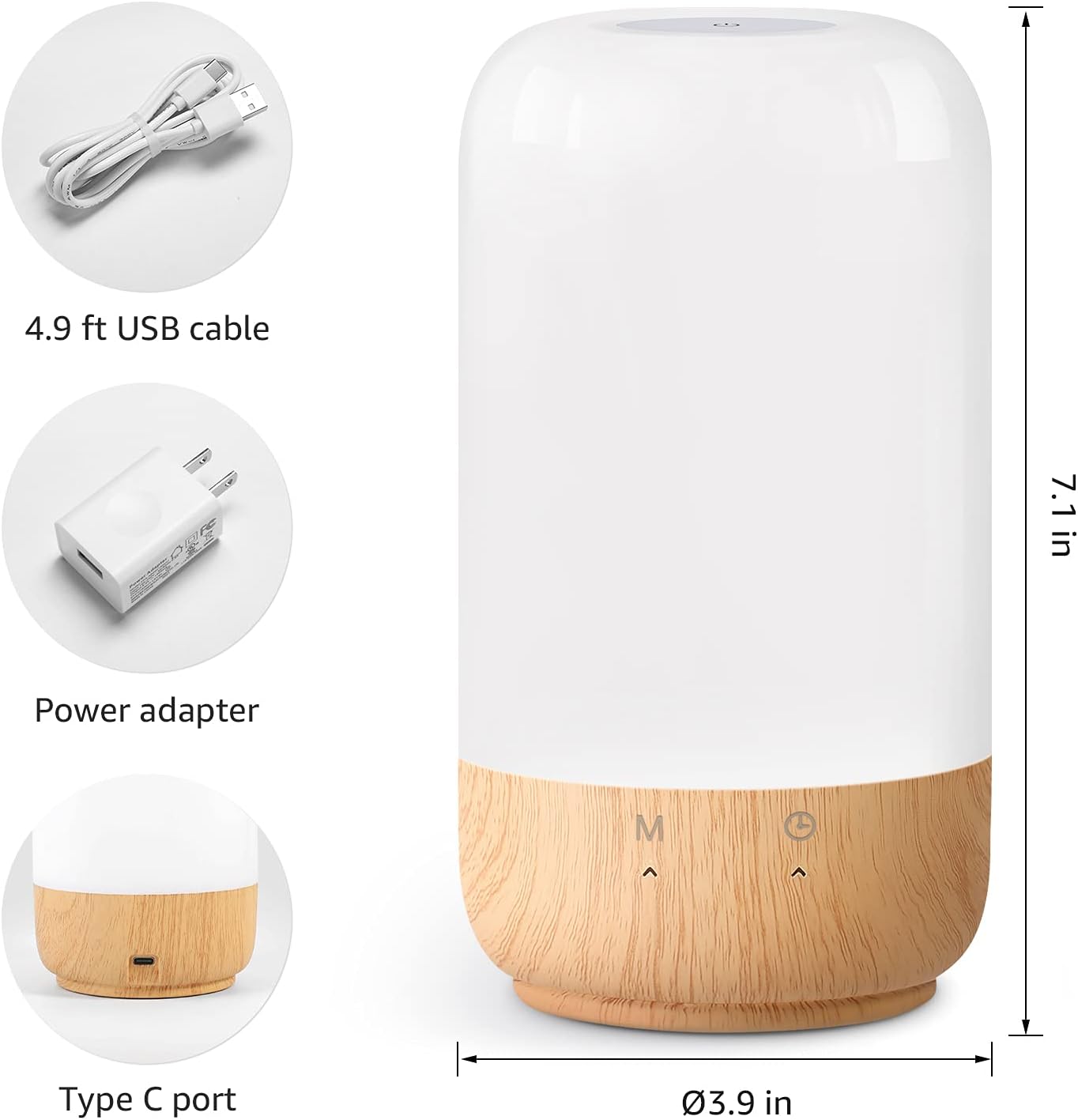
3 സ്പെസിഫിക്കേഷനുകൾ
| ഫീച്ചർ | സ്പെസിഫിക്കേഷൻ |
|---|---|
| മോഡൽ നമ്പർ | PR210003-യുഎസ് |
| അളവുകൾ (D x H) | 3.9" x 7.1" |
| ഭാരം | 13.6 ഔൺസ് |
| പവർ ഉറവിടം | കോർഡഡ് ഇലക്ട്രിക് (120V AC) |
| വാട്ട്tage | 7 വാട്ട്സ് |
| തെളിച്ചം | 350 ല്യൂമെൻസ് |
| പ്രകാശ സ്രോതസ്സ് തരം | എൽഇഡി |
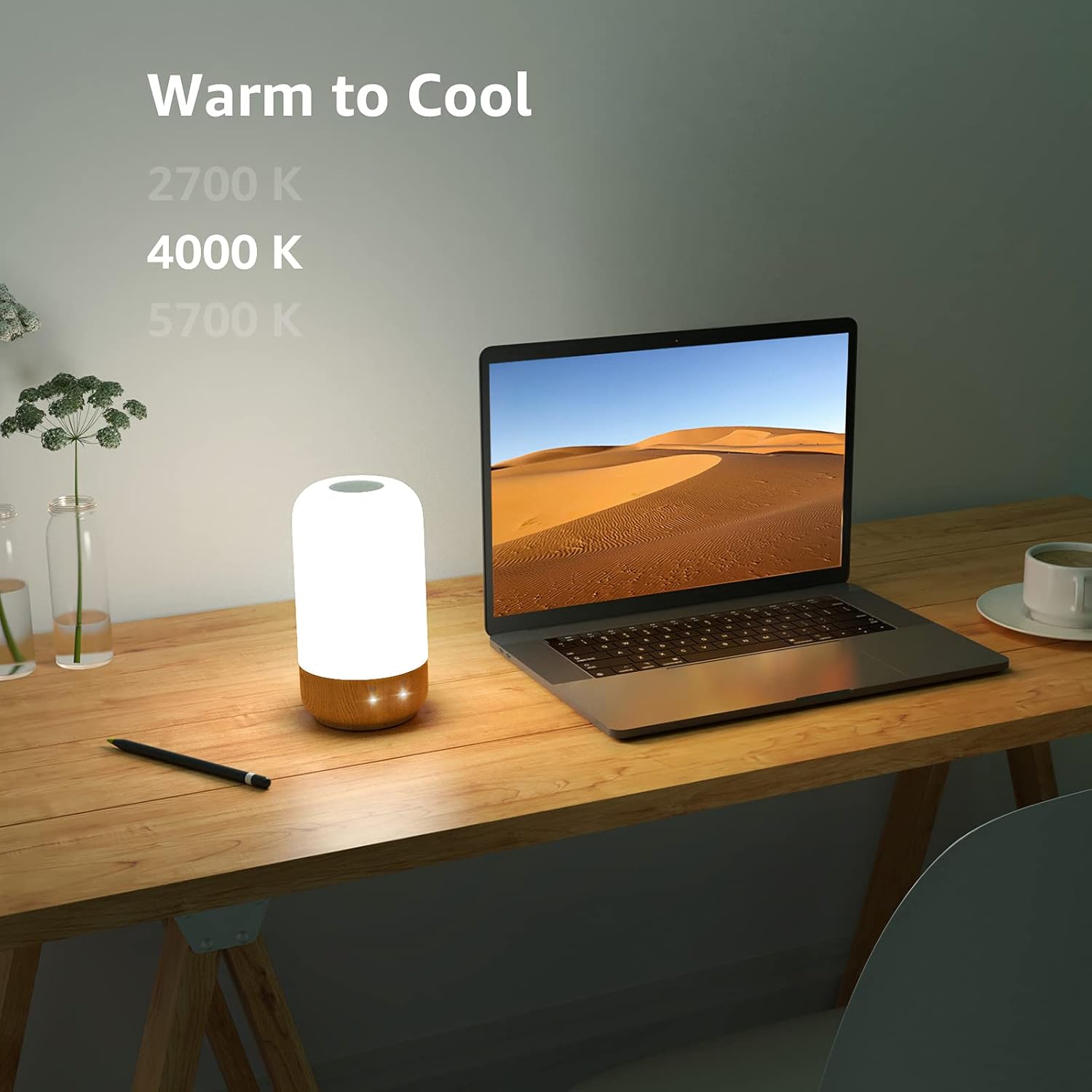
| ഇളം വർണ്ണ ഓപ്ഷനുകൾ | 3 White Light Temperatures (2700K, 4000K, 5700K) + 7 RGB Colors |
| നിയന്ത്രണ രീതി | ടച്ച് നിയന്ത്രണം |
| മെറ്റീരിയൽ | Plastic (Shade), Wood (Base) |
| പ്രത്യേക സവിശേഷതകൾ | Dimmable, Auto-off Timer (30/60 min) |
| ഇൻഡോർ/ഔട്ട്ഡോർ ഉപയോഗം | ഇൻഡോർ ഉപയോഗത്തിന് മാത്രം |
4. സജ്ജീകരണം
- എൽ അൺപാക്ക് ചെയ്യുകamp: പാക്കേജിംഗിൽ നിന്ന് എല്ലാ ഘടകങ്ങളും ശ്രദ്ധാപൂർവ്വം നീക്കം ചെയ്യുക.
- എൽ സ്ഥാപിക്കുകamp: എൽ സ്ഥാപിക്കുകamp on a stable, flat surface in your desired location. Ensure it is away from direct heat sources or moisture.
- പവർ ബന്ധിപ്പിക്കുക: Insert the Type-C end of the provided USB cable into the port at the base of the lamp. Connect the standard USB end to the included power adapter, then plug the adapter into a standard 120V AC wall outlet.

5. പ്രവർത്തന നിർദ്ദേശങ്ങൾ
The Lepro LED Touch Table Lamp features intuitive touch controls located on the top surface and the base. Refer to the diagram below for control locations.

5.1 പവർ ഓൺ/ഓഫ്, തെളിച്ച ക്രമീകരണം
- പവർ ഓൺ/ഓഫ്: ഷോർട്ട് പ്രസ്സ് the touch panel on the top of the lamp ലൈറ്റ് ഓണാക്കാനോ ഓഫാക്കാനോ.
- Brightness Adjustment (White Light Mode): എപ്പോൾ എൽamp is in any white light mode (2700K, 4000K, or 5700K), ലോംഗ് പ്രസ്സ് the top touch panel to adjust the brightness from 5% to 100%. Release when desired brightness is reached.
- Color Selection (Steady Color Mode): എപ്പോൾ എൽamp is in steady color mode, ലോംഗ് പ്രസ്സ് the top touch panel to cycle through the 7 available RGB colors. Release when your preferred color is displayed.
- Color Changing Speed (Color Changing Mode): എപ്പോൾ എൽamp is in color changing mode, ലോംഗ് പ്രസ്സ് the top touch panel to adjust the speed of the color transitions.

5.2 Mode Selection (“M” Button)
The 'M' button on the lamp's base allows you to cycle through different lighting modes:
- ഷോർട്ട് പ്രസ്സ് the 'M' button to switch between the following modes in sequence:
- വാം വൈറ്റ് (2700K)
- ന്യൂട്രൽ വൈറ്റ് (4000K)
- കൂൾ വൈറ്റ് (5700K)
- Steady RGB Color Mode (use top touch panel to select color)
- Dynamic RGB Color Changing Mode (use top touch panel to adjust speed)


5.3 Auto-off Timer (“Timer” Button)
The 'Timer' button on the lamp's base allows you to set an automatic shut-off time:
- ഷോർട്ട് പ്രസ്സ് the 'Timer' button to cycle through the timer options:
- 30 മിനിറ്റ് ഓട്ടോ-ഓഫ്
- 60 മിനിറ്റ് ഓട്ടോ-ഓഫ്
- Timer off (default setting)
- The indicator light next to the 'Timer' button will illuminate to confirm the timer is active.

6. പരിപാലനം
- വൃത്തിയാക്കൽ: എൽ വിച്ഛേദിക്കുകamp from the power source before cleaning. Use a soft, dry cloth to wipe the lamp's surface. Do not use abrasive cleaners, solvents, or harsh chemicals, as these may damage the finish.
- സംഭരണം: എൽ സൂക്ഷിക്കുകയാണെങ്കിൽamp for an extended period, ensure it is clean and dry. Store it in its original packaging or a protective container in a cool, dry place.
- LED ആയുസ്സ്: The integrated LED light source is designed for long-term use and is not user-replaceable.
7. പ്രശ്നപരിഹാരം
| പ്രശ്നം | സാധ്യമായ കാരണം | പരിഹാരം |
|---|---|---|
| Lamp ഓണാക്കുന്നില്ല. | വൈദ്യുതി കണക്ഷനില്ല. | Ensure the power adapter is securely plugged into a working outlet and the USB cable is firmly connected to the lamp. |
| Brightness adjustment is not working. | Incorrect mode or brief touch. | എൽ ഉറപ്പാക്കുകamp is in a white light mode (2700K, 4000K, or 5700K). Use a ലോംഗ് പ്രസ്സ് on the top touch panel to adjust brightness. |
| Colors are not changing or selecting. | Incorrect mode or brief touch. | എൽ ഉറപ്പാക്കുകamp is in steady color or color changing RGB mode (cycle with 'M' button). Use a ലോംഗ് പ്രസ്സ് on the top touch panel to select a color or adjust speed. |
| Auto-off timer is not activating. | ടൈമർ ശരിയായി സജ്ജീകരിച്ചിട്ടില്ല. | Short press the 'Timer' button on the base until the indicator light illuminates, confirming a 30-minute or 60-minute timer is active. |
| Lamp turns off unexpectedly. | Auto-off timer is active. | Check if the auto-off timer is set. Short press the 'Timer' button until the indicator light is off to disable the timer. |
8. വാറൻ്റിയും പിന്തുണയും
Lepro products are designed for reliability and performance. This product comes with a standard manufacturer's warranty against defects in materials and workmanship. Please refer to the warranty information provided with your purchase or visit the official Lepro webവിശദാംശങ്ങൾക്ക് സൈറ്റ്.
For technical support, troubleshooting assistance, or warranty claims, please contact Lepro customer service through the contact information provided on the product packaging or the official Lepro webസൈറ്റ്.


