1. ആമുഖം
This manual provides detailed instructions for the setup, operation, and maintenance of your VSDISPLAY 15.0-inch 1024x768 LCD Screen and VS-TY2660H-V1 LCD Controller Board kit. Please read this manual thoroughly before installation and use to ensure proper functionality and longevity of the product.
2. ഉൽപ്പന്നം കഴിഞ്ഞുview
The VSDISPLAY kit includes a high-brightness 15.0-inch LCD panel and a versatile controller board designed for various display applications. Key components are listed below:
2.1. പാക്കേജ് ഉള്ളടക്കം
- 1 × LCD Controller Board VS-TY2660H-V1
- 1 × 15.0-inch 1024x768 1000nit LCD Screen
- 1 × LVDS Cable
- 1 × Backlight Cable
- 1 × Keyboard With Cable

ചിത്രം 2.1: ഓവർview of the VSDISPLAY 15.0-inch LCD kit components, including the LCD screen, controller board, LVDS cable, backlight cable, and control keyboard.
2.2 പ്രധാന സവിശേഷതകൾ
- LCD സ്ക്രീൻ: 15.0-inch, 1024x768 resolution, 1000 cd/m² brightness (Typ.), 700:1 contrast ratio (Typ.), TN display mode (Normally White, Transmissive).
- കൺട്രോളർ ബോർഡ്: VS-TY2660H-V1, compatible with LVDS interface LCD screens.
- ഇൻപുട്ട് പവർ: Requires 12Vdc, more than 2A power adapter (not included).
- വീഡിയോ ഇൻപുട്ട്: Supports various video inputs (specific types not detailed in source, but implied by OSD).
- OSD മെനു: On-Screen Display for brightness, contrast, auto-adjustment, language selection (English, French, German, Spanish, Italian, etc.).
- സ്റ്റാൻഡ്ബൈ മോഡ്: Low power consumption (<1W) when no signal is input.
3 സാങ്കേതിക സവിശേഷതകൾ
3.1. LCD Controller Board (VS-TY2660H-V1)
| ഫീച്ചർ | സ്പെസിഫിക്കേഷൻ |
|---|---|
| മോഡൽ | VS-TY2660H-V1 |
| അനുയോജ്യത | LVDS Interface LCD Screens |
| ഇൻപുട്ട് പവർ | 12Vdc, >2A (Power adapter not included) |
| സ്റ്റാൻഡ്ബൈ പവർ | <1W |
| ബോർഡ് അളവുകൾ | 74mm x 53mm x 12mm |
| OSD ഭാഷകൾ | ഇംഗ്ലീഷ്, ഫ്രഞ്ച്, ജർമ്മൻ, സ്പാനിഷ്, ഇറ്റാലിയൻ, മുതലായവ. |

Figure 3.1: The VS-TY2660H-V1 LCD Controller Board, showing various ports including power supply, HDMI, keyboard, speaker, 30P LVDS interface, inverter, and firmware refresh.
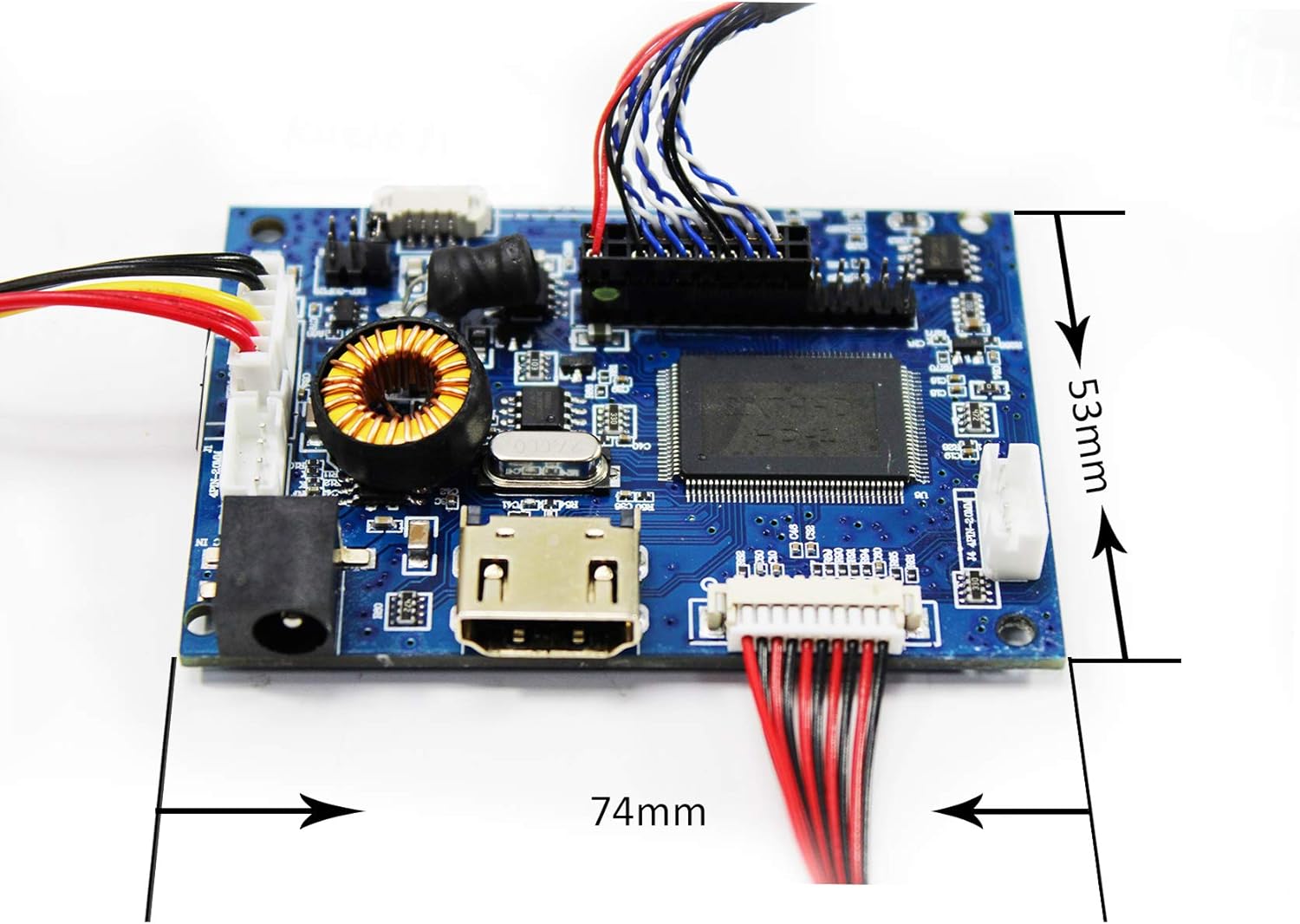
Figure 3.2: Dimensions of the VS-TY2660H-V1 LCD Controller Board, measuring 74mm in length and 53mm in width.
3.2. 15.0-inch LCD Screen
| ഫീച്ചർ | സ്പെസിഫിക്കേഷൻ |
|---|---|
| സ്ക്രീൻ വലിപ്പം | 15.0 ഇഞ്ച് |
| റെസലൂഷൻ | 1024x768 (XGA) |
| ഡിസ്പ്ലേ മോഡ് | TN, Normally White, Transmissive |
| ഔട്ട്ലൈൻ വലിപ്പം | 326.5 × 253.5 × 12 mm (W×H×D) |
| ഡിസ്പ്ലേ ഏരിയ | 304.128 × 228.096 mm (W×H) |
| തെളിച്ചം | 1000 cd / m² (തരം.) |
| കോൺട്രാസ്റ്റ് റേഷ്യോ | 700: 1 (തരം.) |
| Viewing ആംഗിൾ | 80/80/70/70 (Typ.) [Left / Right / Up / Down] |
| സിഗ്നൽ ഇന്റർഫേസ് | LVDS (1 ch, 6/8-bit), 20 pins, Connector |
| ബാക്ക്ലൈറ്റ് | WLED |
| ഇൻപുട്ട് വോളിയംtage | 3.3V (Typ.) |

Figure 3.3: The 15.0-inch LCD screen displaying an image, connected to the controller board and other components.

ചിത്രം 3.4: പിൻഭാഗം view of the 15.0-inch LCD screen, showing the connections to the controller board, backlight inverter, and control keyboard.
4. സജ്ജീകരണവും ഇൻസ്റ്റാളേഷനും
Follow these steps carefully to assemble and connect your LCD screen and controller board. Ensure all power is disconnected before making any connections.
4.1. കണക്ഷൻ ഡയഗ്രം
Refer to the following diagram for a visual guide to connecting the components:
Figure 4.1: An assembled VSDISPLAY LCD kit, illustrating the connections between the 15-inch LCD panel, the VS-TY2660H-V1 controller board, and the associated cables (LVDS, backlight, keyboard).
4.2. ഘട്ടം ഘട്ടമായുള്ള അസംബ്ലി
- Connect the LVDS Cable: Carefully connect one end of the LVDS cable to the 30-pin LVDS interface on the LCD Controller Board (refer to Figure 3.1). Connect the other end to the corresponding LVDS input on the 15.0-inch LCD Screen. Ensure correct orientation and a secure connection.
- Connect the Backlight Cable: Attach the backlight cable to the backlight connector on the LCD Controller Board and to the backlight input on the LCD Screen.
- Connect the Keyboard Cable: Plug the keyboard cable into the designated port on the LCD Controller Board. This keyboard is used for OSD menu navigation.
- പവർ അഡാപ്റ്റർ ബന്ധിപ്പിക്കുക: Connect a 12Vdc, >2A power adapter (not included) to the power input port on the LCD Controller Board. Important: Ensure the power adapter meets the specified voltage and current requirements. Using an incorrect power adapter can damage the device.
- വീഡിയോ ഉറവിടം ബന്ധിപ്പിക്കുക: Connect your video source (e.g., computer, media player) to the appropriate input port on the LCD Controller Board (e.g., HDMI).
Once all connections are made, you can proceed to power on the system.
5. പ്രവർത്തന നിർദ്ദേശങ്ങൾ
5.1. പവർ ഓൺ/ഓഫ്
- പവർ ഓൺ: After connecting the power adapter, the system should power on automatically or can be activated via the keyboard.
- സ്റ്റാൻഡ്ബൈ മോഡ്: The controller board will enter standby mode if no video signal is detected, consuming less than 1W of power.
5.2. OSD മെനു നാവിഗേഷൻ
Use the provided keyboard with cable to access and navigate the On-Screen Display (OSD) menu. The OSD allows you to adjust various display settings:
- തെളിച്ചം: സ്ക്രീനിന്റെ മൊത്തത്തിലുള്ള പ്രകാശം ക്രമീകരിക്കുക.
- ദൃശ്യതീവ്രത: Modify the difference between the lightest and darkest areas of the image.
- യാന്ത്രിക ക്രമീകരണം: Automatically optimizes display settings for the input signal.
- ഭാഷ: Select your preferred OSD language (e.g., English, French, German, Spanish, Italian).
- Other settings may include color temperature, aspect ratio, and input source selection.
6. പ്രശ്നപരിഹാരം
നിങ്ങൾക്ക് പ്രശ്നങ്ങൾ നേരിടുകയാണെങ്കിൽ, ഇനിപ്പറയുന്ന പൊതുവായ പ്രശ്നങ്ങളും പരിഹാരങ്ങളും പരിശോധിക്കുക:
| പ്രശ്നം | സാധ്യമായ കാരണം / പരിഹാരം |
|---|---|
| ഡിസ്പ്ലേ ഇല്ല / ബ്ലാക്ക് സ്ക്രീൻ |
|
| Incorrect Resolution / Distorted Image |
|
| OSD Menu Not Appearing |
|
| സ്ക്രീൻ ഫ്ലിക്കറിംഗ് |
|
7. പരിപാലനം
Proper care and maintenance will extend the lifespan of your VSDISPLAY LCD kit.
- സ്ക്രീൻ വൃത്തിയാക്കൽ: മൃദുവായ, ലിൻ്റ് രഹിത തുണി ഉപയോഗിക്കുകampened with water or a specialized screen cleaner. Avoid harsh chemicals or abrasive materials.
- Cleaning the Controller Board: Keep the controller board free from dust. Use compressed air or a soft brush to gently remove dust. Ensure the board is powered off and disconnected before cleaning.
- പരിസ്ഥിതി വ്യവസ്ഥകൾ: Operate the device in a clean, dry environment. Avoid extreme temperatures, high humidity, and direct sunlight.
- കൈകാര്യം ചെയ്യൽ: Handle the LCD screen and controller board with care to prevent physical damage. Avoid applying pressure to the screen surface.
8. വാറൻ്റിയും പിന്തുണയും
For warranty information or technical support, please refer to the seller's policies or contact VSDISPLAY customer service through their official channels. Keep your purchase receipt for warranty claims.
നിങ്ങൾക്ക് സന്ദർശിക്കാം VSDISPLAY Store on Amazon കൂടുതൽ ഉൽപ്പന്ന വിവരങ്ങൾക്കും പിന്തുണാ ഉറവിടങ്ങൾക്കും.


