ആമുഖം
വാങ്ങിയതിന് നന്ദി.asing the RockJam 61 Key Keyboard Bundle. This bundle includes a portable electronic keyboard, an adjustable keyboard stand, a power supply, piano note stickers, and a sheet music stand. This manual provides essential information for setting up, operating, maintaining, and troubleshooting your new instrument. Please read this manual thoroughly before use to ensure proper operation and to maximize your musical experience.
സുരക്ഷാ വിവരങ്ങൾ
- വൈദ്യുതി വിതരണം: നൽകിയിരിക്കുന്ന പവർ അഡാപ്റ്റർ മാത്രം ഉപയോഗിക്കുക. വോളിയം ഉറപ്പാക്കുകtage matches your local power supply. Unplug the unit during lightning storms or when unused for long periods.
- ജലവും ഈർപ്പവും: Do not expose the keyboard or stand to rain, moisture, or excessive humidity. Do not place objects filled with liquids on or near the unit.
- താപ സ്രോതസ്സുകൾ: റേഡിയേറ്ററുകൾ, ഹീറ്റ് രജിസ്റ്ററുകൾ, സ്റ്റൗകൾ അല്ലെങ്കിൽ മറ്റ് ഉപകരണങ്ങൾ (ഉൾപ്പെടെ) പോലുള്ള താപ സ്രോതസ്സുകളിൽ നിന്ന് യൂണിറ്റ് അകറ്റി നിർത്തുക. ampലൈഫയറുകൾ) ചൂട് ഉത്പാദിപ്പിക്കുന്നത്.
- വെൻ്റിലേഷൻ: വെന്റിലേഷൻ ദ്വാരങ്ങളൊന്നും തടയരുത്. യൂണിറ്റിന് ചുറ്റും ശരിയായ വായുസഞ്ചാരം ഉറപ്പാക്കുക.
- വൃത്തിയാക്കൽ: ഉണങ്ങിയ തുണി ഉപയോഗിച്ച് മാത്രം വൃത്തിയാക്കുക. ലിക്വിഡ് ക്ലീനറുകളോ എയറോസോളുകളോ ഉപയോഗിക്കുന്നത് ഒഴിവാക്കുക.
- സേവനം: ഈ ഉൽപ്പന്നം സ്വയം സേവിക്കാൻ ശ്രമിക്കരുത്. യോഗ്യതയുള്ള സേവന ഉദ്യോഗസ്ഥർക്ക് എല്ലാ സേവനങ്ങളും റഫർ ചെയ്യുക.
- കുട്ടികൾ: This product is not a toy. Adult supervision is recommended for children using the instrument.
പാക്കേജ് ഉള്ളടക്കം
താഴെ പട്ടികപ്പെടുത്തിയിരിക്കുന്ന എല്ലാ ഇനങ്ങളും നിങ്ങളുടെ പാക്കേജിൽ ഉൾപ്പെടുത്തിയിട്ടുണ്ടോയെന്ന് ദയവായി പരിശോധിക്കുക:
- RockJam 61 Key Electronic Keyboard (RJ361)
- Adjustable Single-X Keyboard Stand
- പവർ സപ്ലൈ അഡാപ്റ്റർ
- Piano Note Stickers
- Sheet Music Stand (attaches to keyboard)
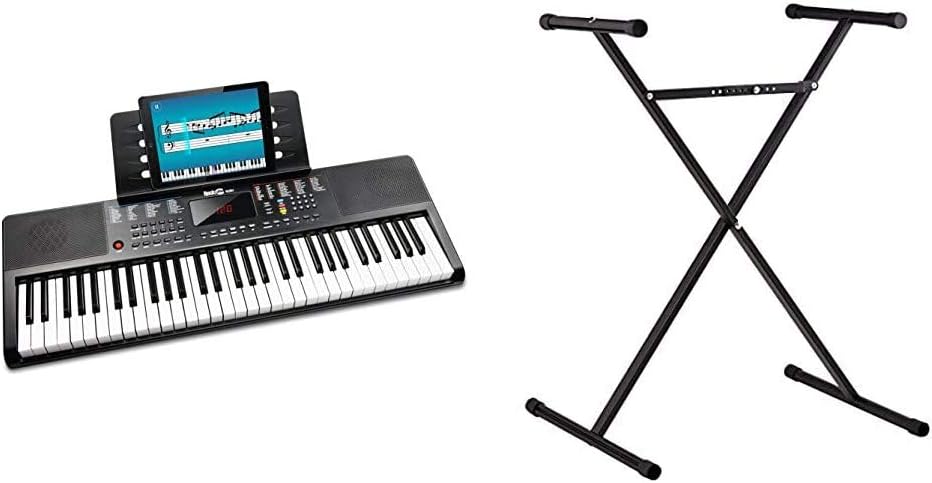
Image: The complete RockJam 61 Key Keyboard Bundle, showing the keyboard and the X-style stand.
സജ്ജമാക്കുക
1. കീബോർഡ് സ്റ്റാൻഡ് അസംബ്ലി
- Unfold the X-style keyboard stand.
- Locate the adjustment mechanism, typically a lever or pin, in the center of the 'X'.
- Adjust the stand to your desired height. Ensure the locking mechanism is securely engaged to prevent collapse.
- Place the keyboard securely on the top arms of the stand. Ensure it is stable and centered.

Image: The adjustable X-style keyboard stand, ready for assembly and height adjustment.
2. Keyboard Power and Connections
- വൈദ്യുതി വിതരണം: Connect the provided power adapter to the DC IN jack on the back of the keyboard. Plug the other end into a standard wall outlet. Alternatively, the keyboard can be powered by batteries (not included) for portable use.
- ഹെഡ്ഫോണുകൾ: For private practice, connect 3.5mm headphones to the headphone output jack. This will mute the built-in speakers.
- AUX ഇതിൽ: To play along with external audio, connect an audio device (e.g., smartphone, MP3 player) to the AUX IN jack using a 3.5mm audio cable.
- യുഎസ്ബി ഇൻപുട്ട്: The USB input allows for playing MP3 files directly through the keyboard's speakers.
- Sheet Music Stand: Insert the included sheet music stand into the designated slots on the top of the keyboard.
- Piano Note Stickers: For beginners, apply the piano note stickers to the keys as guided by the instructions provided with the stickers.

ചിത്രം: മുകളിൽ നിന്ന് താഴേക്ക് view of the RockJam 61 Key Keyboard, showing the layout of keys and control panel.
പ്രവർത്തന നിർദ്ദേശങ്ങൾ
1. അടിസ്ഥാന പ്രവർത്തനങ്ങൾ
- പവർ ഓൺ/ഓഫ്: Press the 'Power' button to turn the keyboard on or off.
- വോളിയം നിയന്ത്രണം: Use the dedicated volume buttons or knob to adjust the overall output volume.
- ടോൺ തിരഞ്ഞെടുക്കൽ: Select from various instrument tones (e.g., Piano, Organ, Strings) using the tone selection buttons or numeric keypad.
- താളം തിരഞ്ഞെടുക്കൽ: Choose from a variety of built-in rhythms (e.g., Pop, Rock, Waltz) to play along with.
- ടെമ്പോ അഡ്ജസ്റ്റ്മെന്റ്: Adjust the speed of the selected rhythm using the tempo control buttons.
2. പഠന സവിശേഷതകൾ
The RockJam RJ361 keyboard includes built-in learning modes and access to the Simply Piano application to assist beginners.
- Built-in Teaching Modes: Refer to the keyboard's display and control panel for specific instructions on activating and using the integrated teaching functions. These modes typically guide you through playing pre-programmed songs.
- Simply Piano App: Your purchase includes 90-day access to the Simply Piano application. Download the app on your tablet or smartphone and follow the instructions to connect it to your keyboard. The app provides interactive lessons and feedback.

Image: The RockJam keyboard with a tablet mounted on the music stand, displaying the Simply Piano application interface.
മെയിൻ്റനൻസ്
- വൃത്തിയാക്കൽ: Wipe the keyboard and stand with a soft, dry, lint-free cloth. Do not use abrasive cleaners, waxes, or solvents.
- സംഭരണം: When not in use, store the keyboard in a cool, dry place away from direct sunlight and extreme temperatures. If storing for an extended period, remove batteries if applicable.
- കൈകാര്യം ചെയ്യൽ: Avoid dropping or subjecting the keyboard to strong impacts. Do not place heavy objects on the keys or control panel.
ട്രബിൾഷൂട്ടിംഗ്
| പ്രശ്നം | സാധ്യമായ കാരണം | പരിഹാരം |
|---|---|---|
| No sound from keyboard | Power not connected; Volume too low; Headphones connected | Ensure power adapter is securely plugged in or batteries are installed correctly. Increase volume. Disconnect headphones if speakers are desired. |
| കീകൾ പ്രതികരിക്കുന്നില്ല | Keyboard not powered on; Malfunction | Ensure the keyboard is powered on. If problem persists, contact customer support. |
| Rhythm/Tempo not changing | Incorrect button pressed; Feature not active | Refer to the operating instructions for correct button usage. Ensure a rhythm is selected before attempting to change tempo. |
| Keyboard stand unstable | Locking mechanism not engaged; Uneven surface | Ensure the stand's locking mechanism is fully engaged. Place the stand on a flat, stable surface. |
സ്പെസിഫിക്കേഷനുകൾ
- കീബോർഡ്: RockJam RJ361
- കീകളുടെ എണ്ണം: 61
- ഊർജ്ജ സ്രോതസ്സ്: Corded Electric (via included adapter) or Battery Powered
- കണക്റ്റിവിറ്റി: AUX In (3.5mm), USB, Headphone Out (3.5mm)
- അന്തർനിർമ്മിത സവിശേഷതകൾ: Teaching modes, Stereo Speakers
- പിന്തുണയ്ക്കുന്ന സോഫ്റ്റ്വെയർ: Simply Piano (90-day access included)
- കീബോർഡ് സ്റ്റാൻഡ്: Adjustable Single-X Style
- Model Name (Keyboard): RK-100S2
വാറൻ്റിയും പിന്തുണയും
For warranty information and customer support, please refer to the documentation included with your product or visit the official RockJam webസൈറ്റ്. ഏതെങ്കിലും വാറന്റി ക്ലെയിമുകൾക്ക് നിങ്ങളുടെ വാങ്ങലിന്റെ തെളിവ് സൂക്ഷിക്കുക.
For additional assistance, you may also refer to the official user manual PDF available online: RockJam User Manual PDF


