ഉൽപ്പന്നം കഴിഞ്ഞുview
The Sharp HP-TW30 True Wireless Noise Cancelling Earphones are designed for an immersive audio experience with enhanced comfort and durability. Featuring active noise cancellation, these earphones reduce background noise, making them ideal for various environments. They offer wireless charging, Bluetooth 5.0 connectivity, and are splashproof for active lifestyles.
പ്രധാന സവിശേഷതകൾ:
- സജീവമായ നോയിസ് റദ്ദാക്കൽ: Reduces ambient noise by 22dB for improved focus and enjoyment.
- വയർലെസ് ചാർജിംഗ്: Convenient charging with the included case, providing up to 4 full charges.
- ബ്ലൂടൂത്ത് 5.0: Ensures stable and efficient wireless connectivity with a range of up to 33 feet.
- IPX4 Splashproof: Resistant to splashes, sweat, and light rain, suitable for workouts and outdoor activities.
- ടച്ച് നിയന്ത്രണങ്ങൾ: Intuitive controls for managing playback, calls, and voice assistants.
- ശബ്ദ നിയന്ത്രണം: Full integration with Apple Siri and Google Assistant for hands-free operation.
- ദൈർഘ്യമേറിയ കളിസമയം: ഒറ്റ ചാർജിൽ 6 മണിക്കൂർ വരെ ഓഡിയോ പ്ലേബാക്ക്.

Figure 1: Sharp HP-TW30 True Wireless Earphones (Black)
പാക്കേജ് ഉള്ളടക്കം
ആരംഭിക്കുന്നതിന് മുമ്പ്, പാക്കേജിൽ എല്ലാ ഇനങ്ങളും ഉണ്ടെന്ന് ഉറപ്പാക്കുക:
- Sharp HP-TW30 True Wireless Earphones (Left and Right)
- ചാർജിംഗ് കേസ്
- USB Type-C Charging Cable (not explicitly listed in 'whats_in_the_box' but implied by 'Charging Port: USB Type C')
- Small, Medium, and Large Ultra-comfortable Ear Tips (3 sizes)
- നിർദ്ദേശ മാനുവൽ (ഈ പ്രമാണം)
സജ്ജമാക്കുക
1. ഇയർഫോണുകളും കേസും ചാർജ് ചെയ്യുന്നു
For first-time use, fully charge the earphones and the charging case. The charging case provides approximately 4 full charges for the earphones.
- Place both earphones into their respective slots in the charging case. Ensure they are seated correctly.
- യുഎസ്ബി ടൈപ്പ്-സി ചാർജിംഗ് കേബിൾ കേസിലെ ചാർജിംഗ് പോർട്ടിലേക്കും മറ്റേ അറ്റം ഒരു യുഎസ്ബി പവർ സ്രോതസ്സിലേക്കും (ഉദാ: വാൾ അഡാപ്റ്റർ, കമ്പ്യൂട്ടർ യുഎസ്ബി പോർട്ട്) ബന്ധിപ്പിക്കുക.
- The LED indicators on the case will show charging status. Charging time for the case and earphones is approximately 2 hours.
- പൂർണ്ണമായി ചാർജ് ചെയ്തുകഴിഞ്ഞാൽ, ചാർജിംഗ് കേബിൾ വിച്ഛേദിക്കുക.
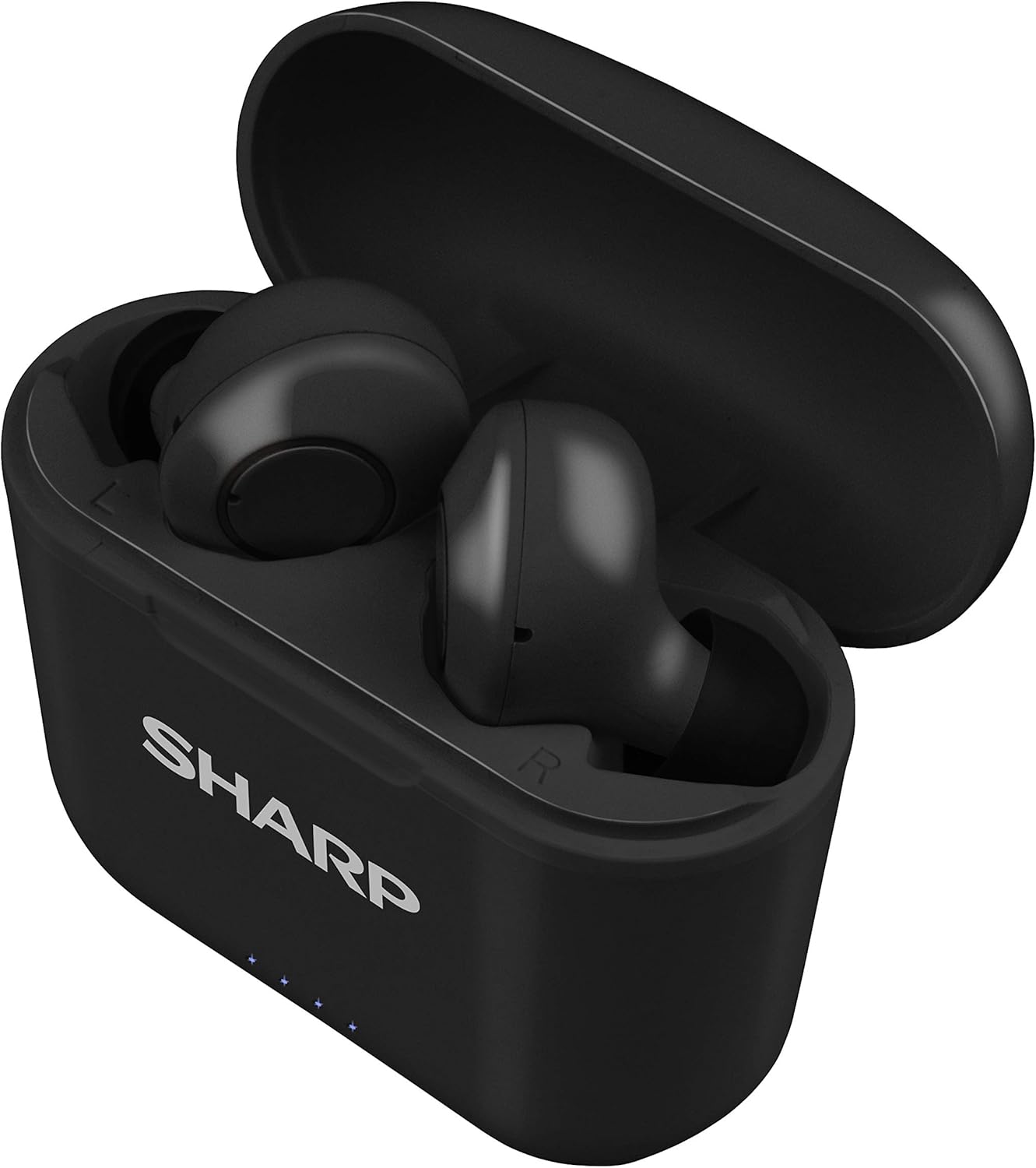
Figure 2: Earphones in Charging Case
2. നിങ്ങളുടെ ഉപകരണവുമായി ജോടിയാക്കുന്നു
The HP-TW30 earphones feature auto-pairing for effortless setup.
- ചാർജിംഗ് കേസ് തുറക്കുക. ഇയർഫോണുകൾ സ്വയമേവ ഓണാകുകയും ജോടിയാക്കൽ മോഡിലേക്ക് പ്രവേശിക്കുകയും ചെയ്യും.
- നിങ്ങളുടെ സ്മാർട്ട്ഫോണിലോ, ടാബ്ലെറ്റിലോ, അല്ലെങ്കിൽ മറ്റ് ബ്ലൂടൂത്ത് പ്രവർത്തനക്ഷമമാക്കിയ ഉപകരണത്തിലോ, ബ്ലൂടൂത്ത് ക്രമീകരണങ്ങളിലേക്ക് പോകുക.
- ഇതിനായി തിരയുക available devices and select "HP-TW30" from the list.
- കണക്റ്റുചെയ്തുകഴിഞ്ഞാൽ, ഒരു വോയ്സ് പ്രോംപ്റ്റ് വിജയകരമായ ജോടിയാക്കൽ സ്ഥിരീകരിക്കും.
- ഉപകരണത്തിൽ ബ്ലൂടൂത്ത് പ്രവർത്തനക്ഷമമാക്കിയിട്ടുണ്ടെങ്കിൽ, കേസിൽ നിന്ന് പുറത്തെടുക്കുമ്പോൾ ഇയർഫോണുകൾ അവസാനം ജോടിയാക്കിയ ഉപകരണവുമായി യാന്ത്രികമായി വീണ്ടും കണക്റ്റുചെയ്യും.
പ്രവർത്തന നിർദ്ദേശങ്ങൾ
ടച്ച് നിയന്ത്രണങ്ങൾ
The HP-TW30 earphones utilize touch-sensitive controls on each earbud for various functions:
- പ്ലേ/താൽക്കാലികമായി നിർത്തുക: ഇയർബഡുകളിൽ ഏതെങ്കിലുമൊന്നിൽ ഒറ്റ ടാപ്പ് ചെയ്യുക.
- അടുത്ത ട്രാക്ക്: വലതുവശത്തെ ഇയർബഡിൽ രണ്ടുതവണ ടാപ്പ് ചെയ്യുക.
- മുമ്പത്തെ ട്രാക്ക്: ഇടതുവശത്തെ ഇയർബഡിൽ രണ്ടുതവണ ടാപ്പ് ചെയ്യുക.
- ഉത്തരം/അവസാന കോൾ: ഇൻകമിംഗ് കോൾ വരുമ്പോൾ ഏത് ഇയർബഡിലും ഒറ്റ ടാപ്പ് ചെയ്യുക.
- കോൾ നിരസിക്കുക: ഇൻകമിംഗ് കോൾ വരുമ്പോൾ ഇയർബഡുകളിൽ ഏതെങ്കിലുമൊന്ന് 2 സെക്കൻഡ് അമർത്തിപ്പിടിക്കുക.
- Activate Voice Assistant (Siri/Google Assist): ഇയർബഡുകളിൽ ഏതെങ്കിലുമൊന്നിൽ മൂന്ന് തവണ ടാപ്പ് ചെയ്യുക.
- Active Noise Cancellation (ANC) On/Off: വലത് ഇയർബഡ് 2 സെക്കൻഡ് അമർത്തിപ്പിടിക്കുക.
സജീവ ശബ്ദ റദ്ദാക്കൽ (ANC)
The ANC feature reduces ambient background noise, providing a more focused listening experience. Activate or deactivate ANC using the touch control as described above.
ജല പ്രതിരോധം (IPX4)
The earphones are rated IPX4 splashproof, meaning they are resistant to water splashes from any direction. This makes them suitable for light rain, sweat, and gym use. Do not submerge the earphones in water.
മെയിൻ്റനൻസ്
ശരിയായ അറ്റകുറ്റപ്പണി നിങ്ങളുടെ ഇയർഫോണുകളുടെ ദീർഘായുസ്സും മികച്ച പ്രകടനവും ഉറപ്പാക്കുന്നു.
- വൃത്തിയാക്കൽ: Regularly clean the earphones and charging case with a soft, dry, lint-free cloth. Do not use abrasive cleaners or solvents.
- ചെവി ടിപ്പുകൾ: Remove and clean the ear tips periodically with a damp വീണ്ടും ഘടിപ്പിക്കുന്നതിന് മുമ്പ് തുണിയും വീര്യം കുറഞ്ഞ സോപ്പും ഉപയോഗിച്ച് നന്നായി ഉണക്കുക.
- സംഭരണം: ഉപയോഗത്തിലില്ലാത്തപ്പോൾ, പൊടിയിൽ നിന്നും കേടുപാടുകളിൽ നിന്നും സംരക്ഷിക്കാൻ ഇയർഫോണുകൾ അവയുടെ ചാർജിംഗ് കേസിൽ സൂക്ഷിക്കുക.
- താപനില: Avoid exposing the earphones to extreme temperatures (hot or cold) or high humidity.
- ചാർജിംഗ് കോൺടാക്റ്റുകൾ: Ensure the charging contacts on both the earphones and inside the case are clean and free of debris to maintain proper charging.
ട്രബിൾഷൂട്ടിംഗ്
If you encounter issues with your Sharp HP-TW30 earphones, try the following solutions:
- ഇയർഫോണുകൾ ജോടിയാക്കുന്നില്ല/കണക്റ്റ് ചെയ്യുന്നില്ല:
- രണ്ട് ഇയർഫോണുകളും പൂർണ്ണമായും ചാർജ് ചെയ്തിട്ടുണ്ടെന്ന് ഉറപ്പാക്കുക.
- നിങ്ങളുടെ ഉപകരണത്തിൽ Bluetooth ഓഫാക്കുക, തുടർന്ന് അത് വീണ്ടും ഓണാക്കുക.
- Forget/delete "HP-TW30" from your device's Bluetooth list and attempt to re-pair.
- Place both earphones back into the charging case, close the lid for 5 seconds, then open it again to reset.
- Only one earbud playing sound:
- രണ്ട് ഇയർബഡുകളും ചാർജ്ജ് ചെയ്തിട്ടുണ്ടെന്ന് ഉറപ്പാക്കുക.
- രണ്ട് ഇയർബഡുകളും ചാർജിംഗ് കെയ്സിലേക്ക് തിരികെ വയ്ക്കുക, ലിഡ് അടയ്ക്കുക, തുടർന്ന് അത് വീണ്ടും തുറക്കുക. ഇത് പലപ്പോഴും അവയെ വീണ്ടും സമന്വയിപ്പിക്കുന്നു.
- രണ്ട് ഇയർബഡുകളിലെയും കേസിനുള്ളിലെയും ചാർജിംഗ് കോൺടാക്റ്റുകൾ വൃത്തിയാക്കുക.
- Try resetting and re-pairing the earphones as described above.
- കുറഞ്ഞ ശബ്ദം അല്ലെങ്കിൽ മോശം ശബ്ദ നിലവാരം:
- നിങ്ങളുടെ ഉപകരണത്തിലും ഇയർഫോണുകളിലും വോളിയം ക്രമീകരിക്കുക.
- Ensure the ear tips are the correct size for a snug fit and are clean.
- Check for any obstructions in the earbud nozzles.
- ഇയർഫോണുകൾ ചാർജ് ചെയ്യുന്നില്ല:
- ചാർജിംഗ് കേബിൾ കേസിലേക്കും പവർ സ്രോതസ്സിലേക്കും സുരക്ഷിതമായി ബന്ധിപ്പിച്ചിട്ടുണ്ടെന്ന് ഉറപ്പാക്കുക.
- വ്യത്യസ്തമായ ഒരു USB Type-C കേബിളും പവർ അഡാപ്റ്ററും പരീക്ഷിച്ചുനോക്കൂ.
- ഇയർഫോണുകളിലെയും കേസിനുള്ളിലെയും ചാർജിംഗ് കോൺടാക്റ്റുകൾ വൃത്തിയാക്കുക.
സ്പെസിഫിക്കേഷനുകൾ
| മോഡലിൻ്റെ പേര് | HP-TW30(BK) |
| കണക്റ്റിവിറ്റി ടെക്നോളജി | വയർലെസ് (ബ്ലൂടൂത്ത്) |
| ബ്ലൂടൂത്ത് പതിപ്പ് | 5.0 |
| ബ്ലൂടൂത്ത് ശ്രേണി | 33 അടി വരെ (10 മീറ്റർ) |
| ശബ്ദ നിയന്ത്രണം | Active Noise Cancellation (22dB reduction) |
| കളിസമയം | ഏകദേശം 6 മണിക്കൂർ |
| സ്റ്റാൻഡ്ബൈ സമയം | ഏകദേശം 90 മണിക്കൂർ |
| ചാർജിംഗ് സമയം | Approx. 2 hours (earphones and case) |
| ചാർജിംഗ് പോർട്ട് | യുഎസ്ബി ടൈപ്പ്-സി |
| ജല പ്രതിരോധം | IPX4 സ്പ്ലാഷ്പ്രൂഫ് |
| നിയന്ത്രണ തരം | ടച്ച് നിയന്ത്രണം |
| ശബ്ദ നിയന്ത്രണം | Apple Siri, Google Assistant |
| ഉൾപ്പെടുത്തിയ ഘടകങ്ങൾ | Small, Medium, and Large Ultra-comfortable Ear tips |
| മെറ്റീരിയൽ | Silicone (ear tips) |
| ഇനത്തിൻ്റെ ഭാരം | 7.9 ഔൺസ് |
വാറൻ്റിയും പിന്തുണയും
Sharp products are manufactured to the highest quality standards. For warranty information, technical support, or service inquiries, please refer to the warranty card included with your purchase or visit the official Sharp support website. Please have your model number (HP-TW30(BK)) and proof of purchase ready when contacting support.
For further assistance, you may visit the Sharp Store on Amazon: Sharp Official Store


