ആമുഖം
നിങ്ങളുടെ ഷാർപ്പ് ഡിജിറ്റൽ അലാറം ക്ലോക്കിന്റെ സജ്ജീകരണം, പ്രവർത്തനം, പരിപാലനം എന്നിവയ്ക്കുള്ള വിശദമായ നിർദ്ദേശങ്ങൾ ഈ മാനുവൽ നൽകുന്നു, മോഡൽ B08TG1QB2B. ലാളിത്യത്തിനായി രൂപകൽപ്പന ചെയ്തിരിക്കുന്ന ഈ ക്ലോക്കിൽ വ്യക്തമായ LED ഡിസ്പ്ലേ, ഇരട്ട ആരോഹണ അലാറങ്ങൾ, വിശ്വാസ്യത ഉറപ്പാക്കാൻ ബാറ്ററി ബാക്കപ്പ് സിസ്റ്റം എന്നിവയുണ്ട്.

ചിത്രം 1: മുൻഭാഗം view ഷാർപ്പ് ഡിജിറ്റൽ അലാറം ക്ലോക്കിന്റെ, പച്ച LED അക്കങ്ങളിൽ സമയം 12:08 പ്രദർശിപ്പിക്കുന്നു.
ഉൽപ്പന്ന സവിശേഷതകൾ
- ഉപയോഗിക്കാൻ എളുപ്പമുള്ള ഡിസൈൻ: എല്ലാ ഉപയോക്താക്കൾക്കും അനുയോജ്യമായ ലളിതമായ പ്രവർത്തനം.
- ഡ്യുവൽ അലാറം സിസ്റ്റം: വ്യത്യസ്ത ഷെഡ്യൂളുകൾക്കായി രണ്ട് സ്വതന്ത്ര അലാറങ്ങൾ സജ്ജമാക്കുക.
- ആരോഹണ അലാറം വോളിയം: അലാറം മൃദുവായി ആരംഭിക്കുകയും സൌമ്യമായ ഉണർവിനായി ക്രമേണ ശബ്ദം വർദ്ധിപ്പിക്കുകയും ചെയ്യുന്നു.
- ബാറ്ററി ബാക്കപ്പ്: വൈദ്യുതി വിതരണ സമയത്ത് സമയവും അലാറം ക്രമീകരണങ്ങളും നിലനിർത്തുന്നു.tages (2x AA ബാറ്ററികൾ ആവശ്യമാണ്, ഉൾപ്പെടുത്തിയിട്ടില്ല).
- പ്രകാശിതമായ പച്ച LED അക്കങ്ങൾ: വ്യക്തവും എളുപ്പത്തിൽ വായിക്കാവുന്നതുമായ ഡിസ്പ്ലേ.
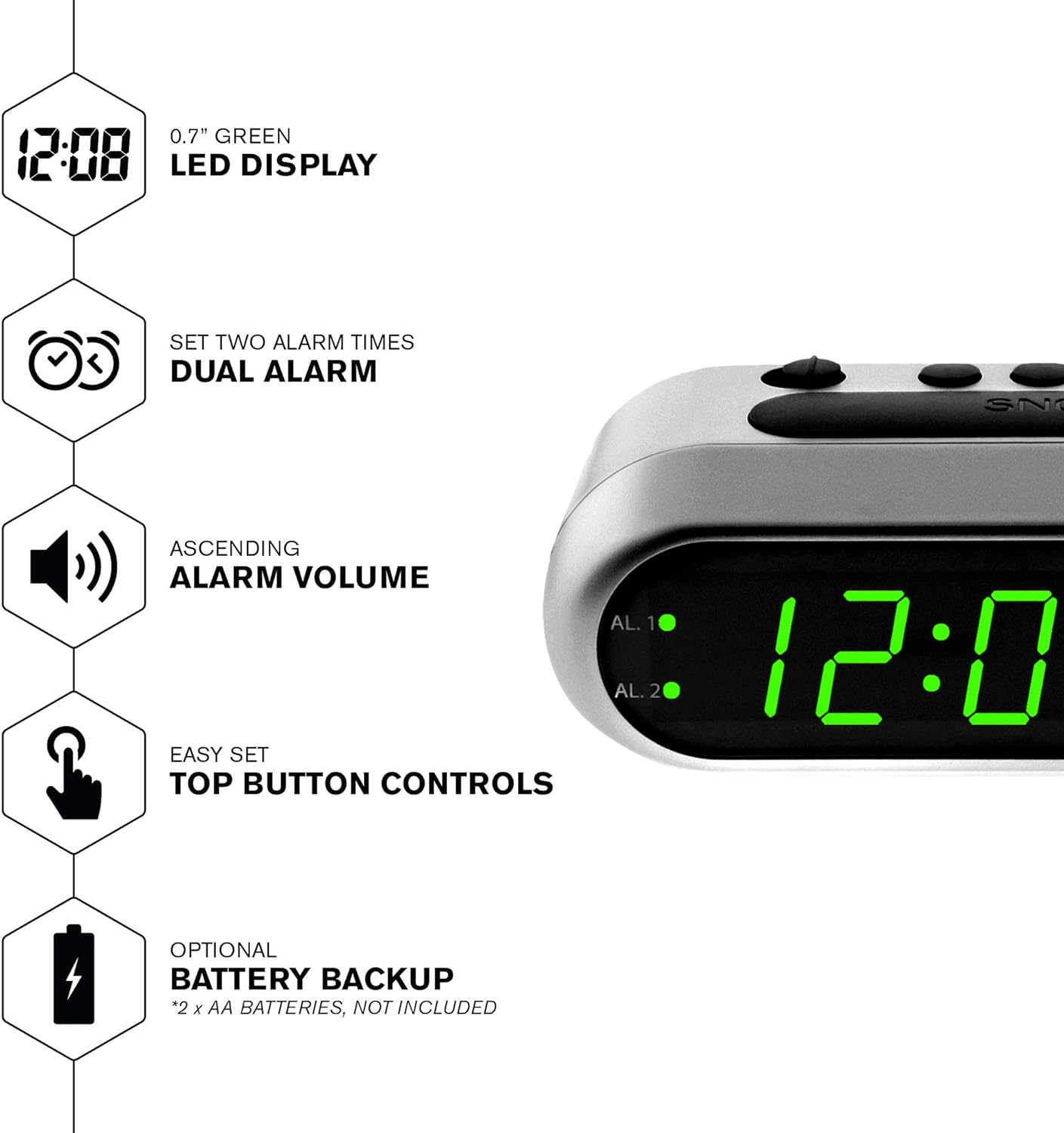
ചിത്രം 2: ഓവർview എൽഇഡി ഡിസ്പ്ലേ, ഡ്യുവൽ അലാറം, ആരോഹണ വോളിയം, ബാറ്ററി ബാക്കപ്പ് എന്നിവയുൾപ്പെടെ ക്ലോക്കിന്റെ പ്രധാന സവിശേഷതകളിൽ ചിലത്.
പാക്കേജ് ഉള്ളടക്കം
- ഷാർപ്പ് ഡിജിറ്റൽ അലാറം ക്ലോക്ക് (മോഡൽ B08TG1QB2B)
- എസി പവർ അഡാപ്റ്റർ
- ഇൻസ്ട്രക്ഷൻ മാനുവൽ
കുറിപ്പ്: ബാറ്ററി ബാക്കപ്പിനായി 2x AA ബാറ്ററികൾ ഉൾപ്പെടുത്തിയിട്ടില്ല, അവ പ്രത്യേകം വാങ്ങണം.
നിയന്ത്രണങ്ങളും പ്രദർശനവും
നിങ്ങളുടെ അലാറം ക്ലോക്കിലെ ബട്ടണുകളും സൂചകങ്ങളും ഉപയോഗിച്ച് സ്വയം പരിചയപ്പെടുക:
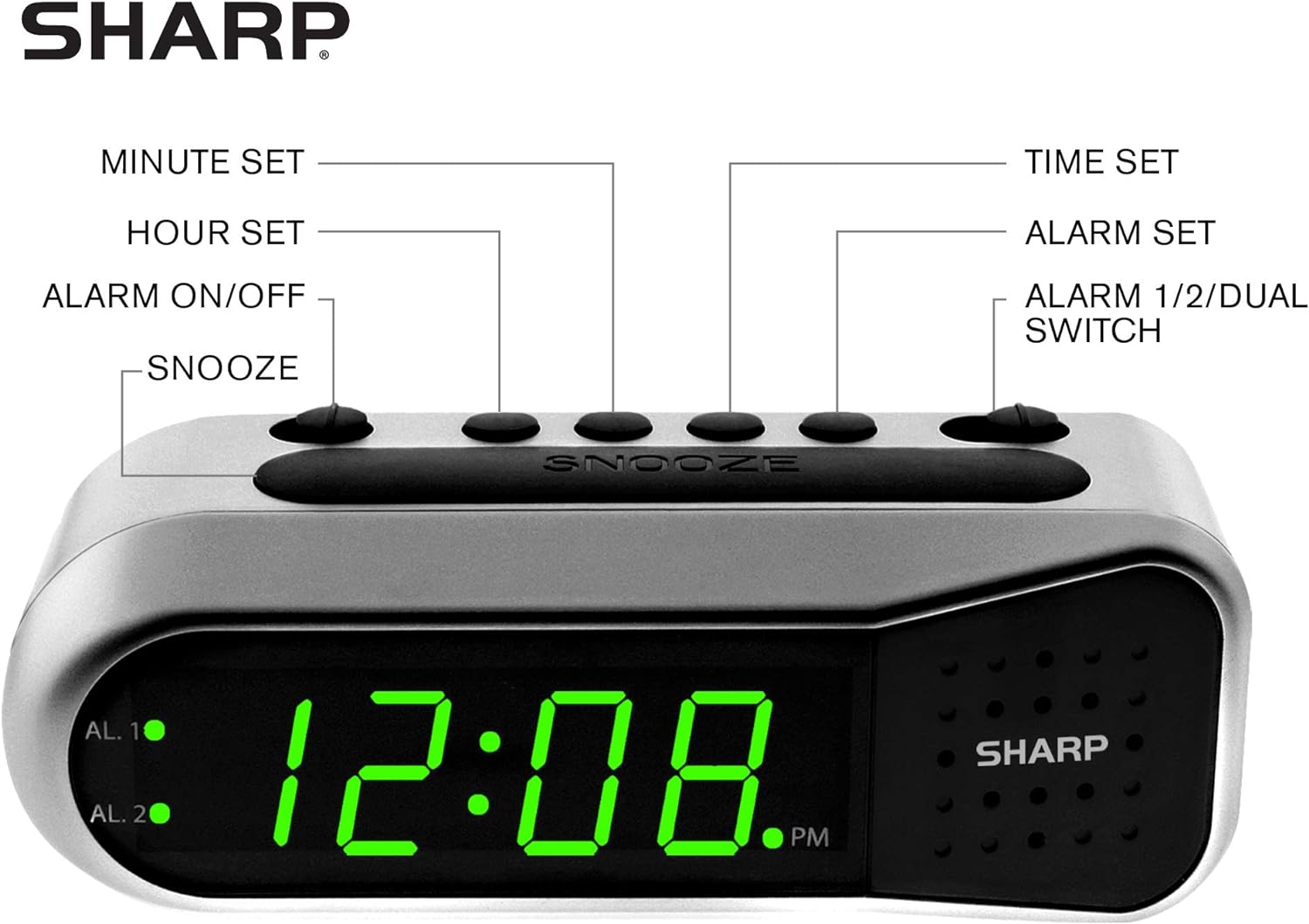
ചിത്രം 3: ക്ലോക്കിന്റെ നിയന്ത്രണങ്ങളുടെയും പ്രദർശന ഘടകങ്ങളുടെയും ലേബൽ ചെയ്ത ഡയഗ്രം.
- മിനിറ്റ് സെറ്റ് ബട്ടൺ: സമയത്തിനും അലാറം ക്രമീകരണത്തിനും അനുസരിച്ച് മിനിറ്റ് ക്രമീകരിക്കുന്നു.
- മണിക്കൂർ സജ്ജീകരണ ബട്ടൺ: സമയത്തിനും അലാറം ക്രമീകരണത്തിനും വേണ്ടി മണിക്കൂർ ക്രമീകരിക്കുന്നു.
- അലാറം ഓൺ/ഓഫ് സ്വിച്ച്: തിരഞ്ഞെടുത്ത അലാറം സജീവമാക്കുന്നു അല്ലെങ്കിൽ നിർജ്ജീവമാക്കുന്നു.
- സ്നൂസ് ബട്ടൺ: ഒരു ചെറിയ സമയത്തേക്ക് അലാറം താൽക്കാലികമായി നിശബ്ദമാക്കുന്നു.
- സമയ സജ്ജീകരണ ബട്ടൺ: സമയ ക്രമീകരണ മോഡിലേക്ക് പ്രവേശിക്കുന്നു.
- അലാറം സജ്ജീകരണ ബട്ടൺ: അലാറം ക്രമീകരണ മോഡിലേക്ക് പ്രവേശിക്കുന്നു.
- അലാറം 1/2/ഡ്യുവൽ സ്വിച്ച്: ഏത് അലാറമാണ് (അലാറം 1, അലാറം 2, അല്ലെങ്കിൽ രണ്ടും) സജ്ജീകരിക്കുന്നതോ സജീവമാക്കുന്നതോ എന്ന് തിരഞ്ഞെടുക്കുന്നു.
- AL. 1 സൂചകം: അലാറം 1 സജീവമാകുമ്പോൾ പ്രകാശിക്കുന്നു.
- AL. 2 സൂചകം: അലാറം 2 സജീവമാകുമ്പോൾ പ്രകാശിക്കുന്നു.
- PM സൂചകം: പ്രദർശിപ്പിക്കുന്ന സമയം PM ആകുമ്പോൾ പ്രകാശിക്കുന്നു.
സജ്ജമാക്കുക
1. പവർ കണക്ഷൻ
അലാറം ക്ലോക്കിന്റെ പിൻഭാഗത്തുള്ള DC ഇൻപുട്ട് ജാക്കിലേക്ക് AC പവർ അഡാപ്റ്റർ ബന്ധിപ്പിക്കുക. ഒരു സാധാരണ ഇലക്ട്രിക്കൽ ഔട്ട്ലെറ്റിലേക്ക് അഡാപ്റ്റർ പ്ലഗ് ചെയ്യുക. ഡിസ്പ്ലേ പ്രകാശിക്കും.
2. ബാറ്ററി ബാക്കപ്പ് ഇൻസ്റ്റലേഷൻ
ബാറ്ററി ബാക്കപ്പ് സവിശേഷതയ്ക്ക് രണ്ട് (2) AA ബാറ്ററികൾ ആവശ്യമാണ് (ഉൾപ്പെടുത്തിയിട്ടില്ല). ഈ ബാറ്ററികൾ ഒരു പവർ ഔട്ട്പുട്ട് സമയത്ത് സമയവും അലാറം ക്രമീകരണങ്ങളും നിലനിർത്തുന്നു.tage പക്ഷേ ഡിസ്പ്ലേ പവർ ചെയ്യരുത്.
- ക്ലോക്കിന്റെ അടിയിലുള്ള ബാറ്ററി കമ്പാർട്ട്മെന്റ് കവർ തുറക്കുക.
- കമ്പാർട്ടുമെന്റിനുള്ളിൽ സൂചിപ്പിച്ചിരിക്കുന്നതുപോലെ ശരിയായ പോളാരിറ്റി (+ ഉം - ഉം) നിരീക്ഷിച്ചുകൊണ്ട് രണ്ട് (2) AA ബാറ്ററികൾ തിരുകുക.
- ബാറ്ററി കമ്പാർട്ട്മെൻ്റ് കവർ മാറ്റിസ്ഥാപിക്കുക.
കുറിപ്പ്: വിശ്വസനീയമായ ബാക്കപ്പ് ഉറപ്പാക്കാൻ, വർഷത്തിലൊരിക്കൽ അല്ലെങ്കിൽ ക്ലോക്കിൽ പതിവായി വൈദ്യുതി തടസ്സങ്ങൾ അനുഭവപ്പെടുമ്പോൾ ബാറ്ററികൾ മാറ്റിസ്ഥാപിക്കുക.
3. പ്രാരംഭ സമയ ക്രമീകരണം
പവർ കണക്റ്റ് ചെയ്ത ശേഷം, ഡിസ്പ്ലേ ഒരു ഡിഫോൾട്ട് സമയം കാണിക്കും (ഉദാ: 12:00 AM). നിലവിലെ സമയം സജ്ജമാക്കുക:
- അമർത്തിപ്പിടിക്കുക ടൈം സെറ്റ് ബട്ടൺ. മണിക്കൂർ അക്കങ്ങൾ മിന്നുന്നു.
- പിടിക്കുമ്പോൾ ടൈം സെറ്റ്, അമർത്തുക മണിക്കൂർ സെറ്റ് മണിക്കൂർ ക്രമീകരിക്കാൻ ബട്ടൺ ആവർത്തിച്ച് അമർത്തുക. ശരിയായ AM/PM ക്രമീകരണത്തിനായി PM സൂചകം നിരീക്ഷിക്കുക.
- റിലീസ് ചെയ്യുക ടൈം സെറ്റ് ബട്ടൺ.
- അമർത്തിപ്പിടിക്കുക ടൈം സെറ്റ് വീണ്ടും ബട്ടൺ അമർത്തുക. മിനിറ്റുകണക്കുകൾ മിന്നിമറയും.
- പിടിക്കുമ്പോൾ ടൈം സെറ്റ്, അമർത്തുക മിനിറ്റ് സെറ്റ് മിനിറ്റ് ക്രമീകരിക്കാൻ ആവർത്തിച്ച് ബട്ടൺ അമർത്തുക.
- റിലീസ് ചെയ്യുക ടൈം സെറ്റ് സമയം ലാഭിക്കാൻ ബട്ടൺ.
പ്രവർത്തന നിർദ്ദേശങ്ങൾ
അലാറം 1 അല്ലെങ്കിൽ അലാറം 2 സജ്ജമാക്കുന്നു
നിങ്ങളുടെ ക്ലോക്കിൽ രണ്ട് സ്വതന്ത്ര അലാറങ്ങളുണ്ട്. ഒരു അലാറം സജ്ജീകരിക്കാൻ:
- സ്ലൈഡ് ചെയ്യുക അലാറം 1/2/ഡ്യുവൽ രണ്ടിലേക്കും മാറുക അൽ. 1 or അൽ. 2, നിങ്ങൾ ഏത് അലാറം സജ്ജമാക്കാൻ ആഗ്രഹിക്കുന്നു എന്നതിനെ ആശ്രയിച്ച്.
- അമർത്തിപ്പിടിക്കുക അലാറം സെറ്റ് ബട്ടൺ. തിരഞ്ഞെടുത്ത അലാറത്തിന്റെ മണിക്കൂർ അക്കങ്ങൾ മിന്നിമറയും.
- പിടിക്കുമ്പോൾ അലാറം സെറ്റ്, അമർത്തുക മണിക്കൂർ സെറ്റ് അലാറം സമയം ക്രമീകരിക്കാൻ ബട്ടൺ ആവർത്തിച്ച് അമർത്തുക. ശരിയായ AM/PM തിരഞ്ഞെടുത്തിട്ടുണ്ടെന്ന് ഉറപ്പാക്കുക.
- റിലീസ് ചെയ്യുക അലാറം സെറ്റ് ബട്ടൺ.
- അമർത്തിപ്പിടിക്കുക അലാറം സെറ്റ് വീണ്ടും ബട്ടൺ അമർത്തുക. തിരഞ്ഞെടുത്ത അലാറത്തിന്റെ മിനിറ്റ് അക്കങ്ങൾ മിന്നിമറയും.
- പിടിക്കുമ്പോൾ അലാറം സെറ്റ്, അമർത്തുക മിനിറ്റ് സെറ്റ് അലാറം മിനിറ്റ് ക്രമീകരിക്കാൻ ആവർത്തിച്ച് ബട്ടൺ അമർത്തുക.
- റിലീസ് ചെയ്യുക അലാറം സെറ്റ് അലാറം സമയം ലാഭിക്കാൻ ബട്ടൺ.
അലാറങ്ങൾ സജീവമാക്കൽ/നിർജ്ജീവമാക്കൽ
ഒരു അലാറം ഓണാക്കാനോ ഓഫാക്കാനോ:
- സ്ലൈഡ് ചെയ്യുക അലാറം 1/2/ഡ്യുവൽ എന്നതിലേക്ക് മാറുക അൽ. 1 or അൽ. 2.
- നീക്കുക അലാറം ഓൺ / ഓഫ് ചെയ്യുക എന്നതിലേക്ക് മാറുക ON അലാറം സജീവമാക്കുന്നതിനുള്ള സ്ഥാനം. അനുബന്ധ AL. 1 അല്ലെങ്കിൽ AL. 2 ഇൻഡിക്കേറ്റർ ലൈറ്റ് പ്രകാശിക്കും.
- നീക്കുക അലാറം ഓൺ / ഓഫ് ചെയ്യുക എന്നതിലേക്ക് മാറുക ഓഫ് അലാറം നിർജ്ജീവമാക്കാനുള്ള സ്ഥാനം. ഇൻഡിക്കേറ്റർ ലൈറ്റ് ഓഫാകും.
രണ്ട് അലാറങ്ങളും സജീവമാക്കാൻ, രണ്ട് അലാറം സമയങ്ങളും സജ്ജീകരിച്ച് സ്ലൈഡ് ചെയ്യുക അലാറം 1/2/ഡ്യുവൽ എന്നതിലേക്ക് മാറുക ഡ്യുവൽ. AL. 1 ഉം AL. 2 ഉം സൂചകങ്ങൾ പ്രകാശിക്കും.
സ്നൂസ് പ്രവർത്തനം
അലാറം മുഴങ്ങുമ്പോൾ, വലിയ ബട്ടൺ അമർത്തുക സ്നൂസ് ചെയ്യുക ക്ലോക്കിന് മുകളിലുള്ള ബട്ടൺ. അലാറം താൽക്കാലികമായി നിർത്തി ഏകദേശം 9 മിനിറ്റിനുശേഷം വീണ്ടും മുഴങ്ങും.
അലാറം നിർത്തുന്നു
അലാറം മുഴങ്ങിയതിനുശേഷം അത് പൂർണ്ണമായും നിർത്താൻ, സ്ലൈഡ് ചെയ്യുക അലാറം ഓൺ / ഓഫ് ചെയ്യുക എന്നതിലേക്ക് മാറുക ഓഫ് സ്ഥാനം. അലാറം അടുത്ത ദിവസത്തേക്ക് പുനഃസജ്ജമാക്കും.
മെയിൻ്റനൻസ്
വൃത്തിയാക്കൽ
മൃദുവായതും ഉണങ്ങിയതുമായ തുണി ഉപയോഗിച്ച് ക്ലോക്ക് തുടയ്ക്കുക. അബ്രാസീവ് ക്ലീനറുകളോ ലായകങ്ങളോ ഉപയോഗിക്കരുത്, കാരണം അവ ഫിനിഷിന് കേടുവരുത്തും.
ബാറ്ററി മാറ്റിസ്ഥാപിക്കൽ
വർഷം തോറും അല്ലെങ്കിൽ വൈദ്യുതി തടസ്സങ്ങൾ മൂലം ക്ലോക്കിന് സമയം നഷ്ടപ്പെടുകയാണെങ്കിൽ AA ബാക്കപ്പ് ബാറ്ററികൾ മാറ്റിസ്ഥാപിക്കുക. നിർദ്ദേശങ്ങൾക്ക് "ബാറ്ററി ബാക്കപ്പ് ഇൻസ്റ്റാളേഷൻ" വിഭാഗം കാണുക.
ട്രബിൾഷൂട്ടിംഗ്
| പ്രശ്നം | സാധ്യമായ കാരണം | പരിഹാരം |
|---|---|---|
| ക്ലോക്ക് ഡിസ്പ്ലേ ശൂന്യമാണ്. | എസി പവർ ഇല്ല. | എസി അഡാപ്റ്റർ ക്ലോക്കിലേക്കും പ്രവർത്തിക്കുന്ന ഒരു ഇലക്ട്രിക്കൽ ഔട്ട്ലെറ്റിലേക്കും സുരക്ഷിതമായി പ്ലഗ് ചെയ്തിട്ടുണ്ടെന്ന് ഉറപ്പാക്കുക. |
| അലാറം മുഴങ്ങുന്നില്ല. | അലാറം സജീവമാക്കിയിട്ടില്ല അല്ലെങ്കിൽ തെറ്റായി സജ്ജീകരിച്ചിട്ടില്ല. | പരിശോധിച്ചുറപ്പിക്കുക അലാറം ഓൺ / ഓഫ് ചെയ്യുക സ്വിച്ച് ON സ്ഥാനം, അലാറം സമയം ശരിയായി സജ്ജീകരിച്ചിരിക്കുന്നു (AM/PM പരിശോധിക്കുക). |
| പവർ OU കഴിഞ്ഞാൽ സമയം തെറ്റാണ്tage. | ബാക്കപ്പ് ബാറ്ററികൾ തീർന്നിരിക്കുന്നു അല്ലെങ്കിൽ ഇൻസ്റ്റാൾ ചെയ്തിട്ടില്ല. | പുതിയ AA ബാറ്ററികൾ സ്ഥാപിക്കുക അല്ലെങ്കിൽ നിലവിലുള്ളവ മാറ്റിസ്ഥാപിക്കുക. ആവശ്യമെങ്കിൽ സമയം പുനഃസജ്ജമാക്കുക. |
| അലാറം വളരെ നിശബ്ദമാണ്/ശബ്ദമുള്ളതാണ്. | അലാറം വോളിയം വർദ്ധിച്ചുകൊണ്ടിരിക്കുന്നു, സ്ഥിരമല്ല. | അലാറത്തിന്റെ ശബ്ദം ആരോഹണ ക്രമത്തിലാണ്. ഇത് നേരിയ തോതിൽ ആരംഭിച്ച് ക്രമേണ വർദ്ധിക്കുന്നു. ഇത് സാധാരണ പ്രവർത്തനമാണ്. |
സ്പെസിഫിക്കേഷനുകൾ
- മോഡൽ: B08TG1QB2B
- ബ്രാൻഡ്: മൂർച്ചയുള്ള
- ഡിസ്പ്ലേ തരം: ഡിജിറ്റൽ എൽഇഡി (പച്ച)
- ഊർജ്ജ സ്രോതസ്സ്: എസി പവർ അഡാപ്റ്റർ (ഉൾപ്പെടുത്തിയിരിക്കുന്നു), 2x എഎ ബാറ്ററികൾ (ബാക്കപ്പിനായി, ഉൾപ്പെടുത്തിയിട്ടില്ല)
- ഉൽപ്പന്ന അളവുകൾ: 5.5" വീതി x 2.1" ഉയരം x 2.3" വീതി (ഏകദേശം)
- ഭാരം: 8.4 ഔൺസ്
- മെറ്റീരിയൽ: പ്ലാസ്റ്റിക്
- നിറം: ബ്രഷ്ഡ് സിൽവർ
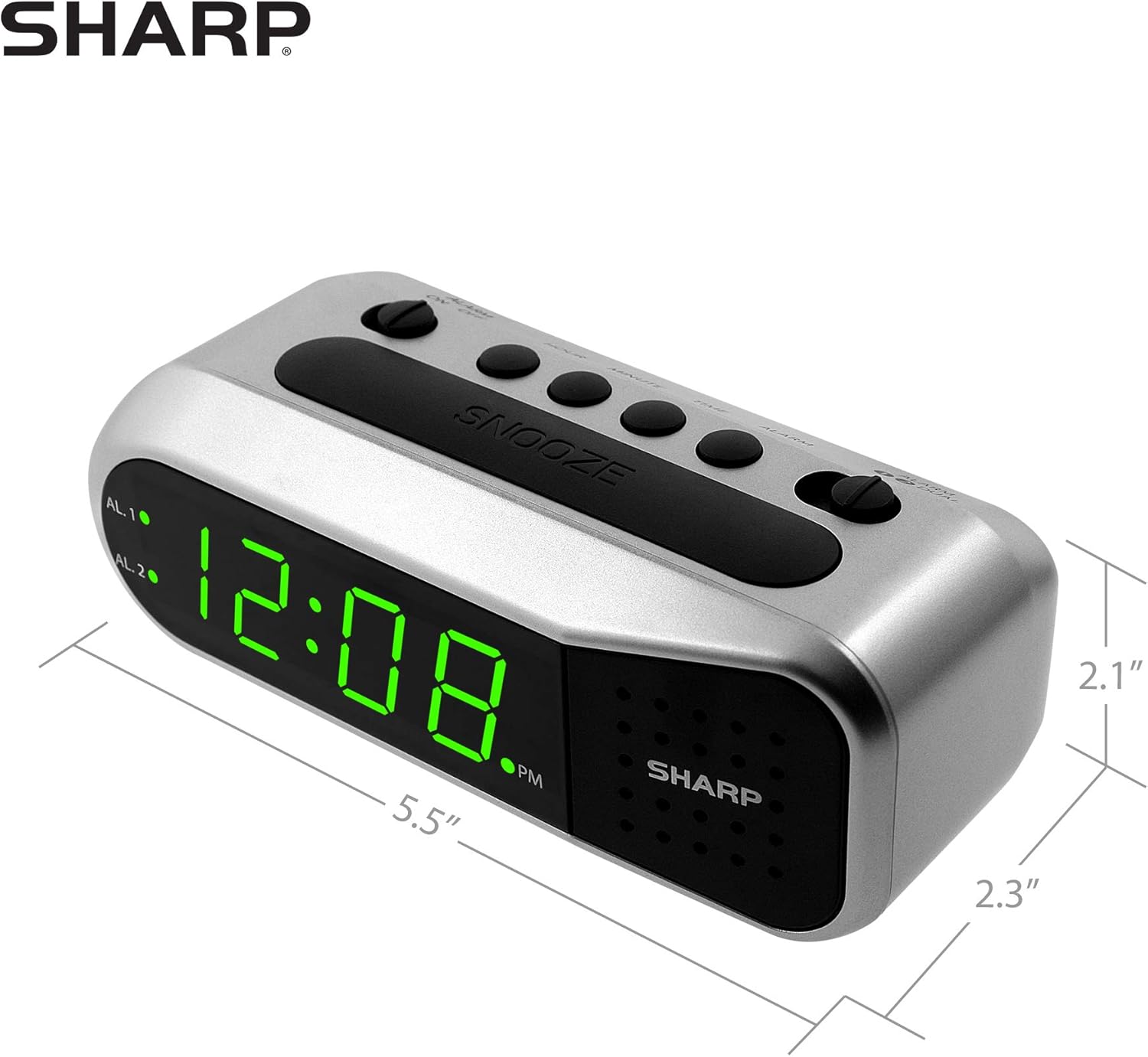
ചിത്രം 4: ഷാർപ്പ് ഡിജിറ്റൽ അലാറം ക്ലോക്കിന്റെ അളവുകൾ.
വാറൻ്റിയും പിന്തുണയും
വാറന്റി വിവരങ്ങൾക്കോ സാങ്കേതിക പിന്തുണയ്ക്കോ, ദയവായി നിങ്ങളുടെ ഉൽപ്പന്നത്തിനൊപ്പം ഉൾപ്പെടുത്തിയിരിക്കുന്ന വാറന്റി കാർഡ് പരിശോധിക്കുകയോ ഔദ്യോഗിക ഷാർപ്പ് സന്ദർശിക്കുകയോ ചെയ്യുക. webസൈറ്റ്. വാങ്ങിയതിന്റെ തെളിവായി നിങ്ങളുടെ വാങ്ങൽ രസീത് സൂക്ഷിക്കുക.
കൂടുതൽ സഹായത്തിന്, നിങ്ങൾക്ക് ഷാർപ്പിന്റെ ഔദ്യോഗിക ചാനലുകൾ വഴി ഉപഭോക്തൃ സേവനവുമായി ബന്ധപ്പെടാം.


