1. ആമുഖം
Welcome to the user manual for your new boAt Airdopes 621 Truly Wireless Earbuds. This guide provides detailed instructions on how to set up, operate, maintain, and troubleshoot your earbuds to ensure you get the best possible audio experience. The Airdopes 621 offers an impressive 150 hours of playback with its charging case, ASAP Charge technology for quick power-ups, and IPX7 water resistance for durability.
2. ബോക്സിൽ എന്താണുള്ളത്?
- 1 x boAt Airdopes 621 TWS Earbuds
- 1 x ചാർജിംഗ് കേസ്
- 1 x യുഎസ്ബി ടൈപ്പ്-സി ചാർജിംഗ് കേബിൾ
- 2 x Additional Earbud Tips (pairs)
- 1 x ഉപയോക്തൃ മാനുവൽ
3. ഉൽപ്പന്നം കഴിഞ്ഞുview
The boAt Airdopes 621 earbuds are designed for comfort and secure fit, featuring a never-drop design. The charging case includes a digital battery indicator for convenient power monitoring.

The boAt Airdopes 621 earbuds, showcasing their sleek black design and in-ear fit.

The charging case features a clear digital display indicating the battery level.

The earbuds are shown alongside their open charging case, ready for use.
നിയന്ത്രണങ്ങൾ
The Airdopes 621 features smooth touch controls for easy management of music playback, calls, and voice assistant activation.
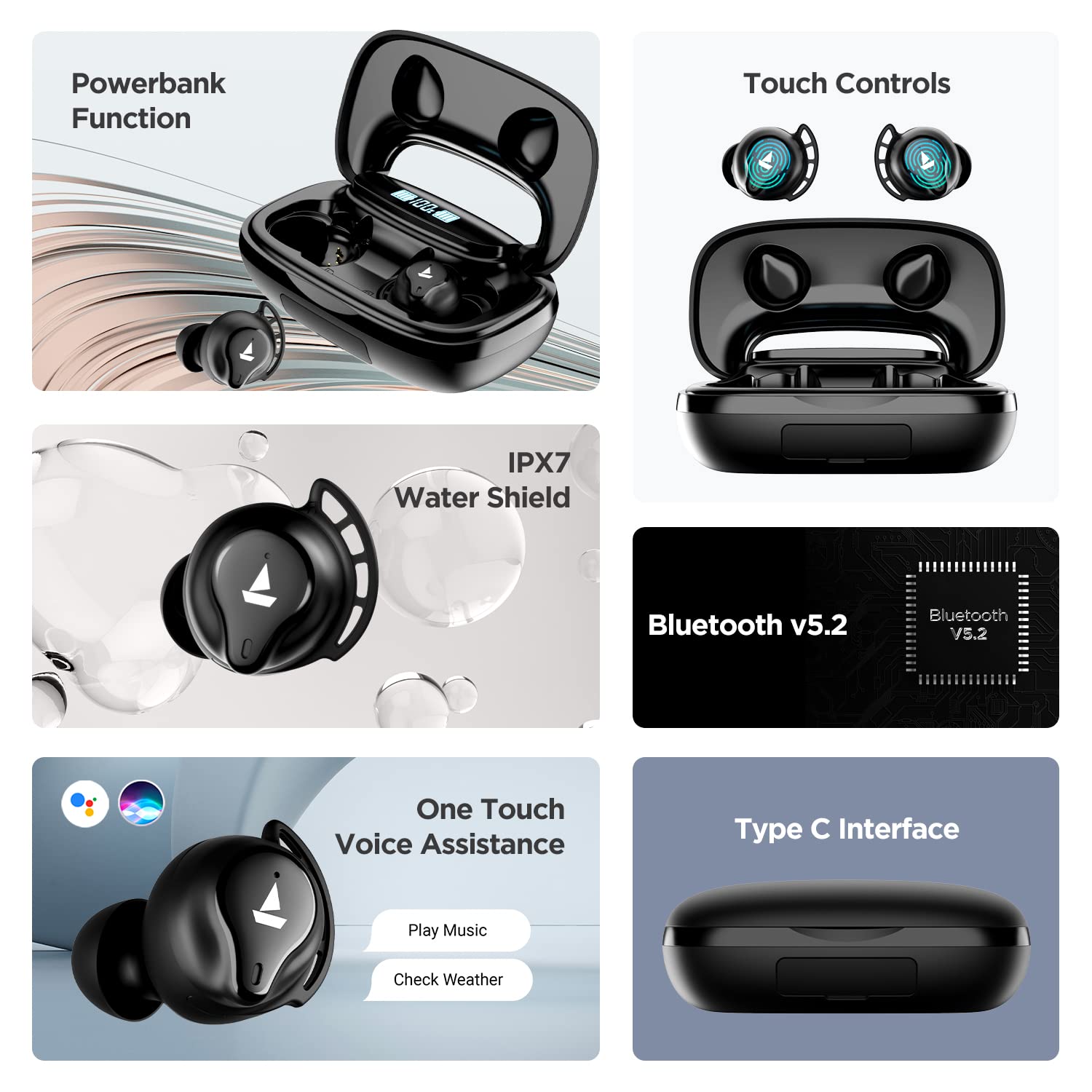
A visual summary of key features including power bank function, touch controls, IPX7 water resistance, Bluetooth v5.2, voice assistance, and Type-C interface.
4. സജ്ജീകരണം
4.1 ഇയർബഡുകളും കേസും ചാർജ് ചെയ്യുന്നു
Before first use, fully charge the Airdopes 621. Place both earbuds into the charging case. Connect the Type-C charging cable to the case and a power source. The digital indicator on the case will show the charging status.
The ASAP Charge technology provides up to 60 minutes of playback with just 5 minutes of charging.

Illustration of the ASAP Charge feature, highlighting 5 minutes of charge for 60 minutes of playtime.
4.2 പവർ ബാങ്ക് പ്രവർത്തനം
The 2600mAh capacity of the charging case allows it to function as a power bank, providing emergency power to other devices via its USB-A output port (cable not included).
4.3 നിങ്ങളുടെ ഉപകരണവുമായി ജോടിയാക്കൽ
- Open the lid of the charging case. The earbuds will power on automatically due to IWP (Insta Wake N' Pair) Technology.
- Ensure Bluetooth is enabled on your device (smartphone, tablet, etc.).
- ഇതിനായി തിരയുക "Airdopes 621" in the list of available Bluetooth devices.
- Select "Airdopes 621" to connect. Once connected, you will hear an audio prompt.
The earbuds will automatically connect to the last paired device when taken out of the case, provided Bluetooth is active on the device.

Visual representation of the IWP Technology, showing the earbuds automatically appearing for connection when the case is opened.
5. പ്രവർത്തന നിർദ്ദേശങ്ങൾ
5.1 പവർ ഓൺ/ഓഫ്
- പവർ ഓൺ: Open the charging case lid. The earbuds will power on automatically.
- പവർ ഓഫ്: ഇയർബഡുകൾ ചാർജിംഗ് കെയ്സിലേക്ക് തിരികെ വയ്ക്കുക, ലിഡ് അടയ്ക്കുക. അവ സ്വയമേവ ഓഫാകും.
5.2 മ്യൂസിക് പ്ലേബാക്ക്
- പ്ലേ/താൽക്കാലികമായി നിർത്തുക: ഇയർബഡുകളിലൊന്നിൽ ഒറ്റത്തവണ ടാപ്പ് ചെയ്യുക.
- അടുത്ത ട്രാക്ക്: വലത് ഇയർബഡിൽ രണ്ടുതവണ ടാപ്പ് ചെയ്യുക.
- മുമ്പത്തെ ട്രാക്ക്: ഇടത് ഇയർബഡിൽ രണ്ടുതവണ ടാപ്പ് ചെയ്യുക.
5.3 കോൾ മാനേജ്മെന്റ്
- ഉത്തരം/അവസാന കോൾ: ഇയർബഡുകളിലൊന്നിൽ ഒറ്റത്തവണ ടാപ്പ് ചെയ്യുക.
- കോൾ നിരസിക്കുക: ഏതെങ്കിലും ഇയർബഡിൽ 2 സെക്കൻഡ് അമർത്തിപ്പിടിക്കുക.
5.4 വോയ്സ് അസിസ്റ്റന്റ്
- വോയ്സ് അസിസ്റ്റന്റ് (സിരി/ഗൂഗിൾ അസിസ്റ്റന്റ്) സജീവമാക്കുക: ഇയർബഡുകളിലൊന്നിൽ മൂന്ന് തവണ ടാപ്പ് ചെയ്യുക.
6. പരിപാലനം
- വൃത്തിയാക്കൽ: ഇയർബഡുകളും ചാർജിംഗ് കെയ്സും മൃദുവായതും ഉണങ്ങിയതുമായ തുണി ഉപയോഗിച്ച് പതിവായി വൃത്തിയാക്കുക. കഠിനമായ രാസവസ്തുക്കളോ ഉരച്ചിലുകളോ ഉള്ള വസ്തുക്കൾ ഉപയോഗിക്കരുത്.
- ജല പ്രതിരോധം: The Airdopes 621 are IPX7 rated, meaning they are protected against immersion in water up to 1 meter for 30 minutes. Do not intentionally submerge them or use them for swimming. Ensure the charging port is dry before charging.
- സംഭരണം: ഇയർബഡുകൾ ഉപയോഗിക്കാത്തപ്പോൾ ചാർജിംഗ് കേസിൽ തന്നെ സൂക്ഷിക്കുക, അങ്ങനെ അവ സംരക്ഷിക്കപ്പെടുകയും ചാർജ്ജ് ആയി നിലനിർത്തുകയും ചെയ്യും. ഉയർന്ന താപനില ഒഴിവാക്കുക.
7. പ്രശ്നപരിഹാരം
- ഇയർബഡുകൾ കണക്റ്റുചെയ്യുന്നില്ല/ജോടിയാക്കുന്നില്ല:
- രണ്ട് ഇയർബഡുകളും ചാർജ്ജ് ചെയ്തിട്ടുണ്ടെന്ന് ഉറപ്പാക്കുക.
- നിങ്ങളുടെ ഉപകരണത്തിൽ Bluetooth ഓഫാക്കുക, തുടർന്ന് അത് വീണ്ടും ഓണാക്കുക.
- Forget "Airdopes 621" from your device's Bluetooth settings and try pairing again.
- Place both earbuds back in the case, close the lid, wait a few seconds, then open the lid to re-initiate pairing.
- ഒരു ഇയർബഡ് മാത്രമേ പ്രവർത്തിക്കുന്നുള്ളൂ:
- രണ്ട് ഇയർബഡുകളും ചാർജ്ജ് ചെയ്തിട്ടുണ്ടെന്ന് ഉറപ്പാക്കുക.
- Place both earbuds back in the charging case, close the lid, and then open it again. This often re-syncs them.
- If the issue persists, try resetting the earbuds (refer to the full product manual for specific reset instructions if available, as this varies by model).
- ചാർജിംഗ് കേസ് ചാർജുചെയ്യുന്നില്ല:
- Check the charging cable and adapter. Try a different cable or power source.
- Ensure the Type-C cable is fully inserted into the charging port.
- മോശം ശബ്ദ നിലവാരം അല്ലെങ്കിൽ വിച്ഛേദങ്ങൾ:
- ഇയർബഡുകൾ നിങ്ങളുടെ ഉപകരണത്തിന്റെ ബ്ലൂടൂത്ത് പരിധിക്കുള്ളിൽ (10 മീറ്റർ വരെ) ഉണ്ടെന്ന് ഉറപ്പാക്കുക.
- മറ്റ് വയർലെസ് ഉപകരണങ്ങളിൽ നിന്നോ ശക്തമായ വൈദ്യുതകാന്തിക മണ്ഡലങ്ങളിൽ നിന്നോ മാറി ഇടപെടൽ കുറയ്ക്കുക.
- Clean the earbud tips and speaker mesh to ensure no debris is blocking the sound.
- Ensure the earbud tips fit snugly in your ears for optimal sound quality.
8 സ്പെസിഫിക്കേഷനുകൾ
| ഫീച്ചർ | സ്പെസിഫിക്കേഷൻ |
|---|---|
| മോഡലിൻ്റെ പേര് | എയർഡോപ്പുകൾ 621 |
| കണക്റ്റിവിറ്റി ടെക്നോളജി | ബ്ലൂടൂത്ത് |
| വയർലെസ് കമ്മ്യൂണിക്കേഷൻ ടെക്നോളജി | ശരിക്കും വയർലെസ് |
| ബ്ലൂടൂത്ത് പതിപ്പ് | 5.2 |
| ബ്ലൂടൂത്ത് ശ്രേണി | 10 മീറ്റർ |
| Playback Time (per charge) | 5.5 മണിക്കൂർ വരെ |
| ആകെ പ്ലേബാക്ക് സമയം (കേസിനൊപ്പം) | 150 മണിക്കൂർ വരെ |
| ASAP ചാർജ് | 5 Mins Charge = 60 Mins Playtime |
| ചാർജിംഗ് പോർട്ട് | ടൈപ്പ്-സി |
| ജല പ്രതിരോധ നില | IPX7 |
| ഓഡിയോ ഡ്രൈവർ വലിപ്പം | 6 മില്ലിമീറ്റർ |
| നിയന്ത്രണ രീതി | സ്പർശിക്കുക |
| വോയ്സ് അസിസ്റ്റൻ്റ് പിന്തുണ | സിരി, Google അസിസ്റ്റന്റ് |
| കെയ്സ് ബാറ്ററി കപ്പാസിറ്റി | 2600mAh (functions as Powerbank) |
| ഇനത്തിൻ്റെ ഭാരം | 106 ഗ്രാം |
| ഉൽപ്പന്ന അളവുകൾ | 8.9 x 5.3 x 3.2 സെ.മീ |
9. വാറണ്ടിയും പിന്തുണയും
Your boAt Airdopes 621 comes with a 1 വർഷത്തെ നിർമ്മാതാവിന്റെ വാറന്റി വാങ്ങിയ തീയതി മുതൽ. ഈ വാറന്റി നിർമ്മാണ വൈകല്യങ്ങൾ ഉൾക്കൊള്ളുന്നു. വാറന്റി ക്ലെയിമുകൾക്കായി നിങ്ങളുടെ വാങ്ങൽ രസീത് സൂക്ഷിക്കുക.
For further assistance, technical support, or warranty claims, please visit the official boAt webസൈറ്റിൽ ബന്ധപ്പെടുക അല്ലെങ്കിൽ അവരുടെ ഉപഭോക്തൃ സേവനവുമായി ബന്ധപ്പെടുക. കൂടുതൽ വിവരങ്ങളും പിന്തുണാ ഉറവിടങ്ങളും നിങ്ങൾക്ക് ഇവിടെ കണ്ടെത്താനാകും boAt Store on Amazon.