ആമുഖം
The WIITHINK WTB-791 is a versatile portable audio system designed for various listening experiences. It combines a top-loading CD player with Bluetooth connectivity, FM radio, USB input, and a 3.5mm AUX headphone jack. This boombox supports CD-R/CD-RW/MP3/WMA playback and offers both AC and battery power options for use at home or on the go. Its compact size and user-friendly design make it suitable for all ages and various environments, from studying to outdoor activities.
ബോക്സിൽ എന്താണുള്ളത്
- 1 x WTB791 പോർട്ടബിൾ സിഡി റേഡിയോ ബൂം ബോക്സ് (ബാറ്ററികൾ ഉൾപ്പെടുത്തിയിട്ടില്ല)
- 1 x Remote Control (Batteries Not Included)
- 1 x പവർ കേബിൾ
- 1 x AUX ലൈൻ
- 1 x ഉപയോക്തൃ മാനുവൽ
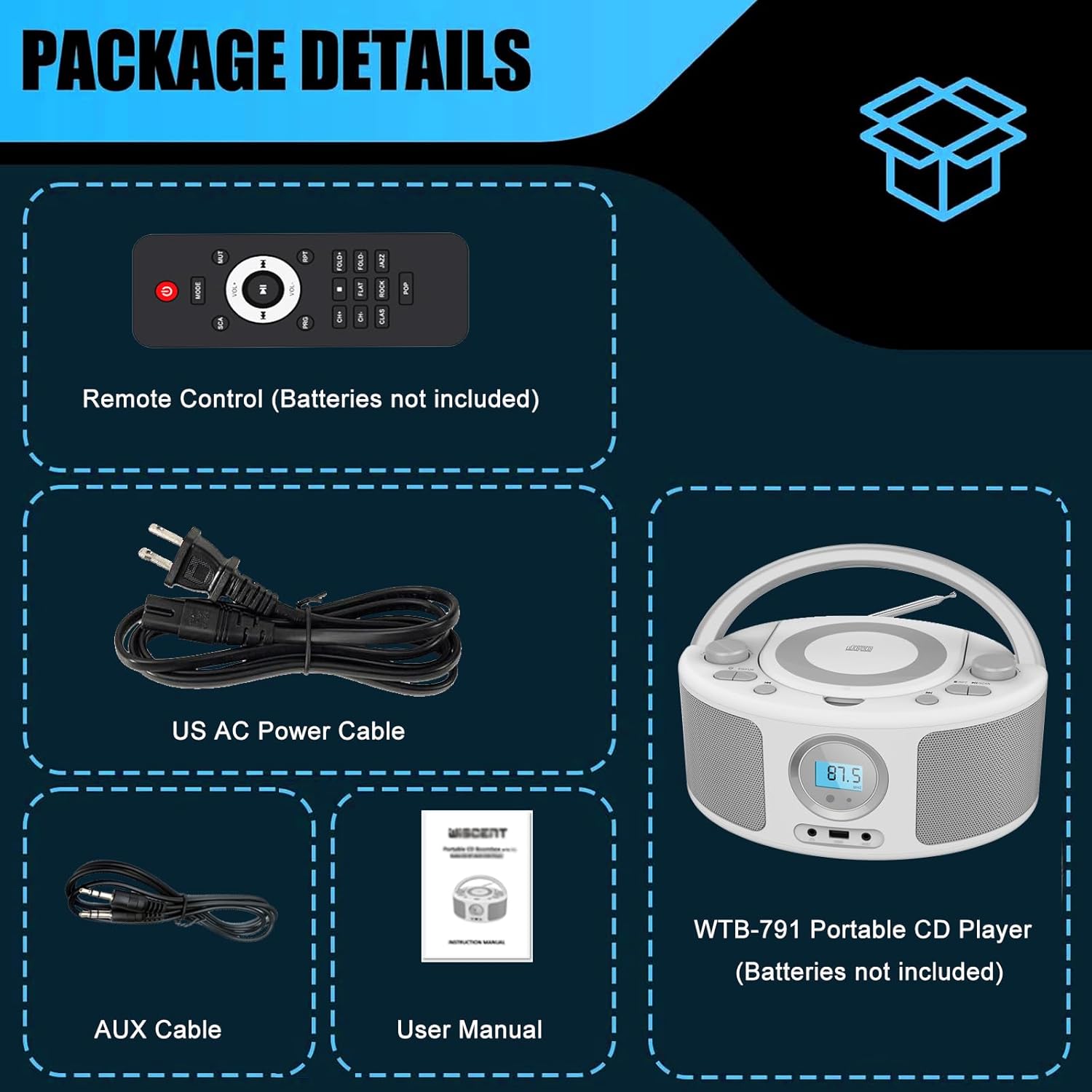
Image: The package contents of the WIITHINK WTB-791 Portable CD Boombox, showing the main unit, remote control, power cable, AUX cable, and user manual.
സജ്ജമാക്കുക
പവർ ഓപ്ഷനുകൾ
The WTB-791 offers flexible power options:
- എസി പവർ: Connect the provided power cable to the AC IN jack on the back of the unit and plug it into a standard 120V/60Hz wall outlet.
- ബാറ്ററി പവർ: For portable use, insert 4 x UM2-C 1.5V batteries (not included) into the battery compartment located on the bottom of the unit. Ensure correct polarity.
ആന്റിന സജ്ജീകരണം
For optimal FM radio reception, extend the telescopic antenna located on the back of the unit. Adjust its position for the clearest signal.
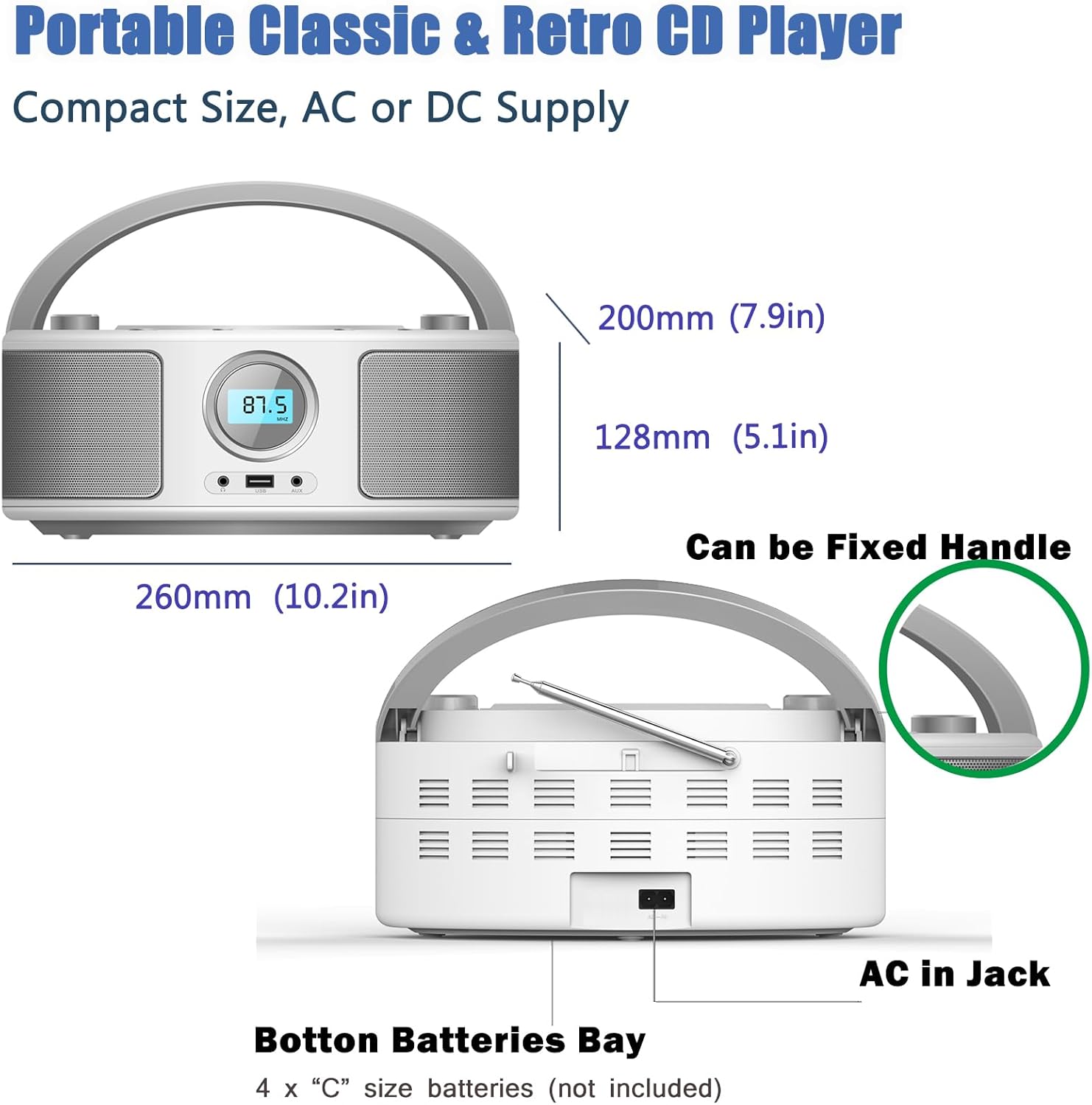
ചിത്രം: പിൻഭാഗം view of the WIITHINK WTB-791 Boombox, highlighting the AC IN jack and the battery compartment for portable power.
പ്രവർത്തന നിർദ്ദേശങ്ങൾ
സിഡി പ്ലെയർ ഓപ്പറേഷൻ
- Open the top-loading CD compartment.
- Carefully place a compatible CD (MP3/CD/CD-R/CD-RW) onto the spindle, label side up.
- സിഡി കമ്പാർട്ട്മെന്റ് അടയ്ക്കുക.
- Press the 'MODE' button to select 'CD' mode.
- പ്ലേബാക്ക് ആരംഭിക്കുന്നതിനോ താൽക്കാലികമായി നിർത്തുന്നതിനോ 'PLAY/PAUSE' ബട്ടൺ ഉപയോഗിക്കുക.
- Use the 'SKIP/SEARCH' buttons to navigate between tracks or fast forward/rewind within a track.
- The 'REPEAT' button allows you to repeat the current track or the entire album.

Image: The top-loading CD player of the WIITHINK WTB-791 Boombox with a compact disc inserted, ready for playback.
ബ്ലൂടൂത്ത് കണക്റ്റിവിറ്റി
- Press the 'MODE' button to select 'Bluetooth' mode. The display will show 'BT' and flash, indicating it's ready for pairing.
- On your Bluetooth-enabled device (smartphone, tablet, etc.), search for available Bluetooth devices.
- Select 'WTB-791' from the list to pair. Once connected, the 'BT' indicator will stop flashing.
- നിങ്ങളുടെ ഉപകരണത്തിൽ നിന്ന് ബൂംബോക്സിലേക്ക് ഇപ്പോൾ വയർലെസ് ആയി ഓഡിയോ സ്ട്രീം ചെയ്യാൻ കഴിയും.

Image: The WIITHINK WTB-791 Boombox wirelessly connected to a smartphone via Bluetooth, demonstrating audio streaming capability.
എഫ്എം റേഡിയോ ഓപ്പറേഷൻ
- Press the 'MODE' button to select 'FM' radio mode.
- മികച്ച സ്വീകരണത്തിനായി ടെലിസ്കോപ്പിക് ആന്റിന നീട്ടുക.
- Use the 'SCAN' button to automatically scan and save available FM stations (up to 30 presets).
- Use the 'CH+' or 'CH-' buttons to navigate through saved preset stations.
- Alternatively, use the 'TUNING' knob to manually tune to desired frequencies (87.5-108MHz).

Image: The WIITHINK WTB-791 Boombox with its telescopic antenna extended, illustrating its FM radio functionality.
USB പ്ലേബാക്ക്
- MP3 അല്ലെങ്കിൽ WMA ഓഡിയോ അടങ്ങിയ യുഎസ്ബി ഫ്ലാഷ് ഡ്രൈവ് ചേർക്കുക fileയൂണിറ്റിന്റെ മുൻവശത്തുള്ള USB പോർട്ടിലേക്ക് s.
- Press the 'MODE' button to select 'USB' mode.
- Playback will begin automatically. Use the 'PLAY/PAUSE' and 'SKIP/SEARCH' buttons to control playback.
AUX Input and Headphone Jack
- AUX ഇൻപുട്ട്: Connect external audio devices (e.g., MP3 players, laptops) to the 'AUX IN' jack on the front using the provided 3.5mm AUX cable. Press the 'MODE' button to select 'AUX' mode.
- ഹെഡ്ഫോൺ ജാക്ക്: For private listening, plug 3.5mm headphones into the 'HEADPHONE' jack on the front. The internal speakers will automatically mute.
റിമോട്ട് കൺട്രോൾ
The included remote control provides convenient operation from a distance. It allows you to:
- പവർ ഓൺ/ഓഫ്
- Change Modes (CD, Bluetooth, FM, USB, AUX)
- വോളിയം ക്രമീകരിക്കുക
- Skip/Search Tracks (CD/USB)
- Repeat Tracks/Albums (CD/USB)
- ഓഡിയോ നിശബ്ദമാക്കുക
- Select EQ/Sound Modes (Flat, Classic, Rock, Jazz, Pop)

Image: The WIITHINK WTB-791 Boombox displayed with its remote control, highlighting the convenience of remote operation.
സ്പെസിഫിക്കേഷനുകൾ
| ഫീച്ചർ | വിവരണം |
|---|---|
| ഉൽപ്പന്ന അളവുകൾ | 10.3 x 9.4 x 4.8 ഇഞ്ച് |
| ഇനത്തിൻ്റെ ഭാരം | 2.64 പൗണ്ട് |
| മോഡൽ നമ്പർ | WTB-791 |
| ബ്രാൻഡ് | വിചിന്തിക്കുക |
| കണക്റ്റിവിറ്റി ടെക്നോളജി | ബ്ലൂടൂത്ത്, ഓക്സിലറി, യുഎസ്ബി |
| നിറം | വെള്ള |
| സ്പീക്കർ തരം | ബിൽറ്റ്-ഇൻ |
| സിഡി അനുയോജ്യത | MP3/CD/CD-R/CD-RW |
| എഫ്എം റേഡിയോ ഫ്രീക്വൻസി | 87.5-108MHz |
| പവർ ഔട്ട്പുട്ട് | 2 x 2W ആർഎംഎസ് |
| പവർ ഓപ്ഷനുകൾ | AC 120V/60Hz or 4 x UM2-C 1.5 V batteries |
ട്രബിൾഷൂട്ടിംഗ്
If you encounter issues with your WIITHINK WTB-791, please refer to the following common solutions:
- ശക്തിയില്ല: Ensure the power cable is securely plugged into both the unit and a working wall outlet. If using batteries, check that they are inserted correctly and are not depleted.
- ശബ്ദമില്ല: Check the volume level on both the boombox and any connected external devices. Ensure headphones are not plugged in if you intend to use the speakers. Verify the correct mode (CD, Bluetooth, FM, USB, AUX) is selected.
- സിഡി പ്ലേ ചെയ്യുന്നില്ല: Ensure the CD is clean and free of scratches. Make sure the CD is inserted correctly, label side up, and the compartment is fully closed.
- Poor FM Reception: Fully extend and adjust the telescopic antenna. Try repositioning the unit to find a stronger signal.
- ബ്ലൂടൂത്ത് ജോടിയാക്കൽ പ്രശ്നങ്ങൾ: Ensure the boombox is in Bluetooth pairing mode ('BT' flashing). Turn off and on your device's Bluetooth, then try searching and pairing again. Make sure no other devices are currently connected to the boombox.
- റിമോട്ട് കൺട്രോൾ പ്രവർത്തിക്കുന്നില്ല: Check if the remote control batteries are inserted correctly and are not depleted. Ensure there are no obstructions between the remote and the boombox's sensor.
വാറൻ്റിയും പിന്തുണയും
WIITHINK offers a 36-month warranty and lifetime technical support for the WTB-791 Portable CD Boombox. For any inquiries or assistance, please refer to the following:
- ഉപയോക്തൃ മാനുവൽ (PDF): A detailed user guide is available for download at https://manuals.plus/m/f26b73cf21f0cb40df67fe64fcf5ce02be1434402d96d0aaa5ed8ac54a19dab7
- ഉപഭോക്തൃ പിന്തുണ: For further assistance, please contact WIITHINK Direct through the Amazon buyer-seller messaging service.
- മാറ്റിസ്ഥാപിക്കൽ നയം: WIITHINK offers an 18-month replacement policy for defective products.


