ആമുഖം
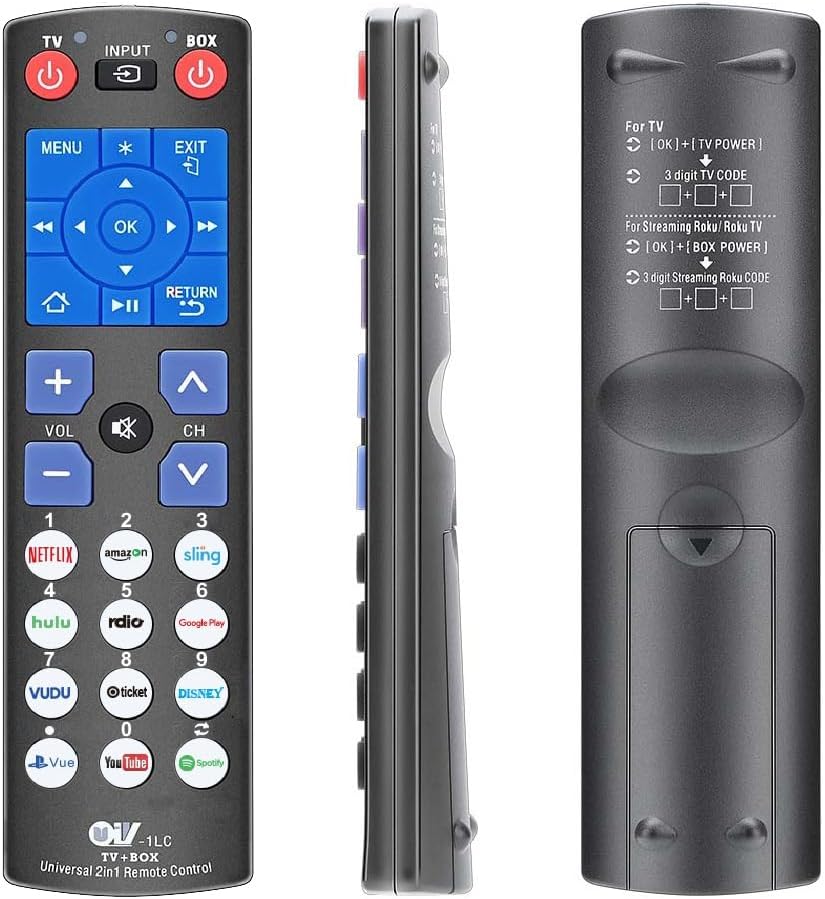
This manual provides detailed instructions for the setup, operation, and maintenance of your Gmatrix URC-1LC Universal 2-in-1 Remote Control. This remote is designed to control both your Roku player (excluding Roku Sticks) and your television, simplifying your entertainment experience.
1. സജ്ജീകരണം
1.1 ബാറ്ററി ഇൻസ്റ്റാളേഷൻ
The Gmatrix URC-1LC remote control requires two (2) AAA batteries (not included) for operation. Follow these steps to install the batteries:
- റിമോട്ട് കൺട്രോളിന്റെ പിൻഭാഗത്ത് ബാറ്ററി കമ്പാർട്ട്മെന്റ് കണ്ടെത്തുക.
- ടാബ് താഴേക്ക് അമർത്തി ബാറ്ററി കവർ താഴേക്ക് സ്ലൈഡ് ചെയ്ത് അത് തുറക്കുക.
- കമ്പാർട്ടുമെന്റിനുള്ളിലെ അടയാളപ്പെടുത്തലുകളുമായി പോസിറ്റീവ് (+), നെഗറ്റീവ് (-) ടെർമിനലുകൾ ശരിയായി വിന്യസിക്കുന്നുണ്ടെന്ന് ഉറപ്പാക്കാൻ രണ്ട് AAA ബാറ്ററികൾ ഇടുക.
- സുരക്ഷിതമായി ക്ലിക്കുചെയ്യുന്നത് വരെ ബാറ്ററി കവർ തിരികെ സ്ഥലത്തേക്ക് സ്ലൈഡ് ചെയ്യുക.

1.2 TV Control Setup
The remote is pre-coded for several popular TV brands. If your TV is one of the pre-coded brands, it may work without additional setup. If not, or if you wish to program it for a specific TV, follow these instructions:
Pre-coded TV Brands: Samsung (default), Vizio, LG, SONY, SHARP, Philips, Toshiba, Panasonic, Insignia, Dynex.
To program TV functions (Power, Volume+/-, Mute, Input):
- നിങ്ങളുടെ ടിവി സ്വമേധയാ ഓണാക്കുക.
- അമർത്തിപ്പിടിക്കുക [ശരി] ബട്ടൺ ഒപ്പം [ടിവി പവർ] button simultaneously for approximately 3 seconds until the indicator light illuminates.
- Enter the 3-digit code for your TV brand. Refer to the code list provided with your remote or search online for universal remote codes for your TV brand.
- നിങ്ങളുടെ ടിവിയിലേക്ക് റിമോട്ട് ചൂണ്ടി അമർത്തുക [ടിവി പവർ] button. If the TV turns off, the code is correct. If not, repeat the process with a different code for your TV brand.
- ടിവി ഓഫായിക്കഴിഞ്ഞാൽ, അമർത്തുക [ശരി] കോഡ് സേവ് ചെയ്യാനുള്ള ബട്ടൺ അമർത്തുക. ഇൻഡിക്കേറ്റർ ലൈറ്റ് ഓഫാകും.
1.3 Roku Player Control Setup
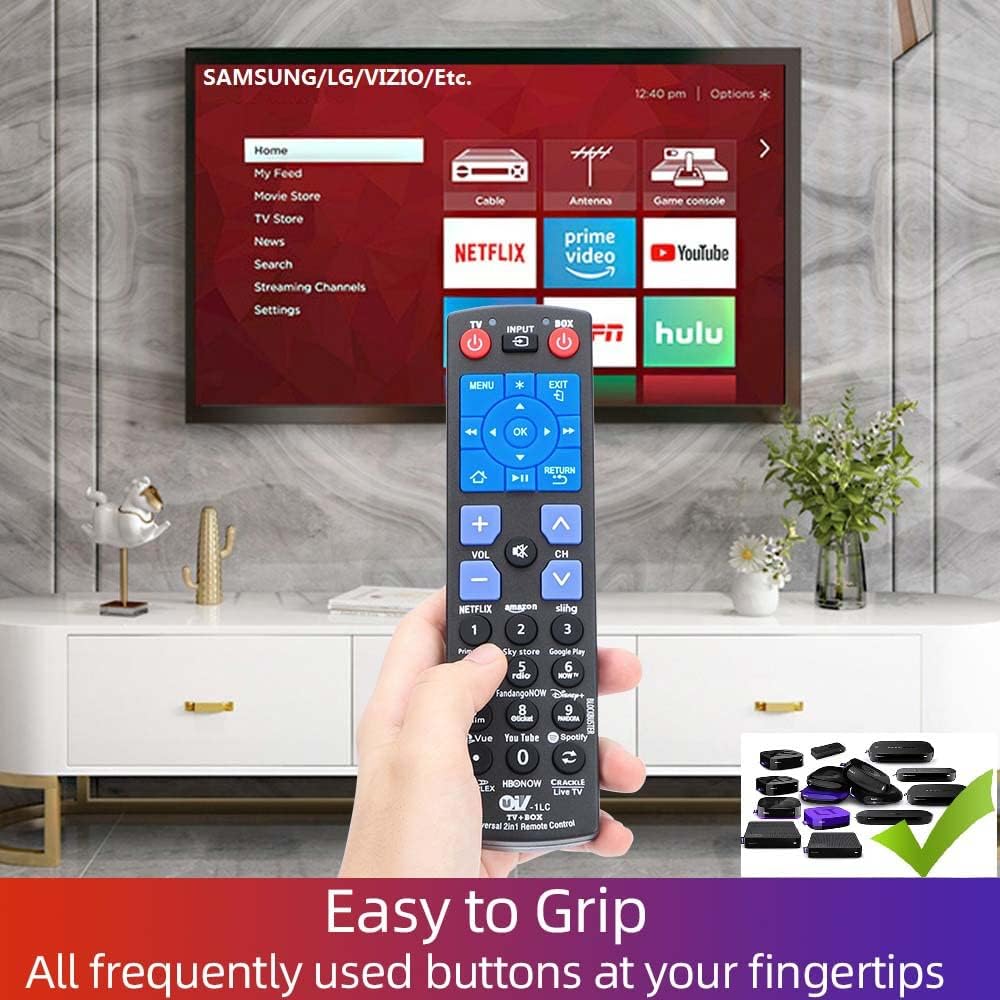
The Gmatrix URC-1LC remote control is pre-programmed to work with most Roku box players (e.g., Roku Express, Premiere, Ultra, Roku 1, 2, 3, 4, and ONN/Roku Smart Soundbar). No additional programming is typically required for these devices. Simply insert batteries and point the remote at your Roku player.
പ്രധാന കുറിപ്പ്: This remote operates via Infrared (IR) signal and requires a direct line of sight to your device. It is NOT compatible with Roku Sticks or Roku devices that require Wi-Fi Direct (RF) pairing, voice control, or have a headphone jack.

2. പ്രവർത്തന നിർദ്ദേശങ്ങൾ
2.1 ബട്ടൺ പ്രവർത്തനങ്ങൾ
Familiarize yourself with the functions of each button on your Gmatrix URC-1LC remote control:
- ടിവി പവർ: ടെലിവിഷൻ ഓണാക്കുകയോ ഓഫാക്കുകയോ ചെയ്യുന്നു.
- BOX POWER: Turns the Roku player on or off.
- ഇൻപുട്ട്: Cycles through the TV's input sources.
- മെനു: Displays the main on-screen menu for the active device.
- പുറത്ത്: നിലവിലെ മെനുവിൽ നിന്നോ സ്ക്രീനിൽ നിന്നോ പുറത്തുകടക്കുന്നു.
- ശരി: ഒരു തിരഞ്ഞെടുപ്പോ പ്രവർത്തനമോ സ്ഥിരീകരിക്കുന്നു.
- Navigation (Up/Down/Left/Right): Navigates through on-screen menus and content.
- വീട്: Immediately returns to the Home screen of the Roku player.
- മടക്കം: മുമ്പത്തെ മെനുവിലേക്കോ സ്ക്രീനിലേക്കോ തിരികെ പോകുന്നു.
- OPTIONS (*): Displays additional options when available.
- VOL +/-: Adjusts the volume of the TV.
- CH +/-: Changes channels on the TV.
- മ്യൂട്ട്: ശബ്ദം താൽക്കാലികമായി വിച്ഛേദിക്കുന്നു.

2.2 കുറുക്കുവഴി ബട്ടണുകൾ
The remote features 12 dedicated shortcut buttons for quick access to popular streaming channels. Simply press the corresponding button to launch the application:
- നെറ്റ്ഫ്ലിക്സ്
- ആമസോൺ
- കവിണ
- ഹുലു
- റേഡിയോ
- ഗൂഗിൾ പ്ലേ
- വുഡു
- Mgo
- ഡിസ്നി+
- Pvue
- Youtube
- സ്പോട്ടിഫൈ
2.3 Learning Function (DIY Buttons)
The Gmatrix URC-1LC remote includes 9 learnable buttons that can be programmed to mimic functions from other original infrared remotes (e.g., for soundbars, DVD players, or additional TV functions). This allows you to consolidate multiple remotes into one.
To use the learning function:
- Ensure both the Gmatrix remote and the original remote are powered on and have fresh batteries.
- Place the two remotes head-to-head (infrared emitters facing each other) at a distance of 1-3 cm.
- On the Gmatrix remote, press and hold the [ശരി] button and the desired learnable button (e.g., one of the numeric keypad buttons if not used for TV channels) for approximately 3 seconds until the indicator light illuminates steadily.
- On the original remote, press the button you wish to learn (e.g., a soundbar power button). The indicator light on the Gmatrix remote should blink, indicating it has received the signal.
- Press the same learnable button on the Gmatrix remote again to save the learned function. The indicator light will turn off.
- Repeat for any other functions you wish to learn.
3 അനുയോജ്യത
The Gmatrix URC-1LC remote control offers broad compatibility:
3.1 Compatible Roku Players
- Roku Express (Models: 3700, 3900, 3930)
- Roku Express+ (Models: 3710, 3910, 3931)
- Roku Premiere (Models: 3920, 4620)
- Roku Premiere+ (Model: 4630)
- Roku Ultra (Models: 4640, 4660, 4662, 4670)
- Roku 1, SE (Model: 2710)
- Roku 2 (Models: 2720, 3000, 3050, 4210)
- Roku 2 XD (Model: 3050)
- Roku 2 XS (Model: 3100)
- Roku 3 (Models: 4200, 4230)
- Roku 4 (Model: 4400)
- ONN/Roku Smart Soundbar (Model: 9101)
3.2 Compatible Smart TVs with Built-in Roku
This remote is compatible with various Smart TVs that have built-in Roku functionality, including but not limited to:
- TCL (e.g., 32S321, 43S425, 65S425 series)
- Hisense (e.g., 50R7E, 32H4E1, 58R6E series)
- ഒഎൻഎൻ
- ഷാർപ്പ്
- ഇൻസിഗ്നിയ
- സാനിയോ
- ആർസിഎ
- വെസ്റ്റിംഗ്ഹൗസ്
- മാഗ്നവോക്സ്
- ഹിറ്റാച്ചി
- LG
- ഫിലിപ്സ്
- ജെ.വി.സി
- എലമെൻ്റ്
- ഹെയർ
3.3 അനുയോജ്യമല്ലാത്ത ഉപകരണങ്ങൾ
- Roku Sticks: This remote is not compatible with any Roku Stick models.
- ശബ്ദ നിയന്ത്രണം: The remote does not support voice commands.
- ഹെഡ്ഫോൺ ജാക്ക്: The remote does not feature a headphone jack for private listening.
- ജോടിയാക്കൽ: This remote uses an IR signal and does not require or support Bluetooth/Wi-Fi pairing.

4. പരിപാലനം
4.1 ബാറ്ററി മാറ്റിസ്ഥാപിക്കൽ
When the remote's performance degrades or buttons become unresponsive, it is likely time to replace the batteries. Follow the battery installation steps (Section 1.1) to replace the two AAA batteries with fresh ones.
4.2 വൃത്തിയാക്കൽ
നിങ്ങളുടെ റിമോട്ട് കൺട്രോൾ വൃത്തിയാക്കാൻ, മൃദുവായതും ഉണങ്ങിയതുമായ ഒരു തുണി ഉപയോഗിക്കുക. കഠിനമായ അഴുക്കിന്, നേരിയ തോതിൽ dampen the cloth with water or a mild, non-abrasive cleaner. Avoid using harsh chemicals or excessive moisture, as this can damage the remote's electronics.
5. പ്രശ്നപരിഹാരം
- റിമോട്ട് പ്രതികരിക്കുന്നില്ല:
- പുതിയ AAA ബാറ്ററികൾ ശരിയായി ഇൻസ്റ്റാൾ ചെയ്തിട്ടുണ്ടെന്ന് ഉറപ്പാക്കുക.
- Check for a clear line of sight between the remote's IR emitter and the device's IR receiver. Remove any obstructions.
- Verify that the remote is pointed directly at the device.
- TV control not working:
- Re-attempt the TV Control Setup (Section 1.2) with different codes for your TV brand.
- Ensure your TV is an IR-controlled model.
- Roku control not working:
- Confirm your Roku device is a compatible Roku player box, not a Roku Stick.
- Ensure your Roku player has a visible IR receiver.
- Learning function issues:
- Ensure the original remote is functioning correctly and has fresh batteries.
- Maintain a close distance (1-3 cm) and direct alignment between the IR emitters of both remotes during the learning process.
- Try the learning process in a dimly lit room to avoid interference from strong ambient light.
6 സ്പെസിഫിക്കേഷനുകൾ
- മോഡൽ: URC-1LC
- വൈദ്യുതി വിതരണം: 2 x 1.5V AAA ബാറ്ററികൾ (ഉൾപ്പെടുത്തിയിട്ടില്ല)
- സിഗ്നൽ തരം: ഇൻഫ്രാറെഡ് (IR)
- അളവുകൾ: ഏകദേശം 6.81 x 2.36 x 0.91 ഇഞ്ച് (17.3 x 6.0 x 2.3 സെ.മീ)
- ഇനത്തിൻ്റെ ഭാരം: ഏകദേശം 2.89 ഔൺസ് (82 ഗ്രാം)
- പിന്തുണയ്ക്കുന്ന ഉപകരണങ്ങളുടെ പരമാവധി എണ്ണം: 2 (One Roku Player, One TV)
- പ്രത്യേക സവിശേഷതകൾ: Ergonomic design, 12 dedicated streaming shortcuts, 9 learnable DIY buttons.
- പരിമിതികൾ: No voice control, no headphone jack, no pairing button/status LED.
7. പിന്തുണ
For further assistance, troubleshooting not covered in this manual, or warranty inquiries, please refer to the Gmatrix official website or contact Gmatrix customer support through your purchase platform.


