1. ഉൽപ്പന്നം കഴിഞ്ഞുview
The COOLOUS Smart Door Lock F20 combines multiple keyless entry methods for enhanced security and convenience. It features fingerprint recognition, passcode entry, emergency key access, and mobile application control via Tuya Bluetooth. Designed for easy installation, this lock is suitable for various applications including homes, apartments, and offices.

പ്രധാന സവിശേഷതകൾ:
- സ്മാർട്ട് ലോക്ക് ടെക്നോളജി: Combines 4 keyless entry methods: Fingerprint, Passcode, Emergency Key, and Mobile Application.
- Highly Accurate Fingerprint Recognition: Unlocks the door within 0.3 seconds, stores up to 120 unique fingerprints.
- മെച്ചപ്പെടുത്തിയ സുരക്ഷ: Remote control, real-time access notifications, and access logs via the Tuya App. Includes an incorrect entry alarm.
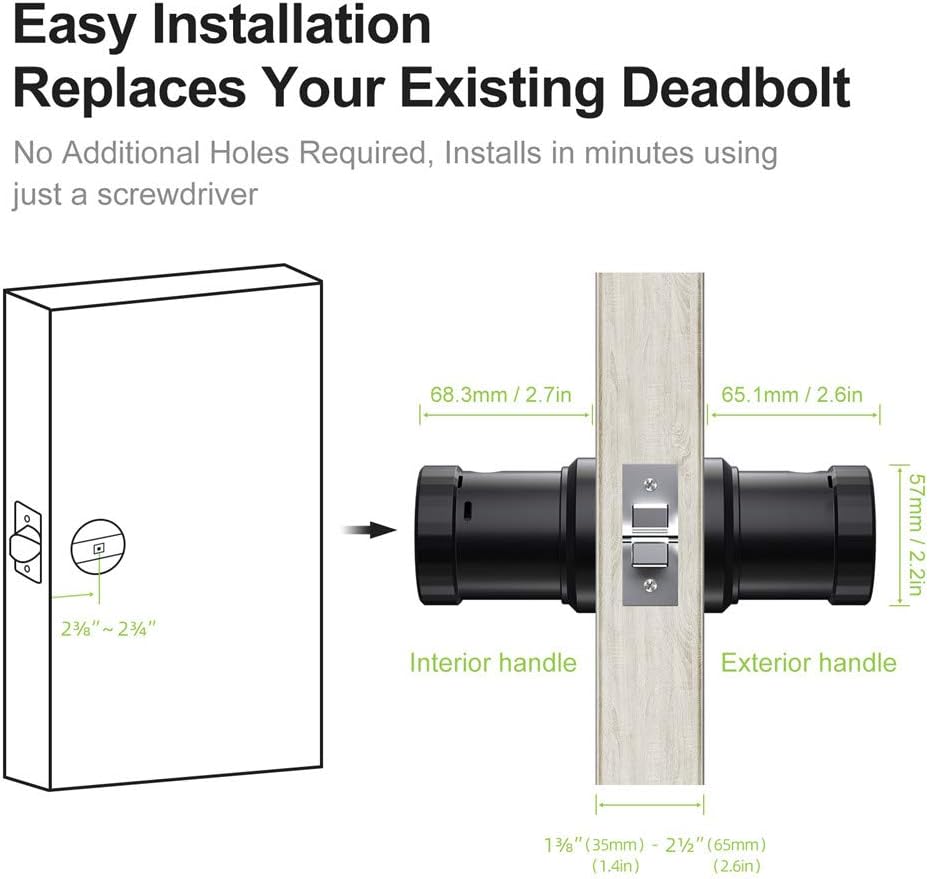
- എളുപ്പമുള്ള ഇൻസ്റ്റാളേഷൻ: Designed to replace existing deadbolts with minimal effort, requiring only a screwdriver and approximately 15 minutes.
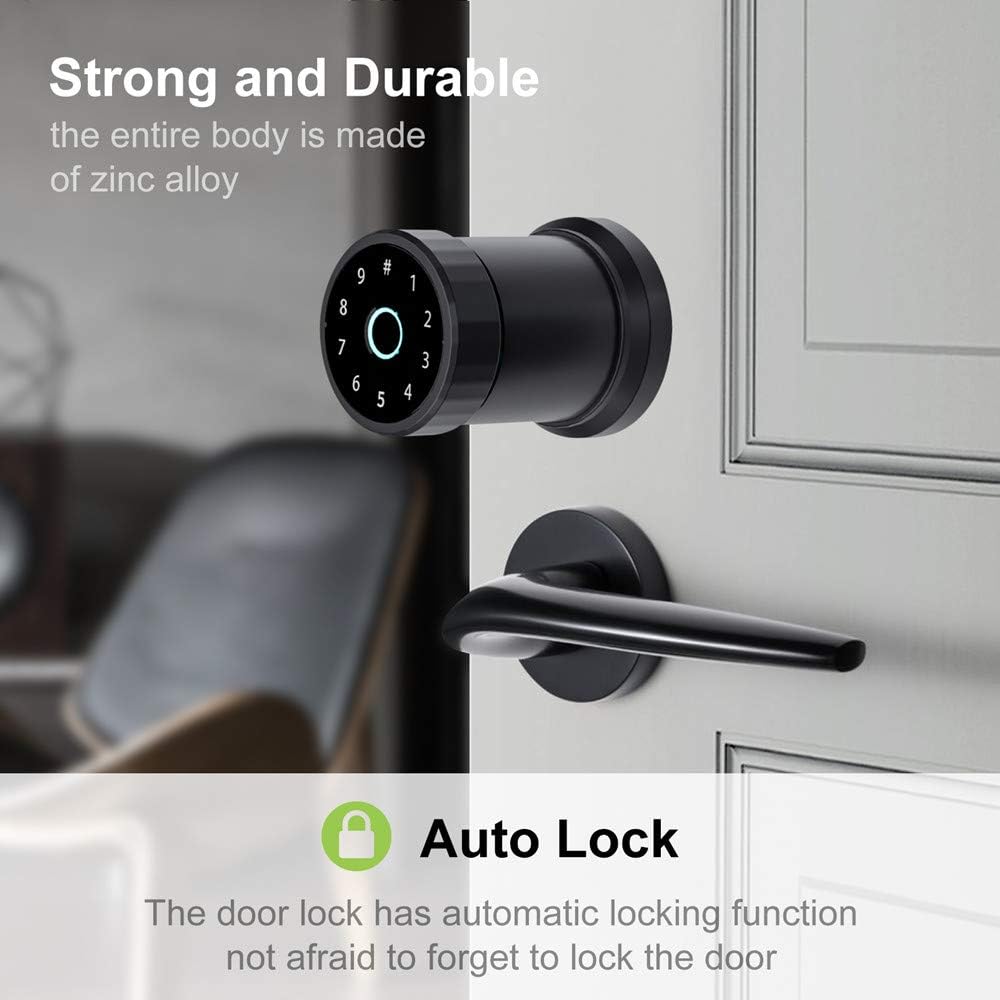
- ആധുനിക ഡിസൈൻ: Constructed from high-quality aluminum alloy with a streamlined design and intuitive LED touch panel.
- Convenience & Smart Life: Wire-free design, long battery standby (up to a year), low battery notification, and emergency power supply. Share one-time passcodes with visitors.
2. പാക്കേജ് ഉള്ളടക്കം
Before beginning installation, please ensure all components are present and in good condition. The package typically includes:
- Exterior Handle with Fingerprint Sensor and Keypad
- Interior Handle with Battery Compartment
- Latch Mechanism (60/70mm adjustable)
- സ്ട്രൈക്ക് പ്ലേറ്റും സ്ക്രൂകളും
- മൗണ്ടിംഗ് പ്ലേറ്റ്
- എമർജൻസി കീകൾ
- ഇൻസ്റ്റലേഷൻ സ്ക്രൂകളും ഹാർഡ്വെയറും
- User Manual and Installation Template

For a visual guide to the package contents, please refer to the video below:
3. ഇൻസ്റ്റാളേഷൻ ഗൈഡ്
The COOLOUS Smart Door Lock F20 is designed for straightforward installation. Follow these steps carefully.
3.1 വാതിൽ തയ്യാറാക്കൽ
Ensure your door meets the required dimensions for installation. The lock is compatible with standard American-style doors with 60/70mm latches.

3.2 ഘട്ടം ഘട്ടമായുള്ള ഇൻസ്റ്റാളേഷൻ
For a detailed visual guide on the installation process, please watch the following video. It covers installing the latch, exterior handle, interior handle, and connecting the power.
Ensure the latch is correctly oriented and secured with screws. When installing the interior handle, connect the power cord between the rear panel and the front panel, then secure the handle with screws, ensuring they are parallel to avoid jamming the lock mechanism.

4. പ്രവർത്തന നിർദ്ദേശങ്ങൾ
The COOLOUS Smart Door Lock F20 offers multiple convenient ways to unlock your door.
4.1 അൺലോക്ക് രീതികൾ

4.1.1 ഫിംഗർപ്രിന്റ് അൺലോക്ക്
Place your registered fingerprint on the sensor. The lock will verify and unlock within 0.3 seconds. Up to 120 unique fingerprints can be stored.

4.1.2 പാസ്കോഡ് അൺലോക്ക്
Enter your programmed passcode on the touchscreen keypad. The lock will verify the code and unlock the door.
4.1.3 Mobile Application (Tuya App) Unlock
Use the Tuya App on your mobile device to remotely unlock the door via Bluetooth. The app also provides access notifications and logs.

4.1.4 മെക്കാനിക്കൽ കീ അൺലോക്ക്
In case of battery depletion or electronic malfunction, use the provided emergency mechanical key to unlock the door manually.
4.2 ഓട്ടോ-ലോക്ക് ഫംഗ്ഷൻ
The door lock features an automatic locking function, ensuring the door is secured after a set period, preventing accidental oversight.

For a demonstration of fingerprint unlocking and the auto-lock feature, please refer to the video below:
5. പരിപാലനം
5.1 ബാറ്ററി മാറ്റിസ്ഥാപിക്കൽ
The lock is powered by 4 AAA batteries (not included). When the battery level is low, you will receive a notification. To replace the batteries:
- Remove the cover of the interior handle's battery compartment.
- പഴയ ബാറ്ററികൾ ശ്രദ്ധാപൂർവ്വം നീക്കം ചെയ്യുക.
- Insert 4 new AAA batteries, ensuring correct polarity.
- ബാറ്ററി കമ്പാർട്ട്മെൻ്റ് കവർ മാറ്റിസ്ഥാപിക്കുക.
If the batteries completely deplete, use the emergency mechanical key or connect an external power source via the emergency power supply port (usually Micro-USB) to temporarily power the lock and gain access.
5.2 വൃത്തിയാക്കൽ
To maintain the appearance and functionality of your smart lock:
- മൃദുവായതും ഉണങ്ങിയതുമായ തുണി ഉപയോഗിച്ച് പുറംഭാഗങ്ങൾ തുടയ്ക്കുക.
- അബ്രാസീവ് ക്ലീനറുകൾ, ലായകങ്ങൾ അല്ലെങ്കിൽ കെമിക്കൽ സ്പ്രേകൾ എന്നിവ ഉപയോഗിക്കുന്നത് ഒഴിവാക്കുക, കാരണം ഇവ ഫിനിഷിനും ഇലക്ട്രോണിക് ഘടകങ്ങൾക്കും കേടുവരുത്തും.
- Keep the fingerprint sensor and touchscreen clean and free of debris for optimal performance.
6. പ്രശ്നപരിഹാരം
If you encounter issues with your COOLOUS Smart Door Lock F20, refer to the following common troubleshooting steps:
- ലോക്ക് പ്രതികരിക്കുന്നില്ല: Check battery levels and replace if necessary. Ensure the power cord connection between the front and rear panels is secure.
- വിരലടയാളം തിരിച്ചറിയാൻ കഴിഞ്ഞില്ല: Ensure your finger is clean and dry. Try re-registering your fingerprint. Ensure the sensor is clean.
- പാസ്കോഡ് പ്രവർത്തിക്കുന്നില്ല: Double-check the entered passcode. Ensure the keypad is clean and responsive.
- Tuya App connectivity issues: നിങ്ങളുടെ ഫോണിൽ ബ്ലൂടൂത്ത് പ്രവർത്തനക്ഷമമാക്കിയിട്ടുണ്ടെന്നും ലോക്ക് പരിധിക്കുള്ളിലാണെന്നും ഉറപ്പാക്കുക. ആപ്പ് പുനരാരംഭിച്ച് വീണ്ടും കണക്റ്റ് ചെയ്യാൻ ശ്രമിക്കുക.
- ലോക്ക് മെക്കാനിസം കുടുങ്ങി: Verify that the installation screws are parallel and not overtightened, which can cause internal friction.
- കുറഞ്ഞ ബാറ്ററി മുന്നറിയിപ്പ്: Replace batteries promptly to avoid being locked out. Use emergency key or external power if batteries are completely drained.
ഈ പരിഹാരങ്ങൾ പരീക്ഷിച്ചതിന് ശേഷവും പ്രശ്നങ്ങൾ നിലനിൽക്കുകയാണെങ്കിൽ, ദയവായി ഉപഭോക്തൃ പിന്തുണയുമായി ബന്ധപ്പെടുക.
7. ഉൽപ്പന്ന സവിശേഷതകൾ
| ഫീച്ചർ | വിശദാംശങ്ങൾ |
|---|---|
| ബ്രാൻഡ് | തണുപ്പുള്ള |
| പ്രത്യേക ഫീച്ചർ | Fingerprint, Smart Lock, Touchscreen |
| ലോക്ക് തരം | Tuya APP/Fingerprint/Code/Key |
| മെറ്റീരിയൽ | Zinc, Aluminum |
| ശുപാർശ ചെയ്യുന്ന ഉപയോഗങ്ങൾ | സുരക്ഷ |
| ശൈലി | ആധുനികം |
| നിറം | കറുപ്പ് |
| കഷണങ്ങളുടെ എണ്ണം | 1 |
| കൺട്രോളർ തരം | കൈ നിയന്ത്രണം |
| ആകൃതി | വൃത്താകൃതി |
| നിയന്ത്രണ രീതി | ആപ്പ് |
| കണക്റ്റിവിറ്റി പ്രോട്ടോക്കോൾ | ബ്ലൂടൂത്ത് |
| യു.പി.സി | 791107928181 |
| നിർമ്മാതാവ് | COOLOUS Lock |
| ഇനത്തിൻ്റെ ഭാരം | 3.98 പൗണ്ട് |
| പാക്കേജ് അളവുകൾ | 10 x 6.77 x 4.76 ഇഞ്ച് |
| ബാറ്ററികൾ ഉൾപ്പെടുത്തിയിട്ടുണ്ടോ? | ഇല്ല |
| ബാറ്ററികൾ ആവശ്യമുണ്ടോ? | ഇല്ല |
| ASIN | B08VDN7T63 |
| ആദ്യ തീയതി ലഭ്യമാണ് | 29 ജനുവരി 2021 |
8. വാറൻ്റിയും പിന്തുണയും
For warranty information and customer support, please refer to the documentation included with your product or contact COOLOUS customer service directly. Keep your purchase receipt as proof of purchase for any warranty claims.


