1. ആമുഖം
Thank you for choosing the Tecknet M005 Omni Mini Wireless Mouse. This manual provides detailed instructions for setting up, operating, maintaining, and troubleshooting your new wireless mouse. Please read this manual thoroughly before use to ensure optimal performance and longevity of your device.
The Tecknet M005 is a compact and portable wireless mouse designed for comfortable and efficient use with various computer systems. It features reliable 2.4GHz wireless connectivity and adjustable DPI settings for precise control.
2. ഉൽപ്പന്നം കഴിഞ്ഞുview

Figure 2.1: Tecknet M005 Omni Mini Wireless Mouse with its USB receiver.
This image displays the black Tecknet M005 wireless mouse alongside its compact USB nano receiver. The mouse features a scroll wheel and a DPI adjustment button on its top surface, with a green indicator light.
പ്രധാന സവിശേഷതകൾ:
- വയർലെസ് കണക്റ്റിവിറ്റി: Utilizes 2.4GHz wireless technology for a stable connection up to 10 meters.
- ക്രമീകരിക്കാവുന്ന DPI: Three adjustable DPI levels (1000, 1500, 2000) for precise cursor control.
- എർഗണോമിക് ഡിസൈൻ: Comfortable and contoured shape with soft rubber grips for extended use.
- ഒതുക്കമുള്ളതും പോർട്ടബിൾ: Small form factor, ideal for travel and mobile use.
- നീണ്ട ബാറ്ററി ലൈഫ്: Designed for extended battery life with a single AA battery.
- ഈടുനിൽക്കുന്ന സ്വിച്ചുകൾ: Lifelong clicks rated for 5.5 million operations.
- Bluewave Sensor: Tecknet Bluewave sensor for enhanced accuracy.
3. പാക്കേജ് ഉള്ളടക്കം
അൺബോക്സ് ചെയ്യുമ്പോൾ പാക്കേജ് ഉള്ളടക്കങ്ങൾ പരിശോധിക്കുക. ഏതെങ്കിലും ഇനങ്ങൾ നഷ്ടപ്പെട്ടാലോ കേടുപാടുകൾ സംഭവിച്ചാലോ, ദയവായി ഉപഭോക്തൃ പിന്തുണയുമായി ബന്ധപ്പെടുക.
- Tecknet M005 Omni Mini Wireless Mouse
- യുഎസ്ബി നാനോ റിസീവർ
- ഉപയോക്തൃ മാനുവൽ (ഈ പ്രമാണം)
- Note: 1 AA battery is not included and must be purchased separately.
4. സജ്ജീകരണം
4.1 ബാറ്ററി ഇൻസ്റ്റാളേഷൻ
- മൗസ് തലകീഴായി തിരിക്കുക.
- Locate the battery compartment cover. Gently slide or lift the cover to open it.
- Insert one (1) AA battery into the compartment, ensuring the positive (+) and negative (-) terminals align correctly with the indicators inside the compartment.
- ബാറ്ററി കമ്പാർട്ട്മെന്റ് കവർ സുരക്ഷിതമായി സ്ഥലത്ത് ക്ലിക്ക് ചെയ്യുന്നതുവരെ മാറ്റിസ്ഥാപിക്കുക.
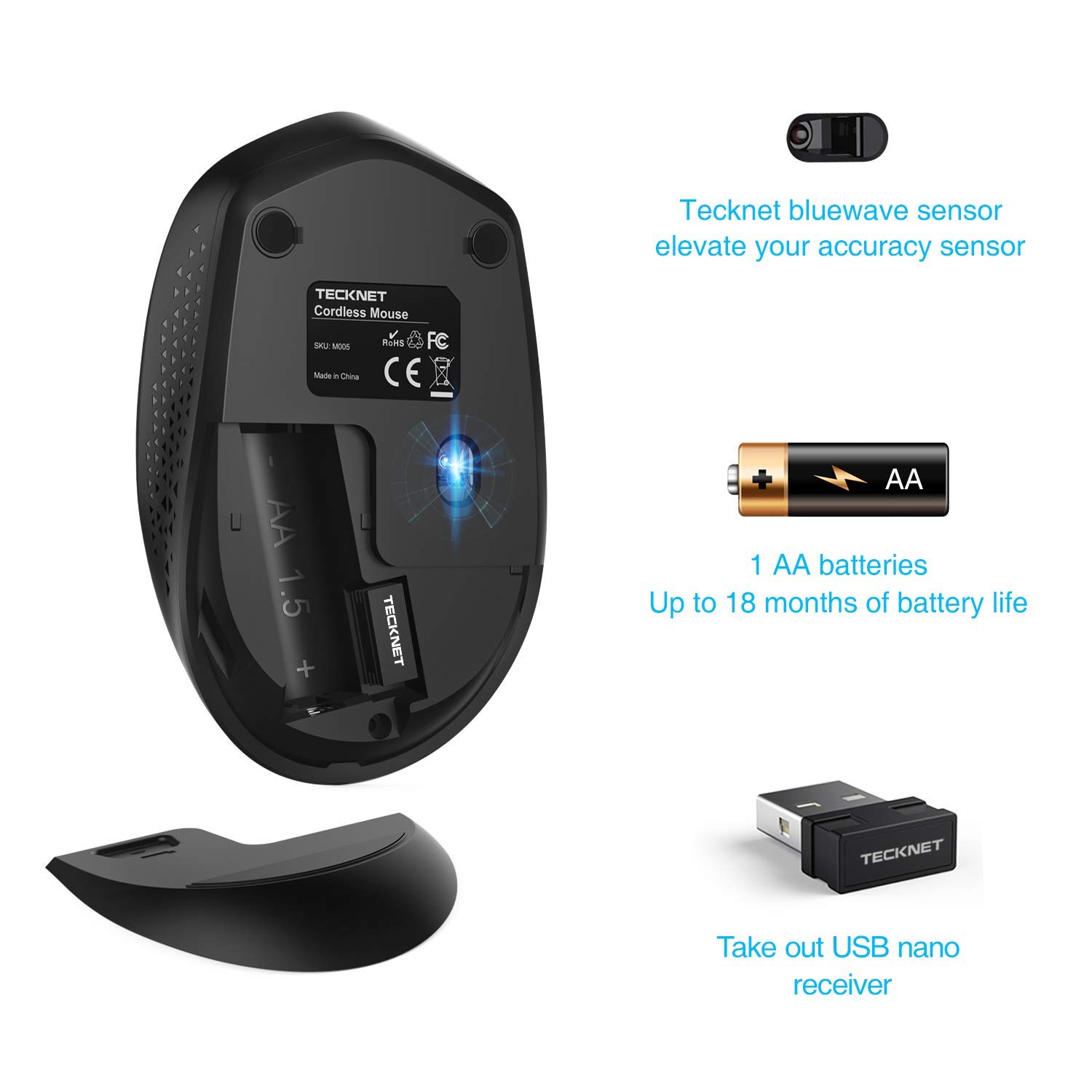
ചിത്രം 4.1: അടിവശം view of the mouse, illustrating the battery compartment and the storage slot for the USB nano receiver.
This image shows the bottom of the Tecknet M005 mouse. The battery cover is open, revealing the slot for a single AA battery. The USB nano receiver is shown detached from its storage slot next to the battery compartment. The Bluewave sensor and product labels (SKU M005, certifications) are also visible.
4.2 Connecting the USB Nano Receiver
- Locate the USB nano receiver, which is typically stored in a slot next to the battery compartment on the underside of the mouse.
- Carefully remove the USB nano receiver from its storage slot.
- Plug the USB nano receiver into an available USB port on your computer (desktop, laptop, etc.).
- നിങ്ങളുടെ കമ്പ്യൂട്ടർ ആവശ്യമായ ഡ്രൈവറുകൾ സ്വയമേവ കണ്ടെത്തി ഇൻസ്റ്റാൾ ചെയ്യണം. ഈ പ്രക്രിയയ്ക്ക് കുറച്ച് നിമിഷങ്ങൾ എടുത്തേക്കാം.
- ഡ്രൈവറുകൾ ഇൻസ്റ്റാൾ ചെയ്തുകഴിഞ്ഞാൽ, മൗസ് ഉപയോഗത്തിന് തയ്യാറാകും.

Figure 4.2: The Tecknet M005 mouse positioned next to a laptop, with the USB nano receiver plugged into the laptop's USB port.
This image demonstrates the wireless connection of the Tecknet M005 mouse to a laptop. The mouse is shown on a desk surface, and the small USB receiver is visible plugged into the side of the laptop. Icons indicate 2.4GHz wireless technology and a 10-meter range.
5. മൗസ് പ്രവർത്തിപ്പിക്കൽ
5.1 അടിസ്ഥാന പ്രവർത്തനങ്ങൾ
- ഇടത് ക്ലിക്ക്: ഇനങ്ങൾ തിരഞ്ഞെടുക്കുന്നതിനും തുറക്കുന്നതിനുമുള്ള പ്രാഥമിക ബട്ടൺ fileകൾ മുതലായവ.
- വലത് ക്ലിക്കിൽ: സന്ദർഭ മെനുകൾക്കും അധിക ഓപ്ഷനുകൾക്കുമുള്ള സെക്കൻഡറി ബട്ടൺ.
- സ്ക്രോൾ വീൽ: ഡോക്യുമെന്റുകളിലൂടെ മുകളിലേക്കോ താഴേക്കോ സ്ക്രോൾ ചെയ്യുക, web pages. Pressing the scroll wheel typically acts as a middle click.

Figure 5.1: A hand demonstrating the use of the Tecknet M005 mouse, emphasizing the primary click areas and scroll wheel.
This image shows a user's hand positioned on the Tecknet M005 mouse, illustrating how the fingers naturally rest on the left and right click buttons and the scroll wheel. The image also highlights the mouse's durability with a "5 million times keystroke test" indicator.
5.2 ഡിപിഐ (സെൻസിറ്റിവിറ്റി) ക്രമീകരിക്കൽ
The Tecknet M005 mouse features a dedicated DPI button to adjust the cursor sensitivity (speed) on the fly. There are three preset DPI levels:
- 1000 DPI (സ്ഥിരസ്ഥിതി)
- 1500 ഡിപിഐ
- 2000 ഡിപിഐ
To change the DPI setting, simply press the DPI button located behind the scroll wheel. Each press will cycle through the available DPI levels. The green indicator light on the mouse may briefly change or flash to indicate a DPI change.

Figure 5.2: Illustration of the DPI adjustment button and the three available DPI settings.
This image focuses on the top of the Tecknet M005 mouse, specifically highlighting the DPI button located just behind the scroll wheel. An overlay indicates "3 GRADE DPI" and "One button to change the moving speed of pointer," with a visual representation of the 1000, 1500, and 2000 DPI settings.
6. പരിപാലനം
6.1 മൗസ് വൃത്തിയാക്കൽ
- Disconnect the USB receiver from your computer.
- മൃദുവായ, ലിൻ്റ് രഹിത തുണി ഉപയോഗിക്കുകampമൗസിന്റെ ഉപരിതലം തുടയ്ക്കാൻ വെള്ളമോ നേരിയ ക്ലീനിംഗ് ലായനിയോ ഉപയോഗിച്ച് നനയ്ക്കുക.
- ഏതെങ്കിലും ദ്വാരങ്ങളിൽ ഈർപ്പം കയറുന്നത് ഒഴിവാക്കുക.
- ഒപ്റ്റിക്കൽ സെൻസറിന്, ഏതെങ്കിലും പൊടിയോ അവശിഷ്ടങ്ങളോ സൌമ്യമായി വൃത്തിയാക്കാൻ ഉണങ്ങിയ കോട്ടൺ സ്വാബ് ഉപയോഗിക്കുക.
6.2 ബാറ്ററി മാറ്റിസ്ഥാപിക്കൽ
When the mouse's performance degrades or the indicator light signals low battery, it's time to replace the AA battery. Follow the steps outlined in Section 4.1 Battery Installation.
കുറിപ്പ്: ഉപയോഗിച്ച ബാറ്ററികൾ പ്രാദേശിക നിയന്ത്രണങ്ങൾ അനുസരിച്ച് ഉത്തരവാദിത്തത്തോടെ സംസ്കരിക്കുക.
7. പ്രശ്നപരിഹാരം
| പ്രശ്നം | സാധ്യമായ കാരണം | പരിഹാരം |
|---|---|---|
| മൗസ് പ്രതികരിക്കുന്നില്ല | കുറഞ്ഞ അല്ലെങ്കിൽ ഡെഡ് ബാറ്ററി | AA ബാറ്ററി മാറ്റിസ്ഥാപിക്കുക. |
| മൗസ് പ്രതികരിക്കുന്നില്ല | USB റിസീവർ ശരിയായി ബന്ധിപ്പിച്ചിട്ടില്ല | പ്രവർത്തിക്കുന്ന ഒരു USB പോർട്ടിലേക്ക് USB റിസീവർ ദൃഢമായി പ്ലഗ് ചെയ്തിട്ടുണ്ടെന്ന് ഉറപ്പാക്കുക. മറ്റൊരു USB പോർട്ട് പരീക്ഷിക്കുക. |
| മൗസ് പ്രതികരിക്കുന്നില്ല | പരിധിക്ക് പുറത്ത് | Move the mouse closer to the USB receiver (within 10 meters). |
| ക്രമരഹിതമായ കഴ്സർ ചലനം | വൃത്തികെട്ട ഒപ്റ്റിക്കൽ സെൻസർ | മൗസിന്റെ അടിവശത്തുള്ള ഒപ്റ്റിക്കൽ സെൻസർ വൃത്തിയാക്കുക. |
| ക്രമരഹിതമായ കഴ്സർ ചലനം | അനുയോജ്യമല്ലാത്ത പ്രതലത്തിൽ ഉപയോഗിക്കുന്നത് | വൃത്തിയുള്ളതും, പ്രതിഫലിക്കാത്തതും, അതാര്യവുമായ ഒരു പ്രതലത്തിലോ അല്ലെങ്കിൽ ഒരു മൗസ് പാഡിലോ മൗസ് ഉപയോഗിക്കുക. |
| Lag or interference | മറ്റ് വയർലെസ് ഉപകരണങ്ങളിൽ നിന്നുള്ള ഇടപെടൽ | Move the mouse and receiver away from other 2.4GHz wireless devices (e.g., Wi-Fi routers, cordless phones). |
8 സ്പെസിഫിക്കേഷനുകൾ
| ഫീച്ചർ | വിശദാംശങ്ങൾ |
|---|---|
| മോഡൽ | M005 |
| കണക്റ്റിവിറ്റി ടെക്നോളജി | 2.4GHz വയർലെസ് |
| വയർലെസ് ശ്രേണി | 10 മീറ്റർ വരെ (33 അടി) |
| മൂവ്മെന്റ് ഡിറ്റക്ഷൻ ടെക്നോളജി | Optical (Tecknet Bluewave Sensor) |
| ഡിപിഐ ലെവലുകൾ | 1000, 1500, 2000 (ക്രമീകരിക്കാവുന്നത്) |
| ബട്ടണുകൾ | Left, Right, Scroll Wheel (Clickable), DPI Button |
| ലൈഫ്സ്പാൻ ക്ലിക്ക് ചെയ്യുക | 5.5 ദശലക്ഷം ക്ലിക്കുകൾ |
| ബാറ്ററി തരം | 1 x AA (ഉൾപ്പെടുത്തിയിട്ടില്ല) |
| പിന്തുണയ്ക്കുന്ന ഓപ്പറേറ്റിംഗ് സിസ്റ്റങ്ങൾ | വിൻഡോസ് എക്സ്പി, വിസ്റ്റ, 7, 8, 10 |
| നിറം | കറുപ്പ് |
| അളവുകൾ (ഏകദേശം.) | 102mm (L) x 62mm (W) x 36mm (H) / 4.0in (L) x 2.44in (W) x 1.42in (H) |
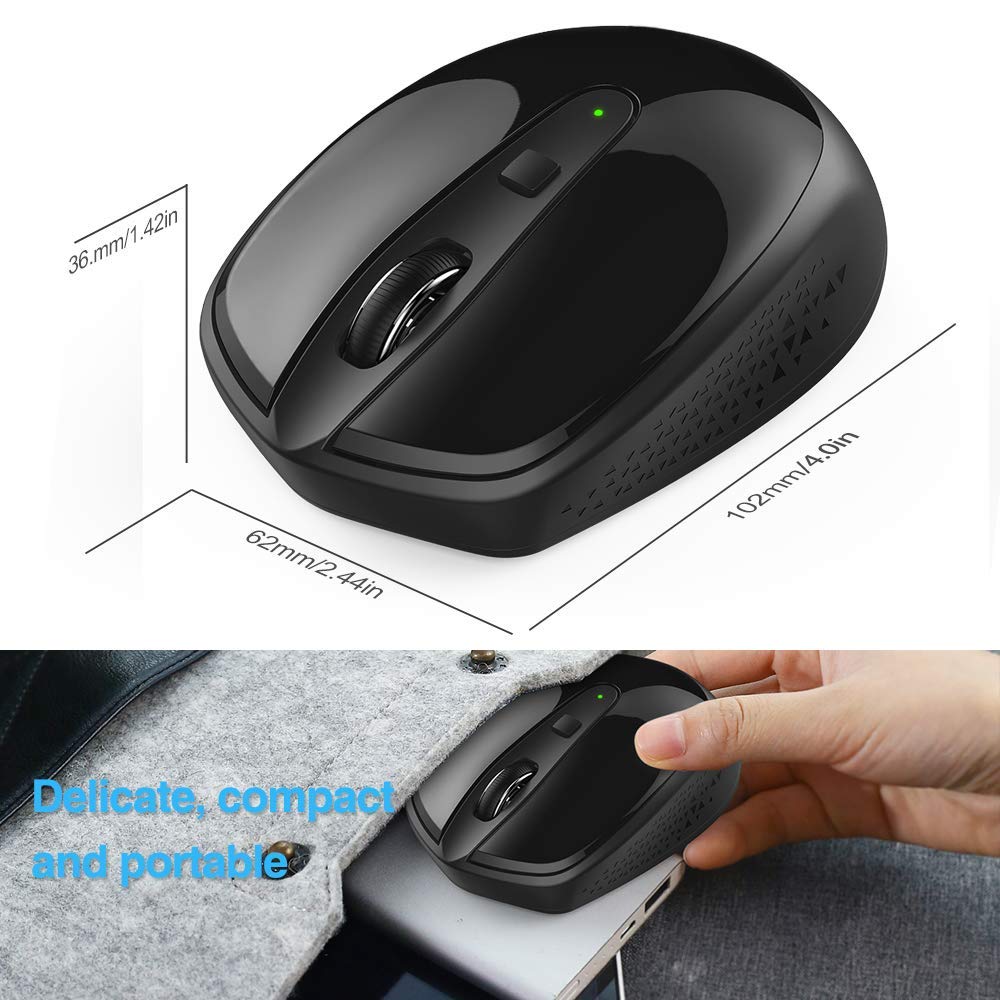
Figure 8.1: Approximate dimensions of the Tecknet M005 mouse.
This image provides a top-down and side view of the Tecknet M005 mouse with measurements indicated: 102mm (length), 62mm (width), and 36mm (height). The image also highlights the mouse's compact and portable nature.
9. വാറൻ്റിയും പിന്തുണയും
9.1 വാറൻ്റി വിവരങ്ങൾ
This Tecknet M005 Omni Mini Wireless Mouse, being a Certified Refurbished product, is tested to work and look like new with minimal to no signs of wear & tear. It comes with relevant accessories and is backed by a minimum six-month supplier-backed warranty.
Please retain your proof of purchase for warranty claims. The warranty covers defects in materials and workmanship under normal use. It does not cover damage caused by misuse, accidents, unauthorized modifications, or normal wear and tear.
9.2 ഉപഭോക്തൃ പിന്തുണ
For technical assistance, warranty claims, or any other inquiries, please contact the supplier or Amazon Renewed customer service. Refer to your purchase documentation for specific contact details.
For general information about Amazon Renewed products, you may visit the ആമസോൺ പുതുക്കിയ പേജ്.


