1. ഉൽപ്പന്നം കഴിഞ്ഞുview
The Gree H13 True HEPA Air Purifier is designed to improve indoor air quality by filtering various airborne particles. It features an H13 True HEPA filter, real-time air quality monitoring, and multiple operating modes.

Figure 1: Gree H13 True HEPA Air Purifier unit.
2 സുരക്ഷാ വിവരങ്ങൾ
- ഉപയോഗിക്കുന്നതിന് മുമ്പ് എല്ലാ നിർദ്ദേശങ്ങളും വായിക്കുക.
- കേടായ ചരടോ പ്ലഗോ ഉപയോഗിച്ച് യൂണിറ്റ് പ്രവർത്തിപ്പിക്കരുത്.
- Keep the unit away from water or moist environments.
- യൂണിറ്റിന് ചുറ്റും ശരിയായ വായുസഞ്ചാരം ഉറപ്പാക്കുക.
- വൃത്തിയാക്കുന്നതിനോ പരിപാലിക്കുന്നതിനോ മുമ്പ് യൂണിറ്റ് അൺപ്ലഗ് ചെയ്യുക.
3. സജ്ജീകരണം
3.1 അൺപാക്കിംഗ്
- എയർ പ്യൂരിഫയർ അതിന്റെ പാക്കേജിംഗിൽ നിന്ന് ശ്രദ്ധാപൂർവ്വം നീക്കം ചെയ്യുക.
- Remove any protective plastic or wrapping from the unit and the filter.
3.2 ഫിൽട്ടർ ഇൻസ്റ്റാളേഷൻ
The air purifier comes with an H13 True HEPA filter. Ensure it is properly installed before first use.
- യൂണിറ്റ് തലകീഴായി തിരിക്കുക.
- Rotate the base counter-clockwise to unlock and remove it.
- Insert the H13 True HEPA filter into the unit. Ensure it is seated correctly.
- Replace the base and rotate it clockwise to lock it securely.

Figure 2: Illustration of filter replacement process.
3.3 പ്ലേസ്മെൻ്റ്
Place the air purifier on a flat, stable surface. For optimal performance, ensure there is adequate space around the unit for air intake and output. The compact design allows for placement on tables or desks, suitable for small rooms.

Figure 3: Air purifier demonstrating 360-degree air intake in a room setting.
3.4 പവർ കണക്ഷൻ
Connect the power adapter to the unit and then plug it into a standard electrical outlet.
4. പ്രവർത്തന നിർദ്ദേശങ്ങൾ
4.1 നിയന്ത്രണ പാനൽ
The control panel is located on the top of the unit. It includes buttons for power, fan speed, timer, and a display for air quality.
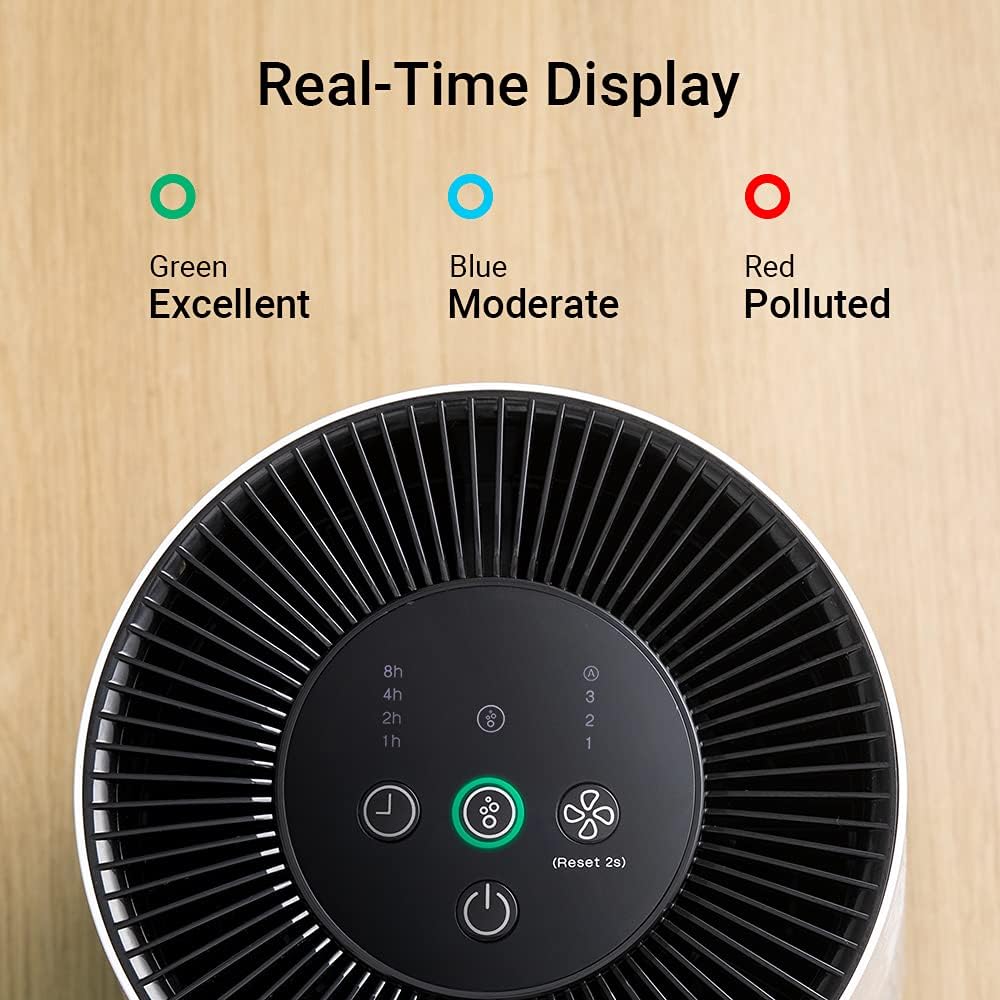
ചിത്രം 4: മുകളിൽ view of the control panel with air quality indicators.
4.2 പവർ ഓൺ/ഓഫ്
അമർത്തുക ശക്തി യൂണിറ്റ് ഓണാക്കാനോ ഓഫാക്കാനോ ഉള്ള ബട്ടൺ.
4.3 ഫാൻ വേഗത ക്രമീകരണം
അമർത്തുക ഫാൻ വേഗത button to cycle through three available wind speeds (1, 2, 3). Speed 1 is the quietest setting, suitable for sleeping environments.
4.4 ടൈമർ പ്രവർത്തനം
അമർത്തുക ടൈമർ button to set the operating time to 1, 2, 4, or 8 hours. The unit will automatically turn off after the selected time.

Figure 5: Visual representation of the timer settings.
4.5 എയർ ക്വാളിറ്റി ഇൻഡിക്കേറ്റർ
The unit is equipped with infrared sensors that provide real-time air quality feedback through a color-coded indicator light:
- പച്ച: മികച്ച വായു നിലവാരം
- നീല: മിതമായ വായു നിലവാരം
- ചുവപ്പ്: Polluted air quality

Figure 6: Close-up of the air quality indicator lights.
4.6 സ്ലീപ്പ് മോഡ്
To ensure undisturbed sleep, the unit operates at an ultra-low noise level (as low as 36 dB(A)) on the lowest fan speed. The indicator light can also be turned off by pressing and holding the light button (refer to control panel diagram for specific button).

Figure 7: Air purifier operating quietly in a bedroom setting.
5. പരിപാലനം
5.1 ഫിൽട്ടർ മാറ്റിസ്ഥാപിക്കൽ
The filter needs to be replaced approximately every 6 months, depending on usage and air quality. A dedicated indicator light on the control panel will illuminate when it's time for replacement.

Figure 8: Control panel showing the filter replacement reminder light.
To replace the filter, follow the steps outlined in Section 3.2. Ensure the unit is unplugged before performing this task. After replacing the filter, press and hold the filter reset button (usually the air quality button for 2 seconds) to reset the filter life indicator.
For replacement filters, please contact Gree customer support or visit the official Gree website to ensure compatibility and availability. The model number for the replacement filter is typically associated with the air purifier model GCF120ASDA.
5.2 യൂണിറ്റ് വൃത്തിയാക്കൽ
- വൃത്തിയാക്കുന്നതിന് മുമ്പ് എയർ പ്യൂരിഫയർ അൺപ്ലഗ് ചെയ്യുക.
- മൃദുവായതും ഉണങ്ങിയതുമായ തുണി ഉപയോഗിച്ച് യൂണിറ്റിന്റെ പുറംഭാഗം തുടയ്ക്കുക.
- ഉരച്ചിലുകളുള്ള ക്ലീനറുകളോ ലായകങ്ങളോ ഉപയോഗിക്കരുത്.
- Periodically clean the air intake and output vents with a soft brush or vacuum cleaner to remove dust accumulation.
6. പ്രശ്നപരിഹാരം
| പ്രശ്നം | സാധ്യമായ കാരണം | പരിഹാരം |
|---|---|---|
| യൂണിറ്റ് ഓണാക്കുന്നില്ല | No power supply; Power cord not connected; Unit damaged | Check power outlet; Ensure power cord is securely connected; Contact customer support |
| ദുർബലമായ വായുപ്രവാഹം | Filter clogged; Air intake/output blocked | Replace filter; Clear any obstructions |
| അസാധാരണമായ ശബ്ദം | Unit not on a flat surface; Foreign object inside; Fan issue | Place on a flat surface; Unplug and check for obstructions; Contact customer support |
| Filter replacement indicator light is on | ഫിൽട്ടർ മാറ്റിസ്ഥാപിക്കേണ്ടതുണ്ട് | Replace the filter and reset the indicator (refer to Section 5.1) |
| Cannot find replacement filter | Specific filter model may have limited availability | Contact Gree customer support directly for information on purchasing compatible replacement filters. |
7 സ്പെസിഫിക്കേഷനുകൾ
| ഫീച്ചർ | വിശദാംശങ്ങൾ |
|---|---|
| മോഡൽ നമ്പർ | GCF120ASDA |
| ഉൽപ്പന്ന അളവുകൾ | 9.37 x 9.37 x 13.18 ഇഞ്ച് |
| ഭാരം | 6 പൗണ്ട് |
| ഫിൽട്ടർ തരം | H13 ട്രൂ HEPA |
| പവർ ഉറവിടം | എസി/ഡിസി |
| നിയന്ത്രണ രീതി | സ്പർശിക്കുക |
| സർട്ടിഫിക്കേഷൻ | CARB സർട്ടിഫൈഡ് |
8. വാറൻ്റിയും പിന്തുണയും
For warranty information and customer support, please refer to the warranty card included with your product or visit the official Gree website. You can also contact Gree customer service for assistance with product inquiries, troubleshooting, or replacement parts.
Official Gree Webസൈറ്റ്: Gree Store on Amazon


