1. ആമുഖം
This manual provides detailed instructions for the installation, operation, and maintenance of your EONON GA2185J 10.1-inch Android Car Navigation System. Please read this manual thoroughly before using the product to ensure proper and safe operation. Keep this manual for future reference.
2 സുരക്ഷാ വിവരങ്ങൾ
- പ്രൊഫഷണൽ ഇൻസ്റ്റാളേഷൻ ശുപാർശ ചെയ്യുന്നു: കാർ ഇലക്ട്രിക്കൽ സിസ്റ്റങ്ങളുടെ സങ്കീർണ്ണത കാരണം, യൂണിറ്റിനോ നിങ്ങളുടെ വാഹനത്തിനോ കേടുപാടുകൾ സംഭവിക്കാതിരിക്കാൻ പ്രൊഫഷണൽ ഇൻസ്റ്റാളേഷൻ വളരെ ശുപാർശ ചെയ്യുന്നു.
- ഡ്രൈവിംഗ് സുരക്ഷ: ഡ്രൈവിംഗിൽ നിന്ന് ശ്രദ്ധ തിരിക്കുന്ന രീതിയിൽ സിസ്റ്റം പ്രവർത്തിപ്പിക്കരുത്. റോഡ് സുരക്ഷയ്ക്ക് എപ്പോഴും മുൻഗണന നൽകുക.
- വൈദ്യുതി വിതരണം: നെഗറ്റീവ് ഗ്രൗണ്ടിംഗ് ഉള്ള ഒരു 12V DC പവർ സപ്ലൈയിലേക്ക് യൂണിറ്റ് ബന്ധിപ്പിച്ചിട്ടുണ്ടെന്ന് ഉറപ്പാക്കുക. തെറ്റായ വോള്യംtage കേടുപാടുകൾ വരുത്തിവയ്ക്കാം.
- താപനില: യൂണിറ്റ് ദീർഘനേരം തീവ്രമായ താപനിലയിലോ നേരിട്ടുള്ള സൂര്യപ്രകാശത്തിലോ ആയിരിക്കുന്നത് ഒഴിവാക്കുക.
- ഈർപ്പം: യൂണിറ്റ് വെള്ളത്തിൽ നിന്നും അമിതമായ ഈർപ്പത്തിൽ നിന്നും അകറ്റി നിർത്തുക.
- വെൻ്റിലേഷൻ: അമിതമായി ചൂടാകുന്നത് തടയാൻ യൂണിറ്റിന് ചുറ്റും മതിയായ വായുസഞ്ചാരം ഉറപ്പാക്കുക.
3. പാക്കേജ് ഉള്ളടക്കം
താഴെ ലിസ്റ്റ് ചെയ്തിരിക്കുന്ന എല്ലാ ഇനങ്ങളും നിങ്ങളുടെ പാക്കേജിൽ ഉൾപ്പെടുത്തിയിട്ടുണ്ടെന്ന് ഉറപ്പാക്കുക:

ചിത്രം: Included Accessories. This image displays all components that come with the EONON GA2185J unit, neatly arranged and numbered for easy identification.
- GPS Antenna (3m) x1
- പവർ കേബിൾ x1
- AV കേബിൾ x2
- Microphone (3m) x1
- USB Cable (1m) x2
- Wi-Fi Antenna (1.5m) x1
- 15A ഫ്യൂസ് x1
- ഡിസ്അസംബ്ലിംഗ് ടൂൾ x1
- മൗണ്ടിംഗ് സ്ക്രൂകൾ x4
- ഇൻസ്ട്രക്ഷൻ മാനുവൽ x1
4. ഉൽപ്പന്നം കഴിഞ്ഞുview
The EONON GA2185J is a 10.1-inch Android 10 car navigation system designed to provide a comprehensive multimedia and navigation experience in your vehicle.

ചിത്രം: EONON GA2185J Main Unit. This image shows the front of the car navigation system, highlighting its memory specifications.
പ്രധാന സവിശേഷതകൾ:
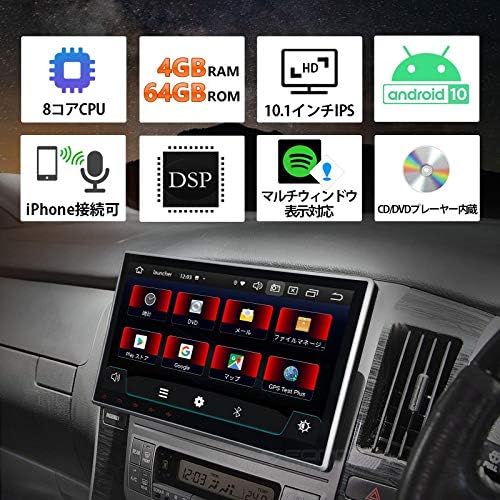
ചിത്രം: ഫീച്ചർ കഴിഞ്ഞുview. This infographic summarizes the main technical specifications and functionalities of the device.
- ഓപ്പറേറ്റിംഗ് സിസ്റ്റം: ആൻഡ്രോയിഡ് 10
- പ്രോസസ്സർ: 8-കോർ സിപിയു
- മെമ്മറി: 4 ജിബി റാം + 64 ജിബി റോം
- ഡിസ്പ്ലേ: 10.1 ഇഞ്ച് ഐപിഎസ് ടച്ച്സ്ക്രീൻ
- കണക്റ്റിവിറ്റി: Built-in Wi-Fi, Built-in Bluetooth, USB
- ഓഡിയോ സവിശേഷതകൾ: DSP (Digital Sound Processor), Equalizer, Subwoofer output, RCA outputs
- റേഡിയോ: FM Tuner, AM Tuner, RDS
- സ്മാർട്ട്ഫോൺ സംയോജനം: iPhone connectivity (Mirroring)
- മൾട്ടിടാസ്കിംഗ്: Multi-window display support
- മീഡിയ പ്ലേബാക്ക്: CD/DVD Player built-in

ചിത്രം: Processor Details. This image highlights the powerful 8-core processor and memory configuration of the system.
പ്രകടനം:

ചിത്രം: Fast Boot Time. This image demonstrates the system's quick startup, powering on in approximately 1 second.
The system is designed for a fast and smooth user experience, supporting numerous applications and improving data transfer speeds for efficient multitasking.
5. സജ്ജീകരണവും ഇൻസ്റ്റാളേഷനും
പ്രീ-ഇൻസ്റ്റലേഷൻ പരിശോധന:
- Before installation, carefully check the size and shape of your vehicle's console panel to ensure compatibility.
- If the product size does not match your console, please contact the service center directly for assistance.
ഫിസിക്കൽ ഇൻസ്റ്റലേഷൻ:
The unit features an adjustable screen, allowing for a gap of up to approximately 35mm between the LCD panel and the main unit for optimal viewകോണുകൾ.

ചിത്രം: Adjustable Screen Angle. This diagram illustrates how the screen can be tilted to achieve the best viewസ്ഥാനം.
- Carefully remove your existing car stereo or panel.
- Connect the necessary wiring harnesses (power, speakers, accessories) to the GA2185J unit.
- Mount the unit securely into the dashboard using the provided mounting screws.
- Adjust the screen angle as needed for optimal visibility.
- Reinstall any removed panels or trim.
വയറിംഗ് കണക്ഷനുകൾ:
Refer to the wiring diagram provided with your unit for specific connections. Key connections include:
- പവർ കേബിൾ: Connect to vehicle's 12V DC power supply (constant, accessory, ground).
- സ്പീക്കർ വയറുകൾ: Connect to your vehicle's speakers.
- ജിപിഎസ് ആന്റിന: ജിപിഎസ് ആന്റിന ബന്ധിപ്പിച്ച് വ്യക്തമായ ഒരു സ്ഥലത്ത് സ്ഥാപിക്കുക view ആകാശത്തിൻ്റെ.
- വൈഫൈ ആന്റിന: Connect the Wi-Fi antenna for optimal wireless signal reception.
- USB കേബിളുകൾ: Connect USB devices for media playback or smartphone charging.
- AV Cables: Use for connecting external audio/video sources or outputting video to external displays.
- മൈക്രോഫോൺ: Connect the external microphone for hands-free calling and voice commands.
6. പ്രവർത്തന നിർദ്ദേശങ്ങൾ
അടിസ്ഥാന പ്രവർത്തനം:
- പവർ ഓൺ/ഓഫ്: Press and hold the power button (if available) or turn on your vehicle's ignition.
- ടച്ച് സ്ക്രീൻ: 10.1 ഇഞ്ച് IPS ടച്ച്സ്ക്രീനിൽ ടാപ്പ് ചെയ്തും, സ്വൈപ്പ് ചെയ്തും, പിഞ്ച് ചെയ്തും ഇന്റർഫേസ് നാവിഗേറ്റ് ചെയ്യുക.
- വോളിയം നിയന്ത്രണം: ഓൺ-സ്ക്രീൻ നിയന്ത്രണങ്ങൾ അല്ലെങ്കിൽ സ്റ്റിയറിംഗ് വീൽ നിയന്ത്രണങ്ങൾ (ബന്ധിപ്പിച്ചിട്ടുണ്ടെങ്കിൽ) ഉപയോഗിച്ച് വോളിയം ക്രമീകരിക്കുക.
ആൻഡ്രോയിഡ് 10 സിസ്റ്റം:
Your device runs on Android 10, offering a familiar and intuitive user interface. It supports a wide range of applications and provides a smooth, responsive experience.

ചിത്രം: Android 10 Interface. This image demonstrates the Android 10 operating system running on the device, showcasing its multimedia capabilities.
ബ്ലൂടൂത്ത് കണക്റ്റിവിറ്റി:
Pair your smartphone or other Bluetooth devices to the unit for hands-free calling and audio streaming.
- Go to the Bluetooth settings on the unit.
- നിങ്ങളുടെ സ്മാർട്ട്ഫോണിൽ ബ്ലൂടൂത്ത് പ്രവർത്തനക്ഷമമാക്കുക, ലഭ്യമായ ഉപകരണങ്ങൾക്കായി തിരയുക.
- Select 'EONON GA2185J' (or similar name) from the list and confirm pairing.
Wi-Fi കണക്ഷൻ:
Connect to a Wi-Fi network to access online features, download apps, and browse the internet.
- Navigate to the Wi-Fi settings menu.
- നിങ്ങൾക്ക് ആവശ്യമുള്ള വൈഫൈ നെറ്റ്വർക്ക് തിരഞ്ഞെടുത്ത് ആവശ്യമെങ്കിൽ പാസ്വേഡ് നൽകുക.
GPS നാവിഗേഷൻ:
Utilize pre-installed or downloaded navigation applications for turn-by-turn directions and real-time traffic information.
- Ensure the GPS antenna is properly installed and has a clear signal.
- Open your preferred navigation app and enter your destination.
Multi-Window Display:
The multi-window feature allows you to split the screen and use two applications simultaneously, enhancing multitasking capabilities.

ചിത്രം: Multi-Window Display. This image illustrates the ability to run two applications side-by-side on the screen, such as navigation and music.
Smartphone Mirroring (iPhone Connectivity):
Connect your iPhone to the unit to mirror its display and access apps, navigation, calls, and music through the car stereo's interface. This feature is designed with driving safety in mind.

ചിത്രം: iPhone Connectivity. This image shows an iPhone connected to the car stereo, demonstrating the mirroring functionality for seamless integration.
ഓഡിയോ ക്രമീകരണങ്ങൾ:
Utilize the built-in DSP, equalizer, and subwoofer output to customize your audio experience.
- Access the audio settings menu to adjust sound profiles, bass, treble, and balance.
- The DSP allows for fine-tuning of sound characteristics.
- Connect an external subwoofer to the dedicated output for enhanced bass.
7. പരിപാലനം
- സ്ക്രീൻ വൃത്തിയാക്കൽ: ടച്ച്സ്ക്രീൻ മൃദുവായി തുടയ്ക്കാൻ മൃദുവായ, ലിന്റ് രഹിത തുണി ഉപയോഗിക്കുക. ഉരച്ചിലുകൾ ഉള്ള ക്ലീനറുകളോ ലായകങ്ങളോ ഉപയോഗിക്കുന്നത് ഒഴിവാക്കുക.
- സോഫ്റ്റ്വെയർ അപ്ഡേറ്റുകൾ: Periodically check for software updates to ensure optimal performance and access to new features. Updates can usually be found on the manufacturer's website or through the system's settings.
- പൊതു പരിചരണം: Keep the unit free from dust and debris. Avoid placing heavy objects on the unit.
8. പ്രശ്നപരിഹാരം
If you encounter issues with your EONON GA2185J, refer to the following common problems and solutions:
| പ്രശ്നം | സാധ്യമായ കാരണം | പരിഹാരം |
|---|---|---|
| യൂണിറ്റ് പവർ ഓണാക്കുന്നില്ല. | Incorrect wiring, blown fuse, vehicle power issue. | Check power cable connections. Inspect the 15A fuse. Verify vehicle's power supply. |
| ശബ്ദമില്ല. | Speaker wires disconnected, volume too low, audio settings incorrect. | Check speaker connections. Increase volume. Verify audio output settings. |
| GPS സിഗ്നൽ ദുർബലമാണ് അല്ലെങ്കിൽ കൃത്യമല്ല. | GPS antenna improperly placed or faulty. | ജിപിഎസ് ആന്റിനയ്ക്ക് വ്യക്തമായ ഒരു രേഖ ഉണ്ടെന്ന് ഉറപ്പാക്കുക view ആകാശത്തിന്റെ. ആന്റിന കണക്ഷൻ പരിശോധിക്കുക. |
| ബ്ലൂടൂത്ത് കണക്ഷൻ പ്രശ്നങ്ങൾ. | ഉപകരണം ജോടിയാക്കൽ മോഡിലല്ല, തടസ്സം, തെറ്റായ ജോടിയാക്കൽ പ്രക്രിയ. | രണ്ട് ഉപകരണങ്ങളും ജോടിയാക്കൽ മോഡിലാണെന്ന് ഉറപ്പാക്കുക. മുമ്പത്തെ ജോടിയാക്കലുകൾ ഇല്ലാതാക്കി വീണ്ടും ശ്രമിക്കുക. യൂണിറ്റിന് അടുത്തേക്ക് നീക്കുക. |
| System freezes or becomes unresponsive. | Software glitch, too many apps running, overheating. | Perform a soft reset (refer to manual for reset button location, usually a small pinhole). Close unnecessary applications. Ensure proper ventilation. |
ഈ പരിഹാരങ്ങൾ പരീക്ഷിച്ചതിന് ശേഷവും പ്രശ്നം നിലനിൽക്കുകയാണെങ്കിൽ, ദയവായി ഉപഭോക്തൃ പിന്തുണയുമായി ബന്ധപ്പെടുക.
9 സ്പെസിഫിക്കേഷനുകൾ
| ഫീച്ചർ | സ്പെസിഫിക്കേഷൻ |
|---|---|
| സ്ക്രീൻ വലിപ്പം | 10.1 ഇഞ്ച് |
| ഓപ്പറേറ്റിംഗ് സിസ്റ്റം | ആൻഡ്രോയിഡ് 10 |
| പ്രോസസ്സർ | 8-കോർ |
| റാം | 4 ജിബി |
| ROM | 64 ജിബി |
| കണക്റ്റിവിറ്റി | ബ്ലൂടൂത്ത്, യുഎസ്ബി, വൈ-ഫൈ |
| മറ്റ് പ്രവർത്തനങ്ങൾ | AM Tuner, Bluetooth Built-in, DSP, FM Tuner, RCA, RDS, Wi-Fi Built-in, Equalizer, Subwoofer, Touchscreen |
| അനുയോജ്യമായ ഉപകരണങ്ങൾ | Smartphones, PCs |
| കണക്റ്റർ തരം | 3.5എംഎം ജാക്ക്, ആർസിഎ |
| ഓഡിയോ put ട്ട്പുട്ട് മോഡ് | ചുറ്റളവ്, സ്റ്റീരിയോ |
| നിയന്ത്രണ രീതി | App, Touch, Remote |
| ഉൽപ്പന്ന ഭാരം | 2.3 കി.ഗ്രാം |
| പാക്കേജ് അളവുകൾ | 34.8 x 32 x 23.88 സെ.മീ |
10. വാറൻ്റിയും പിന്തുണയും
For warranty information, technical support, or service inquiries, please refer to the warranty card included with your product or contact the seller/manufacturer directly. Keep your purchase receipt as proof of purchase.


