1. ആമുഖം
This manual provides detailed instructions for the installation, operation, and maintenance of your MOUNTUP Height Adjustable TV Wall Mount. This full motion articulating TV bracket is designed for 26-55 inch LED/LCD TVs and large monitors, supporting weights from 11 to 66 lbs. It features a pneumatic gas spring for smooth height adjustment, tilt, and swivel capabilities, ensuring a comfortable viewing experience. Please read this manual thoroughly before installation and use.
2 സുരക്ഷാ വിവരങ്ങൾ
- Ensure your TV weight is within the specified capacity of 11-66 lbs (5-30 kg).
- This mount is designed for single wood studs or concrete/brick walls. DO NOT install onto drywall alone.
- Verify VESA pattern compatibility (100x100 mm to 400x400 mm).
- Always use appropriate safety gear during installation.
- If you have any questions or concerns, contact MOUNTUP customer support.
3. പാക്കേജ് ഉള്ളടക്കം
The package includes all necessary hardware for installation. Please verify all components are present before beginning. Refer to the included hardware list in your physical manual for specific screw and component counts.
4. സജ്ജീകരണവും ഇൻസ്റ്റാളേഷനും
Installation can typically be completed within 15 minutes. Follow these general steps:
- ടിവി ബ്രാക്കറ്റുകൾ ടിവിയിൽ ഘടിപ്പിക്കുക: Secure the mounting brackets to the back of your TV using the provided screws that match your TV's VESA pattern.
- Mount Wall Plate to Wall: Locate a single wood stud or a suitable concrete/brick wall. Use a level to ensure the wall plate is straight before drilling and securing it with lag bolts and anchors (for concrete/brick).
- വാൾ പ്ലേറ്റിൽ ടിവി തൂക്കിയിടുക: Carefully lift your TV with the attached brackets and hook it onto the wall plate. Ensure it is securely seated.

Image: Wall Compatibility. This diagram illustrates how to mount the TV bracket to either a wood stud or a concrete/brick wall, emphasizing that drywall alone is not sufficient for secure installation.

Image: Simplified 3-Step Installation. This graphic outlines the quick installation process: attaching TV brackets, mounting the wall plate, and hanging the TV.
5. പ്രവർത്തന നിർദ്ദേശങ്ങൾ
Your MOUNTUP TV wall mount offers full motion capabilities for optimal viewകോണുകൾ.
Height Adjustment (Gas Spring Tension)
The gas spring allows for 8.6 inches of smooth vertical adjustment. The tension needs to be adjusted according to your TV's weight to ensure the arm stays in the desired position. Use the provided Allen Key M8 to adjust the internal screw.
- If the TV arm falls down: Turn the inside screw clockwise ("+" direction) to increase gas spring tension.
- If the TV arm rises up: Turn the inside screw counter-clockwise ("-" direction) to decrease gas spring tension.
Video: Gas Spring Tension Adjustment Guide. This video demonstrates how to adjust the gas spring tension using the Allen key to ensure the TV arm stays in place, whether it's falling down or rising up.
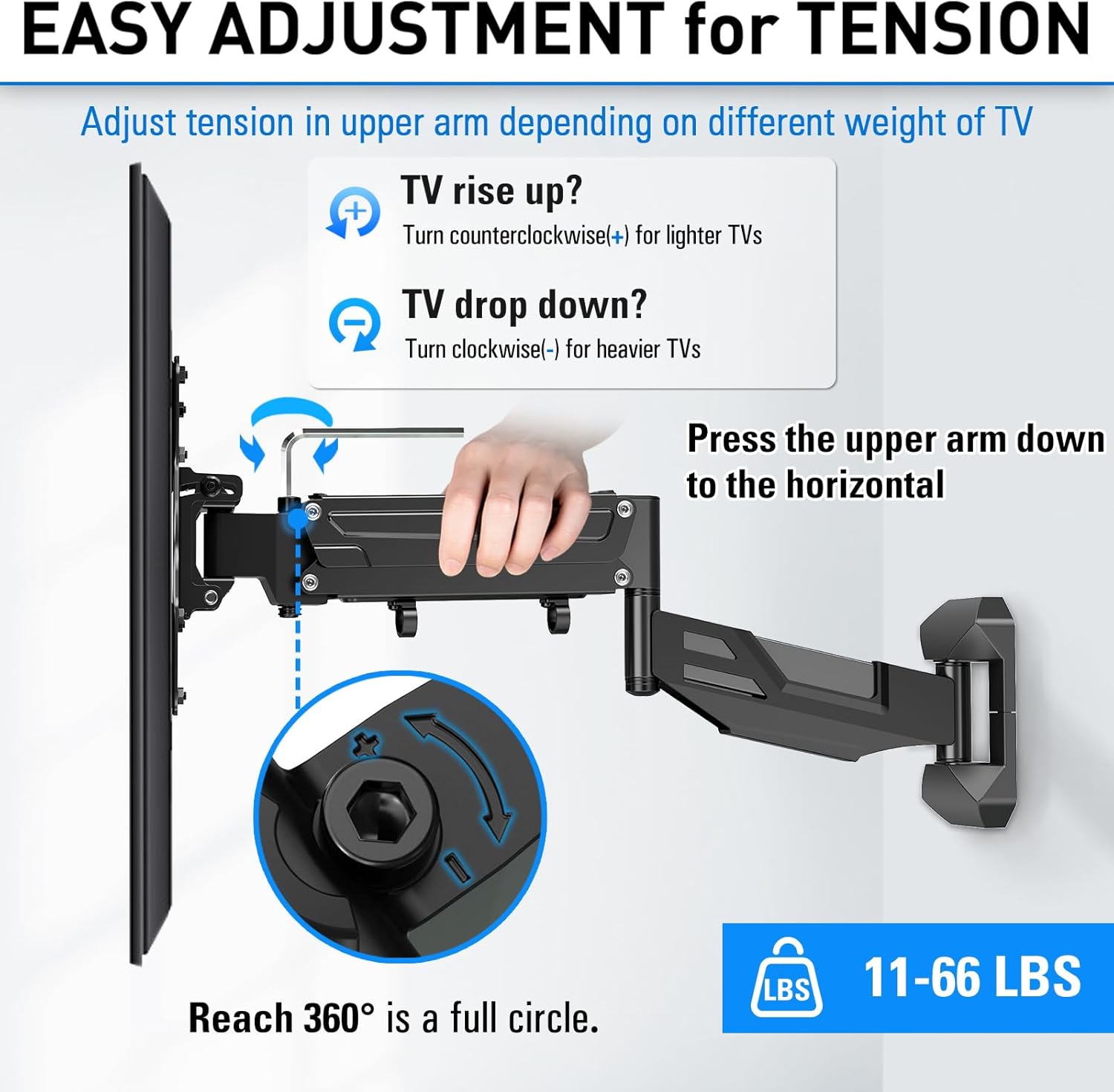
Image: Easy Adjustment for Tension. This graphic illustrates the process of adjusting the gas spring tension to prevent the TV from rising or dropping unexpectedly, based on its weight.
Tilt, Swivel, and Level Adjustment
- ടിൽറ്റ്: Easily tilt your screen +5°/-15° to reduce glare and find the perfect vertical angle.
- സ്വിവൽ: The mount allows for a 180° swivel, enabling you to view your TV from various positions in the room.
- നില: Adjust the TV ±3° after installation to ensure it is perfectly level.
- വിപുലീകരണം: The arm can extend up to 23.11 inches from the wall and retract to 2.36 inches.

Image: A Perfect Range of Motion. This image highlights the mount's ability to extend, tilt, and level, providing versatile viewing ഓപ്ഷനുകൾ.

Image: Swivel for Perfect Viewing. This graphic demonstrates the 180-degree swivel feature, allowing for flexible screen positioning.
6. പരിപാലനം
To ensure the longevity and safe operation of your TV wall mount, perform periodic checks:
- എല്ലാ സ്ക്രൂകളും കണക്ഷനുകളും ഇറുകിയതും സുരക്ഷിതവുമാണെന്ന് ഉറപ്പാക്കാൻ പതിവായി പരിശോധിക്കുക.
- മൃദുവായതും ഉണങ്ങിയതുമായ തുണി ഉപയോഗിച്ച് മൗണ്ട് വൃത്തിയാക്കുക. ഉരച്ചിലുകൾ ഉള്ള ക്ലീനറുകളോ ലായകങ്ങളോ ഉപയോഗിക്കുന്നത് ഒഴിവാക്കുക.
- Check the gas spring tension periodically, especially if you notice the TV sagging or rising unexpectedly, and adjust as needed.
7. പ്രശ്നപരിഹാരം
TV Arm Falls Down or Rises Up
This is typically due to incorrect gas spring tension for your TV's weight. Refer to the "Height Adjustment (Gas Spring Tension)" section under Operating Instructions and the accompanying video for detailed adjustment steps. Ensure you turn the screw the appropriate number of circles based on your TV's weight.
Mount Feels Loose After Installation
Double-check all wall plate and TV bracket screws to ensure they are fully tightened. Confirm that the wall type is suitable (wood stud or concrete/brick) and that appropriate anchors were used for concrete/brick.
Difficulty with Movement (Tilt/Swivel)
Ensure no cables are obstructing the movement of the arm. If the movement feels stiff, check for any overtightened bolts on the articulating joints and loosen slightly if necessary, without compromising safety.
8 സ്പെസിഫിക്കേഷനുകൾ
| ബ്രാൻഡ് | മൗണ്ട്അപ്പ് |
| മോഡൽ നമ്പർ | MU0037 |
| അനുയോജ്യമായ ടിവി വലുപ്പങ്ങൾ | 26-55 ഇഞ്ച് |
| ഭാരം ശേഷി | 11-66 പൗണ്ട് (5-30 കി.ഗ്രാം) |
| VESA അനുയോജ്യത | 100x100 മിമി മുതൽ 400x400 മിമി വരെ |
| ചലന തരം | Articulating, Gas Spring |
| ടിൽറ്റ് ആംഗിൾ | +5°/-15° |
| സ്വിവൽ ആംഗിൾ | 180° |
| ലെവൽ അഡ്ജസ്റ്റ്മെൻ്റ് | ±3° |
| ചുമരിൽ നിന്നുള്ള വിപുലീകരണം | 2.36 ഇഞ്ച് (പിൻവലിച്ചു) മുതൽ 23.11 ഇഞ്ച് (നീട്ടി) വരെ |
| മെറ്റീരിയൽ | അലോയ് സ്റ്റീൽ |

Image: VESA and TV Size Compatibility. This image details the supported VESA patterns and TV screen sizes for the mount.
9. വാറൻ്റിയും പിന്തുണയും
MOUNTUP products are UL listed for safety. We are committed to providing quality products and support. For any pre-purchase or installation questions, our professional support team is available every day to assist you. Additionally, protection plans are available for purchase, including 2-Year and 3-Year options, to further safeguard your investment.


