ആമുഖം
നിങ്ങളുടെ വാനുകളുടെ ഇൻസ്റ്റാളേഷൻ, പ്രവർത്തനം, പരിപാലനം എന്നിവയ്ക്കുള്ള സമഗ്രമായ നിർദ്ദേശങ്ങൾ ഈ ഉപയോക്തൃ മാനുവൽ നൽകുന്നു.view W9 ഔട്ട്ഡോർ സെക്യൂരിറ്റി ക്യാമറ. ശരിയായ പ്രവർത്തനക്ഷമതയും സുരക്ഷയും ഉറപ്പാക്കാൻ ഉൽപ്പന്നം ഉപയോഗിക്കുന്നതിന് മുമ്പ് ദയവായി ഈ മാനുവൽ ശ്രദ്ധാപൂർവ്വം വായിക്കുക. ഭാവിയിലെ റഫറൻസിനായി ഈ മാനുവൽ സൂക്ഷിക്കുക.
ബോക്സിൽ എന്താണുള്ളത്
പാക്കേജിൽ എല്ലാ ഘടകങ്ങളും ഉണ്ടെന്ന് ഉറപ്പാക്കുക:
- വാൻസ്view W9 ഔട്ട്ഡോർ സുരക്ഷാ ക്യാമറ
- 5dBi വൈഫൈ ആന്റിന
- USB പവർ സപ്ലൈ
- മൗണ്ടിംഗ് ബ്രാക്കറ്റ് സെറ്റ്
ഉൽപ്പന്നം കഴിഞ്ഞുview
നിങ്ങളുടെ വാനുകളുടെ പ്രധാന ഘടകങ്ങളുമായി പരിചയപ്പെടുക.view W9 ക്യാമറ.

ചിത്രം 1: വാൻസ്view W9 ഔട്ട്ഡോർ സെക്യൂരിറ്റി ക്യാമറയും ലൈവും View സ്മാർട്ട്ഫോണിൽ.
ഈ ചിത്രം വാനുകളെ കാണിക്കുന്നുview ക്യാമറയിൽ നിന്നുള്ള തത്സമയ വീഡിയോ പ്രദർശിപ്പിക്കുന്ന ഒരു സ്മാർട്ട്ഫോണിനൊപ്പം, ചുവരിൽ ഘടിപ്പിച്ചിരിക്കുന്ന W9 ഔട്ട്ഡോർ സുരക്ഷാ ക്യാമറ. ക്യാമറ വെളുത്ത നിറത്തിലാണ്, കറുത്ത ലെൻസ് ഏരിയയും, ഫോൺ സ്ക്രീനിൽ പുല്ലുള്ള മുറ്റത്ത് ഒരു നായയെ കാണിക്കുന്നു, ഇത് തത്സമയ നിരീക്ഷണ ശേഷിയെ വ്യക്തമാക്കുന്നു.
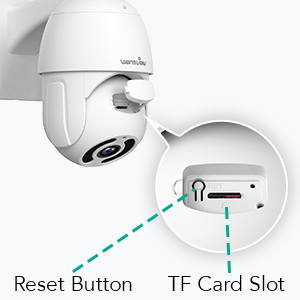
ചിത്രം 2: റീസെറ്റ് ബട്ടണും TF കാർഡ് സ്ലോട്ട് ലൊക്കേഷനും.
ഈ ഡയഗ്രം വാനിലെ റീസെറ്റ് ബട്ടണിന്റെയും TF (മൈക്രോ എസ്ഡി) കാർഡ് സ്ലോട്ടിന്റെയും സ്ഥാനം എടുത്തുകാണിക്കുന്നു.view പ്രാരംഭ സജ്ജീകരണത്തിനും ലോക്കൽ സ്റ്റോറേജിനും അത്യാവശ്യമായ W9 ക്യാമറ.
സജ്ജീകരണ ഗൈഡ്
1. ക്യാമറ ഓൺ ചെയ്യുക
ക്യാമറയിലേക്ക് USB പവർ സപ്ലൈ കണക്റ്റ് ചെയ്ത് ഒരു പവർ ഔട്ട്ലെറ്റിൽ പ്ലഗ് ചെയ്യുക. ക്യാമറ ഓണാക്കി സ്വയം പരിശോധനാ ക്രമം ആരംഭിക്കും.
2. ആപ്പ് ഇൻസ്റ്റാളേഷൻ
"Wans" ഡൗൺലോഡ് ചെയ്യുകview നിങ്ങളുടെ സ്മാർട്ട്ഫോണിന്റെ ആപ്പ് സ്റ്റോറിൽ നിന്ന് (iOS, Android എന്നിവയിൽ ലഭ്യമാണ്) "Cloud" ആപ്പ് ഡൗൺലോഡ് ചെയ്യുക. ഒരു പുതിയ അക്കൗണ്ടിനായി രജിസ്റ്റർ ചെയ്യുക അല്ലെങ്കിൽ നിങ്ങൾക്ക് ഇതിനകം ഒരെണ്ണം ഉണ്ടെങ്കിൽ ലോഗിൻ ചെയ്യുക.
3. നെറ്റ്വർക്ക് കണക്ഷൻ
വാൻസ്view W9 ക്യാമറ വൈ-ഫൈ (2.4GHz മാത്രം), ഇതർനെറ്റ് കണക്ഷനുകൾ എന്നിവ പിന്തുണയ്ക്കുന്നു.
Wi-Fi കണക്ഷൻ:
- വാൻസ് തുറക്കുകview പുതിയൊരു ഉപകരണം ചേർക്കാൻ ക്ലൗഡ് ആപ്പ് തുറന്ന് "+" ഐക്കണിൽ ടാപ്പ് ചെയ്യുക.
- നിങ്ങളുടെ ക്യാമറ മോഡൽ (W9) തിരഞ്ഞെടുത്ത് സ്ക്രീനിലെ നിർദ്ദേശങ്ങൾ പാലിക്കുക.
- നിങ്ങളുടെ ഫോൺ 2.4GHz വൈഫൈ നെറ്റ്വർക്കിലേക്ക് കണക്റ്റ് ചെയ്തിട്ടുണ്ടെന്ന് ഉറപ്പാക്കുക. ക്യാമറ 5GHz വൈഫൈ പിന്തുണയ്ക്കുന്നില്ല.
- നിങ്ങളുടെ ഫോണിൽ പ്രദർശിപ്പിച്ചിരിക്കുന്ന QR കോഡ് ക്യാമറ ലെൻസ് ഉപയോഗിച്ച് സ്കാൻ ചെയ്യുക.
- നിങ്ങളുടെ വൈഫൈ നെറ്റ്വർക്കിലേക്ക് ക്യാമറ കണക്റ്റ് ചെയ്യുന്നതുവരെ കാത്തിരിക്കുക.

ചിത്രം 3: വൈഫൈ അനുയോജ്യത (2.4GHz മാത്രം).
ഈ ചിത്രം വാനുകളെ ചിത്രീകരിക്കുന്നുview വിപുലീകൃത സിഗ്നൽ ശ്രേണിക്കും വേഗത്തിലുള്ള കണക്ഷൻ വേഗതയ്ക്കുമായി 2.4GHz വൈ-ഫൈ നെറ്റ്വർക്കുകളുമായുള്ള അനുയോജ്യത ഊന്നിപ്പറയുന്ന, അപ്ഗ്രേഡ് ചെയ്ത 5dBi ആന്റിനയുള്ള W9 ക്യാമറ. 5GHz വൈ-ഫൈ പിന്തുണയ്ക്കുന്നില്ലെന്ന് ഇത് വ്യക്തമായി കാണിക്കുന്നു.
ഇഥർനെറ്റ് കണക്ഷൻ:
- നിങ്ങളുടെ റൂട്ടറിൽ നിന്ന് ക്യാമറയിലെ RJ45 പോർട്ടിലേക്ക് ഒരു ഇതർനെറ്റ് കേബിൾ ബന്ധിപ്പിക്കുക.
- ക്യാമറ സ്വയമേവ നെറ്റ്വർക്കിലേക്ക് കണക്റ്റുചെയ്യും.
- നിങ്ങളുടെ അക്കൗണ്ടിലേക്ക് ക്യാമറ ചേർക്കാൻ ആപ്പ് നിർദ്ദേശങ്ങൾ പാലിക്കുക.
4. ക്യാമറ ഘടിപ്പിക്കുന്നു
വാൻസ്view W9 ക്യാമറ വാൾ മൗണ്ടിംഗിനും ഔട്ട്ഡോർ ഉപയോഗത്തിനുമായി രൂപകൽപ്പന ചെയ്തിരിക്കുന്നു (IP65 വാട്ടർപ്രൂഫ്).
- ഇൻസ്റ്റാളേഷന് അനുയോജ്യമായ ഒരു സ്ഥലം തിരഞ്ഞെടുക്കുക, വ്യക്തമായ ഒരു സ്ഥലം ഉറപ്പാക്കുക. view സ്ഥിരതയുള്ള മൗണ്ടിംഗ് പ്രതലവും.
- ക്യാമറ ഭിത്തിയിൽ സുരക്ഷിതമായി ഘടിപ്പിക്കാൻ നൽകിയിരിക്കുന്ന മൗണ്ടിംഗ് ബ്രാക്കറ്റ് സെറ്റ് ഉപയോഗിക്കുക.
- ക്യാമറ ഘടിപ്പിച്ചതിന് ശേഷം ആവശ്യാനുസരണം അതിന്റെ ആംഗിൾ ക്രമീകരിക്കുക.
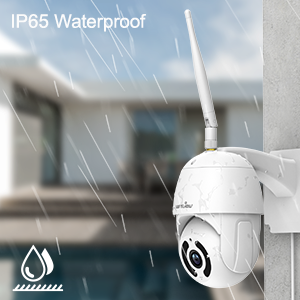
ചിത്രം 4: IP65 വാട്ടർപ്രൂഫ് സവിശേഷത.
ഈ ചിത്രം വാനുകളെ ചിത്രീകരിക്കുന്നു.view മഴ പെയ്യുന്ന W9 ക്യാമറ പുറത്ത് സ്ഥാപിച്ചിരിക്കുന്നു, ദൃശ്യപരമായി അതിന്റെ IP65 വാട്ടർപ്രൂഫ് റേറ്റിംഗ് സ്ഥിരീകരിക്കുന്നു, ഇത് വ്യത്യസ്ത കാലാവസ്ഥകൾക്ക് അനുയോജ്യമാക്കുന്നു.
പ്രവർത്തന നിർദ്ദേശങ്ങൾ
1. പാൻ-ടിൽറ്റ് നിയന്ത്രണം
ക്യാമറയിൽ 350° തിരശ്ചീന പാൻ, 90° ലംബ ടിൽറ്റ് റേഞ്ച് എന്നിവയുണ്ട്, ഇത് വിശാലമായ ഒരു പ്രദേശം നിരീക്ഷിക്കാൻ നിങ്ങളെ അനുവദിക്കുന്നു.
- വാൻസിനുള്ളിൽview ക്ലൗഡ് ആപ്പ്, തത്സമയം ആക്സസ് ചെയ്യുക view നിങ്ങളുടെ ക്യാമറയുടെ.
- ക്യാമറയുടെ പാൻ, ടിൽറ്റ് ആംഗിളുകൾ വിദൂരമായി ക്രമീകരിക്കുന്നതിന് സ്ക്രീനിലെ ദിശാസൂചന നിയന്ത്രണങ്ങൾ ഉപയോഗിക്കുക.

ചിത്രം 5: 2K FHD PTZ കവറേജ്.
ഈ ചിത്രം വാനുകളെ കാണിക്കുന്നുview W9 ക്യാമറയുടെ 2K FHD റെസല്യൂഷനും അതിന്റെ പാൻ-ടിൽറ്റ്-സൂം (PTZ) കഴിവുകളും, സമഗ്രമായ ഏരിയ കവറേജിനായി 350° പാൻ, 95° ടിൽറ്റ് ശ്രേണി കാണിക്കുന്നു, അതിന്റെ ഔട്ട്ഡോർ പ്രയോഗം ചിത്രീകരിക്കുന്നതിന് പശ്ചാത്തലത്തിൽ ഒരു വീടും ഉണ്ട്.
2. നൈറ്റ് വിഷൻ
ക്യാമറയിൽ 12pcs 850nm ഇൻഫ്രാറെഡ് എൽഇഡി ലൈറ്റുകൾ സജ്ജീകരിച്ചിരിക്കുന്നു, ഇത് 50 അടി വരെ വ്യക്തമായ രാത്രി കാഴ്ച നൽകുന്നു.
- കുറഞ്ഞ വെളിച്ചത്തിൽ ക്യാമറ യാന്ത്രികമായി നൈറ്റ് വിഷൻ മോഡിലേക്ക് മാറുന്നു.
- നിങ്ങൾക്ക് കഴിയും view വാൻസിലൂടെ തത്സമയം രാത്രി കാഴ്ച പ്രക്ഷേപണം ചെയ്യുന്നുview ക്ലൗഡ് ആപ്പ്.

ചിത്രം 6: മികച്ച രാത്രി കാഴ്ച ശേഷി.
ഈ ചിത്രം ഒരു വിഭജനം അവതരിപ്പിക്കുന്നു view വാനുകളുടെ പകൽ, രാത്രി കാഴ്ച പ്രകടനത്തെ താരതമ്യം ചെയ്യുന്നു.view W9 ക്യാമറ. നൈറ്റ് വിഷൻ സെഗ്മെന്റ് ഇരുട്ടിൽ 50 അടി അകലെയുള്ള വസ്തുക്കളെ വ്യക്തമായി കാണിക്കുന്നു, ഇത് ക്യാമറയുടെ ഫലപ്രദമായ ഇൻഫ്രാറെഡ് കഴിവുകളെ എടുത്തുകാണിക്കുന്നു.
3. ടു-വേ ഓഡിയോ
ബിൽറ്റ്-ഇൻ മൈക്രോഫോണും സ്പീക്കറും ഉപയോഗിച്ച് സന്ദർശകരുമായി ആശയവിനിമയം നടത്തുക അല്ലെങ്കിൽ നുഴഞ്ഞുകയറ്റക്കാരെ തടയുക.
- തത്സമയം മുതൽ view വാൻസിലുള്ളത്view ക്ലൗഡ് ആപ്പ്, സംസാരിക്കാൻ മൈക്രോഫോൺ ഐക്കണിൽ ടാപ്പ് ചെയ്യുക.
- ക്യാമറയുടെ സ്ഥാനത്ത് നിന്ന് ഓഡിയോ കേൾക്കാൻ സ്പീക്കർ ഐക്കണിൽ ടാപ്പ് ചെയ്യുക.

ചിത്രം 7: ടു-വേ ഓഡിയോ പ്രവർത്തനത്തിൽ.
ഈ ചിത്രം വാൻസിന്റെ ടു-വേ ഓഡിയോ സവിശേഷതയെ ചിത്രീകരിക്കുന്നു.view ഒരു സ്മാർട്ട്ഫോൺ ആപ്പ് വഴി ക്യാമറയിലൂടെ ഒരു ഡെലിവറി ഡ്രൈവറുമായി ആശയവിനിമയം നടത്തുന്ന വ്യക്തിയെ കാണിക്കുന്ന W9 ക്യാമറ. സംഭാഷണ ബബിളുകൾ സംഭാഷണത്തെ സൂചിപ്പിക്കുന്നു, തത്സമയ ഇടപെടൽ പ്രകടമാക്കുന്നു.

ചിത്രം 8: ടു-വേ ഓഡിയോ ഉപയോഗിച്ച് നുഴഞ്ഞുകയറ്റക്കാരെ തടയൽ.
ഈ ചിത്രം വാനുകളെ കാണിക്കുന്നുview ഒരു നുഴഞ്ഞുകയറ്റക്കാരനെ തടയാൻ W9 ക്യാമറ ഉപയോഗിക്കുന്നു. സ്പീച്ച് ബബിളുകൾ ക്യാമറയിൽ നിന്നുള്ള ഒരു കമാൻഡിനെയും ("എന്റെ വീട്ടിൽ നിന്ന് മാറൂ") നുഴഞ്ഞുകയറ്റക്കാരന്റെ പ്രതികരണത്തെയും ("അയ്യോ, ഇല്ല, ഞാൻ ഓഫാണ്") സൂചിപ്പിക്കുന്നു, ഇത് ക്യാമറയ്ക്ക് ഒരു പ്രതിരോധമായി പ്രവർത്തിക്കാനുള്ള കഴിവ് പ്രകടമാക്കുന്നു.
4. മോഷൻ ഡിറ്റക്ഷനും അലേർട്ടുകളും
പ്രവർത്തനം കണ്ടെത്തുന്നതിന് ക്യാമറ മോഷൻ സെൻസറുകൾ ഉപയോഗിക്കുകയും നിങ്ങളുടെ ഫോണിലേക്ക് തൽക്ഷണ അലേർട്ടുകൾ അയയ്ക്കുകയും ചെയ്യുന്നു.
- വാൻസിനുള്ളിലെ സെൻസർ സെൻസിറ്റിവിറ്റിയും ഡിറ്റക്ഷൻ ഏരിയകളും ഇഷ്ടാനുസൃതമാക്കുകview ക്ലൗഡ് ആപ്പ്.
- ചലനം കണ്ടെത്തുമ്പോൾ 10 സെക്കൻഡ് വീഡിയോ അലേർട്ടുകൾ സ്വീകരിക്കുക.

ചിത്രം 9: തൽക്ഷണ കണ്ടെത്തലും അലേർട്ടുകളും.
ഈ ചിത്രത്തിൽ വാൻസിൻറെ "മോഷൻ അലാറം" അറിയിപ്പ് പ്രദർശിപ്പിക്കുന്ന ഒരു സ്മാർട്ട്ഫോൺ കാണിക്കുന്നു.view ക്ലൗഡ് ആപ്പ്, വാൻസ് എന്ന് സൂചിപ്പിക്കുന്നുview W9 ക്യാമറ പ്രവർത്തനം കണ്ടെത്തി ഉപയോക്താവിന്റെ ഫോണിലേക്ക് ഒരു അടിയന്തര അലേർട്ട് അയച്ചു.
5. സ്റ്റോറേജ് ഓപ്ഷനുകൾ (SD കാർഡും ക്ലൗഡും)
വാൻസ്view റെക്കോർഡ് ചെയ്ത ഫൂവിനുള്ള ഫ്ലെക്സിബിൾ സ്റ്റോറേജ് സൊല്യൂഷനുകൾ W9 ക്യാമറ വാഗ്ദാനം ചെയ്യുന്നുtage.
- SD കാർഡ് സംഭരണം: 128GB വരെയുള്ള മൈക്രോ എസ്ഡി കാർഡുകൾ പിന്തുണയ്ക്കുന്നു. TF കാർഡ് സ്ലോട്ടിലേക്ക് കാർഡ് ചേർക്കുക (ചിത്രം 2 കാണുക). റെക്കോർഡ് ചെയ്ത വീഡിയോയും ചിത്രങ്ങളും പ്രീ-ഇന്റർനെറ്റിനായി പ്രാദേശികമായി സൂക്ഷിക്കാം.view.
- ക്ലൗഡ് സംഭരണം: Wans വഴി പണമടച്ചുള്ള ക്ലൗഡ് സേവനത്തിലേക്ക് സബ്സ്ക്രൈബുചെയ്യുകview ക്ലൗഡിലേക്ക് വീഡിയോകൾ സുരക്ഷിതമായി സേവ് ചെയ്യാനും അപ്ലോഡ് ചെയ്യാനും ക്ലൗഡ് ആപ്പ്. ക്യാമറ മോഷണം അല്ലെങ്കിൽ കേടുപാടുകൾക്കെതിരെ ഇത് ഒരു അധിക സുരക്ഷാ പാളി നൽകുന്നു.

ചിത്രം 10: ഡ്യുവൽ സ്റ്റോറേജ് ചോയ്സുകൾ.
ഈ ചിത്രം വാൻസിന്റെ ഡ്യുവൽ സ്റ്റോറേജ് ഓപ്ഷനുകൾ എടുത്തുകാണിക്കുന്നു.view W9 ക്യാമറ: സുരക്ഷിതമായ TF (മൈക്രോ എസ്ഡി) കാർഡ് സംഭരണവും എൻക്രിപ്റ്റ് ചെയ്ത ക്ലൗഡ് സംഭരണവും, റെക്കോർഡ് ചെയ്ത foo ബാക്കപ്പ് ചെയ്യുന്നതിനുള്ള വഴക്കമുള്ള വഴികൾ ഉപയോക്താക്കൾക്ക് നൽകുന്നു.tage.
6. അലക്സാ ഇന്റഗ്രേഷൻ
നിങ്ങളുടെ മോഹങ്ങളെ നിയന്ത്രിക്കുകview W9 ക്യാമറയും view ആമസോൺ അലക്സ ഉപയോഗിച്ചുള്ള ലൈവ് ഫീഡുകൾ.
- വാൻസ് പ്രാപ്തമാക്കുകview Alexa ആപ്പിലെ കഴിവ്.
- നിങ്ങളുടെ വാനുകൾ ലിങ്ക് ചെയ്യുകview അലക്സയുമായുള്ള ക്ലൗഡ് അക്കൗണ്ട്.
- അനുയോജ്യമായ Alexa ഉപകരണങ്ങളിൽ (ഉദാ: Echo Show) ലൈവ് വീഡിയോ പ്രദർശിപ്പിക്കുന്നതിന് "Alexa, [camera name] കാണിക്കൂ" പോലുള്ള വോയ്സ് കമാൻഡുകൾ ഉപയോഗിക്കുക.
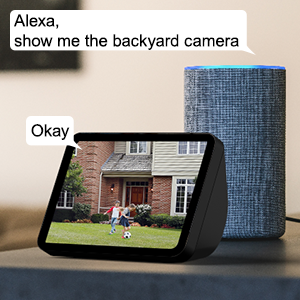
ചിത്രം 11: അലക്സാ ഇന്റഗ്രേഷൻ.
ഈ ചിത്രം ഒരു വാൻസിൽ നിന്നുള്ള ഒരു ലൈവ് വീഡിയോ ഫീഡ് പ്രദർശിപ്പിക്കുന്ന ഒരു ആമസോൺ എക്കോ ഷോ കാണിക്കുന്നു.view ഉപയോക്താവിന്റെ വോയ്സ് കമാൻഡ് ("അലക്സാ, പിൻവശത്തെ ക്യാമറ കാണിക്കൂ") അലക്സയുടെ പ്രതികരണവും ("ശരി") സൂചിപ്പിക്കുന്ന സ്പീച്ച് ബബിളുകളുള്ള ക്യാമറ, വോയ്സ് നിയന്ത്രണത്തിനായി അലക്സയുമായുള്ള തടസ്സമില്ലാത്ത സംയോജനം പ്രകടമാക്കുന്നു.
7. ഒന്നിലധികം കുടുംബാംഗങ്ങളുടെ പങ്കിടൽ
നിങ്ങളുടെ ക്യാമറയുടെ തത്സമയ ഫീഡിലേക്കുള്ള ആക്സസ് ഒരേസമയം 4 ഉപയോക്താക്കളുമായി വരെ പങ്കിടുക.
- Wans-ൽ ഒരു ക്ഷണ ലിങ്ക് സൃഷ്ടിക്കുകview ക്ലൗഡ് ആപ്പ്.
- കുടുംബാംഗങ്ങൾക്ക് ആക്സസ് അനുവദിക്കുന്നതിന് ലിങ്ക് അവരുമായി പങ്കിടുക.
മെയിൻ്റനൻസ്
- വൃത്തിയാക്കൽ: മൃദുവായതും ഉണങ്ങിയതുമായ തുണി ഉപയോഗിച്ച് ക്യാമറ ലെൻസും ബോഡിയും സൌമ്യമായി തുടയ്ക്കുക. കഠിനമായ രാസവസ്തുക്കളോ അബ്രസീവ് ക്ലീനറുകളോ ഉപയോഗിക്കരുത്.
- ഫേംവെയർ അപ്ഡേറ്റുകൾ: വാൻസ് വഴി ഫേംവെയർ അപ്ഡേറ്റുകൾ പതിവായി പരിശോധിച്ച് ഇൻസ്റ്റാൾ ചെയ്യുക.view മികച്ച പ്രകടനവും സുരക്ഷയും ഉറപ്പാക്കാൻ ക്ലൗഡ് ആപ്പ്.
- വൈദ്യുതി വിതരണം: വൈദ്യുതി വിതരണം സുരക്ഷിതമായി ബന്ധിപ്പിച്ചിട്ടുണ്ടെന്നും കേടുപാടുകൾ സംഭവിച്ചിട്ടില്ലെന്നും ഉറപ്പാക്കുക.
- നെറ്റ്വർക്ക് കണക്ഷൻ: തടസ്സമില്ലാത്ത നിരീക്ഷണത്തിനായി ഒരു സ്ഥിരതയുള്ള Wi-Fi അല്ലെങ്കിൽ ഇതർനെറ്റ് കണക്ഷൻ പരിശോധിക്കുക.
ട്രബിൾഷൂട്ടിംഗ്
| പ്രശ്നം | സാധ്യമായ കാരണം | പരിഹാരം |
|---|---|---|
| ക്യാമറ ഓഫ്ലൈനിൽ | വൈദ്യുതിയില്ല; വൈഫൈ സിഗ്നൽ ദുർബലമാണ്/വിച്ഛേദിക്കപ്പെട്ടു; റൂട്ടർ പ്രശ്നം. | പവർ കണക്ഷൻ പരിശോധിക്കുക; ക്യാമറ റൂട്ടറിന് അടുത്തേക്ക് നീക്കുക അല്ലെങ്കിൽ ഇതർനെറ്റ് ഉപയോഗിക്കുക; റൂട്ടർ പുനരാരംഭിക്കുക. |
| Wi-Fi-യിലേക്ക് കണക്റ്റുചെയ്യാൻ കഴിയില്ല | തെറ്റായ വൈഫൈ പാസ്വേഡ്; 5GHz നെറ്റ്വർക്കിലേക്ക് കണക്റ്റുചെയ്യുന്നു; റൂട്ടറിൽ നിന്ന് വളരെ അകലെയാണ്. | പാസ്വേഡ് രണ്ടുതവണ പരിശോധിക്കുക; 2.4GHz വൈഫൈയിലേക്കുള്ള കണക്ഷൻ ഉറപ്പാക്കുക; ക്യാമറയോ റൂട്ടറോ മാറ്റി സ്ഥാപിക്കുക. |
| ചലന മുന്നറിയിപ്പുകൾ ലഭിച്ചില്ല. | ചലന തിരിച്ചറിയൽ പ്രവർത്തനരഹിതമാക്കി; ആപ്പ് അറിയിപ്പുകൾ ഓഫാക്കി; സംവേദനക്ഷമത വളരെ കുറവാണ്. | ആപ്പിൽ ചലന കണ്ടെത്തൽ പ്രവർത്തനക്ഷമമാക്കുക; ഫോൺ അറിയിപ്പ് ക്രമീകരണങ്ങൾ പരിശോധിക്കുക; സംവേദനക്ഷമത ക്രമീകരിക്കുക. |
| മോശം രാത്രി കാഴ്ച നിലവാരം | ലെൻസിന് മുന്നിൽ തടസ്സം; ഇൻഫ്രാറെഡ് എൽഇഡികൾ തടഞ്ഞു. | തടസ്സങ്ങൾ നീക്കുക; ലെൻസ് വൃത്തിയുള്ളതാണെന്ന് ഉറപ്പാക്കുക. |
| ടു-വേ ഓഡിയോ പ്രശ്നങ്ങൾ | മൈക്രോഫോൺ/സ്പീക്കർ ബ്ലോക്ക് ചെയ്തു; ആപ്പ് അനുമതികൾ. | ഓഡിയോയ്ക്ക് വ്യക്തമായ പാത ഉറപ്പാക്കുക; മൈക്രോഫോണിനുള്ള ആപ്പ് അനുമതികൾ പരിശോധിക്കുക. |
സ്പെസിഫിക്കേഷനുകൾ
| മോഡൽ നമ്പർ | W9-W |
| വീഡിയോ ക്യാപ്ചർ റെസല്യൂഷൻ | 1080p (2K HD) |
| പാൻ/ടിൽറ്റ് ശ്രേണി | 350° പാൻ, 90° ചരിവ് |
| കണക്റ്റിവിറ്റി ടെക്നോളജി | വയർലെസ്സ് (വൈ-ഫൈ 2.4GHz), ഇതർനെറ്റ് |
| വയർലെസ് കമ്മ്യൂണിക്കേഷൻ ടെക്നോളജി | വൈഫൈ |
| പവർ ഉറവിടം | കോർഡഡ് ഇലക്ട്രിക് |
| നൈറ്റ് വിഷൻ റേഞ്ച് | 50 അടി |
| അന്താരാഷ്ട്ര സംരക്ഷണ റേറ്റിംഗ് | IP65 (ജലപ്രൂഫ്) |
| സ്റ്റോറേജ് ഓപ്ഷനുകൾ | SD കാർഡ് (128GB വരെ), ക്ലൗഡ് സ്റ്റോറേജ് |
| ഓഡിയോ | 2-വേ ഓഡിയോ (ബിൽറ്റ്-ഇൻ മൈക്രോഫോണും സ്പീക്കറും) |
| അനുയോജ്യമായ ഉപകരണങ്ങൾ | സ്മാർട്ട്ഫോൺ (iOS, Android), അലക്സ എക്കോ ഷോ |
| മൗണ്ടിംഗ് തരം | മതിൽ മൗണ്ട് |
| അളവുകൾ (L x W x H) | 6.3 x 6.1 x 3.94 ഇഞ്ച് |
| ഇനത്തിൻ്റെ ഭാരം | 1.6 പൗണ്ട് |
വാറൻ്റിയും പിന്തുണയും
വാറന്റി വിവരങ്ങൾക്കും സാങ്കേതിക പിന്തുണയ്ക്കും, ദയവായി വാൻസിനെ പരിശോധിക്കുക.view ഉദ്യോഗസ്ഥൻ webസൈറ്റിൽ വിളിക്കുകയോ അവരുടെ ഉപഭോക്തൃ സേവനവുമായി നേരിട്ട് ബന്ധപ്പെടുകയോ ചെയ്യുക. വിശദാംശങ്ങൾ സാധാരണയായി ഉൽപ്പന്ന പാക്കേജിംഗിലോ വാൻസിലോ ലഭ്യമാണ്.view ആമസോണിലെ ബ്രാൻഡ് സ്റ്റോർ.
സന്ദർശിക്കുക വാൻസ്view സ്റ്റോർ കൂടുതൽ വിവരങ്ങൾക്ക്.


