ആമുഖം
Thank you for choosing the WALI Dual Monitor Gas Spring Desk Mount. This manual provides detailed instructions for assembly, operation, and maintenance to ensure optimal performance and longevity of your product. Please read this manual thoroughly before installation and keep it for future reference.

Image: The WALI Dual Monitor Gas Spring Desk Mount, showcasing its two arms and the included C-clamp ഗ്രോമെറ്റ് മൗണ്ടിംഗ് ഓപ്ഷനുകളും.
പ്രധാന സവിശേഷതകൾ
- ഡ്യുവൽ മോണിറ്റർ പിന്തുണ: Designed to hold two monitors, enhancing your workspace efficiency and productivity.
- വിശാലമായ അനുയോജ്യത: Suitable for monitors ranging from 17 to 32 inches, supporting up to 19.8 lbs per arm. Compatible with VESA patterns 75x75mm and 100x100mm.
- പൂർണ്ണ ക്രമീകരണക്ഷമത: Features a high-quality gas spring arm for smooth extension and retraction. Monitor heads can tilt +75°/-45°, swivel +90°/-90°, and rotate 360° for optimal viewകോണുകൾ.
- എർഗണോമിക് ഡിസൈൻ: Allows monitors to be raised to eye level, promoting a more comfortable and ergonomically correct working posture to reduce neck and eye strain.
- ഫ്ലെക്സിബിൾ ഇൻസ്റ്റലേഷൻ: Includes both C-clamp and grommet base options to fit various desk thicknesses (0.4" to 3.3").
- സംയോജിത കേബിൾ മാനേജ്മെൻ്റ്: Efficiently routes cables along the arms to maintain a clean and organized desktop.
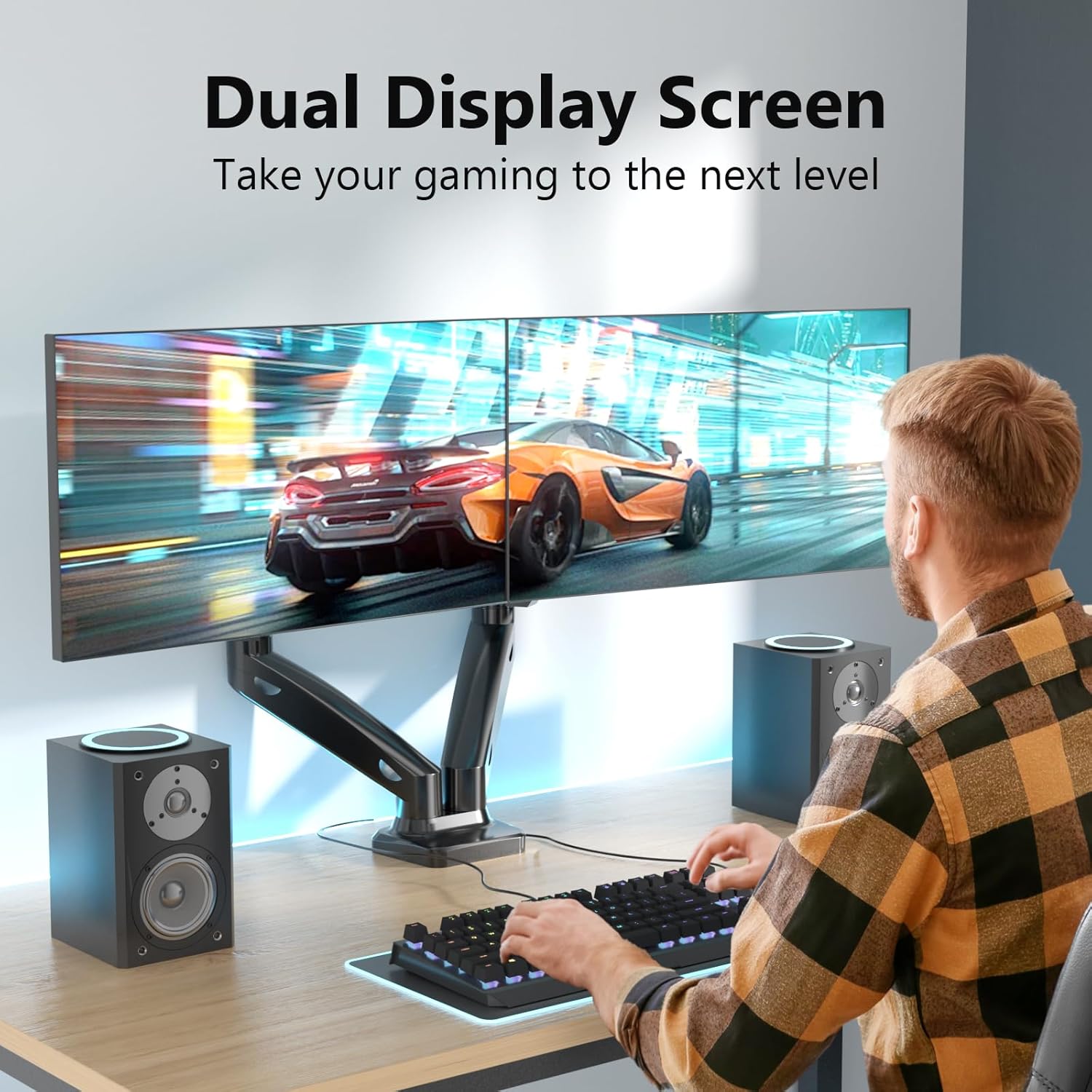
Image: A user demonstrating the dual display setup, highlighting the enhanced workspace and productivity.

Image: Visual representation of display compatibility, showing maximum weight capacity (19.8 lbs per arm), VESA sizes (75x75/100x100mm), and screen size range (17"-32").
സ്പെസിഫിക്കേഷനുകൾ
| ആട്രിബ്യൂട്ട് | മൂല്യം |
|---|---|
| ബ്രാൻഡ് | വാലി |
| മോഡൽ നമ്പർ | GSMP002 |
| നിറം | മാറ്റ് ബ്ലാക്ക് |
| മെറ്റീരിയൽ | അലോയ് സ്റ്റീൽ |
| അനുയോജ്യമായ ഉപകരണങ്ങൾ | മോണിറ്റർ |
| സ്ക്രീൻ വലിപ്പം അനുയോജ്യത | 17 - 32 ഇഞ്ച് |
| Weight Capacity (per arm) | 19.8 പൗണ്ട് വരെ (9 കി.ഗ്രാം) |
| VESA അനുയോജ്യത | 75x75mm, 100x100mm |
| മൗണ്ടിംഗ് തരം | Table Mount (C-clamp അല്ലെങ്കിൽ ഗ്രോമെറ്റ്) |
| മേശയുടെ കനം (C-clamp/ഗ്രോമെറ്റ്) | 0.4 - 3.3 ഇഞ്ച് (10-85 മിമി) |
| ടിൽറ്റ് റേഞ്ച് | +75° മുതൽ -45° വരെ |
| സ്വിവൽ റേഞ്ച് | +90° മുതൽ -90° വരെ |
| ഭ്രമണം | 360° |
| പരമാവധി ഉയരം | 16 ഇഞ്ച് (40.6 സെ.മീ) |
| പരമാവധി വിപുലീകരണം | 19.7 ഇഞ്ച് (50 സെ.മീ) |
| യു.പി.സി | 811278023659 |
സജ്ജീകരണവും ഇൻസ്റ്റാളേഷനും
Before you begin, ensure you have all components from the package and the necessary tools. Two installation options are available: C-clamp ഗ്രോമെറ്റ് ബേസും.
Installation Flexibility: C-clamp vs. Grommet Base
Image: Illustration of the two primary installation methods: Option A (C-clamp base) and Option B (Grommet base), both supporting desk thicknesses from 0.4" to 3.3".
Step-by-Step Installation (General Guide):
- മൗണ്ടിംഗ് ഓപ്ഷൻ തിരഞ്ഞെടുക്കുക: Decide whether to use the C-clamp for desk edges or the grommet base for desks with a pre-drilled hole.
- അടിസ്ഥാനം കൂട്ടിച്ചേർക്കുക: Attach the chosen base (C-clamp or grommet) to the main pole according to the instructions provided in the included mounting tool kit.
- Secure to Desk: Securely fasten the assembled base to your desk. Ensure it is stable and tight to prevent wobbling.
- ആയുധങ്ങൾ ഘടിപ്പിക്കുക: Slide the monitor arms onto the main pole.
- മോണിറ്ററുകളിൽ VESA പ്ലേറ്റുകൾ ഘടിപ്പിക്കുക: Secure the VESA mounting plates to the back of your monitors using the provided screws. Ensure the screws are compatible with your monitor's VESA holes.
- Mount Monitors: Carefully slide the monitors (with VESA plates attached) onto the arms. Ensure they click into place securely.
- Adjust Gas Spring Tension: Adjust the gas spring tension to match the weight of your monitors. This ensures smooth movement and stability. (Refer to Operating section for details).
- കേബിൾ മാനേജുമെന്റ്: Route all cables through the integrated cable management channels on the arms for a tidy setup.
പ്രവർത്തനവും ക്രമീകരണങ്ങളും
The WALI Dual Monitor Mount offers extensive adjustability to customize your viewഅനുഭവം.
ആംഗിൾ അഡ്ജസ്റ്റ്മെൻ്റ്
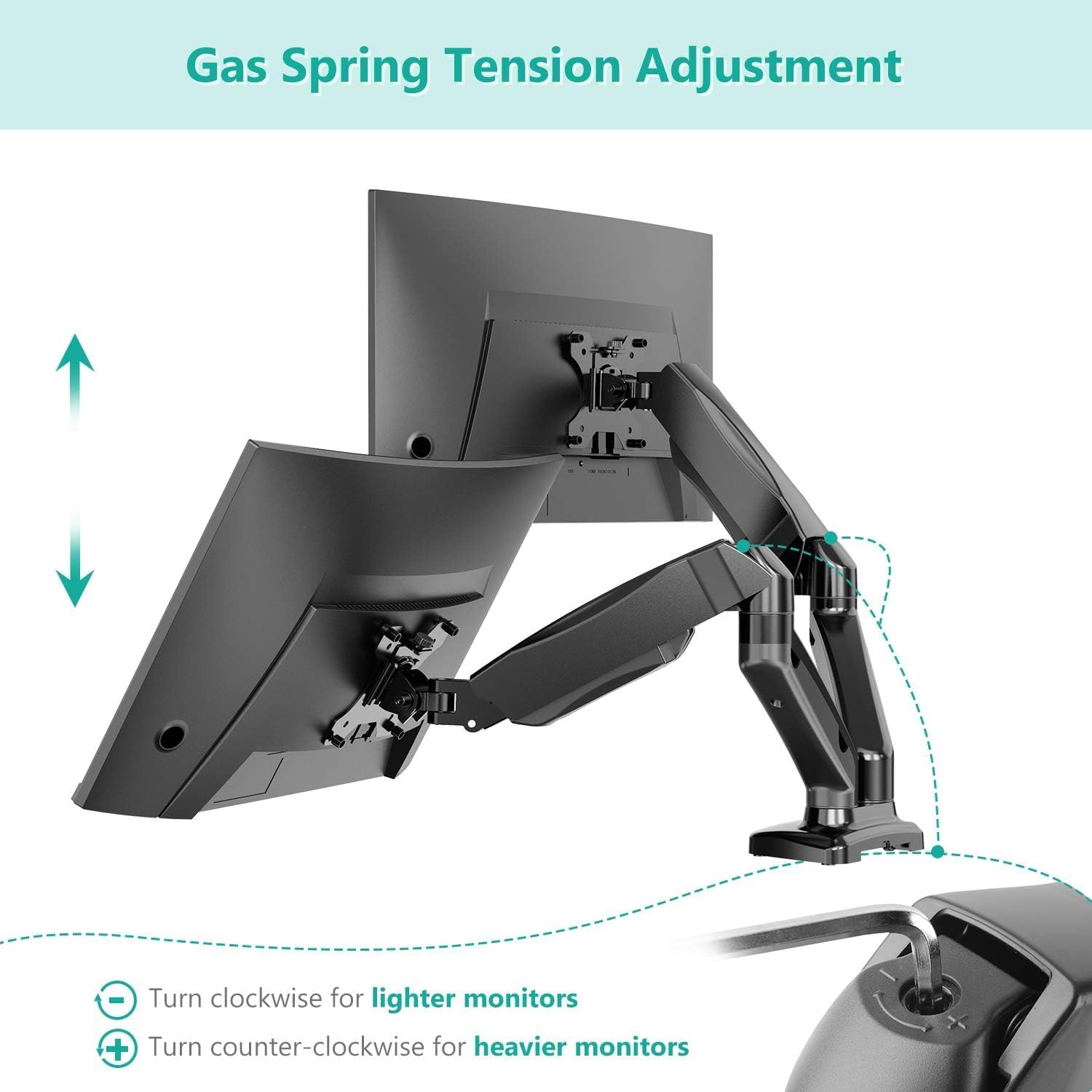
Image: Visual guide for angle adjustments, including swivel (+/-90°), tilt (+75°/-45°), and 360° rotation.
- ടിൽറ്റ്: Adjust the monitor screen vertically from +75° to -45° to reduce glare and optimize viewing.
- സ്വിവൽ: Pivot the monitor horizontally from +90° to -90° to share your screen with others or change viewകോണുകൾ.
- റൊട്ടേഷൻ: ലാൻഡ്സ്കേപ്പ്, പോർട്രെയ്റ്റ് ഓറിയന്റേഷനുകൾക്കിടയിൽ മാറാൻ മോണിറ്റർ 360° തിരിക്കുക.
Height and Extension Adjustment

Image: Diagram illustrating the maximum height (16 inches) and maximum extension (19.6 inches) of the monitor arm.
- ഉയരം: Use the gas spring arm to effortlessly raise or lower your monitors to your desired ergonomic height, up to a maximum of 16 inches.
- വിപുലീകരണം: Extend or retract the arms to bring your monitors closer or push them further away, with a maximum extension of 19.7 inches.
ഗ്യാസ് സ്പ്രിംഗ് ടെൻഷൻ ക്രമീകരണം

Image: Guide on adjusting gas spring tension: turn clockwise for lighter monitors (less tension) and counter-clockwise for heavier monitors (more tension) using the provided hex key.
The gas spring tension needs to be adjusted to match the weight of your monitors for optimal performance. Use the included hex key:
- For Lighter Monitors: Turn the adjustment screw clockwise to decrease tension.
- For Heavier Monitors: Turn the adjustment screw counter-clockwise to increase tension.
Adjust until the monitor stays in place when moved and can be repositioned smoothly with minimal effort.
കേബിൾ മാനേജ്മെൻ്റ്

Image: The monitor arm with yellow cables neatly routed through its integrated cable management system, demonstrating a clean desktop setup.
To maintain a clean and organized workspace, route your monitor and power cables through the designated cable management clips or channels along the underside of the arms. This helps prevent clutter and potential damage to cables.
മെയിൻ്റനൻസ്
- പതിവ് വൃത്തിയാക്കൽ: മൃദുവായ, ഡി ക്ലീനർ ഉപയോഗിച്ച് മൗണ്ട് തുടയ്ക്കുക.amp പൊടിയും അഴുക്കും നീക്കം ചെയ്യാൻ തുണി ഉപയോഗിക്കുക. അബ്രാസീവ് ക്ലീനറുകളോ ലായകങ്ങളോ ഉപയോഗിക്കുന്നത് ഒഴിവാക്കുക.
- കണക്ഷനുകൾ പരിശോധിക്കുക: എല്ലാ സ്ക്രൂകളും കണക്ഷനുകളും ഇറുകിയതും സുരക്ഷിതവുമാണെന്ന് ഉറപ്പാക്കാൻ ഇടയ്ക്കിടെ പരിശോധിക്കുക. ആവശ്യമെങ്കിൽ വീണ്ടും മുറുക്കുക.
- ഗ്യാസ് സ്പ്രിംഗ് ക്രമീകരണം: If your monitor starts to sag or becomes difficult to move, re-adjust the gas spring tension as described in the Operating section.
ട്രബിൾഷൂട്ടിംഗ്
- Problem: Monitor sags or does not stay in position.
- പരിഹാരം: The gas spring tension is likely too low for the monitor's weight. Increase the gas spring tension by turning the adjustment screw counter-clockwise with the hex key until the monitor holds its position firmly.
- Problem: Monitor is difficult to move or adjust.
- പരിഹാരം: The gas spring tension might be too high. Decrease the gas spring tension by turning the adjustment screw clockwise with the hex key. Also, ensure all pivot points are not overly tightened.
- Problem: Mount feels unstable or wobbly.
- പരിഹാരം: C-cl ആണോ എന്ന് പരിശോധിക്കുകamp or grommet base is securely tightened to the desk. Ensure the desk surface is sturdy enough to support the mount and monitors. Verify all arm connections are tight.
- Problem: VESA plate does not fit my monitor.
- പരിഹാരം: Confirm your monitor's VESA pattern (distance between mounting holes) is either 75x75mm or 100x100mm. If it's different, your monitor is not compatible with this mount. Also, ensure you are using the correct screws provided for your monitor's VESA holes.
വാറൻ്റിയും പിന്തുണയും
WALI is committed to providing high-quality solutions for home and office electronic setups. For any product support, technical assistance, or warranty inquiries, please contact WALI customer service. You can typically find contact information on the WALI official webസൈറ്റ് അല്ലെങ്കിൽ നിങ്ങളുടെ വാങ്ങൽ പ്ലാറ്റ്ഫോം വഴി.
WALI has a dedicated product support team available to answer your questions via email within 12 hours, ensuring the best shopping experience.

Image: The WALI brand logo, representing the company's commitment to electronic setup solutions.


