1. ആമുഖം
The D-Link DIR-825M AC1200 MU-MIMO Gigabit Router is a high-performance networking device designed to provide fast and reliable wireless connectivity for your home or small office. Featuring 802.11ac MU-MIMO wireless technology, it delivers enhanced speed, extended range, and improved efficiency for multiple devices simultaneously. This router includes four Gigabit Ethernet LAN ports for high-speed wired connections and a USB 2.0 port for convenient local network sharing. It supports various operating modes, offering flexibility to suit different networking requirements.
2. പാക്കേജ് ഉള്ളടക്കം
നിങ്ങളുടെ പാക്കേജിൽ ഇനിപ്പറയുന്ന ഇനങ്ങൾ അടങ്ങിയിട്ടുണ്ടെന്ന് പരിശോധിക്കുക:
- D-Link DIR-825M AC1200 MU-MIMO Gigabit Router
- പവർ അഡാപ്റ്റർ
- ഇഥർനെറ്റ് കേബിൾ
- ദ്രുത ഇൻസ്റ്റാളേഷൻ ഗൈഡ് (പ്രദേശത്തിനനുസരിച്ച് വ്യത്യാസപ്പെടാം)
If any items are missing or damaged, please contact your local D-Link reseller.
3. ഫിസിക്കൽ ഓവർview
Familiarize yourself with the various components and ports of your D-Link DIR-825M router.

ചിത്രം 3.1: ഫ്രണ്ട് view of the D-Link DIR-825M AC1200 MU-MIMO Gigabit Router, showcasing its four external antennas and the D-Link logo on the top panel.
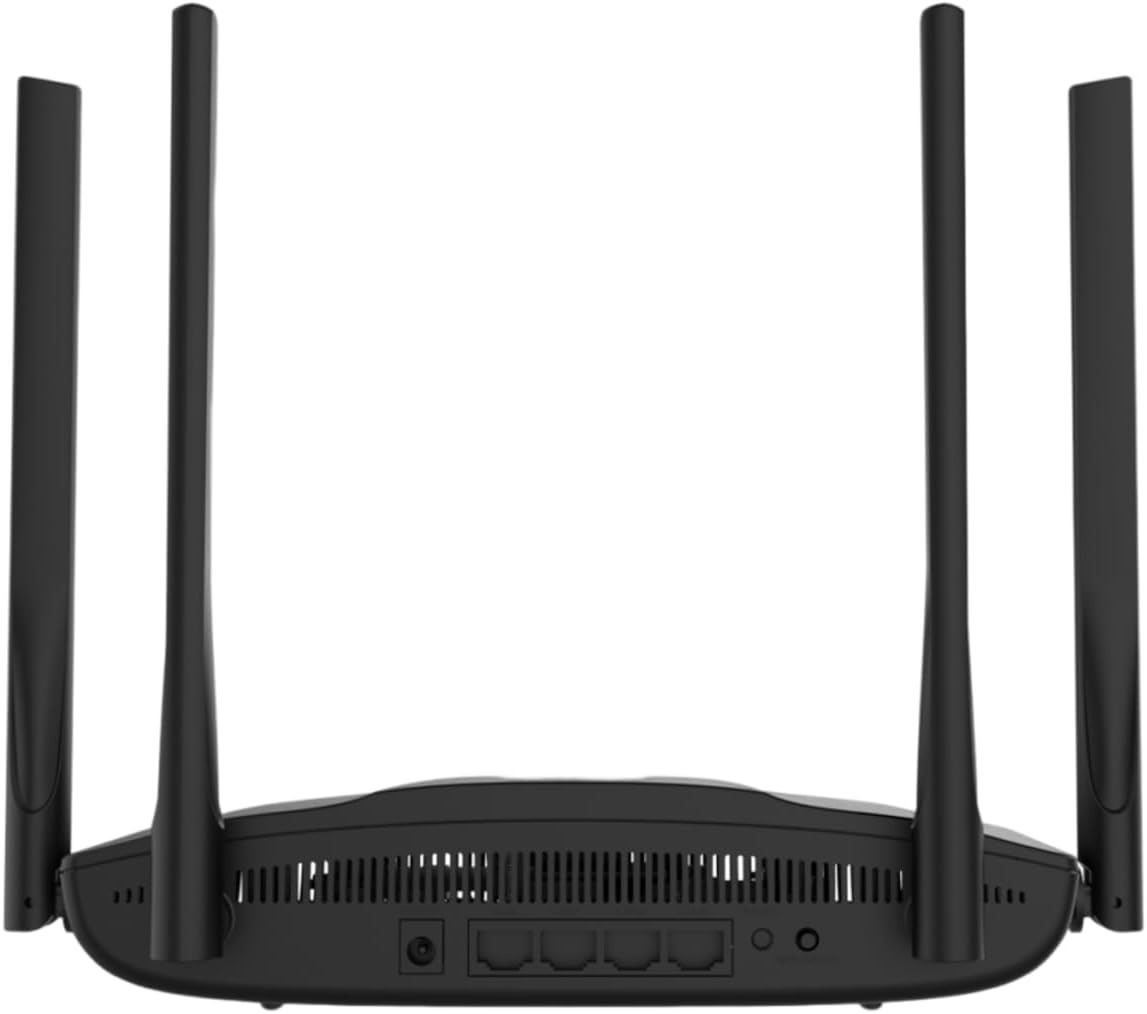
ചിത്രം 3.2: പിൻഭാഗം view of the D-Link DIR-825M router, detailing the power input, WAN port, four Gigabit LAN ports, USB 2.0 port, Reset button, and WPS button.
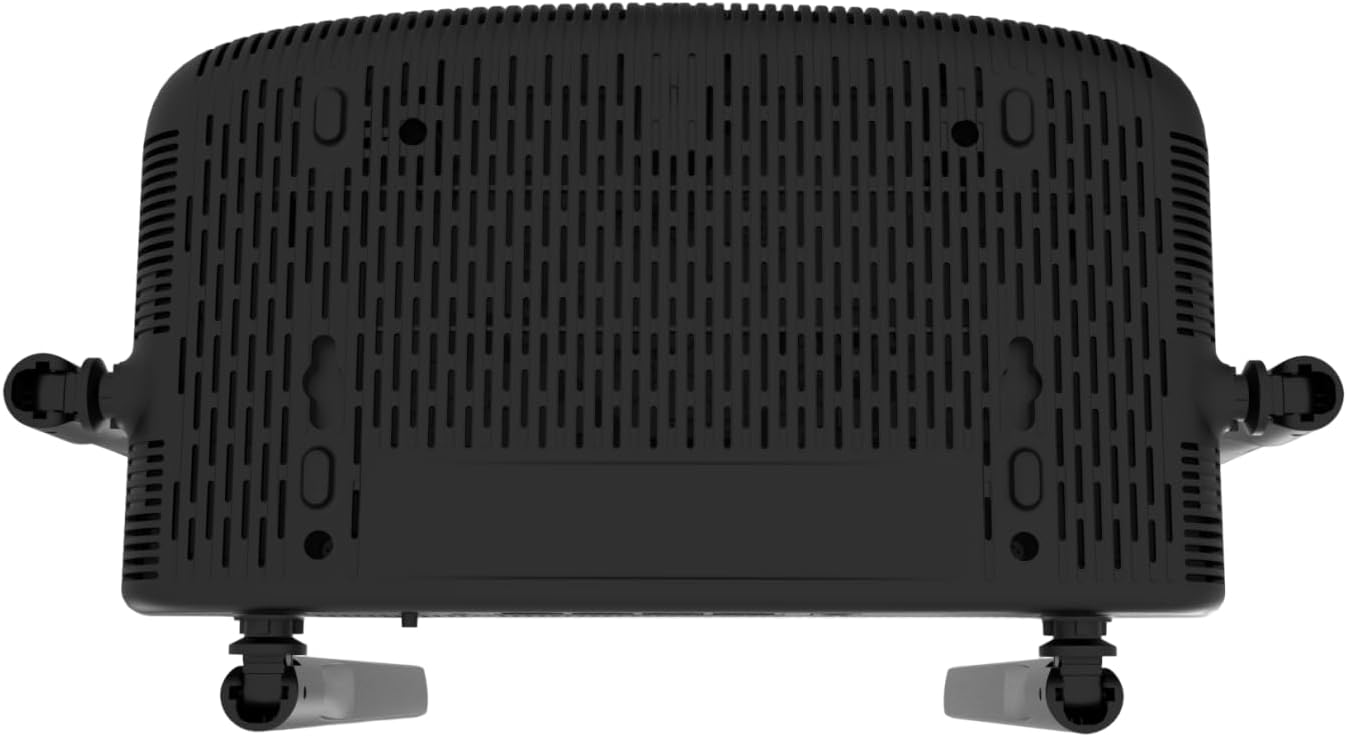
ചിത്രം 3.3: താഴെ view of the D-Link DIR-825M router, illustrating the ventilation grilles for heat dissipation and mounting holes for wall installation.
3.1 ഫ്രണ്ട് പാനൽ സൂചകങ്ങൾ
- പവർ എൽഇഡി: ഉപകരണത്തിൻ്റെ പവർ സ്റ്റാറ്റസ് സൂചിപ്പിക്കുന്നു.
- ഇന്റർനെറ്റ് LED: ഇന്റർനെറ്റ് കണക്ഷന്റെ നില കാണിക്കുന്നു.
- Wi-Fi LEDs (2.4GHz/5GHz): ഓരോ ബാൻഡിനുമുള്ള വയർലെസ് നെറ്റ്വർക്ക് പ്രവർത്തനം സൂചിപ്പിക്കുക.
3.2 പിൻ പാനൽ പോർട്ടുകളും ബട്ടണുകളും
- പവർ കണക്റ്റർ: ഉൾപ്പെടുത്തിയിരിക്കുന്ന പവർ അഡാപ്റ്ററുമായി ബന്ധിപ്പിക്കുന്നു.
- WAN Port (Internet): നിങ്ങളുടെ മോഡം അല്ലെങ്കിൽ ഇന്റർനെറ്റ് സേവന ദാതാവിന്റെ ഉപകരണവുമായി ബന്ധിപ്പിക്കുന്നു.
- LAN പോർട്ടുകൾ (1-4): Connect wired devices such as computers, gaming consoles, or network storage. These are Gigabit Ethernet ports.
- യുഎസ്ബി 2.0 പോർട്ട്: പങ്കിടുന്നതിനായി USB സംഭരണ ഉപകരണങ്ങൾ ബന്ധിപ്പിക്കുന്നതിന് fileനിങ്ങളുടെ നെറ്റ്വർക്കിലുണ്ട്.
- WPS ബട്ടൺ: For quickly connecting WPS-compatible wireless devices.
- റീസെറ്റ് ബട്ടൺ: Used to restore the router to its factory default settings. Press and hold for 10 seconds with a paperclip.
4. സജ്ജീകരണം
Follow these steps for initial setup of your D-Link DIR-825M router.
4.1 ഹാർഡ്വെയർ ഇൻസ്റ്റലേഷൻ
- റൂട്ടർ സ്ഥാപിക്കുക: Place the router in a central location in your home or office, away from obstructions and sources of interference. Adjust the antennas vertically for optimal signal coverage.
- പവർ ബന്ധിപ്പിക്കുക: Connect the provided power adapter to the router's power connector and then plug it into a power outlet. Ensure the Power LED illuminates.
- മോഡമിലേക്ക് കണക്റ്റുചെയ്യുക: Connect an Ethernet cable from your modem's LAN port to the WAN (Internet) port on the DIR-825M router.
- വയർഡ് ഉപകരണങ്ങൾ ബന്ധിപ്പിക്കുക (ഓപ്ഷണൽ): For wired connections, connect an Ethernet cable from your computer or other network devices to any of the LAN ports (1-4) on the router.
4.2 പ്രാരംഭ കോൺഫിഗറേഷൻ
- റൂട്ടറുമായി ബന്ധിപ്പിക്കുക:
- വയർ: Ensure your computer is connected to a LAN port on the router.
- വയർലെസ്: Connect to the default Wi-Fi network (SSID and password are typically printed on a label on the bottom of the router).
- പ്രവേശനം Web ഇൻ്റർഫേസ്: എ തുറക്കുക web ബ്രൗസർ (ഉദാ. ക്രോം, ഫയർഫോക്സ്, എഡ്ജ്) ടൈപ്പ് ചെയ്യുക
http://dlinkrouter.localorhttp://192.168.0.1വിലാസ ബാറിലേക്ക്. എൻ്റർ അമർത്തുക. - ലോഗിൻ: സ്ഥിരസ്ഥിതി ഉപയോക്തൃനാമം നൽകുക (സാധാരണയായി
admin) പാസ്വേഡും (പലപ്പോഴും ശൂന്യമോ അല്ലെങ്കിൽadmin, check the router label). - സജ്ജീകരണ വിസാർഡ് പ്രവർത്തിപ്പിക്കുക: Follow the on-screen instructions of the D-Link Setup Wizard. This wizard will guide you through configuring your internet connection type (e.g., DHCP, PPPoE), setting up your new Wi-Fi network name (SSID) and password, and establishing an administrator password for the router.
- ക്രമീകരണങ്ങൾ സംരക്ഷിക്കുക: After completing the wizard, save your settings and restart the router if prompted.
5 ഓപ്പറേറ്റിംഗ് മോഡുകൾ
The D-Link DIR-825M supports multiple operating modes to adapt to various networking needs.
- റൂട്ടർ മോഡ് (സ്ഥിരസ്ഥിതി): In this mode, the device acts as a primary router, connecting to your modem to provide internet access to all connected wired and wireless devices on your local network. It performs Network Address Translation (NAT) and manages IP addresses.
- ആക്സസ് പോയിന്റ് (AP) മോഡ്: This mode allows the DIR-825M to extend an existing wired network with wireless capabilities. It connects to an existing router via an Ethernet cable and broadcasts a Wi-Fi signal, essentially turning a wired network into a wireless one without performing routing functions.
- റിപ്പീറ്റർ മോഡ്: Also known as Wi-Fi Extender mode, this allows the DIR-825M to wirelessly extend the coverage of an existing Wi-Fi network. It connects to an existing Wi-Fi signal and re-broadcasts it, helping to eliminate Wi-Fi dead zones.
- WISP Repeater Mode: Wireless Internet Service Provider (WISP) Repeater mode enables the router to connect wirelessly to a WISP access point and then share that internet connection with both wired and wireless clients on your local network. This is useful in areas where wired internet access is unavailable.
- വൈഫൈ ക്ലയന്റ് മോഡ്: In this mode, the DIR-825M acts as a wireless adapter for a wired device. It connects wirelessly to an existing Wi-Fi network and provides an Ethernet connection for a single wired device that does not have its own Wi-Fi capability.
You can switch between these modes through the router's web-based management interface, typically found under the 'Operation Mode' or 'System Settings' section.
6. പരിപാലനം
പതിവ് അറ്റകുറ്റപ്പണികൾ നിങ്ങളുടെ റൂട്ടറിന്റെ മികച്ച പ്രകടനവും ദീർഘായുസ്സും ഉറപ്പാക്കുന്നു.
6.1 ഫേംവെയർ അപ്ഡേറ്റുകൾ
D-Link periodically releases firmware updates to improve performance, add new features, and address security vulnerabilities. It is recommended to keep your router's firmware up-to-date.
- ഔദ്യോഗിക ഡി-ലിങ്ക് പിന്തുണ സന്ദർശിക്കുക webനിങ്ങളുടെ പ്രദേശത്തിനായുള്ള സൈറ്റ്.
- ഇതിനായി തിരയുക your model (DIR-825M) and download the latest firmware file.
- Log in to your router's web മാനേജ്മെൻ്റ് ഇൻ്റർഫേസ്.
- Navigate to the 'Tools' or 'Maintenance' section, then 'Firmware Upgrade'.
- ഡൗൺലോഡ് ചെയ്ത ഫേംവെയർ അപ്ലോഡ് ചെയ്യുക file കൂടാതെ സ്ക്രീനിലെ നിർദ്ദേശങ്ങൾ പാലിക്കുക. അപ്ഡേറ്റ് പ്രക്രിയയ്ക്കിടെ റൂട്ടർ ഓഫ് ചെയ്യരുത്.
6.2 ഫാക്ടറി റീസെറ്റ്
A factory reset can resolve persistent configuration issues or be performed before transferring ownership of the device. This will erase all custom settings and restore the router to its original factory defaults.
- With the router powered on, locate the Reset button on the rear panel (refer to Figure 3.2).
- Using a paperclip or a similar pointed object, press and hold the Reset button for approximately 10 seconds.
- Release the button when the Power LED starts blinking or changes color.
- ഫാക്ടറി ഡിഫോൾട്ട് ക്രമീകരണങ്ങൾ ഉപയോഗിച്ച് റൂട്ടർ പുനരാരംഭിക്കും. സെക്ഷൻ 4.2 അനുസരിച്ച് നിങ്ങൾ അത് വീണ്ടും ക്രമീകരിക്കേണ്ടതുണ്ട്.
6.3 വൃത്തിയാക്കൽ
To ensure proper ventilation and prevent overheating, keep the router clean and free from dust. Use a soft, dry cloth to wipe the exterior. Do not use liquid cleaners or aerosols.
7. പ്രശ്നപരിഹാരം
This section provides solutions to common issues you might encounter with your D-Link DIR-825M router.
7.1 ഇന്റർനെറ്റ് കണക്ഷൻ ഇല്ല
- കേബിളുകൾ പരിശോധിക്കുക: എല്ലാ ഇതർനെറ്റ് കേബിളുകളും ശരിയായ പോർട്ടുകളിലേക്ക് (WAN മുതൽ മോഡം വരെ, LAN മുതൽ ഉപകരണങ്ങൾ വരെ) സുരക്ഷിതമായി ബന്ധിപ്പിച്ചിട്ടുണ്ടെന്ന് ഉറപ്പാക്കുക.
- മോഡം നില: Verify that your modem is working correctly and has an active internet connection. Restart your modem if necessary.
- റൂട്ടർ കോൺഫിഗറേഷൻ: റൂട്ടറിലേക്ക് ലോഗിൻ ചെയ്യുക web interface and check your internet connection settings. Ensure the correct connection type (e.g., DHCP, PPPoE) is selected and credentials are correct if required.
- ഉപകരണങ്ങൾ പുനരാരംഭിക്കുക: Power cycle your modem, router, and connected devices in that order.
7.2 Poor Wi-Fi Signal or Coverage
- റൂട്ടർ പ്ലേസ്മെന്റ്: Move the router to a more central location, away from walls, large metal objects, and other electronic devices that may cause interference.
- ആന്റിന ക്രമീകരണം: Adjust the router's antennas to different angles to optimize signal propagation.
- ഇടപെടൽ: Other wireless devices (cordless phones, microwaves, Bluetooth devices) can interfere with Wi-Fi. Try changing the Wi-Fi channel in the router settings.
- തടസ്സങ്ങൾ: Walls, floors, and ceilings can degrade Wi-Fi signals. Consider using Repeater mode or additional access points for larger areas.
7.3 റൂട്ടർ ആക്സസ് ചെയ്യാൻ കഴിയില്ല Web ഇൻ്റർഫേസ്
- IP വിലാസം: നിങ്ങൾ ശരിയായ IP വിലാസമാണ് ഉപയോഗിക്കുന്നതെന്ന് ഉറപ്പാക്കുക (
http://dlinkrouter.localorhttp://192.168.0.1). - കണക്ഷൻ: Verify your device is properly connected to the router, either via Ethernet cable or the router's Wi-Fi network.
- IP ക്രമീകരണങ്ങൾ: നിങ്ങളുടെ കമ്പ്യൂട്ടറിന്റെ നെറ്റ്വർക്ക് അഡാപ്റ്റർ ഒരു IP വിലാസം (DHCP) സ്വയമേവ ലഭിക്കാൻ സജ്ജമാക്കിയിട്ടുണ്ടെന്ന് ഉറപ്പാക്കുക.
- ബ്രൗസർ കാഷെ: നിങ്ങളുടെ web ബ്രൗസറിന്റെ കാഷെയും കുക്കികളും പരിശോധിക്കുക, അല്ലെങ്കിൽ മറ്റൊരു ബ്രൗസർ പരീക്ഷിക്കുക.
- ഫയർവാൾ/ആന്റിവൈറസ്: നിങ്ങളുടെ കമ്പ്യൂട്ടറിലെ ആക്സസ് തടഞ്ഞേക്കാവുന്ന ഏതെങ്കിലും ഫയർവാൾ അല്ലെങ്കിൽ ആന്റിവൈറസ് സോഫ്റ്റ്വെയർ താൽക്കാലികമായി പ്രവർത്തനരഹിതമാക്കുക.
- ഫാക്ടറി പുന et സജ്ജമാക്കുക: If all else fails, perform a factory reset (Section 6.2) and try accessing the interface with default credentials.
8 സ്പെസിഫിക്കേഷനുകൾ
| ബ്രാൻഡ് | ഡി-ലിങ്ക് |
| മോഡൽ | DIR-825M |
| വയർലെസ് സ്റ്റാൻഡേർഡ് | 802.11ac (Wi-Fi 5), 802.11n, 802.11g, 802.11b |
| വയർലെസ് സ്പീഡ് | AC1200 (Up to 300 Mbps on 2.4GHz, 867 Mbps on 5GHz) |
| ഫ്രീക്വൻസി ബാൻഡ് | ഡ്യുവൽ-ബാൻഡ് (2.4 GHz, 5 GHz) |
| ഇഥർനെറ്റ് പോർട്ടുകൾ | 4 x 10/100/1000 Gigabit LAN Ports, 1 x 10/100/1000 Gigabit WAN Port |
| USB പോർട്ട് | 1 x USB 2.0 പോർട്ട് |
| ആൻ്റിനകൾ | 4 ബാഹ്യ ആൻ്റിനകൾ |
| അളവുകൾ (L x W x H) | 19.7 x 14 x 4.4 സെ.മീ |
| ഭാരം | 360 ഗ്രാം |
| ഓപ്പറേറ്റിംഗ് മോഡുകൾ | Router, Access Point, Repeater, WISP Repeater, Wi-Fi Client |
| പവർ ഇൻപുട്ട് | 230 വോൾട്ട് (എസി) |
| അനുയോജ്യമായ ഉപകരണങ്ങൾ | ലാപ്ടോപ്പ്, പേഴ്സണൽ കമ്പ്യൂട്ടർ, സ്മാർട്ട് ടെലിവിഷൻ, ടാബ്ലെറ്റ് |
9 സുരക്ഷാ വിവരങ്ങൾ
നിങ്ങളുടെ ഉപകരണത്തിന്റെ സുരക്ഷിതമായ പ്രവർത്തനം ഉറപ്പാക്കാൻ ദയവായി ഈ സുരക്ഷാ മാർഗ്ഗനിർദ്ദേശങ്ങൾ വായിച്ച് പാലിക്കുക:
- Use only the power adapter supplied with the product. Using an unauthorized power adapter may damage the device and void your warranty.
- Do not expose the device to water, rain, moisture, or extreme temperatures.
- ഉപകരണത്തിന് ചുറ്റും മതിയായ വായുസഞ്ചാരം ഉറപ്പാക്കുക. വെന്റിലേഷൻ ദ്വാരങ്ങളൊന്നും തടയരുത്.
- ഉപകരണം തുറക്കരുത് casing. ഉള്ളിൽ ഉപയോക്തൃ-സേവനയോഗ്യമായ ഭാഗങ്ങളൊന്നുമില്ല.
- ഉപകരണം നേരിട്ടുള്ള സൂര്യപ്രകാശം, താപ സ്രോതസ്സുകൾ, കത്തുന്ന വസ്തുക്കൾ എന്നിവയിൽ നിന്ന് അകറ്റി നിർത്തുക.
- ഈ ഉപകരണം ഇൻഡോർ ഉപയോഗത്തിന് മാത്രമുള്ളതാണ്.
- കുട്ടികൾക്ക് ലഭ്യമാകാതെ സൂക്ഷിക്കുക.
10. വാറൻ്റിയും പിന്തുണയും
For detailed warranty information, please refer to the warranty card included with your D-Link DIR-825M router or visit the official D-Link webനിങ്ങളുടെ പ്രദേശത്തിനായുള്ള സൈറ്റ്. വാറന്റി നിബന്ധനകളും വ്യവസ്ഥകളും രാജ്യത്തിനനുസരിച്ച് വ്യത്യാസപ്പെടാം.
For technical support, product registration, and access to the latest drivers and firmware, please visit the D-Link support portal:
- ഡി-ലിങ്ക് ഗ്ലോബൽ സപ്പോർട്ട്: https://www.dlink.com/support
You may also find contact information for local D-Link customer service on their webസൈറ്റ്.


