1. ഉൽപ്പന്നം കഴിഞ്ഞുview
The Yealink WH66 Wireless DECT Headset is a Teams-certified, single-ear (mono) headset designed for office use, offering versatile connectivity and advanced audio features. It connects to PCs, desk VoIP phones via USB, and smartphones via Bluetooth. Key features include a 4.0-inch touch screen, a full-duplex speakerphone, and a noise-canceling dual microphone with Acoustic Shield Technology for clear communication.

Image: The Yealink WH66 Wireless DECT Headset with its workstation base, featuring a touch screen and a mono headset.
പ്രധാന സവിശേഷതകൾ:
- Teams Certified: Seamless integration with Microsoft Teams for call control, muting, and answering calls directly from the headset, base touch screen, or computer.
- 3-Way Connectivity: Connects to PC, desk VoIP phones (via USB), and smartphones (via Bluetooth) for flexible call management.
- Crystal Speakerphone: Integrated full-duplex speakerphone on the base for hands-free communication, ideal for home office environments.
- Comfortable & Extended Range: Lightweight design (80g) with an adjustable headband and soft ear cushion for all-day comfort. Offers a roaming range of up to 525 ft.
- നോയ്സ്-റദ്ദാക്കൽ മൈക്രോഫോൺ: Dual-mic setup with Acoustic Shield Technology effectively blocks background noise, ensuring clear voice transmission.
2. പാക്കേജ് ഉള്ളടക്കം
നിങ്ങളുടെ പാക്കേജിൽ എല്ലാ ഇനങ്ങളും ഉണ്ടെന്ന് ഉറപ്പാക്കുക:
- Yealink WH66 Wireless DECT Headset (Mono)
- Headset Base with 4.0-inch Touch Screen
- USB കേബിൾ
- ഉപയോക്തൃ മാനുവൽ
3. സജ്ജീകരണ ഗൈഡ്
3.1 ഒരു പിസിയിലേക്ക് ബന്ധിപ്പിക്കുന്നു
To connect your Yealink WH66 headset base to a PC:
- Locate the USB port on the headset base labeled "PC".
- Connect one end of the provided USB cable to the "PC" port on the base.
- നിങ്ങളുടെ കമ്പ്യൂട്ടറിൽ ലഭ്യമായ USB പോർട്ടിലേക്ക് USB കേബിളിൻ്റെ മറ്റേ അറ്റം ബന്ധിപ്പിക്കുക.
- The PC button LED on the base will illuminate, indicating a successful connection.
- Ensure the headset is set as the default audio device in your computer's sound settings and your preferred softphone application (e.g., Microsoft Teams).

Image: The Yealink WH66 headset base connected to a laptop via USB cable.
3.2 Connecting to a Desk Phone
To connect your Yealink WH66 headset base to a desk VoIP phone:
- Locate the USB port on the headset base labeled with a phone icon.
- Connect one end of the provided USB cable to this phone port on the base.
- Connect the other end of the USB cable to an available USB port on your desk phone.
- Alternatively, for certain Yealink desk phones (e.g., T3 series), an EHS35 adapter may be required for remote call control. Connect the EHS35 adapter to the headset port on the desk phone and then to the base.
- The Phone button LED on the base will illuminate, indicating a successful connection.
- Ensure the desk phone's settings are configured to use the headset for ringing and audio.
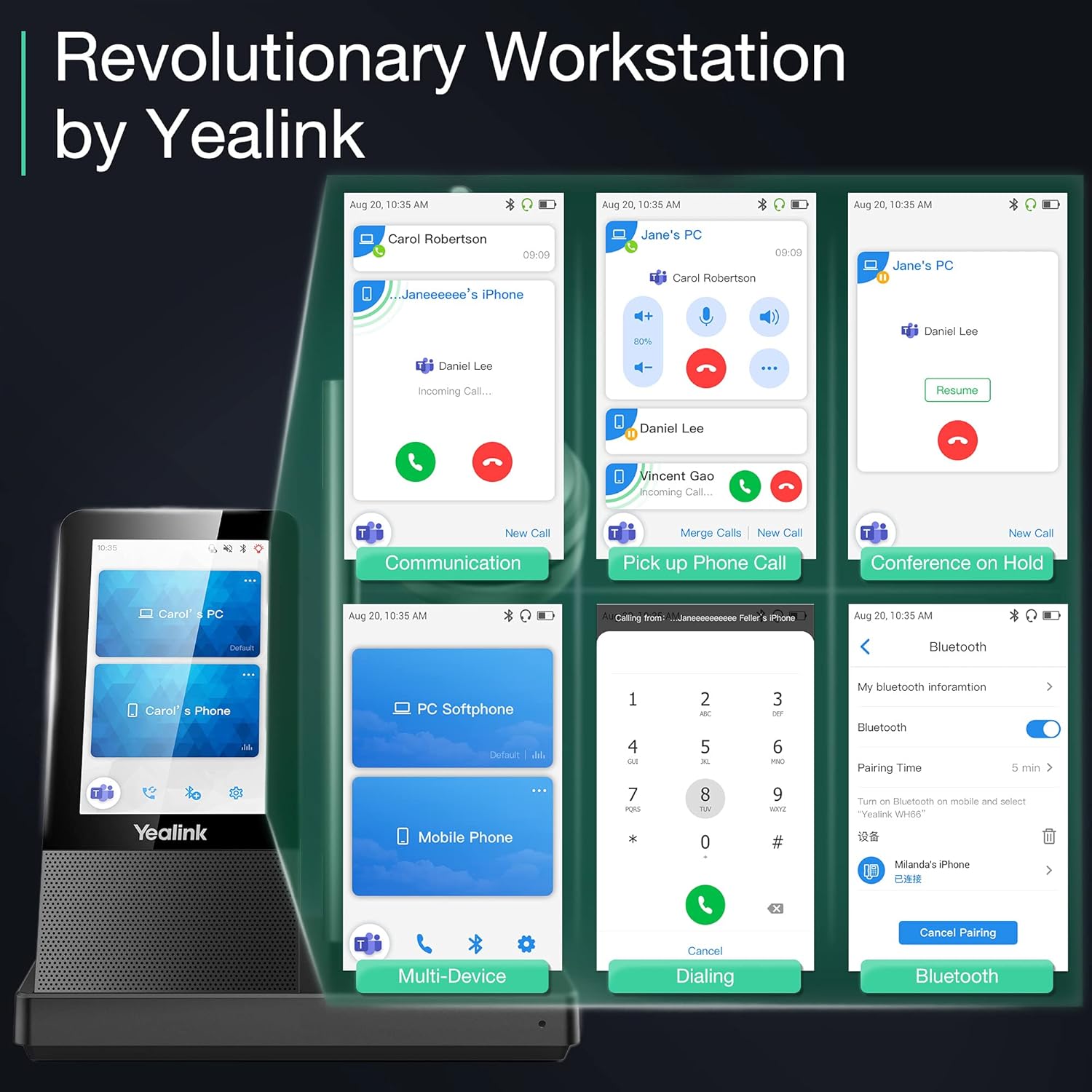
Image: The Yealink WH66 headset base connected to a desk phone.
3.3 ഒരു മൊബൈൽ ഉപകരണവുമായി ജോടിയാക്കൽ
The headset base supports Bluetooth connectivity for mobile devices:
- On the headset base's touch screen, navigate to the Bluetooth settings.
- Ensure Bluetooth is enabled on the headset base. You may also modify the device name for easy identification.
- നിങ്ങളുടെ മൊബൈൽ ഉപകരണത്തിൽ, ബ്ലൂടൂത്ത് പ്രവർത്തനക്ഷമമാക്കി ലഭ്യമായ ഉപകരണങ്ങൾക്കായി തിരയുക.
- Select the Yealink WH66 from the list of available devices to pair.
- Once paired, a mobile phone card will appear on the headset base's touch screen, indicating successful connection.

Image: The Yealink WH66 headset base with a mobile phone placed on an optional wireless charger.
3.4 വസ്ത്രധാരണ ശൈലികൾ
The WH66 headset is designed for comfort and can be adjusted to fit your preference:
- Adjust the headband to ensure a snug yet comfortable fit over your head.
- Position the microphone boom arm so that it points towards your mouth, approximately 0.5 inches away, for optimal voice pickup.
- The microphone boom is bendable, allowing you to fine-tune its position.

Image: A woman wearing the Yealink WH66 headset, demonstrating proper microphone positioning.
4. പ്രവർത്തന നിർദ്ദേശങ്ങൾ
4.1 കോൾ മാനേജ്മെന്റ്
The WH66 offers multiple ways to manage your calls:
- Answering/Rejecting Calls: You can answer or reject incoming calls directly from the headset's button, the base's touch screen, or your connected PC/desk phone interface.
- നിശബ്ദമാക്കൽ: Flip the microphone boom up to automatically mute, or use the dedicated mute button on the headset or the touch screen.
- Multi-way Calls: Manage multiple calls simultaneously, including answering new calls while holding current ones, or merging calls for conferencing.
- വീണ്ടും ഡയൽ ചെയ്യുന്നു: Quickly redial the last number from the touch screen or headset.
4.2 Touch Screen Operations
The 4.0-inch touch screen on the base provides intuitive control over your headset and calls:
- ഡയൽ പാഡ്: Use the on-screen dial pad to make calls directly.
- കോൾ നിയന്ത്രണം: Answer, end, hold, mute, and switch calls with a tap.
- ക്രമീകരണങ്ങൾ: Access basic and advanced settings to customize your headset experience, including wireless range, voice announcements, and auto-answer features.
- ഉപകരണ മാനേജ്മെൻ്റ്: View connected devices (PC, mobile, desk phone) and switch between them.

ചിത്രം: ഒരു ക്ലോസ്-അപ്പ് view of the Yealink WH66 headset base's touch screen interface.
4.3 LED സൂചകങ്ങൾ
The headset and base feature LED indicators to communicate status:
- റിംഗ് ചെയ്യുന്നു: എൽഇഡി ചുവപ്പ് മിന്നുന്നു.
- ഒരു കോളിൽ: Busylight (if connected) glows red.
- ബാറ്ററി നില: Red flashing LED for low battery (0-19%), green flashing for charging (20-100%), solid green for fully charged.
- Teams Connection: LED glows purple when connected to Teams. Flashes purple for missed calls/voice messages.
- പരിധിക്ക് പുറത്ത്: LED ഓറഞ്ച് നിറത്തിൽ മിന്നുന്നു.
5. പരിപാലനം
5.1 Replacing Ear Cushions
To maintain hygiene and comfort, ear cushions can be replaced:
- Gently pull off the old ear cushion from the headset.
- Align the new ear cushion with the headset and press firmly to secure it.
5.2 ഫേംവെയർ അപ്ഡേറ്റുകൾ
Keep your headset updated for optimal performance and new features:
- Download the Yealink USB Connect client from the official Yealink support webസൈറ്റ്.
- Connect your headset base to your PC via USB.
- Launch the Yealink USB Connect client. It will detect your device and show its current firmware version.
- You can check for updates automatically or manually upload firmware files downloaded from the Yealink support site.
- The headset will automatically update firmware when docked in the base. The LED will flash red and green alternatively during the update process.
6. പ്രശ്നപരിഹാരം
If you encounter issues with your Yealink WH66 headset, consider the following general troubleshooting steps:
- No Audio/Microphone Issues: Ensure the headset is selected as the default audio device in your computer's sound settings and softphone application. Check all cable connections.
- ബ്ലൂടൂത്ത് ജോടിയാക്കൽ പ്രശ്നങ്ങൾ: Ensure Bluetooth is enabled on both the headset base and your mobile device. Try unpairing and re-pairing the device.
- പരിമിത ശ്രേണി: Ensure there are no major obstructions (e.g., thick walls, metal objects) between the headset and the base. Avoid interference from other wireless devices.
- Call Control Not Working: Verify that the headset is properly integrated with your softphone (e.g., Teams certified). Check for firmware updates.
- ഹെഡ്സെറ്റ് ചാർജ് ചെയ്യുന്നില്ല: Ensure the headset is correctly docked in the base and the base is powered. Check the charging contacts.
For more detailed troubleshooting guides and FAQs, please visit the official Yealink support webസൈറ്റ്.
7. ഉൽപ്പന്ന സവിശേഷതകൾ
| ഫീച്ചർ | സ്പെസിഫിക്കേഷൻ |
|---|---|
| മോഡലിൻ്റെ പേര് | Yealink WH66 Mono Teams |
| കണക്റ്റിവിറ്റി ടെക്നോളജി | DECT Wireless & Bluetooth |
| വയർലെസ് കമ്മ്യൂണിക്കേഷൻ ടെക്നോളജി | ബ്ലൂടൂത്ത് |
| ഹെഡ്ഫോണുകൾ ജാക്ക് | USB |
| ഇനത്തിൻ്റെ ഭാരം | 1.05 പൗണ്ട് (478 ഗ്രാം) |
| ഉൽപ്പന്ന അളവുകൾ | 5.91 x 7.09 x 3.94 ഇഞ്ച് |
| ബാറ്ററി ലൈഫ് | 8 Hours (Talktime: 13H) |
| Roaming Range | 525 അടി വരെ |
| ശബ്ദ നിയന്ത്രണം | സജീവ നോയ്സ് റദ്ദാക്കൽ |
| നിയന്ത്രണ രീതി | സ്പർശിക്കുക |
| പ്രത്യേക ഫീച്ചർ | ഭാരം കുറഞ്ഞ |
8. വാറൻ്റിയും പിന്തുണയും
Your Yealink WH66 Wireless DECT Headset comes with a manufacturer's warranty. For warranty claims, technical support, or to find answers to frequently asked questions, please refer to the official Yealink support resources.
- ഓൺലൈൻ പിന്തുണ: സന്ദർശിക്കുക യെലിങ്ക് പിന്തുണ Webസൈറ്റ് for knowledge base articles, FAQs, and troubleshooting guides.
- ഫേംവെയർ അപ്ഡേറ്റുകൾ: Regularly check the support website for the latest firmware updates to ensure optimal performance and access to new features.
Video: Frequently Asked Questions on Yealink WH series headsets, provided by Yealink Direct Store.


