ആമുഖം
Thank you for choosing the Opal Selfie Stick OP-Sel-BT-01. This manual provides essential information for the safe and effective use of your device. Please read it thoroughly before operation and retain it for future reference.
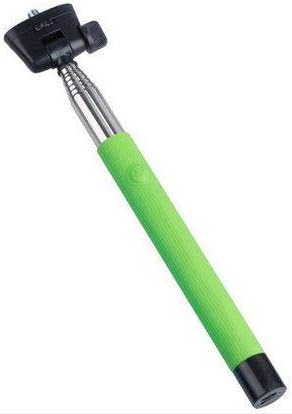
ചിത്രം 1: The Opal Selfie Stick OP-Sel-BT-01 in green, showing its extendable arm, phone holder, and comfortable grip.
ഉൽപ്പന്ന സവിശേഷതകൾ
- നിറം: പച്ച
- പ്രധാന മെറ്റീരിയൽ: ഉരുക്ക്
- പരമാവധി ലോഡ് കപ്പാസിറ്റി: 500 ഗ്രാം
- കണക്റ്റിവിറ്റി: വയർലെസ് (ബ്ലൂടൂത്ത്)
- അനുയോജ്യമായ സിസ്റ്റങ്ങൾ: Android 3.0-ഉം അതിനുമുകളിലും, iOS 4.0-ഉം അതിനുമുകളിലും
സജ്ജമാക്കുക
- Unfold the Selfie Stick: Gently pull the phone holder section upwards to extend the stick.
- Adjust Phone Holder: ഫോൺ cl തുറക്കുകamp and securely place your smartphone within it. Ensure the phone is centered and stable. The clamp is designed to hold various phone sizes.
- പവർ ഓൺ: Locate the power button (if applicable, usually on the handle) and press it to turn on the selfie stick. An indicator light may illuminate.
പ്രവർത്തന നിർദ്ദേശങ്ങൾ
ബ്ലൂടൂത്ത് ജോടിയാക്കൽ
- Ensure the selfie stick is powered on and in pairing mode (indicator light may flash rapidly).
- നിങ്ങളുടെ സ്മാർട്ട്ഫോണിൽ, ഇതിലേക്ക് പോകുക ക്രമീകരണങ്ങൾ > ബ്ലൂടൂത്ത്.
- ബ്ലൂടൂത്ത് ഓണാക്കി ലഭ്യമായ ഉപകരണങ്ങൾക്കായി തിരയുക.
- Select "Opal OP-Sel-BT-01" or a similar name from the list of devices.
- Once paired, the indicator light on the selfie stick may turn solid or turn off, indicating a successful connection.
ഫോട്ടോ/വീഡിയോ എടുക്കൽ
- നിങ്ങളുടെ സ്മാർട്ട്ഫോണിന്റെ ക്യാമറ ആപ്ലിക്കേഷൻ തുറക്കുക.
- സെൽഫി സ്റ്റിക്ക് നിങ്ങൾക്ക് ആവശ്യമുള്ള നീളത്തിലേക്ക് നീട്ടുക.
- ആവശ്യമുള്ള ഷോട്ടിനായി നിങ്ങളുടെ ഫോൺ സ്ഥാപിക്കുക.
- Press the shutter button on the selfie stick handle to capture a photo or start/stop video recording.
മെയിൻ്റനൻസ്
- വൃത്തിയാക്കൽ: Wipe the selfie stick with a soft, dry cloth. Do not use abrasive cleaners or solvents.
- സംഭരണം: Store the device in a cool, dry place away from direct sunlight and extreme temperatures. Retract the stick fully before storage.
- ബാറ്ററി കെയർ: If the selfie stick has a rechargeable battery, ensure it is charged periodically even when not in use to maintain battery health.
ട്രബിൾഷൂട്ടിംഗ്
| പ്രശ്നം | സാധ്യമായ കാരണം | പരിഹാരം |
|---|---|---|
| ഫോണുമായി ജോടിയാക്കാൻ കഴിയില്ല | Selfie stick not in pairing mode; Bluetooth off on phone; battery low. | Ensure stick is on and in pairing mode. Turn phone's Bluetooth off/on. Charge the selfie stick. |
| Shutter button not working | Not paired; camera app settings. | Verify successful Bluetooth pairing. Check camera app settings for volume button shutter control. |
| Phone not stable in clamp | Phone not centered; clamp not fully secured. | Re-position phone to be centered. Ensure clamp is firmly gripping the phone. |
സ്പെസിഫിക്കേഷനുകൾ
- മോഡൽ: OP-Sel-BT-01
- ബ്രാൻഡ്: ഓപാൽ
- നിറം: പച്ച
- പ്രധാന മെറ്റീരിയൽ: ഉരുക്ക്
- പരമാവധി ലോഡ് കപ്പാസിറ്റി: 500 ഗ്രാം
- കണക്റ്റിവിറ്റി: വയർലെസ് (ബ്ലൂടൂത്ത്)
- പിന്തുണയ്ക്കുന്ന ഓപ്പറേറ്റിംഗ് സിസ്റ്റങ്ങൾ: Android 3.0+, iOS 4.0+
- ASIN: B091DBB122
- ആദ്യം ലഭ്യമായ തീയതി: 30 മാർച്ച് 2021
വാറൻ്റിയും പിന്തുണയും
For information regarding warranty coverage or technical support, please refer to the documentation included with your purchase or visit the official Opal webസൈറ്റ്. പ്രദേശത്തെയും റീട്ടെയിലറെയും ആശ്രയിച്ച് നിർദ്ദിഷ്ട വാറന്റി നിബന്ധനകൾ വ്യത്യാസപ്പെടാം.
സുരക്ഷാ വിവരങ്ങൾ
- ഉയർന്ന താപനില, ഈർപ്പം, നേരിട്ടുള്ള സൂര്യപ്രകാശം എന്നിവയ്ക്ക് ഉപകരണം ദീർഘനേരം വിധേയമാക്കരുത്.
- കുട്ടികൾക്ക് ലഭ്യമാകാതെ സൂക്ഷിക്കുക.
- ഉപകരണം വേർപെടുത്താനോ പരിഷ്ക്കരിക്കാനോ ശ്രമിക്കരുത്. ഇത് വാറന്റി അസാധുവാക്കുകയും കേടുപാടുകൾ വരുത്തുകയും ചെയ്തേക്കാം.
- Ensure your phone is securely fastened in the clamp before extending the stick.


