1. ആമുഖം
This manual provides instructions for the installation, configuration, and operation of the Fortinet FortiAP U231F. The FortiAP U231F is an enterprise-class Wi-Fi 6 (802.11ax) indoor access point designed for high-performance wireless connectivity. It features three radios, OFDMA support, and dual 1 Gbps Ethernet ports with Power over Ethernet (PoE) diversity.
For optimal performance and to ensure safe operation, please read this manual thoroughly before using the device and retain it for future reference.
2. പാക്കേജ് ഉള്ളടക്കം
Verify that all items are present and in good condition. If any items are missing or damaged, contact your vendor.
- FortiAP U231F Access Point
- Mounting Bracket (typically included for installation)
- Quick Start Guide (typically included)
The product includes a "Band" component, which refers to its tri-band capability.
3. ഫിസിക്കൽ ഓവർview
The FortiAP U231F features a compact design with indicator LEDs and various ports for connectivity.
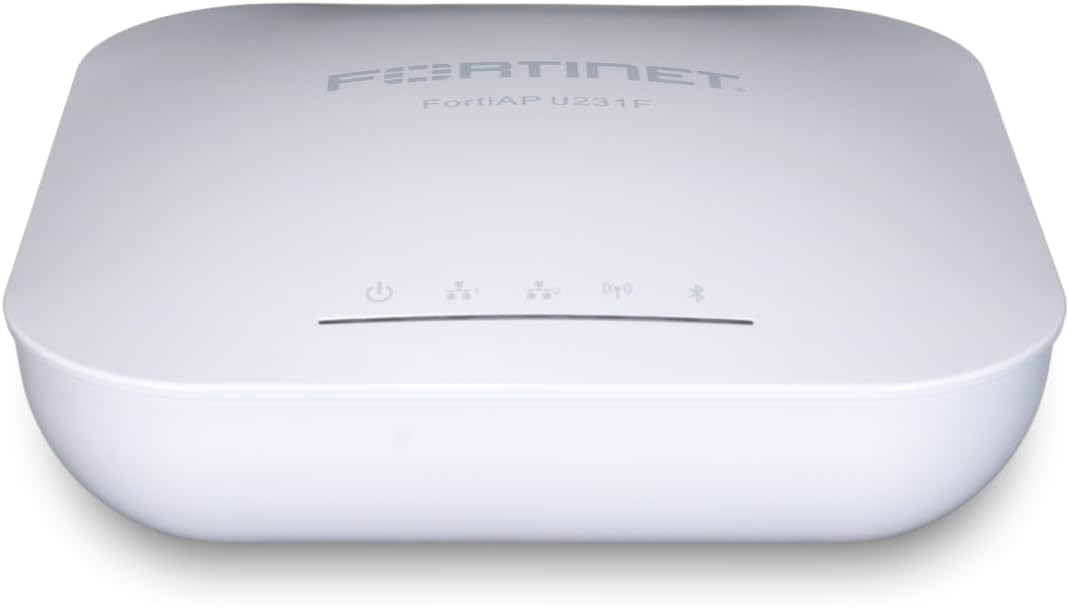
ചിത്രം 3.1: മുകളിൽ view of the FortiAP U231F showing the Fortinet logo and indicator LEDs.
This image displays the top surface of the FortiAP U231F, highlighting the Fortinet branding and the row of status indicator lights. These LEDs provide visual feedback on the device's operational status, including power, Wi-Fi activity, and network connectivity.

ചിത്രം 3.2: FortiAP U231F highlighting key Wi-Fi 6 features.
This image shows the FortiAP U231F alongside icons representing its key features: 802.11ax Wi-Fi 6, 4x4 MU-MIMO, OFDMA, and Enhanced Target Wake Time. These features contribute to improved wireless performance, efficiency, and battery life for connected devices.
ചിത്രം 3.3: പിൻഭാഗം view of the FortiAP U231F displaying connectivity ports.
ഈ ചിത്രം വിശദമായ ഒരു വിവരണം നൽകുന്നു view of the rear panel of the FortiAP U231F. Visible ports include LAN1/PoE, LAN2, a DC power input, a USB port, and a Console port. The LAN1/PoE port supports Power over Ethernet for simplified installation.
LED സൂചകങ്ങൾ
The FortiAP U231F includes several LED indicators to provide status information:
- പവർ എൽഇഡി: പവർ സ്റ്റാറ്റസ് സൂചിപ്പിക്കുന്നു.
- Wi-Fi LED: വയർലെസ് പ്രവർത്തനം സൂചിപ്പിക്കുന്നു.
- നെറ്റ്വർക്ക് LED: Indicates network connectivity status.
- ബ്ലൂടൂത്ത് LED: Indicates Bluetooth Low Energy (BLE) activity.
4. ഇൻസ്റ്റലേഷനും സജ്ജീകരണവും
This section outlines the steps for physically installing and initially setting up your FortiAP U231F.
4.1 ആക്സസ് പോയിന്റ് മൌണ്ട് ചെയ്യുന്നു
The FortiAP U231F can be mounted on a wall or ceiling. Use the provided mounting bracket and hardware. Ensure the mounting location is central to the desired coverage area and away from obstructions or sources of interference.
- Secure the mounting bracket to the desired surface using appropriate screws.
- Align the FortiAP U231F with the mounting bracket and slide it into place until it clicks securely.
4.2 ഉപകരണം പവർ ചെയ്യുന്നു
The FortiAP U231F supports Power over Ethernet (PoE) or can be powered via a DC power adapter (sold separately).
- PoE: Connect an Ethernet cable from a PoE-enabled switch or injector to the LAN1/PoE port on the FortiAP.
- ഡിസി പവർ: Connect a compatible DC power adapter to the power input port on the FortiAP, then plug the adapter into a power outlet.
Upon successful power-up, the Power LED will illuminate.
4.3 നെറ്റ്വർക്ക് കണക്ഷൻ
Connect the FortiAP U231F to your network infrastructure.
- Connect an Ethernet cable from your network switch or router to either the LAN1/PoE or LAN2 port on the FortiAP.
- If using PoE, ensure the LAN1/PoE port is used for both power and data.
5. Initial Configuration and Operation
The FortiAP U231F is typically managed by a FortiGate firewall or FortiManager. Refer to the FortiGate or FortiManager documentation for detailed configuration steps.
5.1 Management Modes
The FortiAP U231F supports various management modes:
- ടണൽ മോഡ്: All wireless traffic is encapsulated and sent to the FortiGate.
- ബ്രിഡ്ജ് മോഡ്: Wireless traffic is bridged directly to the local network segment.
- മെഷ് മോഡ്: Allows the AP to connect wirelessly to other APs to extend network coverage.
5.2 വയർലെസ് നെറ്റ്വർക്ക് കോൺഫിഗറേഷൻ
Configure SSIDs (Service Set Identifiers), security settings (WPA2/WPA3), and other wireless parameters through your FortiGate or FortiManager interface. The FortiAP U231F supports tri-band operation, allowing for flexible deployment of 2.4 GHz and dual 5 GHz networks.
The integrated BLE radio can be utilized for beaconing and location-based applications, configured via the management interface.
6. പരിപാലനം
Regular maintenance ensures the longevity and optimal performance of your FortiAP U231F.
6.1 ഫേംവെയർ അപ്ഡേറ്റുകൾ
Keep the FortiAP firmware updated to the latest version. Firmware updates often include performance enhancements, security patches, and new features. Updates are typically managed through the connected FortiGate or FortiManager.
6.2 വൃത്തിയാക്കൽ
Periodically clean the exterior of the access point with a soft, dry cloth. Do not use liquid or aerosol cleaners, as they may damage the device.
6.3 പരിസ്ഥിതി പരിഗണനകൾ
Ensure the operating environment remains within specified temperature and humidity ranges to prevent damage and ensure stable operation.
7. പ്രശ്നപരിഹാരം
This section provides solutions to common issues you might encounter with your FortiAP U231F.
7.1 വൈദ്യുതിയില്ല
- പവർ സ്രോതസ്സ് പരിശോധിക്കുക: Ensure the power adapter is securely plugged into the device and a working electrical outlet, or that the PoE switch/injector is providing power to the Ethernet cable connected to LAN1/PoE.
- കേബിളുകൾ പരിശോധിക്കുക: Ensure all power and Ethernet cables are properly connected.
7.2 നെറ്റ്വർക്ക് കണക്റ്റിവിറ്റി ഇല്ല
- Check Ethernet Connection: Verify the Ethernet cable is securely connected to the FortiAP's LAN port and the network switch/router.
- Verify Network Configuration: Ensure the FortiAP is correctly configured on your FortiGate or FortiManager, and that it has obtained an IP address.
- ഫയർവാൾ നിയമങ്ങൾ: Check if any firewall rules are blocking communication between the FortiAP and the management device or network resources.
7.3 മോശം വയർലെസ് പ്രകടനം
- സ്ഥാനം: Ensure the AP is mounted in an optimal location, free from physical obstructions and sources of interference (e.g., microwaves, cordless phones).
- ചാനൽ ഇടപെടൽ: Use a Wi-Fi analyzer to identify and select less congested wireless channels.
- ഫേംവെയർ: Ensure the FortiAP has the latest firmware installed.
- ക്ലയന്റ് ഉപകരണങ്ങൾ: Verify that client devices support Wi-Fi 6 (802.11ax) for optimal performance.
8 സ്പെസിഫിക്കേഷനുകൾ
Detailed technical specifications for the Fortinet FortiAP U231F.

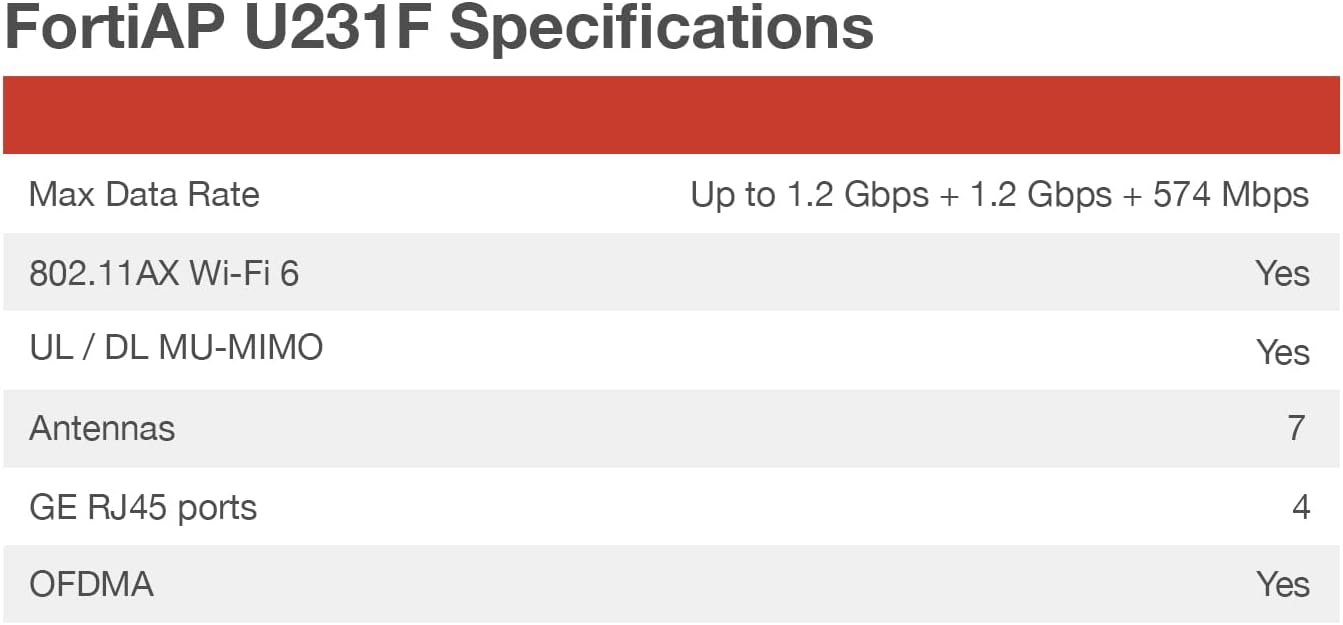
ചിത്രം 8.1: Visual representation of FortiAP U231F key specifications.
This image presents a table summarizing the core specifications of the FortiAP U231F, including Max Data Rate, Wi-Fi standard, MU-MIMO support, number of antennas, GE RJ45 ports, and OFDMA support. This provides a quick overview ഉപകരണത്തിന്റെ കഴിവുകളെ കുറിച്ച്.
| ഫീച്ചർ | വിശദാംശങ്ങൾ |
|---|---|
| മോഡലിൻ്റെ പേര് | FortiAP U231F |
| വയർലെസ് കമ്മ്യൂണിക്കേഷൻ സ്റ്റാൻഡേർഡ് | 802.11ax (Wi-Fi 6) |
| ഫ്രീക്വൻസി ബാൻഡ് ക്ലാസ് | ട്രൈ-ബാൻഡ് (2.4 GHz, 5 GHz, 5 GHz) |
| പരമാവധി ഡാറ്റ നിരക്ക് | Up to 1.2 Gbps + 1.2 Gbps + 574 Mbps (Aggregate) |
| ആൻ്റിനകൾ | Internal, 7 total |
| GE RJ45 Ports | 2 (with PoE diversity on LAN1/PoE) |
| OFDMA | അതെ |
| MU-MIMO | Yes (UL / DL MU-MIMO) |
| പ്രത്യേക ഫീച്ചർ | Access Point Mode, Integrated BLE radio |
| കണക്റ്റിവിറ്റി ടെക്നോളജി | യുഎസ്ബി, വൈ-ഫൈ, ഇതർനെറ്റ് |
| അനുയോജ്യമായ ഉപകരണങ്ങൾ | ലാപ്ടോപ്പ്, പേഴ്സണൽ കമ്പ്യൂട്ടർ, സ്മാർട്ട്ഫോൺ, ടാബ്ലെറ്റ് |
| പാക്കേജ് അളവുകൾ | 7 x 7 x 2 ഇഞ്ച് |
| ഇനത്തിൻ്റെ ഭാരം | 1.5 പൗണ്ട് |
| നിർമ്മാതാവ് | ഫോർട്ടിനെറ്റ് |
9 സുരക്ഷാ വിവരങ്ങൾ
Observe the following safety precautions to prevent damage to the device and ensure personal safety.
- ഉപകരണം വെള്ളത്തിലോ അമിതമായ ഈർപ്പത്തിലോ തുറന്നുകാട്ടരുത്.
- ഉപകരണം തുറക്കുകയോ നന്നാക്കാൻ ശ്രമിക്കുകയോ ചെയ്യരുത്. എല്ലാ സേവനങ്ങളും യോഗ്യതയുള്ള ഉദ്യോഗസ്ഥരെ ഏൽപ്പിക്കുക.
- Use only the power adapter supplied or approved by Fortinet, or a compliant PoE source.
- അമിതമായി ചൂടാക്കുന്നത് തടയാൻ ഉപകരണത്തിന് ചുറ്റും ശരിയായ വായുസഞ്ചാരം ഉറപ്പാക്കുക.
10. വാറൻ്റിയും പിന്തുണയും
For warranty information and technical support, please refer to the official Fortinet website or contact your authorized Fortinet reseller.
- Fortinet Support: https://support.fortinet.com
- ഫോർട്ടിനെറ്റ് Webസൈറ്റ്: https://www.fortinet.com
Protection plans are available for purchase separately, offering extended coverage for your device. These plans are provided by third-party services and can be found on the product's retail page.


