ആമുഖം
Thank you for choosing the BlitzWolf® BW-HP2 Wireless Over-Ear Headset. This manual provides essential information for the proper use, setup, and maintenance of your new headset. Please read it thoroughly before use to ensure optimal performance and longevity of the product.

Image: The BlitzWolf BW-HP2 headset, highlighting its foldable design and wireless capabilities.
സുരക്ഷാ വിവരങ്ങൾ
- ഹെഡ്സെറ്റ് തീവ്രമായ താപനില, ഈർപ്പം, അല്ലെങ്കിൽ നശിപ്പിക്കുന്ന വസ്തുക്കൾ എന്നിവയ്ക്ക് വിധേയമാക്കരുത്.
- ഹെഡ്സെറ്റ് താഴെയിടുകയോ ശക്തമായ ആഘാതങ്ങൾക്ക് വിധേയമാക്കുകയോ ചെയ്യുന്നത് ഒഴിവാക്കുക.
- Do not disassemble or modify the headset. This will void the warranty.
- മൃദുവായതും ഉണങ്ങിയതുമായ തുണി ഉപയോഗിച്ച് ഹെഡ്സെറ്റ് വൃത്തിയാക്കുക. കഠിനമായ രാസവസ്തുക്കളോ ഉരച്ചിലുകളോ ഉള്ള വസ്തുക്കൾ ഉപയോഗിക്കരുത്.
- കേൾവിക്ക് കേടുപാടുകൾ സംഭവിക്കാതിരിക്കാൻ മിതമായ ശബ്ദത്തിൽ കേൾക്കുക.
പാക്കേജ് ഉള്ളടക്കം
പാക്കേജിൽ ഇനിപ്പറയുന്ന ഇനങ്ങൾ ഉണ്ടോ എന്ന് പരിശോധിക്കുക:
- 1 x BlitzWolf BW-HP2 Bluetooth V5.0 Wireless Headset
- 1 x 3.5mm ഓഡിയോ കേബിൾ
- 1 x USB ചാർജിംഗ് കേബിൾ
- 1 x ഉപയോക്തൃ മാനുവൽ (ഈ പ്രമാണം)
- 1 x Headphone Stand (Bessa Protes 3D printed)

Image: The BlitzWolf BW-HP2 headset displayed on the included stand.
ഉൽപ്പന്നം കഴിഞ്ഞുview
Familiarize yourself with the various parts and controls of your BW-HP2 headset.

ചിത്രം: മുൻഭാഗം view of the BlitzWolf BW-HP2 headset, showing the earcups and headband.
പ്രധാന സവിശേഷതകൾ:
- 50mm സ്പീക്കർ ഡ്രൈവർ: Delivers high-definition sound quality with deep full-frequency audio.
- ടച്ച് നിയന്ത്രണം: Simple and convenient touch or press operations for various functions.
- Graphene Diaphragm: Enhances sound clarity and bass response.
- 1000mAh ബാറ്ററി: Provides extended usage time with low power consumption.
- ശബ്ദം റദ്ദാക്കൽ മൈക്രോഫോൺ: Omnidirectional noise reduction ensures clear call quality.
- Comfortable Wearing: Ergonomic over-ear design with high-quality PU leather earcups.
- ബ്ലൂടൂത്ത് V5.0: Advanced chip for stable connection and speedy transmission.

Image: Detailed diagram illustrating the 50mm large dynamic driver with graphene diaphragm, highlighting sound quality.
സജ്ജമാക്കുക
1. ഹെഡ്സെറ്റ് ചാർജ് ചെയ്യുന്നു
Before first use, fully charge the headset. Connect the USB charging cable to the headset's charging port and a USB power source (e.g., computer, wall adapter). The LED indicator will show charging status.
- ചാർജിംഗ് സമയം: ഏകദേശം 3.5 മണിക്കൂർ
- Music Playback Time: Up to 42 hours (at 70% volume in Bluetooth mode)
- കോൾ സമയം: 42 മണിക്കൂർ വരെ
- സ്റ്റാൻഡ്ബൈ സമയം: 600 മണിക്കൂർ വരെ
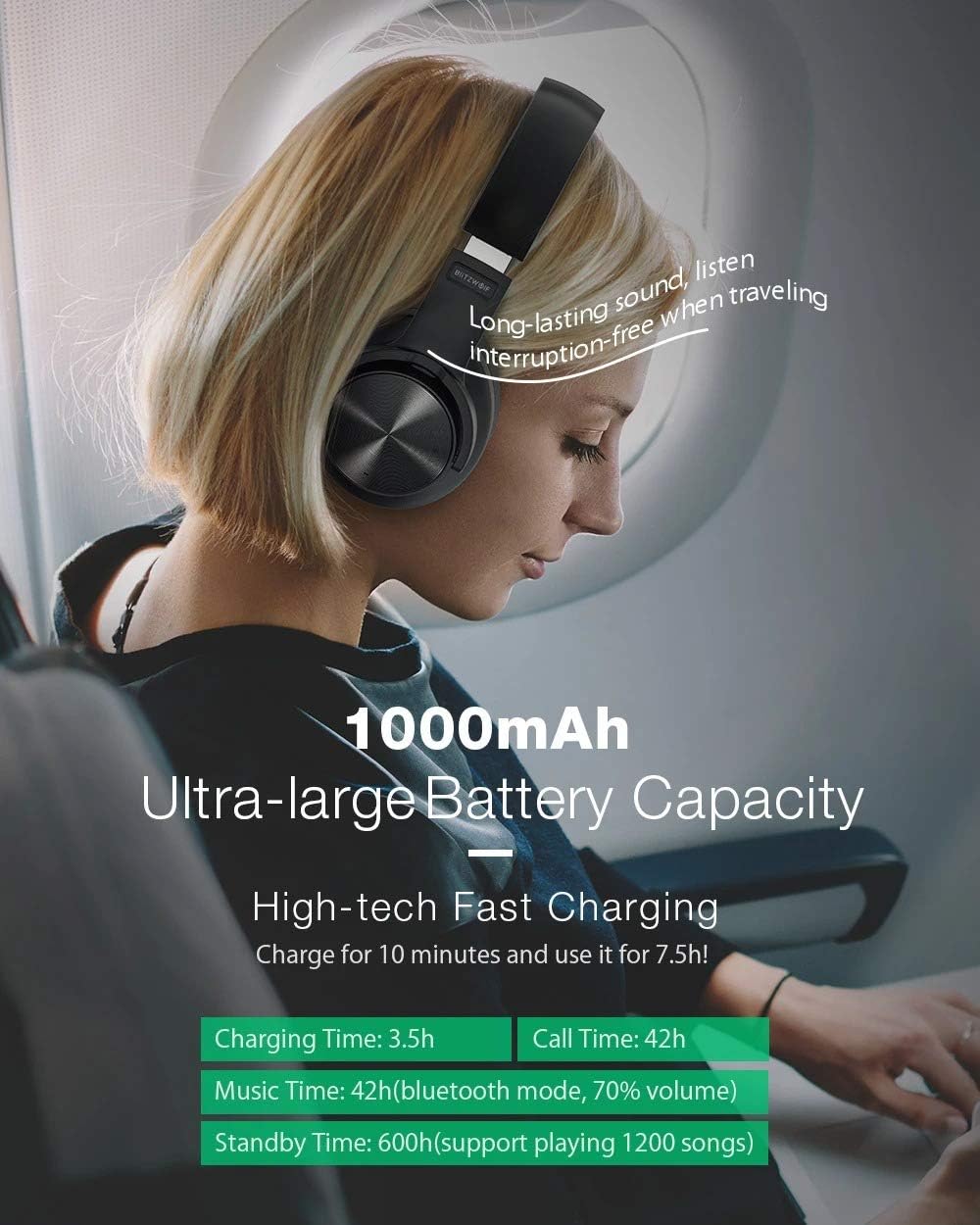
Image: Visual representation of the 1000mAh battery capacity and estimated usage times.
2. ബ്ലൂടൂത്ത് ജോടിയാക്കൽ
To connect your BW-HP2 headset to a Bluetooth-enabled device:
- ഹെഡ്സെറ്റ് ചാർജ് ചെയ്തിട്ടുണ്ടെന്നും ഓഫാണെന്നും ഉറപ്പാക്കുക.
- Press and hold the Power/Multi-function button until the LED indicator flashes red and blue alternately, indicating pairing mode.
- നിങ്ങളുടെ ഉപകരണത്തിൽ (സ്മാർട്ട്ഫോൺ, ടാബ്ലെറ്റ്, കമ്പ്യൂട്ടർ), ബ്ലൂടൂത്ത് പ്രവർത്തനക്ഷമമാക്കി ലഭ്യമായ ഉപകരണങ്ങൾക്കായി തിരയുക.
- Select "BW-HP2" from the list of found devices.
- Once connected, the LED indicator will turn solid blue or flash blue slowly.
3. Pairing Two Devices Simultaneously
The BW-HP2 supports connecting to two Bluetooth devices at the same time:
- ആദ്യത്തെ ഉപകരണത്തിൽ ബ്ലൂടൂത്ത് ഓണാക്കുക.
- Press the headset's "power button" for 3 seconds until the blue/red light flashes.
- Connect with the first device, then turn off Bluetooth on the first device.
- Connect the headphone with the second Bluetooth device according to the above steps (Bluetooth Pairing).
- Open Bluetooth of the first device, select the headphone and connect.
- You can now answer calls from two mobile phones.
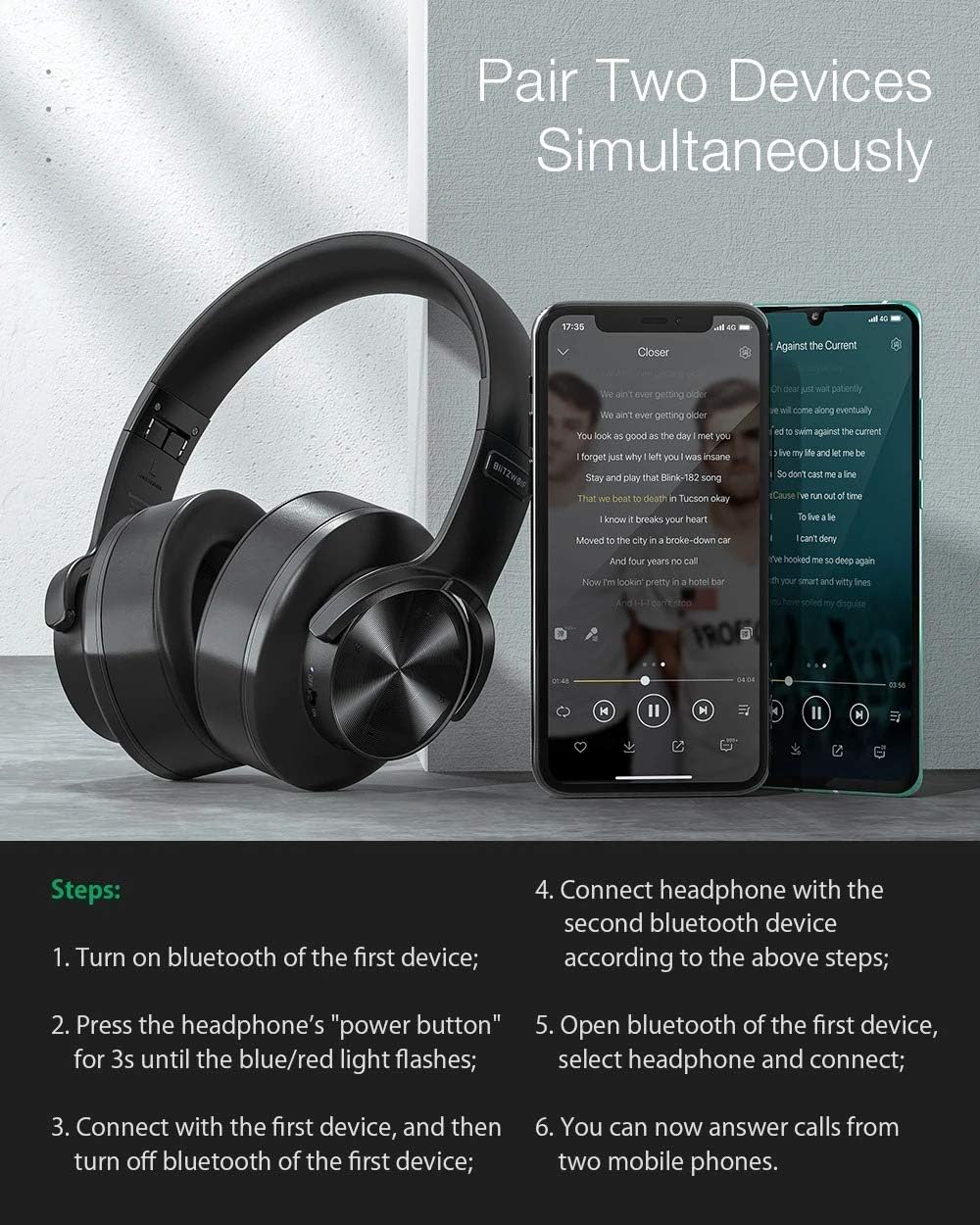
Image: Visual guide demonstrating the steps to pair the headset with two devices concurrently.
4. വയർഡ് കണക്ഷൻ (3.5mm ഓഡിയോ കേബിൾ)
To use the headset with non-Bluetooth devices or when the battery is depleted, connect the included 3.5mm audio cable to the headset's audio jack and your device's audio output.
പ്രവർത്തന നിർദ്ദേശങ്ങൾ
പവർ ഓൺ/ഓഫ്
- പവർ ഓൺ: പവർ/മൾട്ടി-ഫംഗ്ഷൻ ബട്ടൺ 3 സെക്കൻഡ് അമർത്തിപ്പിടിക്കുക.
- പവർ ഓഫ്: Press and hold the Power/Multi-function button for 3 seconds. The headset will automatically power off after five minutes of no connection to save battery.
Music Playback Control (Touch Control)
- പ്ലേ/താൽക്കാലികമായി നിർത്തുക: Single tap the touch control area on the earcup.
- അടുത്ത ട്രാക്ക്: Swipe forward on the touch control area.
- മുമ്പത്തെ ട്രാക്ക്: Swipe backward on the touch control area.
- വോളിയം കൂട്ടുക: Swipe up on the touch control area.
- വോളിയം താഴേക്ക്: Swipe down on the touch control area.
Call Management (Touch Control)
- ഉത്തരം/അവസാന കോൾ: Single tap the touch control area during an incoming call.
- കോൾ നിരസിക്കുക: ഇൻകമിംഗ് കോൾ വരുമ്പോൾ ടച്ച് കൺട്രോൾ ഏരിയ 2 സെക്കൻഡ് അമർത്തിപ്പിടിക്കുക.
- അവസാന നമ്പർ വീണ്ടും ഡയൽ ചെയ്യുക: ടച്ച് കൺട്രോൾ ഏരിയയിൽ രണ്ടുതവണ ടാപ്പ് ചെയ്യുക.

Image: A user wearing the BW-HP2 headset, illustrating its comfortable fit and noise-canceling capabilities for clear audio.
മെയിൻ്റനൻസ്
- വൃത്തിയാക്കൽ: Wipe the headset with a soft, slightly damp cloth. Do not use alcohol, solvents, or abrasive cleaners.
- സംഭരണം: When not in use, store the headset in a cool, dry place, away from direct sunlight and extreme temperatures. The foldable design allows for compact storage.
- ബാറ്ററി കെയർ: ബാറ്ററി ലൈഫ് വർദ്ധിപ്പിക്കാൻ, ഹെഡ്സെറ്റ് ഇടയ്ക്കിടെ പൂർണ്ണമായും ഡിസ്ചാർജ് ചെയ്യുന്നത് ഒഴിവാക്കുക. ദീർഘനേരം ഉപയോഗിച്ചിട്ടില്ലെങ്കിൽ പോലും പതിവായി ചാർജ് ചെയ്യുക.

ചിത്രം: വശം view of the BlitzWolf BW-HP2 headset resting on its stand, demonstrating proper storage.
ട്രബിൾഷൂട്ടിംഗ്
| പ്രശ്നം | സാധ്യമായ കാരണം | പരിഹാരം |
|---|---|---|
| ഹെഡ്സെറ്റ് ഓണാക്കുന്നില്ല. | കുറഞ്ഞ ബാറ്ററി. | ഹെഡ്സെറ്റ് പൂർണ്ണമായും ചാർജ് ചെയ്യുക. |
| ഉപകരണവുമായി ജോടിയാക്കാൻ കഴിയില്ല. | ഹെഡ്സെറ്റ് ജോടിയാക്കൽ മോഡിലല്ല; ഉപകരണത്തിൽ ബ്ലൂടൂത്ത് ഓഫാണ്; ഉപകരണം വളരെ അകലെയാണ്. | Ensure headset is in pairing mode (flashing red/blue). Turn on Bluetooth on your device. Move headset closer to device (within 10m). |
| ശബ്ദമില്ല അല്ലെങ്കിൽ കുറഞ്ഞ ശബ്ദമില്ല. | Volume too low; incorrect audio source; headset not connected. | Adjust volume on both headset and device. Ensure headset is properly connected via Bluetooth or 3.5mm cable. |
| ഇടവിട്ടുള്ള കണക്ഷൻ. | ഇടപെടൽ; ഉപകരണം വളരെ അകലെയാണ്; ബാറ്ററി കുറവാണ്. | Move away from sources of interference (Wi-Fi routers, other Bluetooth devices). Move headset closer to device. Charge the headset. |
സ്പെസിഫിക്കേഷനുകൾ
| ഫീച്ചർ | വിശദാംശങ്ങൾ |
|---|---|
| ബ്രാൻഡ് | ബ്ലിറ്റ്സ് വുൾഫ് (ജനറിക്) |
| മോഡൽ | BW-HP2 |
| ധരിക്കുന്ന തരം | ഓവർ-ഇയർ (സർക്കുമറൽ) |
| മെറ്റീരിയൽ | എബിഎസ് + പിസി |
| മൊത്തം ഭാരം | 240 ഗ്രാം |
| മൈക്രോഫോൺ | Yes, Omnidirectional Noise Reduction |
| വോളിയം നിയന്ത്രണം | അതെ |
| ബ്ലൂടൂത്ത് പതിപ്പ് | V5.0 |
| പിന്തുണയ്ക്കുന്ന പ്രോfiles | HSP / HFP / A2DP / AVRCP |
| ട്രാൻസ്മിഷൻ ദൂരം | 10 മീറ്റർ (33 അടി) |
| റിസപ്ഷൻ സെൻസിറ്റിവിറ്റി | 108 ± 3dB |
| ഫ്രീക്വൻസി പ്രതികരണം | 20-20000Hz |
| ബാറ്ററി ശേഷി | 1000mAh |
| ചാർജിംഗ് സമയം | 3.5 മണിക്കൂർ |
| സംഗീത സമയം | 42 മണിക്കൂർ (70% വോളിയം) |
| കോൾ സമയം | 42 മണിക്കൂർ |
| കണക്റ്റർ | 3.5 എംഎം ജാക്ക് |
| പ്രത്യേക ഉപയോഗങ്ങൾ | Gaming, Entertainment |

Image: Illustration of the advanced Bluetooth V5.0 chip, emphasizing stable performance and low power consumption.
വാറൻ്റിയും പിന്തുണയും
This product is covered by a standard manufacturer's warranty. Please refer to the warranty card included in your package for specific terms and conditions. For technical support, troubleshooting assistance, or warranty claims, please contact your retailer or the manufacturer's customer service.
വാറന്റി ആവശ്യങ്ങൾക്കായി വാങ്ങിയതിന്റെ തെളിവായി നിങ്ങളുടെ വാങ്ങൽ രസീത് സൂക്ഷിക്കുക.


