1. ആമുഖം
This manual provides essential instructions for setting up, operating, and maintaining your ZTE MF286C LTE CAT6/4G Wi-Fi Dual Band Router. Please read this manual thoroughly before using the device to ensure proper functionality and safety.
The ZTE MF286C is a versatile router designed to provide high-speed internet access via LTE CAT6/4G networks and Wi-Fi. It features dual-band Wi-Fi connectivity and supports advanced VoLTE voice calls, making it suitable for both home and office environments.
2. പാക്കേജ് ഉള്ളടക്കം
നിങ്ങളുടെ പാക്കേജിൽ എല്ലാ ഇനങ്ങളും ഉണ്ടെന്ന് ഉറപ്പാക്കുക:
- ZTE MF286C LTE CAT6/4G Wi-Fi Dual Band Router
- പവർ അഡാപ്റ്റർ
- ഇഥർനെറ്റ് കേബിൾ
- ക്വിക്ക് സ്റ്റാർട്ട് ഗൈഡ് (ഉൾപ്പെടുത്തിയിട്ടുണ്ടെങ്കിൽ)
- Lithium-Ion Battery (pre-installed or separate)
3. ഡിവൈസ് ഓവർview
Familiarize yourself with the router's indicators and ports.
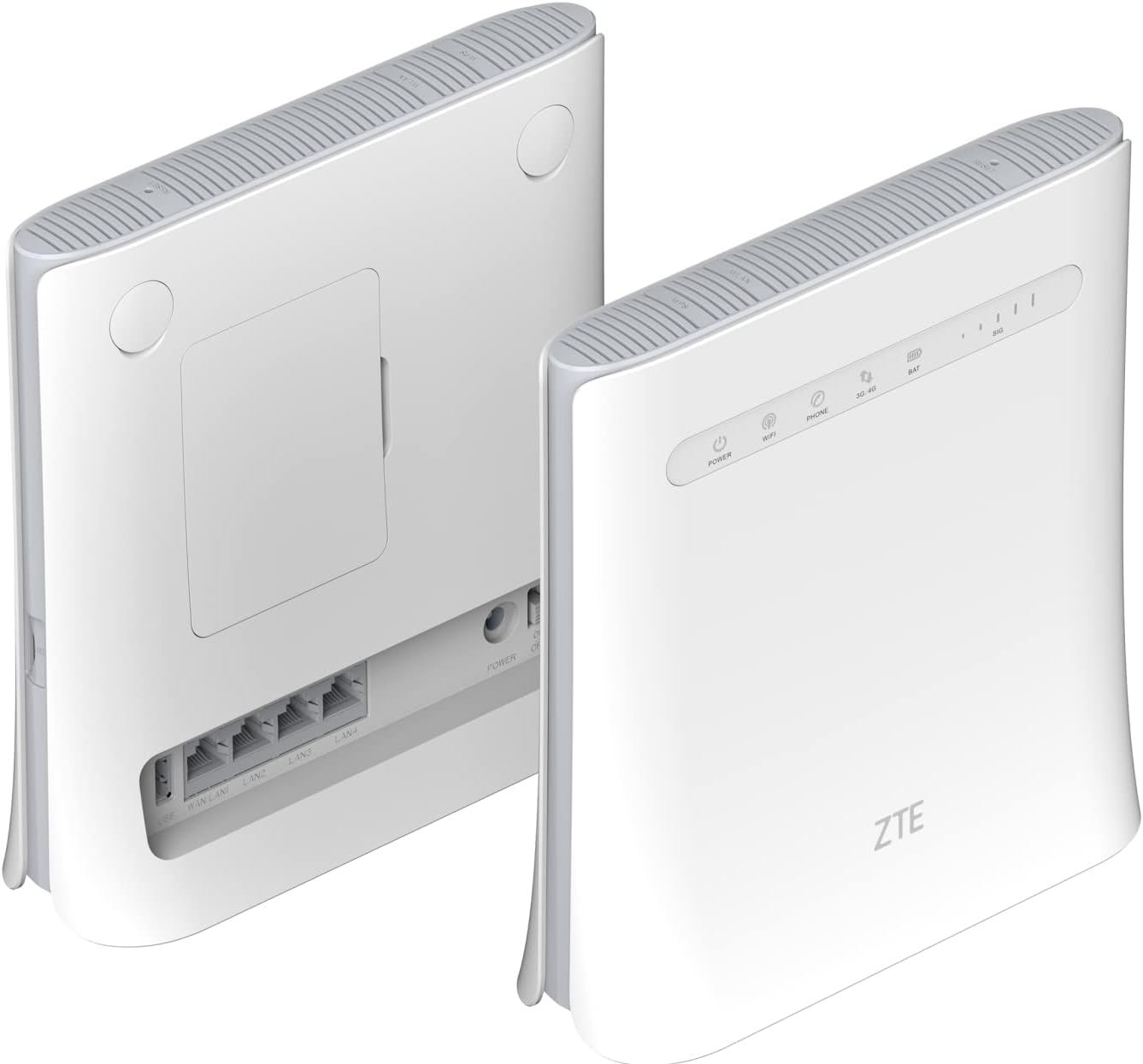
ചിത്രം 3.1: മുന്നിലും പിന്നിലും View of ZTE MF286C Router. This image displays the router from both the front and rear. The front panel shows LED indicators for Power, Wi-Fi, Phone, 3G/4G network status, Battery, and Signal strength. The rear panel reveals the SIM card slot cover, multiple LAN ports, and the power input.
3.1. എൽഇഡി സൂചകങ്ങൾ
- ശക്തി: പവർ സ്റ്റാറ്റസ് സൂചിപ്പിക്കുന്നു.
- വൈഫൈ: വൈഫൈ നെറ്റ്വർക്ക് പ്രവർത്തനത്തെ സൂചിപ്പിക്കുന്നു.
- ഫോൺ: Indicates VoLTE call status.
- 3G/4G: Indicates mobile network connection status (3G or 4G LTE).
- ബാറ്റ്: ബാറ്ററി ചാർജ് നില സൂചിപ്പിക്കുന്നു.
- SIG: Indicates mobile network signal strength.
3.2. പോർട്ടുകളും ബട്ടണുകളും

ചിത്രം 3.2: Rear Panel Ports of ZTE MF286C Router. This image provides a clear view of the router's rear panel, highlighting the WAN/LAN port, three additional LAN ports, the power input, and the power on/off switch. The SIM card slot is located under a cover on the back.
- WAN/LAN പോർട്ട്: Connects to a modem or acts as a LAN port.
- ലാൻ പോർട്ടുകൾ (x3): Connects to wired devices (computers, printers).
- പവർ ഇൻപുട്ട്: പവർ അഡാപ്റ്ററുമായി ബന്ധിപ്പിക്കുന്നു.
- പവർ ബട്ടൺ: ഉപകരണം ഓണാക്കുകയോ ഓഫാക്കുകയോ ചെയ്യുന്നു.
- സിം കാർഡ് സ്ലോട്ട്: Insert your Nano-SIM card here (under the cover).
- റീസെറ്റ് ബട്ടൺ: (Typically recessed) Used to restore factory settings.
4. സജ്ജീകരണം
4.1. സിം കാർഡ് ഇൻസ്റ്റാളേഷൻ
- റൂട്ടർ ഓഫാണെന്ന് ഉറപ്പാക്കുക.
- Locate the SIM card slot cover on the rear of the router.
- കവർ സ ently മ്യമായി നീക്കംചെയ്യുക.
- Insert a standard Nano-SIM card into the slot with the gold contacts facing down and the notched corner oriented correctly. Push until it clicks into place.
- Replace the SIM card slot cover.
4.2. റൂട്ടർ ഓൺ ചെയ്യുക
- Connect the power adapter to the router's power input port and then to a wall outlet.
- Press and hold the Power button until the Power LED illuminates.
- Wait for the router to boot up. The 3G/4G and Wi-Fi LEDs will indicate network and Wi-Fi readiness.
5. പ്രവർത്തന നിർദ്ദേശങ്ങൾ
5.1. Wi-Fi-ലേക്ക് ബന്ധിപ്പിക്കുന്നു
- On your device (smartphone, tablet, laptop), enable Wi-Fi.
- ഇതിനായി തിരയുക ലഭ്യമായ Wi-Fi നെറ്റ്വർക്കുകൾ.
- Select the network name (SSID) displayed on the label at the bottom of your router.
- Enter the Wi-Fi password (WPA/WPA2 key) also found on the router's label.
- Once connected, the Wi-Fi LED on the router will indicate activity.
5.2. ഇതർനെറ്റ് കേബിൾ വഴി ബന്ധിപ്പിക്കുന്നു
- റൂട്ടറിലെ ഒരു ലാൻ പോർട്ടിലേക്ക് ഒരു ഇതർനെറ്റ് കേബിളിന്റെ ഒരറ്റം ബന്ധിപ്പിക്കുക.
- നിങ്ങളുടെ കമ്പ്യൂട്ടറിലോ മറ്റ് വയർഡ് ഉപകരണത്തിലോ ഉള്ള ഇതർനെറ്റ് പോർട്ടിലേക്ക് ഇതർനെറ്റ് കേബിളിന്റെ മറ്റേ അറ്റം ബന്ധിപ്പിക്കുക.
- The device should automatically establish a wired network connection.
5.3 ആക്സസ് ചെയ്യുന്നു Web മാനേജ്മെന്റ് ഇന്റർഫേസ്
For advanced settings, network configuration, and monitoring, access the router's web മാനേജ്മെന്റ് ഇന്റർഫേസ്:
- നിങ്ങളുടെ ഉപകരണം റൂട്ടറിന്റെ Wi-Fi അല്ലെങ്കിൽ LAN-ലേക്ക് കണക്റ്റ് ചെയ്തിട്ടുണ്ടെന്ന് ഉറപ്പാക്കുക.
- എ തുറക്കുക web ബ്രൗസർ (ഉദാ. ക്രോം, ഫയർഫോക്സ്, എഡ്ജ്).
- വിലാസ ബാറിൽ, സ്ഥിരസ്ഥിതി IP വിലാസം ടൈപ്പ് ചെയ്യുക (സാധാരണയായി
192.168.0.1or192.168.1.1) അല്ലെങ്കിൽ web address printed on the router's label, then press Enter. - സ്ഥിരസ്ഥിതി ഉപയോക്തൃനാമവും പാസ്വേഡും നൽകുക (സാധാരണയായി
adminരണ്ടിനും, അല്ലെങ്കിൽ റൂട്ടറിന്റെ ലേബലിൽ വ്യക്തമാക്കിയിരിക്കുന്നത് പോലെ). - You can now configure settings such as Wi-Fi name, password, network modes, and parental controls.
5.4. Using VoLTE Voice Calls
The ZTE MF286C supports advanced VoLTE voice calls. To use this feature:
- Connect a standard analog telephone to the router's phone port (if available, not explicitly shown in images but mentioned in description).
- Ensure your SIM card supports VoLTE and that the service is activated by your mobile operator.
- You can now make and receive calls using the connected telephone, benefiting from improved call quality.
6. പരിപാലനം
- വൃത്തിയാക്കൽ: Use a soft, dry cloth to clean the router. Do not use liquid or aerosol cleaners.
- പ്ലേസ്മെൻ്റ്: Place the router in a well-ventilated area, away from direct sunlight, heat sources, and moisture. Avoid placing it near strong electromagnetic fields.
- ഫേംവെയർ അപ്ഡേറ്റുകൾ: നിർമ്മാതാവിന്റെ webഒപ്റ്റിമൽ പ്രകടനവും സുരക്ഷയും ഉറപ്പാക്കാൻ ഫേംവെയർ അപ്ഡേറ്റുകൾക്കായുള്ള സൈറ്റ്.
- ബാറ്ററി കെയർ: If the router has a removable battery, avoid extreme temperatures and prolonged periods of full discharge or full charge to extend battery life.
7. പ്രശ്നപരിഹാരം
| പ്രശ്നം | സാധ്യമായ പരിഹാരം |
|---|---|
| പവർ എൽഇഡി ഇല്ല | Ensure the power adapter is securely connected to the router and a working power outlet. Try a different outlet. |
| No Internet Connection (3G/4G LED off/red) | Check if the SIM card is correctly inserted. Verify your mobile data plan is active. Restart the router. Check network coverage in your area. |
| Wi-Fi-യിലേക്ക് കണക്റ്റുചെയ്യാൻ കഴിയില്ല | Ensure Wi-Fi is enabled on the router (Wi-Fi LED on). Verify the Wi-Fi password. Restart both the router and your connecting device. |
| കുറഞ്ഞ ഇന്റർനെറ്റ് വേഗത | Check signal strength (SIG LED). Move the router to a location with better signal. Reduce the number of connected devices. Check for network congestion with your service provider. |
| ആക്സസ് ചെയ്യാൻ കഴിയില്ല web മാനേജ്മെൻ്റ് ഇൻ്റർഫേസ് | Ensure your device is connected to the router. Verify the IP address or web address. Clear browser cache or try a different browser. |
| VoLTE calls not working | Ensure a phone is correctly connected. Verify your SIM card and service plan support VoLTE. Contact your mobile operator for assistance. |
8 സ്പെസിഫിക്കേഷനുകൾ
| മോഡൽ | MF286C |
| ബ്രാൻഡ് | ZTE |
| കണക്റ്റിവിറ്റി ടെക്നോളജി | LTE CAT6/4G, Wi-Fi |
| വയർലെസ് സ്റ്റാൻഡേർഡ് | 802.11b (Dual-Band Wi-Fi) |
| Max Download Speed (LTE) | 300 Mbps വരെ |
| Max Upload Speed (LTE) | 50 Mbps വരെ |
| പരമാവധി വൈ-ഫൈ വേഗത | 1300 Mbps വരെ |
| ബാറ്ററി ശേഷി | 3000 mAh Lithium-Ion (included) |
| Battery Life (4G network sharing) | 3 മണിക്കൂർ വരെ |
| Battery Life (VoLTE call) | 4 മണിക്കൂർ വരെ |
| തുറമുഖങ്ങൾ | 1x WAN/LAN, 3x LAN, Power Input, SIM Card Slot, Phone Port (VoLTE) |
| നിറം | വെള്ള |
| അളവുകൾ (L x W x H) | 20 x 8 x 19 സെ.മീ |
| ഭാരം | 780 ഗ്രാം |
| അനുയോജ്യമായ ഉപകരണങ്ങൾ | Personal Computer, Smartphone, Tablet |
| പ്രത്യേക സവിശേഷതകൾ | Remote Access, VoLTE Voice Calls, Built-in Battery |
9 സുരക്ഷാ വിവരങ്ങൾ
- ഉപകരണം തുറക്കുകയോ പരിഷ്ക്കരിക്കുകയോ ചെയ്യരുത്.
- ഉപകരണത്തിനൊപ്പം നൽകിയിരിക്കുന്ന യഥാർത്ഥ പവർ അഡാപ്റ്റർ മാത്രം ഉപയോഗിക്കുക.
- Keep the device away from water, fire, and extreme temperatures.
- പ്രാദേശിക നിയന്ത്രണങ്ങൾ അനുസരിച്ച് ഉപകരണവും അതിന്റെ ബാറ്ററിയും ഉത്തരവാദിത്തത്തോടെ നിർമാർജനം ചെയ്യുക.
- Avoid placing the device near medical equipment to prevent interference.
10. വാറൻ്റിയും പിന്തുണയും
For warranty information and technical support, please refer to the warranty card included in your package or visit the official ZTE webസൈറ്റ്. വാറന്റി ക്ലെയിമുകൾക്കായി നിങ്ങളുടെ വാങ്ങലിന്റെ തെളിവ് സൂക്ഷിക്കുക.


