ആമുഖം
Thank you for choosing the Motorola AmphisoundX 5.1 Channel Home Theatre System. This manual provides essential information for the safe and efficient setup, operation, and maintenance of your new audio system. Please read these instructions thoroughly before use and retain them for future reference.
സുരക്ഷാ വിവരങ്ങൾ
- ഇലക്ട്രിക്കൽ സുരക്ഷ: വൈദ്യുതി വിതരണം വോളിയം ഉറപ്പാക്കുകtage matches the rating indicated on the unit. Do not expose the unit to rain or moisture to prevent fire or electric shock.
- വെൻ്റിലേഷൻ: Maintain adequate space around the unit for proper ventilation. Do not block any ventilation openings.
- പ്ലേസ്മെൻ്റ്: Place the system on a stable, flat surface. Avoid direct sunlight, heat sources, or areas with excessive dust or vibration.
- വൃത്തിയാക്കൽ: Disconnect the power cord before cleaning. Use a soft, dry cloth. Do not use liquid cleaners or aerosol cleaners.
- സേവനം: ഈ ഉൽപ്പന്നം സ്വയം സേവിക്കാൻ ശ്രമിക്കരുത്. യോഗ്യതയുള്ള സേവന ഉദ്യോഗസ്ഥർക്ക് എല്ലാ സേവനങ്ങളും റഫർ ചെയ്യുക.
പാക്കേജ് ഉള്ളടക്കം
താഴെ ലിസ്റ്റ് ചെയ്തിരിക്കുന്ന എല്ലാ ഇനങ്ങളും നിങ്ങളുടെ പാക്കേജിൽ ഉൾപ്പെടുത്തിയിട്ടുണ്ടെന്ന് ഉറപ്പാക്കുക:
- 1 x Subwoofer Unit
- 5 x Satellite Speakers
- 1 x റിമോട്ട് കൺട്രോൾ
- 1 x പവർ കേബിൾ
- 1 x Audio Cable (e.g., RCA to 3.5mm or HDMI cable, depending on model variant)
- 1 x ഉപയോക്തൃ മാനുവൽ (ഈ പ്രമാണം)
ഉൽപ്പന്നം കഴിഞ്ഞുview
മോട്ടറോള AmphisoundX 5.1 Channel Home Theatre System consists of a central subwoofer unit, five satellite speakers, and a remote control for convenient operation. The subwoofer houses the main amplifier and connectivity ports, while the satellite speakers provide immersive surround sound.
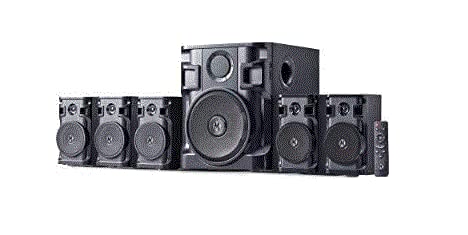
Image of the Motorola AmphisoundX 5.1 Channel Home Theatre System, showing the central subwoofer unit flanked by five satellite speakers and a remote control. This illustration helps identify the main components of the system.
സജ്ജമാക്കുക
1. സ്പീക്കർ പ്ലേസ്മെൻ്റ്
- Front Speakers (Left, Right): Place these on either side of your television, equidistant from the viewസ്ഥാനം.
- സെന്റർ സ്പീക്കർ: Position directly above or below your television, centered with the screen.
- Surround Speakers (Left, Right): Place these to the sides or slightly behind your main listening position, at ear level or slightly above.
- സബ്വൂഫർ: Can be placed anywhere in the room, typically near a wall or corner for enhanced bass response. Experiment with placement for optimal sound.
2. സ്പീക്കറുകൾ ബന്ധിപ്പിക്കുന്നു
- Identify the speaker output terminals on the rear of the subwoofer unit. These are typically color-coded or labeled for each channel (Front L/R, Center, Surround L/R).
- Connect each satellite speaker to its corresponding output terminal on the subwoofer using the provided speaker wires. Ensure correct polarity (positive to positive, negative to negative).
3. ഓഡിയോ ഉറവിടങ്ങൾ ബന്ധിപ്പിക്കുന്നു
Connect your audio sources to the subwoofer unit using the appropriate cables.
- എച്ച്ഡിഎംഐ ആർസി: Connect an HDMI cable from the HDMI ARC port on your television to the HDMI ARC input on the subwoofer. This allows audio from your TV to be sent to the home theatre system.
- ബ്ലൂടൂത്ത്: For wireless audio streaming from a smartphone, tablet, or computer.
- AUX ഇൻപുട്ട്: Use a 3.5mm or RCA audio cable to connect devices with an analog audio output.
- യുഎസ്ബി ഇൻപുട്ട്: ഓഡിയോ അടങ്ങിയ ഒരു USB ഡ്രൈവ് ഇടുക fileനേരിട്ടുള്ള പ്ലേബാക്കിനായി.
4. പവർ കണക്ഷൻ
Connect the power cable to the subwoofer unit and then plug it into a standard AC power outlet.
പ്രവർത്തന നിർദ്ദേശങ്ങൾ
1. പവർ ഓൺ/ഓഫ്
അമർത്തുക പവർ button on the remote control or the main unit to turn the system on or off.
2. ഇൻപുട്ട് തിരഞ്ഞെടുക്കൽ
അമർത്തുക ഇൻപുട്ട് or ഉറവിടം button on the remote control or main unit to cycle through available audio sources (HDMI ARC, Bluetooth, AUX, USB).
3. വോളിയം നിയന്ത്രണം
ഉപയോഗിക്കുക വോളിയം + ഒപ്പം വോളിയം - buttons on the remote control or main unit to adjust the master volume. Press the നിശബ്ദമാക്കുക ഓഡിയോ താൽക്കാലികമായി നിശബ്ദമാക്കാൻ ബട്ടൺ.
4. ബ്ലൂടൂത്ത് ജോടിയാക്കൽ
- Switch the system to Bluetooth input mode. The display will indicate 'BT' or 'PAIRING'.
- നിങ്ങളുടെ മൊബൈൽ ഉപകരണത്തിൽ ബ്ലൂടൂത്ത് പ്രവർത്തനക്ഷമമാക്കുകയും ലഭ്യമായ ഉപകരണങ്ങൾക്കായി തിരയുകയും ചെയ്യുക.
- Select "Motorola AmphisoundX" from the list. Once paired, the system will confirm the connection.
5. വിദൂര നിയന്ത്രണ പ്രവർത്തനങ്ങൾ
The remote control provides full functionality for your home theatre system. Refer to the diagram on the remote for specific button layouts and functions, including playback controls for USB mode, bass/treble adjustments, and individual channel level controls (if available).
മെയിൻ്റനൻസ്
വൃത്തിയാക്കൽ
Wipe the surfaces of the subwoofer and satellite speakers with a soft, dry, lint-free cloth. Do not use abrasive cleaners, waxes, or solvents as they may damage the finish.
സംഭരണം
If storing the system for an extended period, disconnect it from the power outlet and store it in a cool, dry place, away from direct sunlight and extreme temperatures.
ട്രബിൾഷൂട്ടിംഗ്
| പ്രശ്നം | സാധ്യമായ കാരണം | പരിഹാരം |
|---|---|---|
| ശക്തിയില്ല | പവർ കേബിൾ ബന്ധിപ്പിച്ചിട്ടില്ല; പവർ ഔട്ട്ലെറ്റ് തകരാറിലാണ് | Ensure power cable is securely connected; Try a different power outlet. |
| ശബ്ദമില്ല | Incorrect input selected; Volume too low; Speaker wires loose | Select the correct input source; Increase volume; Check all speaker connections. |
| ബ്ലൂടൂത്ത് കണക്റ്റ് ചെയ്യുന്നില്ല | Device not in pairing mode; Out of range; Previously paired device connected | Ensure system is in Bluetooth pairing mode; Move device closer; Disconnect from other Bluetooth devices. |
| വികലമായ ശബ്ദം | Volume too high; Poor audio source quality; Loose connections | Reduce volume; Try a different audio source; Check all cable connections. |
സ്പെസിഫിക്കേഷനുകൾ
- മോഡൽ: MT150-HT51-cr
- പവർ put ട്ട്പുട്ട് (ആർഎംഎസ്): 150 W
- ചാനലുകൾ: 5.1 ചാനൽ
- ബ്ലൂടൂത്ത് പതിപ്പ്: 5.0
- വയർലെസ് ശ്രേണി: 10 മീറ്റർ
- കണക്റ്റിവിറ്റി: HDMI ARC, Bluetooth, AUX, USB
- ഊർജ്ജ സ്രോതസ്സ്: എസി അഡാപ്റ്റർ
- ഉൽപ്പന്ന അളവുകൾ (L x W x H): ഏകദേശം 50 x 52.8 x 49 സെ.മീ
- ഇനത്തിൻ്റെ ഭാരം: ഏകദേശം 7.52 കി.ഗ്രാം
- നിറം: കറുപ്പ്
വാറൻ്റിയും പിന്തുണയും
This Motorola AmphisoundX Home Theatre System comes with a minimum six-month supplier-backed warranty. Please retain your purchase receipt as proof of purchase for warranty claims.
For technical support, service, or warranty inquiries, please contact your retailer or the authorized service center. Do not attempt to repair the unit yourself, as this may void your warranty.


