1. ആമുഖം
This manual provides detailed instructions for the safe and effective operation of your MASINGO Soprano X1 Portable Karaoke Machine. Please read this manual thoroughly before using the product and retain it for future reference. The Soprano X1 is a versatile portable PA speaker system designed for karaoke and audio playback, featuring wireless microphones, various input options, and integrated lighting effects.
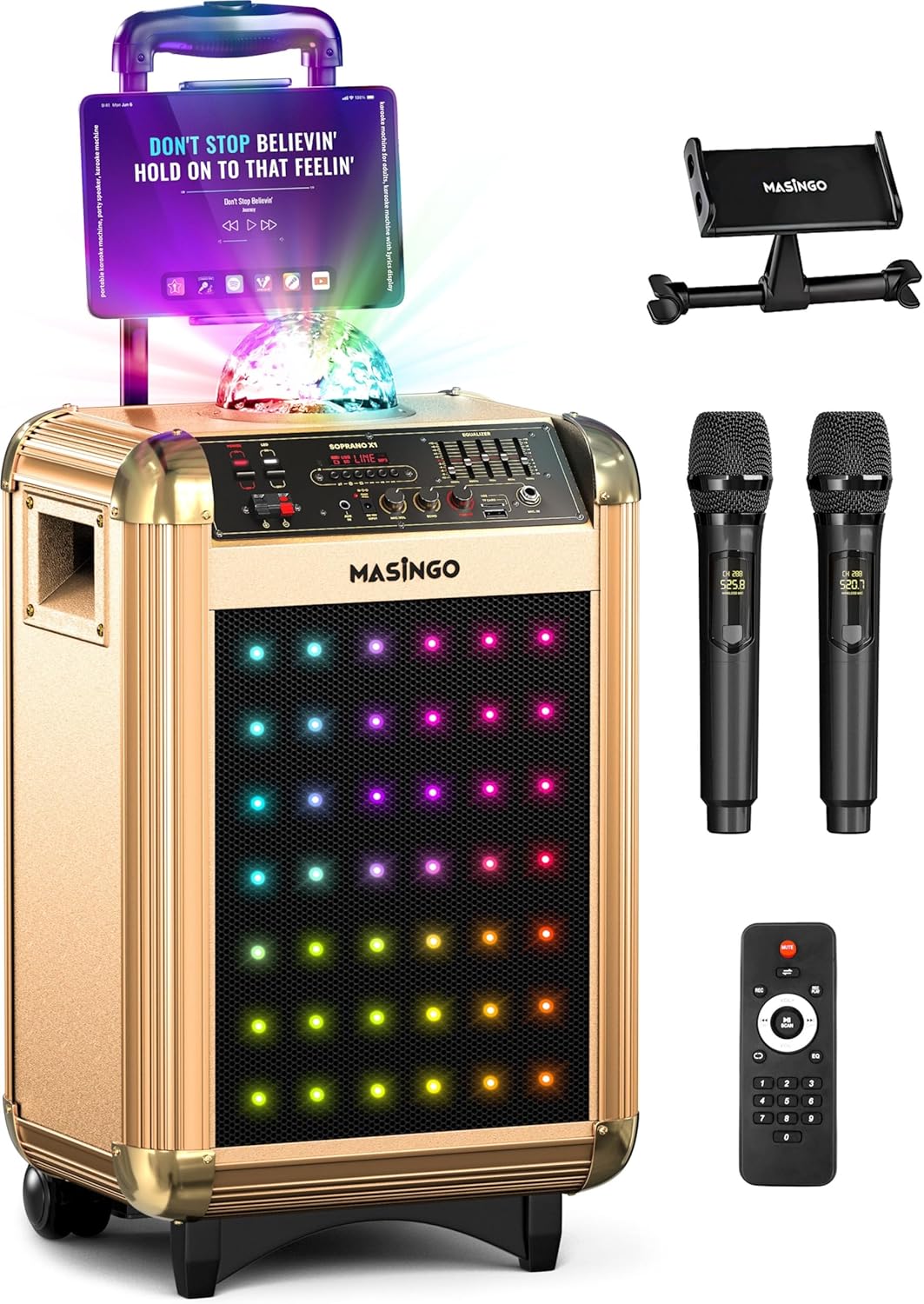
Image 1.1: The MASINGO Soprano X1 Portable Karaoke Machine, showcasing its main unit, tablet holder, two wireless microphones, and remote control.
2. പാക്കേജ് ഉള്ളടക്കം
താഴെ ലിസ്റ്റ് ചെയ്തിരിക്കുന്ന എല്ലാ ഇനങ്ങളും നിങ്ങളുടെ പാക്കേജിൽ ഉൾപ്പെടുത്തിയിട്ടുണ്ടെന്ന് ഉറപ്പാക്കുക. ഏതെങ്കിലും ഇനങ്ങൾ നഷ്ടപ്പെട്ടിട്ടുണ്ടെങ്കിലോ കേടായിട്ടുണ്ടെങ്കിലോ, ദയവായി ഉപഭോക്തൃ പിന്തുണയുമായി ബന്ധപ്പെടുക.
- Soprano X1 Karaoke Machine (Main Unit)
- 2 വയർലെസ് മൈക്രോഫോണുകൾ
- ഉപയോക്തൃ മാനുവൽ (ഈ പ്രമാണം)
- ടാബ്ലെറ്റ് ഹോൾഡർ
- Power Plug (AC adapter)
- ഓക്സിലറി കേബിൾ (3.5mm)
- TV Cable (AUX-RCA)
- Car Plug (for 12V car charging)
- റിമോട്ട് കൺട്രോൾ

Image 2.1: Visual representation of the Soprano X1 main unit and all included accessories: two wireless microphones, 3.5mm AUX cable, AUX-RCA TV cable, 15V charging cable, device holder, and remote control.
3. ഉൽപ്പന്നം കഴിഞ്ഞുview: നിയന്ത്രണങ്ങളും പോർട്ടുകളും
Familiarize yourself with the various controls and connection ports on your Soprano X1 unit.

Image 3.1: Close-up of the Soprano X1 control panel, indicating the location of various inputs, controls, and switches.
- വൈദ്യുതി സ്വിച്ച്: യൂണിറ്റ് ഓണാക്കുകയോ ഓഫാക്കുകയോ ചെയ്യുന്നു.
- LED Lights Switch: Activates or deactivates the front LED lights.
- Disco Ball Switch: Turns the top disco ball light on or off.
- മോഡ് ബട്ടൺ: Cycles through input modes (Bluetooth, USB, Micro-SD, AUX, FM Radio).
- മൈക്രോഫോൺ വോളിയം നോബ്: ബന്ധിപ്പിച്ചിരിക്കുന്ന മൈക്രോഫോണുകളുടെ ശബ്ദം ക്രമീകരിക്കുന്നു.
- മൈക്രോഫോൺ എക്കോ നോബ്: Controls the echo effect applied to microphone audio.
- മാസ്റ്റർ വോളിയം നോബ്: സിസ്റ്റത്തിന്റെ മൊത്തത്തിലുള്ള ഔട്ട്പുട്ട് വോളിയം ക്രമീകരിക്കുന്നു.
- Equalizer (EQ) Sliders: Fine-tune audio frequencies (bass, mid, treble).
- USB പോർട്ട്: യുഎസ്ബി ഡ്രൈവ് പ്ലേബാക്കിനായി.
- മൈക്രോ-എസ്ഡി കാർഡ് സ്ലോട്ട്: For Micro-SD card playback.
- AUX ഇൻപുട്ട് (3.5mm): For connecting external audio devices via auxiliary cable.
- TV Audio Input (RCA): For connecting to a TV for audio output.
- DC 15V ഇൻപുട്ട്: എസി പവർ അഡാപ്റ്റർ ബന്ധിപ്പിക്കുന്നതിന്.
- EXT DC 12V Input: For connecting the car charger.

Image 3.2: The two wireless microphones included with the Soprano X1, highlighting their individual displays for settings like volume, echo, and EQ.
4. സജ്ജീകരണം
4.1. Charging the Main Unit
- Connect the provided AC power adapter to the DC 15V input port on the Soprano X1.
- ഒരു സാധാരണ മതിൽ let ട്ട്ലെറ്റിലേക്ക് അഡാപ്റ്റർ പ്ലഗ് ചെയ്യുക.
- The unit will begin charging. A full charge typically takes several hours. The battery indicator on the unit will show charging status.
- For car charging, use the provided car plug and connect it to the EXT DC 12V input.
4.2. മൈക്രോഫോൺ സജ്ജീകരണം
- ഓരോ വയർലെസ് മൈക്രോഫോണിന്റെയും താഴത്തെ തൊപ്പി അഴിക്കുക.
- ശരിയായ ധ്രുവത (+/-) നിരീക്ഷിച്ചുകൊണ്ട് ഓരോ മൈക്രോഫോണിലും രണ്ട് AA ബാറ്ററികൾ (ഉൾപ്പെടുത്തിയിട്ടില്ല) തിരുകുക.
- താഴെയുള്ള തൊപ്പി മാറ്റിസ്ഥാപിക്കുക.
- Press and hold the power button on each microphone to turn it on. The microphone will automatically connect to the Soprano X1 when the main unit is powered on.
4.3. Installing the Tablet Holder
- Locate the mounting slot on the top of the Soprano X1 unit.
- Insert the tablet holder into the slot until it is securely in place.
- Adjust the holder to accommodate your tablet or smartphone for lyrics display.
5. പ്രവർത്തന നിർദ്ദേശങ്ങൾ
5.1. പവർ ഓൺ/ഓഫ്
- To power on the Soprano X1, toggle the main power switch to the 'ON' position.
- To power off, toggle the main power switch to the 'OFF' position.
5.2. ബ്ലൂടൂത്ത് ജോടിയാക്കൽ
- Turn on the Soprano X1. The unit will automatically enter Bluetooth pairing mode, indicated by a flashing Bluetooth icon on the display.
- നിങ്ങളുടെ സ്മാർട്ട്ഫോണിലോ, ടാബ്ലെറ്റിലോ, അല്ലെങ്കിൽ മറ്റ് ബ്ലൂടൂത്ത് പ്രവർത്തനക്ഷമമാക്കിയ ഉപകരണത്തിലോ, ബ്ലൂടൂത്ത് ക്രമീകരണങ്ങളിലേക്ക് നാവിഗേറ്റ് ചെയ്യുക.
- "M തിരഞ്ഞെടുക്കുകASINGO Soprano X1" from the list of available devices.
- Once paired, the Bluetooth icon on the Soprano X1 display will become solid, and you can play audio wirelessly from your device.
5.3. Media Playback (USB, Micro-SD, AUX)
- USB/Micro-SD: Insert a USB drive or Micro-SD card containing audio files into the respective port/slot. Press the 'Mode' button until 'USB' or 'SD' is displayed. The unit will automatically begin playing compatible audio files.
- AUX ഇൻപുട്ട്: Connect an external audio device (e.g., MP3 player, laptop) to the 3.5mm AUX input using the provided auxiliary cable. Press the 'Mode' button until 'AUX' is displayed.
- TV Audio: Connect your TV's audio output to the RCA TV Audio input using the provided TV cable. Select the appropriate input mode on the Soprano X1.
5.4. Microphone Adjustments
- മൈക്രോഫോൺ വോളിയം: Use the 'Mic Volume' knob on the main unit to adjust the overall volume of both microphones.
- മൈക്രോഫോൺ എക്കോ: Use the 'Mic Echo' knob to add or reduce the echo effect on your vocals.
- Individual Microphone Settings: Each wireless microphone has its own controls for volume, echo, and EQ, accessible via its display. Adjust these settings directly on the microphone for personalized sound.
5.5. ലൈറ്റ് മോഡുകൾ
- മുൻവശത്തെ LED ലൈറ്റുകൾ: Toggle the 'LED Lights' switch on the control panel to activate or deactivate the colorful LED lights on the front speaker grille.
- Disco Ball: Toggle the 'Disco Ball' switch to turn the top-mounted disco ball light on or off.
5.6. എഫ്എം റേഡിയോ
- Press the 'Mode' button until 'FM' is displayed.
- Use the playback control buttons (e.g., Play/Pause, Next/Previous) to scan for and select FM radio stations.
5.7. പോർട്ടബിലിറ്റി
The Soprano X1 features a telescoping handle and wheels for easy transport. Extend the handle and tilt the unit to roll it to your desired location.

Image 5.1: The Soprano X1 being transported with its integrated wheels and extendable handle, highlighting its design for on-the-go use.
6. പരിപാലനം
- വൃത്തിയാക്കൽ: യൂണിറ്റിന്റെ പുറംഭാഗം വൃത്തിയാക്കാൻ മൃദുവായതും ഉണങ്ങിയതുമായ തുണി ഉപയോഗിക്കുക. ലിക്വിഡ് ക്ലീനറുകളോ ഉരച്ചിലുകളുള്ള വസ്തുക്കളോ ഉപയോഗിക്കരുത്.
- സംഭരണം: ഉപയോഗത്തിലില്ലാത്തപ്പോൾ, നേരിട്ടുള്ള സൂര്യപ്രകാശത്തിൽ നിന്നും കടുത്ത താപനിലയിൽ നിന്നും മാറി തണുത്തതും വരണ്ടതുമായ സ്ഥലത്ത് യൂണിറ്റ് സൂക്ഷിക്കുക.
- ബാറ്ററി കെയർ: If storing for extended periods, it is recommended to fully charge the unit every 3-6 months to maintain battery health. Remove batteries from microphones if not used for a long time.
7. പ്രശ്നപരിഹാരം
| പ്രശ്നം | സാധ്യമായ കാരണം | പരിഹാരം |
|---|---|---|
| ശക്തിയില്ല | Unit not charged; Power adapter not connected; Power switch off. | Ensure unit is charged or connected to power. Verify power switch is in 'ON' position. |
| സ്പീക്കറിൽ നിന്ന് ശബ്ദമില്ല | Master volume too low; Incorrect input mode selected; Audio source issue. | Increase Master Volume. Press 'Mode' button to select correct input. Check audio source device. |
| മൈക്രോഫോണുകൾ പ്രവർത്തിക്കുന്നില്ല | Microphone batteries low/dead; Microphones not powered on; Mic volume too low. | Replace microphone batteries. Ensure microphones are powered on. Increase 'Mic Volume' knob. |
| ബ്ലൂടൂത്ത് ഇടയ്ക്കിടെ വിച്ഛേദിക്കുന്നു | Device too far from unit; Interference; Bluetooth device issue. | Keep Bluetooth device within 30 feet (10 meters) of the Soprano X1. Avoid obstacles. Re-pair the device. |
| Excessive echo | 'Mic Echo' knob set too high. | Adjust the 'Mic Echo' knob counter-clockwise to reduce the effect. |
8 സ്പെസിഫിക്കേഷനുകൾ
- മോഡൽ: സോപ്രാനോ X1
- ഇനത്തിൻ്റെ ഭാരം: 24 പൗണ്ട്
- ഉൽപ്പന്ന അളവുകൾ: 13.2 x 15.4 x 24 ഇഞ്ച്
- സ്പീക്കർ പവർ: 40 വാട്ട്സ്
- സ്പീക്കർ എണ്ണം: 1 (three-way woofer)
- ബാറ്ററി തരം: 12V ലെഡ് ആസിഡ്
- ബാറ്ററി ശേഷി: 7.4V 6000 mAh (approx. 2-3 hours run time)
- ഊർജ്ജ സ്രോതസ്സ്: Battery Powered / 15V DC (AC adapter) / 12V DC (Car plug)
- കണക്റ്റിവിറ്റി: Bluetooth, USB, Micro-SD, 3.5mm AUX, RCA (TV Audio)
- പ്രത്യേക സവിശേഷതകൾ: Portable, Rechargeable, Wireless Microphones, Disco Ball, LED Lights, FM Radio
9. വാറൻ്റിയും പിന്തുണയും
എംASINGO Soprano X1 Karaoke Machine comes with a 60-day warranty from the date of purchase. This warranty covers manufacturing defects and malfunctions under normal use. It does not cover damage caused by misuse, accidents, unauthorized modifications, or normal wear and tear.
For technical support, warranty claims, or any questions regarding your product, please refer to the contact information provided on the MASINGO official website or your purchase documentation. Please have your model number (Soprano X1) and proof of purchase ready when contacting support.


