1. ഉൽപ്പന്നം കഴിഞ്ഞുview
കാര്യക്ഷമവും സുരക്ഷിതവുമായ ആക്സസ് നിയന്ത്രണത്തിനും സമയ അറ്റൻഡൻസിനും വേണ്ടി രൂപകൽപ്പന ചെയ്തിരിക്കുന്ന ഒരു നൂതന കോൺടാക്റ്റ്ലെസ് മൾട്ടി-ബയോമെട്രിക് ഐഡന്റിഫിക്കേഷൻ ടെർമിനലാണ് ZKTeco MB20-VL. 30cm മുതൽ 50cm വരെ ദൂരത്തിൽ തിരിച്ചറിയൽ അനുവദിക്കുന്ന ZKTeco യുടെ നൂതനമായ വിസിബിൾ ലൈറ്റ് ഫേഷ്യൽ റെക്കഗ്നിഷൻ സാങ്കേതികവിദ്യ ഇതിൽ ഉൾപ്പെടുത്തിയിട്ടുണ്ട്. മുൻ ഇൻഫ്രാറെഡ് ഫേഷ്യൽ റെക്കഗ്നിഷൻ സിസ്റ്റങ്ങളെ അപേക്ഷിച്ച് മെച്ചപ്പെട്ട തിരിച്ചറിയൽ വേഗതയും കൃത്യതയും നൽകിക്കൊണ്ട് ഈ ഉപകരണം അതിന്റെ കണ്ടെത്തൽ പരിധിക്കുള്ളിലെ മനുഷ്യ മുഖങ്ങളെ യാന്ത്രികമായി കണ്ടെത്തുന്നു.
ഒരു മുൻനിര 3D ന്യൂറൽ ഫിംഗർപ്രിന്റ് അൽഗോരിതം കൊണ്ട് സജ്ജീകരിച്ചിരിക്കുന്ന MB20-VL, മുഖം, വിരലടയാളം, പാസ്വേഡ് എന്നിവയുൾപ്പെടെ ഒന്നിലധികം സ്ഥിരീകരണ രീതികൾ വാഗ്ദാനം ചെയ്യുന്നു, ഇത് വൈവിധ്യമാർന്ന തൊഴിൽ പരിതസ്ഥിതികൾക്കും ഉപഭോക്തൃ ആവശ്യങ്ങൾക്കും അനുയോജ്യമാക്കുന്നു. ഡാറ്റാ കൈമാറ്റത്തിനും മാനേജ്മെന്റിനുമായി ഇത് TCP/IP നെറ്റ്വർക്ക് ആശയവിനിമയത്തെയും USB കണക്റ്റിവിറ്റിയെയും പിന്തുണയ്ക്കുന്നു.

ചിത്രം 1.1: മുൻഭാഗം view ZKTeco MB20-VL മൾട്ടി-ബയോമെട്രിക് ടെർമിനലിന്റെ, ഡിസ്പ്ലേ, കീപാഡ്, ഫിംഗർപ്രിന്റ് സെൻസർ എന്നിവ കാണിക്കുന്നു.
പ്രധാന സവിശേഷതകൾ:
- ദൃശ്യമായ പ്രകാശ മുഖം തിരിച്ചറിയൽ: സമ്പർക്കരഹിതവും വേഗത്തിലുള്ളതുമായ തിരിച്ചറിയൽ.
- ആന്റി-സ്പൂഫിംഗ് അൽഗോരിതം: പ്രിന്റ് ആക്രമണങ്ങൾ (ലേസർ, കളർ, ബി/എൻ ഫോട്ടോകൾ), വീഡിയോ ആക്രമണങ്ങൾ, 3D മാസ്ക് ആക്രമണങ്ങൾ എന്നിവയിൽ നിന്നുള്ള സംരക്ഷണം.
- ഒന്നിലധികം സ്ഥിരീകരണ രീതികൾ: മുഖം, വിരലടയാളം, പാസ്വേഡ് എന്നിവ പിന്തുണയ്ക്കുന്നു.
- ആശയവിനിമയം: ഡാറ്റ മാനേജ്മെന്റിനായി TCP/IP നെറ്റ്വർക്കും USB പോർട്ടും.
- ഇന്റഗ്രേറ്റഡ് എസ്എസ്ആർ എക്സൽ സോഫ്റ്റ്വെയർ: ലളിതവൽക്കരിച്ച റിപ്പോർട്ടിംഗിനുള്ള സ്റ്റാൻഡേർഡ് ഉൾപ്പെടുത്തൽ.
- അടിസ്ഥാന ആക്സസ് കൺട്രോൾ പ്രവർത്തനങ്ങൾ: പ്രവേശനവും പുറത്തുകടക്കലും നിയന്ത്രിക്കുന്നു.
- സംഭരണ ശേഷി: 500 വിരലടയാളങ്ങൾ, 100 മുഖങ്ങൾ, 50,000 ഇവന്റുകൾ വരെ.
2. സജ്ജീകരണവും ഇൻസ്റ്റാളേഷനും
നിങ്ങളുടെ MB20-VL ടെർമിനലിന്റെ ഒപ്റ്റിമൽ പ്രകടനത്തിന് ശരിയായ ഇൻസ്റ്റാളേഷൻ നിർണായകമാണ്. ഉപകരണം സുരക്ഷിതമായി മൌണ്ട് ചെയ്തിട്ടുണ്ടെന്നും ശരിയായി ബന്ധിപ്പിച്ചിട്ടുണ്ടെന്നും ഉറപ്പാക്കുക.
2.1 അൺപാക്കിംഗും പരിശോധനയും
- പാക്കേജിംഗിൽ നിന്ന് ഉപകരണവും എല്ലാ അനുബന്ധ ഉപകരണങ്ങളും ശ്രദ്ധാപൂർവ്വം നീക്കം ചെയ്യുക.
- എല്ലാ ഘടകങ്ങളും ഉണ്ടെന്നും കേടുപാടുകൾ സംഭവിച്ചിട്ടില്ലെന്നും ഉറപ്പാക്കുക. എന്തെങ്കിലും ഇനങ്ങൾ നഷ്ടപ്പെട്ടാലോ കേടുപാടുകൾ സംഭവിച്ചാലോ ഉടൻ തന്നെ നിങ്ങളുടെ വിതരണക്കാരനെ ബന്ധപ്പെടുക.
2.2 ഉപകരണം മൌണ്ട് ചെയ്യുന്നു
ഇൻസ്റ്റാളേഷന് അനുയോജ്യമായ ഒരു സ്ഥലം തിരഞ്ഞെടുക്കുക, പ്രത്യേകിച്ച് വീടിനുള്ളിൽ, നേരിട്ടുള്ള സൂര്യപ്രകാശത്തിൽ നിന്നും ശക്തമായ വൈദ്യുതകാന്തിക ഇടപെടലിൽ നിന്നും അകന്നു നിൽക്കുക. മൗണ്ടിംഗ് ഉപരിതലം സ്ഥിരതയുള്ളതാണെന്നും ഉപകരണത്തിന്റെ ഭാരം താങ്ങാൻ കഴിയുമെന്നും ഉറപ്പാക്കുക.
- ചുമരിലെ ഡ്രില്ലിംഗ് പോയിന്റുകൾ അടയാളപ്പെടുത്താൻ നൽകിയിരിക്കുന്ന മൗണ്ടിംഗ് ടെംപ്ലേറ്റ് (ബാധകമെങ്കിൽ) ഉപയോഗിക്കുക.
- ദ്വാരങ്ങൾ തുരന്ന് മതിൽ പ്ലഗുകൾ തിരുകുക.
- മൗണ്ടിംഗ് ബ്രാക്കറ്റ് (വേർതിരിച്ചാണെങ്കിൽ) സ്ക്രൂകൾ ഉപയോഗിച്ച് ഭിത്തിയിൽ ഉറപ്പിക്കുക.
- MB20-VL ടെർമിനൽ മൗണ്ടിംഗ് ബ്രാക്കറ്റിലേക്കോ നേരിട്ട് ഭിത്തിയിലേക്കോ ഘടിപ്പിക്കുക, അത് ദൃഢമായി സ്ഥാനത്ത് ഉറപ്പിച്ചിട്ടുണ്ടെന്ന് ഉറപ്പാക്കുക.
2.3 വൈദ്യുതിയും നെറ്റ്വർക്കും ബന്ധിപ്പിക്കുന്നു
പോർട്ട് തിരിച്ചറിയലിനായി ഉപകരണത്തിന്റെ പിൻ പാനൽ കാണുക.
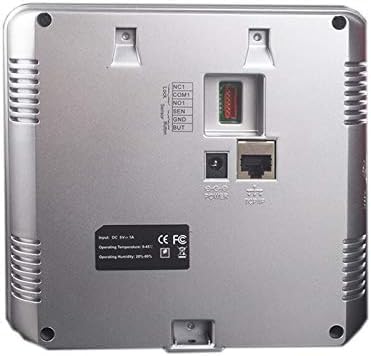
ചിത്രം 2.1: പിന്നിലേക്ക് view പവർ ഇൻപുട്ട്, TCP/IP പോർട്ട്, മറ്റ് കണക്ഷനുകൾ എന്നിവ ചിത്രീകരിക്കുന്ന ZKTeco MB20-VL ന്റെ.
- പവർ കണക്ഷൻ: ഉപകരണത്തിന്റെ പിൻഭാഗത്തുള്ള 'POWER' പോർട്ടിലേക്ക് DC 9V-1A പവർ അഡാപ്റ്റർ ബന്ധിപ്പിക്കുക. അനുയോജ്യമായ ഒരു പവർ ഔട്ട്ലെറ്റിലേക്ക് അഡാപ്റ്റർ പ്ലഗ് ചെയ്യുക.
- നെറ്റ്വർക്ക് കണക്ഷൻ (TCP/IP): നിങ്ങളുടെ നെറ്റ്വർക്ക് റൂട്ടറിൽ നിന്ന് ഒരു ഇതർനെറ്റ് കേബിൾ ബന്ധിപ്പിക്കുക അല്ലെങ്കിൽ ഉപകരണത്തിന്റെ പിൻഭാഗത്തുള്ള 'TCP/IP' പോർട്ടിലേക്ക് മാറുക. ഡാറ്റ സിൻക്രൊണൈസേഷനും റിമോട്ട് മാനേജ്മെന്റിനുമായി നെറ്റ്വർക്ക് ആശയവിനിമയം ഇത് പ്രാപ്തമാക്കുന്നു.
- USB കണക്ഷൻ: ഹാജർ രേഖകൾ കയറ്റുമതി ചെയ്യുകയോ ഉപയോക്തൃ ഡാറ്റ ഇറക്കുമതി ചെയ്യുകയോ പോലുള്ള പ്രാദേശിക ഡാറ്റ കൈമാറ്റത്തിനായി ഒരു USB പോർട്ട് ലഭ്യമാണ്. ഈ പോർട്ട് സാധാരണയായി ഉപകരണത്തിന്റെ വശത്താണ് സ്ഥിതി ചെയ്യുന്നത്.

ചിത്രം 2.2: വശം view ZKTeco MB20-VL ന്റെ, ഡാറ്റാ കൈമാറ്റത്തിനായി USB പോർട്ട് ഹൈലൈറ്റ് ചെയ്യുന്നു.
3. പ്രവർത്തന നിർദ്ദേശങ്ങൾ
ഉപയോക്തൃ എൻറോൾമെന്റും സ്ഥിരീകരണവും ഉൾപ്പെടെ MB20-VL ടെർമിനലിന്റെ അടിസ്ഥാന പ്രവർത്തനത്തിന്റെ രൂപരേഖ ഈ വിഭാഗത്തിൽ നൽകിയിരിക്കുന്നു.
3.1 പ്രാരംഭ സജ്ജീകരണവും അഡ്മിനിസ്ട്രേറ്റർ എൻറോൾമെന്റും
- ആദ്യമായി പവർ-ഓൺ ചെയ്യുമ്പോൾ, ഉപകരണം പ്രാരംഭ സജ്ജീകരണത്തിനായി ആവശ്യപ്പെടും.
- ഉപകരണ ക്രമീകരണങ്ങൾ സുരക്ഷിതമാക്കാൻ ഒരു അഡ്മിനിസ്ട്രേറ്ററെ (മുഖം, വിരലടയാളം അല്ലെങ്കിൽ പാസ്വേഡ് ഉപയോഗിച്ച്) ചേർക്കാൻ ശക്തമായി ശുപാർശ ചെയ്യുന്നു.
- 'M/OK' ബട്ടൺ അമർത്തി പ്രധാന മെനുവിൽ പ്രവേശിക്കുക. ഒരു അഡ്മിനിസ്ട്രേറ്ററെ സജ്ജമാക്കിയിട്ടുണ്ടെങ്കിൽ, സ്ഥിരീകരണത്തിനായി നിങ്ങളോട് ആവശ്യപ്പെടും.
3.2 ഉപയോക്തൃ എൻറോൾമെന്റ്
പുതിയ ഉപയോക്താക്കളെ ചേർക്കാൻ:
- പ്രധാന മെനുവിൽ നിന്ന്, 'ഉപയോക്തൃ മാനേജ്മെന്റ്' അല്ലെങ്കിൽ 'ഉപയോക്താവിനെ ചേർക്കുക' എന്നതിലേക്ക് നാവിഗേറ്റ് ചെയ്യുക.
- 'പുതിയ ഉപയോക്താവ്' തിരഞ്ഞെടുത്ത് ഒരു ഉപയോക്തൃ ഐഡി നൽകുക.
- എൻറോൾ മുഖം: തിരിച്ചറിയൽ മേഖലയിൽ മുഖം സ്ഥാപിക്കാൻ ഓൺ-സ്ക്രീൻ നിർദ്ദേശങ്ങൾ പാലിക്കുക. നല്ല വെളിച്ചവും വ്യക്തമായ വെളിച്ചവും ഉറപ്പാക്കുക. view നിങ്ങളുടെ മുഖത്തിൻ്റെ.
- വിരലടയാളം എൻറോൾ ചെയ്യുക: നിങ്ങളുടെ വിരൽ ഫിംഗർപ്രിന്റ് സെൻസറിൽ ഉറപ്പിച്ചു വയ്ക്കുക. കൃത്യമായ രജിസ്ട്രേഷനായി ആവശ്യപ്പെടുന്നതുപോലെ (സാധാരണയായി 3 തവണ) ഉയർത്തി ആവർത്തിക്കുക.
- എൻറോൾ പാസ്വേഡ്: കീപാഡ് ഉപയോഗിച്ച് ഒരു സംഖ്യാ പാസ്വേഡ് നൽകി അത് സ്ഥിരീകരിക്കുക.
- ഉപയോക്തൃ വിവരങ്ങൾ സംരക്ഷിക്കുക.
3.3 ഉപയോക്തൃ സ്ഥിരീകരണം
സമയ ഹാജർ അല്ലെങ്കിൽ ആക്സസ് നിയന്ത്രണത്തിനായി:
- മുഖം പരിശോധന: ഉപകരണത്തിൽ നിന്ന് 30-50 സെന്റീമീറ്റർ അകലത്തിൽ നിൽക്കുക. ഉപകരണം നിങ്ങളുടെ മുഖം സ്വയമേവ കണ്ടെത്തി പരിശോധിക്കും.
- വിരലടയാള പരിശോധന: നിങ്ങളുടെ രജിസ്റ്റർ ചെയ്ത വിരൽ ഫിംഗർപ്രിന്റ് സെൻസറിൽ വയ്ക്കുക.
- പാസ്വേഡ് പരിശോധന: കീപാഡ് ഉപയോഗിച്ച് നിങ്ങളുടെ രജിസ്റ്റർ ചെയ്ത പാസ്വേഡ് നൽകി 'M/OK' അമർത്തുക.
വിജയകരമായ പരിശോധനയ്ക്ക് ശേഷം, ഉപകരണം ഒരു സ്ഥിരീകരണ സന്ദേശം പ്രദർശിപ്പിക്കുകയും (ഉദാ: 'സ്വാഗതം' അല്ലെങ്കിൽ 'ആക്സസ് അനുവദിച്ചു') ഇവന്റ് റെക്കോർഡ് ചെയ്യുകയും ചെയ്യും.
3.4 ഡാറ്റ മാനേജ്മെൻ്റ്
- ഡാറ്റ ഡൗൺലോഡ് ചെയ്യുന്നു: ഹാജർ ലോഗുകളും ഉപയോക്തൃ ഡാറ്റയും ഡൗൺലോഡ് ചെയ്യുന്നതിന് ഉപകരണത്തിന്റെ USB പോർട്ടിലേക്ക് ഒരു USB ഡ്രൈവ് ബന്ധിപ്പിക്കുക അല്ലെങ്കിൽ അനുയോജ്യമായ സോഫ്റ്റ്വെയർ ഉപയോഗിച്ച് TCP/IP കണക്ഷൻ ഉപയോഗിക്കുക.
- എസ്എസ്ആർ എക്സൽ സോഫ്റ്റ്വെയർ: യുഎസ്ബി വഴി ഉപകരണത്തിൽ നിന്ന് നേരിട്ട് ഹാജർ റിപ്പോർട്ടുകൾ സൃഷ്ടിക്കുന്നതിന് സംയോജിത എസ്എസ്ആർ എക്സൽ സോഫ്റ്റ്വെയർ ഉപയോഗിക്കുക.
4. പരിപാലനം
പതിവ് അറ്റകുറ്റപ്പണികൾ നിങ്ങളുടെ MB20-VL ടെർമിനലിന്റെ ദീർഘായുസ്സും ഒപ്റ്റിമൽ പ്രകടനവും ഉറപ്പാക്കുന്നു.
4.1 വൃത്തിയാക്കൽ
- ഡിസ്പ്ലേയും ലെൻസും: മൃദുവായ, ലിൻ്റ് രഹിത തുണി ഉപയോഗിക്കുകampഡിസ്പ്ലേ സ്ക്രീനും ഫേഷ്യൽ റെക്കഗ്നിഷൻ ലെൻസും സൌമ്യമായി തുടയ്ക്കുന്നതിന് ഒരു ഉരച്ചിലില്ലാത്ത ക്ലീനർ (ഉദാ: സ്ക്രീൻ ക്ലീനർ) ഉപയോഗിച്ച് വൃത്തിയാക്കുക. അമിതമായ ഈർപ്പം ഒഴിവാക്കുക.
- ഫിംഗർപ്രിന്റ് സെൻസർ: ഫിംഗർപ്രിന്റ് സെൻസർ തുടയ്ക്കാൻ വൃത്തിയുള്ളതും ഉണങ്ങിയതും മൃദുവായതുമായ തുണി ഉപയോഗിക്കുക. കഠിനമായ രാസവസ്തുക്കളോ ഉരച്ചിലുകളുള്ള വസ്തുക്കളോ ഉപയോഗിക്കരുത്, കാരണം അവ സെൻസർ പ്രതലത്തിന് കേടുവരുത്തും.
- ഉപകരണം സിasing: പുറംഭാഗം തുടയ്ക്കുക casinമൃദുവായതും ഉണങ്ങിയതുമായ തുണി ഉപയോഗിച്ച് ഗ്രാം.
4.2 പരിസ്ഥിതി വ്യവസ്ഥകൾ
നിർദ്ദിഷ്ട പാരിസ്ഥിതിക പരിധികൾക്കുള്ളിൽ ഉപകരണം പ്രവർത്തിക്കുന്നുണ്ടെന്ന് ഉറപ്പാക്കുക:
- പ്രവർത്തന താപനില: 0°C മുതൽ 45°C വരെ (32°F മുതൽ 113°F വരെ)
- പ്രവർത്തന ഈർപ്പം: 20% മുതൽ 80% വരെ (കണ്ടെൻസിംഗ് അല്ലാത്തത്)
തീവ്രമായ താപനില, നേരിട്ടുള്ള സൂര്യപ്രകാശം, ഉയർന്ന ഈർപ്പം അല്ലെങ്കിൽ പൊടി നിറഞ്ഞ അന്തരീക്ഷം എന്നിവയിൽ ഉപകരണം തുറന്നുകാട്ടുന്നത് ഒഴിവാക്കുക.
4.3 ഡാറ്റ ബാക്കപ്പ്
ഡാറ്റ നഷ്ടം തടയാൻ ഹാജർ രേഖകളും ഉപയോക്തൃ ഡാറ്റയും പതിവായി ബാക്കപ്പ് ചെയ്യുക. ഇത് USB എക്സ്പോർട്ട് വഴിയോ നെറ്റ്വർക്ക് സോഫ്റ്റ്വെയർ വഴിയോ ചെയ്യാം.
5. പ്രശ്നപരിഹാരം
MB20-VL ടെർമിനലിൽ നിങ്ങൾ നേരിട്ടേക്കാവുന്ന പൊതുവായ പ്രശ്നങ്ങൾക്കുള്ള പരിഹാരങ്ങൾ ഈ വിഭാഗം നൽകുന്നു.
| പ്രശ്നം | സാധ്യമായ കാരണം | പരിഹാരം |
|---|---|---|
| ഉപകരണം പവർ ഓണാക്കുന്നില്ല. | പവർ അഡാപ്റ്റർ കണക്റ്റ് ചെയ്തിട്ടില്ല അല്ലെങ്കിൽ തകരാറുണ്ട്; പവർ ഔട്ട്ലെറ്റ് പ്രശ്നം. | പവർ അഡാപ്റ്റർ കണക്ഷൻ പരിശോധിക്കുക. പവർ ഔട്ട്ലെറ്റ് പ്രവർത്തിക്കുന്നുണ്ടെന്ന് ഉറപ്പാക്കുക. മറ്റൊരു ഔട്ട്ലെറ്റ് പരീക്ഷിക്കുക. |
| മുഖം തിരിച്ചറിയൽ പരാജയം. | തെറ്റായ അകലം/ആംഗിൾ; മോശം വെളിച്ചം; മുഖ മാറ്റങ്ങൾ (ഉദാ: പുതിയ കണ്ണട, താടി); ഡാറ്റ കറപ്ഷൻ. | നിങ്ങൾ 30-50 സെന്റിമീറ്ററിനുള്ളിൽ ആണെന്ന് ഉറപ്പാക്കുക. ലൈറ്റിംഗ് ക്രമീകരിക്കുക. ആവശ്യമെങ്കിൽ മുഖം വീണ്ടും എൻറോൾ ചെയ്യുക. |
| ഫിംഗർപ്രിന്റ് തിരിച്ചറിയൽ പരാജയപ്പെട്ടു. | വൃത്തികെട്ട/കേടായ സെൻസർ; ഉണങ്ങിയ/നനഞ്ഞ വിരലുകൾ; തെറ്റായ വിരൽ സ്ഥാനം; ഡാറ്റ കറപ്ഷൻ. | സെൻസർ വൃത്തിയാക്കുക. വിരലുകൾ വൃത്തിയുള്ളതും വരണ്ടതുമാണെന്ന് ഉറപ്പാക്കുക. വിരൽ നേരെയും ഉറപ്പായും വയ്ക്കുക. നിലനിൽക്കുകയാണെങ്കിൽ വിരലടയാളം വീണ്ടും എൻറോൾ ചെയ്യുക. |
| നെറ്റ്വർക്ക് കണക്ഷൻ പ്രശ്നങ്ങൾ. | ഇതർനെറ്റ് കേബിൾ വിച്ഛേദിക്കപ്പെട്ടു/തകരാർ; തെറ്റായ ഐപി ക്രമീകരണങ്ങൾ; നെറ്റ്വർക്ക് റൂട്ടർ പ്രശ്നം. | ഇതർനെറ്റ് കേബിൾ കണക്ഷൻ പരിശോധിക്കുക. ഉപകരണ ഐപി ക്രമീകരണങ്ങൾ നെറ്റ്വർക്ക് കോൺഫിഗറേഷനുമായി പൊരുത്തപ്പെടുന്നുണ്ടെന്ന് ഉറപ്പാക്കുക. റൂട്ടർ/സ്വിച്ച് പുനരാരംഭിക്കുക. |
| മെനു ആക്സസ് ചെയ്യാൻ കഴിയില്ല. | ഒരു അഡ്മിനിസ്ട്രേറ്ററെയും ചേർത്തിട്ടില്ല അല്ലെങ്കിൽ അഡ്മിനിസ്ട്രേറ്റർ പാസ്വേഡ് മറന്നുപോയിട്ടില്ല. | അഡ്മിനെ സജ്ജമാക്കിയിട്ടില്ലെങ്കിൽ, നിങ്ങൾക്ക് ആക്സസ് ചെയ്യാൻ കഴിയണം. അഡ്മിൻ സജ്ജമാക്കിയിട്ട് മറന്നുപോയാൽ, പുനഃസജ്ജീകരണ നടപടിക്രമങ്ങൾക്കായി ZKTeco പിന്തുണയുമായി ബന്ധപ്പെടുക (ഫാക്ടറി പുനഃസജ്ജീകരണം ആവശ്യമായി വന്നേക്കാം). |
ഈ പരിഹാരങ്ങൾ പരീക്ഷിച്ചതിനുശേഷവും പ്രശ്നം നിലനിൽക്കുകയാണെങ്കിൽ, ദയവായി നിങ്ങളുടെ റീസെല്ലറെയോ ZKTeco സാങ്കേതിക പിന്തുണയെയോ ബന്ധപ്പെടുക.
6 സ്പെസിഫിക്കേഷനുകൾ
| നിർമ്മാതാവ് | ZK TECO |
| ബ്രാൻഡ് | ZKTeco |
| മോഡൽ നമ്പർ | MB20_01 |
| നിറം | കറുപ്പ് |
| പാക്കേജ് അളവുകൾ | 33 x 22.8 x 8.4 സെ.മീ |
| ഇനത്തിൻ്റെ ഭാരം | 740 ഗ്രാം |
| പവർ ഇൻപുട്ട് | DC 9V-1A |
| പ്രവർത്തന താപനില | 0°C മുതൽ 45°C വരെ (32°F മുതൽ 113°F വരെ) |
| പ്രവർത്തന ഹ്യുമിഡിറ്റി | 20% മുതൽ 80% വരെ (കണ്ടെൻസിംഗ് അല്ലാത്തത്) |
| വിരലടയാള ശേഷി | 500 |
| ഫേസ് കപ്പാസിറ്റി | 100 |
| ഇവന്റ് ശേഷി | 50,000 |
| ആശയവിനിമയം | ടിസിപി/ഐപി, യുഎസ്ബി |
| സ്ഥിരീകരണ രീതികൾ | മുഖം, വിരലടയാളം, പാസ്വേഡ് |
7. വാറൻ്റിയും പിന്തുണയും
ഉൽപ്പന്ന വാറണ്ടിയെക്കുറിച്ചുള്ള വിവരങ്ങൾക്ക്, ദയവായി നിങ്ങളുടെ വാങ്ങലിനൊപ്പം ഉൾപ്പെടുത്തിയിരിക്കുന്ന വാറന്റി കാർഡ് പരിശോധിക്കുകയോ ഔദ്യോഗിക ZKTeco സന്ദർശിക്കുകയോ ചെയ്യുക. webസൈറ്റ്. വാറന്റി നിബന്ധനകളും വ്യവസ്ഥകളും പ്രദേശത്തിനും റീസെല്ലറിനും അനുസരിച്ച് വ്യത്യാസപ്പെടാം.
സാങ്കേതിക പിന്തുണ, ഉൽപ്പന്ന അന്വേഷണങ്ങൾ അല്ലെങ്കിൽ സേവന അഭ്യർത്ഥനകൾ എന്നിവയ്ക്കായി, ദയവായി നിങ്ങളുടെ അംഗീകൃത ZKTeco റീസെല്ലറെ ബന്ധപ്പെടുക അല്ലെങ്കിൽ ഔദ്യോഗിക ZKTeco പിന്തുണ പോർട്ടൽ സന്ദർശിക്കുക. കാര്യക്ഷമമായ സഹായത്തിനായി നിങ്ങളുടെ ഉൽപ്പന്ന മോഡൽ നമ്പറും (MB20_01) നിങ്ങളുടെ പ്രശ്നത്തിന്റെ വിശദമായ വിവരണവും നൽകുക.


