1. ആമുഖം
The CONTEC-08A is a desktop electronic sphygmomanometer designed for fully automatic blood pressure measurement. It features a high-definition color LCD display and supports both English and Chinese interfaces for strong visibility. This device is suitable for household use and can measure blood pressure for adults, pediatric, and neonatal patients. It offers convenient storage of readings for multiple users, making it ideal for family use.
2 സുരക്ഷാ വിവരങ്ങൾ
Please read this manual carefully before using the CONTEC-08A Blood Pressure Monitor. Keep this manual for future reference.
- This device is intended for non-invasive measurement of blood pressure and pulse rate.
- ശിശുക്കളോ സമ്മതം പ്രകടിപ്പിക്കാൻ കഴിയാത്ത വ്യക്തികളോ ഈ ഉപകരണം ഉപയോഗിക്കരുത്.
- Consult your physician for interpretation of blood pressure measurements. Self-diagnosis and treatment based on measurements can be dangerous.
- Do not use the device in the presence of flammable gases or liquids.
- Keep the device and cuffs out of reach of children.
- ഉപകരണം സ്വയം വേർപെടുത്തുകയോ നന്നാക്കാൻ ശ്രമിക്കുകയോ ചെയ്യരുത്. യോഗ്യതയുള്ള സേവന ഉദ്യോഗസ്ഥരെ ബന്ധപ്പെടുക.
- ഡയറ്ററി സപ്ലിമെൻ്റുകളെക്കുറിച്ചുള്ള പ്രസ്താവനകൾ FDA വിലയിരുത്തിയിട്ടില്ല, അവ ഏതെങ്കിലും രോഗമോ ആരോഗ്യസ്ഥിതിയോ നിർണ്ണയിക്കാനോ ചികിത്സിക്കാനോ സുഖപ്പെടുത്താനോ തടയാനോ ഉദ്ദേശിച്ചുള്ളതല്ല.
3. പാക്കേജ് ഉള്ളടക്കം
നിങ്ങളുടെ പാക്കേജിൽ ഇനിപ്പറയുന്ന എല്ലാ ഇനങ്ങളും ഉൾപ്പെടുത്തിയിട്ടുണ്ടെന്ന് ഉറപ്പാക്കുക:
- One (1) CONTEC-08A Main Unit Monitor
- ഒന്ന് (1) USB കേബിൾ
- Three (3) Blood Pressure Cuffs (Adult, Pediatric, Infant)
- ഒന്ന് (1) ഉപയോക്തൃ മാനുവൽ
- PC Software (available for download, no CD included)
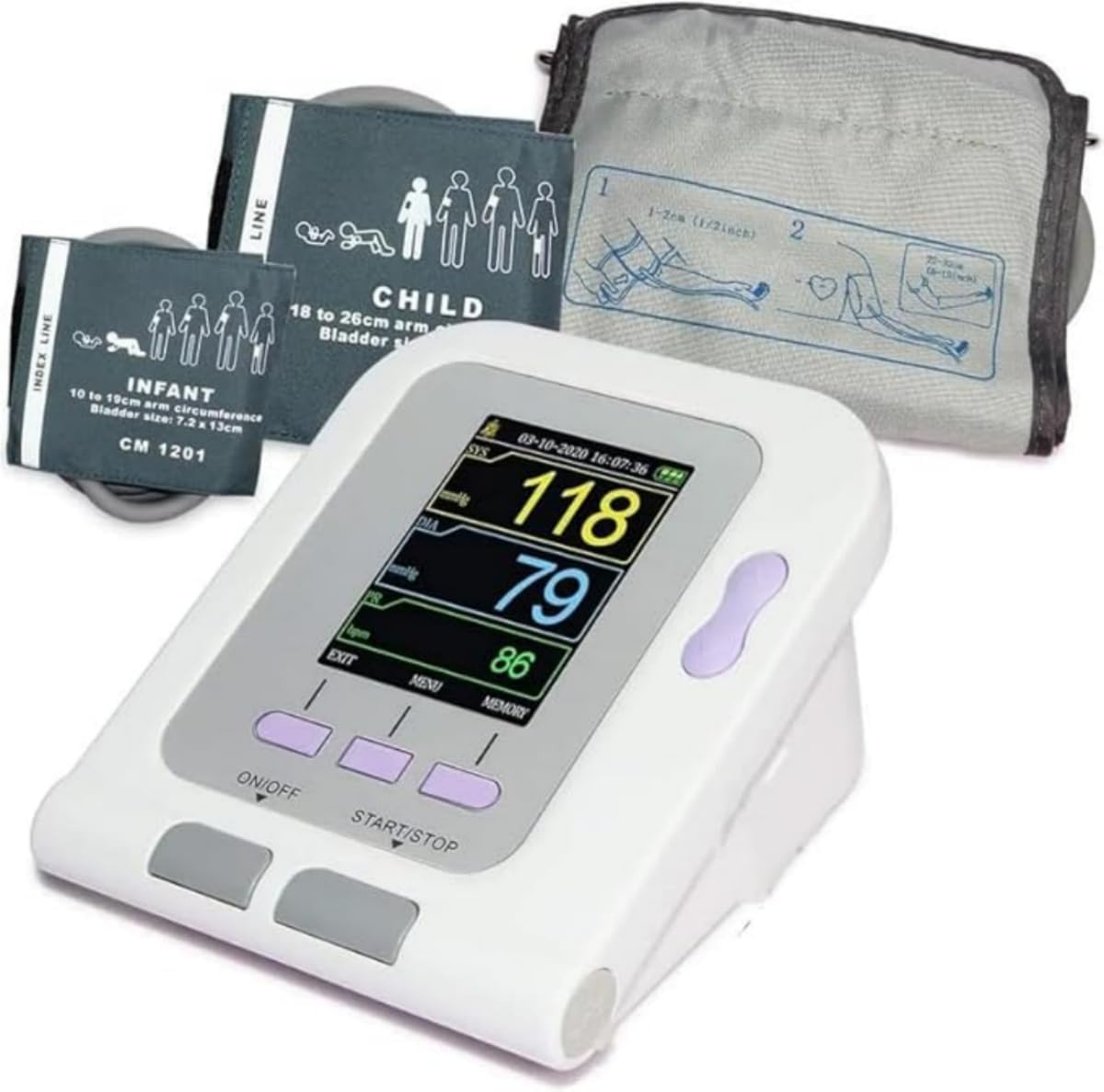
Image: The CONTEC-08A monitor shown with the adult, pediatric, and infant cuffs included in the package.
4. ഉൽപ്പന്നം കഴിഞ്ഞുview
Familiarize yourself with the components and display of your CONTEC-08A Blood Pressure Monitor.

ചിത്രം: വിശദമായ ഒരു ചിത്രം view of the monitor's display, indicating Systolic Pressure, Diastolic Pressure, Pulse Rate, Arm Reminder, Power Display, Up/Down Button, Menu Button, On/Off Button, and Start/Stop Button.
4.1. ഡിസ്പ്ലേ സൂചകങ്ങൾ
- സിസ്റ്റോളിക് മർദ്ദം (SYS): The top number in a blood pressure reading, indicating the pressure in your arteries when your heart beats.
- ഡിഐഎ (ഡയസ്റ്റോളിക് പ്രഷർ): The bottom number in a blood pressure reading, indicating the pressure in your arteries between beats.
- PR (Pulse Rate): Your heart rate, measured in beats per minute (bpm).
- Arm Reminder: An icon indicating proper arm positioning.
- പവർ ഡിസ്പ്ലേ: നിലവിലെ ബാറ്ററി ലെവൽ കാണിക്കുന്നു.
4.2. ബട്ടണുകൾ
- ഓൺ/ഓഫ് ബട്ടൺ: ഉപകരണം ഓൺ അല്ലെങ്കിൽ ഓഫ് ചെയ്യുന്നു.
- START/STOP ബട്ടൺ: Initiates or stops a blood pressure measurement.
- മെനു ബട്ടൺ: Accesses the system settings and other functions.
- മുകളിലേക്ക്/താഴ്ന്ന ബട്ടൺ: മെനു ഓപ്ഷനുകളിലൂടെ നാവിഗേറ്റ് ചെയ്യുകയും ക്രമീകരണങ്ങൾ ക്രമീകരിക്കുകയും ചെയ്യുന്നു.
4.3. Cuffs
The CONTEC-08A comes with three different cuff sizes to accommodate various users:
- Adult Cuff: For arm circumference 8.7-12.6 inches (22-32 cm).
- Child Cuff: For arm circumference 7.1-10.2 inches (18-26 cm).
- Infant Cuff: For arm circumference 3.9-7.5 inches (10-19 cm).

Image: Visual representation of the three cuff sizes and their corresponding arm circumference ranges for accurate measurement.
5. സജ്ജീകരണം
5.1. ഉപകരണം പവർ ചെയ്യുന്നു
The CONTEC-08A can be powered by either batteries or an AC adapter.
- ബാറ്ററി പവർ:
Choose four (4) "AA" batteries. The battery specification is DC 1.5V. For rechargeable batteries, please choose 1.5V specification. Install batteries as shown in the diagram below, ensuring correct polarity.
- എസി അഡാപ്റ്റർ പവർഡ്:
Connect the sphygmomanometer to the power adapter. Insert the power adapter plug into the power adapter socket on the right side of the device.
കുറിപ്പ്:
- The power adapter does not have the function of charging the battery.
- നിയന്ത്രിത പവർ സപ്ലൈയും ബാറ്ററികളും ഒരേ സമയം ഉപയോഗിക്കുമ്പോൾ, ബാറ്ററി പവർ ഉപഭോഗം ചെയ്യപ്പെടില്ല.
- Switch regulated power supply and battery as power supply when the device is off, otherwise, the device may shut down due to power failure.
- When switching between the power adapter and the battery, please do it when the device is off, otherwise the instrument may shut down due to power failure.

Image: Instructions for battery installation and AC adapter connection.
5.2. കഫ് കണക്ഷൻ
Select the appropriate cuff size for the user. Connect the cuff's air tube securely to the air jack on the side of the monitor.
Video: An official product video demonstrating the connection of the cuff to the CONTEC-08A monitor and the measurement process.
6. പ്രവർത്തന നിർദ്ദേശങ്ങൾ
6.1. Before Measurement
- Rest for at least 5 minutes before measurement.
- അളക്കുന്നതിന് മുമ്പ് 30 മിനിറ്റ് ഭക്ഷണം, മദ്യപാനം, പുകവലി, വ്യായാമം, കുളിക്കൽ എന്നിവ ഒഴിവാക്കുക.
- നിങ്ങളുടെ പിൻഭാഗം പിന്തുണയ്ക്കുകയും പാദങ്ങൾ തറയിൽ പരത്തുകയും ചെയ്ത് സുഖപ്രദമായ സ്ഥാനത്ത് ഇരിക്കുക.
- Place the cuff on your bare upper arm, ensuring the center of the cuff is at the same height as your heart.
- Do not talk or move your body during the measurement.

Image: Proper posture and cuff placement for accurate blood pressure measurement. A tip is included to measure three times for more data points to reduce effects of breathing or exercise.
6.2. Performing a Measurement
- അമർത്തുക ഓൺ/ഓഫ് ഉപകരണം ഓണാക്കാനുള്ള ബട്ടൺ.
- ശരിയായ ഉപയോക്തൃ പ്രോ ഉറപ്പാക്കുകfile is selected (see "User Type Selection" below).
- അമർത്തുക ആരംഭിക്കുക/നിർത്തുക button to begin the measurement. The cuff will inflate automatically.
- Remain still and quiet until the measurement is complete and the results are displayed on the screen.
- The device will display Systolic Pressure (SYS), Diastolic Pressure (DIA), and Pulse Rate (PR).
- The measurement will automatically be saved to the selected user's memory.
6.3. User Type Selection
The CONTEC-08A allows you to select the user type (Adult, Neonatal, Pediatric) to ensure appropriate measurement parameters.
- അമർത്തുക മെനു button to enter the system setup.
- ഉപയോഗിക്കുക മുകളിലേക്ക് / താഴേക്ക് buttons to navigate to "USER TYPE".
- അമർത്തുക പ്രവേശിക്കുക button (often the middle button) to select.
- ഉപയോഗിക്കുക മുകളിലേക്ക് / താഴേക്ക് buttons to choose between ADU (Adult), NEO (Neonatal), or PED (Pediatric).
- അമർത്തുക പ്രവേശിക്കുക നിങ്ങളുടെ തിരഞ്ഞെടുപ്പ് സ്ഥിരീകരിക്കാൻ.

Image: The system setup screen, illustrating how to select the user type (Adult, Neonatal, Pediatric) for accurate readings.
6.4. Physiological Alarm Function
The device has a physiological alarm function that can be set to alert you if blood pressure readings exceed high limits or fall below low limits.
- വഴി അലാറം ക്രമീകരണങ്ങൾ ആക്സസ് ചെയ്യുക മെനു.
- Set the desired high and low blood pressure limits.
- The alarm switch can be turned on or off as needed.
7. ഡാറ്റ മാനേജ്മെൻ്റ്
7.1. മെമ്മറി സംഭരണം
The CONTEC-08A can store up to 300 readings, with 100 readings for each of the three user profiles. This allows for convenient tracking of blood pressure trends over time for your entire family.
- ലേക്ക് view stored readings, press the മെമ്മറി ബട്ടൺ.
- ഉപയോഗിക്കുക മുകളിലേക്ക് / താഴേക്ക് buttons to scroll through past measurements.

Image: Illustration of the device's memory capacity, storing 100 readings per user for up to three users.
7.2. PC Software and Data Upload
The CONTEC-08A supports data upload to a PC for further analysis and reporting. The software is available for download from the manufacturer's webസൈറ്റ്.
സോഫ്റ്റ്വെയർ ഡൗൺലോഡ്: http://www.dlsoftw.com (INDEX CODE: 06SFB031)
A. Software use steps:
- Click "Open the software".
- Open the machine, connect the right square port with a USB cable to PC.
- Open the software. Click "Download the data".
- Click the icon, choose the case in storage path when setting.
- Open the data, choose the different function for analysis.

Image: The software interface, highlighting features such as four graph display modes, data upload and download, statistics by period, and print report functionality.
8. പരിപാലനം
8.1. വൃത്തിയാക്കൽ
- Clean the device and cuff with a soft, dry cloth.
- If necessary, use a cloth lightly dampened with water or a mild detergent. Do not use abrasive cleaners or immerse the device in water.
8.2. സംഭരണം
- Store the device in a clean, dry place away from direct sunlight, extreme temperatures, and humidity.
- ദീർഘനേരം ഉപകരണം ഉപയോഗിക്കുന്നില്ലെങ്കിൽ, ചോർച്ച തടയാൻ ബാറ്ററികൾ നീക്കം ചെയ്യുക.
8.3. ബാറ്ററി മാറ്റിസ്ഥാപിക്കൽ
When the power display indicates low battery, replace all four "AA" batteries with new ones, ensuring correct polarity.
9. പ്രശ്നപരിഹാരം
| പ്രശ്നം | സാധ്യമായ കാരണം | പരിഹാരം |
|---|---|---|
| ഉപകരണം ഓണാക്കില്ല. | ബാറ്ററികൾ തീർന്നിരിക്കുന്നു അല്ലെങ്കിൽ തെറ്റായി ഘടിപ്പിച്ചിരിക്കുന്നു; എസി അഡാപ്റ്റർ ശരിയായി ബന്ധിപ്പിച്ചിട്ടില്ല. | Replace batteries or ensure correct polarity. Check AC adapter connection. |
| "Leak" error message. | Cuff is not properly connected or there is a leak in the cuff/tube. | Ensure cuff tube is securely connected to the monitor. Check cuff and tube for any visible damage or holes. |
| കൃത്യമല്ലാത്തതോ പൊരുത്തമില്ലാത്തതോ ആയ വായനകൾ. | Improper cuff placement; movement or talking during measurement; incorrect cuff size; physiological factors. | Ensure correct cuff placement and size. Remain still and quiet during measurement. Consult a healthcare professional if readings remain inconsistent. |
| "Power Low" message when plugged in. | Faulty AC adapter or internal power issue. | Ensure you are using the correct AC adapter. If the issue persists, contact customer support. |
10 സ്പെസിഫിക്കേഷനുകൾ
- മോഡൽ: CONTEC08A
- ഡിസ്പ്ലേ തരം: എൽസിഡി
- ഊർജ്ജ സ്രോതസ്സ്: Corded Electric (AC Adapter) or 4x AA Batteries (DC 1.5V)
- ഉൾപ്പെടുത്തിയ ഘടകങ്ങൾ: Main Unit, USB Cable, 3 Cuffs (Adult, Pediatric, Infant)
- കഫ് വലുപ്പങ്ങൾ:
- Adult: 8.7-12.6 inches (22-32 cm) arm circumference
- Child: 7.1-10.2 inches (18-26 cm) arm circumference
- Infant: 3.9-7.5 inches (10-19 cm) arm circumference
- മെമ്മറി: Up to 300 readings (100 per user for 3 users)
- നിർമ്മാതാവ്: കോണ്ടെക് മെഡിക്കൽ സിസ്റ്റംസ് കോ., ലിമിറ്റഡ്
- പാക്കേജ് അളവുകൾ: 6.42 x 4.8 x 4.72 ഇഞ്ച്
- ഇനത്തിൻ്റെ ഭാരം: 1.48 പൗണ്ട്
11. വാറൻ്റിയും പിന്തുണയും
For any questions, technical support, or warranty claims, please contact CONTEC customer service. While specific warranty details are not provided here, it is recommended to retain your purchase receipt for proof of purchase.
Please note that customer reviews indicate potential challenges with direct manufacturer support from China. For issues, it is often best to contact the retailer where the product was purchased.


