1. ആമുഖം
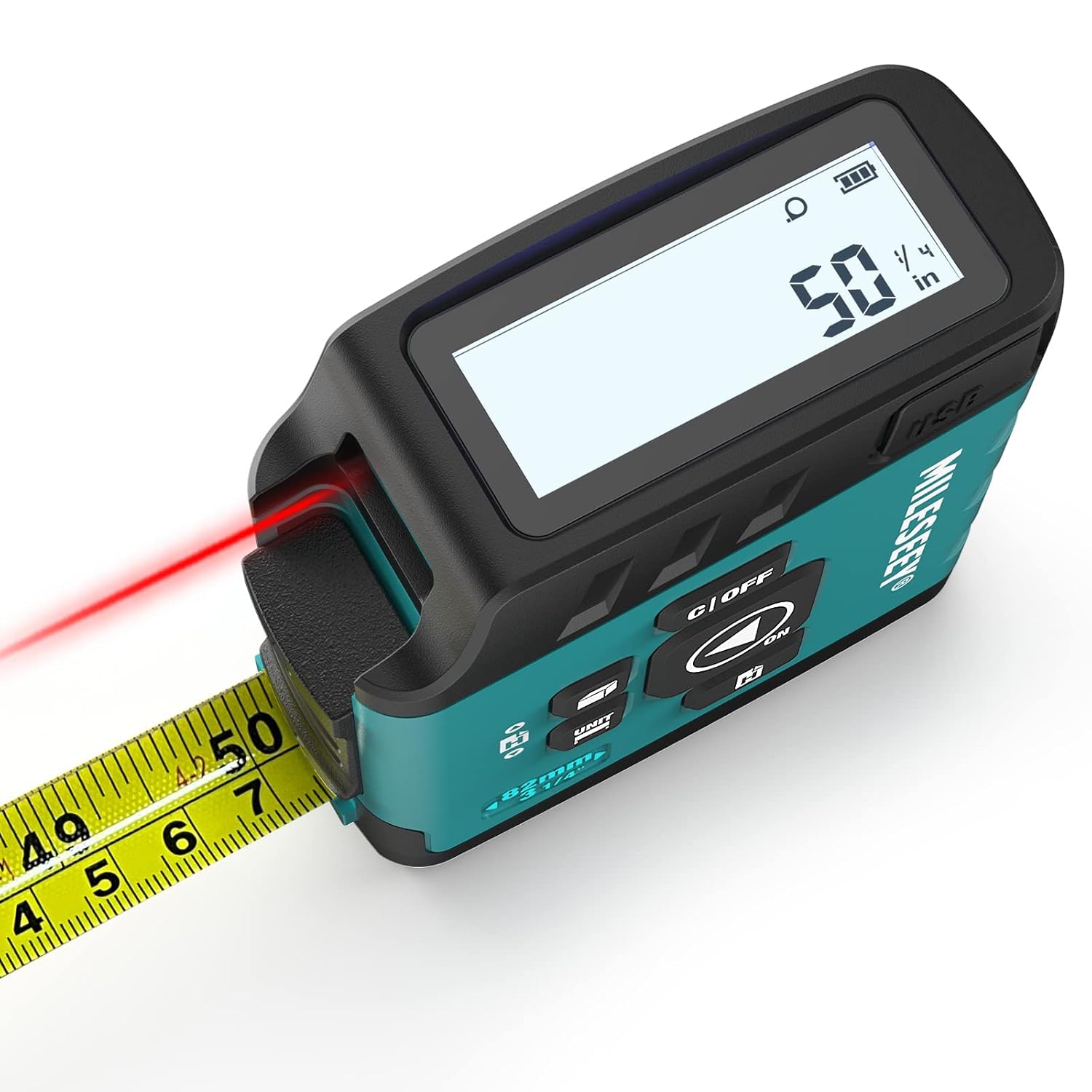
MiLESEEY DT20 ഒരു ഉപകരണത്തിൽ ഒരു ലേസർ ഡിസ്റ്റൻസ് മീറ്ററും ഒരു ഡിജിറ്റൽ റീഡൗട്ട് ടേപ്പ് അളവും സംയോജിപ്പിക്കുന്നു, ഇത് വിവിധ ആപ്ലിക്കേഷനുകൾക്ക് വൈവിധ്യമാർന്ന അളക്കൽ ശേഷികൾ വാഗ്ദാനം ചെയ്യുന്നു.
ഈ ഓഗ്മെന്റഡ് ടൂൾ നിങ്ങളുടെ ലക്ഷ്യ ദൈർഘ്യം നേരിട്ട് അളക്കുകയും ഡിജിറ്റൽ ഏരിയ/വോളിയം അളവുകൾ ഔട്ട്പുട്ട് ചെയ്യുകയും ചെയ്യുന്നു. കൃത്യമായ മൂല്യങ്ങൾ കാര്യക്ഷമമായി ലഭിക്കുന്നതിന്, ഹ്രസ്വ ദൂരങ്ങൾക്ക് ടേപ്പ് ഡാറ്റയുടെ ബദൽ ഉപയോഗവും ദീർഘ ദൂരങ്ങൾക്ക് ലേസർ മോഡും ഇത് അനുവദിക്കുന്നു. ഒരു ടേപ്പ് ലോക്ക് സംവിധാനം ആകസ്മികമായി വഴുതിപ്പോകുന്നത് തടയുന്നു.
വീഡിയോ 1: കഴിഞ്ഞുview MiLESEEY DT20 3-in-1 ലേസർ ടേപ്പ് മെഷറിന്റെ പ്രധാന സവിശേഷതകളും അളക്കൽ ശേഷികളും പ്രകടമാക്കുന്നു.
2. ബോക്സിൽ എന്താണുള്ളത്?
- 1 x MiLESEEY DT20 ലേസർ ഡിജിറ്റൽ ടേപ്പ് അളവ്
- 1 x USB ചാർജിംഗ് കേബിൾ
- 1 x ഉപയോക്തൃ മാനുവൽ
- 1 x പോർട്ടബിൾ റിസ്റ്റ് സ്ട്രാപ്പ്
3. സജ്ജീകരണം
3.1 ഉപകരണം ചാർജ് ചെയ്യുന്നു
DT20-ൽ റീചാർജ് ചെയ്യാവുന്ന ബാറ്ററിയുണ്ട്. നൽകിയിരിക്കുന്ന USB ചാർജിംഗ് കേബിൾ ഉപകരണത്തിന്റെ ചാർജിംഗ് പോർട്ടിലേക്കും അനുയോജ്യമായ ഒരു USB പവർ സ്രോതസ്സിലേക്കും ബന്ധിപ്പിക്കുക. ഡിസ്പ്ലേയിലെ ബാറ്ററി ഇൻഡിക്കേറ്റർ ചാർജിംഗ് നില കാണിക്കും.
3.2 പവർ ഓൺ/ഓഫ്
ഉപകരണം ഓണാക്കാൻ, 'ഓൺ/ഓഫ്' ബട്ടൺ അമർത്തുക. ഡിജിറ്റൽ ഡിസ്പ്ലേ പ്രകാശിക്കും. ഓഫാക്കാൻ, 'ഓൺ/ഓഫ്' ബട്ടൺ കുറച്ച് സെക്കൻഡ് അമർത്തിപ്പിടിക്കുക.
4 ഓപ്പറേറ്റിംഗ് മോഡുകൾ
4.1 ഡിജിറ്റൽ ടേപ്പ് അളവ്
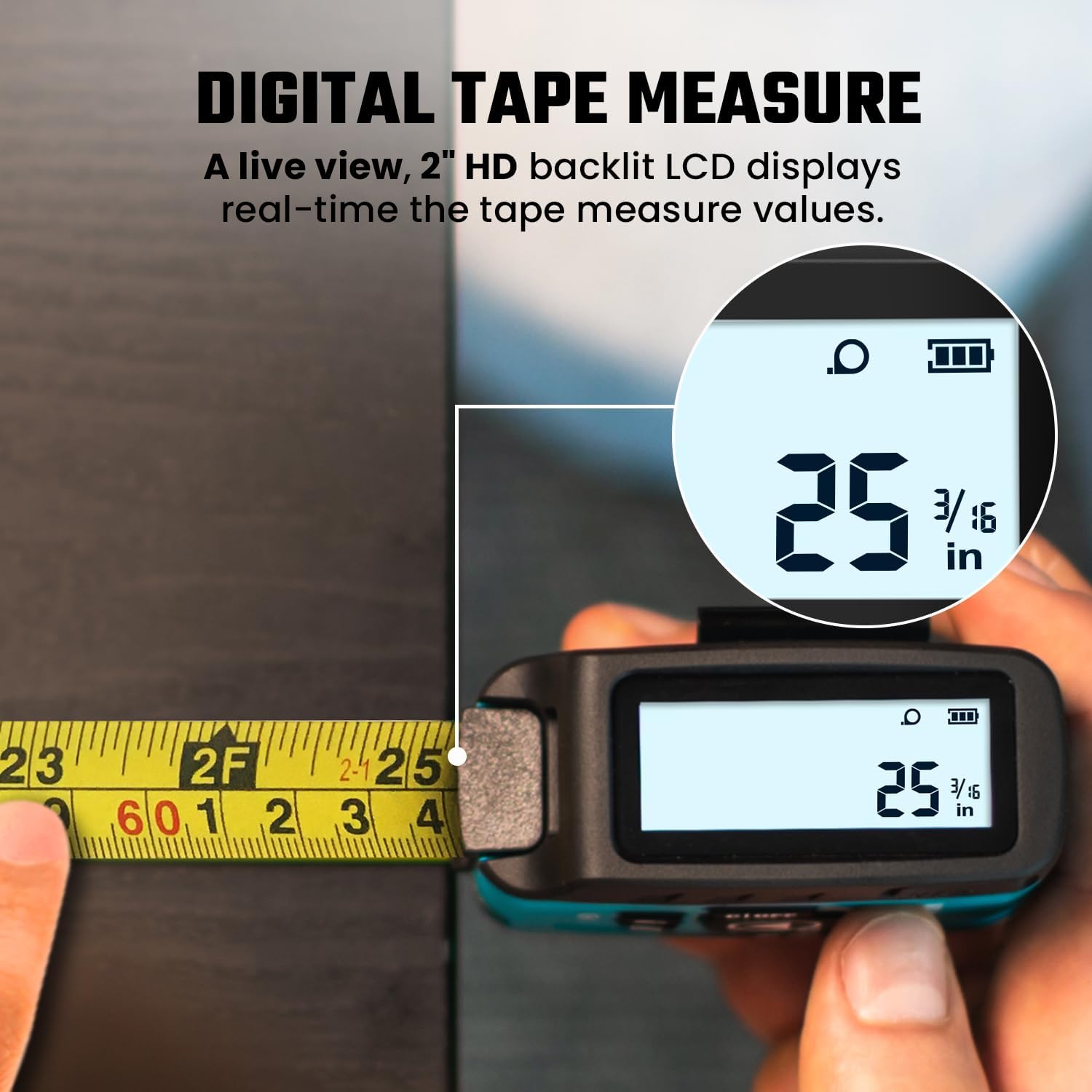
ഭൗതിക ടേപ്പ് അളവ് പുറത്തെടുക്കുക. MiLESEEY-യുടെ പേറ്റന്റ് നേടിയ പവർബ്രസ്റ്റ് ഡിജിറ്റൽ ഡിസ്പ്ലേ സാങ്കേതികവിദ്യ നിങ്ങൾ ടേപ്പ് നീട്ടുമ്പോൾ സ്ക്രീനിൽ തത്സമയ കൃത്യമായ കണക്കുകൾ കാണിക്കും. 16FT ഡിജിറ്റൽ ടേപ്പ് അളവ് ±1/16 ഇഞ്ച് വരെ കൃത്യത വാഗ്ദാനം ചെയ്യുന്നു.
4.2 ലേസർ ദൂരം അളക്കൽ
ലേസർ സജീവമാക്കാൻ 'MEAS' ബട്ടൺ അമർത്തുക. നിങ്ങളുടെ ലക്ഷ്യത്തിലേക്ക് ലേസർ ചൂണ്ടിക്കാണിക്കുക. അളവ് എടുക്കാൻ 'MEAS' വീണ്ടും അമർത്തുക. 130FT ലേസർ ദൂര അളവ് ±1/8 ഇഞ്ച് വരെ കൃത്യത നൽകുന്നു. സുരക്ഷയ്ക്കായി ലേസർ ക്ലാസ് II (<1mW) ആണ്.

4.3 വിസ്തീർണ്ണവും വോളിയം അളക്കലും
DT20 ഏരിയ, വോളിയം കണക്കുകൂട്ടലുകളെ പിന്തുണയ്ക്കുന്നു. ഏരിയ (ചതുര ഐക്കൺ) അല്ലെങ്കിൽ വോളിയം (ക്യൂബ് ഐക്കൺ) മോഡ് തിരഞ്ഞെടുക്കുന്നതുവരെ അളക്കൽ മോഡുകളിലൂടെ സൈക്കിൾ ചെയ്യാൻ 'UNIT' ബട്ടൺ ഉപയോഗിക്കുക. ടേപ്പ് അല്ലെങ്കിൽ ലേസർ ഉപയോഗിച്ച് ആവശ്യമായ നീളം, വീതി, ഉയരം എന്നിവ അളക്കാൻ ഓൺ-സ്ക്രീൻ നിർദ്ദേശങ്ങൾ പാലിക്കുക, ഉപകരണം യാന്ത്രികമായി ഫലം കണക്കാക്കും.

4.4 യൂണിറ്റ് സ്വിച്ചിംഗ് ആൻഡ് മെഷർമെന്റ് ഡാറ്റം
വ്യത്യസ്ത അളവെടുപ്പ് യൂണിറ്റുകൾ (അടി, ഇഞ്ച്, മീറ്റർ) തമ്മിൽ മാറാൻ 'UNIT' ബട്ടൺ അമർത്തുക. അളവെടുപ്പ് ഡാറ്റ (ഉപകരണത്തിന്റെ മുൻവശത്ത് നിന്ന് പ്രീ-ഡാറ്റം അല്ലെങ്കിൽ ഉപകരണത്തിന്റെ പിന്നിൽ നിന്ന് പോസ്റ്റ്-ഡാറ്റം) മാറ്റാൻ 'UNIT' ബട്ടൺ 1 സെക്കൻഡ് അമർത്തിപ്പിടിക്കുക. ഇത് എല്ലാ അളവെടുപ്പ് തരങ്ങൾക്കും ബാധകമാണ്.

വീഡിയോ 2: വിവിധ ഡിജിറ്റൽ ടേപ്പ് അളവ് പ്രവർത്തനങ്ങൾക്കായി MiLESEEY DT20 ന്റെ ഉപയോഗ എളുപ്പത്തിന്റെ പ്രദർശനം.
5. ഡാറ്റ സമന്വയവും സംഭരണവും
അളവെടുക്കുമ്പോൾ സ്ക്രീനിൽ തത്സമയ കൃത്യമായ കണക്കുകൾ നൽകുന്ന ഡാറ്റ സിങ്ക് ഡിസ്പ്ലേ സാങ്കേതികവിദ്യയാണ് DT20-ന്റെ സവിശേഷത. 20 മെഷർമെന്റ് മൂല്യങ്ങൾ വരെ സംഭരിക്കാനുള്ള മെമ്മറിയും ഇതിനുണ്ട്, ഇത് മാനുവൽ നോട്ടുകളുടെ ആവശ്യകത ഇല്ലാതാക്കുന്നു.


6. നൂതന സാങ്കേതികവിദ്യയും കൃത്യതയും
MiLESEEY നൂതന ഒപ്റ്റിക്കൽ ഡീകോഡിംഗ്, ടേപ്പ് പിശക് തിരുത്തൽ സാങ്കേതികവിദ്യ എന്നിവ ഉൾക്കൊള്ളുന്നു, ഇത് വ്യവസായത്തിലെ മുൻനിര കൃത്യതയും സ്ഥിരതയുള്ള പ്രകടനവും ഉറപ്പാക്കുന്നു. 130FT ലേസർ ഡിസ്റ്റൻസ് മെഷറിന് ±1/8 ഇഞ്ച് കൃത്യതയുണ്ട്, അതേസമയം 16FT ഡിജിറ്റൽ ടേപ്പ് മെഷറിന് ±1/16 ഇഞ്ച് കൃത്യത കൈവരിക്കുന്നു. ടേപ്പ് ബ്ലേഡിൽ ഇംഗ്ലീഷ്, മെട്രിക് യൂണിറ്റുകൾ ഉൾപ്പെടുന്നു.

7. പോർട്ടബിലിറ്റിയും ഈടും
DT20-ൽ ഒതുക്കമുള്ളതും, മെലിഞ്ഞതും, ഭാരം കുറഞ്ഞതുമായ രൂപകൽപ്പനയുണ്ട്, ഇത് വളരെ എളുപ്പത്തിൽ കൊണ്ടുപോകാവുന്നതാക്കുന്നു. ടൂൾ ബെൽറ്റുകൾ, പാന്റുകൾ എന്നിവയിൽ എളുപ്പത്തിൽ ഘടിപ്പിക്കുന്നതിനോ, സ്കാഫോൾഡിംഗ് അല്ലെങ്കിൽ ഗോവണി പോലുള്ള ഉയർന്ന ജോലി സാഹചര്യങ്ങളിൽ ഉപയോഗിക്കുന്നതിനോ വേണ്ടി ഒരു റിസ്റ്റ് സ്ട്രാപ്പും ബാക്ക് ക്ലിപ്പും ഇതിൽ ഉൾപ്പെടുന്നു. വീഴ്ചകളിൽ നിന്നും ആഘാതങ്ങളിൽ നിന്നും ഘടകങ്ങളെ സംരക്ഷിക്കുന്നതിന് ആഘാതം ആഗിരണം ചെയ്യുന്ന ജ്യാമിതികളും മൃദുവായ വസ്തുക്കളും ഇതിന്റെ നിർമ്മാണത്തിൽ ഉൾപ്പെടുത്തിയിട്ടുണ്ട്.

8. പരിപാലനം
8.1 ചാർജിംഗ്
മികച്ച പ്രകടനം ഉറപ്പാക്കാൻ നൽകിയിരിക്കുന്ന USB കേബിൾ ഉപയോഗിച്ച് ഉപകരണം പതിവായി ചാർജ് ചെയ്യുക. ഡിസ്പ്ലേയിലെ ബാറ്ററി ഇൻഡിക്കേറ്റർ നിലവിലെ ചാർജ് ലെവൽ കാണിക്കും.
8.2 വൃത്തിയാക്കൽ
മൃദുവായതും ഉണങ്ങിയതുമായ തുണി ഉപയോഗിച്ച് ഉപകരണം തുടച്ച് ബ്ലേഡ് ടേപ്പ് ചെയ്യുക. ഡിസ്പ്ലേയ്ക്കോ ഹൗസിംഗിനോ കേടുപാടുകൾ വരുത്തുന്ന അബ്രാസീവ് ക്ലീനറുകളോ ലായകങ്ങളോ ഉപയോഗിക്കുന്നത് ഒഴിവാക്കുക.
9. പ്രശ്നപരിഹാരം
- ഉപകരണം പവർ ഓൺ ചെയ്യുന്നില്ല: ബാറ്ററി ആവശ്യത്തിന് ചാർജ് ചെയ്തിട്ടുണ്ടെന്ന് ഉറപ്പാക്കുക. ഒരു USB പവർ സ്രോതസ്സിലേക്ക് കണക്റ്റ് ചെയ്ത് അത് ചാർജ് ചെയ്യാൻ അനുവദിക്കുക.
- കൃത്യമല്ലാത്ത ലേസർ അളവ്: നിങ്ങളുടെ ആപ്ലിക്കേഷനായി അളക്കൽ ഡാറ്റ (ഉപകരണത്തിന്റെ മുന്നിലോ പിന്നിലോ) ശരിയായി സജ്ജീകരിച്ചിട്ടുണ്ടെന്ന് ഉറപ്പാക്കുക. ലേസർ ലക്ഷ്യം വ്യക്തവും സ്ഥിരതയുള്ളതുമാണെന്ന് ഉറപ്പാക്കുക.
- ഡിജിറ്റൽ ടേപ്പ് ഡിസ്പ്ലേ സമന്വയിപ്പിക്കുന്നില്ല: ടേപ്പ് സുഗമമായും സ്ഥിരതയോടെയും പുറത്തെടുക്കുന്നുണ്ടെന്ന് ഉറപ്പാക്കുക. പെട്ടെന്നുള്ള ജെർക്കുകളോ നിർത്തലോ ഒഴിവാക്കുക.
10 സ്പെസിഫിക്കേഷനുകൾ
| ഫീച്ചർ | വിശദാംശങ്ങൾ |
|---|---|
| ഉൽപ്പന്ന അളവുകൾ | 3.15"ലിറ്റർ x 1.29"വാട്ട് |
| ഇനം മോഡൽ നമ്പർ | DT20 അളക്കുന്ന ടേപ്പ് |
| ഇനത്തിൻ്റെ ഭാരം | 0.35 ഗ്രാം |
| അളവെടുപ്പ് കൃത്യത (ലേസർ) | ±1/8 ഇഞ്ച് |
| അളവെടുപ്പ് കൃത്യത (ടേപ്പ്) | ±1/16 ഇഞ്ച് |
| ലേസർ സുരക്ഷാ നില | ക്ലാസ് II, <1mW |
| ബ്രാൻഡ് | മിലേസി |
| നിറം | ആപ്പ് അല്ലാത്തത് |
11. വാറൻ്റിയും പിന്തുണയും
വാറന്റിയും നിർദ്ദിഷ്ട പിന്തുണാ കോൺടാക്റ്റ് വിവരങ്ങളും ഈ മാനുവലിൽ ലഭ്യമല്ല. ഉൽപ്പന്ന പാക്കേജിംഗോ നിർമ്മാതാവിന്റെ ഔദ്യോഗിക വിലാസമോ പരിശോധിക്കുക. webവാറന്റി കവറേജും ഉപഭോക്തൃ പിന്തുണയും സംബന്ധിച്ച ഏറ്റവും കാലികമായ വിശദാംശങ്ങൾക്കായി സൈറ്റ് സന്ദർശിക്കുക.


