1. ആമുഖം
Thank you for choosing the Qlima PH635 Portable Reversible Air Conditioner. This manual provides essential information for the safe and efficient operation, maintenance, and troubleshooting of your appliance. Please read it thoroughly before use and keep it for future reference.
The Qlima PH635 is a versatile unit designed to provide comfort in various conditions, offering cooling, heating, dehumidification, and fan functions. It features automatic stop, programming backup in case of power interruption, and adjustable ventilation.
2. സുരക്ഷാ നിർദ്ദേശങ്ങൾ
ഉപയോക്താവിന് അല്ലെങ്കിൽ മറ്റ് ആളുകൾക്കും വസ്തുവകകൾക്കും കേടുപാടുകൾ സംഭവിക്കാതിരിക്കാൻ, ഇനിപ്പറയുന്ന നിർദ്ദേശങ്ങൾ പാലിക്കണം. നിർദ്ദേശങ്ങൾ അവഗണിക്കുന്നതിനാൽ തെറ്റായ പ്രവർത്തനം ദോഷമോ നാശമോ ഉണ്ടാക്കാം.
- ടിപ്പിംഗ് തടയാൻ യൂണിറ്റ് എല്ലായ്പ്പോഴും പരന്നതും സ്ഥിരതയുള്ളതുമായ ഒരു പ്രതലത്തിലാണ് സ്ഥാപിച്ചിരിക്കുന്നതെന്ന് ഉറപ്പാക്കുക.
- Do not operate the unit with a damaged power cord or plug. If the supply cord is damaged, it must be replaced by the manufacturer, its service agent, or similarly qualified persons to avoid a hazard.
- എയർ ഇൻലെറ്റുകളിലേക്കോ ഔട്ട്ലെറ്റുകളിലേക്കോ വിരലുകളോ വിദേശ വസ്തുക്കളോ തിരുകരുത്.
- കത്തുന്ന വസ്തുക്കളിൽ നിന്നും തുറന്ന തീജ്വാലകളിൽ നിന്നും യൂണിറ്റ് അകറ്റി നിർത്തുക.
- Ensure proper ventilation around the unit; do not block air vents.
- വൃത്തിയാക്കുന്നതിനോ അറ്റകുറ്റപ്പണികൾ നടത്തുന്നതിനോ മുമ്പ് ഉപകരണം അൺപ്ലഗ് ചെയ്യുക.
- 8 വയസ്സും അതിനുമുകളിലും പ്രായമുള്ള കുട്ടികൾക്കും ശാരീരികമോ ഇന്ദ്രിയപരമോ മാനസികമോ ആയ കഴിവുകൾ കുറഞ്ഞവർക്കും അനുഭവപരിചയവും അറിവും ഇല്ലാത്തവർക്കും സുരക്ഷിതമായ രീതിയിൽ ഉപകരണം ഉപയോഗിക്കുന്നതുമായി ബന്ധപ്പെട്ട മേൽനോട്ടമോ നിർദ്ദേശമോ നൽകുകയും അപകടസാധ്യതകൾ മനസ്സിലാക്കുകയും ചെയ്തിട്ടുണ്ടെങ്കിൽ ഈ ഉപകരണം ഉപയോഗിക്കാൻ കഴിയും. .
- കുട്ടികൾ ഉപകരണം ഉപയോഗിച്ച് കളിക്കുന്നില്ലെന്ന് ഉറപ്പാക്കാൻ മേൽനോട്ടം വഹിക്കണം.
3. പാക്കേജ് ഉള്ളടക്കം
അൺപാക്ക് ചെയ്യുമ്പോൾ എല്ലാ ഇനങ്ങളും അവിടെയുണ്ടെന്ന് ദയവായി പരിശോധിക്കുക:
- Qlima PH635 Portable Air Conditioner Unit
- എക്സ്ഹോസ്റ്റ് ഹോസ്
- Window Sealing Kit (adaptor, window slide bar)
- റിമോട്ട് കൺട്രോൾ
- ഉപയോക്തൃ മാനുവൽ (ഈ പ്രമാണം)
4. ഉൽപ്പന്നം കഴിഞ്ഞുview
4.1 ഘടകങ്ങൾ
Familiarize yourself with the main parts of your Qlima PH635 unit:
- Control Panel (top of unit)
- Air Outlet (front, adjustable louvers)
- Air Inlet (rear/sides, with air filter)
- Exhaust Air Outlet (rear, for hose connection)
- Continuous Drainage Port (rear, for dehumidification)
- Casters (bottom, for mobility)
- പവർ കോർഡ്
4.2 ഉൽപ്പന്ന ചിത്രം
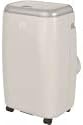
Image showing the Qlima PH635 portable reversible air conditioner from a slight angle, highlighting its compact, rectangular design with a light-colored casing and top control panel. The unit is equipped with casters for easy movement.
5. സജ്ജീകരണം
5.1 അൺപാക്കിംഗ്
- യൂണിറ്റ് അതിന്റെ പാക്കേജിംഗിൽ നിന്ന് ശ്രദ്ധാപൂർവ്വം നീക്കം ചെയ്യുക.
- എല്ലാ പാക്കിംഗ് സാമഗ്രികളും നീക്കം ചെയ്യുക, അവ ഉത്തരവാദിത്തത്തോടെ വിനിയോഗിക്കുക.
- Ensure no parts are missing or damaged.
5.2 പ്ലേസ്മെൻ്റ്
- Place the air conditioner on a firm, level surface in a location that allows for proper air circulation.
- Maintain a minimum distance of 30 cm (12 inches) from walls or other objects to ensure adequate airflow.
- നേരിട്ട് സൂര്യപ്രകാശം ഏൽക്കുന്ന സ്ഥലത്തോ താപ സ്രോതസ്സുകൾക്ക് സമീപമോ യൂണിറ്റ് സ്ഥാപിക്കുന്നത് ഒഴിവാക്കുക.
5.3 എക്സ്ഹോസ്റ്റ് ഹോസ് ഇൻസ്റ്റാളേഷൻ
- Attach one end of the exhaust hose to the exhaust air outlet on the rear of the unit. Twist clockwise until secure.
- Extend the exhaust hose to the nearest window or vent opening. Keep the hose as short and straight as possible to maximize efficiency.
5.4 വിൻഡോ കിറ്റ് ഇൻസ്റ്റാളേഷൻ
For optimal performance, use the provided window sealing kit to prevent hot air from re-entering the room.
- Adjust the window slide bar to fit your window opening.
- Secure the slide bar in the window.
- Connect the other end of the exhaust hose to the adaptor on the window kit.
- Ensure all connections are sealed to prevent air leakage.
5.5 Drainage Setup (Dehumidification Mode)
When using the dehumidification function, continuous drainage is recommended. Connect a drainage hose (not supplied) to the continuous drainage port on the rear of the unit and lead it to a suitable drain or container.
6. പ്രവർത്തന നിർദ്ദേശങ്ങൾ
6.1 നിയന്ത്രണ പാനലും റിമോട്ട് നിയന്ത്രണവും
The unit can be operated via the control panel on top of the unit or the supplied remote control. The functions are generally identical.
6.2 പവർ ഓൺ/ഓഫ്
അമർത്തുക പവർ യൂണിറ്റ് ഓണാക്കാനോ ഓഫാക്കാനോ ഉള്ള ബട്ടൺ.
6.3 മോഡ് തിരഞ്ഞെടുക്കൽ
അമർത്തുക മോഡ് ലഭ്യമായ മോഡുകളിലൂടെ സൈക്കിൾ ചെയ്യാൻ ബട്ടൺ:
- കൂളിംഗ് മോഡ്: മുറി തണുപ്പിക്കാൻ. ആവശ്യമുള്ള താപനില സജ്ജമാക്കുക.
- ചൂടാക്കൽ മോഡ്: മുറി ചൂടാക്കാൻ. ആവശ്യമുള്ള താപനില സജ്ജമാക്കുക.
- ഡീഹ്യുമിഡിഫിക്കേഷൻ മോഡ്: Removes moisture from the air. Fan speed is typically fixed in this mode.
- ഫാൻ മോഡ്: തണുപ്പിക്കാതെയും ചൂടാക്കാതെയും വായു പ്രചരിക്കുന്നു.
6.4 താപനില ക്രമീകരണം
In Cooling or Heating mode, use the UP ഒപ്പം താഴേക്ക് arrow buttons to set your desired temperature. The temperature range is typically 16°C to 30°C (61°F to 86°F).
6.5 ഫാൻ വേഗത
അമർത്തുക ഫാൻ സ്പീഡ് button to select between Low, Medium, or High fan speeds. This function is available in Cooling, Heating, and Fan modes.
6.6 ടൈമർ പ്രവർത്തനം
The timer allows you to set a specific time for the unit to turn on or off automatically.
- അമർത്തുക ടൈമർ ബട്ടൺ.
- ഉപയോഗിക്കുക UP ഒപ്പം താഴേക്ക് arrow buttons to set the desired time (in hours).
- അമർത്തുക ടൈമർ സ്ഥിരീകരിക്കാൻ വീണ്ടും.
6.7 സ്ലീപ്പ് മോഡ്
Activate Sleep Mode for quieter operation and gradual temperature adjustment during sleep. Press the ഉറങ്ങുക ബട്ടൺ.
6.8 Automatic Stop and Programming Backup
The Qlima PH635 features an automatic stop function when the desired temperature is reached or the water tank is full (in dehumidification mode). In case of a power cut, the unit will automatically resume operation with the last settings once power is restored, thanks to its programming backup feature.
7. പരിപാലനം
പതിവ് അറ്റകുറ്റപ്പണികൾ മികച്ച പ്രകടനം ഉറപ്പാക്കുകയും നിങ്ങളുടെ എയർ കണ്ടീഷണറിന്റെ ആയുസ്സ് വർദ്ധിപ്പിക്കുകയും ചെയ്യുന്നു.
7.1 യൂണിറ്റ് വൃത്തിയാക്കൽ
- വൃത്തിയാക്കുന്നതിന് മുമ്പ് എല്ലായ്പ്പോഴും യൂണിറ്റ് അൺപ്ലഗ് ചെയ്യുക.
- ഒരു സോഫ്റ്റ്, ഡി ഉപയോഗിച്ച് പുറംഭാഗം തുടയ്ക്കുകamp തുണി. കഠിനമായ രാസവസ്തുക്കളോ ഉരച്ചിലുകളുള്ള ക്ലീനറുകളോ ഉപയോഗിക്കരുത്.
- ഇലക്ട്രിക്കൽ ഘടകങ്ങളിലേക്ക് വെള്ളം കയറുന്നില്ലെന്ന് ഉറപ്പാക്കുക.
7.2 എയർ ഫിൽട്ടറുകൾ വൃത്തിയാക്കൽ
ഉപയോഗവും വായുവിന്റെ ഗുണനിലവാരവും അനുസരിച്ച് എയർ ഫിൽട്ടറുകൾ രണ്ടാഴ്ച കൂടുമ്പോഴോ അതിലധികമോ തവണ വൃത്തിയാക്കണം.
- യൂണിറ്റ് ഓഫ് ചെയ്ത് അൺപ്ലഗ് ചെയ്യുക.
- Locate and remove the air filters from the rear/sides of the unit.
- Wash the filters under running water (warm, not hot) or use a vacuum cleaner to remove dust.
- ഫിൽട്ടറുകൾ വീണ്ടും ഇൻസ്റ്റാൾ ചെയ്യുന്നതിനുമുമ്പ് പൂർണ്ണമായും ഉണങ്ങാൻ അനുവദിക്കുക.
7.3 സീസണൽ സംഭരണം
യൂണിറ്റ് ദീർഘനേരം ഉപയോഗിക്കുന്നില്ലെങ്കിൽ:
- Drain any accumulated water from the unit.
- Clean the air filters and the exterior.
- Store the unit in a dry, cool place, covered to protect it from dust.
8. പ്രശ്നപരിഹാരം
ഉപഭോക്തൃ പിന്തുണയുമായി ബന്ധപ്പെടുന്നതിന് മുമ്പ്, പൊതുവായ പ്രശ്നങ്ങളും അവയുടെ പരിഹാരങ്ങളും അറിയാൻ ദയവായി ഇനിപ്പറയുന്ന പട്ടിക പരിശോധിക്കുക.
| പ്രശ്നം | സാധ്യമായ കാരണം | പരിഹാരം |
|---|---|---|
| യൂണിറ്റ് ഓണാക്കുന്നില്ല | No power supply; Power cord not plugged in; Fuse blown; Water tank full (in dehumidification) | Check power outlet; Plug in power cord firmly; Replace fuse; Empty water tank. |
| തണുപ്പിക്കൽ/താപനം ഇല്ല | Air filter clogged; Exhaust hose blocked or disconnected; Room temperature already reached; Doors/windows open; Room too large | Clean air filter; Check exhaust hose connection and ensure it's not blocked; Adjust desired temperature; Close doors/windows; Consider room size limitations. |
| വെള്ളം ചോർച്ച | Drainage plug loose; Unit not level; Continuous drainage hose blocked | Ensure drainage plug is secure; Place unit on a level surface; Check and clear continuous drainage hose. |
| ശബ്ദായമാനമായ പ്രവർത്തനം | Unit not on a level surface; Air filter clogged; Foreign object in fan | Ensure unit is on a level surface; Clean air filter; Turn off and unplug, then check for obstructions (if safe to do so). |
9 സ്പെസിഫിക്കേഷനുകൾ
Key technical specifications for the Qlima PH635 Portable Reversible Air Conditioner:
| ഫീച്ചർ | സ്പെസിഫിക്കേഷൻ |
|---|---|
| ബ്രാൻഡ് | ക്ലിമ |
| മോഡലിൻ്റെ പേര് | PH635 |
| അളവുകൾ (L x W x H) | 71 x 33 x 44 സെ.മീ |
| ഭാരം | 31 കിലോഗ്രാം |
| തണുപ്പിക്കൽ ശേഷി | 3200 വാട്ട്സ് (ഏകദേശം 12000 BTU) |
| ചൂടാക്കൽ ശേഷി | 3500 വാട്ട്സ് (ഉൽപ്പന്നത്തിന്റെ പേര് അനുസരിച്ച്) |
| ശബ്ദ നില | 55 ഡെസിബെൽ |
| വാല്യംtage | 240 വോൾട്ട് |
| പ്രത്യേക സവിശേഷതകൾ | Heating and Cooling Function, Programmable, Automatic Stop, Programming Backup |
| സീസണൽ എനർജി എഫിഷ്യൻസി റേഷ്യോ (SEER) | 6.1 |
| ഇൻസ്റ്റലേഷൻ തരം | പോർട്ടബിൾ |
| പവർ ഉറവിടം | കോർഡഡ് ഇലക്ട്രിക് |
10. വാറൻ്റിയും പിന്തുണയും
For warranty information and customer support, please refer to the documentation provided with your purchase or contact your retailer. Information regarding the availability of spare parts is currently unavailable.
When contacting support, please have your model number (PH635) and purchase details ready.


