1. ആമുഖം
കൃത്യമായ സിഗ്നൽ വിശകലനത്തിനും അളവെടുപ്പിനുമായി രൂപകൽപ്പന ചെയ്തിരിക്കുന്ന ഉയർന്ന പ്രകടനമുള്ള ഡിജിറ്റൽ ഓസിലോസ്കോപ്പാണ് റിഗോൾ DS2302A. ഇതിൽ 300 MHz ബാൻഡ്വിഡ്ത്ത്, 2 അനലോഗ് ചാനലുകൾ, 2 GSa/s റിയൽ-ടൈം എസ്.ampലിംഗ് റേറ്റ്, 56 മെഗാപിക്സൽ ആഴത്തിലുള്ള മെമ്മറി ഡെപ്ത്. നിങ്ങളുടെ DS2302A ഓസിലോസ്കോപ്പ് സജ്ജീകരിക്കുന്നതിനും പ്രവർത്തിപ്പിക്കുന്നതിനും പരിപാലിക്കുന്നതിനും ആവശ്യമായ വിവരങ്ങൾ ഈ മാനുവൽ നൽകുന്നു.

ചിത്രം 1.1: മുൻഭാഗം view റിഗോൾ DS2302A ഡിജിറ്റൽ ഓസിലോസ്കോപ്പിന്റെ, ഡിസ്പ്ലേ, കൺട്രോൾ പാനൽ, ഇൻപുട്ട് ചാനലുകൾ എന്നിവ കാണിക്കുന്നു.
2 പ്രധാന സവിശേഷതകൾ
അളക്കൽ ശേഷികളും ഉപയോക്തൃ അനുഭവവും മെച്ചപ്പെടുത്തുന്നതിനായി DS2302A നിരവധി നൂതന സവിശേഷതകൾ ഉൾക്കൊള്ളുന്നു:
- ഉയർന്ന ബാൻഡ്വിഡ്ത്തും എസ്ampലിംഗ് നിരക്ക്: 300 MHz അനലോഗ് ബാൻഡ്വിഡ്ത്തും 2 GSa/s റിയൽ-ടൈം സെക്കന്റുകളുംampവേഗത്തിലുള്ള സിഗ്നലുകൾ പകർത്തുന്നതിനുള്ള ലിംഗ് നിരക്ക്.
- ആഴത്തിലുള്ള മെമ്മറി ഡെപ്ത്: 56 മെഗാപിക്സൽ വരെയുള്ള മെമ്മറി ഡെപ്ത് ഉയർന്ന റെസല്യൂഷനിൽ ദൈർഘ്യമേറിയ തരംഗരൂപ ക്യാപ്ചറുകൾ അനുവദിക്കുന്നു.
- അൾട്രാവിഷൻ സാങ്കേതികവിദ്യ: മൾട്ടി-ലെവൽ ഇന്റൻസിറ്റി ഗ്രേഡിംഗ് ഡിസ്പ്ലേ (256 ലെവലുകൾ വരെ), റിയൽ-ടൈം തുടർച്ചയായ വേവ്ഫോം റെക്കോർഡിംഗ്, പ്ലേബാക്ക്, വിശകലന പ്രവർത്തനങ്ങൾ തുടങ്ങിയ സവിശേഷതകൾ.
- വിപുലമായ ട്രിഗറിംഗ്: എഡ്ജ്, പൾസ്, റണ്ട്, വിൻഡോസ്, എൻത്ത് എഡ്ജ്, സ്ലോപ്പ്, വീഡിയോ, പാറ്റേൺ, ഡിലേ, ടൈംഔട്ട്, ഡ്യൂറേഷൻ, സെറ്റപ്പ്/ഹോൾഡ്, RS232, I2C, SPI, CAN എന്നിവയുൾപ്പെടെ വിവിധ ട്രിഗർ തരങ്ങളെ പിന്തുണയ്ക്കുന്നു.
- സീരിയൽ ബസ് ഡീകോഡിംഗ്: പാരലൽ, RS232, I2C, SPI, CAN തുടങ്ങിയ സാധാരണ സീരിയൽ പ്രോട്ടോക്കോളുകൾക്കായുള്ള ബിൽറ്റ്-ഇൻ ഡീകോഡിംഗ് ഫംഗ്ഷനുകൾ.
- വലിയ ഡിസ്പ്ലേ: 8 ഇഞ്ച് ഡിസ്പ്ലേ വ്യക്തമായ ദൃശ്യപരത നൽകുന്നു. viewതരംഗരൂപങ്ങളുടെയും അളവെടുപ്പ് ഡാറ്റയുടെയും ശേഖരണം.
- അന്തർനിർമ്മിത 50Ω അഡാപ്റ്ററുകൾ: ഉയർന്ന വേഗതയുള്ള സിഗ്നലുകൾക്ക് സിഗ്നൽ സമഗ്രത മെച്ചപ്പെടുത്തുന്നു.
വീഡിയോ 2.1: കഴിഞ്ഞുview റിഗോൾ DS2000 സീരീസ് ഡിജിറ്റൽ ഓസിലോസ്കോപ്പുകളുടെ, വലിയ ഡിസ്പ്ലേ, ഉയർന്ന എസ് തുടങ്ങിയ പ്രധാന സവിശേഷതകൾ എടുത്തുകാണിക്കുന്നുampലിംഗ് റേറ്റ്, ആഴത്തിലുള്ള മെമ്മറി, വിപുലമായ ട്രിഗറിംഗ്, ഡീകോഡിംഗ് കഴിവുകൾ.

ചിത്രം 2.1: ഓസിലോസ്കോപ്പ് ഡിസ്പ്ലേ അതിന്റെ വിശാലമായ ലംബ ശ്രേണിയും (500 µV/div മുതൽ 10 V/div വരെ) കുറഞ്ഞ ശബ്ദ നിലയും കാണിക്കുന്നു, ഇത് ചെറിയ സിഗ്നലുകളെ കൃത്യമായി പകർത്തുന്നതിന് ഗുണം ചെയ്യും.

ചിത്രം 2.2: വിപുലീകൃത തരംഗരൂപ ക്യാപ്ചറിനായി അനലോഗ് ചാനലുകളിൽ 56 Mpts വരെ മെമ്മറി ഡെപ്ത് അനുവദിക്കുന്ന അൾട്രാവിഷൻ ഡീപ് മെമ്മറി സവിശേഷതയുടെ ചിത്രീകരണം.
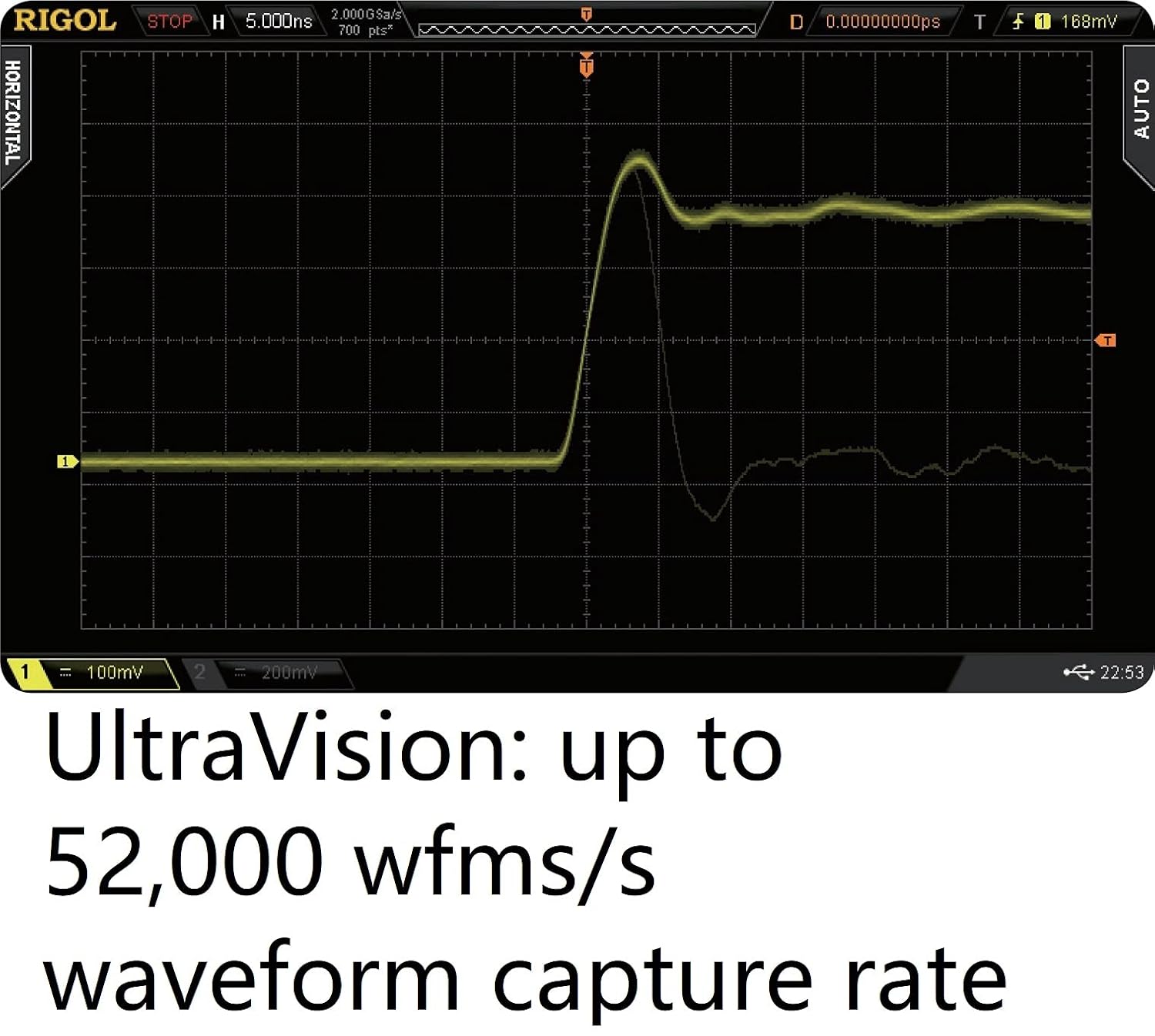
ചിത്രം 2.3: ഓസിലോസ്കോപ്പിന്റെ ഡിസ്പ്ലേ കാണിക്കുന്നുasing അൾട്രാവിഷൻ സാങ്കേതികവിദ്യയുടെ സെക്കൻഡിൽ 52,000 തരംഗരൂപങ്ങൾ വരെയുള്ള ഉയർന്ന തരംഗരൂപ ക്യാപ്ചർ നിരക്ക്, ക്ഷണികമായ സംഭവങ്ങളുടെ നിരീക്ഷണം സാധ്യമാക്കുന്നു.
3. സജ്ജീകരണം
നിങ്ങളുടെ Rigol DS2302A ഓസിലോസ്കോപ്പ് സജ്ജീകരിക്കാൻ ഈ ഘട്ടങ്ങൾ പാലിക്കുക:
- അൺപാക്ക് ചെയ്യുന്നു: ഓസിലോസ്കോപ്പും എല്ലാ അനുബന്ധ ഉപകരണങ്ങളും അതിന്റെ പാക്കേജിംഗിൽ നിന്ന് ശ്രദ്ധാപൂർവ്വം നീക്കം ചെയ്യുക. കേടുപാടുകൾ സംഭവിച്ചതിന്റെ ലക്ഷണങ്ങൾ ഉണ്ടോ എന്ന് പരിശോധിക്കുക.
- പവർ കണക്ഷൻ: നൽകിയിരിക്കുന്ന പവർ കേബിൾ ഓസിലോസ്കോപ്പിന്റെ പിൻ പാനലിലെ പവർ ഇൻപുട്ടിലേക്കും തുടർന്ന് അനുയോജ്യമായ ഒരു എസി പവർ ഔട്ട്ലെറ്റിലേക്കും ബന്ധിപ്പിക്കുക.
- പ്രാരംഭ പവർ ഓൺ: ഓസിലോസ്കോപ്പ് ഓണാക്കാൻ ഫ്രണ്ട് പാനലിലെ പവർ ബട്ടൺ അമർത്തുക. സിസ്റ്റം ബൂട്ട് ചെയ്യാൻ കുറച്ച് നിമിഷങ്ങൾ അനുവദിക്കുക.
- അന്വേഷണ കണക്ഷൻ: മുൻ പാനലിലെ BNC ഇൻപുട്ട് കണക്ടറുകളുമായി (CH1, CH2) ഓസിലോസ്കോപ്പ് പ്രോബുകൾ ബന്ധിപ്പിക്കുക. സുരക്ഷിതമായ കണക്ഷൻ ഉറപ്പാക്കുക.
- ഗ്രൗണ്ടിംഗ്: വൈദ്യുതാഘാതം തടയുന്നതിനും കൃത്യമായ അളവുകൾ ഉറപ്പാക്കുന്നതിനും ഓസിലോസ്കോപ്പ് ശരിയായി ഗ്രൗണ്ട് ചെയ്തിട്ടുണ്ടെന്ന് എല്ലായ്പ്പോഴും ഉറപ്പാക്കുക.

ചിത്രം 3.1: റിഗോൾ DS2302A ഓസിലോസ്കോപ്പിനുള്ള പാക്കേജിംഗ് ബോക്സ്, ശരിയായ കൈകാര്യം ചെയ്യലും പുനരുപയോഗ ചിഹ്നങ്ങളും സൂചിപ്പിക്കുന്നു.
4. പ്രവർത്തന നിർദ്ദേശങ്ങൾ
DS2302A ഓസിലോസ്കോപ്പിന്റെ അടിസ്ഥാന പ്രവർത്തനവും പൊതുവായ പ്രവർത്തനങ്ങളും ഈ വിഭാഗം ഉൾക്കൊള്ളുന്നു.
4.1. അടിസ്ഥാന തരംഗരൂപ പ്രദർശനം
- ലംബ നിയന്ത്രണങ്ങൾ: ലംബ സ്ഥാനവും വോള്യവും ക്രമീകരിക്കുന്നതിന് ഓരോ ചാനലിനും (CH1, CH2) ലംബ സ്ഥാനവും സ്കെയിൽ നോബുകളും ഉപയോഗിക്കുക.tagതരംഗരൂപത്തിന്റെ ഓരോ വിഭജനത്തിനും e.
- തിരശ്ചീന നിയന്ത്രണങ്ങൾ: തരംഗരൂപത്തിന്റെ സമയ അടിത്തറയും തിരശ്ചീന സ്ഥാനവും ക്രമീകരിക്കുന്നതിന് തിരശ്ചീന സ്ഥാനവും സ്കെയിൽ നോബുകളും ഉപയോഗിക്കുക.
- യാന്ത്രിക ബട്ടൺ: അമർത്തുക ഓട്ടോ സ്ഥിരമായ തരംഗരൂപം പ്രദർശിപ്പിക്കുന്നതിന് ലംബ, തിരശ്ചീന, ട്രിഗർ സിസ്റ്റങ്ങളുടെ യാന്ത്രിക സജ്ജീകരണത്തിനുള്ള ബട്ടൺ.
4.2. ട്രിഗർ ഫംഗ്ഷനുകൾ
നിർദ്ദിഷ്ട സംഭവങ്ങളെ സ്ഥിരപ്പെടുത്തുന്നതിനും പകർത്തുന്നതിനും ഓസിലോസ്കോപ്പ് വിവിധ ട്രിഗർ മോഡുകൾ വാഗ്ദാനം ചെയ്യുന്നു.
- എഡ്ജ് ട്രിഗർ: ഒരു സിഗ്നലിന്റെ ഉയരുന്നതോ താഴുന്നതോ ആയ അരികിലുള്ള ട്രിഗറുകൾ.
- പൾസ് ട്രിഗർ: നിർദ്ദിഷ്ട വീതിയോ ധ്രുവതയോ ഉള്ള പൾസുകളിലെ ട്രിഗറുകൾ.
- സീരിയൽ ബസ് ട്രിഗറിംഗ്: നിർദ്ദിഷ്ട ഡാറ്റ പാക്കറ്റുകളോ ഇവന്റുകളോ ഒറ്റപ്പെടുത്തുന്നതിന് I2C, SPI, CAN പോലുള്ള സീരിയൽ പ്രോട്ടോക്കോളുകൾക്കായി സമർപ്പിത ട്രിഗർ തരങ്ങൾ ഉപയോഗിക്കുക.

ചിത്രം 4.1: ഓസിലോസ്കോപ്പിന്റെ ട്രിഗർ മെനു, കൃത്യമായ സിഗ്നൽ ക്യാപ്ചറിനായി റണ്ട്, സെറ്റപ്പ്/ഹോൾഡ്, എൻത്ത് എഡ്ജ് എന്നിവയുൾപ്പെടെ ലഭ്യമായ ട്രിഗർ ഫംഗ്ഷനുകളുടെ വിശാലമായ ശ്രേണി ചിത്രീകരിക്കുന്നു.
4.3. സീരിയൽ ബസ് ഡീകോഡിംഗ്
DS2302A ന് വിവിധ സീരിയൽ ബസുകളിൽ നിന്നുള്ള ഡാറ്റ ഡീകോഡ് ചെയ്യാനും പ്രദർശിപ്പിക്കാനും കഴിയും.
- ഡീകോഡ് ആക്സസ് ചെയ്യുന്നു: എന്നതിലേക്ക് നാവിഗേറ്റ് ചെയ്യുക ഡീകോഡ് ചെയ്യുക ആവശ്യമുള്ള പ്രോട്ടോക്കോൾ തിരഞ്ഞെടുക്കുന്നതിനുള്ള മെനു (ഉദാ. RS232, I2C, SPI, CAN).
- കോൺഫിഗറേഷൻ: നിങ്ങളുടെ നിർദ്ദിഷ്ട ബസിന് ആവശ്യമായ ക്ലോക്ക് ഉറവിടം, ഡാറ്റ ലൈനുകൾ, ബിറ്റ് നിരക്കുകൾ തുടങ്ങിയ ബസ് പാരാമീറ്ററുകൾ കോൺഫിഗർ ചെയ്യുക.
- Viewഡീകോഡ് ചെയ്ത ഡാറ്റ ഡൗൺലോഡ് ചെയ്യുക: ഡീകോഡ് ചെയ്ത ഡാറ്റ സ്ക്രീനിൽ പ്രദർശിപ്പിക്കും, പലപ്പോഴും ടാബുലാർ അല്ലെങ്കിൽ പാക്കറ്റ് അധിഷ്ഠിത ഫോർമാറ്റിൽ, അനലോഗ് തരംഗരൂപങ്ങൾക്കൊപ്പം.

ചിത്രം 4.2: RS232, I2C, SPI, CAN തുടങ്ങിയ പ്രോട്ടോക്കോളുകൾക്കായുള്ള സീരിയൽ ബസ് ട്രിഗറും ഡീകോഡിംഗ് ഫംഗ്ഷനുകളും കാണിക്കുന്ന ഓസിലോസ്കോപ്പിന്റെ ഡിസ്പ്ലേ, അനലോഗ് സിഗ്നലും ഡീകോഡ് ചെയ്ത ഡാറ്റയും കാണിക്കുന്നു.
4.4. വേവ്ഫോം റെക്കോർഡിംഗും വിശകലനവും
ആഴത്തിലുള്ള തരംഗരൂപ വിശകലനത്തിനായി അൾട്രാവിഷൻ സവിശേഷതകൾ ഉപയോഗിക്കുക.
- റെക്കോർഡിംഗ്: ദീർഘമായ തരംഗരൂപ ഡാറ്റ ഡീപ് മെമ്മറിയിലേക്ക് പകർത്താൻ റെക്കോർഡിംഗ് ഫംഗ്ഷൻ ആക്സസ് ചെയ്യുക.
- പ്ലേബാക്ക്: Review അപാകതകൾ തിരിച്ചറിയുന്നതിനായി ഫ്രെയിം തോറും അല്ലെങ്കിൽ തുടർച്ചയായി തരംഗരൂപങ്ങൾ രേഖപ്പെടുത്തുക.
- വിശകലനം: വിശദമായ സ്വഭാവരൂപീകരണത്തിനായി രേഖപ്പെടുത്തിയ ഡാറ്റയിൽ വിവിധ അളവെടുപ്പ്, വിശകലന ഉപകരണങ്ങൾ പ്രയോഗിക്കുക.

ചിത്രം 4.3: ഓസിലോസ്കോപ്പിന്റെ ഡിസ്പ്ലേ കാണിക്കുന്നുasing അൾട്രാവിഷന്റെ തത്സമയ തുടർച്ചയായ തരംഗരൂപ റെക്കോർഡിംഗ്, പ്ലേബാക്ക്, വിശകലന പ്രവർത്തനങ്ങൾ, ഉപയോക്താക്കൾക്ക് ക്ഷണികമായ ഇവന്റുകൾ പകർത്താനും പരിശോധിക്കാനും അനുവദിക്കുന്നു.
5. പരിപാലനം
ശരിയായ അറ്റകുറ്റപ്പണി നിങ്ങളുടെ ഓസിലോസ്കോപ്പിന്റെ ദീർഘായുസ്സും കൃത്യതയും ഉറപ്പാക്കുന്നു.
- വൃത്തിയാക്കൽ: ഉപകരണത്തിന്റെ പുറംഭാഗം വൃത്തിയാക്കാൻ മൃദുവായതും ഉണങ്ങിയതുമായ തുണി ഉപയോഗിക്കുക. കഠിനമായ അഴുക്കിന്, അല്പം ഡി.amp നേരിയ ഡിറ്റർജന്റ് ഉള്ള തുണി ഉപയോഗിക്കാം. ഉരച്ചിലുകൾ ഉണ്ടാക്കുന്ന ക്ലീനറുകളോ ലായകങ്ങളോ ഒഴിവാക്കുക.
- വെൻ്റിലേഷൻ: അമിതമായി ചൂടാകുന്നത് തടയാൻ ഉപകരണത്തിലെ വെന്റിലേഷൻ ദ്വാരങ്ങൾ വ്യക്തവും തടസ്സമില്ലാത്തതുമാണെന്ന് ഉറപ്പാക്കുക.
- സംഭരണം: ഉപയോഗത്തിലില്ലാത്തപ്പോൾ, ഓസിലോസ്കോപ്പ് നേരിട്ട് സൂര്യപ്രകാശം ഏൽക്കാത്തതും തീവ്രമായ താപനില ഏൽക്കാത്തതുമായ ഒരു വൃത്തിയുള്ളതും വരണ്ടതുമായ അന്തരീക്ഷത്തിൽ സൂക്ഷിക്കുക.
- പ്രോബ് കെയർ: ഓസിലോസ്കോപ്പ് പ്രോബുകൾ ശ്രദ്ധയോടെ കൈകാര്യം ചെയ്യുക. പ്രോബ് അഗ്രഭാഗങ്ങൾ വളയ്ക്കുകയോ സമ്മർദ്ദം ചെലുത്തുകയോ ചെയ്യുന്നത് ഒഴിവാക്കുക. കേടുപാടുകൾ സംഭവിക്കാതിരിക്കാൻ അവ ശരിയായി സൂക്ഷിക്കുക.
6. പ്രശ്നപരിഹാരം
നിങ്ങളുടെ DS2302A ഓസിലോസ്കോപ്പുമായി ബന്ധപ്പെട്ട് നിങ്ങൾ നേരിട്ടേക്കാവുന്ന സാധാരണ പ്രശ്നങ്ങളെ ഈ വിഭാഗം അഭിസംബോധന ചെയ്യുന്നു.
| പ്രശ്നം | സാധ്യമായ കാരണം | പരിഹാരം |
|---|---|---|
| പവർ ഓണാക്കിയതിന് ശേഷം പ്രദർശനമില്ല | പവർ കേബിൾ ബന്ധിപ്പിച്ചിട്ടില്ല; പവർ സ്വിച്ച് ഓഫാണ്; ഫ്യൂസ് പൊട്ടിത്തെറിച്ചു | പവർ കേബിൾ കണക്ഷൻ പരിശോധിക്കുക; പവർ സ്വിച്ച് ഓണാണെന്ന് ഉറപ്പാക്കുക; ഫ്യൂസ് മാറ്റിസ്ഥാപിക്കുക (ഫ്യൂസ് സ്പെസിഫിക്കേഷനുകൾക്കായി ബാക്ക് പാനൽ കാണുക). |
| തരംഗരൂപം പ്രദർശിപ്പിച്ചിട്ടില്ല. | പ്രോബ് കണക്ട് ചെയ്തിട്ടില്ല; ഇൻപുട്ട് സിഗ്നൽ വളരെ ചെറുതാണ്/വലുതാണ്; തെറ്റായ ട്രിഗർ ക്രമീകരണങ്ങൾ | പ്രോബ് സുരക്ഷിതമായി ബന്ധിപ്പിക്കുക; ലംബ സ്കെയിൽ ക്രമീകരിക്കുക (വോൾട്ട്/ഡിവിഷൻ); AUTO ബട്ടൺ അമർത്തുക അല്ലെങ്കിൽ ട്രിഗർ ലെവൽ/മോഡ് ക്രമീകരിക്കുക. |
| അസ്ഥിരമായ തരംഗരൂപം | തെറ്റായ ട്രിഗർ ഉറവിടം/മോഡ്/ലെവൽ; സിഗ്നൽ ശബ്ദം | ട്രിഗർ ക്രമീകരണങ്ങൾ പരിശോധിക്കുക; ട്രിഗർ ലെവൽ ക്രമീകരിക്കുക; ശബ്ദം കുറയ്ക്കാൻ ശരാശരി അക്വിസിഷൻ മോഡ് ഉപയോഗിക്കുക. |
7 സ്പെസിഫിക്കേഷനുകൾ
റിഗോൾ DS2302A ഡിജിറ്റൽ ഓസിലോസ്കോപ്പിന്റെ വിശദമായ സാങ്കേതിക സവിശേഷതകൾ:
| ഫീച്ചർ | സ്പെസിഫിക്കേഷൻ |
|---|---|
| അനലോഗ് ബാൻഡ്വിഡ്ത്ത് | 300 MHz |
| അനലോഗ് ചാനലുകളുടെ എണ്ണം | 2 |
| പരമാവധി റിയൽ-ടൈം എസ്ample നിരക്ക് | 2 GSa/s (സിംഗിൾ ചാനൽ), 1 GSa/s (ഡ്യുവൽ ചാനൽ) |
| പരമാവധി മെമ്മറി ഡെപ്ത് | 56 എംപിടിഎസ് (സിംഗിൾ ചാനൽ), 28 എംപിടിഎസ് (ഡ്യുവൽ ചാനൽ) |
| പരമാവധി വേവ്ഫോം ക്യാപ്ചർ നിരക്ക് | 50,000 wfms/s |
| ഉൽപ്പന്ന അളവുകൾ | 14.17 x 7.09 x 5.12 ഇഞ്ച് |
| ഇനത്തിൻ്റെ ഭാരം | 8.36 പൗണ്ട് |
| നിർമ്മാതാവ് | റിഗോൾ |
| ഇനം മോഡൽ നമ്പർ | DS2302A |
8. വാറൻ്റിയും പിന്തുണയും
നിങ്ങളുടെ റിഗോൾ DS2302A ഡിജിറ്റൽ ഓസിലോസ്കോപ്പിനെക്കുറിച്ചുള്ള വാറന്റി വിവരങ്ങൾ, സാങ്കേതിക പിന്തുണ അല്ലെങ്കിൽ കൂടുതൽ അന്വേഷണങ്ങൾക്കായി, ദയവായി റിഗോളിനെ നേരിട്ട് ബന്ധപ്പെടുക.
നിങ്ങൾക്ക് ഔദ്യോഗിക റിഗോൾ നോർത്ത് അമേരിക്കയും സന്ദർശിക്കാം webകൂടുതൽ വിവരങ്ങൾക്കും വിഭവങ്ങൾക്കും സൈറ്റ്: www.rigolna.com


