1. ആമുഖം
This manual provides instructions for the setup, operation, and maintenance of your JVC TH-S560B 2.1-Channel Sound Bar System with Subwoofer and Dolby Atmos. Please read this manual thoroughly before using the product and retain it for future reference.
The JVC TH-S560B system is designed to enhance your audio experience with a sound bar and a wireless subwoofer, offering multiple connectivity options and sound modes.
2 സുരക്ഷാ വിവരങ്ങൾ
ഇലക്ട്രിക്കൽ സുരക്ഷ:
- വൈദ്യുതി വിതരണം വോളിയം ഉറപ്പാക്കുകtage യൂണിറ്റിലെ റേറ്റിംഗ് ലേബലുമായി പൊരുത്തപ്പെടുന്നു.
- തീയോ വൈദ്യുതാഘാതമോ തടയാൻ യൂണിറ്റ് മഴയിലോ ഈർപ്പത്തിലോ തുറന്നുകാട്ടരുത്.
- സി തുറക്കരുത്.asing. എല്ലാ സേവനങ്ങളും യോഗ്യതയുള്ള ഉദ്യോഗസ്ഥർക്ക് റഫർ ചെയ്യുക.
- മിന്നൽ കൊടുങ്കാറ്റുകളുടെ സമയത്തോ ദീർഘകാലത്തേക്ക് ഉപയോഗിക്കാത്ത സമയത്തോ യൂണിറ്റ് അൺപ്ലഗ് ചെയ്യുക.
പ്ലേസ്മെൻ്റ്:
- സുസ്ഥിരവും പരന്നതുമായ പ്രതലത്തിൽ യൂണിറ്റ് സ്ഥാപിക്കുക.
- Avoid placing near heat sources, direct sunlight, or excessive dust.
- യൂണിറ്റിന് ചുറ്റും മതിയായ വായുസഞ്ചാരം ഉറപ്പാക്കുക.
3. പാക്കേജ് ഉള്ളടക്കം
പാക്കേജിൽ എല്ലാ ഇനങ്ങളും ഉണ്ടെന്ന് ഉറപ്പാക്കുക:
- JVC TH-S560B സൗണ്ട് ബാർ
- വയർലെസ്സ് സബ് വൂഫർ
- റിമോട്ട് കൺട്രോൾ
- പവർ കോർഡ്(കൾ)
- ഉപയോക്തൃ മാനുവൽ (ഈ പ്രമാണം)
4. ഉൽപ്പന്നം കഴിഞ്ഞുview
4.1. Sound Bar and Subwoofer

This image displays the JVC TH-S560B sound bar and its accompanying wireless subwoofer. The sound bar is a long, slender unit designed to be placed horizontally, typically below a television. The subwoofer is a rectangular unit, providing enhanced bass audio.
4.2. Sound Bar Rear Panel
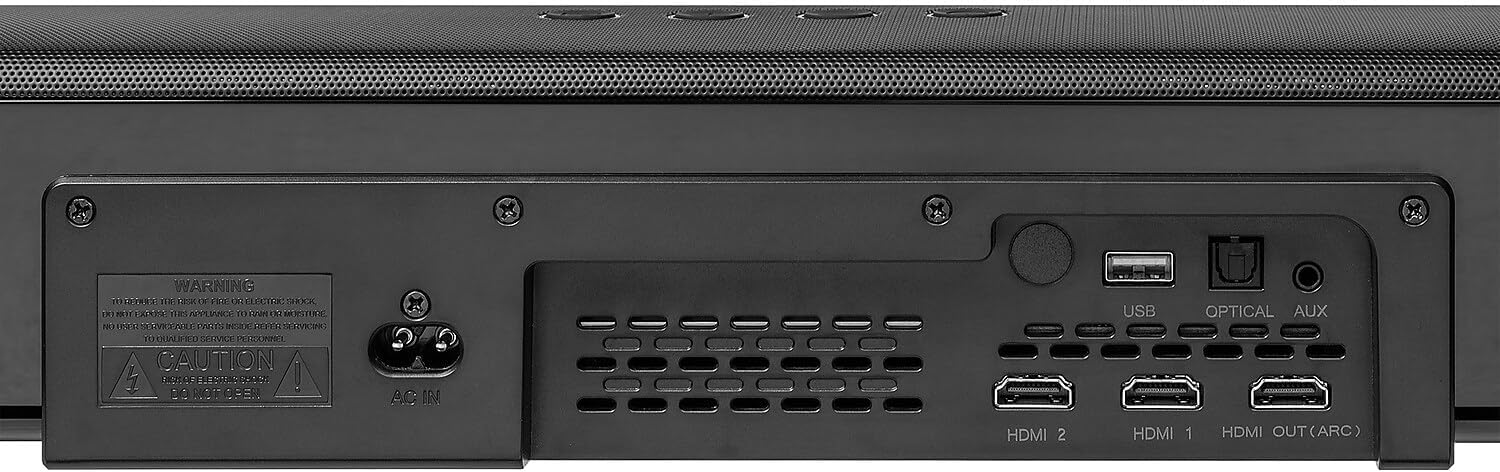
The rear panel of the sound bar features various input and output ports for connecting to external devices. These include HDMI 1, HDMI 2, HDMI OUT (ARC), Optical, USB, and AUX inputs, along with the AC power input.
4.3. Sound Bar Top Panel Controls

The top panel of the sound bar includes essential control buttons for power, input selection, and volume adjustment, providing direct access to common functions.
4.4. Subwoofer Rear Panel
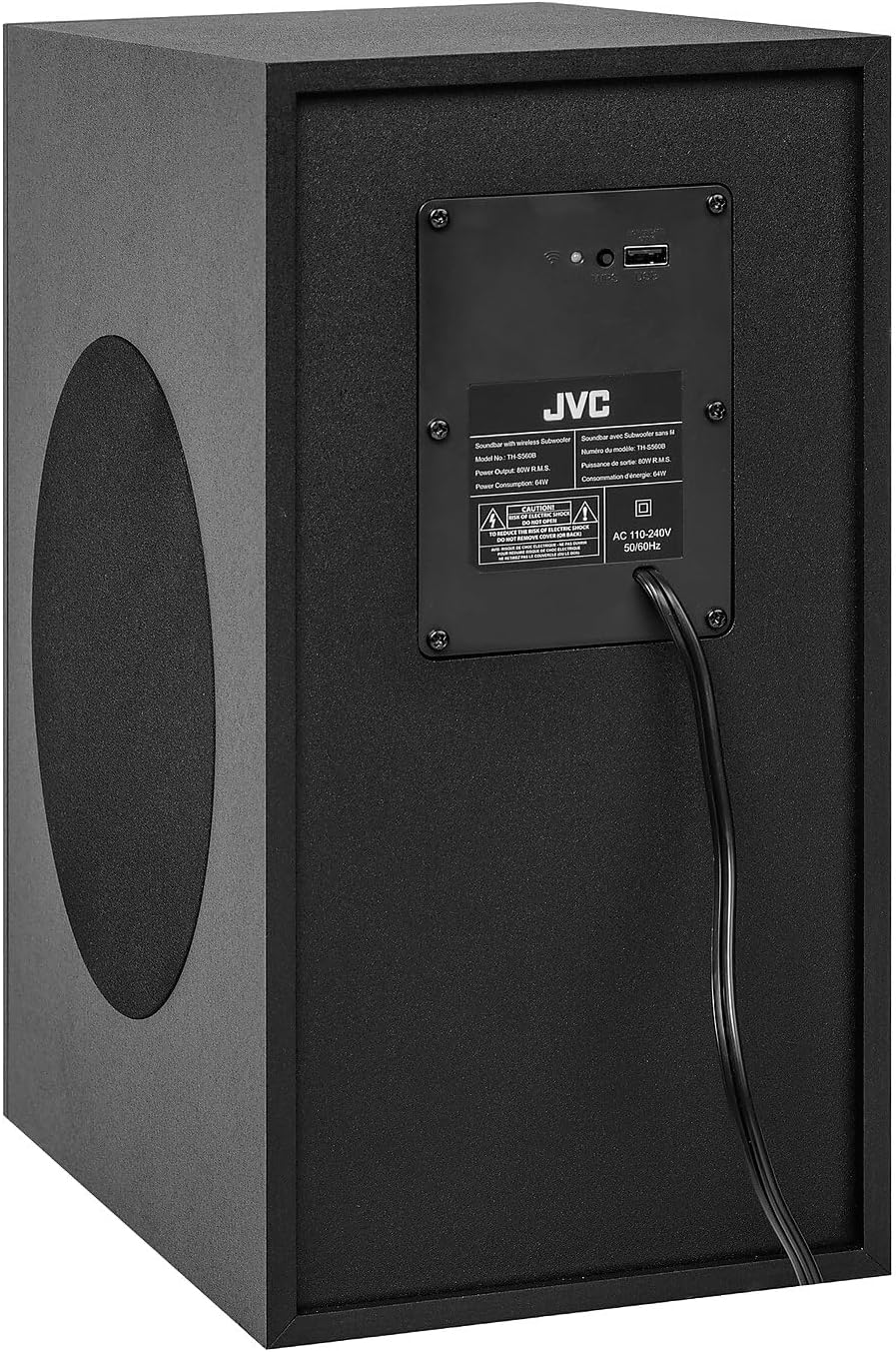
The rear panel of the subwoofer contains the power input and a label with model information and power specifications. It also includes indicators for wireless pairing status.
4.5. റിമോട്ട് കൺട്രോൾ

The remote control provides full functionality for the sound bar system, including power, input selection, volume, mute, playback controls, sound modes (Movie, Music, News, 3D), and bass/treble adjustments.
5. സജ്ജീകരണം
5.1. പ്ലേസ്മെന്റ്
- സൗണ്ട് ബാർ: Place the sound bar on a stable, flat surface directly in front of your television, ensuring it does not obstruct the TV's remote sensor.
- സബ്വൂഫർ: Position the wireless subwoofer on the floor near the sound bar. The wireless connection allows for flexible placement within range.
5.2. കണക്ഷനുകൾ
Connect the sound bar to your television or other audio sources using one of the following methods:
- HDMI ARC (ശുപാർശ ചെയ്യുന്നത്): Connect an HDMI cable from the HDMI OUT (ARC) port on the sound bar to the HDMI ARC port on your TV. This allows audio to be sent from the TV to the sound bar and enables TV remote control of the sound bar's volume.
- ഒപ്റ്റിക്കൽ: Connect an optical cable from the OPTICAL port on the sound bar to the optical output port on your TV.
- ഓക്സ്: Connect a 3.5mm audio cable from the AUX port on the sound bar to the audio output port on your TV or other audio device.
- HDMI 1 / HDMI 2: Connect external devices (e.g., Blu-ray player, game console) to these HDMI input ports on the sound bar.
- USB: മീഡിയ പ്ലേബാക്കിനായി USB പോർട്ടിലേക്ക് ഒരു USB ഡ്രൈവ് ചേർക്കുക.
പവർ കണക്ഷൻ:
- Connect the power cord to the AC IN port on the sound bar and then to a power outlet.
- Connect the power cord to the AC IN port on the subwoofer and then to a power outlet. The subwoofer will automatically pair with the sound bar when both are powered on.
6. പ്രവർത്തന നിർദ്ദേശങ്ങൾ
6.1. പവർ ഓൺ/ഓഫ്
അമർത്തുക പവർ button on the remote control or the sound bar's top panel to turn the system on or off.
6.2. ഇൻപുട്ട് തിരഞ്ഞെടുക്കൽ
അമർത്തുക ഇൻപുട്ട് button on the remote control or the sound bar's top panel repeatedly to cycle through available input sources: HDMI 1, HDMI 2, HDMI ARC, OPTICAL, AUX, BLUETOOTH, USB.
6.3. വോളിയം നിയന്ത്രണം
ഉപയോഗിക്കുക VOL+ ഒപ്പം വോൾ- buttons on the remote control or sound bar to adjust the volume. Press the നിശബ്ദമാക്കുക ഓഡിയോ താൽക്കാലികമായി നിശബ്ദമാക്കാൻ ബട്ടൺ.
6.4. ബ്ലൂടൂത്ത് ജോടിയാക്കൽ
- അമർത്തുക ഇൻപുട്ട് button to select the BLUETOOTH input. The display will show 'BT'.
- നിങ്ങളുടെ മൊബൈൽ ഉപകരണത്തിൽ, ബ്ലൂടൂത്ത് പ്രവർത്തനക്ഷമമാക്കി ലഭ്യമായ ഉപകരണങ്ങൾക്കായി തിരയുക.
- Select 'JVC TH-S560B' from the list to pair. Once connected, the display will show 'PAIRED'.
- To disconnect, press and hold the ജോടിയാക്കുക റിമോട്ട് കൺട്രോളിലെ ബട്ടൺ.
6.5. സൗണ്ട് മോഡുകൾ
Press the dedicated buttons on the remote control to select different sound modes:
- സിനിമ: സിനിമാറ്റിക് ഓഡിയോയ്ക്കായി ഒപ്റ്റിമൈസ് ചെയ്തു.
- സംഗീതം: സംഗീത പ്ലേബാക്കിനായി ഒപ്റ്റിമൈസ് ചെയ്തു.
- വാർത്ത: വോക്കൽ വ്യക്തത വർദ്ധിപ്പിക്കുന്നു.
- 3 ഡി: Provides a wider, more immersive soundstage.
6.6. Bass and Treble Adjustment
ഉപയോഗിക്കുക BASS+ / BASS- ഒപ്പം ട്രെബ്+ / ട്രെബ്- buttons on the remote control to adjust the bass and treble levels according to your preference.
7. പരിപാലനം
വൃത്തിയാക്കൽ:
- വൃത്തിയാക്കുന്നതിന് മുമ്പ് പവർ കോർഡ് വിച്ഛേദിക്കുക.
- Wipe the surfaces of the sound bar and subwoofer with a soft, dry cloth.
- അബ്രാസീവ് ക്ലീനറുകൾ, മെഴുക് അല്ലെങ്കിൽ ലായകങ്ങൾ എന്നിവ ഉപയോഗിക്കരുത്, കാരണം അവ ഫിനിഷിന് കേടുവരുത്തും.
8. പ്രശ്നപരിഹാരം
If you encounter issues with your sound bar system, refer to the following common problems and solutions:
- ശക്തിയില്ല: Ensure both the sound bar and subwoofer are properly connected to a working power outlet. Check the power cords for damage.
- ശബ്ദമില്ല:
- സൗണ്ട് ബാറിൽ ശരിയായ ഇൻപുട്ട് ഉറവിടം തിരഞ്ഞെടുത്തിട്ടുണ്ടെന്ന് ഉറപ്പാക്കുക.
- Check the volume level on both the sound bar and the connected device (e.g., TV).
- കേബിളുകൾ സുരക്ഷിതമായി ബന്ധിപ്പിച്ചിട്ടുണ്ടെന്ന് ഉറപ്പാക്കുക.
- If using Optical or HDMI ARC, check your TV's audio output settings to ensure it's set to external speakers or PCM format.
- Ensure the subwoofer is paired and its power indicator is on.
- ബ്ലൂടൂത്ത് കണക്ഷൻ പ്രശ്നങ്ങൾ:
- സൗണ്ട് ബാർ ബ്ലൂടൂത്ത് ജോടിയാക്കൽ മോഡിലാണെന്ന് ഉറപ്പാക്കുക.
- നിങ്ങളുടെ ബ്ലൂടൂത്ത് ഉപകരണം സൗണ്ട് ബാറിന് അടുത്തേക്ക് നീക്കുക.
- Disconnect and re-pair the device.
- Clear the Bluetooth pairing list on your device and try again.
- റിമോട്ട് കൺട്രോൾ പ്രവർത്തിക്കുന്നില്ല:
- Check the battery orientation and replace batteries if necessary.
- റിമോട്ടിനും സൗണ്ട് ബാറിന്റെ സെൻസറിനും ഇടയിൽ തടസ്സങ്ങളൊന്നുമില്ലെന്ന് ഉറപ്പാക്കുക.
9 സ്പെസിഫിക്കേഷനുകൾ
- മോഡൽ: TH-S560B
- സ്പീക്കർ തരം: വയർലെസ് സബ്വൂഫറോടുകൂടിയ സൗണ്ട്ബാർ
- സറൗണ്ട് സൗണ്ട് ചാനൽ കോൺഫിഗറേഷൻ: 2.1
- പരമാവധി ഔട്ട്പുട്ട് പവർ: 500 വാട്ട്സ് (പീക്ക്)
- RMS പവർ: 160 വാട്ട്സ്
- ഫ്രീക്വൻസി പ്രതികരണം: 45 Hz മുതൽ 20 kHz വരെ
- കണക്റ്റിവിറ്റി ടെക്നോളജി: ബ്ലൂടൂത്ത്, HDMI (ARC), ഒപ്റ്റിക്കൽ, AUX, USB
- പ്രത്യേക സവിശേഷതകൾ: Dolby Vertical Sound, Bass Boost
- നിയന്ത്രണ രീതി: റിമോട്ട്
- ഊർജ്ജ സ്രോതസ്സ്: Corded Electric (AC 110-240V, 50/60Hz)
- Subwoofer Power Consumption: 64W
- ഉൽപ്പന്ന അളവുകൾ (സൗണ്ട് ബാർ): 37.8"D x 4.4"W x 2.9"H
- മെറ്റീരിയൽ: പ്ലാസ്റ്റിക്
- നിറം: കറുപ്പ്
- ഇനത്തിൻ്റെ ഭാരം: 21.2 പൗണ്ട് (ആകെ സിസ്റ്റം)
10. വാറൻ്റിയും പിന്തുണയും
For warranty information and technical support, please refer to the warranty card included with your product or visit the official JVC website. Contact JVC customer service for assistance with product registration, troubleshooting beyond this manual, or service requests.


