ആമുഖം
The ULTRALOQ UL3 BT (2nd Gen) is an advanced smart lever lock offering a 5-in-1 keyless entry solution. This manual provides detailed instructions for the setup, operation, and maintenance of your smart lock, ensuring optimal performance and security. The integrated WiFi Bridge allows for remote access and management, enhancing convenience and control over your property.
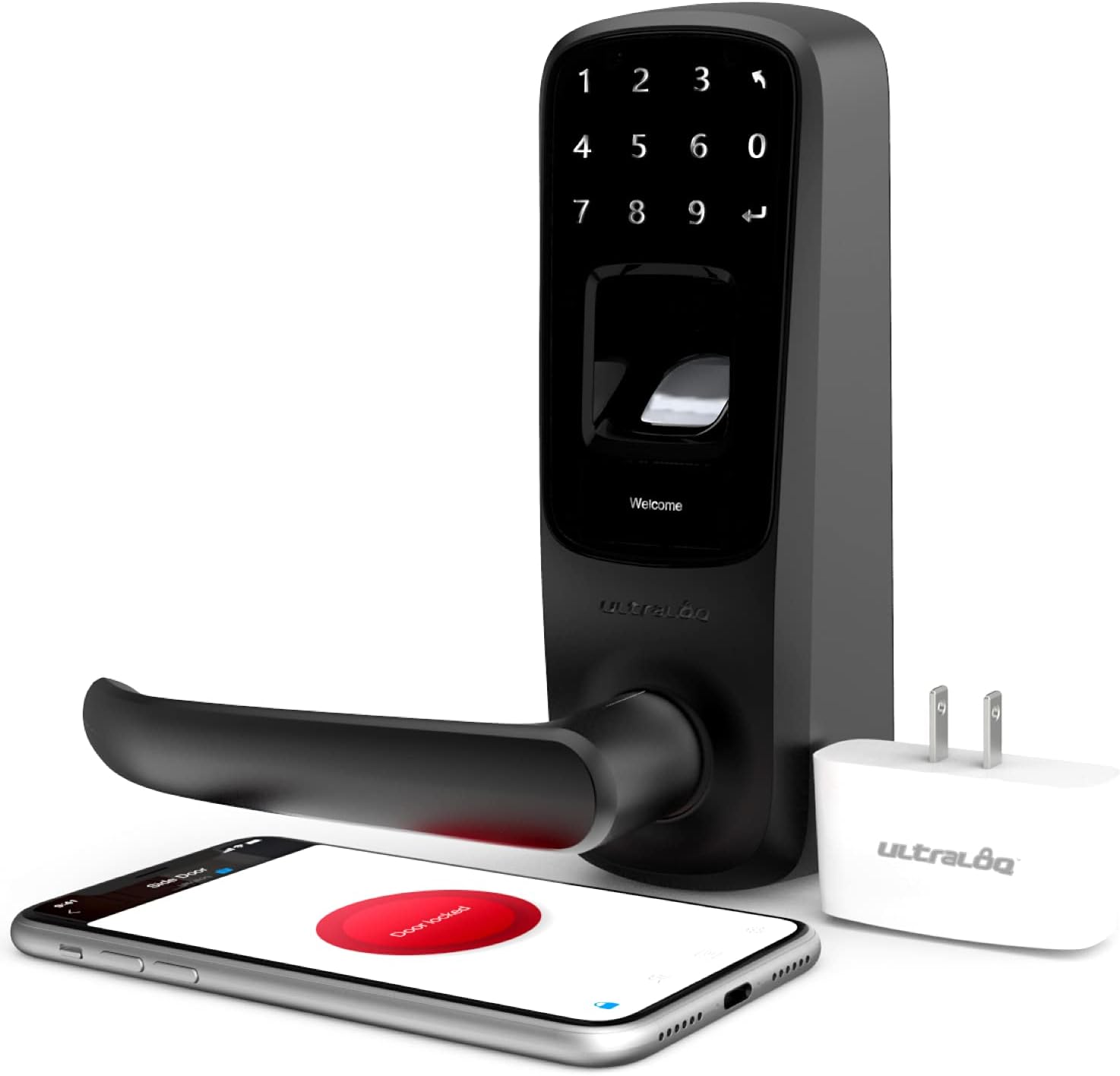
Figure 1: ULTRALOQ UL3 BT 2nd Gen Smart Lock with WiFi Bridge and accessories.
പ്രധാന സവിശേഷതകൾ
- 5-ഇൻ-1 കീലെസ് എൻട്രി: Fingerprint ID, Code, Knock / Shake to Open, Mechanical Key, and Smartphone App control.
- Advanced Fingerprint ID: Second-generation lightning-fast fingerprint recognition with self-learning algorithm.
- Anti-peep Touchscreen: Illuminated keypad allows for entering random digits before or after your actual code to prevent code exposure.
- Remote Access with WiFi Bridge: Unlock, share temporary eKeys, set codes, and view log records from anywhere via the smartphone app.
- യാന്ത്രിക ലോക്ക് പ്രവർത്തനം: Automatically locks the door after a set period for enhanced security.
- DIY ഇൻസ്റ്റാളേഷൻ: Designed for easy installation with a screwdriver, fitting standard doors (1-5/16” to 2” thick and 2-1/8” face bore hole).
- വോയ്സ് കൺട്രോൾ ഇന്റഗ്രേഷൻ: Compatible with Alexa and Google Home enabled speakers via IFTTT.

Figure 2: Recognition for ULTRALOQ Smart Locks.
സജ്ജീകരണവും ഇൻസ്റ്റാളേഷനും
The ULTRALOQ UL3 BT (2nd Gen) is designed for straightforward DIY installation. Ensure your door meets the specified dimensions before beginning.
1. Prepare Your Door
- Verify your door thickness is between 1-5/16 inches (33mm) and 2 inches (50mm).
- Confirm the face bore hole diameter is 2-1/8 inches (54mm).
- Ensure the backset (distance from door edge to center of bore hole) is 2-3/8 inches (60mm) or 2-3/4 inches (70mm).
- Remove any existing door hardware.
2. Install the Latch and Strike Plate
Insert the latch into the door edge and secure it with screws. Install the strike plate on the door frame, aligning it with the latch bolt.
3. എക്സ്റ്റീരിയർ അസംബ്ലി ഇൻസ്റ്റാൾ ചെയ്യുക
Feed the cable and spindle through the bore hole. Position the exterior assembly flush against the door.
4. Install the Interior Mounting Plate
Attach the interior mounting plate to the exterior assembly using the provided screws, ensuring the cable passes through the plate.
5. Connect the Cable and Install the Interior Assembly
Connect the cable from the exterior assembly to the interior assembly. Secure the interior assembly to the mounting plate with screws. Ensure the handle is oriented correctly for your door's handing.
6. ബാറ്ററികൾ ഇൻസ്റ്റാൾ ചെയ്യുക
Insert four AA alkaline batteries into the battery compartment of the interior assembly. Close the battery cover.

Figure 3: Easy DIY installation process.
പ്രവർത്തന നിർദ്ദേശങ്ങൾ
1. പ്രാരംഭ സജ്ജീകരണവും ആപ്പ് ജോടിയാക്കലും
- Download the ULTRALOQ App from the App Store or Google Play.
- ഒരു അക്കൗണ്ട് സൃഷ്ടിച്ച് ലോഗിൻ ചെയ്യുക.
- Follow the in-app instructions to add your UL3 BT (2nd Gen) Smart Lock. This typically involves pressing a button on the interior assembly to put it in pairing mode.
2. അൺലോക്ക് രീതികൾ
- ഫിംഗർപ്രിന്റ് ഐഡി: നിങ്ങളുടെ രജിസ്റ്റർ ചെയ്ത വിരൽ ഫിംഗർപ്രിന്റ് സെൻസറിൽ വയ്ക്കുക. ഫിംഗർപ്രിന്റ് തിരിച്ചറിഞ്ഞാൽ ലോക്ക് അൺലോക്ക് ചെയ്യും.
- കോഡ്: Enter your 4-8 digit code on the illuminated touchscreen keypad, followed by the enter key. Utilize the anti-peep function by adding random digits before or after your actual code.
- Knock / Shake to Open: With the app running in the background, knock on your phone or shake it (depending on settings) to unlock the door when within Bluetooth range.
- മെക്കാനിക്കൽ കീ: In case of battery failure or emergency, use the provided backup mechanical key to unlock the door. The keyhole is located at the bottom of the exterior handle.
- സ്മാർട്ട്ഫോൺ ആപ്പ്: Open the ULTRALOQ App and tap the unlock icon.

Figure 4: Unlocking with Fingerprint ID.
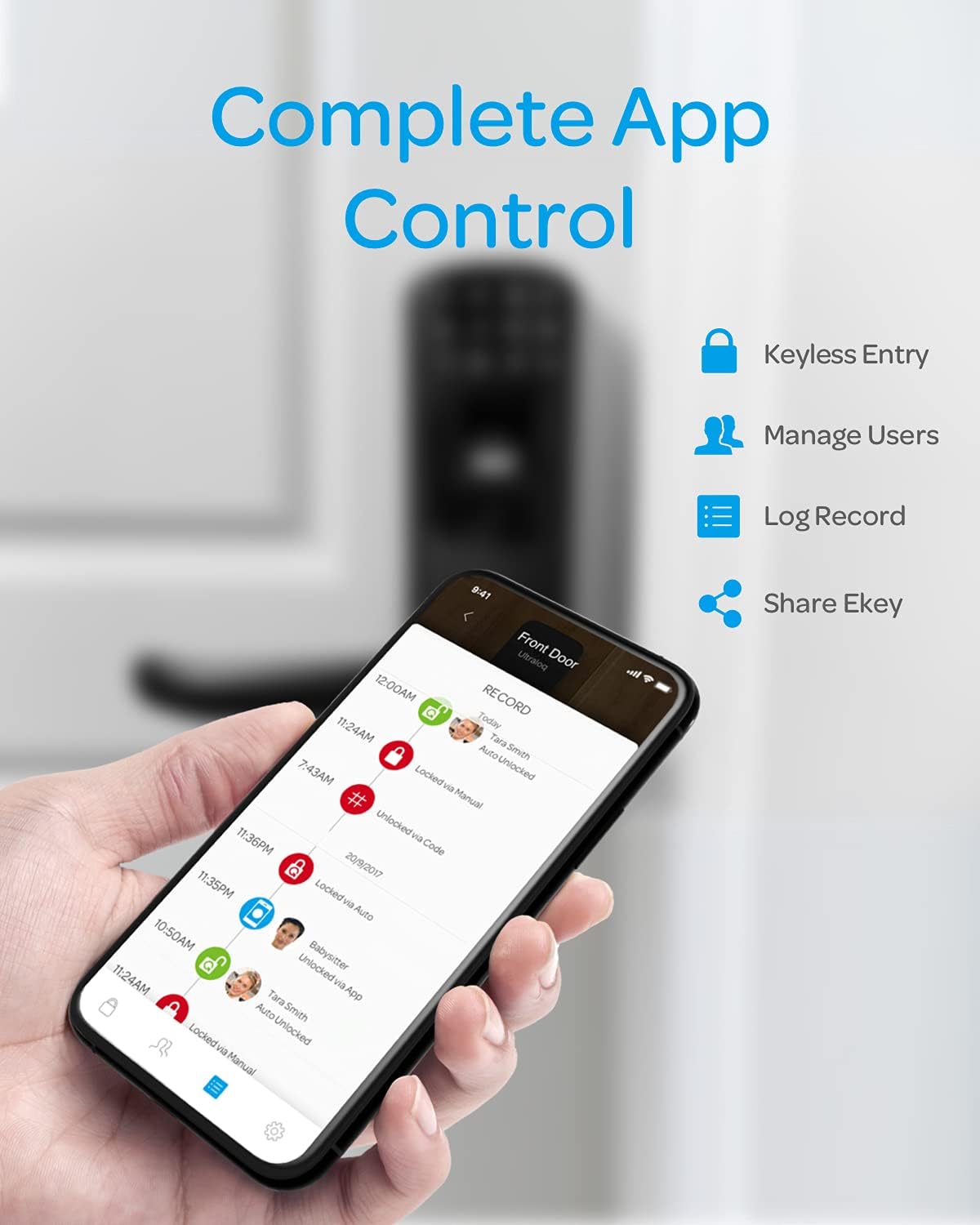
Figure 5: App control for your smart lock.
3. Locking Methods
- യാന്ത്രിക ലോക്ക്: Enable this feature in the app to automatically lock the door after a customizable delay (e.g., 10-900 seconds).
- മാനുവൽ ലോക്ക്: Press any key on the keypad for 2 seconds to lock the door from the outside. From the inside, simply lift the handle.
4. User Management and Remote Access (with WiFi Bridge)
The included WiFi Bridge allows for advanced remote functionalities:
- Add/Delete Users: Manage fingerprints and codes for family members, guests, or service providers directly from the app.
- Share eKeys: Grant temporary or permanent access to others via eKeys sent through the app.
- View ലോഗ് റെക്കോർഡുകൾ: Monitor who entered and at what time from anywhere.
- റിമോട്ട് അൺലോക്ക്/ലോക്ക്: Control your lock remotely via the app.
- ശബ്ദ നിയന്ത്രണം: Integrate with Amazon Alexa or Google Home for voice commands (e.g., “Alexa, unlock my side door”).

Figure 6: ULTRALOQ WiFi Bridge for remote access and smart home integration.
മെയിൻ്റനൻസ്
1. ബാറ്ററി മാറ്റിസ്ഥാപിക്കൽ
The ULTRALOQ UL3 BT (2nd Gen) uses four AA alkaline batteries. The lock will provide low battery warnings through the app and on the touchscreen. Replace all four batteries simultaneously with new, high-quality alkaline batteries when prompted.
2. വൃത്തിയാക്കൽ
ലോക്കിന്റെ പുറംഭാഗം മൃദുവായ, ഡി ക്ലീനർ ഉപയോഗിച്ച് വൃത്തിയാക്കുക.amp cloth. Avoid abrasive cleaners or solvents that could damage the finish or electronic components. Regularly wipe the fingerprint sensor and touchscreen to ensure optimal performance.
3. Mechanical Components
Periodically check the screws and ensure they are tightened. Lubricate the latch bolt and deadlatch with a silicone-based lubricant if they become stiff.
ട്രബിൾഷൂട്ടിംഗ്
| പ്രശ്നം | സാധ്യമായ കാരണം | പരിഹാരം |
|---|---|---|
| ലോക്ക് പ്രതികരിക്കുന്നില്ല / പവർ ഇല്ല. | ഡെഡ് ബാറ്ററികൾ. | Replace all four AA alkaline batteries. Use the backup mechanical key if necessary. |
| വിരലടയാളം തിരിച്ചറിഞ്ഞില്ല. | Finger dirty/wet, sensor dirty, unregistered fingerprint, improper placement. | Ensure finger and sensor are clean and dry. Re-register fingerprint if issues persist. Try different finger angles. |
| കീപാഡ് പ്രതികരിക്കുന്നില്ല. | Low battery, temporary glitch. | Replace batteries. Try pressing any key to wake the keypad. |
| Remote access not working. | WiFi Bridge disconnected, internet issue, lock out of range of bridge. | Check WiFi Bridge connection and internet. Ensure bridge is within effective range of the lock. |
| ലോക്ക് യാന്ത്രികമായി ലോക്ക് ചെയ്യുന്നില്ല. | Auto-lock feature disabled or incorrect settings. | Verify auto-lock settings in the ULTRALOQ App. |
സ്പെസിഫിക്കേഷനുകൾ
- മോഡൽ: UL3 BT (2nd Gen) Smart Lock
- ബ്രാൻഡ്: അൾട്രാലോക്ക്
- ലോക്ക് തരം: സ്മാർട്ട് ലോക്ക്
- മെറ്റീരിയൽ: സിങ്ക്
- നിറം: കറുപ്പ്
- അളവുകൾ (L x W x H): 7 x 6.3 x 3.5 ഇഞ്ച്
- ഇനത്തിൻ്റെ ഭാരം: 6 പൗണ്ട്
- ഊർജ്ജ സ്രോതസ്സ്: 4 x AA ആൽക്കലൈൻ ബാറ്ററികൾ (ഉൾപ്പെടുത്തിയിരിക്കുന്നു)
- കണക്റ്റിവിറ്റി: Bluetooth, 2.4GHz Wi-Fi (via WiFi Bridge)
- വാതിൽ കനം അനുയോജ്യത: 1-5/16” to 2” (33mm - 50mm)
- Face Bore Hole: 2-1/8" (54 മിമി)
- ബാക്ക്സെറ്റ്: 2-3/8” (60mm) or 2-3/4” (70mm)
- പ്രത്യേക സവിശേഷതകൾ: Fingerprint, Touchscreen, Smart Lock, WiFi, Auto-Lock
- ഉൾപ്പെടുത്തിയ ഘടകങ്ങൾ: Smart Lock, WiFi Bridge, Backup Keys, Latch and Strike, Mounting Plate, Screwdriver
- UPC: 850770008528
വാറൻ്റി
ULTRALOQ provides an 18 മാസത്തെ ഇലക്ട്രോണിക് വാറൻ്റി കൂടാതെ എ ആജീവനാന്ത മെക്കാനിക്കൽ വാറന്റി for the UL3 BT (2nd Gen) Smart Lock. Please retain your proof of purchase for warranty claims. For detailed terms and conditions, refer to the official ULTRALOQ webസൈറ്റ് അല്ലെങ്കിൽ ഉപഭോക്തൃ പിന്തുണയുമായി ബന്ധപ്പെടുക.
പിന്തുണ
For further assistance, technical support, or to purchase accessories, please visit the official ULTRALOQ webസൈറ്റ് അല്ലെങ്കിൽ അവരുടെ ഉപഭോക്തൃ സേവന ടീമിനെ ബന്ധപ്പെടുക.
- ഉദ്യോഗസ്ഥൻ Webസൈറ്റ്: www.u-tec.com
- ഉപയോക്തൃ ഗൈഡ് (PDF): PDF ഡൗൺലോഡ് ചെയ്യുക
- ആമസോൺ സ്റ്റോർ: Visit ULTRALOQ Store on Amazon


