1. സുരക്ഷാ നിർദ്ദേശങ്ങൾ
Please read all instructions carefully before operating the dehumidifier and retain this manual for future reference. Failure to follow these instructions may result in electric shock, fire, or personal injury.
- വൈദ്യുതി വിതരണം വോള്യവുമായി പൊരുത്തപ്പെടുന്നുണ്ടെന്ന് ഉറപ്പാക്കുകtagഇ റേറ്റിംഗ് ലേബലിൽ വ്യക്തമാക്കിയിരിക്കുന്നു.
- കേടായ ചരടോ പ്ലഗോ ഉപയോഗിച്ച് യൂണിറ്റ് പ്രവർത്തിപ്പിക്കരുത്. വിതരണ ചരട് കേടായെങ്കിൽ, അപകടം ഒഴിവാക്കാൻ നിർമ്മാതാവ്, സേവന ഏജന്റ് അല്ലെങ്കിൽ സമാനമായ യോഗ്യതയുള്ള വ്യക്തികൾ അത് മാറ്റിസ്ഥാപിക്കണം.
- എയർ ഇൻലെറ്റോ ഔട്ട്ലെറ്റോ തടയരുത്. യൂണിറ്റിന് ചുറ്റും കുറഞ്ഞത് 20 സെന്റീമീറ്റർ ക്ലിയറൻസ് നിലനിർത്തുക.
- എയർ ഇൻലെറ്റ്/ഔട്ട്ലെറ്റിൽ വിരലുകളോ വിദേശ വസ്തുക്കളോ തിരുകരുത്.
- Always place the unit on a level, stable surface to prevent water spillage.
- Unplug the unit before cleaning, moving, or performing any maintenance.
- കത്തുന്ന വാതകങ്ങളോ ദ്രാവകങ്ങളോ സൂക്ഷിച്ചിരിക്കുന്ന സ്ഥലങ്ങളിൽ യൂണിറ്റ് ഉപയോഗിക്കരുത്.
- ഈ ഉപകരണം, അവരുടെ സുരക്ഷയ്ക്ക് ഉത്തരവാദിയായ ഒരു വ്യക്തി ഉപകരണത്തിൻ്റെ ഉപയോഗത്തെ സംബന്ധിച്ച മേൽനോട്ടമോ നിർദ്ദേശമോ നൽകിയിട്ടില്ലെങ്കിൽ, ശാരീരികമോ ഇന്ദ്രിയപരമോ മാനസികമോ ആയ കഴിവുകൾ കുറഞ്ഞതോ അനുഭവത്തിൻ്റെയും അറിവിൻ്റെയും അഭാവം ഉള്ള വ്യക്തികൾക്ക് (കുട്ടികൾ ഉൾപ്പെടെ) ഉപയോഗിക്കാൻ ഉദ്ദേശിച്ചുള്ളതല്ല.
- കുട്ടികൾ ഉപകരണം ഉപയോഗിച്ച് കളിക്കുന്നില്ലെന്ന് ഉറപ്പാക്കാൻ മേൽനോട്ടം വഹിക്കണം.
- The refrigerant R290 is used in this dehumidifier. Handle with care and ensure proper ventilation.
2. ഉൽപ്പന്നം കഴിഞ്ഞുview
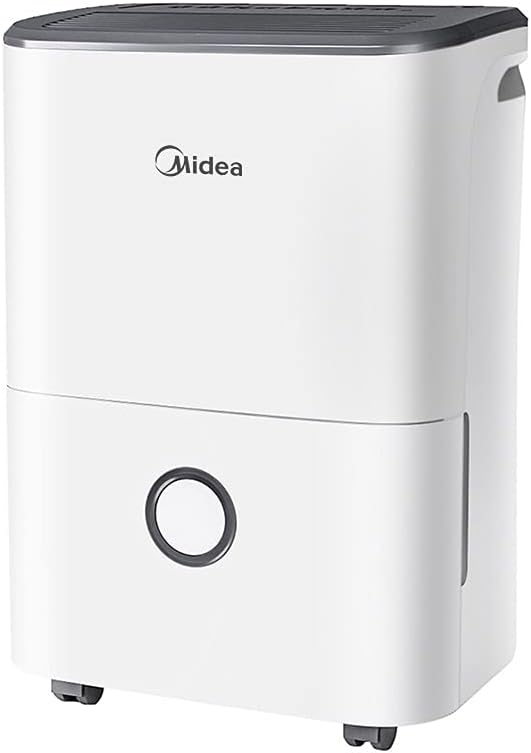
The Carrier Midea DF-20DEN7-WF is an efficient dehumidifier designed to reduce excess moisture in indoor environments, preventing issues such as condensation, mold growth, and musty odors. It is suitable for various rooms including bathrooms, cellars, laundry rooms, kitchens, and poorly ventilated areas.
പ്രധാന സവിശേഷതകൾ:
- ഉയർന്ന ഡീഹ്യുമിഡിഫിക്കേഷൻ ശേഷി: 24 മണിക്കൂറിൽ 20 ലിറ്റർ വരെ.
- App Capable: Remote monitoring and control via a smartphone application.
- Intelligent Dehumidifier Mode: Automatic humidity control between 45% and 55%.
- പോർട്ടബിൾ ഡിസൈൻ: Equipped with flexible wheels for easy movement.
- Environmentally Friendly Refrigerant: Uses R290, a natural, freon-free, and low-carbon refrigerant.
- 24-മണിക്കൂർ ടൈമർ: ഷെഡ്യൂൾ ചെയ്ത പ്രവർത്തനത്തിന് അനുവദിക്കുന്നു.
- നീക്കം ചെയ്യാവുന്ന വാട്ടർ ടാങ്ക്: 3-liter capacity with anti-spill features.
ഉൽപ്പന്ന ഘടകങ്ങൾ:


3. സജ്ജീകരണം
3.1 അൺപാക്കിംഗ്
- ഡീഹ്യൂമിഡിഫയർ അതിന്റെ പാക്കേജിംഗിൽ നിന്ന് ശ്രദ്ധാപൂർവ്വം നീക്കം ചെയ്യുക.
- എല്ലാ പാക്കിംഗ് മെറ്റീരിയലുകളും, ടേപ്പുകളും, സംരക്ഷണ ഫിലിമുകളും നീക്കം ചെയ്യുക.
- ഗതാഗത സമയത്ത് എന്തെങ്കിലും കേടുപാടുകൾ സംഭവിച്ചിട്ടുണ്ടോയെന്ന് പരിശോധിക്കുക. കേടുപാടുകൾ സംഭവിച്ചിട്ടുണ്ടെങ്കിൽ, പ്രവർത്തിപ്പിക്കരുത്, ഉപഭോക്തൃ പിന്തുണയുമായി ബന്ധപ്പെടുക.
3.2 പ്ലേസ്മെൻ്റ്
- വാട്ടർ ടാങ്ക് നിറയുമ്പോൾ അതിന്റെ ഭാരം താങ്ങാൻ കഴിയുന്ന ഒരു ഉറച്ച, നിരപ്പായ പ്രതലത്തിൽ ഡീഹ്യൂമിഡിഫയർ സ്ഥാപിക്കുക.
- Ensure there is at least 20 cm (8 inches) of space around the unit for proper airflow. Do not place it against a wall or furniture that could obstruct the air inlets or outlets.
- മികച്ച പ്രകടനത്തിനായി, ഡീഹ്യൂമിഡിഫയർ പ്രവർത്തിക്കുന്ന മുറിയിലെ എല്ലാ വാതിലുകളും ജനലുകളും അടയ്ക്കുക.
- താപ സ്രോതസ്സുകൾക്ക് സമീപമോ നേരിട്ടുള്ള സൂര്യപ്രകാശത്തിലോ യൂണിറ്റ് സ്ഥാപിക്കുന്നത് ഒഴിവാക്കുക.
3.3 Wheel Installation (Optional)
The dehumidifier comes with flexible wheels for easy mobility. These can be attached or removed as desired.
- Carefully tilt the unit to access the bottom.
- Insert the wheels into the designated slots on the base of the unit until they click into place.
- Ensure all four wheels are securely attached before returning the unit to an upright position.
3.4 പവർ കണക്ഷൻ
- ഗ്രൗണ്ടഡ് ഇലക്ട്രിക്കൽ ഔട്ട്ലെറ്റിലേക്ക് പവർ കോർഡ് പ്ലഗ് ചെയ്യുക.
- Do not use extension cords or multi-plugs, as this may pose a fire hazard.
3.5 App Setup (Optional)
The dehumidifier is app-capable, allowing for remote monitoring and control.
- Download the Midea app from your smartphone's app store (iOS or Android).
- Follow the in-app instructions to create an account and connect your dehumidifier to your home Wi-Fi network.
- Once connected, you can control the unit, set schedules, and monitor humidity levels from your smartphone.
4. പ്രവർത്തന നിർദ്ദേശങ്ങൾ
4.1 പവർ ഓൺ/ഓഫ്
- To turn the unit on, press the Power button on the control panel. The unit will start operating in its default mode.
- To turn the unit off, press the Power button again.
4.2 Setting Desired Humidity Level
The dehumidifier features an intelligent dehumidifier mode that automatically controls room humidity within a comfortable range.
- Press the 'Mode' or 'Humidity' button (refer to control panel icons) to cycle through available humidity settings or modes.
- The intelligent mode aims to maintain humidity between 45% and 55% depending on the room temperature.
- You may also be able to manually set a target humidity percentage using the '+' and '-' buttons.
4.3 ടൈമർ പ്രവർത്തനം
The 24-hour timer allows you to schedule when the unit turns on or off.
- To set Auto-On Timer: With the unit off, press the 'Timer' button. Use '+' and '-' to set the desired delay (in hours) before the unit turns on.
- To set Auto-Off Timer: With the unit on, press the 'Timer' button. Use '+' and '-' to set the desired delay (in hours) before the unit turns off.
- The timer indicator light will illuminate when the timer is active.
4.4 വാട്ടർ ടാങ്ക് മാനേജ്മെന്റ്
The dehumidifier will automatically stop operating when the 3-liter water tank is full. The 'Tank Full' indicator light will illuminate.
- യൂണിറ്റിന്റെ മുൻവശത്ത് നിന്ന് വാട്ടർ ടാങ്ക് ശ്രദ്ധാപൂർവ്വം പുറത്തെടുക്കുക.
- ശേഖരിച്ച വെള്ളം ഒരു സിങ്കിലേക്കോ ഡ്രെയിനിലേക്കോ ഒഴിക്കുക.
- Slide the empty water tank back into the unit until it is securely in place. The unit will resume operation automatically.
4.5 തുടർച്ചയായ ഡ്രെയിനേജ് (ഓപ്ഷണൽ)
For continuous operation without needing to empty the water tank, you can connect a drain hose (not included) to the continuous drainage port on the back of the unit. Ensure the hose is sloped downwards to allow gravity drainage.
5. പരിപാലനം
പതിവ് അറ്റകുറ്റപ്പണികൾ മികച്ച പ്രകടനം ഉറപ്പാക്കുകയും നിങ്ങളുടെ ഡീഹ്യൂമിഡിഫയറിന്റെ ആയുസ്സ് വർദ്ധിപ്പിക്കുകയും ചെയ്യുന്നു.
5.1 എയർ ഫിൽട്ടർ വൃത്തിയാക്കൽ
ഉപയോഗവും വായുവിന്റെ ഗുണനിലവാരവും അനുസരിച്ച് എയർ ഫിൽറ്റർ രണ്ടാഴ്ച കൂടുമ്പോഴോ അതിലധികമോ തവണ വൃത്തിയാക്കണം.
- ഡീഹ്യൂമിഡിഫയർ ഓഫ് ചെയ്ത് പവർ ഔട്ട്ലെറ്റിൽ നിന്ന് അത് ഊരിമാറ്റുക.
- Locate the air filter (usually at the back or side of the unit). Remove it carefully.
- Clean the filter with a vacuum cleaner to remove dust and debris. For heavy dirt, wash it gently with warm, soapy water.
- ഫിൽട്ടർ നന്നായി കഴുകി വീണ്ടും ഇൻസ്റ്റാൾ ചെയ്യുന്നതിന് മുമ്പ് പൂർണ്ണമായും വായുവിൽ ഉണങ്ങാൻ അനുവദിക്കുക. നേരിട്ട് സൂര്യപ്രകാശമോ ഉയർന്ന ചൂടോ ഏൽക്കരുത്.
- ഡ്രൈ ഫിൽറ്റർ യൂണിറ്റിലേക്ക് വീണ്ടും ചേർക്കുക.
5.2 പുറംഭാഗം വൃത്തിയാക്കൽ
- ഒരു സോഫ്റ്റ്, ഡി ഉപയോഗിച്ച് യൂണിറ്റിൻ്റെ പുറംഭാഗം തുടയ്ക്കുകamp തുണി.
- Do not use harsh chemicals, abrasive cleaners, or solvents, as these can damage the surface.
5.3 വാട്ടർ ടാങ്ക് വൃത്തിയാക്കൽ
പൂപ്പലും പൂപ്പലും വളരുന്നത് തടയാൻ ഇടയ്ക്കിടെ വാട്ടർ ടാങ്ക് വൃത്തിയാക്കുക.
- വാട്ടർ ടാങ്ക് നീക്കം ചെയ്ത് ശേഷിക്കുന്ന വെള്ളം ഒഴിക്കുക.
- നേരിയ ഡിറ്റർജന്റും ചെറുചൂടുള്ള വെള്ളവും ഉപയോഗിച്ച് ടാങ്ക് കഴുകുക.
- Rinse thoroughly and allow it to air dry before placing it back into the unit.
5.4 സംഭരണം
യൂണിറ്റ് ദീർഘനേരം ഉപയോഗിക്കുന്നില്ലെങ്കിൽ:
- വാട്ടർ ടാങ്ക് ശൂന്യമാക്കി വൃത്തിയാക്കുക.
- എയർ ഫിൽട്ടർ വൃത്തിയാക്കുക.
- യൂണിറ്റ് ഊരി പവർ കോർഡ് വൃത്തിയായി ചുരുട്ടുക.
- ഡീഹ്യൂമിഡിഫയർ തണുത്തതും വരണ്ടതുമായ സ്ഥലത്ത്, നേരിട്ടുള്ള സൂര്യപ്രകാശത്തിൽ നിന്നും കടുത്ത താപനിലയിൽ നിന്നും അകറ്റി, കുത്തനെയുള്ള സ്ഥാനത്ത് സൂക്ഷിക്കുക.
6. പ്രശ്നപരിഹാരം
ഉപഭോക്തൃ സേവനവുമായി ബന്ധപ്പെടുന്നതിന് മുമ്പ്, പൊതുവായ പ്രശ്നങ്ങൾക്ക് ഇനിപ്പറയുന്ന ട്രബിൾഷൂട്ടിംഗ് ഗൈഡ് പരിശോധിക്കുക.
| പ്രശ്നം | സാധ്യമായ കാരണം | പരിഹാരം |
|---|---|---|
| യൂണിറ്റ് ഓണാക്കുന്നില്ല. | വൈദ്യുതി വിതരണം ഇല്ല. പവർ കോർഡ് സുരക്ഷിതമായി പ്ലഗ് ഇൻ ചെയ്തിട്ടില്ല. Water tank full or not properly installed. | പവർ ഔട്ട്ലെറ്റ് പരിശോധിക്കുക. Ensure power cord is firmly plugged in. വാട്ടർ ടാങ്ക് കാലിയാക്കുക, അത് ശരിയായി സ്ഥാപിച്ചിട്ടുണ്ടെന്ന് ഉറപ്പാക്കുക. |
| ഡീഹ്യുമിഡിഫയർ വെള്ളം ശേഖരിക്കുന്നില്ല. | മുറിയിലെ താപനില വളരെ കുറവാണ്. എയർ ഫിൽട്ടർ അടഞ്ഞുപോയി. ഈർപ്പം ക്രമീകരണം വളരെ കൂടുതലാണ്. വാതിലുകൾ/ജനലുകൾ തുറന്നിരിക്കുന്നു. | Dehumidifiers operate best above 5°C (41°F). എയർ ഫിൽട്ടർ വൃത്തിയാക്കുക. ആവശ്യമുള്ള ഈർപ്പം ക്രമീകരണം കുറയ്ക്കുക. എല്ലാ വാതിലുകളും ജനലുകളും അടയ്ക്കുക. |
| യൂണിറ്റ് ശബ്ദമയമാണ്. | യൂണിറ്റ് നിരപ്പായ പ്രതലത്തിലല്ല. എയർ ഫിൽട്ടർ അടഞ്ഞുപോയി. ഫാൻ തടസ്സം. | പരന്നതും സുസ്ഥിരവുമായ ഉപരിതലത്തിൽ യൂണിറ്റ് സ്ഥാപിക്കുക. എയർ ഫിൽട്ടർ വൃത്തിയാക്കുക. Check for any obstructions in the fan area. |
| യൂണിറ്റിൽ നിന്ന് വെള്ളം ഒഴുകുന്നു. | വാട്ടർ ടാങ്ക് ശരിയായി സ്ഥാപിച്ചിട്ടില്ല. Unit is tilted. Continuous drainage hose is blocked or improperly connected. | Reinstall water tank correctly. Ensure unit is on a level surface. Check and clear the drainage hose, ensure proper slope. |
7 സാങ്കേതിക സവിശേഷതകൾ
| ഫീച്ചർ | സ്പെസിഫിക്കേഷൻ |
|---|---|
| മോഡൽ നമ്പർ | DF-20DEN7-WF |
| ബ്രാൻഡ് | കാരിയർ |
| നിർജ്ജലീകരണ ശേഷി | 20 ലിറ്റർ/24 മണിക്കൂർ |
| വാട്ടർ ടാങ്ക് കപ്പാസിറ്റി | 3 ലിറ്റർ |
| ശുപാർശ ചെയ്യുന്ന തറ വിസ്തീർണ്ണം | 40 ചതുരശ്ര മീറ്റർ വരെ |
| പവർ / വാട്ട്tage | 440 വാട്ട്സ് |
| വാല്യംtage | 230V |
| ശബ്ദ നില | 46 ഡെസിബെൽ |
| റഫ്രിജറൻ്റ് | R290 |
| ഉൽപ്പന്ന അളവുകൾ (D x W x H) | 26D x 35W x 51H സെന്റീമീറ്റർ |
| ഇനത്തിൻ്റെ ഭാരം | 15.1 കിലോഗ്രാം |
| വേഗതകളുടെ എണ്ണം | 2 |
| പ്രത്യേക സവിശേഷതകൾ | Anti-Spill, Removable Tank, App Capable, Auto Shutoff |
| മെറ്റീരിയൽ | മെറ്റൽ, പ്ലാസ്റ്റിക് |
8. വാറൻ്റിയും പിന്തുണയും
This Carrier Midea dehumidifier is covered by a manufacturer's warranty. Please refer to the warranty card included with your purchase for specific terms, conditions, and duration of coverage.
ഉപഭോക്തൃ പിന്തുണ:
For technical assistance, warranty claims, or service inquiries, please contact your local Carrier or Midea authorized service center. Ensure you have your model number (DF-20DEN7-WF) and proof of purchase available when contacting support.
You can also visit the official Carrier or Midea website for additional support resources and contact information.


