ആമുഖം
Thank you for choosing the Mahli Smart Robotic 3-in-1 Vacuum Cleaner. This manual provides important information on the safe use, operation, and maintenance of your device. Please read it thoroughly before first use and keep it for future reference.

Figure 1: Mahli Smart Robotic 3-in-1 Vacuum Cleaner and Remote Control
This image displays the Mahli Smart Robotic 3-in-1 Vacuum Cleaner in white, accompanied by its remote control. The vacuum cleaner is round with a power button on top, and the remote control is rectangular with navigation and function buttons.
സുരക്ഷാ നിർദ്ദേശങ്ങൾ
- ഉപകരണം ഉപയോഗിക്കുന്നതിന് മുമ്പ് എല്ലാ നിർദ്ദേശങ്ങളും വായിക്കുക.
- Do not operate the vacuum cleaner in wet environments or near water.
- മുടി, അയഞ്ഞ വസ്ത്രങ്ങൾ, വിരലുകൾ, ശരീരത്തിൻ്റെ എല്ലാ ഭാഗങ്ങളും തുറസ്സുകളിൽ നിന്നും ചലിക്കുന്ന ഭാഗങ്ങളിൽ നിന്നും അകറ്റി നിർത്തുക.
- ഈ മാനുവലിൽ വിവരിച്ചിരിക്കുന്നതുപോലെ മാത്രം ഉപയോഗിക്കുക. നിർമ്മാതാവ് ശുപാർശ ചെയ്യുന്ന അറ്റാച്ചുമെന്റുകൾ മാത്രം ഉപയോഗിക്കുക.
- കേടായ ചരടോ പ്ലഗോ ഉപയോഗിച്ച് ഉപയോഗിക്കരുത്. ഉപകരണം ശരിയായി പ്രവർത്തിക്കുന്നില്ലെങ്കിൽ, അത് താഴെ വീണിട്ടുണ്ടെങ്കിൽ, കേടുപാടുകൾ സംഭവിച്ചിട്ടുണ്ടെങ്കിൽ, പുറത്ത് വച്ചിട്ടുണ്ടെങ്കിൽ, അല്ലെങ്കിൽ വെള്ളത്തിൽ വീണിട്ടുണ്ടെങ്കിൽ, അത് ഒരു സർവീസ് സെന്ററിലേക്ക് തിരികെ നൽകുക.
- ചരട് ഉപയോഗിച്ച് വലിക്കുകയോ കൊണ്ടുപോകുകയോ ചെയ്യരുത്, ചരട് ഒരു ഹാൻഡിലായി ഉപയോഗിക്കുക, ചരടിൽ ഒരു വാതിൽ അടയ്ക്കുക, അല്ലെങ്കിൽ മൂർച്ചയുള്ള അരികുകളിലോ മൂലകളിലോ ചരട് വലിക്കുക. ചരടിന് മുകളിലൂടെ ഉപകരണം പ്രവർത്തിപ്പിക്കരുത്. ചൂടായ പ്രതലങ്ങളിൽ നിന്ന് ചരട് സൂക്ഷിക്കുക.
- ചരട് വലിച്ചുകൊണ്ട് അൺപ്ലഗ് ചെയ്യരുത്. അൺപ്ലഗ് ചെയ്യാൻ, പ്ലഗ് പിടിക്കുക, ചരടല്ല.
- നനഞ്ഞ കൈകളാൽ പ്ലഗ്ഗോ ഉപകരണമോ കൈകാര്യം ചെയ്യരുത്.
- ഒരു വസ്തുവും തുറസ്സുകളിൽ ഇടരുത്. ഒരു ഓപ്പണിംഗും തടഞ്ഞിരിക്കുമ്പോൾ ഉപയോഗിക്കരുത്; പൊടി, ലിൻ്റ്, മുടി, വായുപ്രവാഹം കുറയ്ക്കുന്ന എന്തും എന്നിവ ഒഴിവാക്കുക.
- അൺപ്ലഗ് ചെയ്യുന്നതിനുമുമ്പ് എല്ലാ നിയന്ത്രണങ്ങളും ഓഫാക്കുക.
- കോണിപ്പടികളിൽ വൃത്തിയാക്കുമ്പോൾ കൂടുതൽ ശ്രദ്ധിക്കണം.
- ഗ്യാസോലിൻ പോലുള്ള കത്തുന്നതോ കത്തുന്നതോ ആയ ദ്രാവകങ്ങൾ എടുക്കാനോ അവ ഉള്ള സ്ഥലങ്ങളിൽ ഉപയോഗിക്കാനോ ഉപയോഗിക്കരുത്.
- കത്തുന്നതോ പുകവലിക്കുന്നതോ ആയ സിഗരറ്റ്, തീപ്പെട്ടി, ചൂടുള്ള ചാരം എന്നിവയൊന്നും എടുക്കരുത്.
- ഡസ്റ്റ് ബാഗ് കൂടാതെ/അല്ലെങ്കിൽ ഫിൽട്ടറുകൾ ഇല്ലാതെ ഉപയോഗിക്കരുത്.
- ബോധപൂർവമല്ലാത്ത തുടക്കം തടയുക. ബാറ്ററി പാക്കിലേക്ക് കണക്റ്റ് ചെയ്യുന്നതിനും ഉപകരണം എടുക്കുന്നതിനും കൊണ്ടുപോകുന്നതിനും മുമ്പ് സ്വിച്ച് ഓഫ് പൊസിഷനിൽ ആണെന്ന് ഉറപ്പാക്കുക.
- നിർമ്മാതാവ് വ്യക്തമാക്കിയ ചാർജർ ഉപയോഗിച്ച് മാത്രം റീചാർജ് ചെയ്യുക.
- ഉപകരണമോ ബാറ്ററി പായ്ക്കോ പരിഷ്കരിക്കുകയോ നന്നാക്കാൻ ശ്രമിക്കുകയോ ചെയ്യരുത്.
ഉൽപ്പന്ന ഘടകങ്ങൾ
The Mahli Smart Robotic 3-in-1 Vacuum Cleaner comes with the following components:
- Main Robotic Vacuum Unit
- റിമോട്ട് കൺട്രോൾ
- യുഎസ്ബി ചാർജിംഗ് കേബിൾ
- സൈഡ് ബ്രഷുകൾ (2x)
- മോപ്പ് തുണി (1x)
- ക്ലീനിംഗ് ബ്രഷ് (1x)
ചിത്രം 2: ഉൾപ്പെടുത്തിയ ഘടകങ്ങൾ
This image shows the Mahli Smart Robotic 3-in-1 Vacuum Cleaner along with its accessories: two side brushes, a mop cloth, a USB charging cable, and a small cleaning brush.
സജ്ജമാക്കുക
1. Charging the Vacuum Cleaner
- Connect the USB charging cable to the charging port on the vacuum cleaner.
- USB കേബിളിന്റെ മറ്റേ അറ്റം അനുയോജ്യമായ ഒരു USB പവർ അഡാപ്റ്ററിലേക്ക് (ഉൾപ്പെടുത്തിയിട്ടില്ല) അല്ലെങ്കിൽ ഒരു കമ്പ്യൂട്ടർ USB പോർട്ടിലേക്ക് പ്ലഗ് ചെയ്യുക.
- ചാർജിംഗ് ഇൻഡിക്കേറ്റർ ലൈറ്റ് പ്രകാശിക്കും. പൂർണ്ണമായി ചാർജ് ചെയ്യാൻ ഏകദേശം 3 മണിക്കൂർ എടുക്കും.
- Once fully charged, the indicator light may change or turn off. Disconnect the vacuum cleaner from the power source.
2. Attaching Side Brushes
Gently press the side brushes onto the designated posts on the underside of the vacuum cleaner until they click into place.
3. Attaching the Mop Cloth (Optional)
If using the mopping function, attach the mop cloth to the designated area on the bottom of the vacuum cleaner. Ensure it is securely fastened.
പ്രവർത്തന നിർദ്ദേശങ്ങൾ
1. പവർ ഓൺ/ഓഫ്
- To power on, press the power switch on the side or bottom of the vacuum cleaner. Alternatively, for some models, simply touch the power button on the top surface after ensuring the main power switch is on.
- To power off, press the power switch again or hold the power button on the top surface.
2. ക്ലീനിംഗ് മോഡുകൾ
The vacuum cleaner features intelligent omni-directional and auto-route technology for efficient cleaning.
- ഓട്ടോമാറ്റിക് ക്ലീനിംഗ്: Once powered on, the vacuum cleaner will automatically begin cleaning, navigating around obstacles and covering the floor area.
- റിമോട്ട് കൺട്രോൾ ഓപ്പറേഷൻ: Use the provided remote control for manual direction changes or to start/stop cleaning.
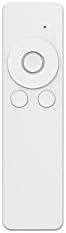
ചിത്രം 3: റിമോട്ട് കൺട്രോൾ
This image shows the white remote control for the Mahli Smart Robotic 3-in-1 Vacuum Cleaner. It features a circular directional pad at the top, with two smaller circular buttons below it.
3. മോപ്പിംഗ് ഫംഗ്ഷൻ
If the mop cloth is attached, the vacuum cleaner will perform mopping simultaneously with sweeping and vacuuming. Ensure the mop cloth is clean and slightly damp മികച്ച ഫലങ്ങൾക്കായി.
മെയിൻ്റനൻസ്
1. ഡസ്റ്റ്ബിൻ കാലിയാക്കൽ
Regularly empty the dustbin to maintain optimal cleaning performance. Locate the dustbin compartment, open it, and dispose of collected debris. Clean the dustbin with the provided cleaning brush or a soft cloth.
2. സൈഡ് ബ്രഷുകൾ വൃത്തിയാക്കുന്നു
Check the side brushes for tangled hair or debris. Remove any obstructions carefully. If brushes are worn, they may need replacement.
3. Cleaning the Mop Cloth
After each use, remove the mop cloth and wash it thoroughly. Allow it to air dry completely before reattaching.
4. സെൻസറുകൾ വൃത്തിയാക്കൽ
Wipe the anti-fall sensors and other optical sensors on the bottom and front of the vacuum cleaner with a clean, dry cloth to ensure proper navigation.
ട്രബിൾഷൂട്ടിംഗ്
| പ്രശ്നം | സാധ്യമായ കാരണം | പരിഹാരം |
|---|---|---|
| വാക്വം ക്ലീനർ ഓണാക്കുന്നില്ല. | Battery is low or depleted. Main power switch is off. | Charge the vacuum cleaner. Ensure the main power switch is in the ON position. |
| Vacuum cleaner stops unexpectedly. | Dustbin is full. Obstruction detected. Battery is low. | Empty the dustbin. Remove any obstructions. Recharge the vacuum cleaner. |
| മോശം ക്ലീനിംഗ് പ്രകടനം. | Dustbin is full. Side brushes are tangled or worn. Sensors are dirty. | Empty the dustbin. Clean or replace side brushes. Clean all sensors. |
| Vacuum cleaner gets stuck frequently. | Too many obstacles in the cleaning area. Sensors are dirty. | Clear the cleaning area of excessive clutter. Clean all sensors. |
സ്പെസിഫിക്കേഷനുകൾ
| ഫീച്ചർ | വിശദാംശങ്ങൾ |
|---|---|
| മോഡൽ | MBOT3002 |
| ഫംഗ്ഷൻ | Sweeping, Vacuuming, Mopping (3-in-1) |
| ബാറ്ററി ശേഷി | 2000mAh |
| ചാർജിംഗ് സമയം | ഏകദേശം 3 മണിക്കൂർ |
| ജോലി സമയം | ഏകദേശം 2 മണിക്കൂർ |
| റേറ്റുചെയ്ത വോളിയംtage | 3.7V |
| ജോലി ശബ്ദം | 55dB |
| അളവുകൾ | വ്യാസം: 12.5 ഇഞ്ച്, ഉയരം: 1.8 ഇഞ്ച് |
| Suitable Floor Types | Wood, Tile, Linoleum |
| പ്രത്യേക സവിശേഷതകൾ | Intelligent Omni-Directional, Auto Route Technology, Smart Navigation, 360 Motion, Advanced Sensors, Anti-Fall Sensors |
| ഉൾപ്പെടുത്തിയ ഘടകങ്ങൾ | Sweeper, 2x Brush, 1x Mop, 1x USB Charging Cable, 1x Cleaning Brush, Remote Control |
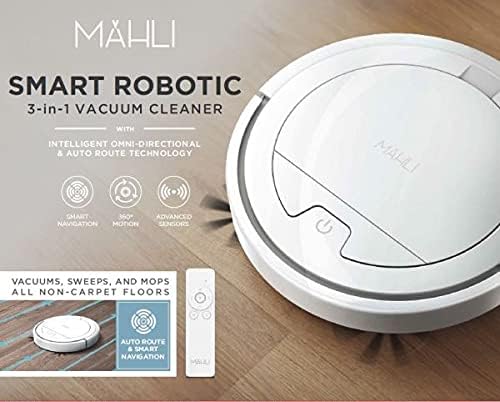
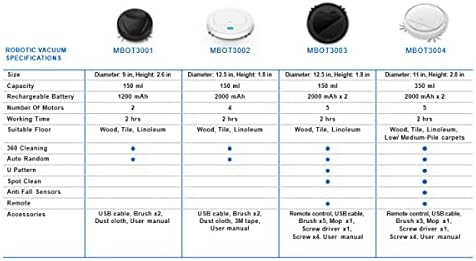
Figure 4: Robotic Vacuum Specifications Overview
This image displays a table comparing specifications for various Mahli robotic vacuum models (MBOT3001, MBOT3002, MBOT3003, MBOT3004). Key specifications include size, capacity, battery, motors, working time, suitable floor, cleaning patterns, sensors, remote, and accessories.
വാറൻ്റിയും പിന്തുണയും
For warranty information and customer support, please refer to the contact details provided on the product packaging or the official Mahli webസൈറ്റ്. വാങ്ങിയതിന്റെ തെളിവായി നിങ്ങളുടെ വാങ്ങൽ രസീത് സൂക്ഷിക്കുക.
For technical assistance or troubleshooting beyond this manual, please contact Mahli customer service.


