ആമുഖം
Thank you for choosing the Obeamiu RGB LED Video Light Stick Wand. This portable studio photography lighting tool is designed to provide versatile and high-quality illumination for various applications, including YouTube content creation, painting, vlogging, live streaming, and self-broadcasting.

Figure 1: Obeamiu RGB LED Video Light Stick Wand and included accessories.
ഉൽപ്പന്ന സവിശേഷതകൾ
- Versatile & Dimmable RGB Lighting: Features a color temperature range from 2600K (warm) to 9600K (cold) with CRI≥97 and TLCI≥97. Brightness is adjustable from 0-100%. Includes 3 normal lighting modes (Yellow Warm, Warm White, White), 9 RGB lighting modes (Red, Green, Blue, Cyan, Magenta, Yellow, Pink, Violet, Orange), and 6 common lighting scene effects (RGB Cycle, Police Car, Ambulance, Fire Truck, Lightning, Candle, etc.).
- ഈടുനിൽക്കുന്നതും സുരക്ഷിതവുമായ രൂപകൽപ്പന: Constructed from aviation aluminum and hard PC for natural heat dissipation. Features an OLED display screen and weighs 360g. Dimensions are 403*48*44mm.
- റീചാർജ് ചെയ്യാവുന്ന ബാറ്ററി: Equipped with a built-in 10W 4000mAh lithium battery and USB Type-C charging port, providing approximately 100 minutes of operation at 100% power. Can be used while charging. Includes overheating protection.
- ഫ്ലെക്സിബിൾ മൗണ്ടിംഗ് ഓപ്ഷനുകൾ: Features a handle grip made of anti-skid material for comfortable holding. Both ends have 1/4 standard nut holes for mounting on tripods or light stands. Integrated 360° rotatable magnets allow attachment to most metal surfaces.
- സൗകര്യപ്രദമായ നിയന്ത്രണം: Includes a wireless remote control for adjusting settings from up to 40 feet away. The light has a power-off memory function, retaining the last settings upon reboot.
പാക്കേജ് ഉള്ളടക്കം
നിങ്ങളുടെ പാക്കേജിൽ എല്ലാ ഇനങ്ങളും ഉണ്ടെന്ന് ദയവായി പരിശോധിക്കുക:
- 1 x C10 RGB Light Stick
- 1 x വയർലെസ് റിമോട്ട് കൺട്രോൾ
- 1 x Tripod Ball Head
- 1 x Handle Grip
- 1 x ചുമക്കുന്ന ബാഗ്
- 1 x യുഎസ്ബി ടൈപ്പ്-സി കേബിൾ
- 1 x ഉപയോക്തൃ മാനുവൽ (ഈ പ്രമാണം)
സജ്ജമാക്കുക
1. പ്രാരംഭ ചാർജിംഗ്
Before first use, fully charge the RGB Light Stick. Connect the provided USB Type-C cable to the charging port on the light stick and plug the other end into a compatible USB power adapter (not included).
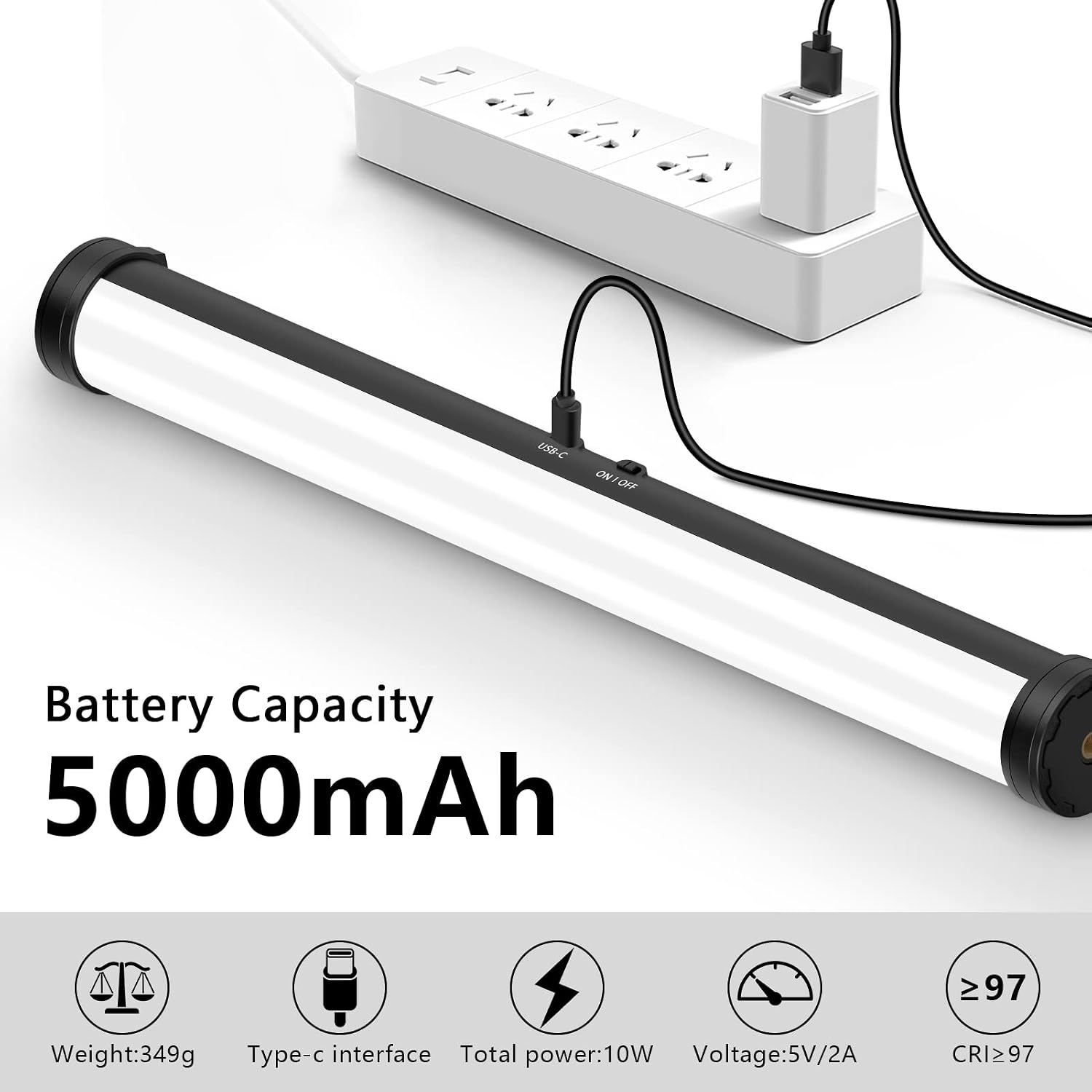
Figure 2: Charging the RGB Light Stick using the USB Type-C cable.
The OLED display will indicate charging status. A full charge provides approximately 100 minutes of operation at maximum brightness.
2. Attaching the Handle Grip
Screw the handle grip onto either of the 1/4" screw holes located at the ends of the light stick. Ensure it is securely fastened for comfortable handheld use.
3 മൗണ്ടിംഗ് ഓപ്ഷനുകൾ
The light stick offers several mounting options:
- ട്രൈപോഡ്/ലൈറ്റ് സ്റ്റാൻഡ്: Use the 1/4" screw holes at both ends to attach the light stick to a tripod or light stand. The included tripod ball head can be used for flexible positioning.
- കാന്തിക അറ്റാച്ച്മെൻ്റ്: The light stick features 360° rotatable magnets on both ends, allowing it to be securely attached to most metal surfaces.
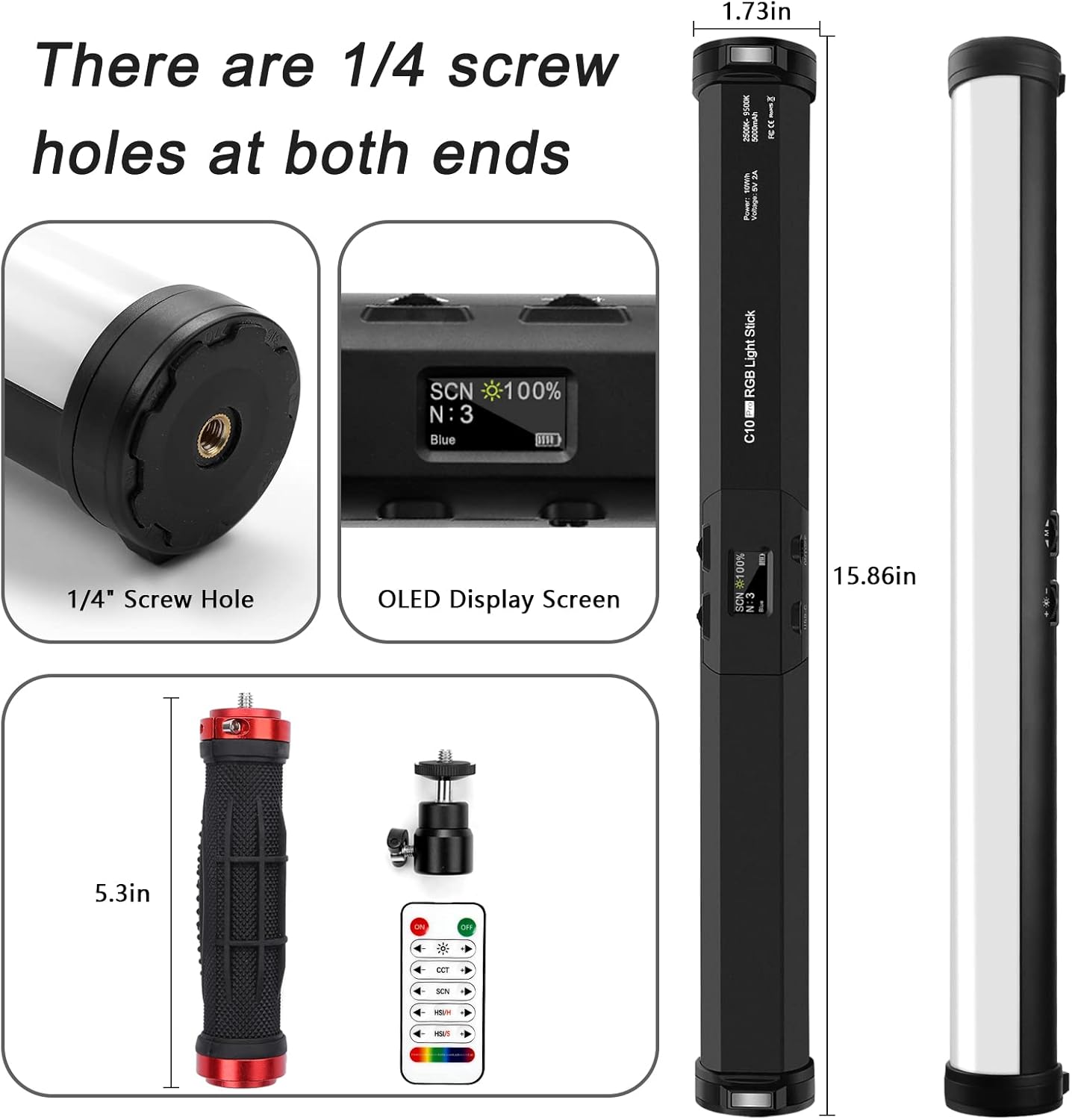
Figure 3: Details of the light stick's ends, showing the 1/4" screw hole and OLED display.

Figure 4: Magnetic and 1/4" screw hole mounting options.
പ്രവർത്തന നിർദ്ദേശങ്ങൾ
1. പവർ ഓൺ/ഓഫ്
Locate the power button on the side of the light stick. Press and hold to turn the device on or off. The OLED display will illuminate upon power-on.
2. Understanding the OLED Display
The OLED display provides real-time information about the current lighting mode, brightness level, color temperature, and battery status.
3. Adjusting Settings (On-Device Controls)
The light stick features two control dials that also function as buttons. These allow for intuitive adjustment of settings:
- മോഡ് തിരഞ്ഞെടുക്കൽ: Rotate one dial to cycle through different lighting modes (CCT, HSI, SCN). Press the dial to confirm selection or enter sub-menus.
- പാരാമീറ്റർ അഡ്ജസ്റ്റ്മെന്റ്: Rotate the other dial to adjust parameters within the selected mode (e.g., brightness, color temperature, hue, saturation). Press the dial to cycle through preset brightness levels (0%, 25%, 50%, 75%, 100%).
4. വയർലെസ്സ് റിമോട്ട് കൺട്രോൾ ഉപയോഗം
The included wireless remote control allows for convenient adjustment of all light settings from a distance of up to 40 feet. Ensure the remote has fresh batteries (not included, typically CR2025 coin cell). Point the remote towards the light stick for optimal response.
- പവർ ബട്ടൺ: ലൈറ്റ് ഓൺ / ഓഫ് ചെയ്യുന്നു.
- തെളിച്ച ബട്ടണുകൾ: തെളിച്ചം കൂട്ടുകയോ കുറയ്ക്കുകയോ ചെയ്യുക.
- മോഡ് ബട്ടണുകൾ: Cycle through CCT, HSI, and SCN modes.
- Color/Effect Buttons: Adjust color temperature, hue, saturation, or select specific scene effects.
5. Lighting Modes Explained

ചിത്രം 5: ഓവർview of HSI, CCT, and SCN lighting modes.
- CCT Mode (Correlated Color Temperature):
Adjusts the white light from warm (2600K) to cold (9600K). Use this mode for standard white light illumination. Brightness is fully adjustable.
- HSI മോഡ് (നിറം, സാച്ചുറേഷൻ, തീവ്രത):
Allows for precise control over the color of the light. Adjust Hue (the color itself, e.g., red, green, blue), Saturation (the intensity or purity of the color), and Intensity (brightness).
- SCN Mode (Scene Effects):
Provides 21 pre-programmed special effects to simulate various scenarios. These include:
- RGB Cycle (slow, medium, quick)
- പോലീസ് കാർ
- ആംബുലൻസ്
- ഫയർ ട്രക്ക്
- Lightning (slow, medium, quick)
- ക്യാമറ ഫ്ലാഷ്
- മെഴുകുതിരി
- ടിവി സ്ക്രീൻ
- വെളിച്ചം ശ്വസിക്കുക
- തകർന്ന ബൾബ്
- ലേസർ ലൈറ്റ്
- Fireworks (slow, medium, quick)
- Fire (slow, medium, quick)

Figure 6: Visual representation of the 21 different light effect modes.
6. തെളിച്ച ക്രമീകരണം
Brightness can be adjusted from 0% to 100% in all modes using the control dial or the remote control. The OLED display will show the current brightness percentage.
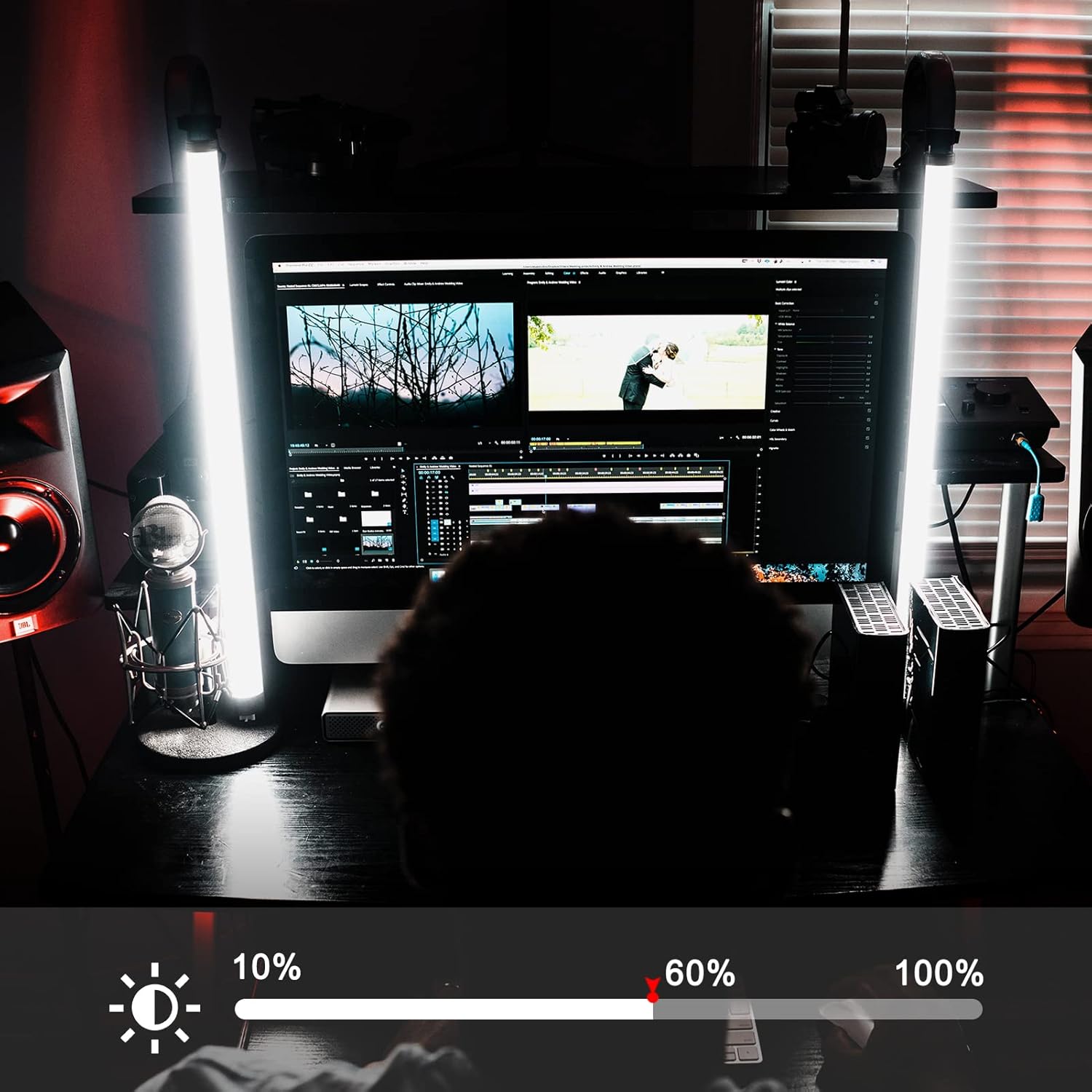
Figure 7: Adjusting brightness levels for optimal illumination.

Figure 8: Brightness control interface.
7. 360-ഡിഗ്രി റൊട്ടേഷൻ
The light stick features a 360° rotatable base on both ends, allowing for flexible light direction when mounted or placed on a surface.

Figure 9: 360-degree rotation feature.
മെയിൻ്റനൻസ്
- വൃത്തിയാക്കൽ: Use a soft, dry cloth to wipe the surface of the light stick. Do not use abrasive cleaners or solvents, as they may damage the finish or internal components.
- സംഭരണം: When not in use, store the light stick in the provided carrying bag in a cool, dry place away from direct sunlight and extreme temperatures.
- ബാറ്ററി കെയർ: To prolong battery life, avoid fully discharging the battery frequently. If storing for an extended period, charge the battery to approximately 50% every few months.
- ആഘാതം ഒഴിവാക്കുക: While durable, avoid dropping or subjecting the light stick to strong impacts, which could damage the internal electronics or LED array.
ട്രബിൾഷൂട്ടിംഗ്
| പ്രശ്നം | സാധ്യമായ കാരണം | പരിഹാരം |
|---|---|---|
| ലൈറ്റ് ഓണാക്കില്ല. | ബാറ്ററി തീർന്നു. പവർ ബട്ടൺ ശരിയായി അമർത്തിയിട്ടില്ല. | Charge the light stick fully using the USB Type-C cable. പവർ ബട്ടൺ കുറച്ച് സെക്കൻഡ് നേരത്തേക്ക് അമർത്തിപ്പിടിക്കുക. |
| റിമോട്ട് കൺട്രോൾ പ്രവർത്തിക്കുന്നില്ല. | റിമോട്ട് ബാറ്ററി തീർന്നു. റിമോട്ടും ലൈറ്റും തമ്മിലുള്ള തടസ്സം. Remote not paired (though typically not required for this model). | റിമോട്ട് കൺട്രോൾ ബാറ്ററി (CR2025) മാറ്റിസ്ഥാപിക്കുക. വ്യക്തമായ കാഴ്ചാ രേഖ ഉറപ്പാക്കുക. Try using the on-device controls. |
| ലൈറ്റ് മിന്നിമറയുന്നു അല്ലെങ്കിൽ ക്രമരഹിതമായി പ്രവർത്തിക്കുന്നു. | കുറഞ്ഞ ബാറ്ററി. അമിത ചൂടാക്കൽ. ഫേംവെയർ പ്രശ്നം. | Recharge the light stick. Allow the light to cool down. Ensure proper ventilation. Turn the light off and on again. If the issue persists, contact customer support. |
| Light does not hold a charge. | ബാറ്ററിയുടെ ശോഷണം. Faulty charging cable/adapter. | Ensure you are using the provided USB Type-C cable and a working power adapter. If the issue persists, the battery may need replacement; contact customer support. |
സ്പെസിഫിക്കേഷനുകൾ
| ഫീച്ചർ | വിശദാംശങ്ങൾ |
|---|---|
| മോഡൽ നമ്പർ | O-RGB-Light-1Pack |
| വർണ്ണ താപനില പരിധി | 2600K-9600K |
| CRI / TLCI | ≥97 / ≥97 |
| പ്രകാശം | Up to 1100 Lux (0.5M) |
| ബാറ്ററി ശേഷി | 4000mAh (ലിഥിയം ബാറ്ററി) |
| ബാറ്ററി ലൈഫ് (100% പവർ) | ഏകദേശം 100 മിനിറ്റ് |
| ചാർജിംഗ് പോർട്ട് | യുഎസ്ബി ടൈപ്പ്-സി |
| ശക്തി | 10W |
| അളവുകൾ | 403 x 48 x 44 മിമി (15.86 x 1.73 x 1.73 ഇഞ്ച്) |
| ഭാരം | 360 ഗ്രാം (1.54 പൗണ്ട്) |
| മൗണ്ടിംഗ് | 1/4" screw holes (both ends), Magnetic attachment |
| റിമോട്ട് കൺട്രോൾ റേഞ്ച് | 40 അടി വരെ |
വാറൻ്റിയും പിന്തുണയും
Obeamiu stands behind the quality of its products. If you encounter any issues or are not satisfied with your RGB LED Video Light Stick Wand for any reason, please contact our customer support team immediately.
We are committed to providing a prompt resolution and will respond to your inquiries within 24 hours. Please refer to your purchase documentation for specific warranty terms and contact information.
For support, please visit the official Obeamiu webസൈറ്റ് അല്ലെങ്കിൽ നിങ്ങളുടെ വാങ്ങൽ പ്ലാറ്റ്ഫോം വഴി വിൽപ്പനക്കാരനെ നേരിട്ട് ബന്ധപ്പെടുക.


