ആമുഖം
This manual provides comprehensive instructions for the PHOINIKAS Q5S Wireless Gaming Headset. It covers setup, operation, maintenance, and troubleshooting to ensure optimal performance and longevity of your device. The Q5S headset offers a versatile gaming experience with 2.4GHz wireless connectivity and a 3.5mm wired mode, featuring 7.1 stereo sound and a detachable noise-canceling microphone.

ഒരു ഓവർview of the PHOINIKAS Q5S wireless gaming headset, showcasing its design, detachable microphone, and the included 2.4GHz USB dongle.
പാക്കേജ് ഉള്ളടക്കം
പാക്കേജിൽ എല്ലാ ഇനങ്ങളും ഉണ്ടെന്ന് ദയവായി പരിശോധിക്കുക:
- PHOINIKAS Q5S വയർലെസ് ഗെയിമിംഗ് ഹെഡ്സെറ്റ്
- 2.4GHz USB വയർലെസ് ട്രാൻസ്മിറ്റർ
- വേർപെടുത്താവുന്ന ഓമ്നിഡയറക്ഷണൽ മൈക്രോഫോൺ
- 3.5 എംഎം ഓഡിയോ കേബിൾ
- USB-C ചാർജിംഗ് കേബിൾ
- ഉപയോക്തൃ മാനുവൽ (ഈ പ്രമാണം)
ഉൽപ്പന്നം കഴിഞ്ഞുview നിയന്ത്രണങ്ങളും
Familiarize yourself with the headset's components and control functions.

A visual guide to the control buttons and ports on the PHOINIKAS Q5S headset.
- Power / Pairing Mode Button: Press and hold to power on/off. Short press to enter pairing mode.
- 7.1 Sound Button: Toggle 7.1 virtual surround sound on/off.
- ലൈറ്റ് ഓൺ/ഓഫ് ബട്ടൺ: Control headset LED lighting.
- മൈക്ക് ഓൺ/ഓഫ് ബട്ടൺ: മൈക്രോഫോൺ നിശബ്ദമാക്കുക അല്ലെങ്കിൽ അൺമ്യൂട്ട് ചെയ്യുക.
- Volume Adjustment Wheel: Rotate to increase or decrease audio volume.
- 3.5mm Wired Interface: വയർഡ് ഓഡിയോ കണക്ഷന്.
- External Microphone Interface: Port for attaching the detachable microphone.
- ടൈപ്പ്-സി ചാർജിംഗ് പോർട്ട്: For charging the headset battery.
സജ്ജമാക്കുക
1. Wireless Connection (2.4GHz USB Dongle)
The 2.4GHz wireless mode provides a low-latency connection for compatible devices.

എ വിശദമായി view of the 2.4GHz USB dongle, which provides a stable wireless connection with less than 25ms latency.
- Ensure Headset is Charged: Before first use, fully charge the headset using the provided USB-C cable.
- Remove 3.5mm Cable: For wireless operation, ensure the 3.5mm audio cable is disconnected from the headset.
- Insert USB Transmitter: Plug the 2.4GHz USB wireless transmitter into an available USB port on your PC, PS4, PS5, or Nintendo Switch console.
- പവർ ഓൺ ഹെഡ്സെറ്റ്: Press and hold the Power button on the headset until the indicator light illuminates. The headset will automatically attempt to pair with the USB transmitter.
- ജോടിയാക്കൽ സ്ഥിരീകരണം: A solid indicator light on both the headset and transmitter confirms a successful connection.
കുറിപ്പ്: When using with Nintendo Switch in wireless mode, audio will function, but the microphone is not supported.
2. വയർഡ് കണക്ഷൻ (3.5mm ഓഡിയോ കേബിൾ)
For devices that do not support 2.4GHz wireless or for a direct audio connection.
- Connect 3.5mm Cable: Plug one end of the 3.5mm audio cable into the 3.5mm Wired Interface on the headset and the other end into the audio jack of your device (e.g., Xbox controller, PC, mobile phone).
- Power Off Headset (Optional): The headset can be used in wired mode even when powered off, conserving battery.
പ്രവർത്തന നിർദ്ദേശങ്ങൾ
പവർ ഓൺ/ഓഫ്
- പവർ ഓണാക്കാൻ: Press and hold the Power button for approximately 3 seconds until the indicator light turns on.
- പവർ ഓഫ് ചെയ്യാൻ: ഇൻഡിക്കേറ്റർ ലൈറ്റ് ഓഫ് ആകുന്നതുവരെ ഏകദേശം 3 സെക്കൻഡ് നേരത്തേക്ക് പവർ ബട്ടൺ അമർത്തിപ്പിടിക്കുക.
7.1 സ്റ്റീരിയോ സൗണ്ട്
Activate the 7.1 virtual surround sound for an immersive audio experience.

This image emphasizes the headset's advanced audio technology, featuring 7.1 stereo sound and 40mm drivers for immersive 3D surround sound.
- Activate 7.1 Sound: Short press the 7.1 Sound button to enable or disable the 7.1 virtual surround sound feature.
മൈക്രോഫോൺ ഉപയോഗം
The headset features a detachable omnidirectional microphone with noise-canceling capabilities.
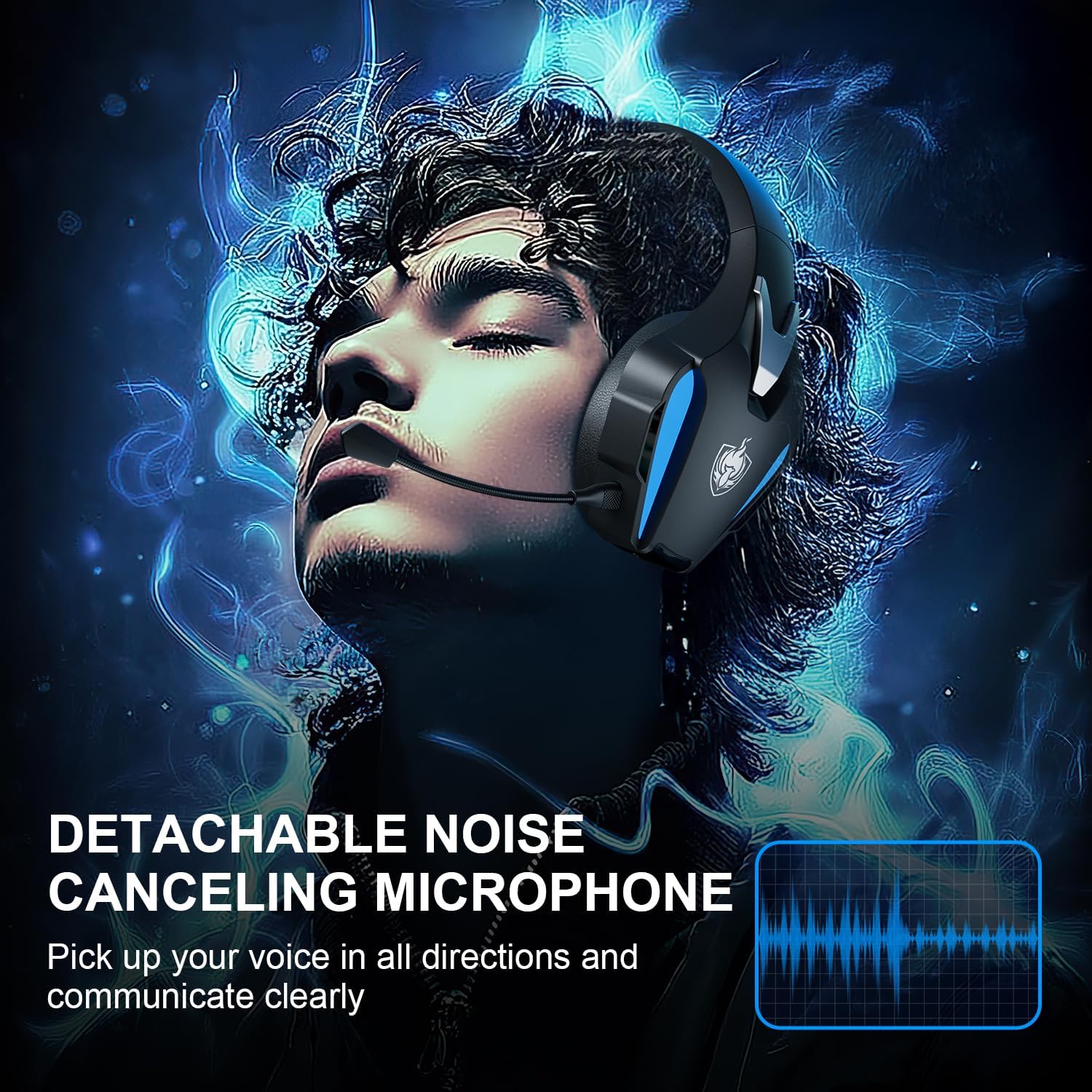
The image showcases the flexible, detachable omnidirectional microphone, designed with high-end noise-canceling features for clear voice communication during gameplay.
- മൈക്രോഫോൺ ഘടിപ്പിക്കുക: Insert the microphone into the External Microphone Interface until it clicks into place.
- മൈക്രോഫോൺ ക്രമീകരിക്കുക: Bend the flexible microphone arm to position it optimally for your voice.
- നിശബ്ദമാക്കുക/അൺമ്യൂട്ടുചെയ്യുക: Press the Mic On/Off button to toggle microphone mute.
കുറിപ്പ്: The microphone function is not available when the headset is connected wirelessly to a Nintendo Switch.
വോളിയം ക്രമീകരണം
- Rotate the Volume Adjustment Wheel up to increase volume and down to decrease volume.
ചാർജിംഗ്
The headset is equipped with a 1200mAh battery for extended use.

The headset is shown with an indication of its 1200mAh battery capacity, providing up to 40 hours of usage on a single charge, with fast USB-C charging.
- ചാർജർ ബന്ധിപ്പിക്കുക: Use the provided USB-C charging cable to connect the headset's Type-C Charging Port to a USB power source.
- ചാർജിംഗ് സൂചകം: The headset's LED indicator will show charging status (e.g., red for charging, off or blue for fully charged, depending on model specifics).
- ചാർജിംഗ് സമയം: പൂർണ്ണമായി ചാർജ് ചെയ്യുന്നതിന് സാധാരണയായി 2.5-3 മണിക്കൂർ എടുക്കും.
- ബാറ്ററി ലൈഫ്: A full charge provides up to 40 hours of usage, though actual battery life may vary based on volume levels and LED lighting usage.
അനുയോജ്യത
The PHOINIKAS Q5S headset offers broad compatibility across various gaming platforms.

This image illustrates the headset's dual connection modes (2.4GHz wireless and 3.5mm wired) and its compatibility with platforms like PS4, PS5, PC, Switch, and other 3.5mm interface devices. It also highlights incompatibilities.
- 2.4GHz വയർലെസ് മോഡ്: Compatible with PC, PS4, PS5, and Nintendo Switch (audio only).
- 3.5mm വയർഡ് മോഡ്: Compatible with any device featuring a 3.5mm audio jack, including Xbox Series controllers, PC, mobile phones, and tablets.
പ്രധാന അനുയോജ്യതാ കുറിപ്പുകൾ:
- ഹെഡ്സെറ്റ് അല്ല compatible with Xbox consoles in wireless mode.
- The microphone function is അല്ല compatible when connected wirelessly to a Nintendo Switch.
- Bluetooth connectivity is അല്ല supported by this headset.
മെയിൻ്റനൻസ്
ശരിയായ പരിചരണം നിങ്ങളുടെ ഹെഡ്സെറ്റിന്റെ ദീർഘായുസ്സും പ്രകടനവും ഉറപ്പാക്കുന്നു.

This image highlights the ergonomic design of the headset, featuring breathable ear cups made from high-protein material for comfort during extended use and effective noise isolation.
- വൃത്തിയാക്കൽ: Use a soft, dry cloth to wipe the headset. For ear cups, a slightly damp cloth can be used, but ensure no moisture enters the speaker grilles. Do not use harsh chemicals or abrasive cleaners.
- സംഭരണം: ഹെഡ്സെറ്റ് തണുത്തതും വരണ്ടതുമായ സ്ഥലത്ത് സൂക്ഷിക്കുക, നേരിട്ടുള്ള സൂര്യപ്രകാശത്തിൽ നിന്നും ഉയർന്ന താപനിലയിൽ നിന്നും അകറ്റി നിർത്തുക. ഭാരമുള്ള വസ്തുക്കൾ ഹെഡ്സെറ്റിൽ വയ്ക്കുന്നത് ഒഴിവാക്കുക.
- കേബിൾ കെയർ: കേബിളുകൾക്ക് കേടുപാടുകൾ സംഭവിക്കാതിരിക്കാൻ മൂർച്ചയുള്ള വളവുകളോ അമിതമായി വലിക്കുന്നതോ ഒഴിവാക്കുക.
- ബാറ്ററി കെയർ: For optimal battery life, avoid fully discharging the headset frequently. Charge it regularly, even if not in use for extended periods.
ട്രബിൾഷൂട്ടിംഗ്
നിങ്ങളുടെ ഹെഡ്സെറ്റിൽ പ്രശ്നങ്ങൾ നേരിടുകയാണെങ്കിൽ, ഇനിപ്പറയുന്ന പൊതുവായ പ്രശ്നങ്ങളും പരിഹാരങ്ങളും പരിശോധിക്കുക:
- No Sound in Wireless Mode:
- ഹെഡ്സെറ്റ് ഓണാക്കിയിട്ടുണ്ടെന്നും പൂർണ്ണമായും ചാർജ് ചെയ്തിട്ടുണ്ടെന്നും ഉറപ്പാക്കുക.
- Verify the 2.4GHz USB transmitter is securely plugged into the device.
- Confirm the headset is successfully paired with the transmitter (solid indicator light).
- ഹെഡ്സെറ്റിലും ബന്ധിപ്പിച്ചിരിക്കുന്ന ഉപകരണത്തിലും വോളിയം ലെവലുകൾ പരിശോധിക്കുക.
- Ensure the 3.5mm audio cable is disconnected from the headset when using wireless mode.
- മൈക്രോഫോൺ പ്രവർത്തിക്കുന്നില്ല:
- ഹെഡ്സെറ്റിൽ മൈക്രോഫോൺ സുരക്ഷിതമായി ഘടിപ്പിച്ചിട്ടുണ്ടെന്ന് ഉറപ്പാക്കുക.
- Check that the microphone is not muted (Mic On/Off button).
- Verify microphone settings on your connected device (e.g., PC sound settings, console audio input).
- Remember the microphone is not supported in wireless mode with Nintendo Switch.
- ഹെഡ്സെറ്റ് ജോടിയാക്കുന്നില്ല:
- Ensure both the headset and USB transmitter are powered on.
- ഹെഡ്സെറ്റും ബന്ധിപ്പിച്ച ഉപകരണവും പുനരാരംഭിക്കാൻ ശ്രമിക്കുക.
- മറ്റ് വയർലെസ് ഉപകരണങ്ങളൊന്നും തടസ്സപ്പെടുത്തുന്നില്ലെന്ന് ഉറപ്പാക്കുക.
- ഹ്രസ്വ ബാറ്ററി ലൈഫ്:
- Ensure the headset is fully charged (2.5-3 hours).
- Reduce volume levels and turn off LED lighting to conserve battery.
- അമിതമായ ഉപയോഗം മൂലം ബാറ്ററി പ്രകടനം കാലക്രമേണ കുറഞ്ഞേക്കാം.
സ്പെസിഫിക്കേഷനുകൾ
Key technical specifications for the PHOINIKAS Q5S Wireless Gaming Headset:
| ഫീച്ചർ | സ്പെസിഫിക്കേഷൻ |
|---|---|
| മോഡൽ | Q5S |
| കണക്റ്റിവിറ്റി | 2.4GHz വയർലെസ്, 3.5mm വയർഡ് |
| ഓഡിയോ ഡ്രൈവറുകൾ | 40 എംഎം ഡൈനാമിക് ഡ്രൈവറുകൾ |
| ശബ്ദ സവിശേഷതകൾ | 7.1 Stereo Sound, 3D Surround |
| വയർലെസ് ലേറ്റൻസി | 25ms-ൽ കുറവ് |
| മൈക്രോഫോൺ | Detachable Omnidirectional, Noise-Canceling |
| ബാറ്ററി ശേഷി | 1200mAh |
| ബാറ്ററി ലൈഫ് | 40 മണിക്കൂർ വരെ (ഉപയോഗത്തിനനുസരിച്ച് വ്യത്യാസപ്പെടുന്നു) |
| ചാർജിംഗ് സമയം | ഏകദേശം 2.5-3 മണിക്കൂർ |
| ചാർജിംഗ് പോർട്ട് | USB-C |
| ഭാരം | 12.3 ഔൺസ് (ഏകദേശം 348 ഗ്രാം) |
| ചെവി പ്ലേസ്മെൻ്റ് | ഓവർ-ഇയർ |
| മെറ്റീരിയൽ | Plastic, High-Protein Earmuffs |
വാറൻ്റിയും പിന്തുണയും
PHOINIKAS products are designed for reliability and performance. For warranty information, technical support, or any inquiries regarding your Q5S Wireless Gaming Headset, please refer to the contact details provided on the product packaging or the official PHOINIKAS webവാറന്റി ക്ലെയിമുകൾക്കുള്ള വാങ്ങലിന്റെ തെളിവായി നിങ്ങളുടെ വാങ്ങൽ രസീത് സൂക്ഷിക്കുക.


