
Tronsmart Apollo Air True Wireless Earbuds
ഉപയോക്തൃ മാനുവൽ
ആമുഖം
This manual provides detailed instructions for the proper use, setup, and maintenance of your Tronsmart Apollo Air True Wireless Earbuds. Please read this manual thoroughly before using the product to ensure optimal performance and longevity.

Image: Tronsmart Apollo Air True Wireless Earbuds in their open charging case, showcasing മിനുസമാർന്ന കറുത്ത ഡിസൈൻ.
പാക്കേജ് ഉള്ളടക്കം
നിങ്ങളുടെ പാക്കേജിൽ എല്ലാ ഇനങ്ങളും ഉണ്ടെന്ന് ദയവായി പരിശോധിക്കുക:
- Tronsmart Apollo Air True Wireless Earbuds (Left and Right)
- ചാർജിംഗ് കേസ്
- യുഎസ്ബി ടൈപ്പ്-സി ചാർജിംഗ് കേബിൾ
- Multiple sizes of Eartips (S, M, L)
- ഉപയോക്തൃ മാനുവൽ (ഈ പ്രമാണം)
- ദ്രുത ആരംഭ ഗൈഡ്
സജ്ജമാക്കുക
1. ഇയർബഡുകളും കേസും ചാർജ് ചെയ്യുന്നു
Before first use, fully charge the earbuds and the charging case. The charging case can be charged via the included USB Type-C cable.
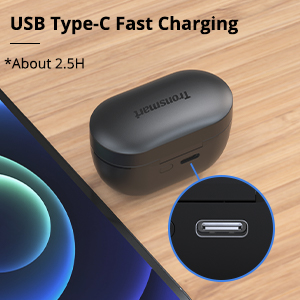
Image: Close-up of the USB Type-C charging port on the Tronsmart Apollo Air charging case, indicating fast charging capability.
- യുഎസ്ബി ടൈപ്പ്-സി കേബിൾ കേസിലെ ചാർജിംഗ് പോർട്ടിലേക്കും ഒരു പവർ സ്രോതസ്സിലേക്കും ബന്ധിപ്പിക്കുക.
- കേസിലെ ഇൻഡിക്കേറ്റർ ലൈറ്റ് ചാർജിംഗ് നില കാണിക്കും.
- കേസ് മുഴുവൻ ചാർജ് ചെയ്യാൻ ഏകദേശം 2.5 മണിക്കൂർ എടുക്കും.
- The earbuds charge automatically when placed inside the charging case.
2. നിങ്ങളുടെ ഉപകരണവുമായി ജോടിയാക്കുന്നു
The earbuds utilize Bluetooth 5.2 technology for a stable and fast connection.

Image: A smartphone displaying a Bluetooth connection icon next to the Tronsmart Apollo Air earbuds and charging case, highlighting Bluetooth 5.2 technology.
- Open the charging case, and the earbuds will automatically enter pairing mode (indicator lights will flash).
- നിങ്ങളുടെ ഉപകരണത്തിൽ (സ്മാർട്ട്ഫോൺ, ടാബ്ലെറ്റ് മുതലായവ), ബ്ലൂടൂത്ത് പ്രവർത്തനക്ഷമമാക്കുക.
- ഇതിനായി തിരയുക "Tronsmart Apollo Air" in the list of available Bluetooth devices.
- Select "Tronsmart Apollo Air" to connect. Once connected, you will hear a confirmation tone, and the indicator lights will stop flashing.

Image: A smartphone screen showing "Connection successful" for "Tronsmart Apollo Air" in Bluetooth settings, next to the earbuds and case.
പ്രവർത്തന നിർദ്ദേശങ്ങൾ
ടച്ച് നിയന്ത്രണങ്ങൾ
The Tronsmart Apollo Air earbuds feature intuitive touch controls for various functions:
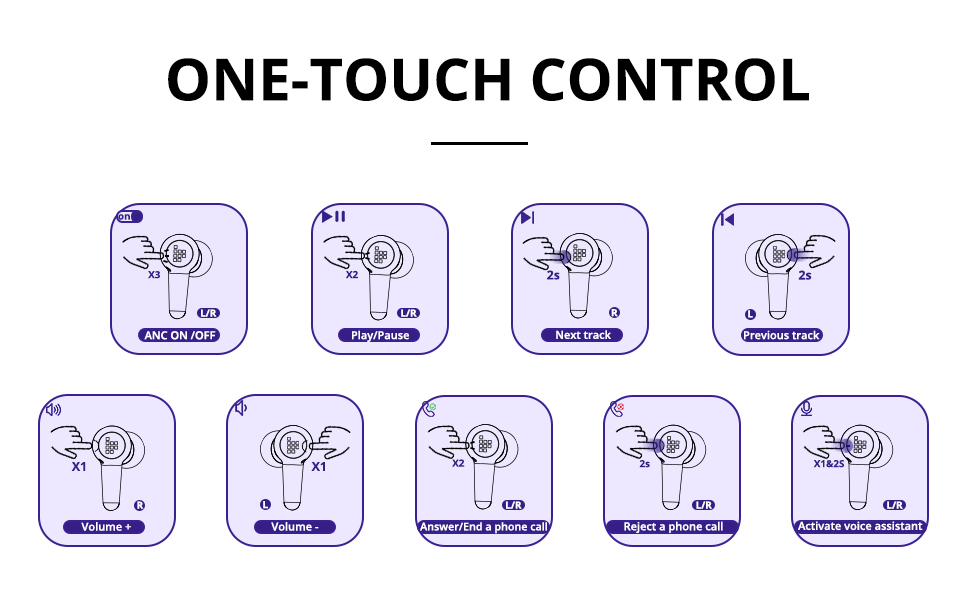
Image: A comprehensive diagram illustrating various touch control gestures on the earbuds for functions like ANC on/off, play/pause, track navigation, volume control, call management, and voice assistant activation.
- ANC ഓൺ/ഓഫ്: Triple tap (L/R earbud).
- പ്ലേ/താൽക്കാലികമായി നിർത്തുക: Double tap (L/R earbud).
- അടുത്ത ട്രാക്ക്: Tap and hold 2 seconds (R earbud).
- മുമ്പത്തെ ട്രാക്ക്: Tap and hold 2 seconds (L earbud).
- വോളിയം +: Single tap (R earbud).
- വ്യാപ്തം -: Single tap (L earbud).
- Answer/End a Phone Call: Double tap (L/R earbud).
- ഒരു ഫോൺ കോൾ നിരസിക്കുക: Tap and hold 2 seconds (L/R earbud).
- വോയ്സ് അസിസ്റ്റന്റിനെ സജീവമാക്കുക: Tap and hold 2 seconds (L/R earbud).
Active Noise Cancellation (ANC) and Ambient Sound Mode
The earbuds offer different listening modes to suit your environment:
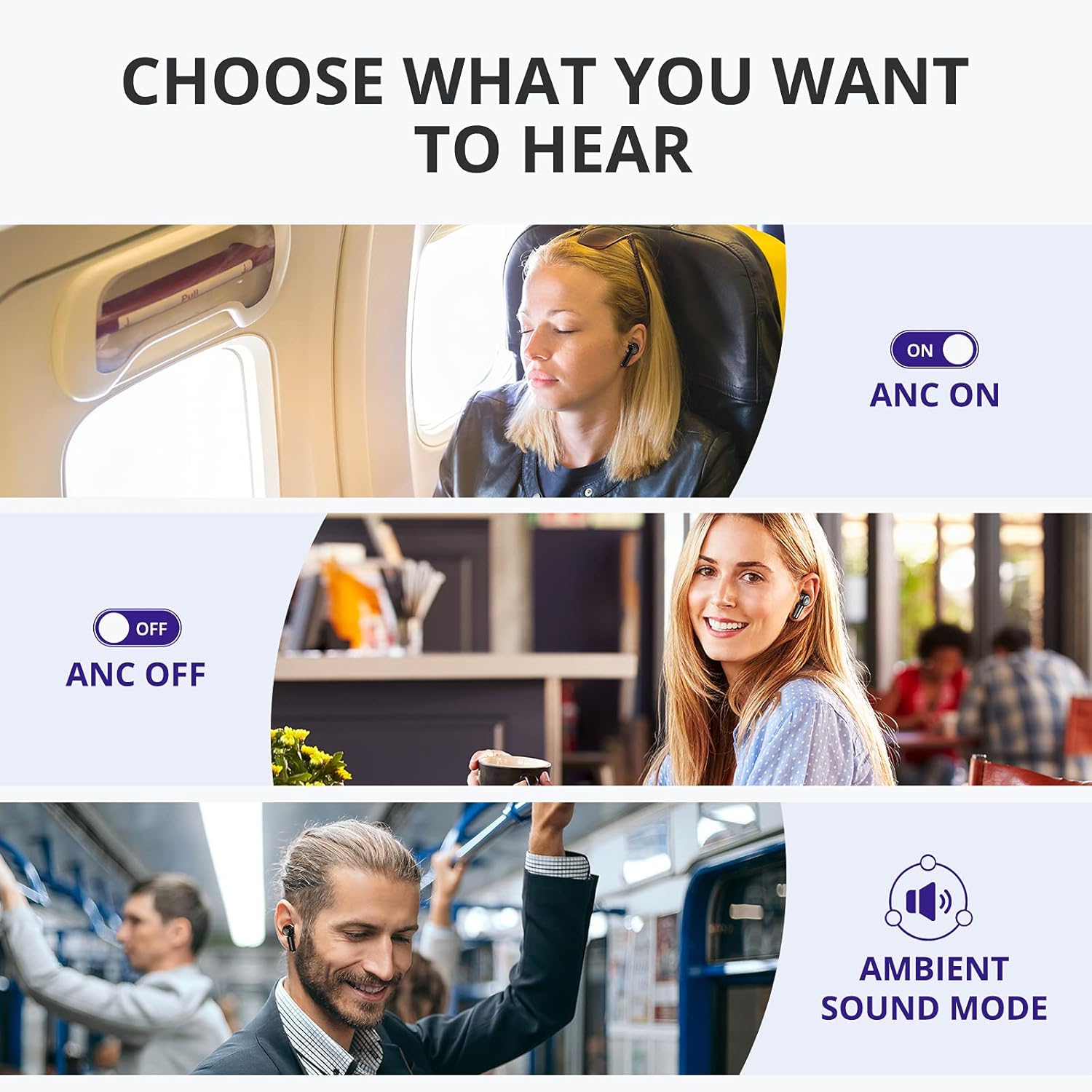
Image: Visual representation of three listening modes: ANC On for blocking noise, ANC Off for normal listening, and Ambient Sound Mode for hearing surroundings.
- ANC ഓൺ: Blocks out ambient noise, providing a more immersive audio experience. Ideal for noisy environments like public transport or offices.
- ANC ഓഫാണ്: Standard listening mode without active noise cancellation.
- ആംബിയന്റ് സൗണ്ട് മോഡ്: Allows you to hear your surroundings while still enjoying your audio. Useful for awareness in urban environments or when interacting with others.
Switch between modes by triple tapping either earbud.

Image: A woman on a bus wearing the earbuds, with a graphic illustrating how the earbuds block out up to 35 dB of noise for tranquility.
കോളുകൾ ചെയ്യലും സ്വീകരിക്കലും
The earbuds are equipped with 6 microphones and cVc 8.0 technology for clear calls.

ചിത്രം: പൊട്ടിത്തെറിച്ച ഒരു view of the earbud highlighting the placement of six microphones (Feedforward Mic, Feedback Mic, Talk Mic) for crystal-clear calls.
- ഉത്തരം/അവസാന കോൾ: ഇയർബഡുകളിലൊന്നിൽ രണ്ടുതവണ ടാപ്പ് ചെയ്യുക.
- കോൾ നിരസിക്കുക: ഏതെങ്കിലും ഇയർബഡിൽ 2 സെക്കൻഡ് ടാപ്പ് ചെയ്ത് പിടിക്കുക.
മെയിൻ്റനൻസ്
ശുചീകരണവും പരിചരണവും
നിങ്ങളുടെ ഇയർബഡുകളുടെ ദീർഘായുസ്സും മികച്ച പ്രകടനവും ഉറപ്പാക്കാൻ, ഈ പരിചരണ നിർദ്ദേശങ്ങൾ പാലിക്കുക:
- ഇയർബഡുകളും ചാർജിംഗ് കെയ്സും മൃദുവായതും ഉണങ്ങിയതും ലിന്റ് രഹിതവുമായ തുണി ഉപയോഗിച്ച് തുടയ്ക്കുക.
- അബ്രാസീവ് ക്ലീനറുകൾ, ആൽക്കഹോൾ, കെമിക്കൽ ലായകങ്ങൾ എന്നിവ ഉപയോഗിക്കരുത്.
- ഇയർബഡുകളിലെയും കെയ്സിലെയും ചാർജിംഗ് കോൺടാക്റ്റുകൾ വൃത്തിയായും അവശിഷ്ടങ്ങൾ ഇല്ലാതെയും സൂക്ഷിക്കുക.
- ഇയർബഡുകൾ ഉപയോഗിക്കാത്തപ്പോൾ അവയുടെ ചാർജ്ജിംഗ് കെയ്സിൽ സൂക്ഷിക്കുക, അവയെ സംരക്ഷിക്കുകയും ചാർജ്ജ് ചെയ്തിരിക്കുകയും ചെയ്യുക.
വെള്ളത്തിനും വിയർപ്പിനും പ്രതിരോധം
The Tronsmart Apollo Air earbuds are IP45 rated, meaning they are resistant to dust and splashes of water from any direction. This makes them suitable for workouts and light rain.

Image: A man exercising in a gym, wearing the earbuds, with an overlay indicating IP45 dust and sweat resistance, assuring durability during physical activity.
Important: The charging case is NOT waterproof. Do not expose the charging case to water or moisture.
ട്രബിൾഷൂട്ടിംഗ്
If you encounter issues with your Tronsmart Apollo Air earbuds, please refer to the following common solutions:
| പ്രശ്നം | സാധ്യമായ പരിഹാരം |
|---|---|
| ഇയർബഡുകൾ ജോടിയാക്കുന്നില്ല/കണക്റ്റ് ചെയ്യുന്നില്ല |
|
| ശബ്ദമോ കുറഞ്ഞ വോളിയമോ ഇല്ല |
|
| Active Noise Cancellation (ANC) not effective or hissing sound |
|
| ഇയർബഡുകൾ ചാർജ് ചെയ്യുന്നില്ല |
|
| ഒരു ഇയർബഡ് പ്രവർത്തിക്കുന്നില്ല |
|
സ്പെസിഫിക്കേഷനുകൾ
Key technical specifications for the Tronsmart Apollo Air True Wireless Earbuds:

Image: Detailed dimensional drawing of the Tronsmart Apollo Air earbuds and their charging case, showing measurements in millimeters and inches.
| ഫീച്ചർ | വിശദാംശങ്ങൾ |
|---|---|
| ബ്രാൻഡ് | ട്രോൺസ്മാർട്ട് |
| മോഡലിൻ്റെ പേര് | അപ്പോളോ എയർ |
| കണക്റ്റിവിറ്റി ടെക്നോളജി | ബ്ലൂടൂത്ത് 5.2, വയർലെസ് |
| ശബ്ദ നിയന്ത്രണം | സജീവ നോയ്സ് റദ്ദാക്കൽ |
| ജല പ്രതിരോധ നില | IP45 (ഇയർബഡുകൾ മാത്രം) |
| പ്ലേടൈം (സിംഗിൾ ചാർജ്) | 5 മണിക്കൂർ വരെ |
| പ്ലേടൈം (ചാർജിംഗ് കേസിനൊപ്പം) | 20 മണിക്കൂർ വരെ |
| ചാർജിംഗ് പോർട്ട് | യുഎസ്ബി ടൈപ്പ്-സി |
| മൈക്രോഫോണുകൾ | 6 (with cVc 8.0 technology) |
| നിയന്ത്രണ രീതി | സ്പർശിക്കുക |
| മെറ്റീരിയൽ | പ്ലാസ്റ്റിക്, സിലിക്കൺ |
| ഇനത്തിൻ്റെ ഭാരം | 5.3 ഔൺസ് |
| പാക്കേജ് അളവുകൾ | 7.13 x 3.43 x 1.5 ഇഞ്ച് |
വാറൻ്റിയും പിന്തുണയും
For warranty information and technical support, please refer to the warranty card included in your product packaging or visit the official Tronsmart website. You may also contact Tronsmart customer service directly for assistance with product issues or inquiries.
Tronsmart Official Webസൈറ്റ്: www.tronsmart.com


