ആമുഖം
പ്രൊവിഷൻ ISR ഓൾ-ഇൻ-വൺ തിരഞ്ഞെടുത്തതിന് നന്ദി. Webcam. ഉയർന്ന നിലവാരമുള്ള ഒരു വീഡിയോ സംയോജിപ്പിച്ച് നിങ്ങളുടെ ഓൺലൈൻ വീഡിയോ പ്രവർത്തനങ്ങൾ ലളിതമാക്കുന്നതിനാണ് ഈ ഉപകരണം രൂപകൽപ്പന ചെയ്തിരിക്കുന്നത്. webക്യാം, മൈക്രോഫോൺ, സ്പീക്കർ, ക്രമീകരിക്കാവുന്ന എൽഇഡി ലൈറ്റ് എന്നിവ ഒറ്റ, സൗകര്യപ്രദമായ യൂണിറ്റിലേക്ക്. നിങ്ങളുടെ പുതിയത് പരമാവധി പ്രയോജനപ്പെടുത്തുന്നുവെന്ന് ഉറപ്പാക്കാൻ സജ്ജീകരണം, പ്രവർത്തനം, അറ്റകുറ്റപ്പണി, ട്രബിൾഷൂട്ടിംഗ് എന്നിവയ്ക്കുള്ള വിശദമായ നിർദ്ദേശങ്ങൾ ഈ മാനുവൽ നൽകുന്നു. webക്യാം

പ്രൊവിഷൻ ISR ഓൾ-ഇൻ-വൺ Webcam, അതിന്റെ പാക്കേജിംഗിനൊപ്പം കാണിച്ചിരിക്കുന്നു, അതിന്റെ സംയോജിത സവിശേഷതകൾ എടുത്തുകാണിക്കുന്നു.
ഉൽപ്പന്നം കഴിഞ്ഞുview
പ്രൊവിഷൻ ISR ഓൾ-ഇൻ-വൺ Webതടസ്സമില്ലാത്ത വീഡിയോ ആശയവിനിമയ അനുഭവത്തിനായി അത്യാവശ്യ സവിശേഷതകൾ cam സംയോജിപ്പിക്കുന്നു.
- ഫുൾ എച്ച്.ഡി Webക്യാം: സെക്കൻഡിൽ 60 ഫ്രെയിമുകളിൽ ക്രിസ്റ്റൽ ക്ലിയർ 1080p വീഡിയോ നൽകുന്നു.
- ബിൽറ്റ്-ഇൻ സ്പീക്കർ: വ്യക്തമായ ഓഡിയോ ഔട്ട്പുട്ടിനായി സംയോജിത 2.5W സ്പീക്കർ.
- നോയ്സ്-കാൻസിലിംഗ് മൈക്രോഫോൺ: പശ്ചാത്തല ശബ്ദം കുറയ്ക്കുമ്പോൾ വ്യക്തമായ ഓഡിയോ പകർത്തുന്നു.
- 3-ലെവൽ ക്രമീകരിക്കാവുന്ന LED ലൈറ്റ്: വ്യത്യസ്ത ലൈറ്റിംഗ് അവസ്ഥകൾക്ക് അനുയോജ്യമായ പ്രകാശം നൽകുന്നു.
- സംയോജിത സ്വകാര്യതാ പരിരക്ഷ: സ്വകാര്യത ഉറപ്പാക്കുമ്പോൾ webക്യാം ഉപയോഗത്തിലില്ല.
- യുഎസ്ബി പ്ലഗ് & പ്ലേ: വേഗത്തിലും എളുപ്പത്തിലും സജ്ജീകരിക്കുന്നതിന് ഡ്രൈവറുകൾ ആവശ്യമില്ല.
- 2-ആക്സിസ് കറങ്ങുന്ന ക്ലിപ്പ്: ഫ്ലെക്സിബിൾ പൊസിഷനിംഗും ആംഗിൾ ക്രമീകരണവും അനുവദിക്കുന്നു.

പ്രധാന സവിശേഷതകൾ webഫുൾ എച്ച്ഡി വീഡിയോ, ക്രമീകരിക്കാവുന്ന എൽഇഡി ലൈറ്റ്, ബിൽറ്റ്-ഇൻ സ്പീക്കർ, നോയ്സ്-കാൻസിലിംഗ് മൈക്രോഫോൺ എന്നിവയുൾപ്പെടെയുള്ള ക്യാമറ.

ദി webവീഡിയോ കോൺഫറൻസിൽ ഉപയോഗത്തിലുള്ള ക്യാം, അതിന്റെ ഓൾ-ഇൻ-വൺ കഴിവുകൾ എടുത്തുകാണിക്കുന്നു.
സജ്ജമാക്കുക
നിങ്ങളുടെ പ്രൊവിഷൻ ISR സജ്ജീകരിക്കുന്നു Webcam ഒരു ലളിതമായ പ്ലഗ്-ആൻഡ്-പ്ലേ പ്രക്രിയയാണ്.
- അൺപാക്ക് ചെയ്യുക Webക്യാം: ശ്രദ്ധാപൂർവ്വം നീക്കം ചെയ്യുക webഅതിന്റെ പാക്കേജിംഗിൽ നിന്ന് ക്യാം.
- മൗണ്ട് ദി Webക്യാം:
- ഫ്ലെക്സിബിൾ ക്ലിപ്പ് ബേസ് തുറക്കുക.
- മൗണ്ട് ദി webനിങ്ങളുടെ മോണിറ്ററിന്റെയോ ലാപ്ടോപ്പ് സ്ക്രീനിന്റെയോ പരന്ന പ്രതലത്തിന്റെയോ മുകളിൽ ക്യാമറ സ്ഥാപിക്കുക.
- ഉറപ്പാക്കാൻ ക്ലിപ്പ് ക്രമീകരിക്കുക webcam സ്ഥിരതയുള്ളതും സുരക്ഷിതമായി സ്ഥാപിച്ചിരിക്കുന്നതുമാണ്. 2-ആക്സിസ് കറങ്ങുന്ന ക്ലിപ്പ് 360° തിരശ്ചീന ഭ്രമണത്തിനും 90° ലംബ ചരിവിനും അനുവദിക്കുന്നു.
- നിങ്ങളുടെ കമ്പ്യൂട്ടറിലേക്ക് ബന്ധിപ്പിക്കുക:
- എന്നതിൽ നിന്ന് USB കേബിൾ പ്ലഗ് ചെയ്യുക webനിങ്ങളുടെ കമ്പ്യൂട്ടറിൽ ലഭ്യമായ ഒരു USB പോർട്ടിലേക്ക് ക്യാം ചെയ്യുക.
- ദി webcam എന്നത് പ്ലഗ്-ആൻഡ്-പ്ലേ ആണ്, അതായത് സാധാരണയായി അധിക ഡ്രൈവറുകൾ ആവശ്യമില്ല. നിങ്ങളുടെ ഓപ്പറേറ്റിംഗ് സിസ്റ്റം ആവശ്യമായ ഘടകങ്ങൾ സ്വയമേവ കണ്ടെത്തി ഇൻസ്റ്റാൾ ചെയ്യണം.
- കണക്ഷൻ സ്ഥിരീകരിക്കുക:
- ഒരു വീഡിയോ കോൺഫറൻസിംഗ് ആപ്ലിക്കേഷൻ (ഉദാ: സൂം, സ്കൈപ്പ്, ഗൂഗിൾ മീറ്റ്) അല്ലെങ്കിൽ നിങ്ങളുടെ കമ്പ്യൂട്ടറിന്റെ ക്യാമറ ആപ്ലിക്കേഷൻ തുറക്കുക.
- "പ്രൊവിഷൻ ISR" തിരഞ്ഞെടുക്കുക Webആപ്ലിക്കേഷൻ ക്രമീകരണങ്ങളിൽ നിങ്ങളുടെ വീഡിയോ, ഓഡിയോ ഇൻപുട്ട് ഉപകരണമായി "cam".

ദി webവിവിധ ഓപ്പറേറ്റിംഗ് സിസ്റ്റങ്ങളുമായും വീഡിയോ കോൺഫറൻസിംഗ് ആപ്ലിക്കേഷനുകളുമായും പൊരുത്തപ്പെടുന്ന യുഎസ്ബി പ്ലഗ് & പ്ലേ കണക്റ്റിവിറ്റിയാണ് കാമിന്റെ സവിശേഷത.

ഭൗതിക അളവുകൾ webcam-ഉം ഒപ്റ്റിമൽ പൊസിഷനിംഗിനായി അതിന്റെ 2-ആക്സിസ് കറങ്ങുന്ന ക്ലിപ്പിന്റെ വഴക്കവും.
പ്രവർത്തന നിർദ്ദേശങ്ങൾ
LED ഫിൽ ലൈറ്റ് ക്രമീകരിക്കുന്നു
ദി webഏത് പരിതസ്ഥിതിയിലും നിങ്ങൾക്ക് നല്ല വെളിച്ചം ലഭിക്കുന്നുണ്ടെന്ന് ഉറപ്പാക്കാൻ, ക്രമീകരിക്കാവുന്ന മൂന്ന് ബ്രൈറ്റ്നെസ് ലെവലുകളുള്ള ഒരു ഇന്റഗ്രേറ്റഡ് എൽഇഡി ഫിൽ ലൈറ്റ് cam-ൽ ഉണ്ട്.
- ലൈറ്റ് ഓണാക്കാനോ ബ്രൈറ്റ്നെസ് ലെവലുകളിലൂടെ സൈക്കിൾ ചെയ്യാനോ, മുകളിലുള്ള ടച്ച്-സെൻസിറ്റീവ് ഏരിയയിൽ സൌമ്യമായി സ്പർശിക്കുക. webക്യാം
- മൂന്ന് വ്യത്യസ്ത തെളിച്ച ക്രമീകരണങ്ങളുണ്ട്. ലെവലുകളിലൂടെ സൈക്കിൾ ചവിട്ടുന്നതിന് സ്പർശിക്കുന്നത് തുടരുക, ലൈറ്റ് ഓഫ് ചെയ്യുക.

മൂന്ന് ക്രമീകരിക്കാവുന്ന ലെവലുകളുടെ ചിത്രീകരണത്തോടൊപ്പം, പ്രകാശം നൽകുന്ന LED ഫിൽ ലൈറ്റിന്റെ പ്രദർശനം.

ക്രമീകരിക്കാവുന്ന LED ലൈറ്റ് ഒരു ലളിതമായ ടച്ച് ഇന്റർഫേസ് വഴിയാണ് നിയന്ത്രിക്കുന്നത്.
സ്വകാര്യതാ കവർ ഉപയോഗിക്കുന്നു
മെച്ചപ്പെട്ട സ്വകാര്യതയ്ക്കും സുരക്ഷയ്ക്കും വേണ്ടി, webcam-ൽ ഒരു ബിൽറ്റ്-ഇൻ സ്വകാര്യതാ കവർ ഉൾപ്പെടുന്നു.
- ലെൻസ് മറയ്ക്കാൻ, ക്യാമറ ലെൻസിന് മുകളിലൂടെ കവർ സ്ലൈഡ് ചെയ്യുക.
- ലെൻസ് അനാവരണം ചെയ്യാൻ, ക്യാമറ ലെൻസിൽ നിന്ന് കവർ നീക്കുക.

ദി webസുരക്ഷയ്ക്കായി cam-ൽ ഒരു ബിൽറ്റ്-ഇൻ സ്വകാര്യതാ കവർ ഉണ്ട്, അതോടൊപ്പം സ്പീക്കറും മൈക്രോഫോണും ഉണ്ട്.

ഒരു വിരൽ ഉപയോഗിച്ച് സ്വകാര്യതാ കവർ എളുപ്പത്തിൽ തുറക്കാനും അടയ്ക്കാനും കഴിയും.
വീഡിയോ, ഓഡിയോ നിലവാരം
ദി webമികച്ച വീഡിയോ ഗുണനിലവാരത്തിനും 100° വീതിയുള്ള ഫീൽഡിനുമായി 6-ലെയർ F1.6 ഗ്ലാസ് ലെൻസാണ് കാമിൽ സജ്ജീകരിച്ചിരിക്കുന്നത്. view, കോൺഫറൻസുകൾക്കും കുടുംബ വീഡിയോ കോളുകൾക്കും അനുയോജ്യം.
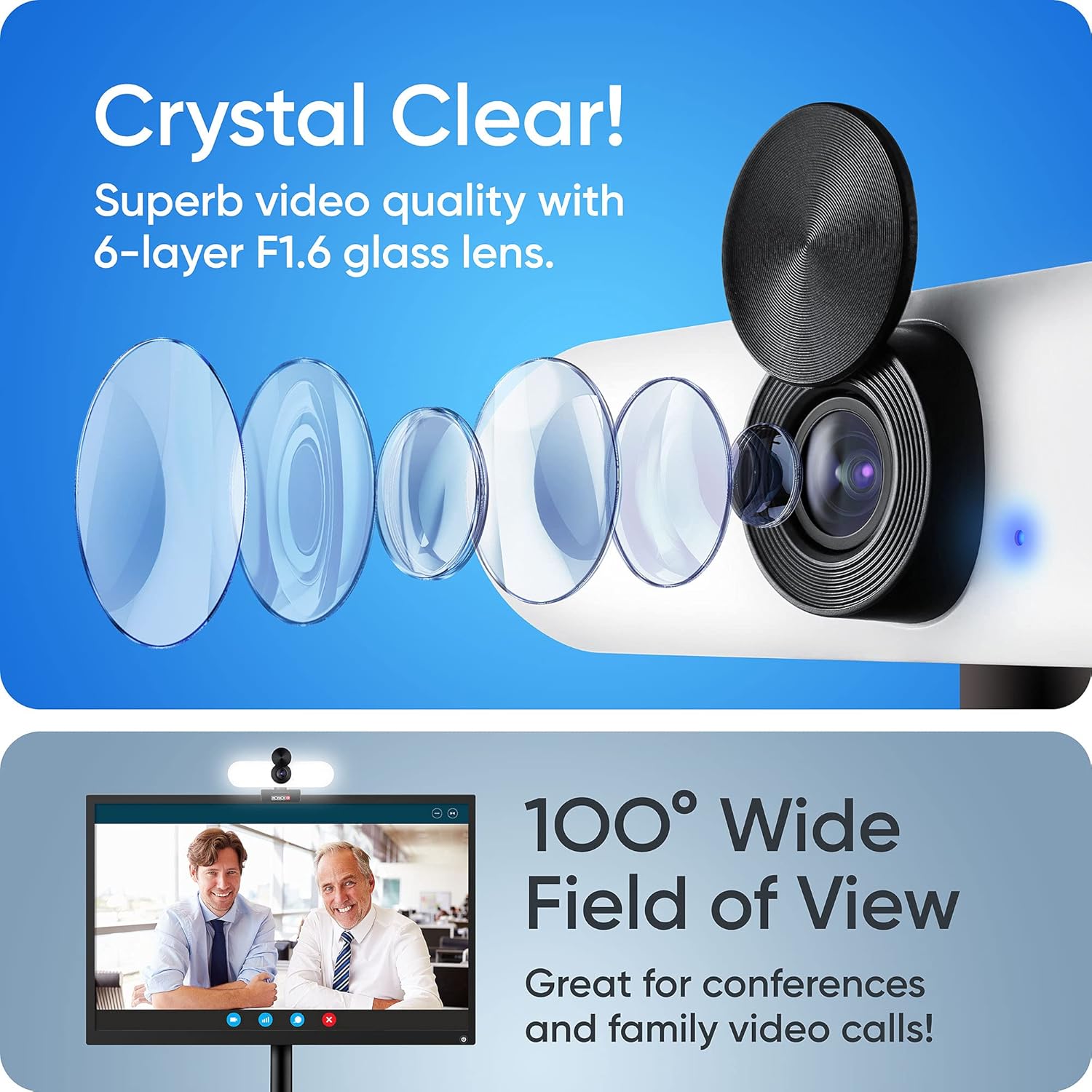
ദി webകാമിന്റെ നൂതന ലെൻസ് സിസ്റ്റം ക്രിസ്റ്റൽ ക്ലിയർ വീഡിയോയും വിശാലമായ ഫീൽഡും നൽകുന്നു view.

ദി webഒപ്റ്റിമൽ എക്സ്പോഷർ തിരുത്തലിനായി ക്യാം യാന്ത്രികമായി ക്രമീകരിക്കുന്നു.

ദി webവ്യക്തമായ ഇമേജ് പകർത്തുന്നതിനായി cam ഷാർപ്പ് ഫോക്കസ് നൽകുന്നു.
അനുയോജ്യത
പ്രൊവിഷൻ ISR Webവിവിധ ഓപ്പറേറ്റിംഗ് സിസ്റ്റങ്ങളുമായും ജനപ്രിയ വീഡിയോ കോൺഫറൻസിംഗ് ആപ്ലിക്കേഷനുകളുമായും വിശാലമായ അനുയോജ്യതയ്ക്കായി cam രൂപകൽപ്പന ചെയ്തിരിക്കുന്നു.
പിന്തുണയ്ക്കുന്ന ഓപ്പറേറ്റിംഗ് സിസ്റ്റങ്ങൾ:
- വിൻഡോസ് 7, 8, 10
- Mac OS 10.6+
- ആൻഡ്രോയിഡ് 5.0+
- എക്സ്ബോക്സ്
- Chrome OS
അനുയോജ്യമായ ആപ്ലിക്കേഷനുകൾ:
- സൂം ചെയ്യുക
- സ്കൈപ്പ്
- ഫേസ്ബുക്ക് മെസഞ്ചർ
- സിസ്കോ Webex
- മൈക്രോസോഫ്റ്റ് ടീമുകൾ
- ഗൂഗിൾ മീറ്റ്
- GoToMeeting
- കൂടാതെ മറ്റു പലതും...
മെയിൻ്റനൻസ്
ശരിയായ അറ്റകുറ്റപ്പണി നിങ്ങളുടെ ഉപകരണത്തിന്റെ ദീർഘായുസ്സും മികച്ച പ്രകടനവും ഉറപ്പാക്കും. webക്യാം
- ലെൻസ് വൃത്തിയാക്കൽ: ക്യാമറ ലെൻസ് സൌമ്യമായി തുടയ്ക്കാൻ ഒപ്റ്റിക്കൽ ലെൻസുകൾക്കായി പ്രത്യേകം രൂപകൽപ്പന ചെയ്ത മൃദുവായ, ലിന്റ് രഹിത തുണി ഉപയോഗിക്കുക. കഠിനമായ രാസവസ്തുക്കളോ ഉരച്ചിലുകളോ ഉള്ള വസ്തുക്കൾ ഉപയോഗിക്കുന്നത് ഒഴിവാക്കുക.
- ശരീരം വൃത്തിയാക്കൽ: തുടയ്ക്കുക webമൃദുവായതും ഉണങ്ങിയതുമായ തുണി ഉപയോഗിച്ച് ക്യാം ബോഡി മൂടുക. ആവശ്യമെങ്കിൽ, അല്പം ഡി.amp തുണി ഉപയോഗിക്കാം, പക്ഷേ ഉപകരണത്തിനുള്ളിൽ ഈർപ്പം കയറുന്നില്ലെന്ന് ഉറപ്പാക്കുക.
- സംഭരണം: ദീർഘകാലത്തേക്ക് ഉപയോഗിക്കാത്തപ്പോൾ, സൂക്ഷിക്കുക webതണുത്തതും വരണ്ടതുമായ സ്ഥലത്ത്, നേരിട്ടുള്ള സൂര്യപ്രകാശത്തിൽ നിന്നും കടുത്ത താപനിലയിൽ നിന്നും അകന്ന്, ക്യാമറ വയ്ക്കുക. ലെൻസ് സംരക്ഷിക്കാൻ സ്വകാര്യതാ കവർ ഉപയോഗിക്കുക.
- തുള്ളികളും ആഘാതങ്ങളും ഒഴിവാക്കുക: കൈകാര്യം ചെയ്യുക webവീഴ്ചകളിൽ നിന്നോ ആഘാതങ്ങളിൽ നിന്നോ ഉണ്ടാകുന്ന കേടുപാടുകൾ തടയാൻ ശ്രദ്ധാപൂർവ്വം ക്യാം ഉപയോഗിക്കുക.
ട്രബിൾഷൂട്ടിംഗ്
നിങ്ങളുടെ പ്രൊവിഷൻ ISR-ൽ പ്രശ്നങ്ങൾ നേരിടുകയാണെങ്കിൽ Webcam-ൽ, ഇനിപ്പറയുന്ന ട്രബിൾഷൂട്ടിംഗ് ഘട്ടങ്ങൾ പരീക്ഷിക്കുക:
- Webക്യാമറ കണ്ടെത്തിയില്ല:
- യുഎസ്ബി കേബിൾ രണ്ടിലും സുരക്ഷിതമായി പ്ലഗ് ചെയ്തിട്ടുണ്ടെന്ന് ഉറപ്പാക്കുക webകാമും നിങ്ങളുടെ കമ്പ്യൂട്ടറും.
- പ്ലഗ് ചെയ്യാൻ ശ്രമിക്കുക webനിങ്ങളുടെ കമ്പ്യൂട്ടറിലെ മറ്റൊരു USB പോർട്ടിലേക്ക് cam ബന്ധിപ്പിക്കുക.
- നിങ്ങളുടെ കമ്പ്യൂട്ടർ പുനരാരംഭിക്കുക.
- നിങ്ങളുടെ ഓപ്പറേറ്റിംഗ് സിസ്റ്റത്തിന്റെ ഉപകരണ മാനേജർ (Windows) അല്ലെങ്കിൽ സിസ്റ്റം വിവരങ്ങൾ (Mac) പരിശോധിച്ച് webകാം ലിസ്റ്റ് ചെയ്തിട്ടുണ്ട്.
- വീഡിയോ ഇല്ല/കറുത്ത സ്ക്രീൻ:
- സ്വകാര്യതാ കവർ തുറന്നിട്ടുണ്ടെന്ന് ഉറപ്പാക്കുക.
- ശരിയാണെന്ന് ഉറപ്പുവരുത്തുക webനിങ്ങളുടെ വീഡിയോ കോൺഫറൻസിംഗ് ആപ്ലിക്കേഷന്റെ ക്രമീകരണങ്ങളിൽ cam തിരഞ്ഞെടുത്തിരിക്കുന്നു.
- മറ്റൊരു ആപ്ലിക്കേഷൻ നിലവിൽ ഉപയോഗിക്കുന്നുണ്ടോയെന്ന് പരിശോധിക്കുക webcam, അത് ആക്സസ് തടഞ്ഞേക്കാം.
- ഓഡിയോ ഇൻപുട്ട് ഇല്ല (മൈക്രോഫോൺ):
- "പ്രൊവിഷൻ ISR" എന്ന് പരിശോധിക്കുക Webനിങ്ങളുടെ ആപ്ലിക്കേഷന്റെ ഓഡിയോ ക്രമീകരണങ്ങളിൽ മൈക്രോഫോൺ ഇൻപുട്ട് ഉപകരണമായി cam" തിരഞ്ഞെടുത്തിരിക്കുന്നു.
- മൈക്രോഫോൺ നിശബ്ദമാക്കിയിട്ടില്ലെന്നും അതിന്റെ വോളിയം മതിയായതാണെന്നും ഉറപ്പാക്കാൻ നിങ്ങളുടെ കമ്പ്യൂട്ടറിന്റെ ശബ്ദ ക്രമീകരണങ്ങൾ പരിശോധിക്കുക.
- മറ്റൊരു ആപ്ലിക്കേഷനും മൈക്രോഫോൺ മാത്രം ഉപയോഗിക്കുന്നില്ലെന്ന് ഉറപ്പാക്കുക.
- ഓഡിയോ ഔട്ട്പുട്ട് ഇല്ല (സ്പീക്കർ):
- "പ്രൊവിഷൻ ISR" എന്ന് പരിശോധിക്കുക Webcam" അല്ലെങ്കിൽ "USB ഓഡിയോ ഉപകരണം" എന്നത് നിങ്ങളുടെ ആപ്ലിക്കേഷന്റെ ഓഡിയോ ക്രമീകരണങ്ങളിലും കമ്പ്യൂട്ടറിന്റെ ശബ്ദ ക്രമീകരണങ്ങളിലും സ്പീക്കർ ഔട്ട്പുട്ട് ഉപകരണമായി തിരഞ്ഞെടുത്തിരിക്കുന്നു.
- നിങ്ങളുടെ കമ്പ്യൂട്ടറിലും ആപ്ലിക്കേഷനിലും വോളിയം ലെവലുകൾ പരിശോധിക്കുക.
- മോശം വീഡിയോ നിലവാരം:
- ലെൻസ് വൃത്തിയുള്ളതാണെന്ന് ഉറപ്പാക്കുക (മെയിന്റനൻസ് വിഭാഗം കാണുക).
- നിങ്ങളുടെ ഇന്റർനെറ്റ് കണക്ഷൻ വേഗത പരിശോധിക്കുക, കാരണം കണക്ഷൻ മന്ദഗതിയിലാണെങ്കിൽ അത് ഓൺലൈൻ കോളുകളിലെ വീഡിയോ ഗുണനിലവാരത്തെ ബാധിച്ചേക്കാം.
- മികച്ച പ്രകാശത്തിനായി LED ഫിൽ ലൈറ്റ് ക്രമീകരിക്കുക.
സ്പെസിഫിക്കേഷനുകൾ
പ്രൊവിഷൻ ISR ഓൾ-ഇൻ-വണ്ണിനായുള്ള വിശദമായ സാങ്കേതിക സവിശേഷതകൾ Webക്യാം
| ഫീച്ചർ | സ്പെസിഫിക്കേഷൻ |
|---|---|
| ബ്രാൻഡ് | വ്യവസ്ഥ ISR |
| മോഡൽ നമ്പർ | വ്യവസ്ഥ ISR |
| ASIN | B094W6SSRR-ൽ നിന്നുള്ള വീഡിയോകൾ |
| വീഡിയോ റെസല്യൂഷൻ | 1080p ഫുൾ എച്ച്ഡി |
| ഫ്രെയിം റേറ്റ് | 60 fps (പേരിൽ നിന്ന് സൂചിപ്പിച്ചത്) |
| ലെൻസ് അപ്പർച്ചർ | F1.6 (ചിത്രത്തിൽ നിന്ന് സൂചിപ്പിച്ചത്) / 1.6 മില്ലിമീറ്റർ |
| ഫീൽഡ് View | 100° വൈഡ് ആംഗിൾ |
| ഒപ്റ്റിക്കൽ സൂം | 1x ഗുണിതം |
| ഡിജിറ്റൽ സൂം | 2x ഗുണിതം |
| പ്രത്യേക സവിശേഷതകൾ | കുറഞ്ഞ പ്രകാശ പ്രകടനം, ബിൽറ്റ്-ഇൻ LED ലൈറ്റ് (3 ലെവലുകൾ), ബിൽറ്റ്-ഇൻ സ്പീക്കർ (2.5W), നോയ്സ്-കാൻസിലിംഗ് മൈക്രോഫോൺ, സ്വകാര്യതാ കവർ |
| കണക്റ്റിവിറ്റി ടെക്നോളജി | USB |
| ഇമേജ് സ്റ്റെബിലൈസേഷൻ | ഇല്ല |
| സെൻസർ ടെക്നോളജി | CMOS |
| പാക്കേജ് അളവുകൾ | 14.3 x 6.9 x 6.6 സെ.മീ; 240 ഗ്രാം |
| USB കേബിൾ ദൈർഘ്യം | 5.25 അടി (ചിത്രത്തിൽ നിന്ന് സൂചിപ്പിച്ചത്) |
വാറൻ്റിയും പിന്തുണയും
നിങ്ങളുടെ പ്രൊവിഷൻ ISR-നുള്ള വാറന്റി, ഉപഭോക്തൃ പിന്തുണ എന്നിവയെക്കുറിച്ചുള്ള വിവരങ്ങൾ Webക്യാം
ഉൽപ്പന്ന വിവരങ്ങളിൽ നിർദ്ദിഷ്ട വാറന്റി വിശദാംശങ്ങൾ നൽകിയിട്ടില്ല. ഉൽപ്പന്ന പാക്കേജിംഗ് അല്ലെങ്കിൽ ഔദ്യോഗിക പ്രൊവിഷൻ ISR പരിശോധിക്കുക. webഏറ്റവും കാലികമായ വാറൻ്റി വിവരങ്ങൾക്കായുള്ള സൈറ്റ്.
സാങ്കേതിക പിന്തുണയ്ക്കോ കൂടുതൽ സഹായത്തിനോ, ദയവായി ഔദ്യോഗിക പ്രൊവിഷൻ ISR പിന്തുണ പേജ് സന്ദർശിക്കുക അല്ലെങ്കിൽ അവരുടെ ഉപഭോക്തൃ സേവന വിഭാഗവുമായി ബന്ധപ്പെടുക. കോൺടാക്റ്റ് വിവരങ്ങൾ സാധാരണയായി നിർമ്മാതാവിന്റെ വെബ്സൈറ്റിൽ കാണാം. webസൈറ്റ് അല്ലെങ്കിൽ ഉൽപ്പന്ന ഡോക്യുമെന്റേഷൻ.

വീഡിയോ നിരീക്ഷണത്തിലും വൈദഗ്ധ്യത്തിലും വൈദഗ്ധ്യമുള്ള ഒരു കമ്പനിയായ പ്രൊവിഷൻ ഐഎസ്ആർ web 2007 മുതൽ ക്യാമറകൾ.