ആമുഖം
This manual provides comprehensive instructions for the installation, operation, maintenance, and troubleshooting of your CATCHFACE A201Black Smart Fingerprint Door Lock. Designed for enhanced security and convenience, this smart lock offers multiple access methods including fingerprint, keypad, mobile application, and traditional key. Please read this manual thoroughly before installation and use to ensure proper function and longevity of your device.

ചിത്രം 1: ഓവർview of the CATCHFACE A201Black Smart Fingerprint Door Lock and its associated TTLock mobile application.
സജ്ജീകരണവും ഇൻസ്റ്റാളേഷനും
The CATCHFACE A201Black smart lock is designed for easy installation, replacing standard American single-cylinder door locks without requiring new drilling. It fits door holes with a diameter of 5.4 cm and door thicknesses ranging from 3.5 cm to 5.1 cm. The adjustable latch supports backsets of 60mm or 70mm.
പാക്കേജ് ഉള്ളടക്കം:
- 1 Smart Lock Unit (front and rear handles)
- 1 Latch and Strike Box
- 1 Adjustable 60/70mm Latch
- 1 Installation Bag (screws, spindle, etc.)
- 2 മെക്കാനിക്കൽ കീകൾ
പ്രീ-ഇൻസ്റ്റലേഷൻ പരിശോധനകൾ:
- Ensure your door's dimensions match the lock's requirements.
- Verify all components are present as listed above.
- Prepare a Phillips head screwdriver and a measuring tape.
ഇൻസ്റ്റലേഷൻ ഘട്ടങ്ങൾ:
- Remove your existing door lock.
- Install the new latch into the door edge, ensuring the correct backset (60mm or 70mm).
- Insert the spindle through the latch.
- Attach the exterior handle (with keypad and fingerprint sensor) to the door, aligning the spindle and mounting posts.
- Attach the interior mounting plate to the exterior handle using screws.
- Connect the cable from the exterior handle to the interior handle.
- Attach the interior handle to the mounting plate, securing it with screws.
- Install 4 AAA alkaline batteries into the battery compartment of the interior handle.
- Test the lock's functionality with the mechanical key and by pressing the reset button if available.

Figure 2: The smart lock is compatible with standard door preparations, allowing for easy replacement of existing knob or lever sets.

Figure 3: Detailed dimensions of the lock components, including the adjustable latch for universal left/right door direction.
പ്രവർത്തന നിർദ്ദേശങ്ങൾ
Your CATCHFACE A201Black smart lock offers multiple convenient ways to unlock your door:
1. Fingerprint Unlock:
- The lock features an advanced 3D fingerprint sensor for quick access (recognition in 0.5 seconds).
- It supports 360° fingerprint recognition and can store up to 120 fingerprints.
- To unlock, place your registered finger on the sensor.
- To add fingerprints, use the TTLock app (refer to App Control section).

Figure 4: Accessing the door using the integrated fingerprint sensor.
2. Keypad (Virtual Anti-Peep Password):
- Enter your passcode followed by the '#' key.
- The virtual anti-peep function allows you to enter random digits before or after your actual passcode to prevent others from guessing your code. For exampതുടർന്ന്, നിങ്ങളുടെ കോഡ് 123456 ആണെങ്കിൽ, നിങ്ങൾക്ക് 987123456012# നൽകാം.
3. TTLock App Control:
- Download the "TTLock" app from your smartphone's app store (iOS/Android).
- Pair your lock with the app via Bluetooth.
- അൺലോക്ക്/ലോക്ക്: Use the app to remotely lock or unlock your door when within Bluetooth range.
- Generate Passcodes: Create various types of passcodes (e.g., permanent, timed, one-time, recurring) for guests or service providers.
- Send eKeys: Grant access to other TTLock app users.
- View Activity Logs: Monitor who accessed the door and when, in real-time.
- ക്രമീകരണങ്ങൾ: Adjust lock settings such as passage mode, auto-lock timer, and silent mode.
- Remote Control (with G2 Gateway): For control from anywhere, a separate G2 Gateway (ASIN: B09Q14GN2D) is required to connect the lock to your home Wi-Fi network.
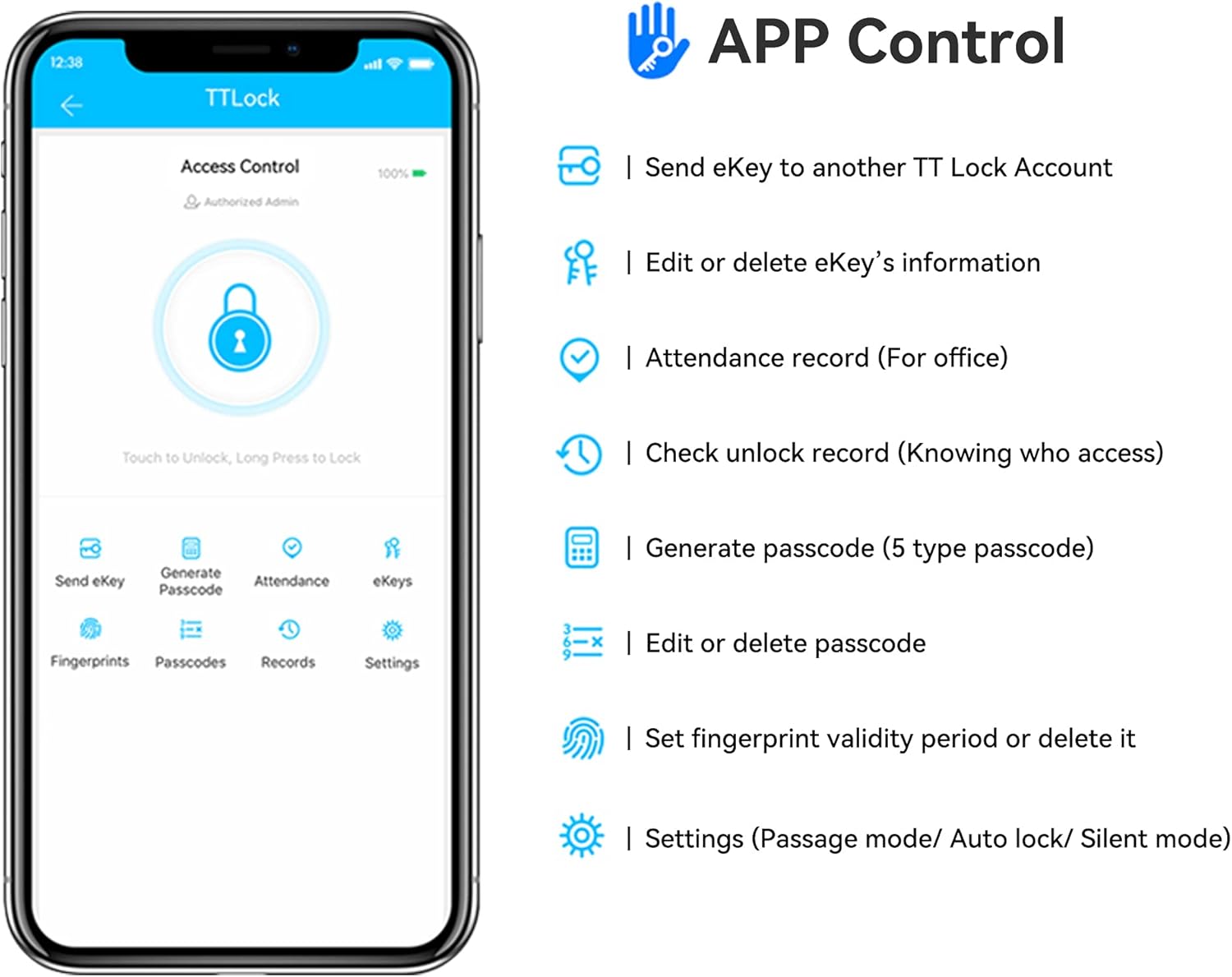
Figure 5: Key features and functions available within the TTLock mobile application.

Figure 6: Monitoring door access history through the TTLock app.
4. Mechanical Key Unlock:
- Use one of the two provided physical keys for traditional manual unlocking. This serves as a backup in case of battery depletion or electronic malfunction.

ചിത്രം 7: ഓവർview of the multiple unlocking methods available for the smart lock.
മെയിൻ്റനൻസ്
Proper maintenance ensures the longevity and optimal performance of your smart lock.
ബാറ്ററി മാനേജ്മെൻ്റ്:
- The lock is powered by 4 AAA alkaline batteries (not included).
- The TTLock app will provide a low battery alarm, notifying you when it's time to replace the batteries.
- In case of complete battery depletion, you can use the mechanical key for access.
- Additionally, the lock features a micro-USB port for emergency power supply. Connect a power bank or USB charger to this port to temporarily power the lock and gain access.
ശുചീകരണവും പരിചരണവും:
- Clean the lock's surface with a soft, dry cloth. Avoid abrasive cleaners or solvents that could damage the finish or electronic components.
- മികച്ച പ്രകടനത്തിനായി ഫിംഗർപ്രിന്റ് സെൻസർ വൃത്തിയുള്ളതും അഴുക്കോ ഈർപ്പമോ ഇല്ലാതെ സൂക്ഷിക്കുക.
ട്രബിൾഷൂട്ടിംഗ്
If you encounter issues with your smart lock, refer to the following common problems and solutions:
| പ്രശ്നം | സാധ്യമായ കാരണം | പരിഹാരം |
|---|---|---|
| Fingerprint not recognized or inconsistent. | Dirty sensor, unregistered fingerprint, dry/wet finger, sensor malfunction. | Clean the sensor with a soft cloth. Ensure your finger is clean and dry. Re-register your fingerprint in the app. Try different fingers. |
| Keypad unresponsive or code not accepted. | Low batteries, incorrect code, keypad malfunction. | Check battery level and replace if low. Ensure correct passcode is entered, followed by '#'. Try emergency power via micro-USB. |
| ആപ്പ് കമാൻഡുകളോട് ലോക്ക് പ്രതികരിക്കുന്നില്ല. | Bluetooth off, out of range, app not connected, low lock battery. | Ensure Bluetooth is enabled on your phone. Be within Bluetooth range of the lock. Re-open the app and reconnect. Check lock batteries. |
| Lock is completely unresponsive. | Dead batteries, internal error. | Replace all 4 AAA batteries. Use the mechanical key for access. If still unresponsive, use the micro-USB emergency power. If the issue persists, contact customer support. |
സ്പെസിഫിക്കേഷനുകൾ
| ഫീച്ചർ | വിശദാംശങ്ങൾ |
|---|---|
| നിർമ്മാതാവ് | ക്യാച്ച്ഫേസ് |
| മോഡൽ നമ്പർ | A201Black |
| ഉൽപ്പന്ന അളവുകൾ (L x W x H) | 16.51 x 6.48 x 2.49 സെ.മീ (6.5 x 2.55 x 0.98 ഇഞ്ച്) |
| ഭാരം | 907.18 ഗ്രാം (2 പൗണ്ട്) |
| നിറം | A201 കറുപ്പ് |
| മെറ്റീരിയൽ | സിങ്ക് അലോയ് |
| ലോക്ക് തരം | Biometric, Keyless Entry with Keypad, Bluetooth Smart Lock, Fingerprint Smart Lock |
| പ്രത്യേക ഫീച്ചർ | സ്മാർട്ട് ഫിംഗർപ്രിൻ്റ് ലോക്ക് |
| അൺലോക്ക് രീതികൾ | Mechanical Key, Fingerprint, TTLock App, Digital Passcode |
| പവർ ഉറവിടം | 4 x AAA ആൽക്കലൈൻ ബാറ്ററികൾ (ഉൾപ്പെടുത്തിയിട്ടില്ല) |
| എമർജൻസി പവർ | മൈക്രോ-യുഎസ്ബി പോർട്ട് |
| വാതിലിന്റെ കനം അനുയോജ്യത | 3.5 സെ.മീ മുതൽ 5.1 സെ.മീ വരെ (1.38 മുതൽ 2 ഇഞ്ച് വരെ) |
| ഡോർ ഹോൾ വ്യാസം | 5.4 സെ.മീ (2.12 ഇഞ്ച്) |
| ക്രമീകരിക്കാവുന്ന ലാച്ച് | 60mm / 70mm (2.36 inches / 2.75 inches) |
| വിരലടയാള ശേഷി | 120 വിരലടയാളങ്ങൾ വരെ |
വാറൻ്റിയും പിന്തുണയും
For any questions, technical assistance, or warranty claims, please contact CATCHFACE customer support through the retailer where you purchased the product or refer to the contact information provided in your product packaging.
വാറന്റി ആവശ്യങ്ങൾക്കായി നിങ്ങളുടെ വാങ്ങിയതിന്റെ തെളിവ് സൂക്ഷിക്കുക.


