1. ആമുഖം
This manual provides comprehensive instructions for the installation, operation, and maintenance of your Imou 2.5K(4MP) Indoor WiFi Surveillance Camera (Model: IPC-K2ECP-4H1W). Please read this manual thoroughly before using the product to ensure proper and safe operation.
2. ഉൽപ്പന്നം കഴിഞ്ഞുview
The Imou 2.5K(4MP) Indoor WiFi Surveillance Camera is designed for indoor security, offering high-resolution video, 360-degree pan and tilt capabilities, two-way audio, and advanced AI detection features.

Figure 2.1: Imou 2.5K(4MP) Indoor WiFi Surveillance Camera. This image shows the camera alongside a smartphone screen displaying a live feed of a cat, highlighting its use for pet monitoring and its 2.5K resolution capability.

Figure 2.2: 360-Degree Coverage. This image illustrates the camera's ability to provide a full 360-degree panoramic view of an indoor space, ensuring comprehensive monitoring.
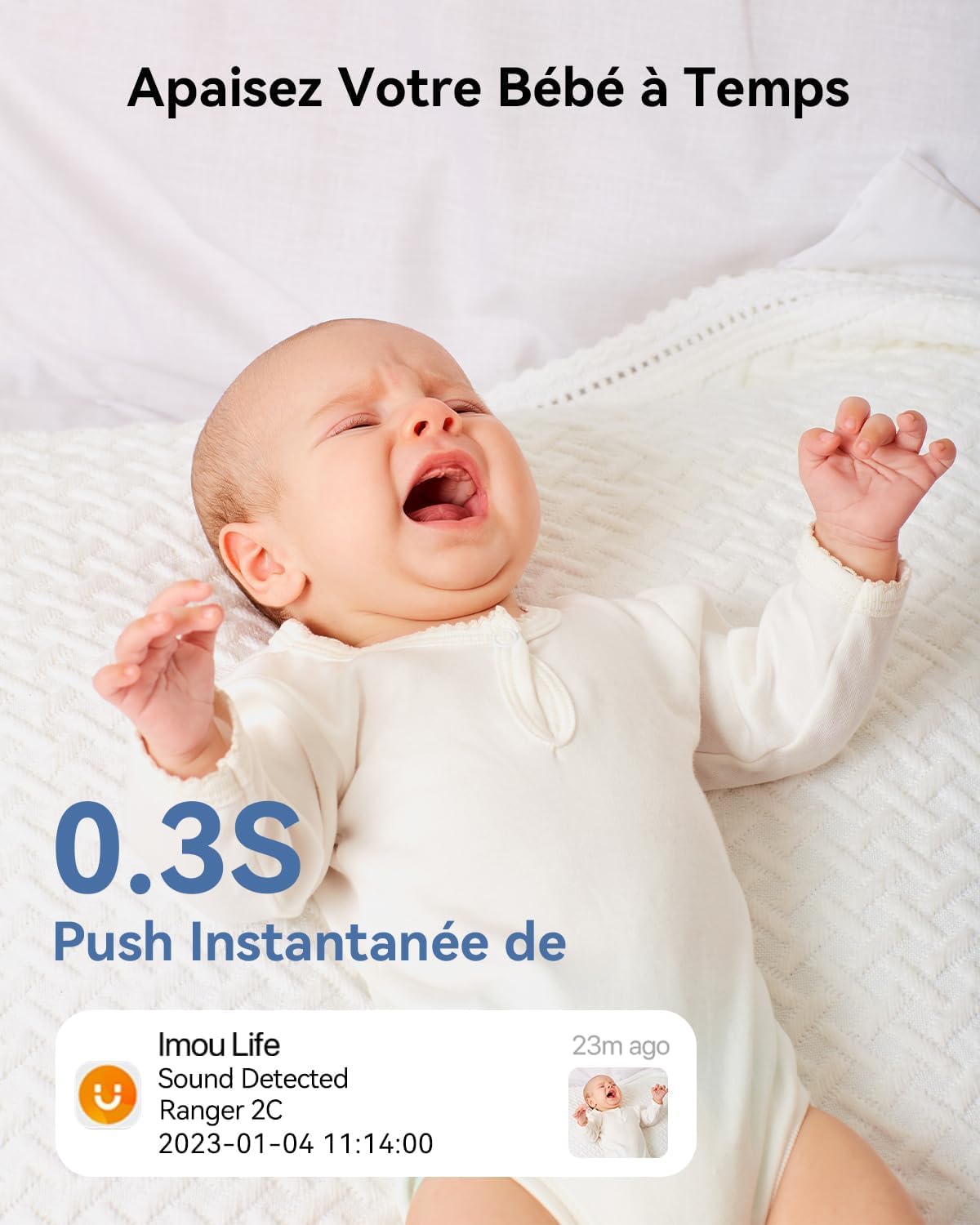
Figure 2.3: AI Human Detection and Smart Tracking. The image depicts the camera's AI capabilities, highlighting its ability to detect and track human movement, as shown by the orange box around a child.
3 പ്രധാന സവിശേഷതകൾ
- 4MP Super HD & 10M Night Vision: This 4MP indoor security camera delivers superior video quality, capturing more video details for better identification of intruders or other security threats. Superior night vision provides clarity with rich details even in total darkness, up to 10m distance.

Image: Detail comparison between 1080P and 4MP UHD resolution, showing the enhanced clarity of 4MP.

Image: Night vision capabilities, showing a clear image of a dog in a dimly lit room, with indicators for 8x digital zoom, 2K resolution, and 10m night vision distance.
- 360° Pan & Tilt & Two-Way Audio: This indoor camera features a horizontal rotation of 0 to 355° and a vertical rotation of -5 to 80°. View every corner of your home with easy pan and tilt control via the Imou Life app while you're away. The integrated speaker and microphone allow you to interact with your family and pets.

Image: Illustrates the camera's 360-degree pan and tilt functionality, showing a child on a tricycle within the camera's wide field of view.

Image: Demonstrates the two-way audio feature, with a child speaking through the camera and a parent responding via the Imou Life app, emphasizing communication.
- AI Human and Sound Detection: This indoor surveillance camera can quickly distinguish between human and animal movements to avoid false alarms. An instant notification will be sent to you when the connected camera detects baby crying, dog barking, or other abnormal sounds. You can adjust the detection region and sensitivity, and set the alarm schedule.

Image: Shows a crying baby and an Imou Life app notification indicating sound detection, highlighting the camera's ability to alert users to abnormal sounds.

Image: Illustrates abnormal sound detection, showing a dog creating a mess and an Imou Life app notification for "Abnormal Sound" in the living room.
- സ്മാർട്ട് ട്രാക്കിംഗ്: With one click to activate smart tracking, the wireless indoor WiFi camera will focus on and follow moving people or objects, record real-time videos, and send you instant alerts if human detection is activated. You can check videos with a Micro SD card or Imou Cloud, keeping you informed of what's happening at home/office/store from anywhere.

Image: Demonstrates smart tracking, with the camera following a cat climbing a scratching post, and an Imou Life app notification for "Smart Tracking" event.
- Secure Storage and Privacy Mode: Only you and your authorized user have access to images and videos stored on the Micro SD card (up to 256GB, which can store approximately 14 days), Imou Cloud (30-day free trial with 7-day recording cycle) or NVR. You can activate PRIVACY MODE to hide the camera lens when you are home or whenever you don't want it to record.

Image: Shows the camera's physical lens masking feature for privacy mode, with the lens rotating downwards to block the view.

Image: Illustrates the storage options: local storage via Micro SD card (up to 256GB) and Imou Cloud storage with a 30-day free trial.
- അലക്സ ഉപയോഗിച്ചുള്ള ശബ്ദ നിയന്ത്രണം: Compatible with Amazon Alexa for convenient voice control.
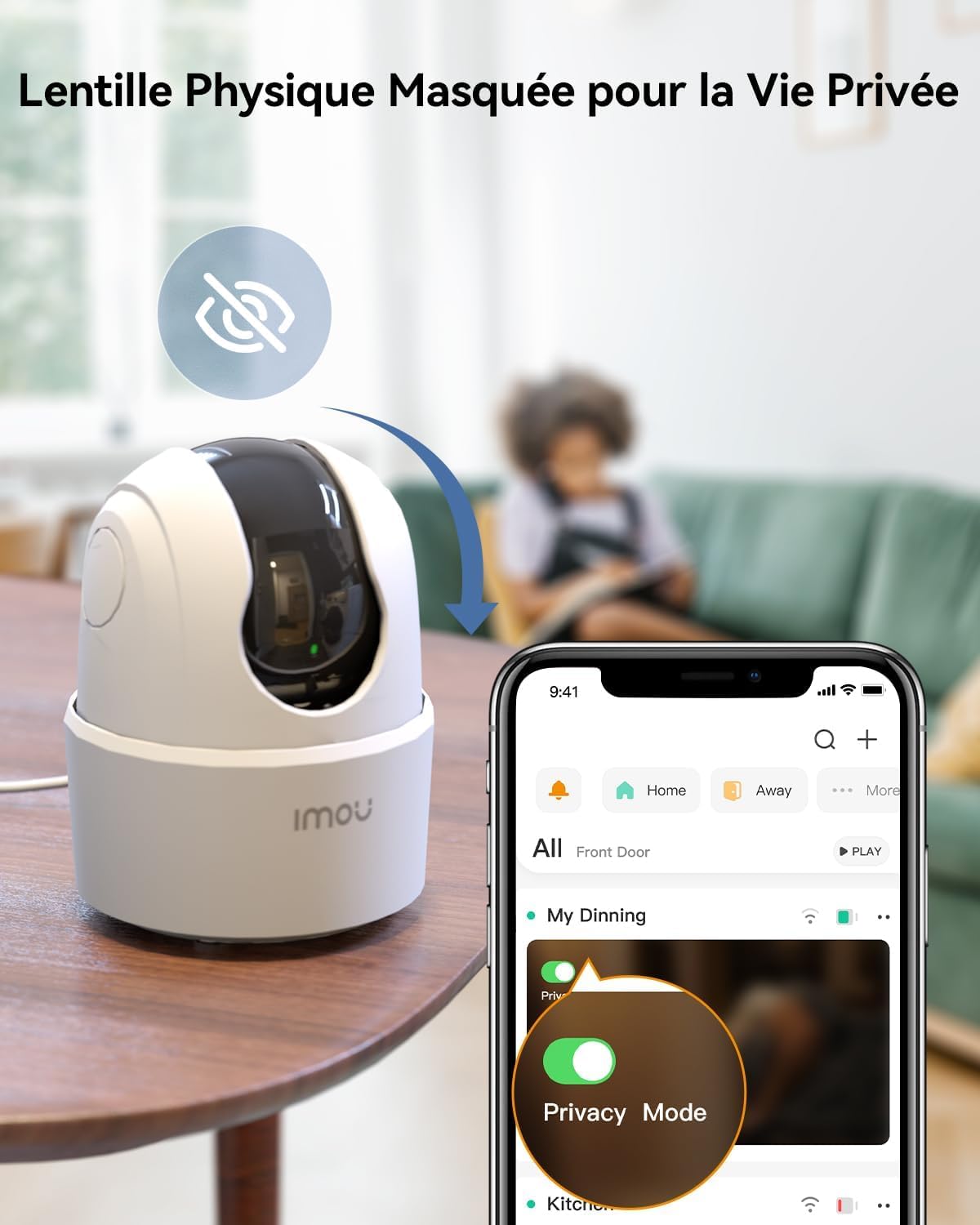
Image: Depicts a woman in a kitchen using an Amazon Echo Show to view the camera feed via voice command, demonstrating Alexa compatibility.
4. സജ്ജീകരണം
4.1 പാക്കേജ് ഉള്ളടക്കം
ആരംഭിക്കുന്നതിന് മുമ്പ്, എല്ലാ ഇനങ്ങളും ഉണ്ടെന്ന് ഉറപ്പാക്കുക:
- Imou 2.5K(4MP) Indoor WiFi Surveillance Camera (IPC-K2ECP-4H1W)
- പവർ അഡാപ്റ്റർ
- മൗണ്ടിംഗ് പ്ലേറ്റ്
- മൗണ്ടിംഗ് സ്ക്രൂകളും വാൾ പ്ലഗുകളും
- ദ്രുത ആരംഭ ഗൈഡ്
4.2 Initial Setup and Connection
- ഇമോ ലൈഫ് ആപ്പ് ഡൗൺലോഡ് ചെയ്യുക: ഇതിനായി തിരയുക "Imou Life" in your mobile app store (App Store for iOS or Google Play Store for Android) and download the application.
- ഒരു അക്കൗണ്ട് സൃഷ്ടിക്കുക: Open the Imou Life app and register for a new account or log in if you already have one.
- ക്യാമറ ഓൺ: Connect the camera to a power outlet using the provided power adapter. The indicator light on the camera will turn green when it's ready for setup.
- ഉപകരണം ചേർക്കുക: In the Imou Life app, tap the "+" icon in the top right corner to add a new device. Scan the QR code located on the bottom of the camera.
- വൈഫൈയിലേക്ക് കണക്റ്റുചെയ്യുക: Follow the on-screen prompts in the app to connect the camera to your 2.4GHz Wi-Fi network. കുറിപ്പ്: ക്യാമറ 5GHz വൈഫൈ നെറ്റ്വർക്കുകളെ പിന്തുണയ്ക്കുന്നില്ല.
- സജ്ജീകരണം പൂർത്തിയാക്കുക: Once connected, the camera's indicator light will turn solid green. You can now name your camera and begin using it.
4.3 ക്യാമറ മൗണ്ടിംഗ്
ക്യാമറ ഒരു പരന്ന പ്രതലത്തിൽ സ്ഥാപിക്കാം അല്ലെങ്കിൽ ചുവരിലോ സീലിംഗിലോ ഘടിപ്പിക്കാം.
- ഒരു ലൊക്കേഷൻ തിരഞ്ഞെടുക്കുക: ആവശ്യമുള്ളത് നൽകുന്ന ഒരു സ്ഥലം തിരഞ്ഞെടുക്കുക viewആംഗിൾ ആണ്, നിങ്ങളുടെ വൈഫൈ നെറ്റ്വർക്കിന്റെയും പവർ ഔട്ട്ലെറ്റിന്റെയും പരിധിയിലാണ്.
- ഉപരിതലം തയ്യാറാക്കുക: For wall or ceiling mounting, use the mounting plate as a template to mark the drill holes. Drill holes and insert wall plugs if necessary.
- മൗണ്ടിംഗ് പ്ലേറ്റ് സുരക്ഷിതമാക്കുക: Attach the mounting plate to the wall/ceiling using the provided screws.
- ക്യാമറ ഘടിപ്പിക്കുക: Align the camera with the mounting plate and twist it to lock it into place.
5. പ്രവർത്തന നിർദ്ദേശങ്ങൾ
5.1 തത്സമയം View കൂടാതെ പാൻ/ടിൽറ്റ് നിയന്ത്രണം
- ഇമൗ ലൈഫ് ആപ്പ് തുറന്ന് ഉപകരണ ലിസ്റ്റിൽ നിന്ന് നിങ്ങളുടെ ക്യാമറ തിരഞ്ഞെടുക്കുക.
- ക്യാമറയുടെ പാൻ (തിരശ്ചീന) ചലനങ്ങളും ടിൽറ്റ് (ലംബ) ചലനങ്ങളും നിയന്ത്രിക്കുന്നതിന് ഓൺ-സ്ക്രീൻ ജോയ്സ്റ്റിക്ക് അല്ലെങ്കിൽ സ്വൈപ്പ് ആംഗ്യങ്ങൾ ഉപയോഗിക്കുക.
5.2 ടു-വേ ഓഡിയോ
- ലൈവിൽ ആയിരിക്കുമ്പോൾ view, ടു-വേ ഓഡിയോ പ്രവർത്തനക്ഷമമാക്കാൻ മൈക്രോഫോൺ ഐക്കണിൽ ടാപ്പ് ചെയ്യുക.
- ക്യാമറയുടെ സ്പീക്കറിലൂടെ നിങ്ങളുടെ ശബ്ദം കൈമാറാൻ ഫോണിന്റെ മൈക്രോഫോണിൽ സംസാരിക്കുക.
- ടു-വേ ഓഡിയോ പ്രവർത്തനരഹിതമാക്കാൻ മൈക്രോഫോൺ ഐക്കണിൽ വീണ്ടും ടാപ്പ് ചെയ്യുക.
5.3 റെക്കോർഡിംഗും പ്ലേബാക്കും
- മാനുവൽ റെക്കോർഡിംഗ്: Tap the record icon in live view to start/stop manual recording. Recordings are saved to your phone or the inserted Micro SD card.
- ഇവൻ്റ് റെക്കോർഡിംഗ്: The camera automatically records when motion or sound is detected (if enabled).
- പ്ലേബാക്ക്: റെക്കോർഡ് ചെയ്ത foo ആക്സസ് ചെയ്യുകtage via the "Playback" or "Event" section in the Imou Life app. You can filter by date and event type.
5.4 സ്വകാര്യത മോഡ്
- To activate Privacy Mode, navigate to the camera settings in the Imou Life app.
- Toggle the "Privacy Mode" option. The camera lens will physically retract, ensuring no video is recorded or streamed.
6. പരിപാലനം
- വൃത്തിയാക്കൽ: ക്യാമറ ലെൻസും ബോഡിയും വൃത്തിയാക്കാൻ മൃദുവായതും ഉണങ്ങിയതുമായ തുണി ഉപയോഗിക്കുക. ലിക്വിഡ് ക്ലീനറുകളോ എയറോസോളുകളോ ഉപയോഗിക്കരുത്.
- ഫേംവെയർ അപ്ഡേറ്റുകൾ: Regularly check for and install firmware updates via the Imou Life app to ensure optimal performance and security.
- മൈക്രോ എസ്ഡി കാർഡ് മാനേജ്മെന്റ്: If using a Micro SD card, periodically back up important footage and format the card to maintain performance.
7. പ്രശ്നപരിഹാരം
| പ്രശ്നം | സാധ്യമായ കാരണം | പരിഹാരം |
|---|---|---|
| ക്യാമറ ഓഫ്ലൈനിൽ | No power; Wi-Fi disconnected; Router issue. | Check power connection; Restart camera and router; Ensure camera is within Wi-Fi range. |
| Wi-Fi-യിലേക്ക് കണക്റ്റുചെയ്യാൻ കഴിയില്ല | Incorrect Wi-Fi password; 5GHz network used; Weak signal. | പാസ്വേഡ് പരിശോധിക്കുക; നിങ്ങൾ 2.4GHz നെറ്റ്വർക്കിലേക്ക് കണക്റ്റ് ചെയ്യുന്നുണ്ടെന്ന് ഉറപ്പാക്കുക; ക്യാമറ റൂട്ടറിന് അടുത്തേക്ക് നീക്കുക. |
| ചലനം കണ്ടെത്തൽ അലേർട്ടുകളൊന്നുമില്ല | Detection sensitivity too low; Detection zone not set; Notifications disabled. | Adjust sensitivity in app; Configure detection zones; Enable app notifications. |
| മോശം വീഡിയോ നിലവാരം | Insufficient bandwidth; Dirty lens. | Check internet speed; Clean camera lens. |
8 സ്പെസിഫിക്കേഷനുകൾ
- മോഡൽ: ഐപിസി-കെ2ഇസിപി-4എച്ച്1ഡബ്ല്യു
- റെസലൂഷൻ: 4MP (2.5K)
- പാൻ/ടിൽറ്റ് ശ്രേണി: Pan 0-355°, Tilt -5-80°
- രാത്രി കാഴ്ച ദൂരം: 10 മീറ്റർ വരെ
- കണക്റ്റിവിറ്റി: വൈഫൈ (2.4GHz മാത്രം)
- സംഭരണം: Micro SD Card (up to 256GB, not included), Imou Cloud, NVR
- ഓഡിയോ: ടു-വേ ഓഡിയോ (ബിൽറ്റ്-ഇൻ മൈക്രോഫോണും സ്പീക്കറും)
- പ്രത്യേക സവിശേഷതകൾ: AI Human Detection, Sound Detection, Smart Tracking, Privacy Mode, Alexa Compatibility
- ശക്തി: 5V DC, 5.3W
- അളവുകൾ (L x W x H): 10.1 x 7.7 x 7.7 സെ.മീ
- ഭാരം: 380 ഗ്രാം
9. വാറൻ്റിയും പിന്തുണയും
ഈ ഉൽപ്പന്നം എ 2 വർഷത്തെ നിർമ്മാതാവിന്റെ വാറന്റി.
For technical support, troubleshooting, or warranty claims, please contact Imou customer service through the Imou Life app or visit the official Imou webസൈറ്റ്:
- ഇമൗ ഒഫീഷ്യൽ Webസൈറ്റ്: www.imoulife.com
- ഇൻ-ആപ്പ് പിന്തുണ: Access the "Help & Feedback" section within the Imou Life application.
വാറന്റി ആവശ്യങ്ങൾക്കായി നിങ്ങളുടെ വാങ്ങിയതിന്റെ തെളിവ് സൂക്ഷിക്കുക.


