1. ആമുഖം
This manual provides comprehensive instructions for the safe and effective use of the C-LOGIC 580 Smart Digital Multimeter. Please read this manual thoroughly before operation and retain it for future reference.
The C-LOGIC 580 is a smart digital multimeter designed for accurate and efficient electrical measurements. Its smart technology allows for automatic recognition of measurement parameters, reducing potential errors for amateur users and saving time for professionals.
2 സുരക്ഷാ വിവരങ്ങൾ
Always observe safety precautions when using electrical testing equipment. Failure to do so may result in injury or damage to the device.
- ഓരോ ഫംഗ്ഷനും വ്യക്തമാക്കിയിട്ടുള്ള പരമാവധി ഇൻപുട്ട് മൂല്യങ്ങൾ കവിയരുത്.
- Ensure the test leads are properly connected and the function switch is in the correct position before making any measurements.
- ലൈവ് സർക്യൂട്ടുകളിൽ പ്രവർത്തിക്കുമ്പോൾ അതീവ ജാഗ്രത പാലിക്കുക.
- Do not use the multimeter if it appears damaged or if the test leads are compromised.
- Refer to the CAT III 600V and MAX 600V markings on the device for voltagഇ പരിധികൾ.
3. ഉൽപ്പന്ന സവിശേഷതകൾ
- സ്മാർട്ട് ടെക്നോളജി: Automatic recognition of measurement parameters.
- Error Reduction: Designed to minimize errors for amateur users.
- സമയം ലാഭിക്കൽ: Streamlines measurement processes for professional users.
- ഡിജിറ്റൽ ഡിസ്പ്ലേ: Clear and easy-to-read digital readout.
- ഒന്നിലധികം പ്രവർത്തനങ്ങൾ: Capable of measuring various electrical parameters.
4. പാക്കേജ് ഉള്ളടക്കം
പാക്കേജ് തുറക്കുമ്പോൾ എല്ലാ ഇനങ്ങളും ഉണ്ടെന്നും കേടുപാടുകൾ സംഭവിച്ചിട്ടില്ലെന്നും ഉറപ്പാക്കുക.
- C-LOGIC 580 Smart Digital Multimeter
- ടെസ്റ്റ് ലീഡുകൾ (ചുവപ്പും കറുപ്പും)
- ഉപയോക്തൃ മാനുവൽ
5. സജ്ജീകരണം
5.1 ബാറ്ററി ഇൻസ്റ്റാളേഷൻ
The C-LOGIC 580 is battery powered. Ensure batteries are correctly installed before first use.
- മൾട്ടിമീറ്ററിന്റെ പിൻഭാഗത്ത് ബാറ്ററി കമ്പാർട്ട്മെന്റ് കവർ കണ്ടെത്തുക.
- ബാറ്ററി കമ്പാർട്ട്മെന്റ് തുറക്കാൻ ഒരു സ്ക്രൂഡ്രൈവർ ഉപയോഗിക്കുക.
- Insert the required batteries, observing the correct polarity (+ and -).
- ബാറ്ററി കമ്പാർട്ട്മെന്റ് കവർ മാറ്റി സുരക്ഷിതമാക്കുക.
5.2 ടെസ്റ്റ് ലീഡുകൾ ബന്ധിപ്പിക്കുന്നു
കൃത്യവും സുരക്ഷിതവുമായ അളവുകൾക്ക് ടെസ്റ്റ് ലീഡുകളുടെ ശരിയായ കണക്ഷൻ നിർണായകമാണ്.
- "COM" (കോമൺ) ഇൻപുട്ട് ജാക്കിലേക്ക് കറുത്ത ടെസ്റ്റ് ലീഡ് തിരുകുക.
- Insert the red test lead into the "VHz%" input jack for voltage, frequency, and duty cycle measurements.
- കണക്ഷനുകൾ ദൃഢവും സുരക്ഷിതവുമാണെന്ന് ഉറപ്പാക്കുക.
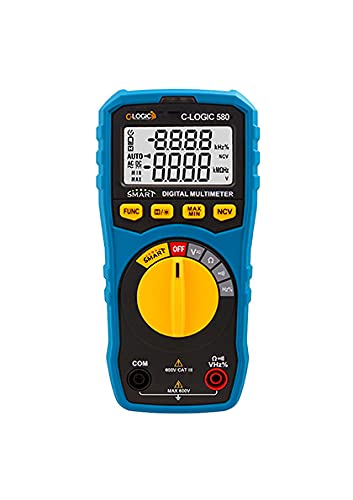
ചിത്രം 1: മുൻഭാഗം view of the C-LOGIC 580 Smart Digital Multimeter, showing the display, rotary switch, function buttons, and input jacks (COM and VHz%). The display shows "-8.8.8.8" and "0.0.0.0" with indicators for AUTO, AC/DC, kHz%, NCV, MAX, MIN, and V. The rotary switch is set to OFF. The input jacks are labeled "COM" and "VHz%".
6. പ്രവർത്തന നിർദ്ദേശങ്ങൾ
6.1 പവർ ഓൺ/ഓഫ്
To power on the multimeter, rotate the central yellow dial from the "OFF" position to any desired measurement function. To power off, rotate the dial back to "OFF".
6.2 Smart Measurement Mode
The C-LOGIC 580 features a smart mode that automatically identifies the type of measurement (e.g., AC voltagഇ, ഡിസി വോളിയംtage, resistance) when the leads are connected to a circuit. This simplifies operation by eliminating the need to manually select the measurement type.
6.3 ഫംഗ്ഷൻ ബട്ടണുകൾ
The multimeter includes several function buttons below the display:
- FUNC: Used to cycle through different measurement modes within a single rotary switch setting (e.g., AC/DC voltage, resistance/continuity).
- (Diode/Continuity): Activates diode test or continuity check.
- പരമാവധി/മിനിറ്റ്: Toggles between maximum and minimum value hold during a measurement.
- NCV: Activates Non-Contact Voltagഇ കണ്ടെത്തൽ.
6.4 അടിസ്ഥാന അളവുകൾ
വാല്യംtagഇ മെഷർമെന്റ് (എസി/ഡിസി):
- Set the rotary switch to the 'V' position.
- Connect the black test lead to the 'COM' jack and the red test lead to the 'VHz%' jack.
- Connect the test leads in parallel to the circuit or component to be measured.
- The multimeter will automatically detect AC or DC voltage. Use the FUNC button if manual selection is needed.
പ്രതിരോധം അളക്കൽ:
- Set the rotary switch to the 'Ω' position.
- Connect the black test lead to the 'COM' jack and the red test lead to the 'VHz%' jack.
- പ്രതിരോധം അളക്കുന്നതിന് മുമ്പ് സർക്യൂട്ട് ഡീ-എനർജൈസ് ചെയ്തിട്ടുണ്ടെന്ന് ഉറപ്പാക്കുക.
- അളക്കേണ്ട ഘടകത്തിലുടനീളം ടെസ്റ്റ് ലീഡുകൾ ബന്ധിപ്പിക്കുക.
തുടർച്ച പരിശോധന:
- Set the rotary switch to the 'Ω' position.
- അമർത്തുക (Diode/Continuity) button to select continuity mode.
- Connect the test leads across the circuit or component. A beep indicates continuity.
നോൺ-കോൺടാക്റ്റ് വോളിയംtage (NCV) കണ്ടെത്തൽ:
- റോട്ടറി സ്വിച്ച് 'NCV' സ്ഥാനത്തേക്ക് സജ്ജമാക്കുക.
- Move the top part of the multimeter near a live conductor. The device will indicate the presence of AC voltagനേരിട്ട് ബന്ധപ്പെടാതെ ഇ.
7. പരിപാലനം
7.1 വൃത്തിയാക്കൽ
മൾട്ടിമീറ്റർ c തുടയ്ക്കുകasinപരസ്യത്തോടുകൂടിയ ജിamp തുണിയും നേരിയ ഡിറ്റർജന്റും. ഉരച്ചിലുകളോ ലായകങ്ങളോ ഉപയോഗിക്കരുത്. സൂക്ഷിക്കുന്നതിനോ ഉപയോഗിക്കുന്നതിനോ മുമ്പ് ഉപകരണം ഉണങ്ങിയെന്ന് ഉറപ്പാക്കുക.
7.2 ബാറ്ററി മാറ്റിസ്ഥാപിക്കൽ
When the low battery indicator appears on the display, replace the batteries promptly to ensure accurate readings. Follow the battery installation steps in Section 5.1.
7.3 സംഭരണം
മൾട്ടിമീറ്റർ നേരിട്ട് സൂര്യപ്രകാശത്തിൽ നിന്നും കടുത്ത താപനിലയിൽ നിന്നും അകന്ന് തണുത്തതും വരണ്ടതുമായ സ്ഥലത്ത് സൂക്ഷിക്കുക. കൂടുതൽ നേരം സൂക്ഷിക്കുകയാണെങ്കിൽ, ചോർച്ച തടയാൻ ബാറ്ററികൾ നീക്കം ചെയ്യുക.
8. പ്രശ്നപരിഹാരം
| പ്രശ്നം | സാധ്യമായ കാരണം | പരിഹാരം |
|---|---|---|
| Multimeter does not power on. | ഡെഡ് അല്ലെങ്കിൽ തെറ്റായി ഇൻസ്റ്റാൾ ചെയ്ത ബാറ്ററികൾ. | ബാറ്ററി പോളാരിറ്റി പരിശോധിക്കുക അല്ലെങ്കിൽ ബാറ്ററികൾ മാറ്റിസ്ഥാപിക്കുക. |
| കൃത്യമല്ലാത്ത വായനകൾ. | Incorrect function selected; poor test lead connection; low battery. | Ensure correct function is selected (if not in smart mode); check test lead connections; replace batteries. |
| No continuity beep. | Circuit is open; continuity mode not selected. | Verify circuit integrity; press FUNC button to select continuity mode. |
9 സ്പെസിഫിക്കേഷനുകൾ
| പരാമീറ്റർ | വിശദാംശങ്ങൾ |
|---|---|
| ബ്രാൻഡ് | സി-ലോജിക് |
| മോഡൽ | 580 |
| പവർ ഉറവിടം | ബാറ്ററി പവർ |
| അളക്കൽ തരം | മൾട്ടിമീറ്റർ |
| നിർമ്മാതാവ് | സി-ലോജിക് |
| ASIN | B0967VMK1W |
| യു.പി.സി | 810053671603 |
| ആദ്യ തീയതി ലഭ്യമാണ് | മെയ് 31, 2021 |
10. വാറൻ്റിയും പിന്തുണയും
For warranty information or technical support regarding your C-LOGIC 580 Smart Digital Multimeter, please contact C-LOGIC customer service. Refer to the product packaging or the official C-LOGIC webബന്ധപ്പെടാനുള്ള വിശദാംശങ്ങൾക്കുള്ള സൈറ്റ്.
Note: Specific warranty terms may vary by region and retailer. Please retain your proof of purchase.


