ആമുഖം
Thank you for choosing Redzeo MDots Wireless Earbuds. This manual provides detailed instructions on how to set up, operate, maintain, and troubleshoot your new earbuds. Please read this manual carefully before use to ensure optimal performance and longevity of your device.
പാക്കേജ് ഉള്ളടക്കം
- Redzeo MDots Wireless Earbuds (Left and Right)
- വയർലെസ് ചാർജിംഗ് കേസ്
- യുഎസ്ബി ചാർജിംഗ് കേബിൾ
- ഒന്നിലധികം വലുപ്പത്തിലുള്ള ഇയർടിപ്പുകൾ (S/M/L)
- Multiple Sizes of Earwings (S/M/L)
- ഉപയോക്തൃ മാനുവൽ
സജ്ജമാക്കുക
1. പ്രാരംഭ ചാർജിംഗ്
ആദ്യ ഉപയോഗത്തിന് മുമ്പ്, ചാർജിംഗ് കെയ്സും ഇയർബഡുകളും പൂർണ്ണമായും ചാർജ് ചെയ്യുക.
- ഇയർബഡുകൾ ചാർജിംഗ് കേസിൽ വയ്ക്കുക. അവ അവയുടെ സ്ലോട്ടുകളിൽ ശരിയായി സ്ഥാപിച്ചിട്ടുണ്ടെന്ന് ഉറപ്പാക്കുക.
- USB ചാർജിംഗ് കേബിൾ കേസിലെ ചാർജിംഗ് പോർട്ടിലേക്കും മറ്റേ അറ്റം ഒരു USB പവർ സ്രോതസ്സിലേക്കും (ഉദാ: കമ്പ്യൂട്ടർ, വാൾ അഡാപ്റ്റർ) ബന്ധിപ്പിക്കുക.
- The indicator light on the charging case will show charging status. A full charge for the case takes approximately 2.0 hours. The earbuds provide 4.0 hours of playback per charge, and the case provides up to 4 full charges, totaling 20 hours of enjoyment.

Image: The Redzeo MDots earbuds and charging case, illustrating the 20 hours total playtime with the case, 4.0 hours playback per earbud charge, and 2.0 hours to fully charge the case.
2. നിങ്ങളുടെ ഉപകരണവുമായി ജോടിയാക്കുന്നു
The earbuds automatically enter pairing mode when taken out of the charging case.
- ചാർജിംഗ് കെയ്സ് തുറന്ന് രണ്ട് ഇയർബഡുകളും നീക്കം ചെയ്യുക. അവ സ്വയമേവ ഓണാകുകയും പരസ്പരം കണക്റ്റ് ചെയ്യാൻ ശ്രമിക്കുകയും ചെയ്യും.
- നിങ്ങളുടെ ബ്ലൂടൂത്ത് പ്രാപ്തമാക്കിയ ഉപകരണത്തിൽ (സ്മാർട്ട്ഫോൺ, ടാബ്ലെറ്റ് മുതലായവ), ബ്ലൂടൂത്ത് ക്രമീകരണങ്ങളിലേക്ക് പോകുക.
- ഇതിനായി തിരയുക new devices and select "Redzeo MDots" from the list.
- കണക്റ്റ് ചെയ്തുകഴിഞ്ഞാൽ, ഒരു സ്ഥിരീകരണ ടോൺ നിങ്ങൾ കേൾക്കും, ഇയർബഡുകൾ ഉപയോഗത്തിന് തയ്യാറാകും.

Image: The Redzeo MDots wireless earbuds resting inside their open charging case, ready for pairing or charging.
3. ഇയർബഡുകൾ ഘടിപ്പിക്കൽ
For optimal sound quality and comfort, choose the correct size of eartips and earwings.
- Experiment with the different sizes of eartips (S/M/L) to find the best seal for your ear canal. A good seal is crucial for bass response and noise isolation.
- Select the appropriate earwings (S/M/L) that fit snugly into your ear's concha, providing stability during movement.
- Gently insert the earbuds into your ears and twist slightly until they feel secure and comfortable.
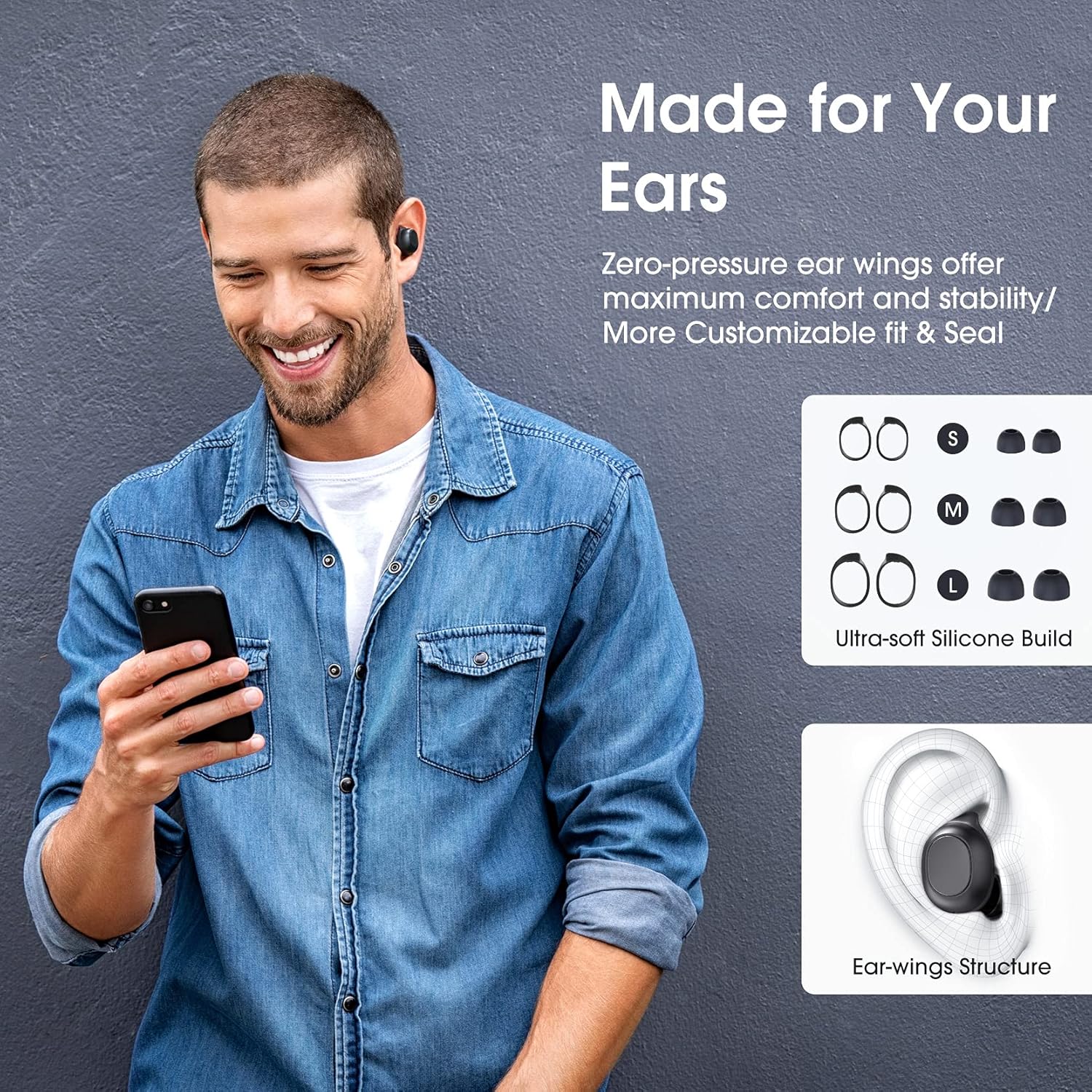
Image: A man wearing the Redzeo MDots earbuds, demonstrating their comfortable fit. The image also shows diagrams of various earwing sizes (S, M, L) and an illustration of how the earwing structure fits into the ear for maximum comfort and stability.
പ്രവർത്തന നിർദ്ദേശങ്ങൾ
ബട്ടൺ നിയന്ത്രണങ്ങൾ
The Redzeo MDots earbuds feature two easy-to-press buttons on each earbud for comprehensive control.
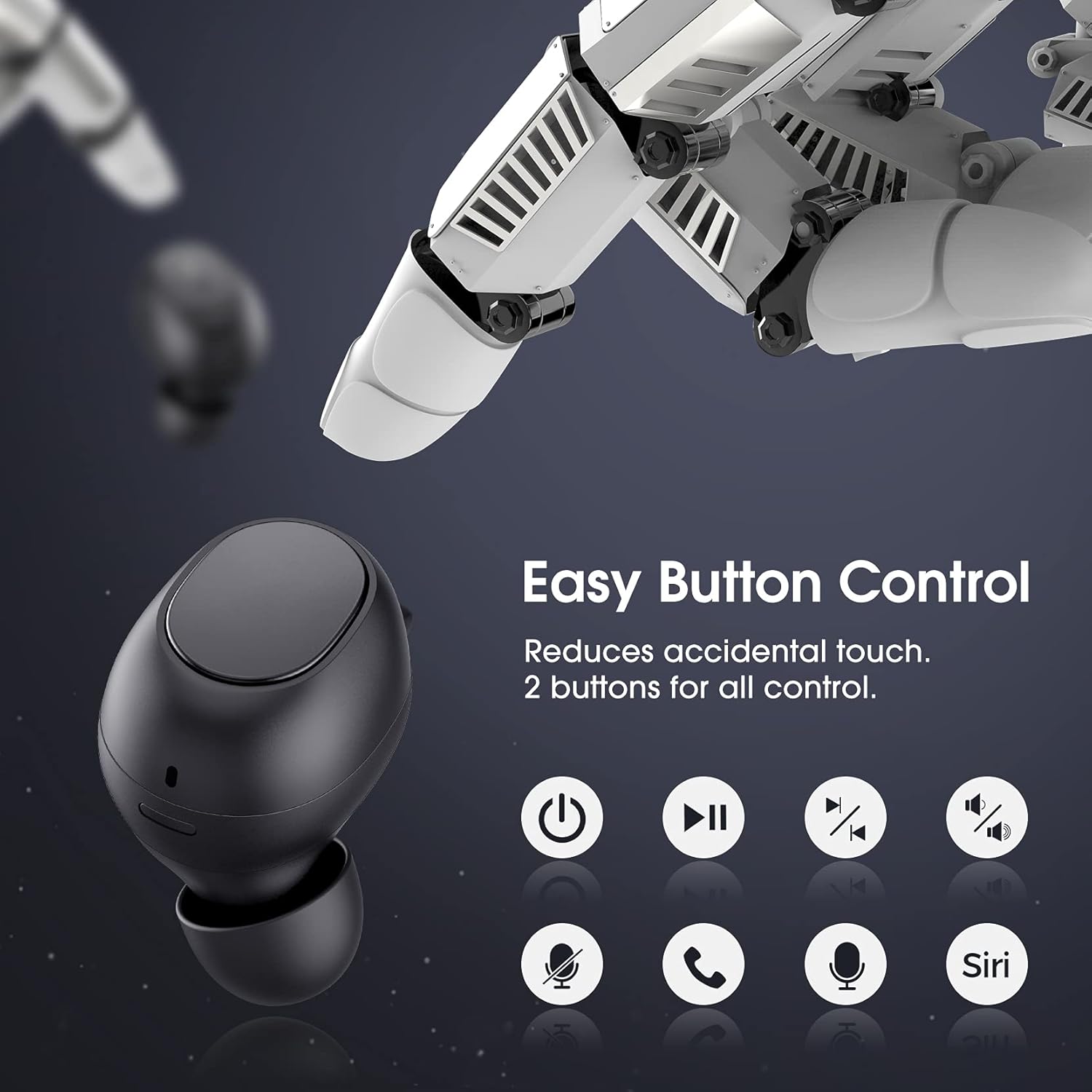
Image: A visual representation of the easy button controls on the Redzeo MDots earbuds, with icons indicating functions such as power on/off, play/pause, skip track, volume control, microphone mute, call answer/end, and voice assistant activation (Siri/Google Assistant).
| ഫംഗ്ഷൻ | ആക്ഷൻ |
|---|---|
| പവർ ഓൺ | ചാർജിംഗ് കേസിൽ നിന്ന് നീക്കം ചെയ്യുക |
| പവർ ഓഫ് | Place back into charging case |
| പ്ലേ/താൽക്കാലികമായി നിർത്തുക | Single press on either earbud |
| അടുത്ത ട്രാക്ക് | Double press on the Right earbud |
| മുമ്പത്തെ ട്രാക്ക് | Double press on the Left earbud |
| വോളിയം കൂട്ടുക | വലത് ഇയർബഡ് അമർത്തിപ്പിടിക്കുക |
| വോളിയം ഡൗൺ | ഇടതുവശത്തെ ഇയർബഡ് അമർത്തിപ്പിടിക്കുക |
| ഉത്തരം / കോൾ അവസാനിപ്പിക്കുക | Single press on either earbud |
| കോൾ നിരസിക്കുക | ഏതെങ്കിലും ഇയർബഡിൽ അമർത്തിപ്പിടിക്കുക |
| വോയ്സ് അസിസ്റ്റന്റ് (സിരി/ഗൂഗിൾ അസിസ്റ്റന്റ്) സജീവമാക്കുക | Triple press on either earbud |
Mono Mode and Twin Stereo Mode
The Redzeo MDots earbuds offer flexible listening options:
- മോണോ മോഡ്: Each earbud can be used independently. This allows you to leave one ear free to hear your surroundings while still enjoying audio. Simply take one earbud out of the case to use it in mono mode.
- ട്വിൻ സ്റ്റീരിയോ മോഡ്: Use both earbuds simultaneously for an immersive true wireless stereo sound experience. This mode is ideal for enjoying music or blocking out surrounding noise.

Image: A visual guide demonstrating the different listening modes: Right Mono Mode (using only the right earbud), Left Mono Mode (using only the left earbud to hear ambient sound), and Twin Stereo Mode (using both earbuds for immersive sound).
സൗണ്ട് ക്വാളിറ്റി
The MDots wireless earbuds deliver well-balanced sound with stereo bass. For the best audio experience, ensure you have selected the optimal eartips for a proper seal, which enhances bass and overall sound clarity.

Image: An exploded diagram illustrating the internal components of the Redzeo MDots earbud, highlighting the driver and acoustic structure responsible for delivering magical immersive sound with rich, high-quality audio.
മെയിൻ്റനൻസ്
വൃത്തിയാക്കൽ
പതിവായി വൃത്തിയാക്കുന്നത് ശബ്ദ നിലവാരവും ശുചിത്വവും നിലനിർത്താൻ സഹായിക്കുന്നു.
- ഇയർബഡുകളും ചാർജിംഗ് കെയ്സും തുടയ്ക്കാൻ മൃദുവായതും ഉണങ്ങിയതും ലിന്റ് രഹിതവുമായ ഒരു തുണി ഉപയോഗിക്കുക.
- For eartips, remove them from the earbuds and clean with a mild soap solution if necessary, then rinse thoroughly and dry completely before reattaching.
- ഇയർബഡ് മെഷിൽ നിന്ന് ഇയർവാക്സ് അല്ലെങ്കിൽ അവശിഷ്ടങ്ങൾ ഒരു ചെറിയ മൃദുവായ ബ്രഷ് അല്ലെങ്കിൽ കോട്ടൺ സ്വാബ് ഉപയോഗിച്ച് സൌമ്യമായി നീക്കം ചെയ്യുക.
സംഭരണം
ഇയർബഡുകൾ ഉപയോഗിക്കാത്തപ്പോൾ അവ സംരക്ഷിക്കാനും ചാർജ്ജ് ചെയ്ത് നിലനിർത്താനും എപ്പോഴും ചാർജിംഗ് കേസിൽ തന്നെ സൂക്ഷിക്കുക.
ജല പ്രതിരോധം (IPX6)
The Redzeo MDots earbuds feature an IPX6 waterproof nano-coating design, making them resistant to sweat, water splashes, and rain. They are suitable for strenuous exercise and all-weather conditions.

Image: The Redzeo MDots earbuds resting on a wet surface, visually representing their IPX6 waterproof capability, which provides water protection for daily use and resistance to sweat, water, and rain, making them ideal for running, yoga, and gym activities.
പ്രധാന കുറിപ്പ്: Do not use the earbuds for swimming or immerse them in heavy rain. The IPX6 rating protects against strong jets of water, but not continuous submersion.
ട്രബിൾഷൂട്ടിംഗ്
പൊതുവായ പ്രശ്നങ്ങളും പരിഹാരങ്ങളും
- ഉപകരണവുമായി ഇയർബഡുകൾ ജോടിയാക്കുന്നില്ല:
- നിങ്ങളുടെ ഉപകരണത്തിൽ ബ്ലൂടൂത്ത് പ്രവർത്തനക്ഷമമാക്കിയിട്ടുണ്ടെന്ന് ഉറപ്പാക്കുക.
- ഇയർബഡുകൾ ചാർജ്ജ് ചെയ്തിട്ടുണ്ടെന്ന് ഉറപ്പാക്കുക.
- Place earbuds back in the case, close it, wait a few seconds, then open and remove them to re-enter pairing mode.
- Forget/delete "Redzeo MDots" from your device's Bluetooth list and try pairing again.
- ഒരു ഇയർബഡ് മാത്രമേ പ്രവർത്തിക്കുന്നുള്ളൂ:
- രണ്ട് ഇയർബഡുകളും ചാർജ്ജ് ചെയ്തിട്ടുണ്ടെന്ന് ഉറപ്പാക്കുക.
- Place both earbuds back into the charging case, close the lid, and then open it again. This should force them to re-sync.
- പ്രശ്നം നിലനിൽക്കുകയാണെങ്കിൽ, ഇയർബഡുകൾ പുനഃസജ്ജമാക്കാൻ ശ്രമിക്കുക (നിർമ്മാതാവിന്റെ website or contact support for specific reset instructions if not detailed here).
- ശബ്ദമില്ല അല്ലെങ്കിൽ കുറഞ്ഞ ശബ്ദം:
- നിങ്ങളുടെ ഉപകരണത്തിലെയും ഇയർബഡുകളിലെയും വോളിയം ലെവൽ പരിശോധിക്കുക.
- ഇയർബഡുകൾ നിങ്ങളുടെ ഉപകരണവുമായി ശരിയായി ബന്ധിപ്പിച്ചിട്ടുണ്ടെന്ന് ഉറപ്പാക്കുക.
- Clean any debris from the earbud mesh that might be obstructing sound.
- Try different eartip sizes to ensure a proper seal in your ear.
- ചാർജിംഗ് കേസ് ചാർജുചെയ്യുന്നില്ല:
- ചാർജിംഗ് കേബിൾ കേസിലേക്കും പവർ സ്രോതസ്സിലേക്കും സുരക്ഷിതമായി ബന്ധിപ്പിച്ചിട്ടുണ്ടെന്ന് ഉറപ്പാക്കുക.
- മറ്റൊരു USB കേബിളോ പവർ അഡാപ്റ്ററോ പരീക്ഷിക്കുക.
- ചാർജിംഗ് പോർട്ടിൽ എന്തെങ്കിലും അവശിഷ്ടങ്ങൾ ഉണ്ടോ എന്ന് പരിശോധിക്കുക.
സ്പെസിഫിക്കേഷനുകൾ
| ഫീച്ചർ | വിശദാംശങ്ങൾ |
|---|---|
| മോഡൽ നമ്പർ | ബിഎച്ച് 510 എ |
| ബ്രാൻഡ് | റെഡ്സിയോ |
| കണക്റ്റിവിറ്റി ടെക്നോളജി | വയർലെസ്സ് (ബ്ലൂടൂത്ത് 5.0) |
| ചെവി പ്ലേസ്മെൻ്റ് | ചെവിയിൽ |
| ഫോം ഫാക്ടർ | ചെവിയിൽ |
| ഹെഡ്ഫോൺ ജാക്ക് | USB |
| നിറം | ഇളം കറുപ്പ് |
| മെറ്റീരിയൽ | പ്ലാസ്റ്റിക് |
| ഉൽപ്പന്ന അളവുകൾ | 6.35 x 2.49 x 1.98 സെ.മീ |
| ഇനത്തിൻ്റെ ഭാരം | 91 ഗ്രാം |
| വാട്ടർ റെസിസ്റ്റൻസ് റേറ്റിംഗ് | IPX6 |
| പ്ലേബാക്ക് സമയം (ഇയർബഡുകൾ) | 4 മണിക്കൂർ വരെ |
| ആകെ പ്ലേബാക്ക് സമയം (ചാർജിംഗ് കേസിനൊപ്പം) | 20 മണിക്കൂർ വരെ |
| ചാർജിംഗ് സമയം (കേസ്) | ഏകദേശം 2 മണിക്കൂർ |
| ഉൾപ്പെടുത്തിയ ഘടകങ്ങൾ | വയർലെസ് ചാർജിംഗ് കേസ് |
| ആദ്യ തീയതി ലഭ്യമാണ് | 31 മെയ് 2021 |
വാറൻ്റിയും പിന്തുണയും
Redzeo products are designed and manufactured to the highest quality standards. For information regarding warranty coverage, technical support, or customer service, please refer to the warranty card included in your product packaging or visit the official Redzeo webസൈറ്റ്. ഏതെങ്കിലും വാറന്റി ക്ലെയിമുകൾക്കായി നിങ്ങളുടെ വാങ്ങലിന്റെ തെളിവ് സൂക്ഷിക്കുക.
For further assistance, you may contact Redzeo customer support through the contact information provided on their official webസൈറ്റ്.