1. ആമുഖം
This manual provides detailed instructions for the installation, operation, and maintenance of your SDTNOVA HD SDI Camera, model SDI2812. This 2MP 1080P digital CCTV security camera is designed for various surveillance applications, offering high-definition video output and a manual varifocal lens for flexible viewകോണുകൾ.
ശരിയായ സജ്ജീകരണവും ഒപ്റ്റിമൽ പ്രകടനവും ഉറപ്പാക്കാൻ ഉൽപ്പന്നം ഉപയോഗിക്കുന്നതിന് മുമ്പ് ദയവായി ഈ മാനുവൽ നന്നായി വായിക്കുക.
2. ഉൽപ്പന്ന സവിശേഷതകൾ
- ഉയർന്ന റെസല്യൂഷൻ സെൻസർ: Equipped with a 1/2.8 inch CMOS image sensor for clear 2MP 1080P video output.
- ഡ്യുവൽ വീഡിയോ ഔട്ട്പുട്ട്: Provides both HD-SDI 1080P and CVBS video outputs for versatile connectivity.
- Manual Varifocal Lens: Features a 2.8-12mm manual varifocal HD 3MP lens with CS mount, allowing adjustment of zoom and focus.
- ഹൈ ഡെഫനിഷൻ: Delivers 1080P high-definition image quality with an effective resolution of 1920x1080, ensuring real-time transmission without latency or compression loss.
- OSD മെനു: On-Screen Display (OSD) menu for configuration, including Digital Wide Dynamic Range (D-WDR) and Double Scan Wide Dynamic Range (DS-WDR) settings.
- നീണ്ടുനിൽക്കുന്ന നിർമ്മാണം: Housed in a mini metal shell with double 1/4 inch screw threads for secure mounting.
- Color Imaging: Designed for color video capture; does not include night vision capabilities.
3. പാക്കേജ് ഉള്ളടക്കം
നിങ്ങളുടെ പാക്കേജിൽ എല്ലാ ഇനങ്ങളും ഉണ്ടെന്ന് ദയവായി പരിശോധിക്കുക:
- SDTNOVA HD SDI Camera (Model: SDI2812)
- എസ്ഡിഐ കേബിൾ
- Power Adapter (DC12V 1A) - Note: While typically included, some packages may offer the camera without a power adapter. Please check your specific product listing.
4. സജ്ജീകരണ ഗൈഡ്
4.1 ക്യാമറ കഴിഞ്ഞുview
Familiarize yourself with the camera's components and connections.

ചിത്രം 1: മുന്നിലും വശത്തും view of the SDTNOVA HD SDI Camera, showing the manual varifocal lens.
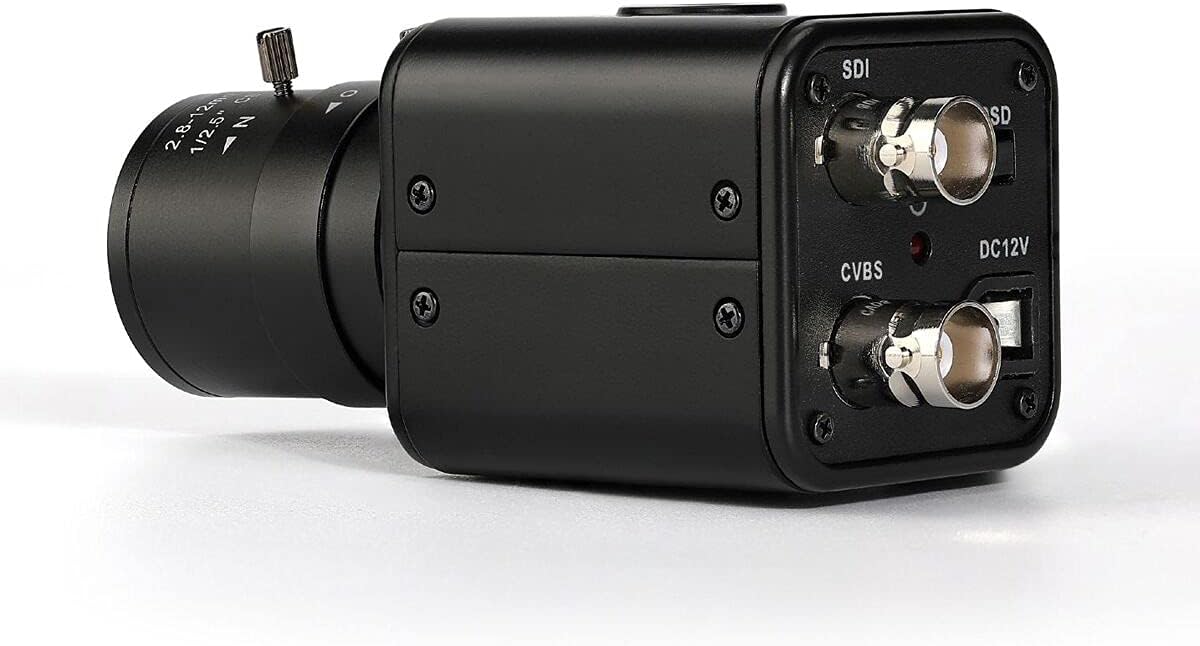
ചിത്രം 2: പിൻഭാഗം view of the camera, displaying the SDI and CVBS output ports, DC12V power input, and OSD menu control button.

ചിത്രം 3: Close-up of the camera's rear panel, clearly labeling the HD-SDI Output, CVBS Output, DC12V power input, and OSD Menu Control button.
4.2 ക്യാമറ മൗണ്ടിംഗ്
The camera features double 1/4 inch screw threads for mounting. Secure the camera to a stable surface or bracket using compatible screws (not included).

ചിത്രം 4: Camera dimensions and location of the 1/4 inch screw thread for mounting.
4.3 ക്യാമറ കണക്ട് ചെയ്യുന്നു
- പവർ കണക്ഷൻ: Connect the DC12V 1A power adapter (if included) to the DC12V input port on the camera's rear panel.
- വീഡിയോ ഔട്ട്പുട്ട്:
- For HD-SDI output, connect an SDI cable to the HD-SDI OUTPUT port and to your SDI-compatible monitor or recording device.
- For CVBS (composite video) output, connect a BNC cable to the CVBS OUTPUT port and to a CVBS-compatible monitor or device. This output is often useful for initial setup and OSD menu access if the SDI signal is not yet configured.
5. പ്രവർത്തന നിർദ്ദേശങ്ങൾ
5.1 Lens Adjustment (Manual Varifocal)
The camera features a 2.8-12mm manual varifocal lens. To adjust the field of view and focus:
- സൂം അഡ്ജസ്റ്റ്മെന്റ്: Rotate the zoom ring on the lens to achieve the desired focal length (2.8mm for wide view, 12mm for narrow view).
- ഫോക്കസ് അഡ്ജസ്റ്റ്മെന്റ്: After setting the zoom, rotate the focus ring until the image on your monitor is sharp and clear.
5.2 OSD മെനു നിയന്ത്രണം
The On-Screen Display (OSD) menu allows you to configure various camera settings. Access the OSD menu using the joystick button located on the camera's rear panel (refer to Figure 2 and 3).
- അമർത്തുക: Enter/Confirm selection.
- മുകളിലേക്ക്/താഴേക്ക്: മെനു ഓപ്ഷനുകളിലൂടെ നാവിഗേറ്റ് ചെയ്യുക.
- ഇടത്/വലത്: Adjust values or navigate sub-menus.
Key settings accessible via the OSD menu include:
- വീഡിയോ ഫോർമാറ്റ്: Adjust resolution (e.g., 1080P) and frame rate (e.g., 25 FPS, 30 FPS). Ensure this matches your display device's capabilities.
- സമ്പർക്കം: Adjust brightness, shutter speed, and gain.
- വൈറ്റ് ബാലൻസ്: Set automatic or manual white balance to ensure accurate color reproduction.
- ബാക്ക്ലൈറ്റ് നഷ്ടപരിഹാരം (BLC): Compensates for strong backlighting.
- വൈഡ് ഡൈനാമിക് റേഞ്ച് (WDR): Digital WDR (D-WDR) or Double Scan WDR (DS-WDR) for improved image quality in scenes with high contrast.
- ചിത്ര ക്രമീകരണങ്ങൾ: Adjust sharpness, contrast, saturation, etc.
6. പരിപാലനം
- വൃത്തിയാക്കൽ: ക്യാമറ ബോഡി വൃത്തിയാക്കാൻ മൃദുവായതും ഉണങ്ങിയതുമായ തുണി ഉപയോഗിക്കുക. ലെൻസിന്, പോറലുകൾ ഒഴിവാക്കാൻ ഒരു പ്രത്യേക ലെൻസ് ക്ലീനിംഗ് തുണിയും ലായനിയും ഉപയോഗിക്കുക.
- പരിസ്ഥിതി വ്യവസ്ഥകൾ: Ensure the camera operates within the specified temperature range (-10℃ to 60℃). Avoid exposing the camera to extreme moisture, dust, or direct sunlight for prolonged periods.
- കേബിൾ മാനേജുമെന്റ്: എല്ലാ കേബിൾ കണക്ഷനുകളും സുരക്ഷിതമാണെന്നും കേടുപാടുകൾ സംഭവിച്ചിട്ടില്ലെന്നും ഉറപ്പാക്കാൻ ഇടയ്ക്കിടെ പരിശോധിക്കുക.
7. പ്രശ്നപരിഹാരം
| പ്രശ്നം | സാധ്യമായ കാരണം | പരിഹാരം |
|---|---|---|
| No image/signal on monitor (SDI output) | Incorrect video format/frame rate setting in OSD menu; faulty cable; power issue. | 1. Ensure power is connected. 2. Check SDI cable connection. 3. If no SDI signal, connect via CVBS output to access OSD menu. Navigate to System > Frame Rate and adjust to a compatible setting (e.g., 1080_30I or 1080_30P). |
| OSD menu not visible | Monitor not compatible with current SDI output settings; SDI cable issue. | Connect the camera's CVBS output to a standard composite video monitor to access and configure the OSD menu. |
| ചിത്രം മങ്ങിയതാണ്/ഫോക്കസിന് പുറത്താണ് | Lens focus not adjusted correctly. | Manually adjust the focus ring on the lens until the image is sharp. |
| Poor color reproduction/grainy image | Insufficient lighting; incorrect white balance or exposure settings. | 1. Ensure adequate lighting in the surveillance area. 2. Adjust White Balance and Exposure settings via the OSD menu. 3. Note that some chromatic aberration may be present depending on lighting conditions and lens characteristics. |
| ക്യാമറ ഓണാക്കുന്നില്ല | No power; faulty power adapter; loose connection. | 1. Verify the power adapter is correctly connected to a working power outlet and the camera. 2. Ensure the power adapter is DC12V 1A. 3. Test with a different compatible power adapter if available. |
8 സ്പെസിഫിക്കേഷനുകൾ
| ഫീച്ചർ | വിശദാംശങ്ങൾ |
|---|---|
| മോഡൽ | SDI2812 |
| ഇമേജ് സെൻസർ | 1/2.8 ഇഞ്ച് CMOS സെൻസർ |
| ഫലപ്രദമായ പിക്സലുകൾ | 1920(H) x 1080(V) / 2MP |
| റെസലൂഷൻ | 1080P @ 25(PAL) / 30(NTSC) FPS |
| ലെൻസ് | 2.8-12mm Manual Varifocal HD 3MP Lens (CS Mount) |
| ന്റെ ആംഗിൾ View | 42° ~ 110° |
| വീഡിയോ ഔട്ട്പുട്ട് | HD-SDI, CVBS |
| വൈദ്യുതി വിതരണം | DC12V 1A |
| അളവുകൾ | 3.54 x 1.73 x 1.73 ഇഞ്ച് (90 x 44 x 44 മിമി) |
| ഭാരം | 6.9 ഔൺസ് (ഏകദേശം 195 ഗ്രാം) |
| പ്രവർത്തന താപനില | -10℃ ~ 60℃ |
| പ്രത്യേക സവിശേഷതകൾ | Image Adjustment, Motion Detection (via OSD), Portable |
9. വാറൻ്റിയും പിന്തുണയും
For warranty information, technical support, or service inquiries, please refer to the documentation provided with your purchase or contact SDTNOVA customer service directly. Contact details can typically be found on the manufacturer's official webസൈറ്റ് അല്ലെങ്കിൽ നിങ്ങളുടെ വാങ്ങൽ പോയിന്റ് വഴി.
വാറൻ്റി ക്ലെയിമുകൾക്കായി നിങ്ങളുടെ വാങ്ങിയതിൻ്റെ തെളിവ് സൂക്ഷിക്കുക.