1. ആമുഖം
This manual provides detailed instructions for the setup, operation, and maintenance of your JADENS Thermal Shipping Label Printer, model JD-168. Please read this manual thoroughly before using the printer to ensure proper functionality and to maximize its lifespan.
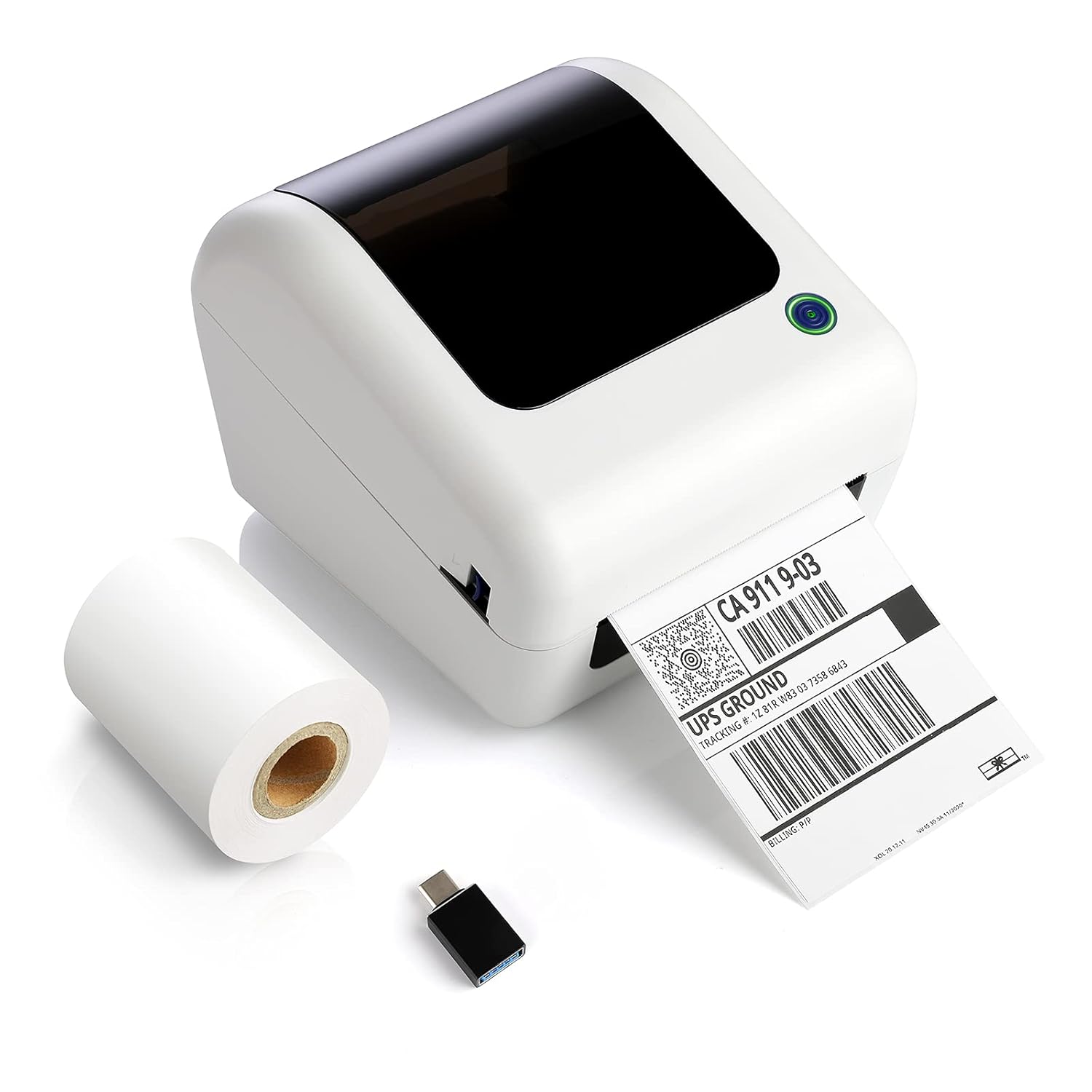
Image: The JADENS Thermal Shipping Label Printer JD-168, shown with a printed shipping label emerging from the front slot and a roll of blank thermal labels next to it. A USB adapter is also visible.
2. പാക്കേജ് ഉള്ളടക്കം
അൺപാക്ക് ചെയ്യുമ്പോൾ, താഴെ ലിസ്റ്റ് ചെയ്തിരിക്കുന്ന എല്ലാ ഇനങ്ങളും അവിടെയുണ്ടെന്ന് ദയവായി ഉറപ്പാക്കുക:
- JADENS Thermal Shipping Label Printer (Model JD-168)
- പവർ അഡാപ്റ്റർ
- USB കേബിൾ
- U-disk (containing drivers and instruction videos)
- ദ്രുത ആരംഭ ഗൈഡ്
- 1 Roll of Thermal Labels (100 sheets)
3. ഉൽപ്പന്ന സവിശേഷതകൾ
- നേരിട്ടുള്ള താപ പ്രിന്റിംഗ്: മഷിയോ ടോണറോ ആവശ്യമില്ല.
- ഹൈ-സ്പീഡ് പ്രിന്റിംഗ്: Up to 150mm/s (approximately 72 labels per minute).
- വൈഡ് ലേബൽ അനുയോജ്യത: Supports thermal direct labels with widths from 1.57" to 4.1".
- Automatic Label Identification: Automatically detects label properties for accurate printing.
- Built-in Paper Bin: Space-saving design for both roll and fan-fold labels.
- Broad Platform Compatibility: Works with major shipping and e-commerce platforms.

Image: An infographic showcasing the JADENS Thermal Label Printer's features, including built-in bin, easy operation, great compatibility, fast printing, high resolution, automatic label identification, multiple paper sizes, and no ink/toner requirement.
4. System Requirements & Compatibility
The JADENS JD-168 printer is designed for use with specific operating systems and platforms:
- ഓപ്പറേറ്റിംഗ് സിസ്റ്റങ്ങൾ: Windows 8 or later, Mac OS X v10.9 or later.
- കണക്റ്റിവിറ്റി: USB direct connection.
- പിന്തുണയ്ക്കുന്ന പ്ലാറ്റ്ഫോമുകൾ: Compatible with most major shipping and e-commerce platforms such as eBay, Amazon, Etsy, Pirateship, Endicia, ShipStation, Ordoro, and Shopify.
- Unsupported Systems: This printer does അല്ല support Chromebook or Linux operating systems. Bluetooth connectivity is also അല്ല പിന്തുണച്ചു.

Image: The JADENS printer connected via USB to a laptop, with icons indicating compatibility with Windows 7/8/10 and Mac OS X v10.9 or later. A warning states that Chromebook and Linux are not supported.

Image: A JADENS printer on a desk with Mac and Windows logos, emphasizing compatibility. Text clearly states "Support Windows (8,10 or later), MAC" and "Not Support Chromebook" and "Not Support Bluetooth."
5. സജ്ജീകരണം
5.1 പ്രിന്റർ ബന്ധിപ്പിക്കുന്നു
- പ്രിന്റർ ഒരു സ്ഥിരതയുള്ളതും പരന്നതുമായ പ്രതലത്തിൽ സ്ഥാപിക്കുക.
- Connect the power adapter to the printer's power port and then plug it into an electrical outlet.
- Connect the USB cable to the printer's USB port and the other end to your computer.
5.2 ഡ്രൈവർ ഇൻസ്റ്റലേഷൻ
It is crucial to install the printer driver മുമ്പ് attempting to print.
- Insert the provided U-disk into your computer's USB port.
- ഇൻസ്റ്റാളർ കണ്ടെത്തി പ്രവർത്തിപ്പിക്കുക file for your operating system (Windows or Mac) from the U-disk.
- ഡ്രൈവർ ഇൻസ്റ്റലേഷൻ പൂർത്തിയാക്കാൻ ഓൺ-സ്ക്രീൻ നിർദ്ദേശങ്ങൾ പാലിക്കുക.
- Instructional videos are also available on the U-disk for visual guidance.

Image: A JADENS printer connected to a laptop via USB, with a visual cue suggesting a straightforward installation process.
5.3 ലേബലുകൾ ലോഡുചെയ്യുന്നു
The JD-168 printer supports both roll and fan-fold thermal labels.
- പ്രിന്ററിന്റെ മുകളിലെ കവർ തുറക്കുക.
- For roll labels: Place the label roll into the built-in paper bin, ensuring the labels feed from the bottom and the printable side faces upwards.
- For fan-fold labels: Feed the stack of labels from the rear slot into the printer, ensuring the printable side faces upwards.
- Adjust the label guides to fit the width of your labels snugly, without creasinഅവരെ ജി.
- മുകളിലെ കവർ അടയ്ക്കുക. പ്രിന്റർ ലേബൽ വലുപ്പം സ്വയമേവ കണ്ടെത്തി കാലിബ്രേറ്റ് ചെയ്യും.

Image: An open JADENS printer revealing the internal mechanism with a roll of thermal labels correctly loaded into the built-in paper bin. Label guides are visible, and an arrow indicates automatic position detection.
6. പ്രവർത്തന നിർദ്ദേശങ്ങൾ
6.1 പവർ ഓൺ/ഓഫ്
- പവർ ഓൺ: Press the power button located on the side or front of the printer. The indicator light will illuminate.
- പവർ ഓഫ്: ഇൻഡിക്കേറ്റർ ലൈറ്റ് ഓഫ് ആകുന്നതുവരെ പവർ ബട്ടൺ അമർത്തിപ്പിടിക്കുക.
6.2 Printing a Label
- പ്രിന്റർ ഓണാക്കിയിട്ടുണ്ടെന്നും നിങ്ങളുടെ കമ്പ്യൂട്ടറുമായി ബന്ധിപ്പിച്ചിട്ടുണ്ടെന്നും ഉറപ്പാക്കുക.
- Open the document or application from which you wish to print (e.g., shipping software, PDF viewer).
- Select the JADENS JD-168 printer from your printer options.
- Verify print settings, especially label size, to match your loaded labels. For best quality, open PDF files with Adobe printing software.
- Initiate the print command. The printer will feed and print the label.

Image: The JADENS printer actively printing a label, with text indicating "150mm/s High Speed Printing" and "72 Labels/one minute," highlighting its efficiency.
6.3 ഓട്ടോമാറ്റിക് ലേബൽ ഐഡന്റിഫിക്കേഷൻ
The JD-168 features automatic label identification. After loading labels and closing the cover, the printer will briefly feed a label to detect its size and type, ensuring correct alignment and preventing misprints.

Image: The JADENS printer with a label partially fed, illustrating the automatic label identification feature with a blue light indicating the process.
6.4 Label Size Guidelines
The printer supports thermal labels with a width range of 1.57 inches (40mm) to 4.1 inches (104mm). Ensure your labels fall within this range for optimal performance.

Image: The JADENS printer with a label emerging, visually indicating the supported label width range of 1.57" to 4.1". Below, examples of various label types are shown, including nutrition facts, shipping, address, and ASIN code labels.
7. പരിപാലനം
7.1 പ്രിന്റ് ഹെഡ് വൃത്തിയാക്കൽ
Regular cleaning of the print head ensures consistent print quality and extends the printer's life. Clean the print head if print quality degrades or after every few rolls of labels.
- പ്രിന്റർ ഓഫാക്കി പവർ കോർഡ് അൺപ്ലഗ് ചെയ്യുക.
- മുകളിലെ കവർ തുറക്കുക.
- Gently wipe the print head surface with an alcohol swab or a soft cloth lightly dampഐസോപ്രോപൈൽ ആൽക്കഹോൾ ഉപയോഗിച്ചാണ് നിർവഹിച്ചത്.
- കവർ അടച്ച് പ്രിന്റർ ഓണാക്കുന്നതിന് മുമ്പ് പ്രിന്റ് ഹെഡ് പൂർണ്ണമായും ഉണങ്ങാൻ അനുവദിക്കുക.

ചിത്രം: വിശദമായ ഒരു ചിത്രം view of the JADENS printer's internal components, specifically highlighting the thermal print head. Text indicates "Thermal Print Head No Need of Ink Ribbon or Toner."
7.2 പൊതു പരിചരണം
- പ്രിന്റർ വൃത്തിയുള്ളതും പൊടി രഹിതവുമായ ഒരു സ്ഥലത്ത് സൂക്ഷിക്കുക.
- Avoid exposing the printer to direct sunlight, extreme temperatures, or high humidity.
- Do not use abrasive cleaners or solvents on the printer's exterior. Use a soft, damp വൃത്തിയാക്കാനുള്ള തുണി.
8. പ്രശ്നപരിഹാരം
If you encounter issues with your JADENS JD-168 printer, refer to the following common problems and solutions:
| പ്രശ്നം | സാധ്യമായ കാരണം | പരിഹാരം |
|---|---|---|
| പ്രിന്റർ പ്രതികരിക്കുന്നില്ല | Power cable loose, USB cable disconnected, printer off. | Check power and USB connections. Ensure printer is powered on. |
| ലേബലുകൾ പ്രിന്റ് ചെയ്യുന്നില്ല | No labels loaded, labels loaded incorrectly, driver not installed. | Load labels correctly. Install printer driver. |
| Poor print quality (faded, blurry) | Print head dirty, incorrect label type, low-quality image. | Clean the print head. Ensure you are using thermal direct labels. Use high-resolution images. |
| Labels feeding incorrectly or skipping | Label guides not adjusted, labels jammed, automatic identification failed. | Adjust label guides. Clear any jams. Power cycle the printer to re-initiate auto-identification. |
| കമ്പ്യൂട്ടർ പ്രിന്റർ തിരിച്ചറിഞ്ഞില്ല. | Driver not installed or corrupted, faulty USB cable. | Reinstall the driver. Try a different USB port or cable. |
If these solutions do not resolve your issue, please contact JADENS customer support.
9 സ്പെസിഫിക്കേഷനുകൾ
| ഫീച്ചർ | വിശദാംശങ്ങൾ |
|---|---|
| മോഡൽ നമ്പർ | JD-168 |
| പ്രിൻ്റിംഗ് ടെക്നോളജി | നേരിട്ടുള്ള തെർമൽ |
| കണക്റ്റിവിറ്റി | USB |
| പ്രിൻ്റ് വേഗത | 150 mm/s (പരമാവധി) |
| പ്രിൻ്റർ ഔട്ട്പുട്ട് | മോണോക്രോം |
| ലേബൽ വീതി | 1.57" - 4.1" (40 മിമി - 104 മിമി) |
| ഉൽപ്പന്ന അളവുകൾ (D x W x H) | 6.1" x 7.87" x 6.69" (15.5സെ.മീ x 20സെ.മീ x 17സെ.മീ) |
| ഭാരം | 4.52 പൗണ്ട് (2.05 കി.ഗ്രാം) |
| നിറം | ഓഫ് വൈറ്റ് |
10. വാറൻ്റി വിവരങ്ങൾ
Specific warranty details for the JADENS Thermal Shipping Label Printer JD-168 are not provided in the product information. Please refer to the warranty card included with your product or visit the official JADENS webഏറ്റവും പുതിയ വാറന്റി നയത്തിനും രജിസ്ട്രേഷൻ വിവരങ്ങൾക്കുമുള്ള സൈറ്റ്.
11. ഉപഭോക്തൃ പിന്തുണ
For technical assistance, troubleshooting, or any inquiries regarding your JADENS Thermal Shipping Label Printer, please contact our customer support team:
- ഇമെയിൽ: (Please refer to your product packaging or JADENS website for email address)
- ഫോൺ: (Please refer to your product packaging or JADENS website for phone number)
- Webസൈറ്റ്: JADENS Official Store on Amazon (for general information and support resources)
- Remote control assistance is also available for certain technical issues.
Our support team is available to assist you with any questions or concerns.
12. Product Application Exampലെസ്
The JADENS JD-168 printer is versatile and suitable for various applications:
- ഹോം ഓഫീസ്: Efficiently print shipping labels for personal use or small online sales.
- ചെറുകിട ബിസിനസ്: Ideal for e-commerce businesses needing to print shipping labels for platforms like Amazon, eBay, Etsy, and Shopify.
- Warehouse & Logistics: Suitable for printing warehouse labels, barcode labels, and product identification labels.

Image: A collage depicting four common usage scenarios for the JADENS thermal label printer: home office, shipping label creation, small business operations, and warehouse label printing.


