1. ആമുഖം
This manual provides essential information for the safe and effective use of your Datalogic Memor K Spare Battery (3800MAH). Please read it thoroughly before installation and operation to ensure proper functionality and to prevent potential hazards. This battery is designed specifically for compatible Datalogic Memor K devices.
2 സുരക്ഷാ വിവരങ്ങൾ
Your Datalogic Memor K Spare Battery is a high-performance lithium-polymer battery. Adherence to the following safety guidelines is crucial for preventing injury, damage, or malfunction.
- മുന്നറിയിപ്പ്: പരിക്ക് തടയാൻ, ചെയ്യരുത് disassemble, puncture, crush, heat, or burn the battery.
- ഉപയോഗിക്കുക മാത്രം Datalogic-authorized chargers and accessories.
- Never attempt to disassemble or modify the battery yourself.
- ബാറ്ററി ടെർമിനലുകളുടെ ഷോർട്ട് സർക്യൂട്ട് ഒഴിവാക്കുക.
- Dispose of the battery correctly according to local regulations. Do not dispose of in general waste.
- Do not expose the battery to high temperatures or direct flame, as this could cause an explosion.
- If the battery is immersed in water or becomes wet, discontinue use immediately.
- If the battery appears damaged, swollen, or leaks, discontinue use immediately and dispose of it properly.
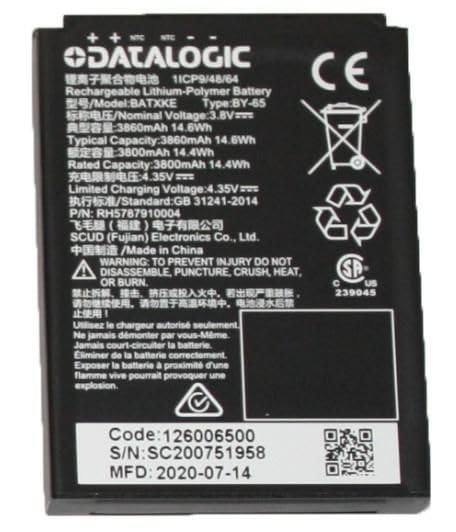
This image displays the Datalogic Memor K 3800MAH spare battery, a black rectangular lithium-polymer battery. The label on the battery shows specifications such as model number BATXKE, type BY-65, nominal voltage 3.8V, typical capacity 3860mAh 14.6Wh, and rated capacity 3800mAh 14.4Wh. It also includes safety warnings, manufacturing details, and certification marks like CE and UL.
3. സജ്ജീകരണം (ഇൻസ്റ്റലേഷൻ)
Follow these steps to properly install the spare battery into your Datalogic Memor K device:
- Ensure your Datalogic Memor K device is powered ഓഫ് before proceeding with battery installation or removal.
- Locate the battery compartment on your device. Refer to your device's specific user manual for the exact location and opening instructions.
- ബാറ്ററി കമ്പാർട്ട്മെന്റ് കവർ ശ്രദ്ധാപൂർവ്വം തുറക്കുക.
- If replacing an old battery, gently remove it from the compartment.
- Insert the new Datalogic Memor K 3800MAH spare battery into the compartment, ensuring the contacts align correctly with the device's terminals. Do not force the battery into place.
- ബാറ്ററി കമ്പാർട്ട്മെൻ്റ് കവർ സുരക്ഷിതമായി അടയ്ക്കുക.
- പുതിയ ബാറ്ററി ആദ്യമായി ഉപയോഗിക്കുന്നതിന് മുമ്പ് പൂർണ്ണമായും ചാർജ് ചെയ്യാൻ ശുപാർശ ചെയ്യുന്നു.
4. Operating (Charging & Usage)
4.1 ബാറ്ററി ചാർജ് ചെയ്യുന്നു
- Connect your Datalogic Memor K device (with the battery installed) to an authorized Datalogic charger.
- The battery's nominal voltage is 3.8V, with a limited charging voltage of 4.35V. Ensure your charger meets these specifications.
- The device's indicator light or screen will typically show the charging status. Refer to your device's manual for specific charging indicators.
- Allow the battery to fully charge for optimal performance, especially before its initial use.
4.2 ബാറ്ററി ഉപയോഗം
- The battery provides power to your Datalogic Memor K device. Battery life will vary depending on device usage, settings, and environmental conditions.
- Monitor the battery level through your device's display to avoid unexpected power loss.
- Avoid completely discharging the battery frequently, as this can reduce its overall lifespan.
5. പരിപാലനം
Proper maintenance can extend the life and performance of your battery:
- സംഭരണം: Store the battery in a cool, dry place away from direct sunlight and extreme temperatures. For long-term storage, it is recommended to store the battery at approximately 50% charge.
- വൃത്തിയാക്കൽ: If necessary, gently wipe the battery and its contacts with a clean, dry cloth. Do not use liquid cleaners or solvents.
- താപനില: Avoid exposing the battery to temperatures below 0°C (32°F) or above 45°C (113°F) during operation or storage.
- നീക്കം ചെയ്യൽ: When the battery reaches the end of its life, dispose of it responsibly at a certified recycling facility. Do not incinerate or dispose of with household waste.
6. പ്രശ്നപരിഹാരം
If you encounter issues with your Datalogic Memor K Spare Battery, consider the following:
- ബാറ്ററി ചാർജുചെയ്യുന്നില്ല:
- Ensure the charger is properly connected to both the device and a power source.
- Verify that you are using an authorized Datalogic charger.
- Check the battery contacts for any dirt or obstruction.
- If the battery is very old, its capacity may have degraded.
- ഹ്രസ്വ ബാറ്ററി ലൈഫ്:
- High device usage (e.g., continuous scanning, Wi-Fi/Bluetooth use) will consume battery faster.
- ഉയർന്ന താപനില ബാറ്ററി പ്രകടനത്തെ ബാധിച്ചേക്കാം.
- Battery age and number of charge cycles will naturally reduce capacity over time.
- ബാറ്ററി അമിത ചൂടാക്കൽ:
- Immediately discontinue use and remove the battery if it feels excessively hot.
- Ensure the device's ventilation is not blocked.
- If overheating persists, contact Datalogic support.
For persistent issues not resolved by these steps, please contact Datalogic customer support.
7 സ്പെസിഫിക്കേഷനുകൾ
| മോഡലിൻ്റെ പേര് | 3800MAH |
| ബാറ്ററി തരം | റീചാർജ് ചെയ്യാവുന്ന ലിഥിയം-പോളിമർ ബാറ്ററി |
| നാമമാത്ര വോളിയംtage | 3.8V |
| സാധാരണ ശേഷി | 3860mAh (14.6Wh) |
| റേറ്റുചെയ്ത ശേഷി | 3800mAh (14.4Wh) |
| പരിമിതമായ ചാർജിംഗ് വോളിയംtage | 4.35V |
| സ്റ്റാൻഡേർഡ് | GB 31241-2014 |
| ഭാഗം നമ്പർ (P/N) | RH5787910004 |
| നിർമ്മാതാവ് | SCUD (Fujian) Electronics Co., Ltd. |
| മാതൃരാജ്യം | ചൈനയിൽ നിർമ്മിച്ചത് |
| Manufacturing Date (MFD) | 2020-07-14 |
| കോഡ് | 126006500 |
| സീരിയൽ നമ്പർ (S/N) | SC200751958 |
8. വാറൻ്റിയും പിന്തുണയും
For information regarding the warranty of your Datalogic Memor K Spare Battery, please refer to the warranty documentation provided at the time of purchase or visit the official Datalogic webസൈറ്റ്. വാറന്റി നിബന്ധനകളും വ്യവസ്ഥകളും പ്രദേശത്തിനും റീട്ടെയിലർക്കും അനുസരിച്ച് വ്യത്യാസപ്പെടാം.
For technical support, service, or further inquiries, please contact Datalogic customer support through their official channels. Ensure you have your product model number and any relevant purchase information available when seeking support.


