1. ആമുഖം
The Ortur Laser Master 2 LU1-4 is a versatile CNC laser engraving and cutting machine designed for precision work on various materials. Equipped with a 32-bit motherboard, it offers enhanced speed and accuracy for both hobbyists and professionals. This manual provides essential information for the safe and effective operation, setup, and maintenance of your device.
2 സുരക്ഷാ വിവരങ്ങൾ
Operating a laser engraver requires strict adherence to safety protocols to prevent injury and damage. Always prioritize safety.
- നേത്ര സംരക്ഷണം: Always wear appropriate laser safety goggles when the laser is active. While the device features an eye-protection design, direct viewing of the laser beam should be avoided.
- Unauthorized Movement Detection: The main board includes a G-sensor. If the machine detects unauthorized movement during operation, the laser beam will automatically stop to prevent accidents.
- Connection Interruption Safety: In the event of a computer system stop or USB cable disconnection, which causes the laser engraver to cease movement, the laser beam will automatically stop to mitigate fire risks.
- Motor Stop Safety: If the laser engraver is under control but the user forgets to operate it, and the motor stops moving while the laser beam remains active, an additional safety mechanism will cut off the laser to prevent fire.
- വെൻ്റിലേഷൻ: Ensure adequate ventilation in your workspace to dissipate fumes and smoke produced during engraving and cutting.
- കത്തുന്ന വസ്തുക്കൾ: Exercise extreme caution when working with flammable materials. Never leave the machine unattended during operation.
3. ഉൽപ്പന്നം കഴിഞ്ഞുview
3.1 പ്രധാന സവിശേഷതകൾ
- അഡ്വാൻസ്ഡ് മദർബോർഡ്: Equipped with a 32-bit motherboard and 32Bits MCU, capable of preprocessing 32 instructions for smoother and faster operation.
- ഉയർന്ന വേഗത: Supports up to 921600 baud rate and engraving speeds of up to 3000mm/min.
- കൊത്തുപണി ഏരിയ: Generous carving area of X: 390MM x Y: 410MM.
- LU1-4 Laser Module: Features an electric power of 20W and a laser power of 5.5W, with a wavelength of 445 ± 5nm. It has a fixed focus with a default focal length of 29MM.
- വിശാലമായ അനുയോജ്യത: Compatible with various engraving software including LaserGRBL (Windows) and LightBurn (Windows, Mac, Linux).
- പിന്തുണച്ചു File ഫോർമാറ്റുകൾ: Accepts NC, BMP, JPG, PNG, DXF, and other common file ഫോർമാറ്റുകൾ.
3.2 ഘടകങ്ങൾ
The Ortur Laser Master 2 LU1-4 comes with the main engraving unit and essential accessories for operation.

The image displays the Ortur Laser Master 2 LU1-4 laser engraver unit, along with essential accessories such as safety goggles, wrenches, material samples, cable ties, and a cleaning brush.

This image shows the Ortur Laser Master 2 LU1-4 laser engraver with its dimensions (500mm width, 570mm depth) and icons highlighting key features: 32-bit motherboard, 3 safety protections, 390x410 engraving area, longer service life, safe circuit system, and faster engraving speed.
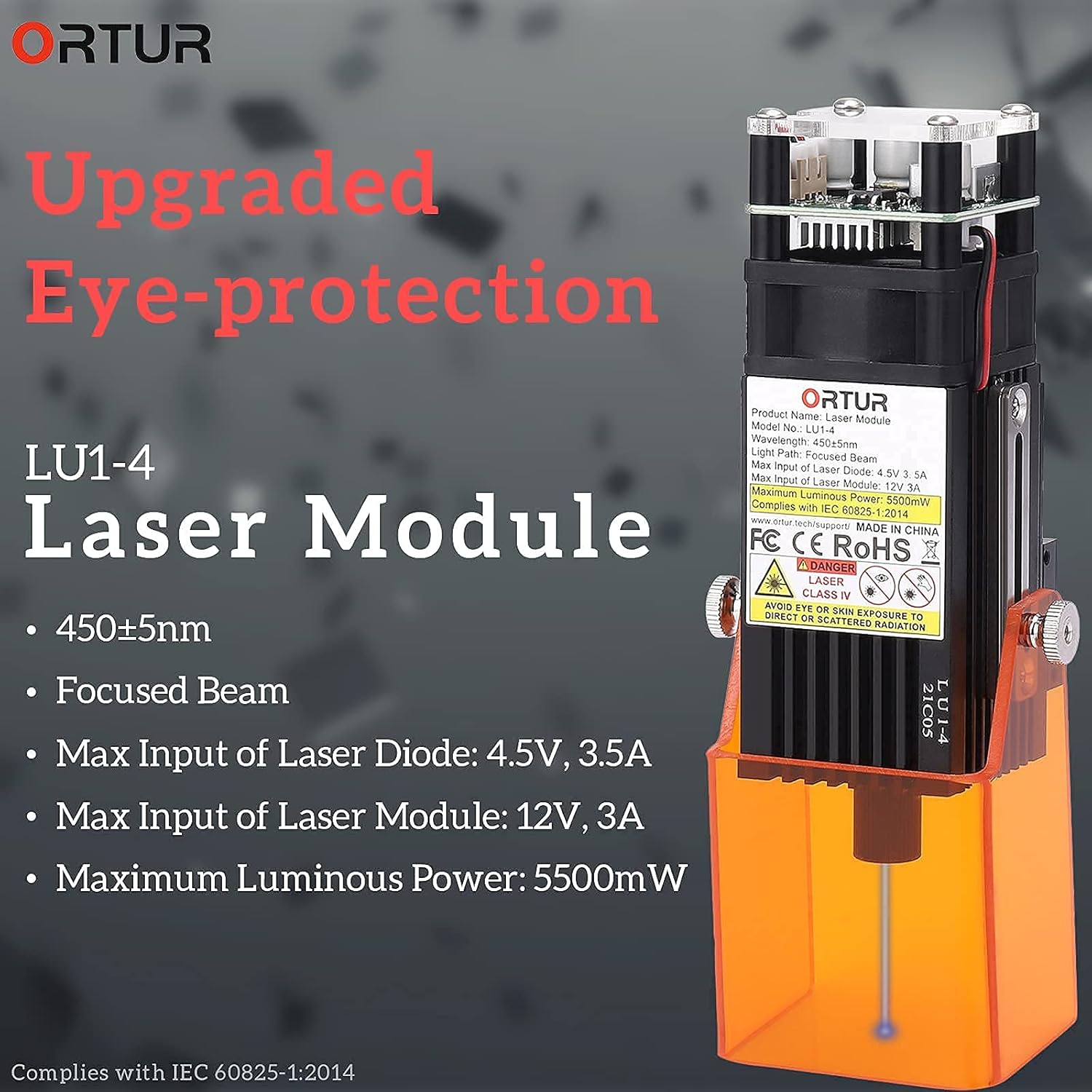
ഒരു ക്ലോസപ്പ് view of the LU1-4 laser module, detailing its specifications: 450±5nm wavelength, focused beam, Max Input of Laser Diode: 4.5V, 3.5A, Max Input of Laser Module: 12V, 3A, and Maximum Luminous Power: 5500mW. It also notes compliance with IEC 60825-1:2014.

This image shows the specialized 32-bit motherboard of the Ortur Laser Master 2, designed for smoother and faster carving operations, capable of pre-processing 32 instructions.
4. സജ്ജീകരണം
Follow these general steps to set up your Ortur Laser Master 2 LU1-4:
- ഘടകങ്ങൾ അൺപാക്ക് ചെയ്യുക: പാക്കേജിംഗിൽ നിന്ന് എല്ലാ ഘടകങ്ങളും ശ്രദ്ധാപൂർവ്വം നീക്കം ചെയ്ത് പാക്കിംഗ് ലിസ്റ്റുമായി താരതമ്യം ചെയ്യുക.
- ഫ്രെയിം കൂട്ടിച്ചേർക്കുക: Follow the assembly instructions provided in the separate assembly guide to construct the machine frame.
- ലേസർ മൊഡ്യൂൾ ഇൻസ്റ്റാൾ ചെയ്യുക: Securely attach the LU1-4 laser module to the gantry according to the assembly instructions.
- പവർ ബന്ധിപ്പിക്കുക: Connect the provided 12V 3A power adapter to the machine and a suitable power outlet.
- കമ്പ്യൂട്ടറുമായി ബന്ധിപ്പിക്കുക: Use a USB cable to connect the engraver to your computer.
- സോഫ്റ്റ്വെയർ ഇൻസ്റ്റാൾ ചെയ്യുക: Download and install compatible engraving software such as LaserGRBL or LightBurn. Software can be downloaded from ortur.tech/olm2/.
- പ്രാരംഭ കാലിബ്രേഷൻ: Perform initial calibration and focus adjustments as guided by the software and specific laser module instructions.
5. പ്രവർത്തന നിർദ്ദേശങ്ങൾ
5.1 സോഫ്റ്റ്വെയർ അനുയോജ്യത
The Ortur Laser Master 2 is compatible with:
- ലേസർജിആർബിഎൽ: For Windows operating systems.
- ലൈറ്റ് ബേൺ: For Windows, Mac OS, and Linux operating systems.
5.2 പിന്തുണയ്ക്കുന്നു File ഫോർമാറ്റുകൾ
The machine supports various input formats including NC, BMP, JPG, PNG, and DXF.
5.3 കൊത്തുപണി പ്രക്രിയ
Once the machine is set up and software is installed, follow these steps for engraving or cutting:
- മെറ്റീരിയൽ തയ്യാറാക്കുക: Select your desired material (e.g., wood, metal, stone, glass) and ensure it is clean and properly secured.
- സ്ഥലം മെറ്റീരിയൽ: Position the material within the 390x410mm carving area on the machine bed.
- ലോഡ് ഡിസൈൻ: Open your chosen design file in the engraving software.
- ക്രമീകരണങ്ങൾ ക്രമീകരിക്കുക: Configure laser settings such as power, speed, and number of passes based on the material and desired effect.
- പ്രവർത്തനം ആരംഭിക്കുക: Start the engraving or cutting process from the software.
- നിരീക്ഷിക്കുക: Continuously monitor the operation. Ensure safety goggles are worn or the eye protection design is effectively utilized.

The image illustrates the 'New Eye Protection Design' feature of the Ortur Laser Master 2, allowing users to observe laser engraving without requiring additional safety goggles, though wearing them is always recommended for direct viewing.
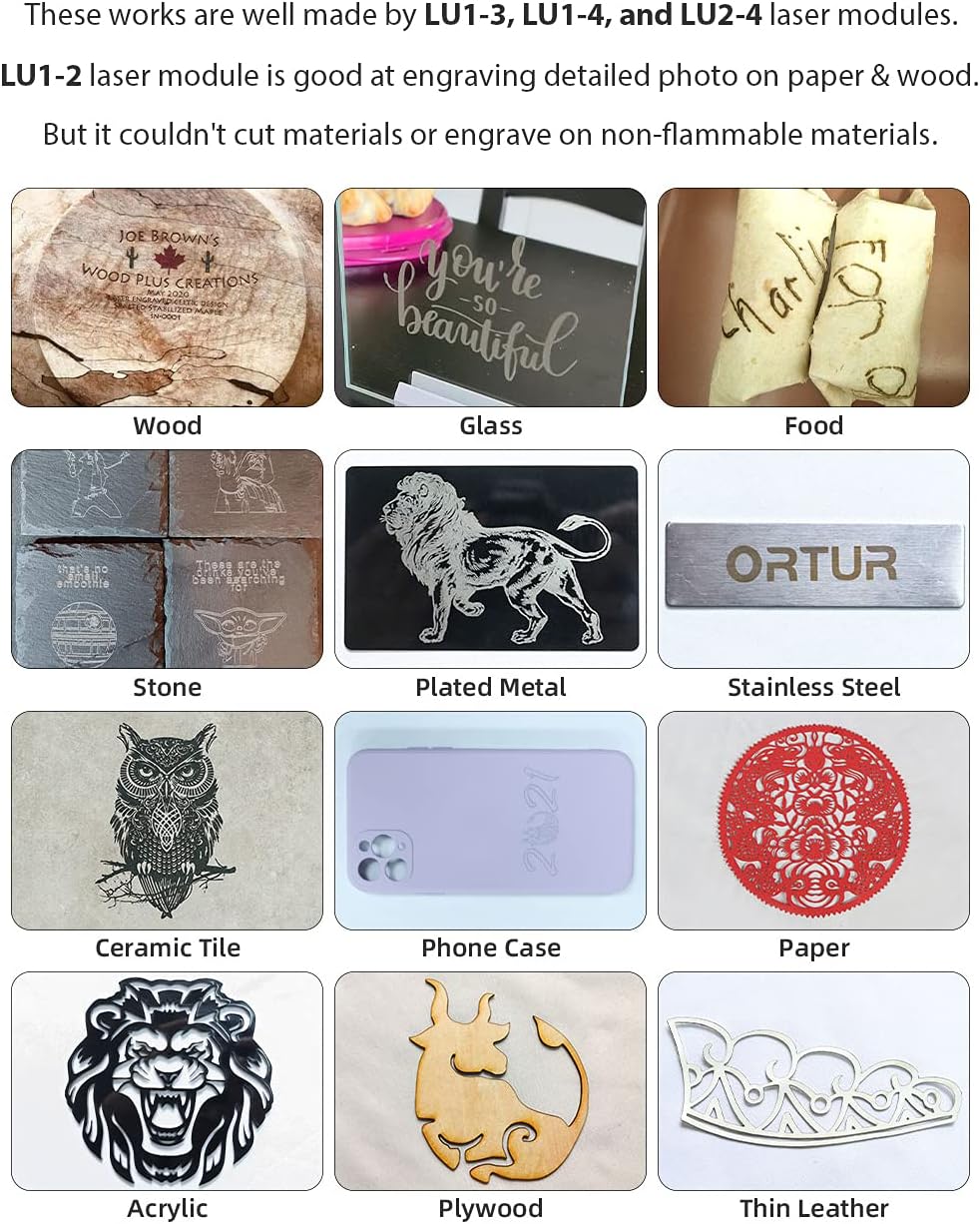
This image showcases various materials successfully engraved by the Ortur Laser Master 2, including wood, glass, food, stone, plated metal, stainless steel, ceramic tile, phone cases, paper, acrylic, plywood, and thin leather. It highlights the versatility of the LU1-3, LU1-4, and LU2-4 laser modules, noting that the LU1-2 is suitable for detailed photos on paper and wood but not for cutting or engraving non-flammable materials.
6. പരിപാലനം
Regular maintenance ensures optimal performance and longevity of your laser engraver:
- ക്ലീൻ ലേസർ ലെൻസ്: Periodically clean the laser lens with a suitable lens cleaning solution and cloth to maintain engraving quality.
- Clean Machine Frame: Keep the machine frame, rails, and moving parts free from dust and debris.
- കണക്ഷനുകൾ പരിശോധിക്കുക: Regularly inspect all electrical and USB connections for secure fit.
- വെന്റിലേഷൻ ഉറപ്പാക്കുക: Maintain clear airflow around the machine to prevent overheating and ensure efficient smoke extraction.
7. പ്രശ്നപരിഹാരം
പൊതുവായ പ്രശ്നങ്ങളും അവയുടെ സാധ്യമായ പരിഹാരങ്ങളും അറിയാൻ ഈ വിഭാഗം കാണുക:
- ലേസർ വെടിവയ്ക്കുന്നില്ല:
- മെഷീൻ ഓണാക്കിയിട്ടുണ്ടോ എന്നും എല്ലാ കേബിളുകളും സുരക്ഷിതമായി ബന്ധിപ്പിച്ചിട്ടുണ്ടോ എന്നും പരിശോധിക്കുക.
- സോഫ്റ്റ്വെയറിലെ ലേസർ പവർ ക്രമീകരണങ്ങൾ പരിശോധിക്കുക.
- Ensure the laser module is properly seated.
- മോശം കൊത്തുപണി നിലവാരം:
- Adjust the laser focus. The LU1-4 has a fixed focus, ensure material height is correct.
- ലേസർ ലെൻസ് വൃത്തിയാക്കുക.
- Experiment with different speed and power settings for the material.
- മെഷീൻ കമ്പ്യൂട്ടറുമായി ബന്ധിപ്പിക്കുന്നില്ല:
- Ensure the USB cable is functional and securely connected.
- Check if the necessary drivers are installed on your computer.
- മെഷീനും കമ്പ്യൂട്ടറും പുനരാരംഭിക്കുക.
- മെഷീൻ അപ്രതീക്ഷിതമായി നിർത്തുന്നു:
- Review the safety features mentioned in Section 2. An unexpected movement or connection loss can trigger a safety stop.
- Check for any obstructions in the machine's movement path.
8 സാങ്കേതിക സവിശേഷതകൾ
| ഫീച്ചർ | സ്പെസിഫിക്കേഷൻ |
|---|---|
| മദർബോർഡ് | 32 bits motherboard with 32Bits MCU |
| ഫേംവെയർ | Ortur Laser Master Firmware |
| OS അനുയോജ്യത | Windows (LaserGRBL), MAC OS and Linux (LightBurn) |
| അഡാപ്റ്റർ പവർ | 36W, 12V 3A |
| Machine Power (LU1-4) | 20W |
| Laser Module Power (LU1-4) | 5000mW-5500mW |
| ലേസർ തരംഗദൈർഘ്യം | 445 ± 5nm |
| Laser Focus (LU1-4) | സ്ഥിരമായ ഫോക്കസ് |
| Default Focal Length (LU1-4) | 29 എംഎം |
| ഇൻപുട്ട് ഫോർമാറ്റ് | NC, BMP, JPG, PNG, DXF, മുതലായവ. |
| Carving Area | X: 390MM x Y: 410MM |
| Carving Speed | 3000MM / Min and less |
| ചിത്രത്തിൻ്റെ വലുപ്പം | No Limit (Pixel accuracy adjustable, default 300 PPI, ~0.81um pixel precision) |
| മോഡൽ നമ്പർ | ORTUR Laser Master 2 |
| ASIN | B096X28B1R |
9. വാറൻ്റിയും പിന്തുണയും
Ortur is committed to providing comprehensive pre-sales and after-sales services for its customers.
For pre-sale consultations or general inquiries, please contact us via email: support_ortur@163.com.
For technical support and troubleshooting assistance, please visit our dedicated support portal: ortur.tech/support. Additional product information and resources can be found at: ortur.tech/olm2.


