1. ഉൽപ്പന്നം കഴിഞ്ഞുview
The KOFIRE UG-05 is a versatile wireless gaming headset designed for an immersive audio experience across multiple platforms. It features 3D stereo surround sound, vibration feedback, and flexible connectivity options.

Figure 1: KOFIRE UG-05 Wireless Gaming Headset
പ്രധാന സവിശേഷതകൾ:
- 3D Stereo & Vibrating Sound Quality: Dual 40mm dynamic EQ driver units provide immersive 3D stereo surround sound and strong bass with vibration feedback.
- 2.4GHz Ultra Low Latency: Delivers real-time transmission for lag-free gaming with up to 15M (50ft) connection range.
- Detachable Noise-Cancelling Microphone: Features a boom mic with a one-click mute button for clear voice pickup.
- ദൈർഘ്യമേറിയ കളിസമയം: Up to 30 hours of playtime on a single 1-2 hour charge, with a 3.5mm AUX cable for wired backup.
- മൾട്ടി-പ്ലാറ്റ്ഫോം അനുയോജ്യത: Supports PS5, PS4, PC, Laptop via 2.4GHz dongle; Android, iOS, WP Cellphones via Bluetooth 5.4; and Xbox, Xbox series via 3.5mm audio cable.
2. സജ്ജീകരണ ഗൈഡ്
2.1 പാക്കേജ് ഉള്ളടക്കം
സജ്ജീകരിക്കുന്നതിന് മുമ്പ്, എല്ലാ ഘടകങ്ങളും ഉണ്ടെന്ന് ഉറപ്പാക്കുക:

Figure 2: Headset and Included Accessories
- KOFIRE UG-05 വയർലെസ് ഗെയിമിംഗ് ഹെഡ്സെറ്റ്
- 2.4GHz യുഎസ്ബി ഡോംഗിൾ
- വേർപെടുത്താവുന്ന ബൂം മൈക്രോഫോൺ
- 3.5mm AUX ഓഡിയോ കേബിൾ
- USB-C ചാർജിംഗ് കേബിൾ
- മൈക്രോഫോൺ ഫോം കവർ
2.2 മൈക്രോഫോൺ ബന്ധിപ്പിക്കുന്നു
The boom microphone is detachable for convenience. To attach:
- Locate the microphone port on the left earcup of the headset.
- Firmly insert the detachable boom microphone into the port until it clicks securely into place.
- Optionally, place the foam cover over the microphone head to reduce wind noise.
വേർപെടുത്താൻ, പോർട്ടിൽ നിന്ന് മൈക്രോഫോൺ സൌമ്യമായി പുറത്തെടുക്കുക.

ചിത്രം 3: വേർപെടുത്താവുന്ന മൈക്രോഫോൺ ഘടിപ്പിക്കുന്നു
2.3 കണക്ഷൻ മോഡുകൾ
The headset offers three primary connection modes:
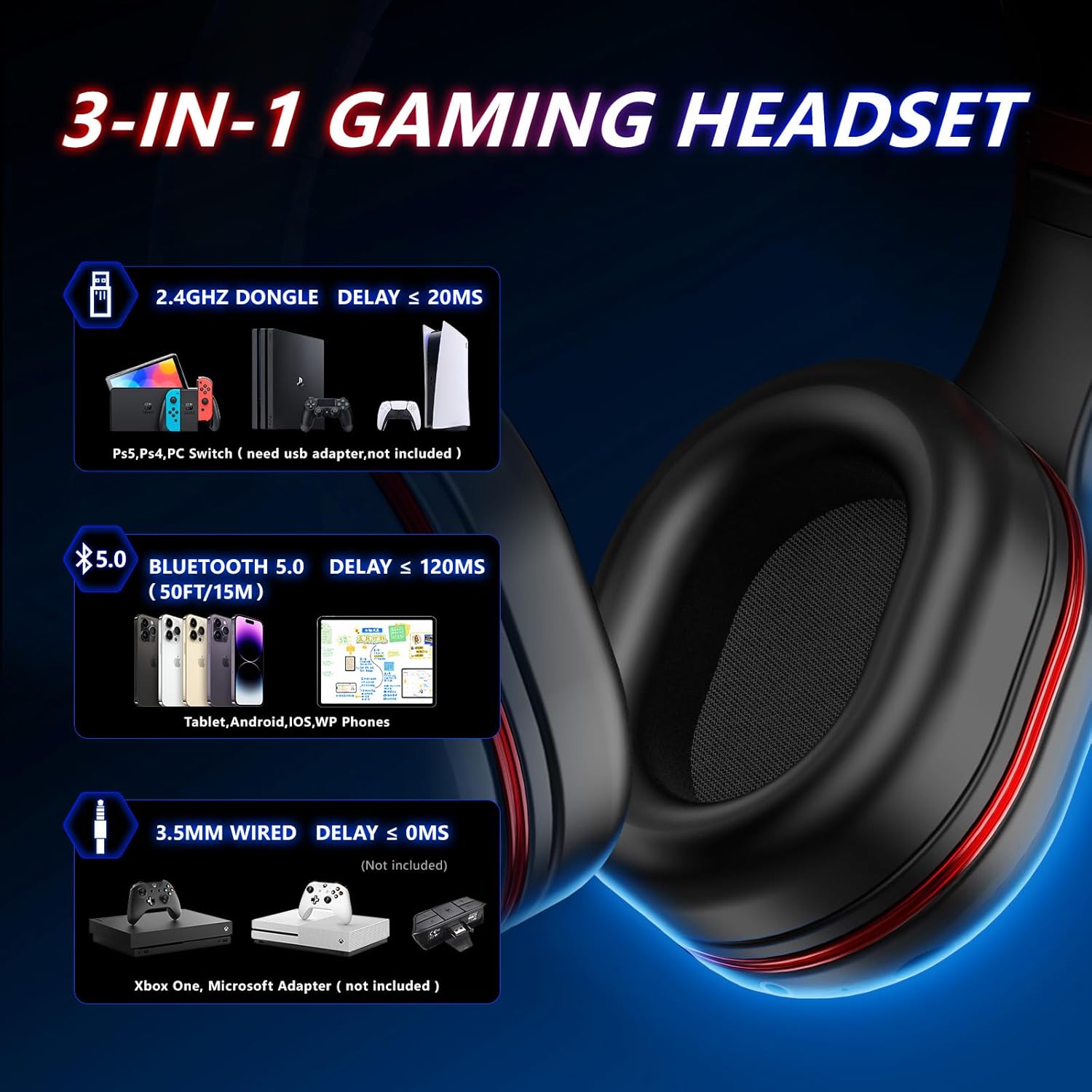
Figure 4: Multi-Platform Connectivity Options
- 2.4GHz Wireless (for PS5, PS4, PC, Laptop, Nintendo Switch):
- Plug the 2.4GHz USB dongle into an available USB port on your gaming device.
- Power on the headset. It should automatically pair with the dongle.
- For some games or systems, you may need to manually set the headset as the input and output audio device in your system settings.
- കുറിപ്പ്: The microphone might be unavailable when connected to Nintendo Switch via Bluetooth. For microphone use on Switch, connect via the USB dongle.
- Bluetooth 5.4 (for Android, iOS, WP Cellphones):
- Ensure the headset is powered on and not connected via the 2.4GHz dongle.
- Activate Bluetooth on your mobile device and search for "UG-05" or "KOFIRE Headset".
- Select the headset to pair.
- 3.5mm AUX Wired (for Xbox, Xbox Series, PC, Laptop, Switch):
- Connect one end of the 3.5mm AUX audio cable to the headset's 3.5mm audio jack.
- Connect the other end to the 3.5mm audio port on your device (e.g., Xbox controller, PC).
- This mode is ideal when the headset battery is low or for devices without wireless support.
3. പ്രവർത്തന നിർദ്ദേശങ്ങൾ
3.1 നിയന്ത്രണങ്ങൾ കഴിഞ്ഞുview
ഇയർകപ്പുകളിൽ സ്ഥിതിചെയ്യുന്ന അവബോധജന്യമായ നിയന്ത്രണങ്ങൾ ഹെഡ്സെറ്റിന്റെ സവിശേഷതയാണ്:

ചിത്രം 5: ഹെഡ്സെറ്റ് നിയന്ത്രണങ്ങൾ
- ON/OFF Key / Answer/Hang-up: Press and hold to power on/off. Short press to answer/end calls.
- വോളിയം + / അടുത്ത ട്രാക്ക്: വോളിയം കൂട്ടാൻ ഷോർട്ട് പ്രസ്സ് ചെയ്യുക. അടുത്ത ട്രാക്കിനായി ദീർഘനേരം അമർത്തുക.
- വോളിയം - / മുമ്പത്തെ ട്രാക്ക്: ശബ്ദം കുറയ്ക്കാൻ ഷോർട്ട് പ്രസ്സ് ചെയ്യുക. മുമ്പത്തെ ട്രാക്കിനായി ദീർഘനേരം അമർത്തുക.
- Haptic Feedback Button: Activates/deactivates the vibration feedback feature.
- Mute Button (on mic): One-click to mute/unmute the microphone.
- USB-C ചാർജിംഗ് പോർട്ട്: ഹെഡ്സെറ്റ് ചാർജ് ചെയ്യുന്നതിനായി.
- 3.5mm ഓഡിയോ ജാക്ക്: വയർഡ് കണക്ഷനായി.
3.2 വൈബ്രേഷൻ ഫീഡ്ബാക്ക്
The headset includes extra bass units that produce strong bass and vibration feedback, enhancing immersion during gaming or music listening. You can feel the vibration during explosions, shooting, or racing scenes. Use the Haptic Feedback Button to toggle this feature.

Figure 6: Immersive Vibration Feedback
4. പരിപാലനം
4.1 ഹെഡ്സെറ്റ് ചാർജ് ചെയ്യുന്നു
The headset is equipped with a 1000 mA rechargeable battery.
- Connect the USB-C charging cable to the headset's USB-C port and the other end to a USB power source.
- ഒരു ഫുൾ ചാർജ് ഏകദേശം 1-2 മണിക്കൂർ എടുക്കും.
- The headset provides up to 30 hours of playtime on a full charge.
4.2 പരിചരണവും സംഭരണവും
- Clean the earcups and headband with a soft, dry cloth. Avoid abrasive cleaners.
- ഹെഡ്സെറ്റ് നേരിട്ട് സൂര്യപ്രകാശം ഏൽക്കാത്തതും ഉയർന്ന താപനില ഏൽക്കാത്തതുമായ ഒരു തണുത്ത വരണ്ട സ്ഥലത്ത് സൂക്ഷിക്കുക.
- The headset features a foldable design for compact storage and portability.

Figure 7: Foldable Design for Easy Portability
5. പ്രശ്നപരിഹാരം
5.1 മൈക്രോഫോൺ പ്രശ്നങ്ങൾ
If the microphone is not working:
- Ensure Microphone is Fully Inserted: Please plug the microphone a little harder and make sure it is fully inserted into the headset.
- മ്യൂട്ട് ബട്ടൺ ചെക്ക് ചെയ്യുക: Try to press the mute button on the end of the microphone to unmute it.
- സിസ്റ്റം ക്രമീകരണങ്ങൾ: Plug the dongle into your device and launch the game. Some games may require you to set the headset as your input and output device in their settings.
- കണക്ഷൻ മോഡ്: The microphone might be unavailable when connected to Nintendo Switch via Bluetooth. For microphone use on Switch, connect via the 2.4GHz dongle.
5.2 കണക്റ്റിവിറ്റി പ്രശ്നങ്ങൾ
- No Sound/Connection (2.4GHz): Ensure the USB dongle is securely plugged in and the headset is powered on and within the 15M range. Try re-pairing by powering off/on the headset.
- ബ്ലൂടൂത്ത് ജോടിയാക്കൽ പരാജയം: Ensure the headset is not connected via the dongle. Turn off and on Bluetooth on your device and the headset, then try pairing again.
- Wired Connection Issues: Ensure the 3.5mm AUX cable is fully inserted into both the headset and the device. Test with another audio source if possible.
6 സ്പെസിഫിക്കേഷനുകൾ
| ഫീച്ചർ | വിശദാംശങ്ങൾ |
|---|---|
| മോഡലിൻ്റെ പേര് | യുജി-05 |
| കണക്റ്റിവിറ്റി ടെക്നോളജി | Bluetooth, Auxiliary Cable, 2.4GHz Wireless |
| വയർലെസ് കമ്മ്യൂണിക്കേഷൻ ടെക്നോളജി | ബ്ലൂടൂത്ത് 5.4 |
| ഓഡിയോ ഡ്രൈവർ വലിപ്പം | 40 മില്ലിമീറ്റർ |
| ബാറ്ററി ലൈഫ് | 30 മണിക്കൂർ |
| ചാർജിംഗ് സമയം | 1-2 മണിക്കൂർ |
| ബ്ലൂടൂത്ത് ശ്രേണി | 15 മീറ്റർ |
| അനുയോജ്യമായ ഉപകരണങ്ങൾ | PS4, PS5, PC, Nintendo Switch, Android, iOS, WP Cellphones, Xbox, Xbox Series |
| ശബ്ദ നിയന്ത്രണം | സൗണ്ട് ഐസൊലേഷൻ |
| ഇനത്തിൻ്റെ ഭാരം | 0.41 കിലോഗ്രാം (14.4 ഔൺസ്) |
| മെറ്റീരിയൽ | പ്ലാസ്റ്റിക് |
| നിറം | ചുവപ്പ് |
7. ഔദ്യോഗിക ഉൽപ്പന്ന വീഡിയോ
Video 1: UG-05 Wireless Gaming Headset Overview by KOFIRE. This video provides a visual demonstration of the headset's features, including its ultra-low latency, 3D stereo sound, battery life, and multi-platform compatibility.
8. വാറൻ്റിയും പിന്തുണയും
For detailed warranty information and further support, please refer to the official User Manual provided with your product or visit the KOFIRE official webസൈറ്റ്.
ഉപയോക്തൃ മാനുവലിന്റെ ഡിജിറ്റൽ പതിപ്പ് ഡൗൺലോഡ് ചെയ്യാൻ ലഭ്യമാണ്:


