ആമുഖം
This manual provides essential instructions for the safe and effective operation of your VJIANGER 4K 48MP Vlogging Camera, Model 4K-2. Please read this manual thoroughly before using the camera and retain it for future reference.
എന്താണ് ഉൾപ്പെടുത്തിയിരിക്കുന്നത്
The VJIANGER 4K 48MP Vlogging Camera package includes the following items:
- VJIANGER 4K 48MP Vlogging Camera (Model: 4K-2)
- 52mm Wide Angle Lens
- മാക്രോ ലെൻസ്
- 32 ജിബി മൈക്രോ എസ്ഡി കാർഡ്
- USB കേബിൾ
- ഡ്യുവൽ ചാർജർ
- 2 x ലിഥിയം അയൺ ബാറ്ററികൾ
- പവർ അഡാപ്റ്റർ
- ഉപയോക്തൃ മാനുവൽ

Figure 1: VJIANGER 4K 48MP Vlogging Camera and its primary accessories.

Figure 2: Breakdown of included accessories for the VJIANGER 4K 48MP Vlogging Camera.
ക്യാമറ ഘടകങ്ങൾ
Familiarize yourself with the main components of your camera:
- ലെൻസ്: The primary lens for capturing images and videos. The camera supports 16X Digital Zoom.
- ഫ്ലാഷ്: കുറഞ്ഞ വെളിച്ചമുള്ള സാഹചര്യങ്ങൾക്കായി സംയോജിത ഫ്ലാഷ്.
- ഹോട്ട് ഷൂ: Allows attachment of external accessories like microphones or additional lights.
- 180° ഫ്ലിപ്പ് സ്ക്രീൻ: Rotatable LCD screen for easy self-recording and viewing.
- നിയന്ത്രണ ബട്ടണുകൾ: Various buttons for navigation, menu access, zoom, and playback.
- പവർ ബട്ടൺ: ക്യാമറ ഓൺ/ഓഫ് ചെയ്യുന്നു.
- ഷട്ടർ ബട്ടൺ: Captures photos and starts/stops video recording.
- യുഎസ്ബി-സി പോർട്ട്: ചാർജിംഗിനും ഡാറ്റ കൈമാറ്റത്തിനും.
- എച്ച്ഡിഎംഐ പോർട്ട്: ബാഹ്യ ഡിസ്പ്ലേകളിലേക്ക് ബന്ധിപ്പിക്കുന്നതിന്.
- മൈക്രോഫോൺ ഇൻപുട്ട്: ബാഹ്യ മൈക്രോഫോണിനുള്ള 3.5 എംഎം ജാക്ക്.
- ട്രൈപോഡ് മൗണ്ട്: 1/4 standard size thread for tripod attachment.
ചിത്രം 3: മുൻഭാഗം view of the VJIANGER 4K 48MP Vlogging Camera.

ചിത്രം 4: പിൻഭാഗം view of the VJIANGER 4K 48MP Vlogging Camera with flip screen open.
സജ്ജമാക്കുക
1. ബാറ്ററി ഇൻസ്റ്റാളേഷനും ചാർജിംഗും
- ക്യാമറയുടെ അടിയിൽ സ്ഥിതിചെയ്യുന്ന ബാറ്ററി കമ്പാർട്ട്മെന്റ് കവർ തുറക്കുക.
- Insert a fully charged Lithium Ion battery into the compartment, ensuring correct polarity.
- ബാറ്ററി കമ്പാർട്ട്മെൻ്റ് കവർ സുരക്ഷിതമായി അടയ്ക്കുക.
- To charge batteries, use the provided dual charger and USB cable. Connect the charger to a power source using the power adapter.
- A fully charged battery provides approximately 1-1.5 hours of use. The camera supports recording while charging.
2. മെമ്മറി കാർഡ് ഇൻസ്റ്റാളേഷൻ
- Locate the Micro SD card slot, typically near the battery compartment.
- Insert the provided 32GB Micro SD card into the slot until it clicks into place.
- Ensure the card is inserted correctly to avoid damage.
3. ലെൻസ് അറ്റാച്ച്മെന്റ്
- The camera comes with a pre-attached macro lens and a separate wide-angle lens.
- To attach the wide-angle lens, gently twist it onto the front of the macro lens until secure.
- Ensure lenses are clean and free of dust before attachment.

Figure 5: VJIANGER 4K 48MP Vlogging Camera with wide-angle lens attached.
ഓപ്പറേറ്റിംഗ് മോഡുകൾ
1. പവർ ഓൺ/ഓഫ്
അമർത്തിപ്പിടിക്കുക പവർ ബട്ടൺ (usually on top) to turn the camera on or off. The LCD screen will display a welcome message upon startup.
2. ഫോട്ടോ മോഡ്
- Select Photo Mode using the mode dial or menu.
- Frame your shot using the 180° flip screen.
- അമർത്തുക ഷട്ടർ ബട്ടൺ halfway to focus, then fully press to capture the photo.
- The camera captures images at 48MP resolution.
3. വീഡിയോ മോഡ്
- Select Video Mode using the mode dial or menu.
- അമർത്തുക ഷട്ടർ ബട്ടൺ to start recording. A red indicator will typically appear on the screen.
- അമർത്തുക ഷട്ടർ ബട്ടൺ റെക്കോർഡിംഗ് നിർത്താൻ വീണ്ടും.
- The camera records 4K video at 30FPS, 1080p, or 720p for slow-motion effects.
- പ്രവർത്തനം താൽക്കാലികമായി നിർത്തുക: During video recording, you can pause and resume without creating a new file.

Figure 6: Video resolution options and flip screen functionality.
വിപുലമായ സവിശേഷതകൾ
1. Manual Focus (MF)
This camera supports Manual Focus. In both video and photo modes, gently press the shutter button halfway. A focusing logo frame will appear on the display, allowing you to achieve precise focus before fully pressing the button to capture the moment.
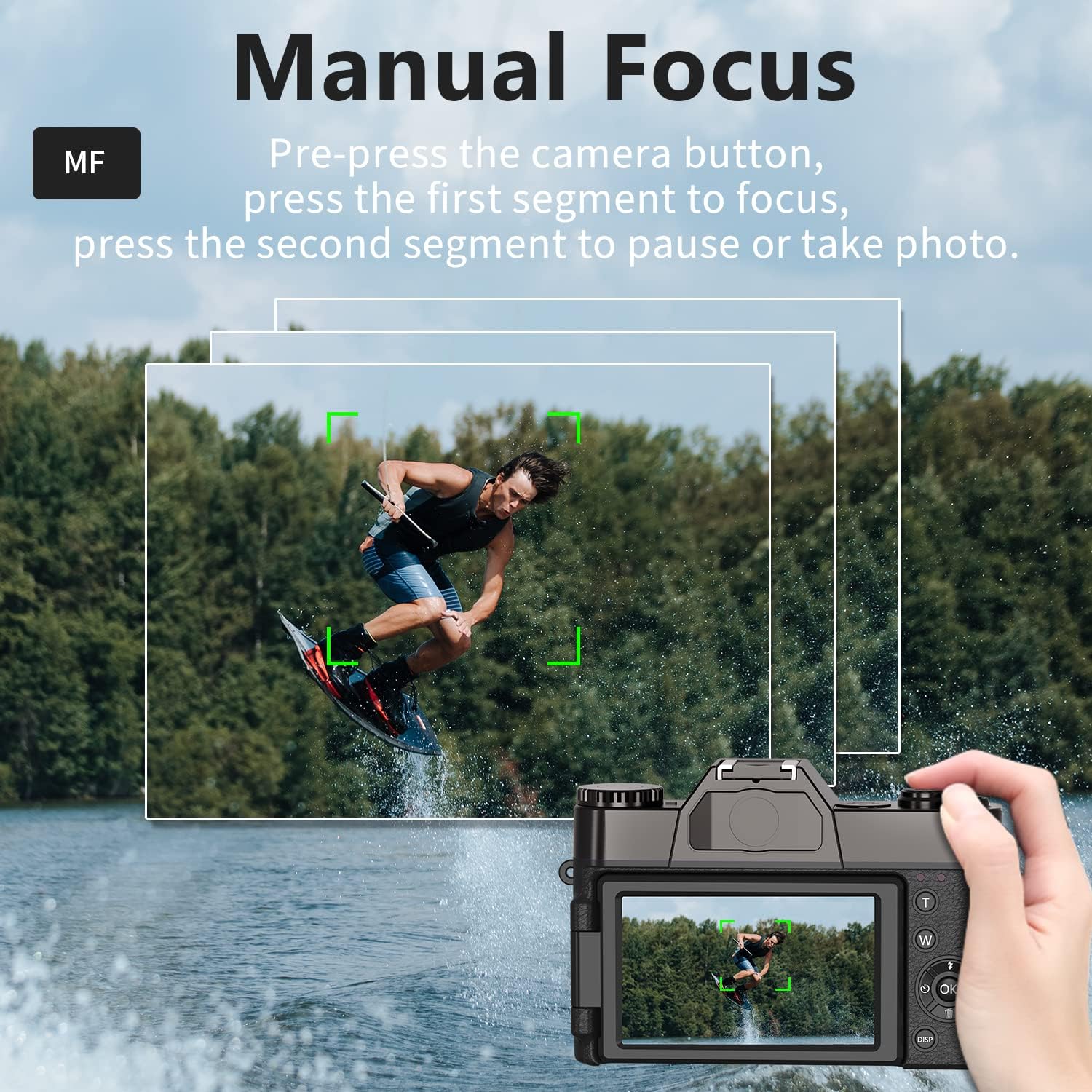
Figure 7: Manual Focus feature in action.
2. Webക്യാം പ്രവർത്തനം
The camera can be used as a PC camera for live streaming. Connect the camera to your PC using the USB cable and select "Camera Mode" on the device. No additional hardware or software is required.
3 ബാഹ്യ ആക്സസറികൾ
The camera features a 3.5mm jack for an external microphone and a hot shoe for connecting external fill lights. It also supports a standard 1/4 inch tripod mount.
4. Wi-Fi കണക്റ്റിവിറ്റി
The camera supports Wi-Fi connectivity for transferring photos and videos to a mobile device. Refer to the camera's on-screen menu for Wi-Fi setup instructions and app download details.
മെയിൻ്റനൻസ്
- Keep the camera and lenses clean using the provided cleaning cloth.
- Store the camera in a dry, cool place away from direct sunlight and moisture.
- ബാറ്ററി കോൺടാക്റ്റുകൾ വൃത്തിയുള്ളതാണെന്ന് ഉറപ്പാക്കുക.
- Use the lens cap when the camera is not in use to protect the lens.
ട്രബിൾഷൂട്ടിംഗ്
പ്രശ്നങ്ങൾ നേരിടുകയാണെങ്കിൽ, ഇനിപ്പറയുന്നവ പരീക്ഷിക്കുക:
- ക്യാമറ ഓണാക്കുന്നില്ല: ബാറ്ററികൾ പൂർണ്ണമായും ചാർജ്ജ് ചെയ്തിട്ടുണ്ടെന്നും ശരിയായി ചേർത്തിട്ടുണ്ടെന്നും ഉറപ്പാക്കുക.
- മങ്ങിയ ഫോട്ടോകൾ: Ensure proper focus (manual or autofocus) and hold the camera steady during capture.
- മെമ്മറി കാർഡ് പിശക്: Reinsert the Micro SD card or try a different compatible card.
- ഹ്രസ്വ ബാറ്ററി ലൈഫ്: Ensure batteries are fully charged. Consider carrying spare charged batteries.
സ്പെസിഫിക്കേഷനുകൾ
| ഉൽപ്പന്ന അളവുകൾ | 4.33 x 2.95 x 1.18 ഇഞ്ച് |
| ഇനത്തിൻ്റെ ഭാരം | 1.34 പൗണ്ട് |
| ഇനം മോഡൽ നമ്പർ | 4 കെ -2 |
| ബാറ്ററികൾ | 2 ലിഥിയം അയോൺ ബാറ്ററികൾ ആവശ്യമാണ് (ഉൾപ്പെടുത്തിയിരിക്കുന്നു) |
| നിർമ്മാതാവ് | വിജിയാംഗർ |
| ഫോട്ടോ സെൻസർ ടെക്നോളജി | CMOS |
| പിന്തുണച്ചു File ഫോർമാറ്റ് | JPEG, റോ |
| ഇമേജ് സ്റ്റെബിലൈസേഷൻ | ഡിജിറ്റൽ |
| ഒപ്റ്റിക്കൽ സൂം | 16 x |
| പരമാവധി അപ്പേർച്ചർ | 2 എഫ് |
വാറൻ്റിയും പിന്തുണയും
For warranty information, technical support, or service inquiries, please refer to the documentation included with your product or visit the official VJIANGER webസൈറ്റ്. ഉപഭോക്തൃ സേവനത്തിനായുള്ള കോൺടാക്റ്റ് വിവരങ്ങൾ സാധാരണയായി ഉൽപ്പന്ന പാക്കേജിംഗിൽ നൽകിയിട്ടുണ്ട്.


