ആമുഖം
വാങ്ങിയതിന് നന്ദി.asing the AZATOM A2 Portable DAB/DAB+ Digital Radio. This compact and versatile device is designed to provide high-quality digital and FM radio reception, offering a superior listening experience on the go. Please read this manual carefully to understand the features and operation of your new radio.

The AZATOM A2 radio, showcasing its stylish and compact design, perfect for portability.
ബോക്സിൽ എന്താണുള്ളത്
- AZATOM A2 Portable DAB/DAB+ Digital Radio
- യുഎസ്ബി-സി കേബിൾ
- സ്പോർട്സ് ഇയർഫോണുകൾ
- ഉപയോക്തൃ മാനുവൽ (ഈ പ്രമാണം)
- വാറൻ്റി കാർഡ്
ഉൽപ്പന്നം കഴിഞ്ഞുview
Familiarize yourself with the buttons and ports on your AZATOM A2 radio:

ഫ്രണ്ട് view of the AZATOM A2 radio, highlighting the display and control buttons.
- പവർ ബട്ടൺ: റേഡിയോ ഓൺ/ഓഫ് ചെയ്യുന്നു.
- മെനു ബട്ടൺ: മെനു ഓപ്ഷനുകൾ ആക്സസ് ചെയ്യുന്നു.
- VOL+ / VOL- ബട്ടണുകൾ: വോളിയം ലെവൽ ക്രമീകരിക്കുന്നു.
- ENTER/SCAN Button: Confirms selections or initiates station scanning.
- PRESET Buttons (1/2, 3/4): Recalls stored preset stations.
- മോഡ് ബട്ടൺ: Switches between DAB/DAB+ and FM modes.
- ഇയർഫോൺ ജാക്ക്: Connects the included earphones, which also function as the antenna.
- യുഎസ്ബി-സി പോർട്ട്: ഉപകരണം ചാർജ് ചെയ്യുന്നതിനായി.
സജ്ജമാക്കുക
1 ബാറ്ററി ചാർജ് ചെയ്യുന്നു
Before first use, fully charge the radio. Connect the supplied USB-C cable to the radio's USB-C port and the other end to a USB power adapter (not included) or a computer's USB port. The display will indicate charging status. A full charge provides up to 24 hours of playtime.

The AZATOM A2 features a long-lasting rechargeable battery for extended use.
2. Connecting Earphones (Antenna)
The included earphones serve as the radio's antenna for both DAB/DAB+ and FM reception. It is essential to connect the earphones to the 3.5mm jack before operating the radio to ensure proper signal reception.
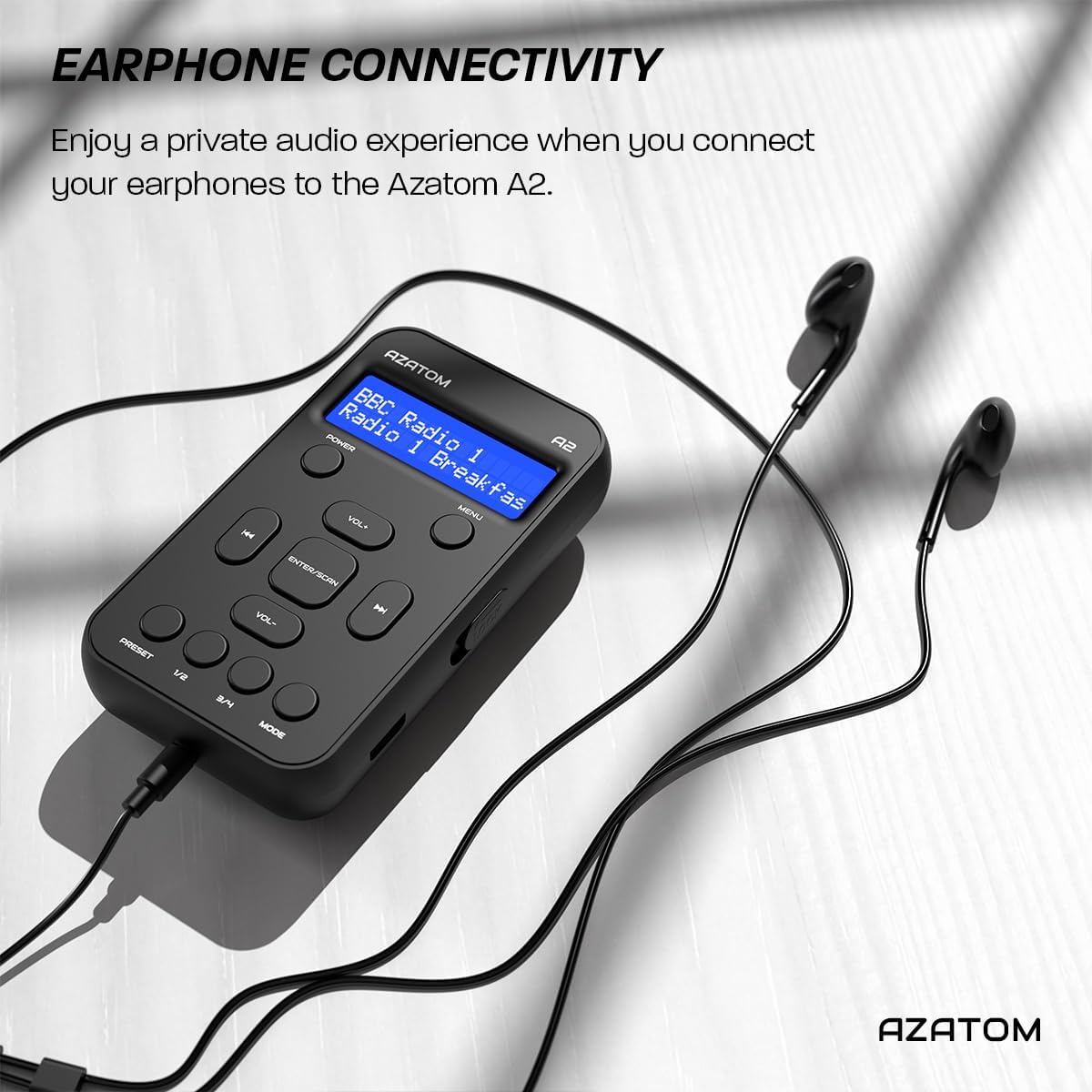
Connect the supplied earphones to the radio for optimal reception and a private listening experience.
പ്രവർത്തന നിർദ്ദേശങ്ങൾ
പവർ ഓൺ/ഓഫ്
- അമർത്തിപ്പിടിക്കുക പവർ റേഡിയോ ഓണാക്കാനോ ഓഫാക്കാനോ ഉള്ള ബട്ടൺ.
DAB/DAB+ റേഡിയോ പ്രവർത്തനം

The AZATOM A2 supports both DAB/DAB+ and FM radio technologies.
- Ensure the earphones are connected.
- അമർത്തുക മോഡ് button until 'DAB' or 'DAB+' is displayed.
- The radio will automatically perform a full scan for available DAB/DAB+ stations upon first use or if no stations are found. To manually scan, press and hold the നൽകുക/സ്കാൻ ചെയ്യുക ബട്ടൺ.
- ഉപയോഗിക്കുക VOL+ or വോൾ- കണ്ടെത്തിയ സ്റ്റേഷനുകളുടെ പട്ടികയിലൂടെ നാവിഗേറ്റ് ചെയ്യാനുള്ള ബട്ടണുകൾ.
- അമർത്തുക നൽകുക/സ്കാൻ ചെയ്യുക ഒരു സ്റ്റേഷൻ തിരഞ്ഞെടുക്കാൻ.
എഫ്എം റേഡിയോ ഓപ്പറേഷൻ
- Ensure the earphones are connected.
- അമർത്തുക മോഡ് button until 'FM' is displayed.
- To auto-scan for FM stations, press and hold the നൽകുക/സ്കാൻ ചെയ്യുക button. The radio will scan and save available stations.
- To manually tune, briefly press the VOL+ or വോൾ- buttons to adjust the frequency in small increments.
പ്രീസെറ്റുകൾ ക്രമീകരിക്കുകയും തിരിച്ചുവിളിക്കുകയും ചെയ്യുന്നു
The AZATOM A2 allows you to store up to 40 DAB+ and 40 FM favorite stations.

The AZATOM A2 allows for easy recall of your favorite preset stations.
ഒരു പ്രീസെറ്റ് സംഭരിക്കാൻ:
- ആവശ്യമുള്ള സ്റ്റേഷനിലേക്ക് ട്യൂൺ ചെയ്യുക.
- അതിലൊന്ന് അമർത്തിപ്പിടിക്കുക പ്രീസെറ്റ് buttons (1/2 or 3/4) until the display shows 'Preset Store'.
- ഉപയോഗിക്കുക VOL+ or വോൾ- ആവശ്യമുള്ള പ്രീസെറ്റ് നമ്പർ (1-40) തിരഞ്ഞെടുക്കാൻ ബട്ടണുകൾ.
- അമർത്തുക നൽകുക/സ്കാൻ ചെയ്യുക to confirm and save the station.
ഒരു പ്രീസെറ്റ് തിരിച്ചുവിളിക്കാൻ:
- അതിലൊന്ന് ചുരുക്കി അമർത്തുക പ്രീസെറ്റ് buttons (1/2 or 3/4).
- ഉപയോഗിക്കുക VOL+ or വോൾ- buttons to navigate through your stored presets.
- അമർത്തുക നൽകുക/സ്കാൻ ചെയ്യുക to select and play the desired preset station.
വോളിയം നിയന്ത്രണം
- അമർത്തുക VOL+ വോളിയം വർദ്ധിപ്പിക്കാൻ.
- അമർത്തുക വോൾ- വോളിയം കുറയ്ക്കാൻ.
തെളിച്ചം പ്രദർശിപ്പിക്കുക
The XL digital display's brightness can be adjusted to your preference. Access this setting through the MENU options.

ഒരു ക്ലോസപ്പ് view of the AZATOM A2's clear digital display.
മെയിൻ്റനൻസ്
- വൃത്തിയാക്കൽ: റേഡിയോയുടെ ഉപരിതലം വൃത്തിയാക്കാൻ മൃദുവായതും ഉണങ്ങിയതുമായ തുണി ഉപയോഗിക്കുക. അബ്രാസീവ് ക്ലീനറുകളോ ലായകങ്ങളോ ഉപയോഗിക്കരുത്.
- ബാറ്ററി കെയർ: To prolong battery life, avoid fully discharging the battery frequently. Charge the radio regularly, even if not in use for extended periods.
- സംഭരണം: നേരിട്ടുള്ള സൂര്യപ്രകാശത്തിൽ നിന്നും കടുത്ത താപനിലയിൽ നിന്നും അകലെ തണുത്തതും വരണ്ടതുമായ സ്ഥലത്ത് റേഡിയോ സൂക്ഷിക്കുക.
ട്രബിൾഷൂട്ടിംഗ്
| പ്രശ്നം | സാധ്യമായ കാരണം | പരിഹാരം |
|---|---|---|
| No power/Radio won't turn on. | ബാറ്ററി തീർന്നു. | Charge the radio using the supplied USB-C cable. |
| Poor radio reception (DAB/FM). | Earphones not connected or not fully inserted. Weak signal area. | Ensure earphones are securely connected. Try moving to an open area or near a window. Perform a new scan. |
| ശബ്ദമില്ല. | Volume is too low or muted. Earphones not connected. | Increase the volume using VOL+. Ensure earphones are connected. |
| റേഡിയോ മരവിക്കുന്നു അല്ലെങ്കിൽ പ്രതികരിക്കുന്നില്ല. | താൽക്കാലിക സോഫ്റ്റ്വെയർ തകരാർ. | Press and hold the POWER button to force a restart. If issue persists, allow battery to fully discharge then recharge. |
സ്പെസിഫിക്കേഷനുകൾ

Dimensions of the AZATOM A2 radio.
| ഫീച്ചർ | വിശദാംശങ്ങൾ |
|---|---|
| മോഡൽ | A2 |
| അളവുകൾ (L x W x H) | 9 x 4 x 11 cm (approx. 90mm x 50mm x 24mm) |
| ഭാരം | 90 ഗ്രാം |
| റേഡിയോ ബാൻഡുകൾ പിന്തുണയ്ക്കുന്നു | ഡിഎബി, ഡിഎബി+, എഫ്എം |
| പ്രീസെറ്റുകൾ | 40 DAB+, 40 FM |
| ബാറ്ററി തരം | Rechargeable Lithium Ion (1800mAh) |
| കളിസമയം | 24 മണിക്കൂർ വരെ |
| ഡിസ്പ്ലേ തരം | എൽസിഡി |
| കണക്റ്റിവിറ്റി | USB-C (for charging), 3.5mm Earphone Jack |
| മെറ്റീരിയൽ | പ്ലാസ്റ്റിക് |
വാറൻ്റിയും പിന്തുണയും
AZATOM products are designed and engineered in the UK. The AZATOM A2 comes with a premium 3-year warranty (registration required). For any questions or support, please contact our dedicated customer service team. Lifetime customer support is provided to assist you with any queries.
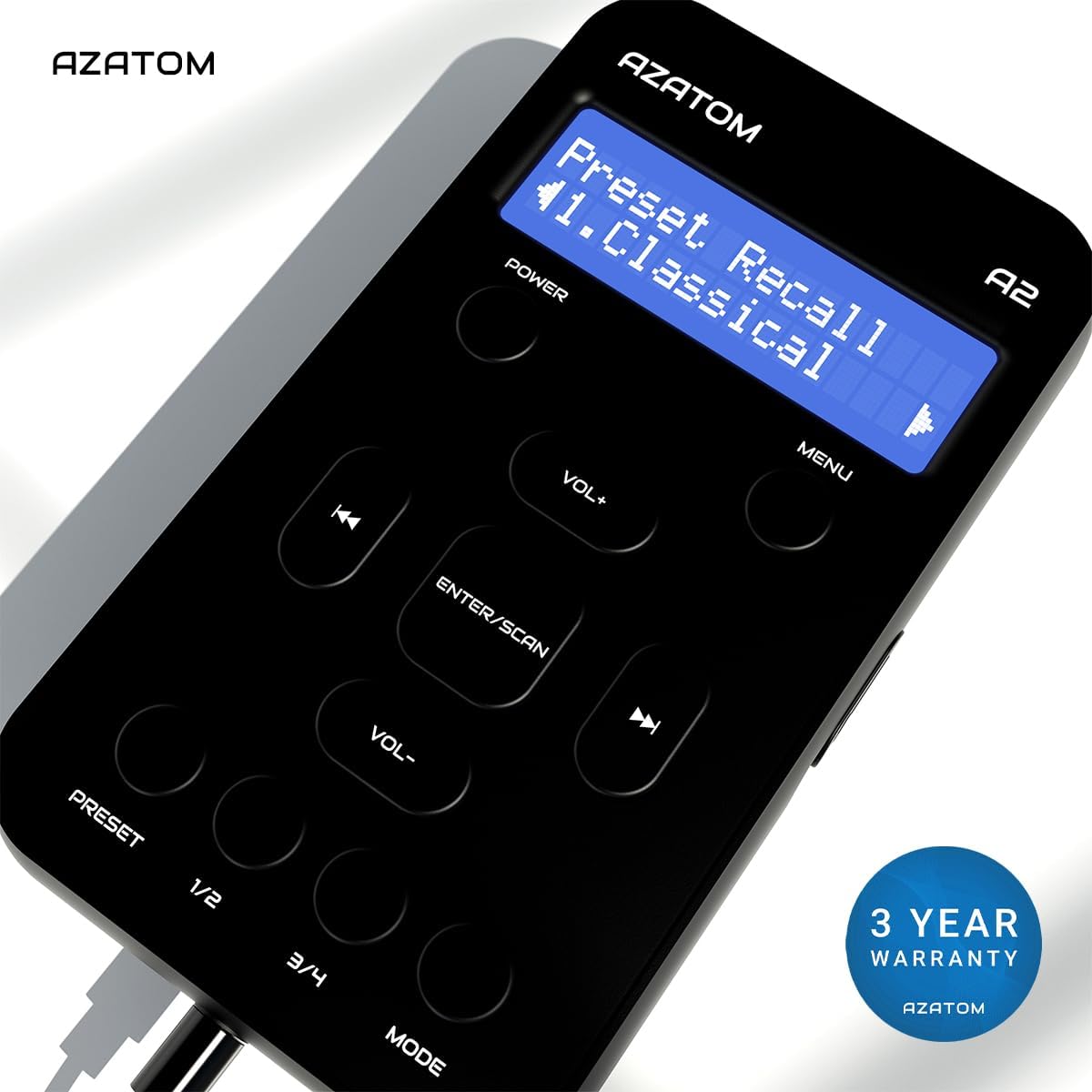
The AZATOM A2 is backed by a 3-year warranty.


