ഉൽപ്പന്നം കഴിഞ്ഞുview
The Cisco Business CBS220-8T-E-2G Smart Switch is designed to provide a simple and affordable networking solution for small to medium-sized businesses. This switch bridges the gap between unmanaged devices and more complex smart switches, offering ease-of-use with an intuitive dashboard, mobile app support, and various Power over Ethernet (PoE) options to build a robust business network.

ചിത്രം 1: മുൻഭാഗം view of the Cisco Business CBS220-8T-E-2G Smart Switch, showing 8 Gigabit Ethernet ports and 2 SFP uplink ports.
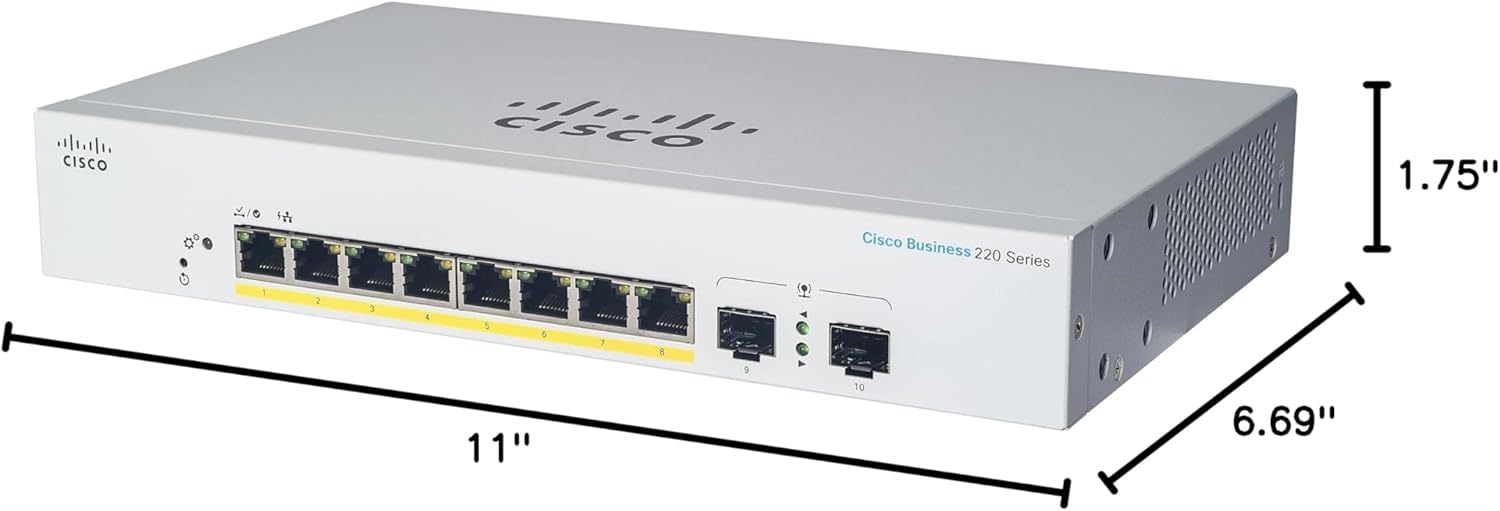
Figure 2: Dimensions of the Cisco Business CBS220-8T-E-2G Smart Switch: 11 inches (L) x 6.69 inches (W) x 1.75 inches (H).
സജ്ജീകരണവും ഇൻസ്റ്റാളേഷനും
This section guides you through the initial setup of your Cisco Business CBS220-8T-E-2G Smart Switch.
1. അൺബോക്സിംഗും പാക്കേജ് ഉള്ളടക്കങ്ങളും
Carefully unpack the contents of the box. Ensure all components are present before proceeding with the installation.
- Cisco Business CBS220-8T-E-2G Smart Switch
- പവർ കോർഡ് അല്ലെങ്കിൽ അഡാപ്റ്റർ
- മൗണ്ടിംഗ് ഹാർഡ്വെയർ (ബാധകമെങ്കിൽ)
- ദ്രുത ആരംഭ ഗൈഡ്
Video 1: Unboxing the Cisco Business 220 Series Smart Switch. This video demonstrates the contents of the package and initial setup steps.
2. പവർ കണക്ഷൻ
Connect the provided power adapter to the switch's power input port and then plug it into a power outlet. The power LED on the switch will illuminate, indicating that the device is receiving power.
3. നെറ്റ്വർക്ക് കണക്റ്റിവിറ്റി
Connect the switch to your existing network infrastructure. Typically, one of the Gigabit Ethernet ports or SFP uplink ports will connect to your router or main network device.
- Connect an Ethernet cable from your router's LAN port to any of the 8 Gigabit Ethernet ports (1-8) on the switch.
- For higher bandwidth connections, utilize the 2x1G Small Form-Factor Pluggable (SFP) uplink ports (9-10) with compatible SFP modules (sold separately).
4. ഉപകരണങ്ങൾ ബന്ധിപ്പിക്കുന്നു
Once the switch is powered on and connected to your network, you can connect other network devices such as computers, servers, printers, or Cisco Business Wireless Access Points to the remaining available ports.
The CBS220 series supports Power over Ethernet (PoE) on certain models, allowing compatible devices to receive power and data over a single Ethernet cable. Refer to your specific model's specifications for PoE capabilities.
5. Initial Configuration (Mobile App)
For fast and easy setup, use the Cisco Business mobile app. This app simplifies network operations and automates lifecycle management.
- Download and launch the Cisco Business mobile app from your device's app store.
- Follow the on-screen prompts to create your site and add your address.
- Answer a few questions to configure your network settings.
- Add your wired and wireless devices through the app.
The mobile app allows you to monitor device status, perform actions like backup/restore, edit device details, reboot, and upgrade firmware, and view connected clients and their usage.
6. പ്രാരംഭ കോൺഫിഗറേഷൻ (Web (ഉപയോക്തൃ ഇന്റർഫേസ്)
വിപുലമായ കോൺഫിഗറേഷനും മാനേജ്മെന്റിനും, സ്വിച്ചുകൾ ആക്സസ് ചെയ്യുക web user interface (UI). Refer to the Quick Start Guide for instructions on how to access the web UI, typically by entering the switch's IP address into a web ബ്രൗസർ.
ദി web UI offers comprehensive tools for network segmentation (VLANs), Quality of Service (QoS), security features (IEEE 802.1X, DoS attack prevention, ACLs), and detailed system monitoring.
Operating Your Smart Switch
The Cisco Business CBS220-8T-E-2G Smart Switch is designed for reliable and efficient network operation. Once configured, it will automatically manage traffic flow and provide connectivity to your devices.
നെറ്റ്വർക്ക് സവിശേഷതകൾ
- VLAN-കൾ: മെച്ചപ്പെട്ട സുരക്ഷയ്ക്കും പ്രകടനത്തിനുമായി നിങ്ങളുടെ നെറ്റ്വർക്കിനെ തരംതിരിക്കുന്നതിന് വെർച്വൽ ലോക്കൽ ഏരിയ നെറ്റ്വർക്കുകൾ സൃഷ്ടിക്കുക.
- സേവനത്തിൻ്റെ ഗുണനിലവാരം (QoS): Prioritize network traffic for critical applications, ensuring smooth operation for voice and video communications.
- സുരക്ഷ: Integrated with IEEE 802.1X to control access, Denial-of-Service (DoS) attack prevention, and Access Control Lists (ACLs) to protect against unauthorized users.
- Energy Efficient Ethernet (EEE): Compliant with IEEE802.3az, optimizing power usage to lower operational costs.
നിരീക്ഷണവും മാനേജ്മെൻ്റും
You can monitor your network and switch status using the Cisco Business mobile app or the web UI. These tools provide real-time insights into network performance, connected devices, and potential issues.
മെയിൻ്റനൻസ്
Regular maintenance ensures the optimal performance and longevity of your Cisco Business Smart Switch.
- ഫേംവെയർ അപ്ഡേറ്റുകൾ: Periodically check for and install the latest firmware updates to ensure your switch has the most current features, security patches, and performance improvements. Firmware updates can typically be performed via the mobile app or web യുഐ.
- കോൺഫിഗറേഷൻ ബാക്കപ്പ്: Regularly back up your switch's configuration settings. This allows for quick restoration in case of accidental changes or device replacement.
- ശാരീരിക പരിശോധന: Ensure the switch is placed in a well-ventilated area, free from dust and obstructions. Keep all cables securely connected.
ട്രബിൾഷൂട്ടിംഗ്
If you encounter issues with your Cisco Business Smart Switch, consider the following troubleshooting steps:
- ശക്തിയില്ല: Verify the power adapter is securely connected to both the switch and a working power outlet. Check the power LED on the switch.
- നെറ്റ്വർക്ക് കണക്റ്റിവിറ്റി ഇല്ല:
- Ensure Ethernet cables are properly connected to both the switch and connected devices.
- Check the link/activity LEDs on the switch ports; they should be illuminated or blinking.
- Verify your router or upstream network device is functioning correctly.
- ആക്സസ് ചെയ്യുന്നു Web UI/Mobile App Issues:
- Confirm your device is on the same network as the switch.
- Verify the switch's IP address.
- Try restarting the switch.
- പ്രകടന പ്രശ്നങ്ങൾ:
- അമിതമായ നെറ്റ്വർക്ക് ട്രാഫിക്കോ ലൂപ്പുകളോ പരിശോധിക്കുക.
- Review QoS settings if specific applications are experiencing issues.
- ഫേംവെയർ കാലികമാണെന്ന് ഉറപ്പാക്കുക.
For more detailed troubleshooting or persistent issues, refer to the comprehensive online documentation available from Cisco or contact Cisco technical support.
സ്പെസിഫിക്കേഷനുകൾ
| ഫീച്ചർ | വിശദാംശങ്ങൾ |
|---|---|
| മോഡൽ നമ്പർ | CBS220-8T-E-2G-NA |
| തുറമുഖങ്ങൾ മാറുക | 8 x 10/100/1000 Gigabit Ethernet + 2 x 1G SFP |
| ഉൽപ്പന്ന അളവുകൾ | 11"L x 6.69"W x 1.75"H |
| ഇനത്തിൻ്റെ ഭാരം | 5.37 പൗണ്ട് |
| ഡാറ്റ കൈമാറ്റ നിരക്ക് | 20000 Megabits Per Second (2E+4 Mbps) |
| ഇൻ്റർഫേസ് തരം | പിഒഇ, എസ്എഫ്പി |
| സ്വിച്ച് തരം | സ്മാർട്ട് സ്വിച്ച് |
| നിർമ്മാതാവ് | സിസ്കോ |
| യു.പി.സി | 889728345033 |
| മാതൃരാജ്യം | ചൈന |
വാറൻ്റിയും പിന്തുണയും
Cisco provides comprehensive support for its business products.
- പരിമിതമായ ഹാർഡ്വെയർ വാറന്റി: The Cisco Business CBS220-8T-E-2G Smart Switch comes with a 3-year limited hardware warranty, including return-to-factory replacement.
- സാങ്കേതിക സഹായം: One-year technical support is included to assist with any operational or configuration queries.
- ഓൺലൈൻ ഉറവിടങ്ങൾ: For additional information, documentation, and support, visit the official Cisco website or refer to the provided Quick Start Guide. You can also find the Instructions for Use (IFU) in PDF format ഇവിടെ.


