ആമുഖം
The FreedConn KY-Pro is a waterproof wireless Bluetooth headset designed for motorcycle helmets, offering communication and entertainment features. It supports Bluetooth 5.0, enabling intercom communication up to 1000 meters for 2 riders and 2000 meters for 6 riders. Key features include FM radio, phone call management, music streaming, and universal pairing with other Bluetooth headsets.
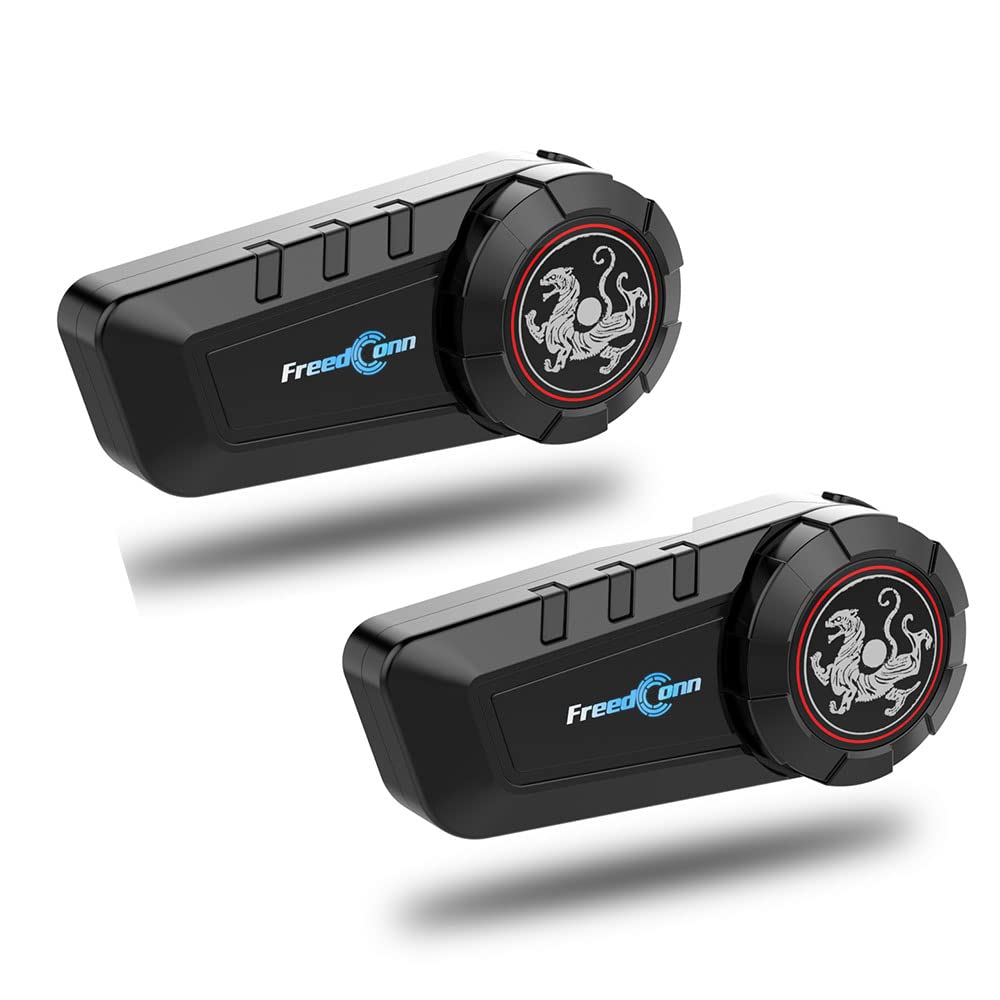
Image: The FreedConn KY-Pro Bluetooth headset unit, showcasing its sleek design and branding.
ബോക്സിൽ എന്താണുള്ളത്
The package for the FreedConn KY-Pro Bluetooth Headset includes the following components:
- Bluetooth Headset Unit
- 2 x Earphone (speakers)
- 2-ഇൻ-1 സോഫ്റ്റ് & ഹാർഡ് മൈക്ക് ഇയർഫോൺ
- Hook Clip and Velcro Clip for mounting
- Headphone Velcro pads
- Walkie-talkie Control Line
- ചാർജ് ചെയ്യാനുള്ള യുഎസ്ബി കേബിൾ
- ഉപയോക്തൃ മാനുവൽ
- DIY Cases (decorative covers)

Image: A visual representation of all items included in the FreedConn KY-Pro package, such as the main unit, speakers, microphones, mounting clips, and cables.
ഇൻസ്റ്റലേഷൻ നടപടിക്രമം
Follow these steps to properly install the FreedConn KY-Pro Bluetooth headset onto your motorcycle helmet:
- സ്ക്രൂകൾ അഴിക്കുക: Use the provided screwdriver to loosen the screws on the back of the clamp.
- സ്ഥാനം Clamp: Open the helmet lining and insert the clamp into the proper position on the left side of the helmet. Fasten the screw securely, but do not overtighten to avoid damaging the clamp.
- Insert BT Receiver: Slide the Bluetooth receiver unit into the slot of the clamp. Ensure it is locked securely in place.
- സ്പീക്കറുകൾ ഘടിപ്പിക്കുക: Open the helmet lining near the ear position. Clean the EPS surface and attach the Velcro pads for the speakers. Properly tidy the helmet lining around the speakers.
- മൈക്രോഫോൺ ഘടിപ്പിക്കുക: Attach the hook surface of the microphone to the rough surface of Velcro inside the helmet, positioning it near your mouth.
- Connect Headphone Plug: Insert the headphone plug into the corresponding headphone jack on the receiver to complete the installation.

Image: A step-by-step diagram illustrating the installation process of the FreedConn KY-Pro unit, including mounting the clamp, inserting the main unit, and positioning the speakers and microphone.
പ്രവർത്തന നിർദ്ദേശങ്ങൾ
പവർ ഓൺ/ഓഫ്
- പവർ ഓൺ: ഇൻഡിക്കേറ്റർ ലൈറ്റ് മിന്നുന്നത് വരെ പവർ ബട്ടൺ അമർത്തിപ്പിടിക്കുക.
- പവർ ഓഫ്: ഇൻഡിക്കേറ്റർ ലൈറ്റ് ഓഫ് ആകുന്നതുവരെ പവർ ബട്ടൺ അമർത്തിപ്പിടിക്കുക.
Bluetooth Pairing with Mobile Phone
- Ensure the KY-Pro unit is powered off.
- ജോടിയാക്കൽ മോഡ് സൂചിപ്പിക്കുന്ന ഇൻഡിക്കേറ്റർ ലൈറ്റ് ചുവപ്പും നീലയും മാറിമാറി മിന്നുന്നതുവരെ ഏകദേശം 5-7 സെക്കൻഡ് നേരത്തേക്ക് പവർ ബട്ടൺ അമർത്തിപ്പിടിക്കുക.
- നിങ്ങളുടെ മൊബൈൽ ഫോണിൽ, ബ്ലൂടൂത്ത് പ്രവർത്തനക്ഷമമാക്കി ലഭ്യമായ ഉപകരണങ്ങൾക്കായി തിരയുക.
- Select "FreedConn KY-Pro" from the list. If prompted, enter "0000" as the PIN.
- Once paired, the indicator light will flash blue slowly.
ഇന്റർകോം കമ്മ്യൂണിക്കേഷൻ
The KY-Pro supports intercom communication between multiple riders. For optimal performance, ensure units are within range (up to 1000m for 2 riders, 2000m for 6 riders).
- ഇന്റർകോം ആരംഭിക്കുക: Briefly press the Intercom button on your unit to start an intercom connection with a paired unit.
- ഇന്റർകോം അവസാനിപ്പിക്കുക: Briefly press the Intercom button again to end the intercom conversation.
- Multi-rider Intercom: Follow the specific instructions in the full manual for pairing multiple units for group intercom.

Image: Depicts two riders communicating via the FreedConn KY-Pro units, illustrating the 1000-meter intercom range for two riders and the potential for up to six riders.
ഫോൺ കോളുകൾ
- മറുപടി കോൾ: Briefly press the Phone button.
- കോൾ അവസാനിപ്പിക്കുക: Briefly press the Phone button.
- കോൾ നിരസിക്കുക: ഫോൺ ബട്ടൺ 2 സെക്കൻഡ് അമർത്തിപ്പിടിക്കുക.
- അവസാന നമ്പർ വീണ്ടും ഡയൽ ചെയ്യുക: ഫോൺ ബട്ടൺ രണ്ടുതവണ അമർത്തുക.
സംഗീത പ്ലേബാക്ക്
- പ്ലേ/താൽക്കാലികമായി നിർത്തുക: Briefly press the Multi-function button (often the main control knob).
- അടുത്ത ട്രാക്ക്: Rotate the Multi-function button clockwise.
- മുമ്പത്തെ ട്രാക്ക്: Rotate the Multi-function button counter-clockwise.
- വോളിയം കൂട്ടുക/താഴ്ത്തുക: Use the volume buttons or rotate the Multi-function button while music is playing.
എഫ്എം റേഡിയോ
- എഫ്എം ഓൺ/ഓഫ് ചെയ്യുക: FM ബട്ടൺ അമർത്തുക.
- സ്കാൻ സ്റ്റേഷനുകൾ: Briefly press the Multi-function button to scan for stations.
- ആവൃത്തി ക്രമീകരിക്കുക: Rotate the Multi-function button to fine-tune the frequency.

Image: Close-up of the FreedConn KY-Pro unit highlighting its button design and functions for calls, FM radio, music, and helmet integration.
മെയിൻ്റനൻസ്
- വൃത്തിയാക്കൽ: മൃദുവായ, ഡി ഉപയോഗിച്ച് യൂണിറ്റ് തുടയ്ക്കുകamp തുണി. കഠിനമായ രാസവസ്തുക്കളോ ഉരച്ചിലുകളുള്ള ക്ലീനറുകളോ ഉപയോഗിക്കരുത്.
- ജല പ്രതിരോധം: The unit is waterproof, but avoid prolonged submersion. Ensure all ports are properly sealed before exposure to water.
- സംഭരണം: ഉപയോഗത്തിലില്ലാത്തപ്പോൾ തണുത്തതും വരണ്ടതുമായ സ്ഥലത്ത് യൂണിറ്റ് സൂക്ഷിക്കുക. കടുത്ത താപനില ഒഴിവാക്കുക.
- ബാറ്ററി കെയർ: Charge the battery regularly, even if the unit is not used for extended periods, to maintain battery health.
ട്രബിൾഷൂട്ടിംഗ്
- ശക്തിയില്ല: Ensure the unit is fully charged. Connect to a power source using the provided USB cable.
- ജോടിയാക്കാൻ കഴിയില്ല: Ensure the unit is in pairing mode (red and blue indicator lights flashing alternately). Delete previous pairings on your phone and try again.
- ഇന്റർകോം വിച്ഛേദിക്കുന്നു: Ensure units are within the specified intercom range and there are no significant obstructions. Re-initiate the intercom connection.
- മോശം ഓഡിയോ നിലവാരം: Check speaker and microphone connections. Ensure speakers are positioned correctly in the helmet. Reduce environmental noise if possible.
- എഫ്എം റേഡിയോ പ്രശ്നങ്ങൾ: Move to an area with better signal reception.
സ്പെസിഫിക്കേഷനുകൾ
| ഫീച്ചർ | വിശദാംശങ്ങൾ |
|---|---|
| മോഡലിൻ്റെ പേര് | KY-Pro-Dualmic |
| കണക്റ്റിവിറ്റി ടെക്നോളജി | ബ്ലൂടൂത്ത് 5.0 |
| ഇന്റർകോം റേഞ്ച് | Up to 1000 meters (2 riders), 2000 meters (6 riders) |
| ബാറ്ററി ലൈഫ് (സ്റ്റാൻഡ്ബൈ) | 12 ദിവസം വരെ (168 മണിക്കൂർ) |
| Battery Life (Talking) | 11 മണിക്കൂർ വരെ |
| ബാറ്ററി ലൈഫ് (ഇന്റർകോം) | 10 മണിക്കൂർ വരെ |
| ചാർജിംഗ് സമയം | 2 മണിക്കൂർ |
| ജല പ്രതിരോധ നില | വാട്ടർപ്രൂഫ് |
| പ്രത്യേക സവിശേഷതകൾ | Lightweight, Noise Cancellation, FM Radio |
| അനുയോജ്യമായ ഉപകരണങ്ങൾ | Motorcycles, Cellphones |
| ഉൽപ്പന്ന അളവുകൾ | 6 x 3 x 4.5 ഇഞ്ച് |
| ഇനത്തിൻ്റെ ഭാരം | 1.57 പൗണ്ട് |

Image: Illustrates the battery performance of the FreedConn KY-Pro, showing standby, talk, and intercom times, along with charging duration.
വാറൻ്റിയും പിന്തുണയും
വാറന്റി വിവരങ്ങൾക്കും സാങ്കേതിക പിന്തുണയ്ക്കും, ദയവായി ഔദ്യോഗിക ഫ്രീഡ്കോണിനെ പരിശോധിക്കുക. webസൈറ്റിൽ ബന്ധപ്പെടുകയോ അവരുടെ ഉപഭോക്തൃ സേവനവുമായി നേരിട്ട് ബന്ധപ്പെടുകയോ ചെയ്യുക. ഏതെങ്കിലും വാറന്റി ക്ലെയിമുകൾക്ക് വാങ്ങിയതിന്റെ തെളിവായി നിങ്ങളുടെ വാങ്ങൽ രസീത് സൂക്ഷിക്കുക.


