1. പ്രധാന സുരക്ഷാ നിർദ്ദേശങ്ങൾ
Please read these instructions carefully before using the device and retain them for future reference. Failure to follow these instructions may result in electric shock, fire, or other hazards.
- ഈ ഉപകരണം മഴയിലോ ഈർപ്പത്തിലോ തുറന്നുകാട്ടരുത്.
- വെന്റിലേഷൻ തുറസ്സുകളൊന്നും തടയരുത്. നിർമ്മാതാവിന്റെ നിർദ്ദേശങ്ങൾക്കനുസൃതമായി ഇൻസ്റ്റാൾ ചെയ്യുക.
- റേഡിയറുകൾ, ഹീറ്റ് രജിസ്റ്ററുകൾ, സ്റ്റൗകൾ, അല്ലെങ്കിൽ മറ്റ് ഉപകരണങ്ങൾ (ഉൾപ്പെടെ) പോലെയുള്ള താപ സ്രോതസ്സുകൾക്ക് സമീപം ഇൻസ്റ്റാൾ ചെയ്യരുത്. ampലൈഫയറുകൾ) ചൂട് ഉത്പാദിപ്പിക്കുന്നത്.
- പവർ കോർഡ് നടക്കാനോ നുള്ളിയെടുക്കാനോ സംരക്ഷിക്കുക, പ്രത്യേകിച്ചും പ്ലഗുകൾ, സ re കര്യപ്രദമായ റെസപ്റ്റാക്കലുകൾ, അവർ ഉപകരണത്തിൽ നിന്ന് പുറത്തുകടക്കുന്ന സ്ഥലം.
- നിർമ്മാതാവ് വ്യക്തമാക്കിയ അറ്റാച്ച്മെൻ്റുകൾ/ആക്സസറികൾ മാത്രം ഉപയോഗിക്കുക.
- മിന്നൽ കൊടുങ്കാറ്റുകളുടെ സമയത്തോ ദീർഘനേരം ഉപയോഗിക്കാത്ത സമയത്തോ ഈ ഉപകരണം അൺപ്ലഗ് ചെയ്യുക.
- എല്ലാ സേവനങ്ങളും യോഗ്യതയുള്ള സേവന ഉദ്യോഗസ്ഥർക്ക് റഫർ ചെയ്യുക. പവർ സപ്ലൈ കോർഡ് അല്ലെങ്കിൽ പ്ലഗ് കേടാകുക, ദ്രാവകം ഒഴുകുകയോ ഉപകരണങ്ങൾ ഉപകരണത്തിലേക്ക് വീഴുകയോ ചെയ്യുക, ഉപകരണം മഴയോ ഈർപ്പമോ സമ്പർക്കം പുലർത്തുക, സാധാരണയായി പ്രവർത്തിക്കാത്തത് എന്നിങ്ങനെയുള്ള ഏതെങ്കിലും വിധത്തിൽ ഉപകരണത്തിന് കേടുപാടുകൾ സംഭവിക്കുമ്പോൾ സേവനം ആവശ്യമാണ്. , അല്ലെങ്കിൽ ഉപേക്ഷിച്ചു.
- Do not open the unit. There are no user-serviceable parts inside.
2. ഉൽപ്പന്നം കഴിഞ്ഞുview
The LONPOO Portable CD Player Boombox (Model zxg-103) is a versatile audio device offering multiple playback options including CD, FM Radio, Bluetooth, USB, and AUX input. It features a built-in rechargeable battery for portability and dual stereo speakers for clear sound.
പ്രധാന സവിശേഷതകൾ:
- Top-loading CD player compatible with CD, CD-R, and CD-RW discs.
- Built-in FM radio tuner.
- വയർലെസ് ഓഡിയോ സ്ട്രീമിംഗിനായി ബ്ലൂടൂത്ത് കണക്റ്റിവിറ്റി.
- USB port for MP3/WMA playback from flash drives.
- AUX input for connecting external audio devices.
- 3.5mm headphone jack for private listening.
- 3.5mm microphone port for external microphone input.
- Integrated rechargeable battery and AC power option.
- LCD display and intuitive control panel.
- Portable handle for easy transport.
പാക്കേജ് ഉള്ളടക്കം:
- LONPOO Portable CD Player Boombox (zxg-103)
- എസി പവർ അഡാപ്റ്റർ
- റിമോട്ട് കൺട്രോൾ
- ഉപയോക്തൃ മാനുവൽ (ഈ പ്രമാണം)
Controls and Ports Diagram:
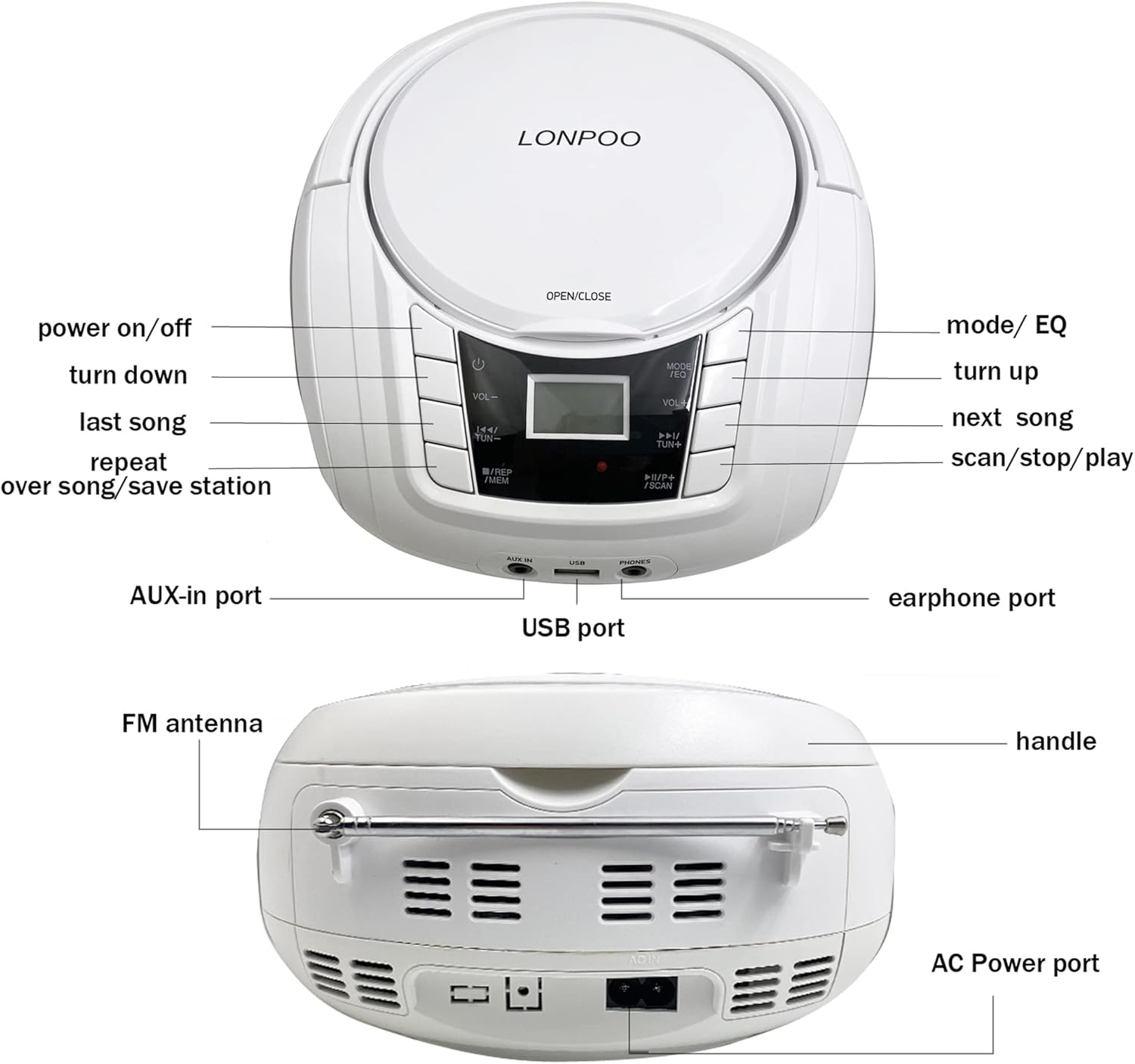
ചിത്രം: മുന്നിലും പിന്നിലും view of the LONPOO Portable CD Player Boombox, highlighting the power button, volume controls, mode/EQ button, track/tuning buttons, repeat/memory button, scan/stop/play button, AUX-in port, USB port, earphone port, FM antenna, handle, and AC power port.
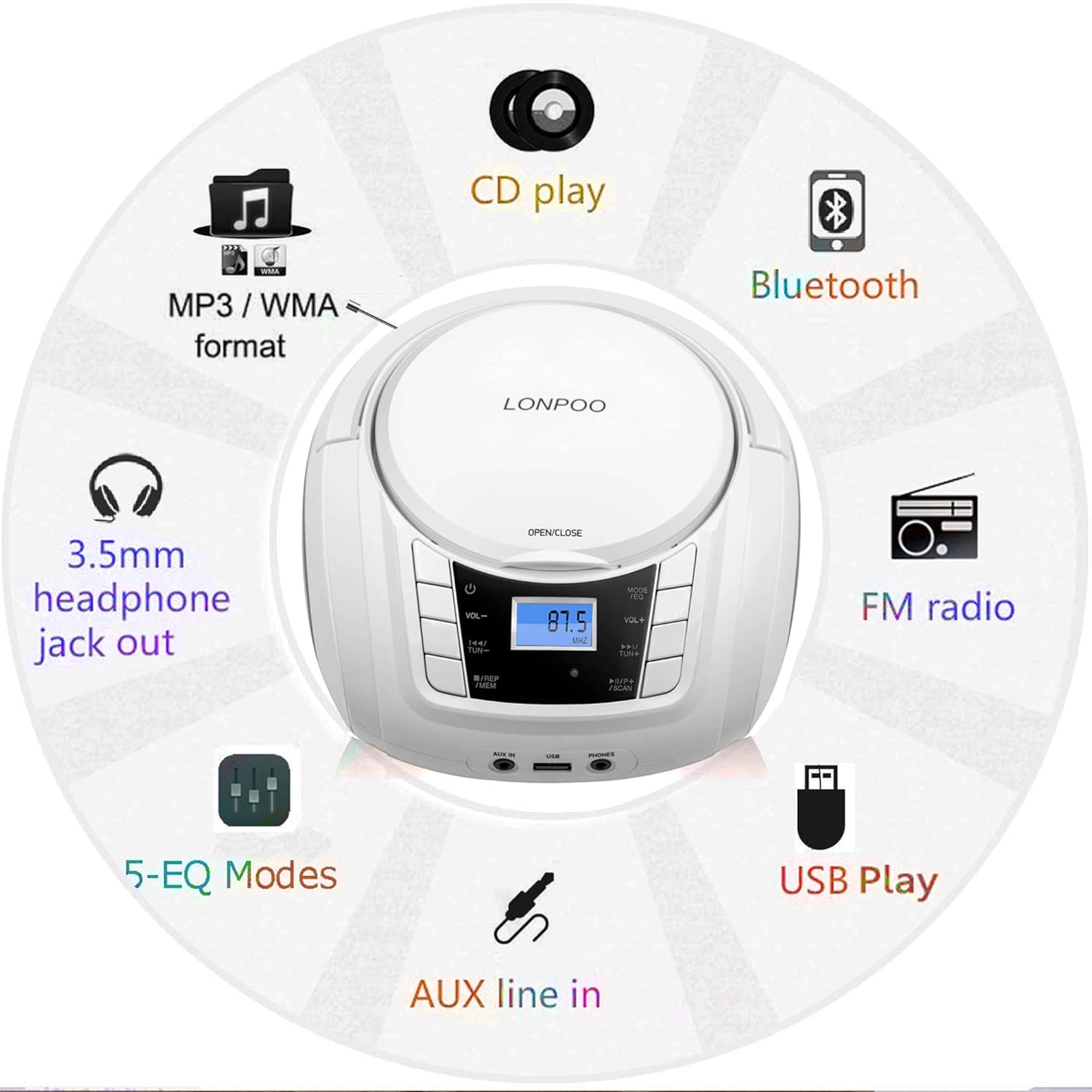
Image: A circular diagram illustrating the multiple functions of the boombox, including CD play, MP3/WMA format support, Bluetooth, FM radio, USB play, AUX line-in, 5-EQ modes, and 3.5mm headphone jack out.
3. സജ്ജീകരണം
3.1 ഉപകരണം പവർ ചെയ്യുന്നു
The boombox can be powered by the included AC adapter or its internal rechargeable battery.
- എസി പവർ: Connect the AC power adapter to the AC IN port on the back of the unit and plug the other end into a standard wall outlet.
- റീചാർജ് ചെയ്യാവുന്ന ബാറ്ററി: The internal battery charges automatically when the unit is connected to AC power. A full charge provides several hours of playback. The battery indicator on the LCD display will show charging status.
3.2 പ്രാരംഭ പവർ ഓൺ
- Ensure the unit is connected to power or has sufficient battery charge.
- അമർത്തുക പവർ button (usually marked with a circle and a vertical line) on the front panel to turn on the device. The LCD display will illuminate.
4. പ്രവർത്തന നിർദ്ദേശങ്ങൾ
4.1 സിഡി പ്ലേബാക്ക്
- അമർത്തുക തുറക്കുക/അടയ്ക്കുക button or lift the CD compartment lid.
- Place a CD, CD-R, or CD-RW disc onto the spindle with the label side facing up.
- സിഡി കമ്പാർട്ട്മെന്റ് ലിഡ് ദൃഡമായി അടയ്ക്കുക.
- അമർത്തുക മോഡ്/ഇക്യു button repeatedly until 'CD' mode is selected on the LCD display.
- അമർത്തുക പ്ലേ/താൽക്കാലികമായി നിർത്തുക പ്ലേബാക്ക് ആരംഭിക്കുന്നതിനുള്ള ബട്ടൺ.
- ഉപയോഗിക്കുക മുമ്പത്തെ അടുത്തത് ട്രാക്കുകൾ ഒഴിവാക്കാനുള്ള ബട്ടണുകൾ.
- അമർത്തുക ആവർത്തിക്കുക നിലവിലെ ട്രാക്ക് അല്ലെങ്കിൽ എല്ലാ ട്രാക്കുകളും ആവർത്തിക്കാൻ ബട്ടൺ.
- ഉപയോഗിച്ച് വോളിയം ക്രമീകരിക്കുക VOL+ ഒപ്പം വോൾ- ബട്ടണുകൾ.

Image: The LONPOO Portable CD Player Boombox with its top-loading CD compartment open, showing a CD being placed inside. This illustrates the CD loading process.
4.2 എഫ്എം റേഡിയോ പ്രവർത്തനം
- Extend the FM antenna on the back of the unit for optimal reception.
- അമർത്തുക മോഡ്/ഇക്യു button repeatedly until 'FM' mode is selected.
- അമർത്തിപ്പിടിക്കുക സ്കാൻ ചെയ്യുക ലഭ്യമായ എഫ്എം സ്റ്റേഷനുകൾ സ്വയമേവ സ്കാൻ ചെയ്യാനും സംരക്ഷിക്കാനും ബട്ടൺ.
- ഉപയോഗിക്കുക മുമ്പത്തെ അടുത്തത് buttons to navigate through saved stations or manually tune.
- ഉപയോഗിച്ച് വോളിയം ക്രമീകരിക്കുക VOL+ ഒപ്പം വോൾ- ബട്ടണുകൾ.
4.3 ബ്ലൂടൂത്ത് കണക്ഷൻ
- അമർത്തുക മോഡ്/ഇക്യു button repeatedly until 'BT' (Bluetooth) mode is selected. The LCD display will show 'BT' and flash, indicating it's in pairing mode.
- നിങ്ങളുടെ Bluetooth പ്രാപ്തമാക്കിയ ഉപകരണത്തിൽ (ഉദാ: സ്മാർട്ട്ഫോൺ, ടാബ്ലെറ്റ്), Bluetooth പ്രാപ്തമാക്കി ലഭ്യമായ ഉപകരണങ്ങൾക്കായി തിരയുക.
- Select 'LP-D03' (or similar model name) from the list of devices.
- Once paired, the 'BT' indicator on the boombox will stop flashing and remain solid. You can now stream audio from your device.
- ഉപയോഗിച്ച് വോളിയം ക്രമീകരിക്കുക VOL+ ഒപ്പം വോൾ- buttons on the boombox or your connected device.

Image: The LONPOO Portable CD Player Boombox positioned next to a smartphone displaying its Bluetooth settings, showing a successful connection to 'LP-D03'. This illustrates the Bluetooth pairing process.
4.4 യുഎസ്ബി പ്ലേബാക്ക്
- Insert a USB flash drive (containing MP3/WMA audio files) into the USB port on the front of the unit.
- അമർത്തുക മോഡ്/ഇക്യു button repeatedly until 'USB' mode is selected.
- The unit will automatically begin playing the audio fileയുഎസ്ബി ഡ്രൈവിൽ നിന്നുള്ള ങ്ങൾ.
- ഉപയോഗിക്കുക മുമ്പത്തെ അടുത്തത് ട്രാക്കുകൾ ഒഴിവാക്കാനുള്ള ബട്ടണുകൾ.
- ഉപയോഗിച്ച് വോളിയം ക്രമീകരിക്കുക VOL+ ഒപ്പം വോൾ- ബട്ടണുകൾ.
4.5 AUX ഇൻപുട്ട്
- Connect an external audio device (e.g., MP3 player, smartphone) to the AUX IN port on the front of the unit using a 3.5mm audio cable (not included).
- അമർത്തുക മോഡ്/ഇക്യു 'AUX' മോഡ് തിരഞ്ഞെടുക്കുന്നത് വരെ ബട്ടൺ ആവർത്തിച്ച് അമർത്തുക.
- നിങ്ങളുടെ ബാഹ്യ ഓഡിയോ ഉപകരണത്തിൽ പ്ലേബാക്ക് ആരംഭിക്കുക.
- ഉപയോഗിച്ച് വോളിയം ക്രമീകരിക്കുക VOL+ ഒപ്പം വോൾ- ബൂംബോക്സിലെയും/അല്ലെങ്കിൽ നിങ്ങളുടെ ബാഹ്യ ഉപകരണത്തിലെയും ബട്ടണുകൾ.
4.6 ഹെഡ്ഫോൺ ഉപയോഗം
- 3.5mm ഹെഡ്ഫോണുകൾ പ്ലഗ് ചെയ്യുക ഫോണുകൾ port on the front of the unit.
- സ്പീക്കറുകളിൽ നിന്ന് ഹെഡ്ഫോണുകളിലേക്ക് ഓഡിയോ സ്വയമേവ മാറും.
- ഉപയോഗിച്ച് വോളിയം ക്രമീകരിക്കുക VOL+ ഒപ്പം വോൾ- ബട്ടണുകൾ.

Image: A child and an adult are shown happily listening to the LONPOO Portable CD Player Boombox using wired headphones, demonstrating the private listening feature.
4.7 മൈക്രോഫോൺ ഇൻപുട്ട്
Connect a 3.5mm microphone (not included) to the എം.ഐ.സി port on the front of the unit. The microphone input will mix with the current audio source.
4.8 ഇക്വലൈസർ (EQ) മോഡുകൾ
അമർത്തുക മോഡ്/ഇക്യു button briefly while in any playback mode to cycle through available equalizer presets (e.g., Pop, Rock, Jazz, Classic, Flat) to adjust the sound profile.
5. പരിപാലനം
5.1 വൃത്തിയാക്കൽ
- വൃത്തിയാക്കുന്നതിന് മുമ്പ് എല്ലായ്പ്പോഴും പവർ ഔട്ട്ലെറ്റിൽ നിന്ന് യൂണിറ്റ് അൺപ്ലഗ് ചെയ്യുക.
- Use a soft, dry cloth to clean the exterior surfaces. Do not use abrasive cleaners or solvents.
- For the CD lens, use a specialized CD lens cleaning kit. Do not touch the lens directly.
5.2 സംഭരണം
When not in use for extended periods, store the boombox in a cool, dry place away from direct sunlight and extreme temperatures. Ensure the unit is fully charged before storing to maintain battery health.
6. പ്രശ്നപരിഹാരം
If you encounter issues with your LONPOO Portable CD Player Boombox, please refer to the following common problems and solutions:
| പ്രശ്നം | സാധ്യമായ കാരണം | പരിഹാരം |
|---|---|---|
| ശക്തിയില്ല | AC adapter not connected; Battery depleted | Ensure AC adapter is securely plugged in; Charge the battery. |
| ശബ്ദമില്ല | Volume too low; Mute activated; Incorrect mode selected; Headphones connected | Increase volume; Check if muted; Select correct playback mode; Disconnect headphones if not desired. |
| സിഡി പ്ലേ ചെയ്യുന്നില്ല/ഒഴിവാക്കുന്നു | Disc dirty or scratched; Disc inserted incorrectly; Non-compatible disc format | Clean disc with a soft cloth; Reinsert disc correctly; Ensure disc is CD, CD-R, or CD-RW. |
| എഫ്എം റേഡിയോ സ്റ്റാറ്റിക് | Poor reception; Antenna not extended | Extend and adjust FM antenna; Try moving the unit to a different location. |
| ബ്ലൂടൂത്ത് കണക്റ്റ് ചെയ്യുന്നില്ല | Boombox not in pairing mode; Device Bluetooth off; Incorrect device selected | Ensure boombox is in 'BT' mode and flashing; Enable Bluetooth on your device; Select 'LP-D03' from device list. |
| യുഎസ്ബി പ്ലേ ചെയ്യുന്നില്ല | USB drive not inserted correctly; Incompatible file format; USB drive corrupted | Reinsert USB drive; Ensure files are MP3/WMA; Try a different USB drive. |
7 സ്പെസിഫിക്കേഷനുകൾ
| ഫീച്ചർ | സ്പെസിഫിക്കേഷൻ |
|---|---|
| മോഡൽ നമ്പർ | zxg-103 |
| ഉൽപ്പന്ന അളവുകൾ (L x W x H) | 9.5 x 8.3 x 5.1 ഇഞ്ച് (24.1 x 21.1 x 13 സെ.മീ) |
| ഇനത്തിൻ്റെ ഭാരം | 3.19 പൗണ്ട് (1.45 കി.ഗ്രാം) |
| പവർ ഔട്ട്പുട്ട് | 10W x 2 (RMS) |
| സ്പീക്കർ തരം | സ്റ്റീരിയോ |
| കണക്റ്റിവിറ്റി ടെക്നോളജി | Bluetooth, USB, AUX, 3.5mm MIC, 3.5mm Headphone |
| സിഡി അനുയോജ്യത | CD, CD-R, CD-RW |
| USB Playback Formats | MP3, WMA |
| പവർ ഉറവിടം | AC Power Adapter, Built-in Rechargeable Battery |

Image: The LONPOO Portable CD Player Boombox shown on a wooden surface with its approximate dimensions (9.3 inches length, 8.3 inches width, 4.5 inches height) clearly labeled.
8. വാറൻ്റിയും പിന്തുണയും
This product is covered by a standard manufacturer's warranty. For specific warranty details, please refer to the documentation included with your purchase or contact LONPOO customer support.
For technical assistance, troubleshooting not covered in this manual, or warranty claims, please visit the official LONPOO webസൈറ്റിൽ ബന്ധപ്പെടുകയോ അവരുടെ ഉപഭോക്തൃ സേവന വിഭാഗവുമായി ബന്ധപ്പെടുകയോ ചെയ്യുക. സാധാരണയായി ഉൽപ്പന്ന പാക്കേജിംഗിലോ ബ്രാൻഡിന്റെ ഔദ്യോഗിക ഓൺലൈൻ സാന്നിധ്യത്തിലോ ബന്ധപ്പെടാനുള്ള വിവരങ്ങൾ കണ്ടെത്താൻ കഴിയും.